
Open-source stack for newsrooms in 2026
The newsroom's open-source stack in 2026 - sources, drafts, and documents you control
A newsroom runs on things it cannot afford to leak: a source's name, a draft nobody should see yet, a document that arrived in confidence. Per-seat cloud suites hold all of it, on servers you do not control, priced by how many people you employ. This is a different setup. Five open-source tools, hosted in a container you control, cover the same daily work.
None of these tools make a newsroom safe on their own. They give you encrypted drafts, expiring shares, and access you decide. Source protection still rests on how your team works. What changes here is who holds the data and how the bill is structured.
TL;DR
- The stack: Nextcloud for files, CryptPad for encrypted drafts, Matrix and Element for chat, PrivateBin for expiring snippets, and Paperless-NGX for a searchable document archive.
- The price: five apps at €9 each is €45 per month, flat, no matter how many reporters you add.
- The contrast: the per-seat bundle it replaces passes $360 per month at ten people and keeps climbing.
- The control: each app runs in an isolated container, in the region you choose, across 21 datacenter locations.
- The honest limit: this is your internal workbench, not a publishing CMS, and not a substitute for good source-protection habits.
Who this list is for, and who it is not
This list is for newsrooms and independent journalists who want tighter control over sources, drafts, and documents than a per-seat cloud suite offers. It fits teams of two to fifty who are comfortable owning their access rules. It is not for a single writer who needs nothing beyond one SaaS plan, and not for teams that want one integrated suite and will not move.
The people who get the most from it tend to share a problem. An investigative desk holding material that should not sit on a third party's servers. A freelancer handling a leak who needs a draft that stays scrambled until it ships. A small outlet leaving a bundled Big Tech plan because the per-seat bill grows faster than the masthead.
It is worth being plain about the misfits too. If your funders or partners require a formal third-party security report on file, a provider that already holds one is the better fit. If you want zero setup decisions and one login for everything, a turnkey suite will feel smoother. This stack trades a little convenience for control, and that trade is not right for everyone.
The five tools, and the job each one does
Each tool below does one job well, runs as its own €9 app, and replaces a piece of the cloud bundle. The point is not to install all five on day one. It is to pick the job that hurts most, replace that, and add the rest only when each one earns its place in the newsroom.
CryptPad - encrypted drafting
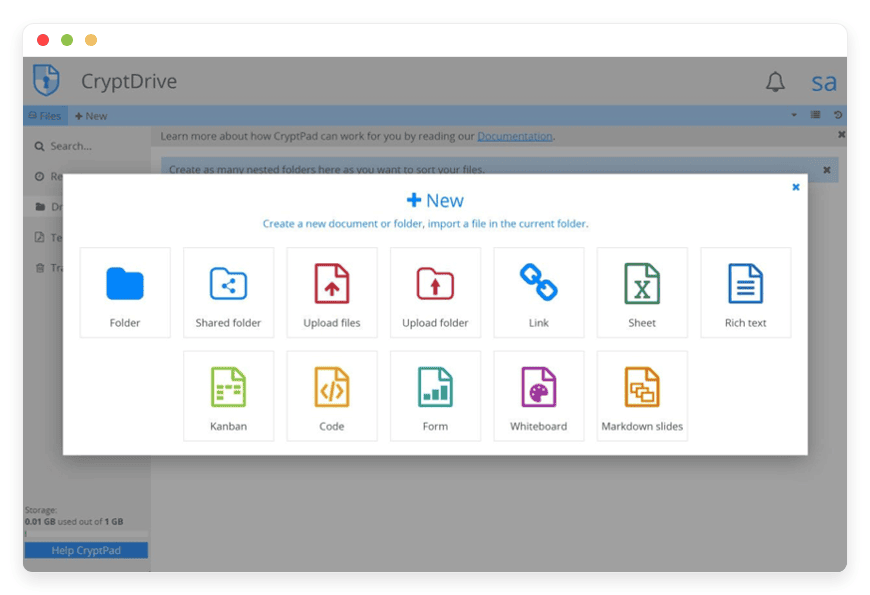
CryptPad is an end-to-end encrypted office suite: documents, spreadsheets, kanban boards, and notes, encrypted in your browser before they reach the server. It replaces Google Docs and most note SaaS for sensitive drafting. A draft nobody should see yet stays scrambled on disk, and people without an account can still be invited to a single document by link. Best for teams of one to twenty-five; switching is low effort. CryptPad for encrypted drafts sits behind the same €9 floor.
Matrix and Element - secure team messaging
Matrix is an open messaging standard; Element is the app most teams use to reach it. Conversations are end-to-end encrypted, and you run your own server rather than renting space on someone else's. It replaces Slack for day-to-day chat, with channels, direct messages, and calls. History migration is the hard part, so plan a phased move and start fresh channels in parallel. Matrix/Element for secure messaging runs managed, in the region you choose.
Nextcloud - files and sharing
Nextcloud is the file platform tens of thousands of organizations run to replace Google Drive and Dropbox. It syncs to a desktop folder, shares files by link with passwords and expiry dates, and keeps version history. For a newsroom it is the shared drive that lives on a machine you chose, not on a vendor's. Switching is medium effort, mostly a bulk upload. Nextcloud for files is the usual anchor of the stack.
PrivateBin - expiring snippet sharing
PrivateBin shares a sensitive snippet through a link that self-deletes after one read or a set time. Text is encrypted in the browser with 256-bit keys, and the server stores only scrambled data it cannot read. It replaces the bad habit of pasting secrets into email or chat threads that live forever. The catch is honest: a recipient can screenshot what they open, so treat it as one layer, not a guarantee. Switching is trivial.
Paperless-NGX - a document archive you can search
Paperless-NGX turns a pile of PDFs, scans, and letters into a searchable archive. It runs OCR with the Tesseract engine across more than 100 languages, tags documents, and lets you set who can open each one. For a newsroom it is the filing cabinet for FOI responses, contracts, and records, with full-text search over all of it. Best for any team size; ingesting old documents takes some patience up front.
How the five fit together
The five tools cover a story's lifecycle inside the newsroom. A tip arrives and goes into an encrypted CryptPad draft. The team coordinates in Matrix and Element. Source documents land in Paperless-NGX, searchable later. Shared files live in Nextcloud. A sensitive snippet goes out through a self-deleting PrivateBin link. Each step stays on hosting you chose.
In practice, two pairings carry most of the weight. Drafting plus chat is the daily core: CryptPad for what you write, Matrix and Element for how you coordinate. Files plus archive is the records layer: Nextcloud for working documents, Paperless-NGX for the things you need to find again in two years. PrivateBin is the careful-sharing exception you reach for when something must not linger.
The honest trade-off is that these are five separate apps, not one unified suite. There is no single shared inbox across all of them, and people sign in to each tool. If that friction starts to cost time, single sign-on ties them together for €30. The reason to accept the seams is the same reason to run the stack at all: you hold each piece, rather than renting the convenience of one vendor owning the lot.
What the stack costs against a per-seat bundle
Five apps at €9 each is €45 per month, flat. The cloud bundle it replaces is billed per seat, so it grows every time you hire. Google Workspace Business Standard is about $14 per user per month, Slack Pro about $7.25, Dropbox Business about $15. Three tools, ten people, and you are past $360 a month.
Newsroom headcount is also lumpy in a way per-seat pricing handles badly. You bring on a freelancer for one investigation, a fixer for one trip, a stringer for one election, then part ways a month later. A per-seat plan charges for each of them for as long as they hold a login, and leaves you trimming seats afterward. Per-app pricing does not move when contributors come and go: the five apps cost €45 whether three people or thirteen touch them in a given week.
| Tool | What it does | Replaces | DANIAN price | Team-size fit | Where it runs |
|---|---|---|---|---|---|
| Nextcloud | Files and sharing | Google Drive, Dropbox | €9/mo | 1-100+ | Any of 21 regions |
| CryptPad | Encrypted drafts | Google Docs, note SaaS | €9/mo | 1-25 | Any of 21 regions |
| Matrix and Element | Secure team chat | Slack | €9/mo | 1-100+ | Any of 21 regions |
| PrivateBin | Expiring snippet sharing | Pasting secrets into email or chat | €9/mo | Any | Any of 21 regions |
| Paperless-NGX | Searchable document archive | A pile of PDFs or a document system | €9/mo | Any | Any of 21 regions |
The per-seat side is where the structure shows. The table below runs the three paid tools above at their annual rates against the flat five-app stack, at three newsroom sizes.
| Newsroom size | Per-seat bundle (Workspace + Slack + Dropbox, annual rates) | DANIAN five-app stack |
|---|---|---|
| 3 people | about $109 per month | €45 per month, flat |
| 8 people | about $290 per month | €45 per month, flat |
| 15 people | about $544 per month | €45 per month, flat |
The bundle figure is $36.25 per user per month: Google Workspace Business Standard at $14, Slack Pro at $7.25, and Dropbox Business Standard at $15, all on annual billing. A paid note or wiki tool adds roughly $8 to $12 per user on top. The DANIAN row is €45, about $49, at every size.
The honest read: at the smallest scale the gap narrows. A three-person shop running only Google Workspace pays about $42 a month, less than the €45 five-app stack. At that size the reason to choose this stack is control, plus two capabilities the bundle does not include cleanly, expiring shares and a searchable archive, rather than the monthly price. Past a couple of tools or a few more people, the per-seat line crosses €45 and keeps rising while the stack stays flat. Source prices are linked at the end.
How to start without betting the newsroom on it
Start with one app and a real project, not a migration plan. Pick the tool that solves your sharpest problem, deploy it on the 7-day free trial with no card, and move one live workflow into it. Run it beside your current tool for two weeks. Keep what earns its place; drop what does not.
A few steps make the trial honest rather than a demo. Decide the access rules first: who can open what, before anything sensitive goes in. Move one project's drafts into CryptPad, or one team's chat into Matrix and Element, and use it for real work, not a test message. Add Nextcloud for files once the first tool sticks, and ingest a single folder rather than your whole drive. Layer PrivateBin and Paperless-NGX last; they cost nothing to leave idle until a story needs them. Turn on single sign-on only when the separate logins start to annoy people.
Part of an honest trial is checking the exit, not just the entrance. Before you commit, export a document out of CryptPad, pull a file back from Nextcloud, and confirm the data leaves in a format you can still open elsewhere. Because these are open formats and the trial needs no card, testing the way out costs you nothing, and it tells you what leaving would really involve.
Start a 7-day trial - no card with one app, or see the full app catalog to map the five tools to what your newsroom already runs.
Questions newsrooms ask
What this stack is, and what it is not
What does this five-tool stack cover?
It covers the newsroom's internal workbench: files and sharing in Nextcloud, encrypted drafts in CryptPad, team chat in Matrix and Element, expiring snippet sharing in PrivateBin, and a searchable document archive in Paperless-NGX. Each runs in a container you control, hosted by us at €9 per app per month.
Does this replace our publishing CMS?
No. This is your internal workbench for sources, drafts, chat, and documents, not a public publishing system. Your website, WordPress, Ghost, or a custom newsroom CMS still runs your published output. The five tools sit behind the scenes, where the reporting and editing happen before anything goes live.
Do these tools protect our sources by themselves?
Not by themselves. Encrypted drafts, expiring shares, and access controls support careful practice, but they do not replace it. Source protection still depends on device habits, who you grant access to, and the metadata around a file. You run the instances and set the rules; the tools give you the controls.
Which tool should a small newsroom start with?
Start with the one that solves your sharpest problem. For most newsrooms that is either CryptPad for encrypted drafting or Matrix and Element for chat off Slack. Add Nextcloud for files once drafting works, then PrivateBin and Paperless-NGX. One app at €9 per month is enough to test the approach.
Cost and what is included
What does the full stack cost per month?
The full five-app stack costs €45 per month: five apps at €9 each, flat. That price does not change with the size of your team, because you pay per app, not per seat. A reporter you hire next week adds nothing to the bill. Most newsrooms start with two or three apps first.
How does per-app pricing compare to per-seat SaaS as we hire?
Per-app pricing stays flat while per-seat pricing climbs with headcount. Google Workspace Business Standard runs about $14 per user per month, Slack Pro about $7.25, Dropbox Business about $15. At ten people those three tools alone pass $360 per month. The DANIAN stack stays at €45, regardless of headcount.
What is included in the €9, and what costs extra?
Each €9 app includes one compute unit, 30 GB of storage, and 1,000 GB of monthly traffic, plus patching, monitoring, and daily off-site backups. Beyond that, storage is €0.50 per GB and traffic is €0.03 per GB. Single sign-on adds €30. A document-heavy archive is the line item most likely to grow.
Is there a free trial?
Yes. Every app comes with a 7-day free trial, and no card is required to start. That is enough to deploy one tool, move a real project into it, and decide whether the approach fits your newsroom before you pay anything. Most teams trial CryptPad or Matrix first, since those replace daily habits.
Data, control, and where it runs
Who can read our documents and messages?
For CryptPad, PrivateBin, and Element, content is encrypted in the browser, so the server stores scrambled data it cannot read. In Nextcloud and Paperless-NGX, you set who can open each file through per-user permissions. You hold the access decisions; we run the machines and stay out of your content.
Where is our data hosted?
You choose the region. DANIAN runs in 21 datacenter locations across six continents, and your apps are hosted in the region you pick when you deploy. You can place a newsroom's tools close to the team that uses them, or in a jurisdiction you have chosen deliberately. The choice is yours, per app.
Can we get our data out if we leave?
Yes. These are open-source tools that store data in open formats, so you can export documents, messages, and files and move them elsewhere. Nextcloud syncs to a desktop folder, CryptPad and Paperless-NGX export standard files, and Matrix history is portable. There is no contract lock-in, and the 7-day trial needs no card.
How isolated is each app from other customers?
Each app runs in its own hardened, isolated container with its own storage, not shared with other customers. You get per-container terminal access if you want to inspect or extend the setup. Isolation reduces the reach of any single problem, though no shared platform can promise that risk is ever zero.
What happens with expiring snippets and burn-after-reading?
PrivateBin lets you share a snippet that self-deletes after one read or after a set time, from five minutes to a year. The content is encrypted before it leaves the browser. The limit is real: a recipient can still screenshot what they open, and access timing can appear in logs, so treat it as one layer, not a guarantee.
Running it and switching
Who patches and backs up these tools?
We do. DANIAN patches each app, monitors it 24/7, and runs daily off-site backups, so you are not on call for security updates at 2am. You run the content and the access rules; we run the hosting underneath. If something breaks, you reach a human rather than a status page.
How hard is it to migrate off Google Workspace, Slack, or Dropbox?
It is a phased move, not a weekend. Files from Dropbox or Drive upload into Nextcloud in bulk, and documents export into CryptPad cleanly. Chat history is the hard part: Matrix can import some history, but plan to start fresh channels in parallel. Move one tool at a time and keep the old one until you trust the new.
Do we need a sysadmin to run this?
No. The hosting is managed, so you do not need a sysadmin to patch servers, renew certificates, or restore backups. What you do own is the newsroom side: who has access, how you share, and which tools you turn on. Setup help is there when a configuration needs a human touch.
When is this the wrong choice for a newsroom?
It is the wrong fit in three cases. A single writer running one tool may pay less on one SaaS plan, so the case there is control, not cost. If your funders or partners require a formal third-party security report on file, choose a provider that already holds one. And teams that want one integrated suite may prefer to stay put.
Can we add more tools later from the catalog?
Yes. The catalog runs more than 150 open-source apps at the same €9 floor, so you can add a wiki, a form builder, a project board, or a newsletter tool when you need one. You pay per app you actually run, and you can deploy or remove tools as the newsroom changes. Start narrow, grow on demand.
Where to go from here
The case for this stack is not that it is the cheapest option at every size, because it is not. It is that the newsroom holds its own sources, drafts, and documents, on hosting it chose, at a price that does not punish hiring. The control is real, and so are the limits: the tools support careful work, they do not replace it.
Pick the one tool that worries you most today. Move it this week. Add the rest when each earns the slot. You can compare what each app costs before you commit a single euro.
Sources
- Nextcloud - https://nextcloud.com/
- CryptPad - https://cryptpad.org/
- Element and Matrix - https://element.io/
- PrivateBin - https://privatebin.info/
- Paperless-NGX - https://docs.paperless-ngx.com/
- Google Workspace pricing - https://workspace.google.com/pricing
- Slack pricing - https://slack.com/pricing
- Dropbox business plans - https://www.dropbox.com/business/plans-comparison





