Fully Managed CryptPad
as a Service

Deploy CryptPad as a fully managed service starting at €9/mo. Get automated backups, SSL, updates, support and monitoring included.

CryptPad is an end-to-end encrypted office suite — documents, spreadsheets, slides, kanban, whiteboard, forms, drive — combining the convenience of Google Workspace with the security of zero-knowledge collaboration. Maintained by XWiki SAS, AGPL-3.0 licensed, in production for more than ten years.

Free 7-day trial  99.9% Uptime SLA  No credit card  Cancel anytime

Free 7-day trial  99.9% Uptime SLA
No credit card  Cancel anytime

CryptPad

CryptPad

STARTING AT

€9/month
Automated Backups
Monitoring
Automated Updates
Auto SSL

USAGE

Unlimited
Human Support
Custom Domains
Terminal Access
File Manager Access
Deploy in your region 21 locations worldwide
GermanyFinlandNetherlandsUKSwedenUnited StatesCanadaSingaporeJapanAustraliaBrazilSouth Africa+9 more →
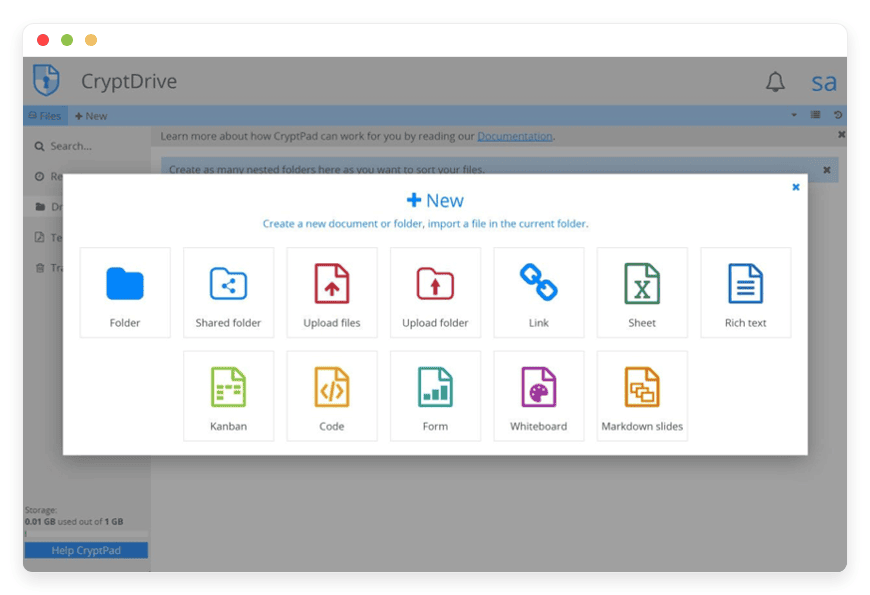
CryptPad Preview Image

ABOUT THE SOFTWARE

What is CryptPad

CryptPad is an end-to-end encrypted office suite covering documents, spreadsheets, slides, kanban, whiteboard, diagrams, forms, calendar, and a private file drive. Server operators cannot read user content. AGPL-3.0 licensed, maintained by XWiki SAS in France.

CryptPad was created in 2014 by Caleb James de Lisle as part of an XWiki SAS research project funded by BPI France. The cryptographic primitive at the centre — ChainPad, a CRDT adapted from Bitcoin's consensus mechanism — makes real-time multi-user editing possible while keeping the server blind to document content. The project is now maintained by a seven-person team at XWiki SAS, led by David Benque under CEO Ludovic Dubost, and has been in continuous public release for more than ten years.

The flagship instance at cryptpad.fr is the public reference. In January 2026 alone, more than 10,000 new users registered, 3 million pads were opened, and 367,000 unique IP addresses connected. Production-grade adopters named on CryptPad's testimonial wall include the French Ministry for the Ecological Transition, the City of Ulm, Connecting the Dots Institute Netherlands, Université Paris Cité, RWTH Aachen, Hamburg University of Applied Science, Digitalcourage e.V., and human-rights organisation SEDEM. The United Nations used CryptPad Forms to gather endorsements for its Open Source principles.

FEATURES

What CryptPad does

CryptPad covers fifteen apps under one encrypted account — three OnlyOffice-powered office editors plus a dozen native apps for kanban, whiteboard, diagrams, forms, calendar, and more. Everything is end-to-end encrypted; everything works in the browser.

Document, Sheet, Presentation

OnlyOffice integration with .docx, .xlsx, .pptx, .odt, .ods, .odp support. Fast and Strict collaboration modes; full history browsing since 2026.2.0.

Kanban and Markdown Slides

Tag-filtered Kanban cards with AND/OR logic. Markdown-syntax slide decks distinct from the OnlyOffice Presentation app — for engineers who write decks in plain text.

Forms with conditional logic

Build surveys and intake forms with branching logic and anonymous-response mode. Export responses as CSV, JSON, or a CryptPad Sheet. Used by the UN for open-source principles endorsement.

SSO and 2FA

OIDC and SAML via the official CryptPad SSO plugin — Keycloak and Univention UCS confirmed. TOTP two-factor authentication available since 2025.3.0; enforcement options tightened in the same release.

Rich Text and Code/Markdown

Browser-native WYSIWYG plus a CodeMirror editor with live Markdown preview, Mermaid.js diagrams, Markmap mind-maps, and MathJax LaTeX rendering.

Whiteboard and Diagram

Freehand multi-user Whiteboard. Diagram app powered by Drawio 29 (since 2026.5.0) with sketch and classic themes — mind-maps, architecture diagrams, freehand canvas.

CryptDrive, Teams, Calendar, Contacts, Chat

Encrypted file storage with shared folders and tags. Team drives with granular access control. Multi-calendar with recurring events. Public-key-verified contacts. End-to-end encrypted DM and team channels.

Zero-knowledge architecture

Keys derived from your username and password in-browser using TweetNaCl. The server stores encrypted patches; operators see ciphertext. ChainPad CRDT resolves merges deterministically.

WHAT'S ALWAYS INCLUDED

Every app. Fully managed.
Nothing extra to pay for.

Every app you deploy includes the full managed service — security, backups, updates, and support from day one.

Automatic updates and patches

Apps run the latest stable version. Security patches applied silently, with rollback if needed.

Daily off-site backups

Multiple daily backups in redundant off-site locations. One-click restore if anything goes wrong.

24/7 uptime monitoring

Continuous monitoring with instant alerting. We respond before you notice.

SSL, firewall, DDoS protection

Auto-renewing SSL, hardened firewall rules, DDoS mitigation on every deployment.

Performance and scaling

We monitor resource usage continuously. When your app needs more headroom, we flag it and upgrade with your explicit approval.

Dedicated engineering support

Real engineers on chat. DNS, SMTP & migration help. All included in €9.

WHY MANAGED

Why teams pick managed CryptPad

Microsoft published a 1 July 2026 price increase on Microsoft 365 Business Standard (+12%) and Business Basic (+16.7%); Google Workspace already raised prices 17–22% in January 2025 with the Gemini bundling. Teams looking at the per-seat math are revisiting CryptPad — and finding the self-host has real operational teeth.

Self-hosting CryptPad is documented and possible; the official admin guide is thorough. It is also where most attempts go wrong. The documented production setup needs two DNS names, two SSL certificates (or one cert covering both), and a precise Content-Security-Policy on the sandbox domain. The CryptPad team is explicit about it: "Most problems with new instances are related to this system blocking access because of incorrectly configured sandboxes. If you only see a white screen when you try to load CryptPad, this is probably the cause."

OnlyOffice is no longer bundled with CryptPad releases — the install script has to be re-run after every upgrade, and the commit hash pinning per OnlyOffice major version must match. The 2026.5.0 release notes say bluntly: "If you are upgrading from a version older than 2026.2.2 please read the upgrade notes of all versions between yours and 2026.5.0 to avoid configuration issues." The SSO plugin lives in a separate repository and has its own version pin (v0.5.0 for current CryptPad). The AppConfig.loginSalt setting becomes immutable after the first user account — generate it wrong and the only fix is starting over.

On managed CryptPad we provision the two-domain sandbox correctly the first time, pin OnlyOffice and SSO plugin versions per release, generate loginSalt with openssl rand -hex 32 at first provision, keep the example nginx CSP profile synchronised with each upstream release, and take daily off-site encrypted backups of the four data directories. Patches land within days of upstream — the CVE-2025-51846 WebSocket DoS, for instance, shipped a fix in 2026.2.2 inside the disclosure window.

What we ship by default: two-domain sandbox with hardened CSP, OnlyOffice installer commit-pinned, SSO plugin, daily off-site encrypted backups, TOTP 2FA available, custom domain with auto-renewing SSL, and a chat that performs the work — not a ticket queue.

REVIEWS

Hear from customers ​like you​​​​​​​

Successful businesses and professionals around the world rely on DANIAN every day

USE CASES

Three teams who run CryptPad on DANIAN

These are representative team types we set up most often. Each starts with the same flat €9 plan.

12-PERSON INVESTIGATIVE OUTLET

Coordinating source intake across three reporters and an editor

Sweden region. SSO against the newsroom Keycloak. Per-investigation CryptDrive folders with a Form for anonymous tip intake. Password-protected Document links sent to sources who never create an account. Daily off-site backups; chat for the SSO setup. Replaces a shared Google Drive that broke source confidentiality.

30-VOLUNTEER CLIMATE GROUP

Running a six-month campaign without trusting a US cloud

Finland region. Custom domain. Campaign Kanban for action coordination, Forms for volunteer intake with conditional logic, shared Drive for legal briefings, Calendar for protest dates. Operates under a threat model that includes police data requests. No accounts needed for view-only collaborators.

REGIONAL GYMNASIUM, 480 STUDENTS

Replacing Google Workspace after the state rejected it

Germany region. SSO against the school's existing identity provider — 60 staff and 480 students onboarded in one weekend. Teachers post read-only Pad links to students; group projects use Kanban; year-end assessments use Forms with response export to Sheet. Follows the 2022–2024 Hessen and Baden-Württemberg rulings against Microsoft 365 in schools.

COMPARISON

Four ways to run CryptPad

Four real paths a privacy-conscious team takes when replacing a proprietary office suite. The math at five and ten seats is where the choice gets decided — not the marketing.

 PATHCOST AT 1 USERCOST AT 5 USERSCOAST AT 10 USERSWHAT YOU OWN
Google Workspace Business Standard
€13.80/mo€69/mo€138/moSaaS. Server-side keys. AI training opt-outs negotiated separately.
Self-host on a VPS

~$24/mo~$24/mo~$24/mo + ops timeFull control. Two-domain sandbox to configure. OnlyOffice install script to re-run every release. 2–6 ops hours/month.
Home server
(HPE ProLiant ML30 Gen11)
~€2,880 one-time+ ~€210/yr power+ ops timeHardware on your premises. Same operational burden as VPS plus electricity and hardware maintenance.
DANIAN Managed CryptPad€9/mo€9/mo€9/moHosted in your chosen region. Sandbox, OnlyOffice, SSO plugin, backups, monitoring, patches, human chat — all included.

Google Workspace Business Standard at €13.80/user/month (annual billing) per workspace.google.com EU pricing. VPS reference is a 4 vCPU / 8 GB / 80 GB SSD class machine. Home-server price from HPE direct store, 4-core Xeon 6315P with 16 GB ECC DDR5. Microsoft published a Business Standard +12% increase effective 1 July 2026.

BY INDUSTRY

CryptPad for specific industries

Four industries put specific demands on collaborative editing — regulatory exposure, threat models that include the platform operator, multi-stakeholder document flows. CryptPad's zero-knowledge architecture answers all four in materially different ways.

Source-protection statutes vary by country, but the operational floor is the same: a journalist's notes, contact list, and draft attribution should not be readable by the hosting provider — not even under subpoena. GDPR Article 32 sets the data-security baseline; national journalist source-shield laws set the higher bar.

CryptPad's zero-knowledge architecture means the server stores only encrypted patches; DANIAN cannot decrypt content on demand. We provision a custom domain so the address reads as the publication's own, and we keep daily off-site encrypted backups so a single device loss does not end an investigation.

A typical newsroom workflow: a CryptDrive folder per investigation, with the lead reporter and editor holding edit access; password-protected Document links sent to sources who never create accounts; a CryptPad Form for anonymous tip intake (no IP logging beyond country-level metadata). Le Monde used CryptPad for a 2025 Ukraine drone-warfare investigation; Reporterre migrated full editorial workflow in November 2025; Connecting the Dots Institute Netherlands describes CryptPad as "the zero-trust secure note and collaboration suite for journalists." Pick the region nearest your editorial team from 21 datacenter locations across six continents.
Activist groups operate under a threat model that exceeds the GDPR Article 32 minimum — police data requests, financial-institution pressure, and government surveillance scrutiny are routine.

End-to-end encryption protects campaign documents, volunteer lists, legal briefings, and internal minutes from server-side compromise. The architecture matters more than the certification; CryptPad is AGPL-3.0 self-hostable, which is the bus-factor argument groups make to volunteer treasurers.

On managed CryptPad we run the two-domain sandbox under hardened CSP, pin upstream releases within days, and support custom domains so the URL reads as your campaign rather than a hosting provider. Extinction Rebellion, Parents for Future, Friends of the Earth, and Piratenpartei Deutschland members are named on CryptPad's public testimonial wall. The typical campaign of 30 volunteers runs: a Kanban for action coordination, a Form for volunteer intake with branching logic, a shared CryptDrive for legal documents, and Calendar for coordinated mobilisation. View-only collaborators need no account.
Hessen (2022) and Baden-Württemberg (2024) issued rulings restricting Microsoft 365 in public schools on data-protection grounds; the French Ministry of Education followed with a November 2022 instruction limiting Google and Microsoft services. GDPR Article 32 is the regulatory baseline; the state-level rulings raise the bar for processor due diligence.

CryptPad answers both — zero-knowledge means even the host cannot read student work, and AGPL-3.0 self-hostability means the institution can verify the code.

Around 15 named schools and universities sit on CryptPad's public testimonial wall — Université Paris Cité, RWTH Aachen, Hamburg University of Applied Science, multiple German Gymnasiums, and French Lycées professionnels. The typical classroom workflow: a teacher creates a shared Pad and posts a read-only link; students collaborate without accounts. Group projects use Kanban; assessments use Forms. We provision SSO against the institution's identity provider so a 500-student cohort onboards in one batch. Picking a region close to campus keeps real-time editing latency under 30 ms.
NIS2 has been transposed into national law in 20 of 27 EU Member States as of January 2026 — public-sector buyers face stronger due-diligence obligations on data processors and supply-chain cybersecurity than they did two years ago. The European Health Data Space regulation entered into force in 2025. The Cyber Resilience Act lands in 2027. The trajectory is consistent: more documentation, more processor scrutiny, more pressure to host data in places auditors can reach.

CryptPad's zero-knowledge model and AGPL-3.0 codebase answer both the data-sovereignty question and the audit-trail one. The French Ministry for the Ecological Transition and the City of Ulm appear on the public testimonial wall; the United Nations used CryptPad Forms for its Open Source principles endorsement campaign.

A typical workflow: ministry-internal policy drafting in shared Documents, multi-department Team drives, meeting minutes in Pads with read-only public links for transparency. Pick the region nearest your operational headquarters from 21 datacenter locations across six continents.

FAQ

Frequently asked questions

Everything teams ask before signing up — answered straight, without sales speak.

Three groups: technical setup, migration, and how DANIAN works as a service.

01

Technical and configuration

CryptPad's Document, Spreadsheet, and Presentation apps integrate OnlyOffice on the client side. The top toolbar is CryptPad's, used for file operations, history, sharing, and access control. The lower toolbar belongs to OnlyOffice and handles formatting, formulas, and editing modes. Both have a File menu, so import/export may appear in either one. The architecture matters: CryptPad uses only OnlyOffice's client-side code, never its document server, which is why managed CryptPad instances do not need the RAM-heavy OnlyOffice server process.
No. The CryptPad team disables OnlyOffice plugins and macros for security reasons — macros are JavaScript executed inside the editor iframe, and allowing them would break the sandbox-domain isolation that prevents an XSS bug from exposing user encryption keys. This is a deliberate trade-off. If your workflow depends on macros, CryptPad is the wrong tool. If you only need standard formulas, formatting, comments, and track-changes, the OnlyOffice integration covers them. We do not bypass this restriction on managed instances; the security property only holds if every operator enforces it the same way.
No. CryptPad encrypts documents in your browser before they reach the server. Encryption keys are derived from your username and password — neither is ever sent to the server in cleartext. The server stores only encrypted patches plus a login block; our admins see ciphertext, not content. The honest caveat: the server still serves the JavaScript that performs encryption in your browser. A malicious operator could theoretically push backdoored code (an active attack). We run CryptPad unmodified from upstream releases and do not maintain custom forks.
Before CryptPad 2026.2.0, history in OnlyOffice-powered apps was limited to a jump-to-previous-version control. The 2026.2.0 Winter release brought full history browsing to Document, Spreadsheet, and Presentation, matching what Rich Text and Code already had. We run 2026.5.0 on managed instances, so the full history feature is available in every office app. History is stored as the same encrypted-patch stream that powers real-time collaboration via the ChainPad CRDT — checkpoint frames are written every 50 patches, so seeking through a long edit history stays responsive.
Document supports .docx and .odt for import and export, plus .pdf and .bin for export. Spreadsheet handles .xlsx, .ods, .pdf, and .bin. Presentation handles .pptx, .odp, .pdf, and .bin. Rich Text exports to HTML and .doc. Code and Markdown round-trip as plain text. The .bin format is CryptPad's encrypted backup file — useful for moving a single document between CryptPad instances when there is no federation path. Complex .docx features such as track-changes and advanced citations round-trip through OnlyOffice with high but not perfect fidelity; test any document you depend on legally.
CryptPad runs the user interface on a separate domain (httpSafeOrigin) from the main domain that performs encryption (httpUnsafeOrigin). The user-interface domain serves a strict Content-Security-Policy that blocks JavaScript from exfiltrating data — so if an attacker found a cross-site-scripting bug in the editor, the blast radius is contained to documents the user already had access to. We provision both domains, request a TLS certificate that covers both, and apply the upstream nginx CSP profile on every release. Most self-hosting failures we see in forums are misconfigured sandboxes; we make that gotcha disappear.
Your encryption keys are derived from your username and password — DANIAN cannot reset them, and no administrator on any CryptPad instance can. If you lose your password while still logged in on any device, open Settings → CryptDrive → Backup keys, save the recovery file, then register a new account and use Restore from backup. Set up two-factor authentication and store the recovery keys somewhere safe (a password manager, not a CryptPad document). This trade-off is the point: a server-side reset would mean the server could decrypt your data, which is exactly the property zero-knowledge encryption removes.
Not natively — each CryptPad instance is independent, and there is no live federation between instances today. Cross-instance sharing works by exporting an encrypted .bin file from one instance and importing it on the other. For organisations that need a single shared collaboration space across multiple offices or partner organisations, the cleaner answer is one managed CryptPad instance that all parties access through SSO. We support OIDC and SAML — Keycloak and Univention UCS are confirmed working — and we set the SSO plugin to the version pinned by the current CryptPad release.
Default per-user storage on the managed €9 tier is 5 GB, which covers a normal user's worth of documents, spreadsheets, and uploaded PDFs comfortably for several years of work. You can raise individual quotas from the admin panel on request. Larger team drives are also supported. If your usage genuinely outgrows the default — typical for media-heavy whiteboards, large CSV exports, or video attachments — we tell you before any upgrade and never charge for resource changes without explicit consent.

02

Migration and onboarding

We can activate your app on your own custom domain/subdomain. Examples: mydomain.com, anyword.mydomain.com.
Or, on our randomized free subdomain. Example: 963.apps.danian.cloud
If you wish to use a custom domain/subdomain, select that option when ordering your app (or notify us later). We will send you the required DNS records and if needed, our tech team will modify them for you.
21 datacenter locations across six continents. You choose the region at provisioning. Application data sits in the region you choose; pick whichever is closest to your users or matches your data-residency preference.
Yes. Request a region migration from the dashboard and we run the move in the background. The system emails you when the migration completes; total transfer time depends on data volume but typical instances finish in a few hours. There is no extra charge for a region change.
Yes. Full data export is available at any time, in a portable format you can bring to any infrastructure.
Export your Google Docs as .docx, Sheets as .xlsx, and Slides as .pptx — either one by one from the File menu or in bulk via Google Takeout. Upload the files to a CryptDrive folder; each opens directly in the matching CryptPad app. Complex formatting (advanced citations, embedded diagrams, custom fonts) round-trips through OnlyOffice with high but not perfect fidelity, so test a representative document first. A typical 50-person org migration runs four to eight weeks at user pace; we have done the bulk Takeout import for several teams on the trial day. We can help you script the upload if you want.
Export Word, Excel, and PowerPoint files from OneDrive or SharePoint and upload them to CryptDrive — the OnlyOffice integration opens them natively. SharePoint sites with heavy custom workflows do not have a CryptPad equivalent; if you depend on those, plan to keep the workflow logic somewhere else and use CryptPad for the documents themselves. Tracked changes and comments translate cleanly. Macros do not transfer — CryptPad disables OnlyOffice macros for security. Your information-security team will likely approve of that constraint.
Etherpad is the canonical predecessor here — Digitalcourage's IT admin describes migrating their organisation off Etherpad onto CryptPad in a few weeks. Export each Etherpad as .html or .docx; both import into CryptPad Rich Text. Etherpad pads with heavy author-colour markup may need a manual cleanup pass; for most pads the round-trip is straightforward. We help with the bulk export script on request — Etherpad APIs differ by version, so we look at your specific instance before quoting a timeline.
Yes. Nextcloud Text exports to .md or .docx; the Collabora-edited .odt and .docx files in your Nextcloud Files import directly into CryptPad. The structural change is that CryptPad does not run a separate office document server — the editor runs in the browser — so the operational footprint is smaller than Nextcloud's Collabora or OnlyOffice integration. We run both side-by-side during a transition; some teams keep Nextcloud for raw file storage and use CryptPad for collaborative editing.

03

Billing, support, and platform

€9 covers everything we do for that app: hardware in the region you choose, daily off-site backups with one-click restore, automatic security patches and version upgrades, 24/7 monitoring, SSL and firewall, and engineering support on Email/LiveChat. There are no setup fees or hidden line items. For more info see our Pricing page.
If you decide to continue, we charge €9/app/month from day 8. If you don't, the trial ends and you can export your data. No card is required for the trial, and we never auto-charge you without explicit consent.
No. The €9/month is flat regardless of how many users log into your app. Add 5 users or 50; the price doesn't change.
24/7 Live chat and email support, both staffed by engineers who run the systems. We handle DNS configuration, SMTP setup, app integrations, performance tuning, troubleshooting, and migration help. Response time is typically under an hour. There is no tier system — every customer gets the same support.
Yes. Cancel from the dashboard. We don't charge a cancellation fee, we don't lock data, and we will export your data to you on request before deletion. data to you on request before deletion.
Every customer instance is backed up daily to a separate region from the primary. We test restores. You can request a restore at any backup point within the retention window — usually 7 days for daily backups.
Your application data sits in the region you choose at provisioning — 21 datacenter locations across six continents. Account-level data (billing, account email, support ticket history) is processed centrally. Application data region is picked by you, per app.
99.9% uptime SLA on every app, every tenant. Service credits are documented at danian.co/service-level-agreement. The status page is located at status.danian.co.
When your tenant approaches the resource ceiling — the base tier holds 1 vCPU/RAM, 30 GB storage — we notify you. Resource upgrades happen with your explicit consent; we will not upgrade your tenant or charge you without it.
We wait. We don't suspend the app or delete your data on the first failed charge. We email you, you fix the card on file, and we continue.
Invoices can be downloaded from the billing dashboard in PDF the day each charge succeeds. EU VAT is added where applicable and the VAT-reverse-charge regime applies for VAT-registered businesses with a valid number.
150+ open-source apps across automation, team chat, file sync, analytics, AI, password management, email marketing, dev tools, project management, smart home, CMS, and federated social. See the full catalog →
Yes. Every instance comes with a web-based terminal and a file manager in your DANIAN management dashboard. Useful for managing your data and customizations.
Resources scale with your usage. If your app needs more vCPU, RAM, or storage, we add it — and we ask first before any change to your plan. €9 is the floor; resource-heavy workloads may price higher, but you'll always know in advance.
Yes. We have both a Partner program and an Affiliate program available. Anybody can sign up.
No contract. No minimum commitment. Cancel anytime from the dashboard with one click. The 7-day free trial requires no credit card. After the trial converts to paid, you can still cancel at any month without notice or penalty.

DEPLOY IN YOUR REGION

21 datacenter locations on six continents

Pick the region closest to your users.

United States, Germany, Finland, Singapore, Australia, Brazil, Canada, Netherlands, UK, Spain, Italy, France, Sweden, Malaysia, India, Japan, Mexico, Poland, South Korea, Chile, South Africa and more coming soon
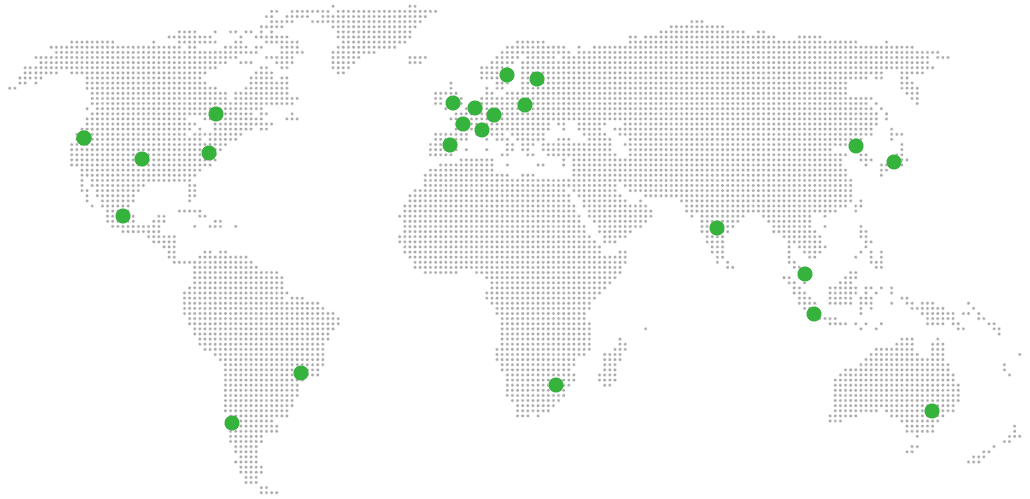
Global Reach Map

Try managed CryptPad for 7 days

No card. Cancel from the dashboard.