Open-source stack for small MSPs in 2026
A small managed-service provider runs on records: which laptop sits at which client, where the runbook lives, who holds the admin password, and how a tech reaches a client machine at 9pm. Most MSPs rent all of that from per-seat SaaS. This is the open-source stack that lets you own it instead, for a flat €9 per app.
The trigger is usually a renewal email. IT Glue lists at $29 per user per month with a five-seat minimum, so the floor is $145 a month before you add a tech.<sup class="fn">1</sup> Hudu lists at $30 per user per month, or $27 billed annually, with no minimum.<sup class="fn">2</sup> Both price per technician. Add seats, add cost - while the client records you pay to store sit on someone else's platform, under their export rules.
Five open-source apps cover the core of that work: Snipe-IT for client assets and licenses, osTicket for tickets, BookStack for documentation and runbooks, Vaultwarden for credentials, and Apache Guacamole for browser-based remote access. Run all five and you pay €45 a month, flat, with the records living on infrastructure you control.
The trade-off is worth naming up front. This is a documentation, asset, ticketing, vault, and remote-access stack. It is not a full RMM with remote patching and endpoint agents, and it is not a billing-and-quoting PSA. More on that boundary below.
- IT Glue starts at $145 a month (5 seats x $29); Hudu at $27 to $30 per seat. Both scale with headcount.
- The five-app open-source stack - Snipe-IT, osTicket, BookStack, Vaultwarden, Guacamole - costs €45 a month flat, run for you, with unlimited users on each app.
- You own the client records and the credentials. Export them, move them, or keep them in the region closest to your clients.
- The honest limit: this is docs, assets, tickets, vault, and remote access. It is not remote patching, endpoint agents, or PSA billing.
- Best starting combination for owning client environments: Snipe-IT plus Vaultwarden plus Guacamole.
Who this stack is for
This list is for the owner of a small MSP or IT shop who supports a handful of clients and is tired of per-seat math on documentation and asset tools. It suits teams that want to own client records, not rent them. It is the wrong fit for shops that need agent-based patching out of the box.
You are a fit if you bill clients monthly, run a small team of techs, and your documentation and asset tools have started to cost more than the value you get from them. You are a fit if a client has ever asked where their data lives and you wanted a cleaner answer than "our vendor's cloud."
You are not a fit if remote patch management and monitoring agents are the job, not a side concern - that is RMM territory, and none of these five apps do it. You are also not a fit if no one can give half a day to setup decisions; someone has to choose how client data is organised, even when the running is handled for you.
The five apps
Snipe-IT - the client asset and license register
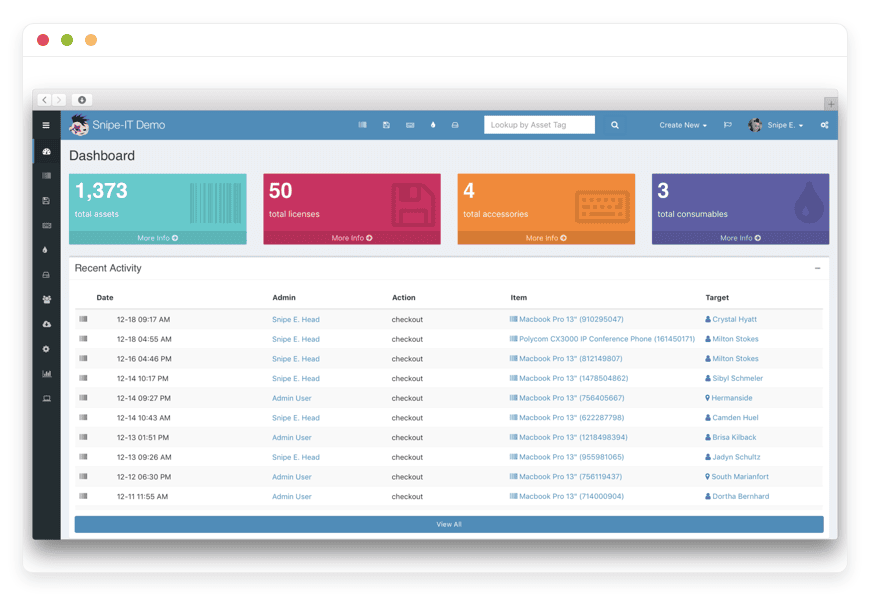
Snipe-IT is an asset-management system for tracking hardware, software licenses, accessories, and consumables. It is built on the Laravel PHP framework by Grokability and released under the AGPL-3.0 license, with no cap on assets or users in the self-hosted version.<sup class="fn">3</sup> For an MSP, it answers the questions a spreadsheet stops answering at the third client: which machines sit where, who has which laptop, and when each client's software licenses renew.
The features that earn their place are check-in and check-out with barcode or QR scanning, license-expiry alerts that fire before a client's renewal lapses, and a full REST API for pushing asset data in from other tools. Every change is timestamped and tied to a user, so you have a clean record of who did what. It signs in against LDAP and SAML.
On DANIAN, each client runs an isolated Snipe-IT for client assets instance, which keeps one client's hardware records away from another's. It replaces spreadsheets and the asset module of platforms like IT Glue, or Snipe-IT's own hosted cloud at $39.99 a month. Switching effort is moderate: Snipe-IT imports assets, users, and licenses from CSV, so the migration is mostly cleanup.
The honest limit: Snipe-IT has no network-discovery agent. It will not crawl a client network and find devices on its own - you feed it by import, API, or scan. If automatic discovery is what you need, pair it with a separate tool.
osTicket - the client helpdesk
osTicket turns client requests from email, a web form, or a phone note into tracked tickets in one shared queue. It is one of the most widely deployed open-source ticketing systems, written in PHP and released under the GPLv2 license.<sup class="fn">4</sup> For a small MSP, it gives every client request a number, an owner, and a status, instead of a founder's inbox doing the job.
The useful parts are email piping - a client emails support, a ticket appears - departments and assignment so requests route to the right tech, canned responses for the questions you answer weekly, and service-level reminders so nothing sits untouched for three days. Custom fields let you attach a client name or contract reference to each ticket.
It replaces a shared inbox, or the helpdesk seat of a bundled PSA suite. Because it is self-hosted, you add as many techs as you like at no extra per-seat cost. Switching effort is low to moderate: point your support email at it, set up departments, and you are taking tickets.
The honest limit: the interface looks its age. osTicket is stable and dependable, but it is not a modern, animated helpdesk, and it has no built-in live chat - it is email-and-ticket-centric. If a slick client-facing chat widget matters to you, osTicket is not it.
BookStack - runbooks and client documentation
BookStack organises knowledge into a simple hierarchy: shelves hold books, books hold chapters, and chapters hold pages. It is built on Laravel and released under the MIT License, created by Dan Brown in 2015, and it is the most widely used wiki written in PHP.<sup class="fn">5</sup> For an MSP, it is where the per-client runbook lives - the "how this client's mail flow works" that currently sits in one tech's head.
It has a WYSIWYG editor and a Markdown editor with live preview, built-in diagrams.net for network diagrams, full-text search across every page, and role-based permissions so a client can see their own space and nothing else. It supports LDAP, SAML, and OpenID for sign-in, and it is light enough to run on modest hardware.
It replaces scattered documents and the documentation core of an IT-documentation suite. On DANIAN, BookStack for runbooks costs the same €9 as the rest of the stack. Switching effort is low for new content and higher if you migrate a large existing knowledge base, since the structure has to be rebuilt by hand.
The honest limit: the shelves-books-chapters structure is rigid. It is clear and tidy for procedural runbooks, but it suits structured documentation better than free-form, heavily cross-linked notes. There is also no real-time co-editing - two people editing the same page at once is not its strength.
Vaultwarden - the credential vault
Vaultwarden is a credential vault: a lightweight server, written in Rust, that is compatible with the official Bitwarden apps and browser extensions. It is released under the AGPL-3.0 license and is one of the most popular self-hosted projects on GitHub.<sup class="fn">6</sup> For an MSP, it holds the thing you least want on a shared SaaS plan - every client's admin passwords, API keys, and recovery codes.
Because it speaks the Bitwarden protocol, your team uses the same Bitwarden clients they may already know; only the server changes. You can organise credentials per client, grant a tech access to one client's collection and not another's, and use Bitwarden Send for one-off secret sharing. Switching effort is low: the Bitwarden export and import format works, so moving an existing vault in is straightforward.
The honest limit: Vaultwarden is an unofficial, community-built server, not the official Bitwarden product. It tracks the Bitwarden feature set closely, but it carries no vendor support contract of its own and omits some of official Bitwarden's enterprise administration extras. For a small MSP that wants the vault run and patched for them, that gap is what a managed host covers; for a shop that specifically needs the vendor's enterprise plan, the official product is the better call.
Apache Guacamole - browser-based remote access
Apache Guacamole is a clientless remote-access gateway. It runs in the browser and speaks the standard remote protocols - RDP for Windows, VNC, and SSH - so a tech reaches a client machine through a web page, with nothing to install on either end. It is released under the Apache 2.0 license and maintained by the Apache Software Foundation.<sup class="fn">7</sup>
For an MSP, it is the controlled front door to client machines: one portal, browser-based, with access you grant and revoke. It authenticates against a database, LDAP, SAML, OpenID, or time-based two-factor, and session recording is built in, so you keep a record of who connected to which machine and when. Guacamole for remote access means a tech does not need a separate remote-access client for every client environment.
It replaces per-technician seats on tools like TeamViewer or AnyDesk and scattered remote-access logins. Switching effort is moderate: you configure a connection per target machine, so there is setup work proportional to how many machines you reach.
The honest limit: Guacamole is an access gateway, not an agent. It does not auto-enrol every endpoint, push patches, or run unattended in the background - you reach machines you have set up connections to. For unattended fleet management you would add a separate tool. It is the access layer, not the management layer.
| App | What it replaces | License | Per app / month |
|---|---|---|---|
| Snipe-IT | Client asset and license tracking (IT Glue asset module; Snipe-IT's own hosted cloud) | AGPL-3.0 | €9 |
| osTicket | A shared support inbox; the helpdesk seat in a bundled suite | GPLv2 | €9 |
| BookStack | The documentation core of an IT-documentation suite | MIT | €9 |
| Vaultwarden | A per-seat password manager | AGPL-3.0 | €9 |
| Apache Guacamole | Per-technician remote-access seats (TeamViewer, AnyDesk) | Apache 2.0 | €9 |
All five run for you, in the region you choose, with unlimited technicians. Total: €45 a month.
See the five apps in the catalog →
How they fit together
The five apps are separate tools, not one suite - and that is the trade-off against an all-in-one platform like IT Glue. What you give up is the tight cross-linking of a single product, where an asset record links straight to its password and its documentation. What you get is five focused tools you own outright, each replaceable on its own terms.
For owning client environments, the core three are Snipe-IT, Vaultwarden, and Guacamole. Snipe-IT records what each client has, Vaultwarden holds the credentials to reach it, and Guacamole is the gateway you actually connect through. Together they answer the question every MSP owner cares about: what does this client run, how do I get in, and is that access under my control.
BookStack and osTicket wrap the client relationship around that core. BookStack holds the runbook for each client's setup; osTicket turns client requests into tracked work. A new tech can read the runbook, pick up a ticket, find the asset in Snipe-IT, pull the password from Vaultwarden, and connect through Guacamole - without a single per-seat license in the chain.
The honest version: these tools integrate loosely. Snipe-IT's API can push asset data elsewhere, and all five share sign-in through LDAP or SAML, but they do not present one unified console. If a single linked pane of glass is non-negotiable, a bundled commercial suite does that better. If owning the pieces matters more than welding them together, the open stack wins.
What a typical setup looks like
Picture a three-person shop with eight clients. In Snipe-IT, each client is a company, and every laptop, server, and license sits under it, so a tech can pull up one client and see what they run. In BookStack, each client gets a book: a chapter for the network, a chapter for mail, a chapter for the recovery steps you only need at 2am. In Vaultwarden, each client is a collection, and a tech sees only the clients they work on.
When a request comes in, it lands in osTicket with the client's name attached, and the tech assigned to that client picks it up. They read the runbook in BookStack, find the affected machine in Snipe-IT, pull the admin password from Vaultwarden, and open a session to the machine through Guacamole - all in the browser, under one set of sign-in rules. Onboarding a ninth client is the same five steps, not a new contract. Nothing in that flow charges by the head, and nothing in it sits on a platform you cannot export from. And because these are the same apps thousands of teams already run, a new hire who has used any of them is productive from day one, with no proprietary console to learn first.
What this stack is not
This is the boundary, stated plainly. The five-app stack covers documentation, assets, tickets, credentials, and remote access. It does not cover two things MSPs often expect from a single platform: remote monitoring and management, and a billing-and-quoting PSA.
There is no endpoint agent here. None of these apps install a background agent on every client device to monitor health, push operating-system patches, or alert on a failing disk. That is RMM, a different category of tool. You can add open-source monitoring - Uptime Kuma watches whether services are up, Beszel watches server metrics - but monitoring is not management. Those tools tell you something is wrong; they do not remediate it across a fleet.
There is also no PSA billing engine. This stack will not generate client invoices, track billable hours against contracts, or produce quotes. It records and operates; it does not bill. If your buying decision hinges on agent-based patching or integrated billing, this is not the stack to replace those, and an honest answer beats a sale that disappoints in month two.
What owning it actually buys you
Owning the apps instead of renting seats changes three things. The bill stops tracking your headcount: add a tech, add a client, and the €45 does not move. The data stops being a hostage: every app exports in a standard format, so you can move it or take it with you. And the location stops being someone else's default - you choose the region each client's apps run in.
None of that means giving up the convenience of a hosted service. DANIAN runs the patching, the backups, and the monitoring, and a human answers on chat. You get the ownership of self-hosting without the part where a midnight patch on a client's vault becomes your problem. For a small MSP, that combination - own the records, rent the operations - is the point. It also means one less vendor relationship to manage, and one less price increase to absorb at renewal time.
The cost: €45 flat vs per-seat
Here is the math the renewal email starts. Per-seat SaaS prices the team; the open stack prices the app. At five apps, the open stack is €45 a month, flat, no matter how many techs you add. The per-seat tools climb with every seat.
| Tool | 3 technicians | 5 technicians | 10 technicians |
|---|---|---|---|
| IT Glue (from $29/seat, 5-seat minimum) | $145 (5-seat floor) | $145 | $290 |
| Hudu ($27/seat, billed annually) | $81 | $135 | $270 |
| Open-source stack (5 apps, run by DANIAN) | €45 flat | €45 flat | €45 flat |
IT Glue and Hudu prices are in USD, taken from their pricing pages noted above. The open-source stack runs €45 a month - five apps at €9 each - with unlimited technicians. The two SaaS tools are single integrated products; the stack is five separate apps that also add ticketing and browser-based remote access.
The €45 covers the hosting, patching, daily off-site backups, and monitoring for all five apps, handled for you, with no server maintenance on your side. And the billing stays predictable: we will not raise your resources or your bill without asking first. If a card fails, we wait - we do not delete your data.
How to start
Do not migrate five tools at once. Pick the one that hurts most - usually the credential vault or the asset register - deploy it, move one client in, and run it for two weeks before you touch the next.
Start with the vault or the asset register, because those carry the records you most want off a per-seat plan. Move a single client's data in first, not the whole book. Use the app for real for two weeks: log a ticket, write a runbook, connect to a machine, reconcile a license. If it holds up, bring the next client and the next app. A 7-day free trial lets you stand the apps up before you commit, with no card needed.
In those two weeks, check the things that matter for client work: import one client's assets and confirm the license-expiry alerts fire, write one real runbook, share a credential with a second tech through a collection, and connect to a client machine through the browser. If those four feel right, the rest of the migration is repetition. Most teams settle on two or three apps first and add the others over a few weeks.
Frequently asked questions
Cost and seats
How much does the five-app stack cost per month?
The five apps cost €45 monthly - five apps at €9 each, billed flat. That price does not change with the number of technicians, because it is charged per app, not per seat. Hosting, patching, backups, and monitoring for all five are included in the €9.
Is the open stack really cheaper than IT Glue or Hudu?
Yes, at almost any team size. IT Glue starts at $145 a month - five seats at $29, its minimum - and Hudu lists at $27 to $30 per seat. The open stack is €45 a month flat. The per-seat tools climb with headcount; the flat stack does not.
Does the price rise as I add technicians?
No. The stack is priced per app, not per technician, so €45 a month covers the five apps no matter how many techs use them. Self-hosted open-source apps do not charge per seat, which is the main reason the cost stays flat as the team grows.
Are there setup or onboarding fees?
No setup or onboarding fee. You pay €9 per app per month and nothing up front. A 7-day free trial lets you stand the apps up and move a client in before any charge, and no card is needed to start the trial.
What does the €9 per app include?
The €9 covers hosting, security patching, off-site backups taken daily, monitoring, and chat support with a human. You run the app and own its data; the running and patching of the underlying server is the part DANIAN covers, so no one on your team maintains a server.
Owning your data
Do I own the client records?
Yes. The records live in apps you control, and the data is yours to export at any time. Nothing is locked behind a vendor plan tier. When a client asks where their information sits and who can reach it, you have a direct answer rather than a referral to a SaaS provider.
Where is the client data hosted?
In the region you choose, ideally the one closest to your clients. DANIAN runs across many datacenter locations, so you pick where each client's apps live rather than accepting a single default. The data sits on infrastructure run for you, in a location you select.
Can I export or move my data if I leave?
Yes. Each app uses standard export formats - Snipe-IT and most of the stack export to CSV, and Vaultwarden uses the Bitwarden import and export format. You can take your data with you or move it elsewhere; the open-source apps are built to avoid lock-in.
Are clients isolated from one another?
Yes. Each app runs in its own isolated, hardened container, so one client's asset register or vault is separated from another's. You can also run a separate instance of an app per client when you want each client's records kept fully apart.
What it does and what it does not
Is this stack a remote monitoring and management tool?
No. There is no endpoint agent, no remote patching, and no fleet health monitoring built in - that is RMM, a different category of tool. This stack covers documentation, assets, tickets, credentials, and remote access. If agent-based patching is the job, keep your RMM alongside it.
Does it replace my PSA billing system?
No. The stack does not generate invoices, track billable hours against contracts, or build quotes. It records and operates; it does not bill. If integrated billing and quoting is what you need, this stack is not a substitute for a PSA, and an honest answer beats a sale that disappoints later.
Can it monitor my clients' endpoints?
Not the way an RMM would. You can add open-source monitoring - Uptime Kuma watches whether services are up, Beszel watches server metrics - but those tools report problems rather than fix them across a fleet. Monitoring tells you something is wrong; it does not manage the endpoint.
Does Snipe-IT discover devices on a client network automatically?
No. Snipe-IT has no network-discovery agent, so it will not crawl a client network and find machines on its own. You feed it by CSV import, by its REST API, or by barcode and QR scanning. If automatic discovery matters, pair it with a separate tool that does that.
Is Vaultwarden the same thing as Bitwarden?
Not exactly. Vaultwarden is an unofficial, community-built server that speaks the Bitwarden protocol, so it works with the official Bitwarden apps and extensions. It tracks Bitwarden's features closely but is not the vendor's own product and carries no vendor support contract of its own.
Will my technicians have to learn new apps?
Less than you might expect. Vaultwarden uses the same Bitwarden clients your team may already know, Guacamole runs in the browser with nothing to install, and Snipe-IT, BookStack, and osTicket are plain web apps. The learning curve is mostly in setup, not in daily use.
Running and switching
Who runs and patches the apps?
DANIAN does. The hosting, security patching, backups, and monitoring for each app are handled for you; you log in and use the app. The €9 per app per month covers that operational work, so no one on your team has to maintain or update a server.
How hard is it to migrate from IT Glue or Hudu?
The transfer itself is usually straightforward - Snipe-IT imports assets and licenses from CSV, and Vaultwarden imports a Bitwarden-format export. The harder part is your own data quality, not the import button. Plan for some cleanup, and move one client at a time rather than everything at once.
Can I start with just one app?
Yes, and that is the recommended way. Pick the one tool whose per-seat cost or renewal annoys you most, deploy it, move a single client in, and run it for two weeks. Add the next app once the first is part of the daily routine. There is no need to switch everything at once.
How many technicians can use each app?
As many as you like. Self-hosted open-source apps do not meter users, so you add technicians to Snipe-IT, BookStack, osTicket, Vaultwarden, and Guacamole at no extra per-seat cost. This is the core difference from per-seat SaaS, where every new technician adds to the bill.
What happens if something breaks?
You reach a human on chat, and DANIAN monitors the apps and aims to fix problems quickly. The €9 per app includes that support. You are not handed a server to debug at midnight; the operational side is covered, so you can stay focused on your clients.
Is there a free trial?
Yes - a 7-day free trial, with no card needed to start. You can stand up the apps, move one client's data in, and use them for real before committing. Most teams begin with two or three apps and add the rest once those are part of the workflow.
What about GLPI as one app for everything?
GLPI is the credible all-in-one path: inventory, a CMDB, and ITIL ticketing with SLAs in a single GPL-v3 application with two decades of history, led today by the French company Teclib'. This stack deliberately splits those jobs across Snipe-IT and osTicket because each is simpler to run and exports cleanly. If one app beats five for you, GLPI is the alternative to pick, and GLPI runs managed at DANIAN at the same €9 a month.
The bottom line
A small MSP runs on records and access. The choice is whether you rent them by the seat or own them at a flat price. The five-app open-source stack - Snipe-IT, osTicket, BookStack, Vaultwarden, Guacamole - covers the core of the work for €45 a month, run for you, with the client data living where you choose.
It will not patch endpoints or bill clients; if those are the job, keep your RMM and PSA. But for owning the assets, the documentation, the credentials, and the access at the centre of an MSP, this stack does the work without a per-seat tax. This week, pick the one tool whose renewal annoys you most, start a free trial, and move a single client in.
Open a 7-day free trial - no card →
Sources
- IT Glue pricing - Basic plan from $29 per user per month, five-user minimum (one-time onboarding fee applies). itglue.com/pricing
- Hudu pricing - $30 per user per month billed monthly, $27 per user per month billed annually, no user minimum, no setup fee. hudu.com/pricing
- Snipe-IT - free and open source under the AGPL-3.0 license; optional hosted cloud from $39.99 per month. snipeitapp.com
- osTicket - free and open source under the GPLv2 license. osticket.com
- BookStack - free and open source under the MIT License. bookstackapp.com
- Vaultwarden - free and open source under the AGPL-3.0 license; an unofficial Bitwarden-compatible server written in Rust. github.com/dani-garcia/vaultwarden
- Apache Guacamole - free and open source under the Apache License 2.0, maintained by the Apache Software Foundation. guacamole.apache.org