Open-source CI/CD stack for dev teams in 2026

Six open-source tools for a self-hosted dev platform — git, CI pipelines, private registry, dashboards, secrets and SSO you own. Managed at €9/app.

The small dev team's open-source CI/CD stack in 2026 — git, pipelines, registry and secrets you own

A small engineering team can run its whole development toolchain on six open-source tools: git, pipelines, a private registry, dashboards, secrets, and single sign-on. You give up GitHub's ecosystem; you keep ownership of your code, your build data, and a cost that does not move when your team grows.

  • The stack: Gitea for git, Woodpecker CI for pipelines, Verdaccio for a private npm registry, Grafana for dashboards, Vault for secrets, and Keycloak for single sign-on.

  • Run all six managed by us and the math is flat: 6 × €9 = €54/month, in the region you choose, across 21 datacenter regions on six continents.

  • The equivalent SaaS toolchain — GitHub seats, CI minutes, a private registry, Datadog, a hosted secrets manager, and Okta — runs from roughly $195 to $510 or more per month at five developers, and climbs with every seat, host, and secret.

  • The honest trade: GitHub's Actions marketplace and integrations are unmatched. Self-hosting swaps that breadth for cost you can predict and data you control.

  • Start with two tools, not six. Put git on Gitea, wire one pipeline in Woodpecker, and evaluate for 14 days.

Who this stack is for (and who should stay on GitHub)

This list is for a small engineering team — say two to ten developers — that already pays for several developer tools separately and wants fewer invoices and more control. It is not for teams that lean on the GitHub Actions marketplace or want everything inside one vendor's bundle. For those teams, GitHub is the better choice.

GitHub's ecosystem is the reason most teams never leave. The Actions marketplace has thousands of prebuilt steps. Copilot sits in the editor. The integrations are everywhere, and most of the world's developers already have an account. Self-hosting trades that gravity for three things: a cost that does not scale with seats, source and build artifacts that stay on infrastructure you control, and no per-tool price creep.

If the marketplace breadth is load-bearing for your workflow, stay where you are. If predictable cost and data control matter more, the six tools below cover the whole loop.

The six tools, and what each one replaces

Each tool below does one job and replaces one paid SaaS slice. We host every one at €9 per app, per month, patched and backed up daily off-site, in the region you pick. The capsules name the license, the GitHub stars, what the tool replaces, and the one thing it does not do well.


Gitea — your git hosting

Gitea is a self-hosted git forge: repositories, pull requests, code review, issues, a kanban board, and a built-in package registry. It is written in Go, licensed MIT, and carries about 55,700 GitHub stars. It runs on a small server and starts in seconds. For most teams it covers what GitHub's core does: hosting code, reviewing pull requests, tracking issues, and tagging releases. Gitea also ships Gitea Actions, a built-in CI system whose syntax mirrors GitHub Actions, so existing workflow files mostly carry over.

The honest limit is community size. GitHub has the world's developers and an integration for nearly everything. Gitea's third-party surface is smaller. The community split in late 2022 when the Forgejo fork launched over governance concerns, and Forgejo became a fully independent project in early 2024. Both projects are healthy, but neither has GitHub's gravity. If your work depends on a long list of GitHub-only integrations, that gap is real.

We run managed Gitea for git hosting at €9/month. We patch it, back it up daily off-site, and keep it monitored. You push code; you do not run the server.


Woodpecker CI — your pipelines

Woodpecker CI runs your build and deploy pipelines. It is a community fork of Drone, licensed Apache 2.0, with about 6,400 GitHub stars. Every pipeline step runs in its own Docker container, and the server idles at roughly 100 MB of RAM. Pipelines are defined in a plain .woodpecker.yml file, and Woodpecker has first-class support for Gitea, so the git host and the CI engine fit together without glue code. A push to Gitea triggers a run; the run builds, tests, and deploys.

The honest limit is the plugin ecosystem. GitHub Actions has a marketplace with thousands of prebuilt actions, and that breadth is hard to match. Woodpecker's plugin catalog is far smaller, though Drone plugins are compatible and most build steps are a few shell commands anyway. Setup also asks more of you than a hosted runner: TLS, OAuth, and a reverse proxy. Self-hosted CI means someone owns the uptime.

That someone is us. We run Woodpecker CI for pipelines at €9/month, wired to your Gitea instance, patched and monitored. When a runner needs attention, a human engineer handles it.


Verdaccio — your private npm registry

Verdaccio is a private npm registry. It stores your internal packages and proxies the public npm registry, caching what your builds download. It is licensed MIT, carries about 17,700 GitHub stars, boots in seconds, and is fast enough to sit inside CI — many open-source projects use it for end-to-end tests. Point a project's .npmrc at Verdaccio and your private packages install exactly like public ones, without publishing your code to the public registry.

The honest limit is scope and staffing. Verdaccio is built for npm; it is not a multi-format artifact platform, so a team needing Maven, PyPI, and Docker in one place will outgrow it. It is also volunteer-maintained, with no full-time team and, by the maintainers' own note, no current funding for security research. The project is active and widely used, but it is community software, not a vendor product.

We run managed Verdaccio at €9/month, patched and backed up. Your private packages and your cache live on infrastructure you control, not inside a registry seat plan that bills per developer.


Grafana — your dashboards

Grafana turns metrics, logs, and traces into dashboards and alerts. It connects to more than 150 data sources, including Prometheus, Loki, and Postgres, and it is the most widely used open-source tool for the job. Grafana is licensed AGPLv3 — it moved from Apache 2.0 in 2021 — and carries more than 60,000 GitHub stars. You watch your deploys, your error rates, and your build health on one screen, and you set alerts when something crosses a line.

The honest limit is that Grafana is the visualization layer, not the whole observability stack. It needs a data source behind it — usually Prometheus for metrics — and that is a separate thing to run. Datadog bundles collection, dashboards, APM, and alerting into one product that works out of the box; Grafana asks you to assemble more pieces, and its query languages take time to learn. The trade is cost and control: Grafana plus Prometheus runs for a fraction of Datadog's per-host bill.

We run Grafana for dashboards at €9/month, patched and monitored, in the region you choose. The data stays yours.


Vault — your secrets

Vault stores and manages secrets: API keys, database passwords, certificates, and encryption keys. It hands secrets to your pipelines and apps at runtime, so credentials never sit in plain text in a repo or a CI variable. It records which client read which secret and when. Vault carries about 35,700 GitHub stars and is the most established tool in its category.

One honest point matters here. Vault is no longer open source in the strict sense. In 2023 its maker moved it to the Business Source License, which is source-available rather than OSI-approved; HashiCorp is now owned by IBM. The community responded with OpenBao, a fork under the Linux Foundation that keeps the MPL 2.0 open-source license and stays API-compatible. If a strictly open-source license is a hard requirement, OpenBao is the path; if you want the established tool, Vault is it. The other honest limit is operational weight: initialization, unsealing, and high availability are not trivial, and Vault ships security fixes almost monthly.

We run managed Vault at €9/month and carry that operational weight — the unseal flow, the patching, the backups — so your team does not.


Keycloak — one login across the toolchain

Keycloak is identity and single sign-on. It speaks OpenID Connect, OAuth 2.0, and SAML, connects to LDAP and Active Directory, and supports multi-factor login. Wire it in front of the other five tools and your team signs in once to reach Gitea, Woodpecker, Verdaccio, Grafana, and Vault. Keycloak began at Red Hat, is a CNCF project, is licensed Apache 2.0, and carries about 34,700 GitHub stars.

The honest limit is weight and complexity. Keycloak is full identity-and-access management, and it shows: the base configuration wants around 1.25 GB of RAM, and production deployments typically run 2 to 4 GB. Lighter single-sign-on tools exist if all you need is a login gate. Keycloak also ships frequent security patches that have to be applied promptly. Okta and Auth0 hide all of this behind a hosted console — that polish is what their per-user price buys.

We run managed Keycloak at €9/month and keep it patched. Your team gets one login across the stack; you do not run the identity server or chase its security releases.

How the six fit together

The six tools form one loop. A developer pushes code to Gitea. The push triggers a Woodpecker pipeline. The pipeline pulls dependencies from Verdaccio, builds, and deploys. You watch the result in Grafana. Vault hands each step the secrets it needs, and Keycloak gives the whole team one login across all six.

In practice it reads like this. A developer opens a pull request in Gitea and a teammate reviews it. On merge, Woodpecker starts a run defined in .woodpecker.yml. The run installs packages from Verdaccio — private ones you published, public ones it cached — then runs tests and ships the build. Throughout, the pipeline asks Vault for the database password and the deploy key rather than reading them from a file. After deploy, a Grafana dashboard shows error rates and response times, with an alert set for regressions. Everyone reached every tool through a single Keycloak login. No part of that loop sent your source, your packages, or your build logs to a vendor you do not control.

What the stack costs

Run all six with us and the math is simple: six apps at €9 each is €54 per month, flat, no matter how many developers, hosts, secrets, or build minutes you use. The equivalent SaaS toolchain at five developers runs from roughly $195 to $510 or more per month — and the number rises as you grow.

 The job Typical SaaS, list price at about 5 developers Self-hosted, run by DANIAN
 Git hosting GitHub Team, 5 × $4 = $20/mo Gitea — €9/mo
 CI/CD pipelines GitHub Actions or CircleCI minutes — about $15–50/mo in overage (Linux $0.006/min) Woodpecker CI — €9/mo
 Private npm registry npm Teams, 5 × $7 = $35/mo (a dedicated artifact platform starts near $150/mo) Verdaccio — €9/mo
 Dashboards and monitoring Datadog, about $15/host/mo plus APM and logs — roughly $45–150/mo Grafana — €9/mo
 Secrets management A hosted secrets manager — a few dollars on per-secret pricing up to about $90/mo on a per-seat plan Vault — €9/mo
 Single sign-onOkta, $6/user/mo with a $1,500/year contract minimum (about a $125/mo floor)  Keycloak — €9/mo
 Total About $195–$510+ per month, rising with use €54 per month, flat

A few honest caveats sit behind that table. GitHub bundles some of these jobs — Actions for CI, Packages for a registry — so a GitHub-centric team may not buy every line separately. The SaaS figures are list prices in US dollars; real bills vary with usage and negotiated discounts. Datadog and the secrets managers are usage-priced, so their cost climbs with hosts and secret counts rather than seats. Okta's $1,500 annual minimum means even a three-person team pays a four-figure floor.

The pattern holds at any reasonable exchange rate: a flat €54 beats a usage-metered toolchain that starts near $200 and only grows. We do not bill per developer, and we will not raise your price because your team grew.

Start a 7-day free trial — no card needed.

How to start

Do not stand up six services at once. Start with two. Put your git on Gitea and wire one pipeline in Woodpecker, then run that pair for 14 days against real work. If it holds, add the registry, dashboards, secrets, and single sign-on one at a time.

A sensible order is git first, then CI, then the rest as you feel the need. Move one repository to Gitea and review a few pull requests there. Add a .woodpecker.yml to that repo and let one pipeline build and deploy. Once that loop is steady, point your .npmrc at Verdaccio, then add a Grafana dashboard for the service you just shipped. Bring in Vault when you want secrets out of CI variables, and Keycloak when one login across the tools starts to matter. Each tool is €9/month on its own, so you grow the stack at your own pace.

See how managed Gitea works.

Frequently asked questions


What is a self-hosted CI/CD stack?

It is the set of tools a team runs on its own infrastructure to write, build, and ship software: git hosting, a pipeline engine, a package registry, monitoring, secrets, and single sign-on. You own the data and the uptime instead of renting each piece from a SaaS vendor.

Which open-source tools make up a self-hosted developer platform in 2026?

A common set is Gitea for git, Woodpecker CI for pipelines, Verdaccio for a private npm registry, Grafana for dashboards, Vault for secrets, and Keycloak for single sign-on. The six cover the whole loop from code commit to running service, and each replaces one paid SaaS slice.

What does each tool in the stack replace?

Gitea replaces the GitHub or GitLab git layer. Woodpecker replaces GitHub Actions or CircleCI minutes. Verdaccio replaces npm's private packages or a hosted artifact registry. Grafana replaces Datadog's dashboards. Vault replaces a hosted secrets manager. Keycloak replaces Okta or Auth0.

What is the best self-hosted GitHub alternative in 2026?

For git hosting, Gitea is the leading self-hosted GitHub alternativeyFd7KDA"] .zpicon-common svg{ fill:#0F4C5C !important }

Custom Domains

Terminal Access

File Manager Access

Deploy in your region — 21 locations worldwide
GermanyFinlandNetherlandsUKSwedenUnited StatesCanadaSingaporeJapanAustraliaBrazilSouth Africa+9 more →
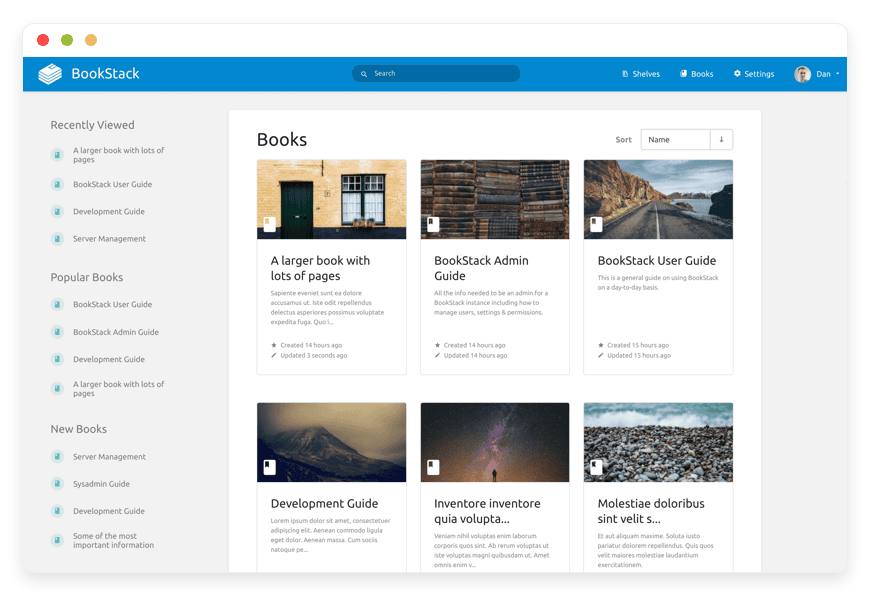
BookStack Preview Image

ABOUT THE SOFTWARE

What is BookStack

BookStack is an open-source knowledge base built around a four-level hierarchy: shelves group books, books group chapters, chapters group pages. Each page can be edited in WYSIWYG or Markdown. The software is MIT-licensed and runs on PHP with MySQL or MariaDB.

BookStack is MIT-licensed and maintained by Dan Brown, a UK-based developer who started the project as Oxbow in July 2015. The codebase is Laravel-based PHP. The minimum runtime is PHP 8.2 and MySQL 8.0 or MariaDB 10.6 as of the v25.12 release. The project moved its primary repository from GitHub to Codeberg on 28 April 2026; the GitHub repository now mirrors and points at Codeberg as the source of truth.

Every page can be edited in WYSIWYG — a TinyMCE-derived editor — or Markdown with live preview, and the choice can be flipped on any page. The diagrams.net editor is embedded directly in both. A REST API covers shelves, books, chapters, pages, attachments, users, and roles. Webhooks fire on configurable events. Search is a built-in index covering titles, body, and tags; reindex runs through php artisan bookstack:regenerate-search. The UI is translated through Crowdin into more than thirty languages.


FEATURES

What BookStack does

BookStack covers the documentation surface a small or mid-sized team needs without a paid Marketplace: hierarchy, permissions, audit log, multi-format export, two editors, embedded diagrams, search, and an API. Capabilities below are BookStack's own, not platform extras layered on top.

Shelves, books, chapters, pages

The four-level hierarchy lets a team organise by department, product line, or audience. A book can sit on multiple shelves; chapters are optional groupings within a book.

Role-based permissions with overrides

Roles define system capabilities. Permissions can override roles on any shelf, book, chapter, or page. Useful for separating editor, approver, and reader access cleanly.

Embedded diagrams.net editor

Every page editor launches diagrams.net (formerly draw.io) in-browser and saves the diagram directly back to the page. No paid Marketplace add-on or separate tool needed.

OIDC, SAML, LDAP, plus password

First-class OIDC with auto-discovery, RS256 signing, PKCE, and group-claim sync. SAML2 and LDAP supported separately. Local password remains the fallback for break-glass admin accounts.

WYSIWYG and Markdown per page

Each page picks its editor. WYSIWYG is TinyMCE-derived; Markdown ships with live preview. A new WYSIWYG editor with a developer JavaScript API arrived in v25.12.

Audit log, revisions, draft auto-save

Every save creates a revision; diffs and rollback are built in. The audit log records who did what. Drafts auto-save per user per page so a tab close does not lose work.

Multi-format export at every level

HTML, PDF, plain text, and Markdown export at page, chapter, and book level. Bulk export at the book level. Useful for accreditation evidence and ISO 9001 controlled-document records.

REST API, webhooks, theme modules

The REST API covers core entities. Webhooks fire on configurable events with URL allow-listing. The v26.03 theme module system installs plugin-like extensions with one CLI command.

WHAT'S ALWAYS INCLUDED

Every app. Fully managed.
Nothing extra to pay for.

Every app you deploy includes the full managed service — security, backups, updates, and support from day one.

Automatic updates and patches

Apps run the latest stable version. Security patches applied silently, with rollback if needed.

Daily off-site backups

Multiple daily backups in redundant off-site locations. One-click restore if anything goes wrong.

24/7 uptime monitoring

Continuous monitoring with instant alerting. We respond before you notice.

SSL, firewall, DDoS protection

Auto-renewing SSL, hardened firewall rules, DDoS mitigation on every deployment.

Performance and scaling

We monitor resource usage continuously. When your app needs more headroom, we flag it and upgrade with your explicit approval.

Dedicated engineering support

Real engineers by email and ticket. DNS, SMTP & migration help. All included in €9.

WHY MANAGED

Why teams pick managed BookStack

Atlassian set the new-sale cutoff for Confluence Data Center at 30 March 2026, the expansion cutoff at 30 March 2028, and full read-only mode at 28 March 2029. Cloud list prices rose 5 to 10 percent in October 2025. BookStack is what people pick when they want to keep self-hosting without keeping the operations.

Running BookStack yourself is not the same as installing it. The install script is straightforward — about twenty minutes on a fresh Ubuntu host. The work that follows is what takes the time. PHP minimums shift between releases — 8.2 from v25.02, with the official Ubuntu 26.04 script now on 8.5. Database minimums shifted with v25.12 to MySQL 8.0 or MariaDB 10.6, up from 5.7 and 10.2. The HTML content filter tightened in v25.12.4 and broke link target attributes, comment user references, and diagrams.net attachments — fixed across v25.12.5 through .8.

The most asked operational question on the BookStack forum is what happens when an admin switches AUTH_METHOD from standard to oidc on an existing instance. BookStack matches OIDC accounts to existing users via the sub claim stored in the user's external_auth_id field, not by email. Existing users cannot log in until that column is populated. The official fix is to switch back to standard, log in as admin, toggle to oidc to expose the External Authentication ID form field on each user, and then either populate per-user or run an UPDATE against the database directly.

We run a tuned default. Redis is wired in for sessions and cache, and the queue worker handles asynchronous email and webhook delivery. MySQL's innodb_buffer_pool_size is sized to the host, not left at the 128 MB default. APP_CONTENT_FILTERING is set to the documented allow-list profile so the v25.12.4 trap is closed. The SMTP HELO domain matches APP_URL so verification mail and the v25.12 @user mention notifications actually deliver. Off-site daily backups run on 7 days retention.

REVIEWS

Hear from customers ​like you​​​​​​​

Successful businesses and professionals around the world rely on DANIAN every day

USE CASES

Three teams who run BookStack on DANIAN

BookStack on DANIAN tends to land with teams that have outgrown a per-seat wiki or want to keep their documentation on infrastructure they can point at. Three patterns we see, each with the configuration choices that matter for that pattern.

14-PERSON DEVOPS TEAM

Replacing Confluence Cloud after the per-seat bill crossed $750 a year

Germany region. Microsoft Entra ID OIDC with group-claim sync to roles engineer, sre, and pm. Thirty-plus books across shelves for Runbooks, On-Call Playbooks, Post-Mortems Q1–Q4, Architecture Decision Records, and Compliance Evidence. Slack webhook on page.update for the On-Call Playbooks shelf. Daily backups, 7 days retention.

12-SEAT LAW FIRM

Migrating internal procedures off Notion for matter-data control

UK region. Google Workspace OIDC, MFA enforced per role via TOTP. Three shelves — Internal Procedures, Conflict-Check Workflow, Practice-Area Knowledge — with granular per-shelf permissions so the conflict-check shelf stays editor-only to compliance. Audit log retained seven years. Weekly PDF export of Internal Procedures pinned to S3 with object lock.

UNIVERSITY RESEARCH DEPARTMENT

Documenting lab protocols, equipment SOPs, and module materials for 145 staff and students

Regional datacenter bound to the campus directory. LDAP with LDAP_START_TLS="true" and group sync to roles faculty, postgrad, and undergrad. Multi-language UI per user. Bulk PDF export of course books at semester-end for accreditation. The v25.12 slug-history system preserves citations after page renames.

COMPARISON

Four ways to run BookStack

Compare the cost and the ongoing work, not just the price. A proprietary wiki replaces BookStack with a recurring per-seat bill. A VPS replaces the bill with operations. A home server replaces both with hardware that is yours to keep alive. DANIAN covers the work for €9 a month.

 PATH1 SEAT5 SEATS 10 SEATSONGOING WORK
Proprietary SaaS
Confluence Cloud Standard
$6.40/mo$32/mo$64/moVendor handles ops; per-seat bill scales linearly; admin still maintains spaces, permissions, and Marketplace add-ons.
Self-host on a VPS
$24/mo production-class VPS
~$44/mo infra~$44/mo infra~$44/mo infraPlus €60–240/mo in your team's time for patching, backups, SSL, on-call. DB tuning kicks in past 25 users.
Home server
HP ProLiant ML30 Gen10
€210–667/mo*€210–667/mo*€210–667/mo*Hardware lives or dies on your hands; business internet plus static IP required; replacing the unit is its own project.
DANIAN Managed BookStack€9/mo€9/mo€9/moZero hours per month on your side. We patch, monitor, back up, restore. SSO, SMTP, DNS, custom domain configuration included.

* Home server total includes hardware amortised over 36 months (€18–55), electricity at €0.30/kWh (€17–32), business internet with static IP (€40–80), off-site backup target (€10–20), and operator time at €60–120/hour (€120–480). DANIAN's price stays flat across seat counts because BookStack pricing is per app, not per user.

BY INDUSTRY

BookStack for specific industries

BookStack's combination of hierarchical pages, per-item permissions, in-browser diagrams, multi-format export, and a real audit log fits some industries more closely than others. Four where we configure the same set of knobs most often, each with the operational anchor that matters for that work.

Most teams writing post-mortems are doing it to evidence ITIL incident-management practice or to build a runbook library for on-call rotations that does not live in a stranger's SaaS.

Daily database backups run on 7 days retention. Audit log is retained twelve months. A Slack webhook fires on page.update for the on-call shelf.

Post-mortems live under a chapter per quarter with a standard incident-summary template. Architecture Decision Records sit in a separate book referenced from each post-mortem. On-call playbooks fire a Slack notification when edited so the rotation sees changes within minutes.

PDF export of every quarter's post-mortems pinned at quarter-end.
Law firms run under ABA Model Rules of Professional Conduct — Rules 1.1, 1.6, and 1.15 on competence, confidentiality, and safekeeping of client property.

We select the region to match the firm's jurisdiction. Public view disabled (APP_PUBLIC=false), registration disabled.

Conflict-check questionnaire stored as a chapter template. Matter procedures pinned as books per practice area. Pages versioned for every edit, with the revision diff readable. Per-shelf permissions keep conflict-check content editor-only to the compliance role.

Audit log retained seven years; weekly PDF export of internal procedures written-once to storage.
Education and research operate under Good Laboratory Practice for biological and chemical work, plus accreditation bodies — ABET, AACSB, and equivalents — that require versioned protocol and curriculum records.

Multi-language UI per user.

Lab protocols organised as a book per technique with a chapter per revision. Course materials kept as a book per module, with per-page permissions on unreleased assessment content. End-of-semester bulk PDF export at the book level produces accreditation evidence in one operation.

The v25.12 slug-history system keeps old citation URLs working after pages are renamed.
Manufacturers and medical-device makers run under ISO 9001 or ISO 13485 controlled-document requirements. Both require versioned, approved, and retained procedural records.

We configure roles author, approver, and reader with per-book permissions that lock down editing on approved content. Daily database and filesystem backups run with ten-year retention on the off-site copy (Note: the default is 7 days).

Each work instruction lives as a single page. Approval is recorded by the approver role updating a status tag, then exporting the page as a PDF pinned at the approval date — that PDF becomes the controlled-document of record. Line layouts and process flows stay live in the embedded diagrams.net editor.

Every page version PDF-exported and stored ten years per typical ISO 9001 retention.

FAQ

Frequently asked questions

Everything teams ask before signing up — answered straight, without sales speak.

Three groups: technical setup, migration, and how DANIAN works as a service.

01

Technical and configuration

BookStack ships no one-click importer; the project FAQ states that directly. The community has built tools for Confluence — gloverab/confluence-server-to-bookstack-importer, oddineers-public/bookstack-html-importer, and transcriptionstream/confluence-to-bookstack-wizard — each reads Confluence's HTML export and posts to the BookStack REST API.
Each page picks one editor and the choice can be changed. WYSIWYG is the TinyMCE-derived editor; Markdown ships with live preview. A new WYSIWYG editor has been in alpha since v24.10. The v25.12 release added a developer JavaScript API for it; the project plans to make it the default during 2026.
BookStack defaults to local-disk storage at /config inside the container. Disk usage stays in our monitoring; we raise capacity before page-load latency does.
Roles define system-level capability. Item-level permissions override roles on any shelf, book, chapter, or page. You set the shelf to view: all roles, edit: compliance and the override carries down. The v23.01 release changed permission handling significantly; a regeneration runs on upgrade so existing instances stay consistent.
The built-in index covers page titles, body, tags, and chapter/book/shelf names. It does not index attachment contents — search inside a PDF or DOCX attachment does not work. Reindex is php artisan bookstack:regenerate-search; we run it on a cron. The v25.12 release added a view-table index for query efficiency.
Built-in notifications are email-only: new comment, @user mention from v25.12, and page-watch updates. Slack and Teams come in through the webhook subsystem — you register the incoming-webhook URL and BookStack POSTs configurable events. We help wire it up during onboarding.
The HTML Purifier allow-list introduced in v25.12.4 stripped legitimate content — link target attributes, user references in comments, diagrams.net attributes. We run the patched v26.03.4 with APP_CONTENT_FILTERING set to the documented standard profile and the deprecated ALLOW_CONTENT_SCRIPTS left unset. New instances inherit the same defaults.

02

Migration and onboarding

We can activate your app on your own custom domain/subdomain. Examples: mydomain.com, anyword.mydomain.com.
Or, on our randomized free subdomain. Example: 963.apps.danian.cloud
If you wish to use a custom domain/subdomain, select that option when ordering your app (or notify us later). We will send you the required DNS records and if needed, our tech team will modify them for you.
21 datacenter locations across six continents. You choose the region at provisioning. Application data sits in the region you choose; pick whichever is closest to your users or matches your data-residency preference.
Yes. Request a region migration from the dashboard and we run the move in the background. The system emails you when the migration completes; total transfer time depends on data volume but typical instances finish in a few hours. There is no extra charge for a region change.
Yes. Full data export is available at any time, in a portable format you can bring to any infrastructure.
It depends on the source size and shape. A Confluence Cloud space with a few hundred pages and clean attachments usually fits a single working day for the data move plus a second day for permission mapping and link rewriting. Wikis with deep macro usage take longer because macros do not translate.

03

Billing, support, and platform

€9 covers everything we do for that app: hardware in the region you choose, daily off-site backups with one-click restore, automatic security patches and version upgrades, 24/7 monitoring, SSL and firewall, and engineering support on email and the ticket section in the client portal. There are no setup fees or hidden line items. For more info see our Pricing page.
If you decide to continue, we charge €9/app/month from day 8. If you don't, the trial ends and you can export your data. No card is required for the trial, and we never auto-charge you without explicit consent.
No. The €9/month is flat regardless of how many users log into your app. Add 5 users or 50; the price doesn't change.
24/7 email and ticket support, both staffed by engineers who run the systems. We handle DNS configuration, SMTP setup, app integrations, performance tuning, troubleshooting, and migration help. Response time is typically under an hour. There is no tier system — every customer gets the same support.
Yes. Cancel from the dashboard. We don't charge a cancellation fee, we don't lock data, and we will export your data to you on request before deletion. data to you on request before deletion.
Every customer instance is backed up daily to a separate region from the primary. We test restores. You can request a restore at any backup point within the retention window — usually 7 days for daily backups.
Your application data sits in the region you choose at provisioning — 21 datacenter locations across six continents. Account-level data (billing, account email, support ticket history) is processed centrally. Application data region is picked by you, per app.
99.9% uptime SLA on every app, every tenant. Service credits are documented at danian.co/service-level-agreement. The status page is located at status.danian.co.
When your tenant approaches the resource ceiling — the base tier holds 1 vCPU/RAM, 30 GB storage — we notify you. Resource upgrades happen with your explicit consent; we will not upgrade your tenant or charge you without it.
We wait. We don't suspend the app or delete your data on the first failed charge. We email you, you fix the card on file, and we continue.
Invoices can be downloaded from the billing dashboard in PDF the day each charge succeeds. EU VAT is added where applicable and the VAT-reverse-charge regime applies for VAT-registered businesses with a valid number.
150+ open-source apps across automation, team chat, file sync, analytics, AI, password management, email marketing, dev tools, project management, smart home, CMS, and federated social. See the full catalog →
Yes. Every instance comes with a web-based terminal and a file manager in your DANIAN management dashboard. Useful for managing your data and customizations.
Resources scale with your usage. If your app needs more vCPU, RAM, or storage, we add it — and we ask first before any change to your plan. €9 is the floor; resource-heavy workloads may price higher, but you'll always know in advance.
Yes. We have both a Partner program and an Affiliate program available. Anybody can sign up.
No contract. No minimum commitment. Cancel anytime from the dashboard with one click. The 7-day free trial requires no credit card. After the trial converts to paid, you can still cancel at any month without notice or penalty.

DEPLOY IN YOUR REGION

21 datacenter locations on six continents

Pick the region closest to your users.

United States, Germany, Finland, Singapore, Australia, Brazil, Canada, Netherlands, UK, Spain, Italy, France, Sweden, Malaysia, India, Japan, Mexico, Poland, South Korea, Chile, South Africa and more coming soon
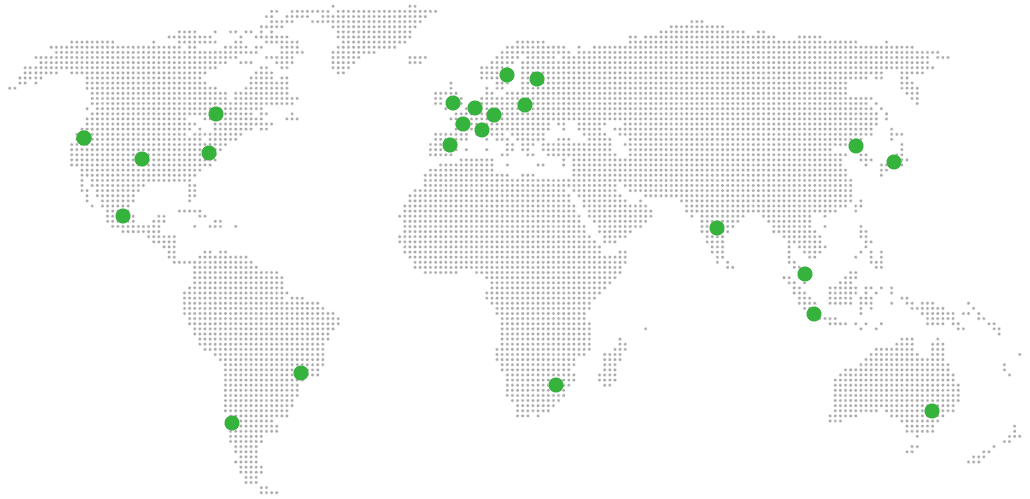
Global Reach Map

Try managed BookStack for 7 days

No card. Cancel from the dashboard.