Open-source stack for the privacy-first solo operator
The privacy-first solo operator's open-source stack in 2026 — own your data without owning the operations
TL;DR.
- Six open-source apps cover the typical solo operator's daily SaaS surface: Vaultwarden for passwords, CryptPad for private documents, Matomo for analytics, HedgeDoc for collaborative notes, Nextcloud for files, BookStack for the knowledge base.
- All six are under permissive or copyleft licences (AGPL-3.0, GPL-3.0, MIT). Data stays yours; source is inspectable.
- On DANIAN, the full stack runs at €54 per month total — six apps at €9 each. We handle patching, backups, monitoring, and a human replies when something needs attention.
- Honest trade-off: at one seat on free SaaS tiers, this stack is not the cheap option. The argument is data ownership and zero operational time, not a cheaper monthly bill. At three seats, the math flips and DANIAN is also cheaper.
- Pick one app first, evaluate for 14 days, then add the next. The 6-app stack is a destination, not a starting move.
Who this list is for — and who it isn't for
The buyer this list assumes is a one-to-five-person operation where the founder or owner answers the data questions themselves. An indie consultant whose client just asked where the project files live. A freelance researcher whose ethics review board wants a data-flow diagram. A small studio whose monthly privacy-policy review by a customer turns into a 90-minute homework assignment.
The common thread is one of those triggers, not a general unease about Big Tech. The privacy-policy question came from outside — a client, a reviewer, a customer survey — and the answer “we use Google Docs and 1Password” stopped being good enough.
This list is not for you if:
- Your team is twenty-plus people with a full IT or DevOps function. You can run more of this yourself, and the calculus shifts.
- Your forcing function is cost reduction at the cheapest SaaS tiers. The free tiers of Notion, Google Workspace, and Confluence will beat €54 per month for a single operator. The argument here is ownership, not price.
- You need an attested certification today. DANIAN does not hold one. If a customer contract requires a specific audited certification, a certified provider serves you better right now.
- You want feature parity with the SaaS originals at the same level of polish. Several of these tools are honestly less polished than what they replace. The list names the gaps where they exist.
The shortlist — six apps, what each replaces, what it costs
Each capsule below covers the same six fields: what the app does, who builds it, the licence, the typical SaaS it replaces, what €9 per month buys on DANIAN, the team size it scales well for, and what switching to it actually looks like.
Vaultwarden — Bitwarden-compatible password server
What it is. An unofficial server that speaks the Bitwarden API. The official Bitwarden mobile apps, browser extensions, and desktop clients all connect to it. The client side stays Bitwarden; the server side is yours.
Who builds it. Maintained by Daniel García with around 170 contributors. The repository at github.com/dani-garcia/vaultwarden has roughly 60,500 stars as of May 2026. Latest release v1.36.0 shipped in May 2026 with single sign-on (OpenID Connect) and several security fixes.
Licence. AGPL-3.0. Written in Rust, which keeps the resource footprint small.
What it replaces. The hosted side of 1Password or Bitwarden Cloud. 1Password Business runs $7.99 per user per month on annual billing. At three seats that is roughly $24 per month, and 1Password raised consumer pricing 25 to 33 percent on 27 March 2026.
On DANIAN. €9 per month per Vaultwarden instance. You install the Bitwarden browser extension and mobile app, point them at your custom subdomain, and you have your team's vault — without the Bitwarden Cloud account on top.
Team size and switching. Works well from one user up to twenty-five. Switching is a one-evening job: export your existing vault to CSV from 1Password or Bitwarden Cloud, import to Vaultwarden, redirect everyone's clients to the new server, retire the old account next renewal. Most teams switch on a Friday and forget about it on Monday. Visit our managed Vaultwarden hosting page if this is the trigger that brought you here.
CryptPad — end-to-end encrypted office suite
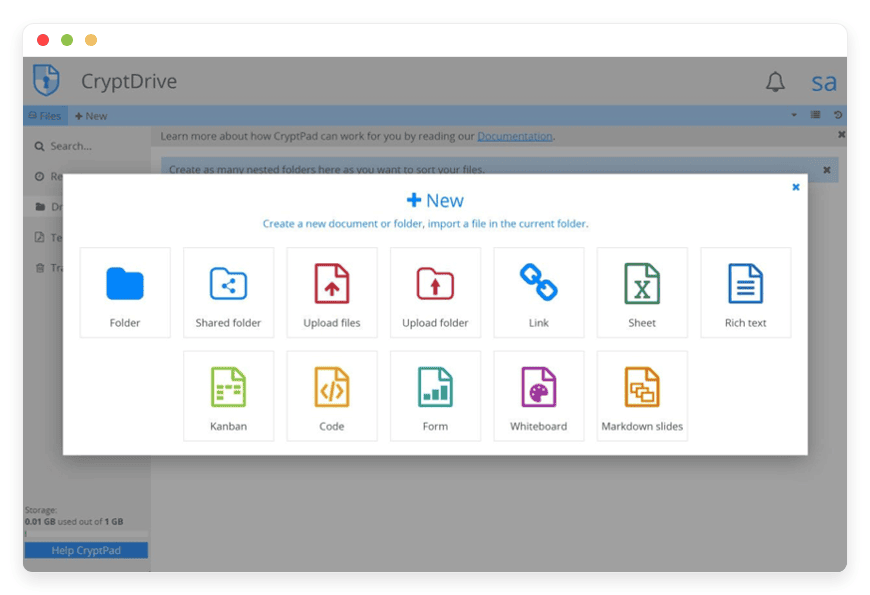
What it is. A collaborative office suite where documents are encrypted in your browser before they leave your machine. Pads (their term for documents), spreadsheets, presentations, kanban boards, polls, and forms. The server stores ciphertext only. The CryptPad team running the public instance — and DANIAN running yours — cannot read what is inside.
Who builds it. Originally funded between 2015 and 2019 by the French state through BPI France, and since by NLnet's PET, NGI TRUST, and NGI DAPSI research grants plus their own subscriber base. Project home at cryptpad.org and source at github.com/cryptpad/cryptpad.
Licence. AGPL-3.0. JavaScript end-to-end. Real-time collaboration runs over their open-source ChainPad algorithm.
What it replaces. The private-document part of Google Docs. The part where you write the offer letter, the salary table, the client onboarding checklist with credentials in it. Google Workspace Business Starter is around $7.20 per user per month, and Google itself is the strongest possible counterparty for that data.
On DANIAN. €9 per month per CryptPad instance. You can share pads via link or by adding registered users to a team. We run the managed CryptPad for encrypted collaboration, which means the patches, backups, and TLS certificates are not your problem.
Team size and switching. Works well from one person up to about ten. Switching is medium effort because the encryption model changes the sharing UX. Documents cannot be searched server-side. Permission changes mean re-keying. Teams who collaborate constantly on the same handful of documents adapt quickly. Teams whose habit is “find any old doc by Googling its title” will need a different habit.
Matomo — web analytics that don't leave your domain
What it is. An open-source web analytics platform. Visits, sessions, events, funnels, goal conversions, heatmaps and session recordings as plugins. The hosted Matomo Cloud is a paid service; the on-premises version is free, and that is what DANIAN runs for you.
Who builds it. InnoCraft (the company behind Matomo, formerly known as Piwik) plus a wide contributor base. Site at matomo.org, source at github.com/matomo-org/matomo.
Licence. GPL-3.0. PHP application, MySQL or MariaDB underneath.
What it replaces. GA4. The trigger here is rarely cost — GA4 is free. It is the review conversation: where do the cookies go, what data leaves the page, can you turn off the third-party transfer. National data-protection authorities have raised this exact question against GA4 in several jurisdictions over the past three years, and “we use GA4” is a quieter sentence in 2026 than it used to be.
On DANIAN. €9 per month per Matomo instance, one tracking domain. Add the JavaScript snippet, your visitors are tracked on your subdomain, no third-party request leaves the browser for analytics.
Team size and switching. Scales to any team size since it is measured by visits, not seats. Switching is a few hours of work: install the snippet, optionally import historical GA4 data, re-tag your event labels because the schema is slightly different. Plan a long afternoon, not a weekend.
HedgeDoc — collaborative markdown notes
What it is. A real-time collaborative markdown editor. Multiple cursors, version history, presentation mode that turns the document into a deck. Forked from CodiMD, which was forked from HackMD.
Who builds it. The HedgeDoc community — a volunteer maintainer team. Site at hedgedoc.org, source at github.com/hedgedoc/hedgedoc, around 6,800 stars.
Licence. AGPL-3.0. Node.js application.
What it replaces. The notes-and-jotting-pad part of Notion. Honest scoping: HedgeDoc is markdown documents, not Notion's blocks-and-databases model. If your team lives in Notion databases — linked tables, kanban views, project trackers — HedgeDoc does not replace those. If your team uses Notion as a fancy shared notebook, HedgeDoc replaces that cleanly.
On DANIAN. €9 per month per HedgeDoc instance.
Team size and switching. Works well from one user up to about fifteen on a single instance. Switching is the easiest of the six for plain-text-friendly teams: paste a markdown export from Notion into a new pad, you are done. Switching is awkward for teams who built whole project management workflows on Notion databases — in that case, the right path is HedgeDoc for the writing parts and a different tool for the database parts.
Nextcloud — files, sync, and a few apps you might actually use
What it is. A self-hostable file sync and collaboration platform. Sync clients for desktop and mobile, web file manager, sharing by link with optional expiry and password, calendar, contacts, an optional Office integration (Collabora or OnlyOffice), and a long catalog of community add-ons.
Who builds it. Nextcloud GmbH plus a large open-source community. Site at nextcloud.com.
Licence. AGPL-3.0. PHP application.
What it replaces. Dropbox at the file-sync layer. Maybe iCloud Drive or OneDrive depending on what you currently use. Dropbox Plus runs $11.99 per month for personal use; Dropbox Standard for business is $15 per user per month with a three-seat minimum.
On DANIAN. €9 per month per Nextcloud instance. We host the server side and patch it on Nextcloud's release cycle. You install the sync client on your machine and it behaves like every file-sync client you have used. We run managed Nextcloud hosting on the same €9 per app pricing.
Team size and switching. Scales from one user up to about fifty comfortably on a base plan, and further with upgraded resources. Switching is straightforward but takes a couple of hours: install the sync client, point it at your subdomain, copy files in via the sync client or the web uploader. Plan a weekend if you have a few hundred gigabytes to move.
BookStack — a wiki that's pleasant to use
What it is. A self-hostable knowledge base organised as books, chapters, and pages. Markdown or WYSIWYG editor, page-level permissions, full-text search, attachments, image gallery, and export to PDF, HTML, or markdown.
Who builds it. Dan Brown (the developer, not the novelist) leads it with a community of contributors. Site at bookstackapp.com, source at github.com/BookStackApp/BookStack, around 17,600 stars.
Licence. MIT. PHP application.
What it replaces. Confluence at the documentation-wiki layer. Confluence Standard runs $5.42 per user per month on annual billing; the free tier covers up to ten users.
On DANIAN. €9 per month per BookStack instance.
Team size and switching. Works well from one user up to thirty. Switching is medium effort: BookStack's structure (books, chapters, pages) is more hierarchical than Confluence's free-form spaces, so the migration involves making structural choices, not just copying content. The good news is that BookStack imports markdown cleanly, and most Confluence content exports to markdown via Atlassian's tools. The bad news is that linked content, embedded macros, and Jira integrations do not carry across.
How the six fit together
You do not need all six on day one. Three useful subsets describe the most common entry points: the data-flow core that answers a reviewer's questions, the documentation pair that handles the team's writing, and the highest-privacy subset for credentials and sensitive documents.
The data-flow core. Vaultwarden, Nextcloud, and Matomo. These three answer the three questions a client or reviewer most often asks: where do your passwords live, where do our project files live, and how are you measuring our website's visitors. Three apps, €27 per month total, the most common privacy-policy questions resolved.
The documentation pair. HedgeDoc plus BookStack. HedgeDoc is where you draft, brainstorm, and collaborate live on a shared page. BookStack is where the final version lives once the topic is decided. Two apps that do work most teams try to fit into one tool and then complain about. €18 per month total.
The highest-privacy subset. Vaultwarden plus CryptPad. The vault for credentials, the encrypted office suite for the documents containing them. Both are zero-knowledge with respect to the server operator — we cannot read your password vault and we cannot read your CryptPad documents. €18 per month total.
DANIAN's role across all six: one dashboard, one bill, one named human to email when any of them needs attention. We run the managed Vaultwarden hosting the same way we run the others — same patch cadence, same daily off-site backups, same 24/7 support. You do not context-switch between six maintenance schedules.
The full stack at a glance
The table below summarises the six apps on the same axes: what they replace, the licence they ship under, the team size each one comfortably handles, and the realistic switching effort. Every app is €9 per month on DANIAN, regardless of which row you read.
| App | Replaces | DANIAN price | Licence | Ideal team size | Switching effort |
|---|---|---|---|---|---|
| Vaultwarden | 1Password / Bitwarden Cloud | €9/month | AGPL-3.0 | 1–25 | Low |
| CryptPad | Google Docs (private documents) | €9/month | AGPL-3.0 | 1–10 | Medium |
| Matomo | GA4 | €9/month | GPL-3.0 | Any | Low–Medium |
| HedgeDoc | Notion (notes part) | €9/month | AGPL-3.0 | 1–15 | Low |
| Nextcloud | Dropbox | €9/month | AGPL-3.0 | 1–50 | Medium |
| BookStack | Confluence | €9/month | MIT | 1–30 | Medium |
The cost reality — be honest about it
Six apps on DANIAN cost €54 per month, all in. Hardware, security, updates, backups, monitoring, and support are included. There is no separate infrastructure line, and we will not upgrade your resources without asking. The honest comparison against SaaS depends entirely on how many seats you have.
At one seat, on the free or cheapest tiers of each SaaS, the comparison is roughly:
- 1Password Individual: $3.99 per month
- Google Workspace Business Starter: $7.20 per month
- GA4: free
- Notion Free: $0
- Dropbox Plus (personal): $11.99 per month
- Confluence Free, up to ten users: $0
- Total: roughly $23 per month
At one seat, the SaaS stack on free or entry tiers is cheaper than DANIAN's €54. That is the honest answer. The argument for DANIAN at this scale is not that it is cheaper. It is that you own the data, the source code of every tool is inspectable, and your operational time investment is zero.
At three seats — a small studio, a freelancer with two collaborators — the math shifts:
- 1Password Business at 3 seats: $23.97 per month
- Google Workspace at 3 seats: $21.60 per month
- Notion Plus at 3 seats: roughly $30 per month (annual billing)
- Dropbox Standard, three-seat minimum: $45 per month
- Confluence Standard at 3 seats: $16.26 per month
- Total: about $137 per month
At three seats, DANIAN's €54 is well under half the SaaS bill. At five seats, the gap widens further. If a privacy-policy review triggered the search that brought you here, the spend is not really a budget line — it is the cost of being able to answer the data-flow question without three days of vendor research, every time it comes up.
The friction worth naming before you switch
None of these tools is a drop-in replacement for the SaaS original. The differences are worth knowing in advance so they do not surprise you in week two.
CryptPad's encryption model changes how collaboration feels. You cannot search across all documents server-side, because the server cannot read them. Permission changes require re-keying. Teams whose habit is “let me Google for that doc title in our drive” will need a different habit — naming conventions, a top-level index pad, or just better folder discipline.
Vaultwarden's mobile experience is the official Bitwarden app pointed at your server. It is good — millions of people use Bitwarden as their daily driver — but it is not the visual polish of 1Password. If your team is highly aesthetic-sensitive on mobile, plan a brief adjustment period.
HedgeDoc is markdown, not blocks. If your team built workflows on Notion's database views — sub-tasks rolling up to a parent project, formula columns, calendar views of records — HedgeDoc does not replicate that. The pragmatic answer: HedgeDoc for the writing parts, keep your project tracker elsewhere or build it in a tool that is actually a project tracker.
Nextcloud is heavier than Dropbox at the UX level. The web interface includes calendar, contacts, Talk, Mail, Deck, and more. You can disable the apps you do not use, but the default install is opinionated about being a full productivity suite, not a folder of files.
Matomo's feature surface is slightly different from GA4's. Event-tracking syntax, custom dimensions, and goal definitions all need re-mapping rather than copy-paste. Budget a few hours for a marketing person who knows the existing setup, not a weekend.
BookStack's permission model is simpler than Confluence's. Pages inherit from chapters, which inherit from books; you cannot easily grant a specific reader access to one page deep inside a private book. For most small operations this simplicity is a feature; for organisations that built complex sharing matrixes in Confluence, it is a downgrade.
How to start — a 14-day plan, not a 6-app cutover
Switching to six tools in one weekend is a bad idea. It nearly always ends in someone keeping a quiet shadow Google Doc anyway. The pattern that works is sequential: one app, two weeks, a real decision, then the next one. The 6-app stack is a destination most operators arrive at over six months, not six days.
Pick the one app whose SaaS counterpart triggered the conversation. If the trigger was a privacy-policy review, that is probably Matomo or Nextcloud. If it was a Bitwarden price hike, that is Vaultwarden. If it was a Notion renewal sticker shock, that is HedgeDoc. Whatever drove you here, that is the first move.
Start a 7-day trial on DANIAN. Pick the region closest to your team or your customers — we run in 21 datacenter locations across 6 continents, so latency is rarely a constraint. Deploy the app, give it your custom subdomain, set up your account. See the full app catalog if you want to scope beyond the first switch.
Spend week one on a representative sample. For Vaultwarden, that is importing your personal vault and trying it on mobile for a week. For Matomo, that is putting the snippet on one page (not the whole site) and watching the data come in. For Nextcloud, that is moving one project folder, not the entire archive.
Spend week two on the daily-driver test. Use the app the way you will actually use it. Note the rough edges. Decide.
The question to ask at the end of two weeks: did a colleague without context notice the difference in their daily work? If yes, the friction is real, and you need to evaluate whether the trade is worth it. If no, you can switch fully and add the next app.
FAQ
Does DANIAN run all six apps on the same physical server?
No, not by default. Each app runs in its own isolated container with its own resource allocation, and you can choose a different datacenter region per app if it matters. The €9 per month buys you the isolated container, not a shared instance. The /trust page has the technical detail.
Can my client or reviewer see where the data actually lives?
Yes. You can show them the datacenter region (you chose it), the named subprocessors on our /trust page, and the per-app sync and backup model. We are not certified to anything specific today, and we say that plainly when asked. For a privacy-policy review, the data-flow diagram is usually what is wanted.
What happens to my data if I stop paying DANIAN?
You can export it before you leave. Each of the six apps has its own export — Vaultwarden to JSON or CSV, Nextcloud over the sync client or SFTP, Matomo via the API, HedgeDoc and CryptPad to markdown, BookStack to its archive format. Our published “How to leave DANIAN” guide covers each one. The software is open-source; you can take it elsewhere.
Why are most of these on AGPL-3.0?
AGPL-3.0 is the strong-copyleft licence with a network clause: a service operator running a modified version must offer the modifications back to users. We do not fork or modify the upstream apps in user-visible ways, but the licence shapes how managed-hosting services treat the underlying code. It is a feature, not a bug.
Can I really do this myself on a VPS?
Yes, you can. A $24 per month production-class VPS with object-storage backups and a monitoring layer runs about $44 per month in infrastructure, plus 5 to 10 hours of initial setup and 1 to 2 hours of monthly maintenance per app at freelance sysadmin rates. For one app this is reasonable. For six, the time cost dominates the equation.
What is the worst part of switching?
Usually the calendar week of being in two places at once. Your team has the old SaaS open in one tab and the new app in another, and people forget which one is current for half a day. The fix is to set a hard cutover date and remove the old SaaS shortcut from everyone's bookmarks bar. Two weeks later, no one remembers.
Is Vaultwarden as secure as 1Password?
Vaultwarden uses the same Bitwarden API and encryption model that protects millions of vaults — your data is encrypted client-side with your master password before it leaves your device. The cryptographic security is equivalent. The organisational differences are real: 1Password has formal third-party security audits and a dedicated incident-response team; Vaultwarden has community code review and a single named maintainer with strong release discipline. For most solo operators and small teams, the trade is acceptable.
What is the difference between CryptPad and Google Docs?
Both let multiple people edit the same document in real time. The difference is who can read it. Google Docs stores documents in plaintext on Google's servers; Google can read them, scan them for policy violations, and respond to law-enforcement requests with their contents. CryptPad encrypts documents in your browser before they leave the device; the server stores only ciphertext and cannot decrypt them, even if compelled.
Is Matomo a drop-in replacement for Google Analytics 4?
For pageviews, sessions, events, sources, and conversion goals, yes — the core analytics surface is comparable, and historical GA4 data can be imported. The differences are operational: tag-naming schemas differ, custom dimensions need re-mapping, and some GA4 integrations (BigQuery export, Google Signals) have no direct Matomo equivalent. Plan a few hours of reconfiguration, not a weekend.
How does HedgeDoc compare to Notion for small teams?
HedgeDoc is a markdown editor with live multi-cursor collaboration; Notion is a blocks-and-databases workspace. For collaborative note-taking, drafting, and shared documentation, HedgeDoc is a clean replacement. For project trackers built on Notion databases, kanban views, or formula columns, HedgeDoc does not replace those — keep a project-management tool, or rebuild the workflow in a different self-hosted app.
Is Nextcloud as reliable as Dropbox?
Reliability on Nextcloud depends on who runs the server. On DANIAN, the patching cadence, daily off-site backups, and monitoring are equivalent to a commercial sync service. The desktop sync client is mature and battle-tested across operating systems. Where Dropbox can win is mobile photo backup and shared-link UX polish. Where Nextcloud wins is having the full apps catalog (calendar, contacts, mail, office) on the same instance, with no per-feature upsell.
What is the difference between BookStack and Confluence?
BookStack organises content into books, chapters, and pages — a hierarchical model. Confluence uses free-form spaces with deep cross-linking. BookStack's permission model is simpler (permissions inherit down the book → chapter → page tree); Confluence's is more granular. For small teams documenting projects, BookStack is faster to learn and free of per-user pricing. For large organisations with complex sharing matrixes and Jira integration, Confluence is more powerful.
What does AGPL-3.0 mean for me as a customer?
AGPL-3.0 is a strong-copyleft licence with a network clause. As a customer using a hosted instance, your rights are the same as if you downloaded the software yourself — you receive a copy of the source code, you can modify it, you can run it yourself, and you can take your data elsewhere. The licence binds the operator (us, or you if you self-host): any modifications to the upstream code must be offered back to users. We do not modify the upstream apps in user-visible ways, so the practical effect for customers is identical to using the upstream version with a managed-operations layer on top.
Which of these six apps has the largest open-source community?
Vaultwarden is the largest by raw GitHub star count at roughly 60,500 as of May 2026. BookStack follows at around 17,600. Matomo has roughly 20,000 stars across its repository tree. HedgeDoc sits at around 6,800. Nextcloud and CryptPad split their codebases across multiple repositories so a single star count understates them, but both have multi-year contributor lineages and active backing — Nextcloud GmbH for Nextcloud, NLnet and NGI research grants for CryptPad.
How long does it take to migrate from 1Password to Vaultwarden?
Most single-owner and small-team migrations finish in 30 to 90 minutes. Export the 1Password vault to CSV from the desktop app, import to Vaultwarden via the admin panel, reinstall the Bitwarden browser extension and mobile app on each device, sign in to your new server. Plan a Friday afternoon and let the weekend be the validation period. Cancel the 1Password subscription at the next renewal, not the same day.
Can I run this stack without a technical person on my team?
Yes. The point of DANIAN is that the technical work — server patching, backups, certificates, monitoring, security updates — does not fall on you. You manage the apps the way you manage any SaaS: through their web interfaces. Anything that genuinely needs a technical hand (DNS edits, regional moves, custom configurations) goes through our support. The skill requirements on your side are roughly the same as managing Google Workspace.
Do these apps have mobile apps and offline sync?
Vaultwarden uses the official Bitwarden mobile apps (iOS, Android) with offline cache. Nextcloud has native mobile apps with selective sync for offline access. Matomo offers a separate dashboard-viewer app for iOS and Android. CryptPad, HedgeDoc, and BookStack are primarily web-based with mobile-responsive interfaces — they work on a phone, but there is no dedicated native app.
Can I use my own custom domain for each app?
Yes. Each app on DANIAN gets a subdomain you choose — vault.yourcompany.com, files.yourcompany.com, analytics.yourcompany.com. The TLS certificates are provisioned and renewed for you. You point a CNAME record at our infrastructure during trial setup, and the rest is handled.
What happens if DANIAN has an outage?
The public status page at status.danian.co posts incidents within minutes of detection, with the affected region, the cause if known, and an estimated recovery window. Our support is staffed during incidents. We post an incident report after resolution with the timeline, the cause, and what changed. We do not delete data after an incident. If an outage materially affects your trial period, talk to us and we will extend the trial.
Can I back up the data myself, separate from DANIAN's backups?
Yes, and we encourage it for the data you care about most. Each app exposes its own export path: Vaultwarden to encrypted JSON, Nextcloud over SFTP or the sync client, Matomo via the API or scheduled report, HedgeDoc and CryptPad to markdown, BookStack to its archive format. You can script a weekly pull to your own storage. Our backups run daily and off-site; a customer-controlled copy on top of that is good practice.
Does DANIAN support single sign-on across the six apps?
Yes, when the underlying app supports it. Vaultwarden v1.36 and later supports OpenID Connect SSO. Nextcloud and HedgeDoc support OIDC and SAML. Matomo and BookStack support OIDC via plugins. CryptPad's end-to-end encrypted model uses its own authentication and is not compatible with external SSO — that is a deliberate property of zero-knowledge encryption. You can stand up your own OIDC provider (Keycloak, Authentik) as another app on DANIAN, or use an existing one.
What to do this week
If you have read this far, the trigger that brought you here is probably specific. A client's question about your password manager. A reviewer's request for a data-flow diagram. A renewal email from a SaaS you have grown tired of. The conversation that made you type “self-hosted tools solo operator” into a search bar.
The honest move from here is not to switch everything. Switch the one app the trigger named, run it for two weeks, decide if the friction is acceptable, and then decide whether the rest of the stack is worth following. Start your 7-day free trial on the app that matches your trigger — no card needed — and if you would like to talk through which of the six fits your situation first, the chat on danian.co is staffed and a named human replies. Email also works.