
Open-source home-lab stack in 2026
The home-lab enthusiast's open-source stack in 2026: what to host yourself and what to let managed run
TL;DR
- A home lab is self-hosted by definition. Managed hosting at €9 an app isn't a replacement for the hobby — it's a place for the apps you'd rather not babysit, or that should stay online when your home doesn't.
- The six apps here: Home Assistant, AdGuard Home, Immich, Uptime Kuma, Navidrome, and Audiobookshelf.
- Keep Home Assistant on local hardware. It needs a Zigbee or Z-Wave radio and LAN access; a remote instance can only reach cloud-API and Wi-Fi devices.
- Uptime Kuma is the clearest case for off-site hosting: a monitor on your home server goes dark the moment your home does — exactly when you need the alert.
- DANIAN runs any of these for €9 per app per month, with patching, daily off-site backups, monitoring, and 24/7 support. The €9 base includes 30 GB of storage; media libraries past a few hundred gigabytes are cheaper on home disks.
Who this is for, and who it isn't
This is for the home-labber on one box who has hit the limits: a server that must stay up for the whole house, ports forwarded through the router, apps that want Sunday patching. It isn't an argument to shut the hobby down — just a sort of six apps into what to hand off at €9 a month and what to keep at home.
If you enjoy running your own hardware, keep doing it. The point here is narrower than "move everything to the cloud." Some open-source apps reward local hardware and a weekend of tinkering. Others make poor houseguests at home.
The poor houseguests share a pattern. They need to stay reachable when your power flickers. They expose your home network to reach them from outside. Or they want patching, backups, and certificate renewals you'd rather skip. This guide sorts the six apps by that pattern, and shows the maths where managed hosting earns its €9.
The short version
Keep Home Assistant local.
Move Uptime Kuma off-site so it can watch your home from outside.
The other four — Immich, AdGuard Home, Navidrome, and Audiobookshelf — go either way, and the deciding factor is usually storage and how much you value being reachable 24/7 over raw cost per gigabyte.
The rest of this guide explains each call, app by app, with the honest limitation included for every one.
The shortlist
Home Assistant — keep it local
Home Assistant is the most popular open-source home-automation platform — more than 75,000 GitHub stars, over 2,800 device integrations, Apache 2.0 licensed. It runs the brain of a smart home: lights, sensors, locks, thermostats, and the automations that connect them. For most homes, it belongs on local hardware.
The reason is physical. Many devices Home Assistant controls speak Zigbee, Z-Wave, Thread, or Bluetooth. Those protocols need a radio dongle plugged into the machine running Home Assistant. A remote-hosted instance has no radio.
So a cloud Home Assistant can reach cloud-API integrations and Wi-Fi devices that phone home. It cannot talk to a Zigbee bulb or a Z-Wave lock on your network. Host Home Assistant away from home and you lose local device control — the reason to run it at all.
There's a second reason to keep the brain at home. Cloud smart-home platforms change their terms, get bought, or shut down — SmartThings has broken automations on app migrations, and Insteon went dark overnight in 2022. A local Home Assistant keeps running regardless.
A Home Assistant Green at around $99, a Raspberry Pi 5, or a small mini-PC handles it well. What people want from "the cloud" here is usually remote access — checking the house while away. You get that without giving up local control. A VPN such as WireGuard, a tunnel, or the official Home Assistant Cloud (Nabu Casa, about $7.50/month) all reach a local instance securely, with no ports forwarded to the open internet.
If you prefer to use Home Assistant only with cloud-API and Wi-Fi devices, then we recommend our managed Home Assistant service.
Recommendation: host locally; use a VPN or the official cloud add-on for remote access. This is one app where managed hosting is the wrong fit, and saying so is more useful than pretending otherwise.
Uptime Kuma — move this one off-site
Uptime Kuma is the self-hosted monitor the home-lab community has standardised on — more than 84,000 GitHub stars, MIT-licensed, light enough to run in about 400 MB of RAM. It checks your services, shows a clean status page, and alerts you across more than 90 channels. Hosting it off-site fixes its one real flaw.
That flaw is structural. Uptime Kuma monitors from a single location — the machine it runs on. Put it on your home server and it has a blind spot. When your home loses power or internet, the monitor goes down with everything it watched, so the one alert you needed never arrives.
A managed Uptime Kuma sits outside your home and watches in. It pings your public services and receives heartbeat pushes from the ones that aren't publicly reachable. It tells you the moment your home setup drops, because it isn't on the same power strip. At €9/month it runs patched, backed up, and on monitored infrastructure, with no upkeep from you.
Recommendation: run this one managed, or at least off your home network. A monitor that sleeps when the house sleeps isn't a monitor.
Immich — off-site photo backup
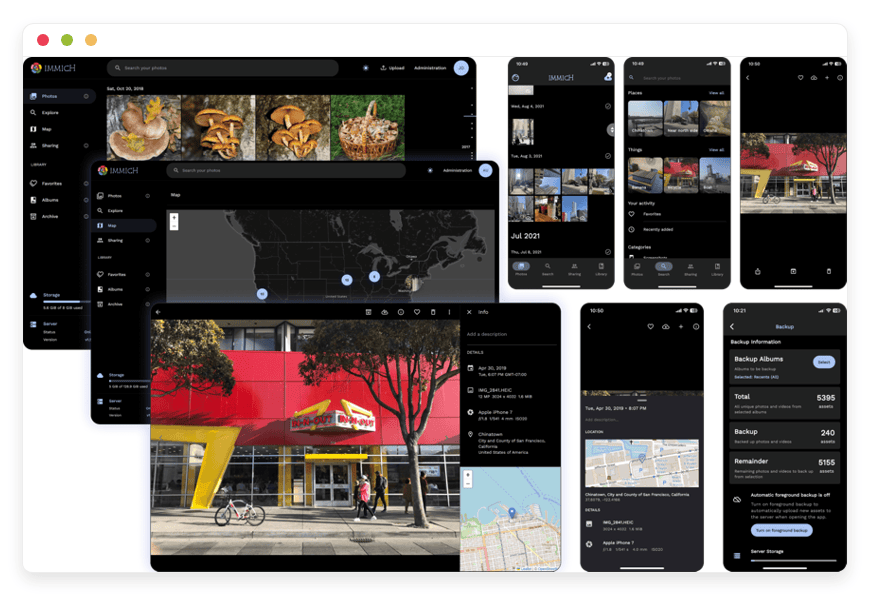
Immich is the open-source photo app that finally matches Google Photos on the things that matter: automatic phone backup, face recognition, search, and a fast timeline. It reached its 2.0 stable release in October 2025 and is AGPL-3.0 licensed. Whether to host it managed comes down to one number: library size.
The case for managed Immich is backup discipline. A photo backup in the same building as your originals isn't really a backup — one fire, theft, or dead drive takes both. A managed instance keeps your photos off-site and reachable from your phone, without exposing your home network, and backs up daily on its own. The mobile app needs HTTPS, which a managed instance provides.
The catch is storage. Two phones on automatic backup fill roughly 100 GB a year. DANIAN's base plan includes 30 GB; beyond that, storage is €0.50 per GB per month. So a 100 GB library runs about €44/month all in. That's fair for a recent-photos backup and steep for a decade-deep archive.
A NAS with a large drive at home wins on cost per gigabyte at that size. You can run managed Immich for photo backup for the library you want off-site, and keep the full archive at home.
Recommendation: managed for a phone-backup-sized library you want off-site and always reachable; home storage for a large archive.
AdGuard Home — a resolver that follows you
AdGuard Home is a network-wide DNS ad and tracker blocker — GPL-3.0, around 24,000 GitHub stars, written in Go. It blocks ads for every device that uses it, with per-client rules and parental controls, and it speaks encrypted DNS as a server. Where you host it changes what it can do.
Encrypted DNS only helps when it leaves your network. The point of DNS-over-HTTPS or DNS-over-TLS is to keep your lookups private from the networks between you and the resolver — café Wi-Fi, a mobile carrier. That needs a public address.
A managed AdGuard Home gives you exactly that: a private encrypted resolver you point your phone, laptop, and tablet at everywhere, not just at home. It blocks ads on the train, with no per-device app and no query caps. That's the job a paid service like NextDNS does, on infrastructure you control. You can run AdGuard Home for DNS blocking this way at €9/month.
Two things stay local. A remote resolver won't hand out DHCP leases or resolve your LAN hostnames — those are local-network jobs, so a Pi at home still suits whole-house, router-level blocking. And a public resolver must be locked to your own devices with client IDs or access control, or it gets abused as an open resolver.
Recommendation: managed as a private, follow-you-everywhere encrypted resolver; local for whole-home, router-level blocking and LAN name resolution.
Navidrome — stream your own library
Navidrome turns your own music files into a private streaming service — GPL-3.0, more than 21,000 GitHub stars, light on CPU. It speaks the Subsonic API, so dozens of mobile and desktop players work with it, and it streams FLAC, MP3, AAC, and OPUS. The hosting decision is Immich's again: storage.
Navidrome itself is tiny — it runs happily in a few hundred megabytes of RAM. A managed instance streams your library to any device, anywhere, without exposing your home network or keeping a home server awake to play an album on your commute. Application data sits in the region you choose, across 21 datacenter locations spanning six continents, so playback stays smooth.
The variable is the library. A lossless FLAC collection is large — a thousand albums can run 300 to 500 GB. At €0.50 per GB per month over the 30 GB base, that adds up fast. A compressed MP3 or AAC library is a fraction of the size and fits managed hosting well.
Recommendation: managed for a compressed or modest library you want everywhere; home storage for a large lossless archive.
Audiobookshelf — audiobooks and podcasts
Audiobookshelf is a self-hosted audiobook and podcast server, GPL-3.0 licensed, that works like a Plex built for spoken audio. It tracks your place across devices, fetches metadata, generates per-user podcast feeds, and has a polished Android app. It hosts well managed, with two limitations to flag first.
Audiobook and podcast libraries are usually modest, so the storage maths that complicate Immich and Navidrome rarely bite here. A managed instance keeps your books and shows reachable from any device, syncs your progress, and fetches new podcast episodes on its own schedule — off your home network, with daily backups. You can run Audiobookshelf for audiobooks at €9/month.
Two caveats first. The iOS app is still TestFlight-only and the beta fills up, so iPhone users typically use a third-party client such as ShelfPlayer, while Android users get the official app. And you supply DRM-free files — Audible downloads are locked, so you'll need audiobooks you own in an open format.
Recommendation: a solid managed fit. Check the iOS client situation first if you're on iPhone.
How they fit together
The sensible home-lab shape in 2026 isn't all-local or all-managed — it's a split. The brain and the bulk stay home: Home Assistant on a Pi with its radios, the big media archive on a NAS. The always-on, off-network jobs move out: the monitor that watches the house, the photo backup that outlives it, the resolver that travels with you.
A concrete example. Home Assistant runs locally, reached over WireGuard. A managed Uptime Kuma watches your home services from outside and pings you when the broadband drops. A managed Immich holds an off-site copy of this year's photos while the full archive lives on the NAS. A managed AdGuard Home blocks ads on every device you carry.
This also closes a backup gap. The off-site copy is the part most home setups skip — a 3-2-1 backup wants three copies, on two kinds of media, with one kept off-site. A managed Immich, or a managed file store, holds that off-site copy without shipping a drive to a friend's house.
Nothing competes; each piece sits where it's strongest. Managed hosting and a home lab aren't rivals. The hobby keeps the parts that are fun and local; managed takes the parts that want uptime, distance from your home network, and someone else doing the patching.
The six apps at a glance
The table sums up each call: what the app replaces, what DANIAN charges to run it, when managed is the better choice, and when a box at home wins. Every managed instance is €9 per app per month, with patching, daily off-site backups, monitoring, and 24/7 support from a named person.
| App | Replaces | Managed (DANIAN) | Best run managed when… | Better kept at home when… |
|---|---|---|---|---|
| Home Assistant | Google Home, SmartThings | €9/mo* | you use only cloud-API and Wi-Fi devices | almost always — Zigbee, Z-Wave, or local devices |
| Uptime Kuma | Paid uptime monitors | €9/mo | almost always — it must watch your home from outside | you only monitor non-home services from one place |
| Immich | Google Photos, iCloud | €9/mo | a phone-sized library you want off-site and reachable | your archive runs to many hundreds of GB |
| AdGuard Home | NextDNS | €9/mo | a private encrypted resolver on every device, everywhere | whole-home, router-level blocking and LAN name resolution |
| Navidrome | Spotify | €9/mo | you stream a compressed or modest library on the move | you keep a large lossless archive |
| Audiobookshelf | Audible, podcast apps | €9/mo | audiobooks and podcasts on any device, synced and off-site | you're iPhone-only and want the first-party app today |
*Home Assistant is available managed, but for local device control it belongs at home — see the section above.
The storage question, with the actual maths
Storage is the one place where managed hosting can lose to home hardware, and the maths are worth getting right. DANIAN's €9 base plan includes 30 GB. Past that, storage is €0.50 per GB per month. For small libraries that's a rounding error; for large media archives it's the deciding number.
Run the numbers. A 200 GB photo library is 170 GB over the base, so about €85 in storage plus the €9 base — roughly €94/month. A 500 GB lossless music collection is closer to €244/month. A 4 TB drive for a home NAS costs around €100 once. Past a few hundred gigabytes, home storage wins on cost per gigabyte, and it isn't close.
So managed media hosting isn't about beating a NAS on price at scale. It's about three things a home NAS doesn't give you free: an off-site copy that survives your house, availability when your home power or internet is down, and no home network exposed to reach your files. For a phone-sized photo backup or a compressed music library, that's worth €9 and a small storage line. For a multi-terabyte archive, keep it at home and let managed run the always-on, low-storage services instead.
See how managed Immich handles photo backup and storage →
We will not upgrade your resources or charge you without your explicit consent. Card failed? We wait. We don't delete your data.
How to start
Pick the one app you'd most like off your plate and try it. For most home-labbers the clearest first move is the monitor — a managed Uptime Kuma watching the home from outside — or an off-site Immich for photo backup. The trial is 7 days, no card, on any app in the catalogue.
The test is simple. Deploy the app, point your devices or push your monitors at it, and run it through the trial. If it earns its place, keep it. If your home setup did the job better, you've lost a week and nothing else. Resource upgrades, region changes, and a few config tasks go through chat, where a named person handles them; the rest is one click.
Start a 7-day free trial — no card →
FAQ
Which of these apps should I host at home, and which should I let managed run?
Keep Home Assistant local — it needs Zigbee or Z-Wave radios on the same machine. Move Uptime Kuma off-site, where it can watch your home from outside. Immich, AdGuard Home, Navidrome, and Audiobookshelf go either way; the deciding factor is library size and how much you value 24/7 reach.
Will managed hosting replace my home lab?
No, and it shouldn't try to. A home lab is self-hosted by definition. Managed hosting is for the specific apps that want 24/7 uptime, an off-site copy, or distance from your home network — the ones you'd rather not patch on a weekend. The rest stays yours, at home.
What's the difference between self-hosting and managed hosting?
Self-hosting means you run the server — the operating system, Docker, updates, backups, TLS, and the 2am fixes. Managed hosting means we run all of that and you just use the app. The open-source software is identical either way; the difference is who owns the operations and the on-call.
Is self-hosting or managed hosting cheaper for these apps?
It depends on whether you count your time. A home box's hardware is cheap, but an always-on server costs €17–32 a month in electricity, plus off-site backup and the hours you spend patching. DANIAN is €9 per app, everything included. For low-storage apps you'd otherwise babysit, managed usually wins.
Why pay €9 a month when my home server is already running?
For most apps you wouldn't, if you enjoy the upkeep and the box is reliable. The €9 buys what a home server doesn't give you free: an off-site copy, uptime when home is down, no exposed home network, and someone else handling patches, backups, and TLS.
Can I run these apps on a Raspberry Pi instead?
Most of them, yes. AdGuard Home, Uptime Kuma, and Navidrome run comfortably on a Raspberry Pi 4 or 5; Immich wants 4–8 GB of RAM for its machine-learning features. A Pi is a fine home host — the trade-offs are uptime, off-site backup, and your maintenance time.
Do I need to know Docker to run these apps with DANIAN?
No. Self-hosting these apps usually means Docker Compose, reverse proxies, and YAML files. On DANIAN you pick the app and use it; we handle the container, updates, and certificates. If you enjoy Docker, self-hosting at home is a fine path — the managed option is for when you'd rather not.
How do I access my self-hosted apps when I'm away from home?
Three common ways: a VPN such as WireGuard or Tailscale, a tunnel like Cloudflare Tunnel, or a reverse proxy with TLS. Each keeps your home server as the single point of failure. A managed instance has its own address and certificate, reachable anywhere without exposing your home network.
Is it safe to expose my home server to the internet?
Only with care. Forwarding a raw port is the risk most home setups underestimate; you want a reverse proxy with TLS, a VPN, or a tunnel, plus regular patching and 2FA. Managed hosting sidesteps the question — the app is reachable without opening anything on your home router.
Can I run Home Assistant in the cloud?
Partly, and usually not the way you want. A remote Home Assistant reaches cloud-API and Wi-Fi devices, but it can't talk to Zigbee, Z-Wave, Thread, or Bluetooth hardware, which need a local radio. For local device control, host it at home and reach it over a VPN or the official Home Assistant Cloud.
Is Immich a stable, safe place for my only photo copy in 2026?
Immich reached its 2.0 stable release in October 2025 and dropped its old "not for irreplaceable photos" warning, so it's solid. Even so, no single instance is a backup — keep a second copy. A managed Immich provides the off-site copy a home-only setup usually lacks.
How much does running Immich cost compared with Google Photos?
Google's free tier is 15 GB shared across your whole account; more storage is a monthly fee. Immich software is free. On DANIAN it's €9 a month plus €0.50 per GB over the 30 GB base, so a 200 GB library is about €94 — fair off-site, steep for a huge archive.
Can AdGuard Home block ads when I'm not at home?
Yes, if it has a public address. AdGuard Home speaks encrypted DNS (DNS-over-HTTPS and DNS-over-TLS), so a managed instance becomes a private resolver your phone and laptop use everywhere — the job a paid service like NextDNS does. A home-only instance only blocks on your home network.
Can Navidrome replace Spotify?
For music you own, yes. Navidrome streams your files — FLAC, MP3, AAC, OPUS — to any Subsonic-compatible player, with no monthly fee for the software. What it won't do is recommend or stream music you don't own; it's your library, not a catalogue you rent.
Does Audiobookshelf work on iPhone?
Not through a finished first-party app yet — the official iOS app is TestFlight-only and the beta fills up. iPhone users run a third-party client such as ShelfPlayer, while Android has the official app. The server is the same; only the iOS client situation is the catch.
How much storage do I get, and what about a big photo or music library?
The €9 base plan includes 30 GB. Beyond that, storage is €0.50 per GB per month. That suits a phone-sized photo backup or a compressed music library. For a multi-terabyte archive, home disks are far cheaper per gigabyte, so keep large libraries at home.
Is my data private on managed hosting, or am I sharing a server?
Each app runs in its own hardened container, with its own resource allocation and isolated networking. The underlying infrastructure is multi-tenant — that's how €9 works — but the boundaries between containers are real, and the backup, patching, and access model is the same we'd run on a dedicated box.
Can I move my data in, and get it out if I leave?
Yes to both. The open-source app is yours; we operate it. You can import your existing files and export everything on demand over SFTP or download. Daily off-site backups run automatically. There is no lock-in beyond the data formats the apps themselves use.
Can I move my existing self-hosted instance over to DANIAN?
Usually, yes. Because it's the same open-source app, you import your existing data — photos, music, configs — into the managed instance over SFTP or upload. There's no proprietary format to convert. Larger libraries take longer to transfer, so plan the first sync around your connection speed.
Can I use my own domain name?
Yes. You can serve any app on your own subdomain — photos.yourdomain.com, music.yourdomain.com — with TLS handled for you. DNS changes that need a human go through chat; the rest is set from the dashboard. Your app, on your domain, without you renewing certificates.
What happens if something breaks at 2am?
You get 24/7 email and tickets, and a named person replies — not a ticket queue. We monitor 24/7 and usually fix problems before customers see impact, and we post incidents on a public status page. At home, the 2am fix is yours; that trade is the point of €9.
Does latency hurt streaming music or photos from a managed instance?
Rarely, if you choose the region well. Application data sits in the region you choose, across 21 datacenter locations spanning six continents, so a photo timeline or an album feels local. The honest exception is sub-50ms control latency, which matters for automations, not media — one more reason Home Assistant stays local.
What to do this week
Keep the home lab. It's yours, and it's the fun part. Then look at your stack for the two or three apps that fight you: the monitor that can't see the house when it's down, the photos on one drive, the resolver you wish followed you. Those are the ones to move.
Start with one. A managed Uptime Kuma is the cleanest win — it does a job your home server structurally can't. An off-site Immich for this year's photos is a close second. Run either through the 7-day trial and judge it on results.
If it earns its place, add the next. Keep what you enjoy running; let us run the rest.
Browse the catalogue of 150+ apps →
Sources
- Home Assistant — home-assistant.io
- AdGuard Home — adguard.com/en/adguard-home
- Immich — immich.app
- Uptime Kuma — github.com/louislam/uptime-kuma
- Navidrome — navidrome.org
- Audiobookshelf — audiobookshelf.org





