Fully Managed Immich
as a Service

Deploy Immich as a fully managed service starting at €9/mo. Get automated backups, SSL, updates, support and monitoring included.

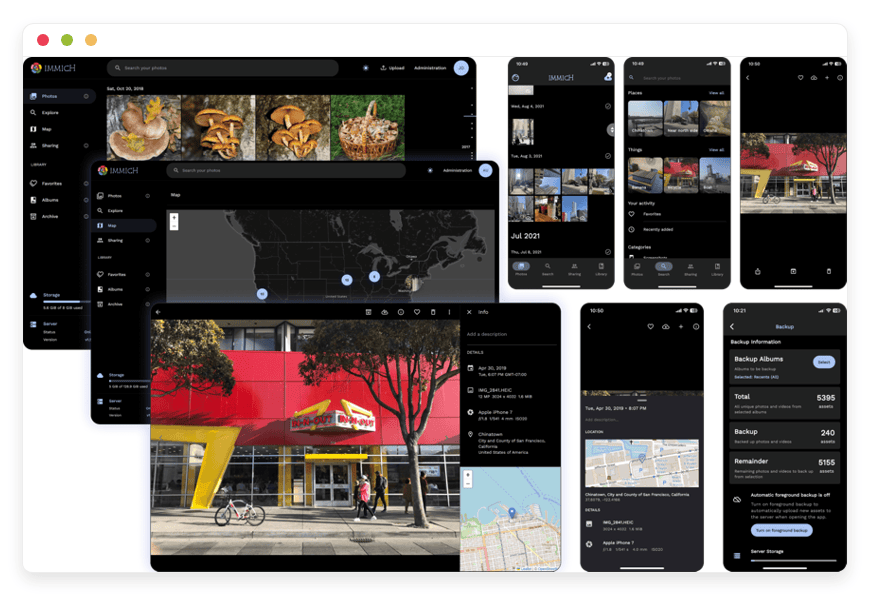
Immich is an open-source, self-hosted photo and video management platform — automatic mobile backup, CLIP-based smart search, and on-device face recognition — combining the convenience of Google Photos and iCloud with the security and control of self-hosted infrastructure.

Free 7-day trial  99.9% Uptime SLA  No credit card  Cancel anytime

Free 7-day trial  99.9% Uptime SLA
No credit card  Cancel anytime

Immich

Immich

STARTING AT

€9/month
Automated Backups
Monitoring
Automated Updates
Auto SSL

USAGE

Unlimited
Human Support
Custom Domains
Terminal Access
File Manager Access
Deploy in your region 21 locations worldwide
GermanyFinlandNetherlandsUKSwedenUnited StatesCanadaSingaporeJapanAustraliaBrazilSouth Africa+9 more →
Immich Preview Image

ABOUT THE SOFTWARE

What is Immich

Immich is the high-performance, self-hosted photo and video management platform that has become the de facto open-source replacement for Google Photos and iCloud Photos. It runs natively on your own server with first-party iOS and Android apps.

The project began as a personal weekend build by Alex Tran in February 2022 — a developer who wanted a private photo library for his family. It grew faster than almost any other self-hosted project in recent memory. In May 2024 the core maintainers, Alex Tran and Zack Pollard, joined FUTO, an open-source organisation that took the team full-time. The project is licensed under AGPL-3.0, which means the source is open, forks are permitted, and the licence specifically prevents the code from being taken proprietary in the future.

The signature moment was v2.0.0, shipped 9 October 2025 — Immich's first stable release. The "use at your own risk" banner came off the website, the data schema was versioned with a commitment to compatible migrations, and the project moved to semantic versioning. The current line is the v2.x series; as of writing the repository has over 98,000 GitHub stars and the project ships releases roughly every few weeks. Smart search and facial recognition run locally on the server through Postgres extensions (VectorChord, the successor to pgvecto.rs) and ONNX-based CLIP models. No photo is ever sent to an external service.

FEATURES

What Immich does

Immich is feature-complete enough to replace Google Photos and iCloud Photos for most users. The mobile apps are the differentiator from earlier self-hosted attempts — the auto-backup actually works the way phone users expect.

Automatic mobile backup

First-party iOS and Android apps upload new photos and videos in the background. WiFi-only mode, charging-only mode, per-album selection, resumable uploads.

Face recognition and people grouping

Photos auto-group by the people they contain. Name a face once, browse all photos featuring that person. The face vectors never leave your server.

Partner Sharing and multi-user libraries

Each user gets a private library. Partner Sharing enables one-way visibility between two accounts — typical setup is two adults sharing in both directions.

Hardware-accelerated machine learning

CUDA, OpenVINO, ROCm, ARM NN, and RKNN backends for face detection, CLIP, and OCR. Initial face-detection runs drop from days to hours on a modest GPU.

CLIP-based smart search

Natural-language queries against your library. "Beach sunset 2023", "my kid in the blue jacket", "screenshot from last spring" — all of it runs locally against the CLIP model on your server.

Timeline, map, and album views

Virtualised timeline that handles 100,000-plus photos without scroll lag. World map view via reverse-geocoded EXIF. Albums for the manual organisers among us.

External libraries and RAW support

Point Immich at an existing directory and it indexes files in place without copying them. Reads Canon CR3, Sony ARW, Nikon NEF, Fuji RAF, Adobe DNG through libraw.

Hardware-accelerated video transcoding

VAAPI on Intel, NVENC on NVIDIA, AMF on AMD. H.265 and AV1 clips play in any browser without pinning a CPU core for minutes per video.

WHAT'S ALWAYS INCLUDED

Every app. Fully managed.
Nothing extra to pay for.

Every app you deploy includes the full managed service — security, backups, updates, and support from day one.

Automatic updates and patches

Apps run the latest stable version. Security patches applied silently, with rollback if needed.

Daily off-site backups

Multiple daily backups in redundant off-site locations. One-click restore if anything goes wrong.

24/7 uptime monitoring

Continuous monitoring with instant alerting. We respond before you notice.

SSL, firewall, DDoS protection

Auto-renewing SSL, hardened firewall rules, DDoS mitigation on every deployment.

Performance and scaling

We monitor resource usage continuously. When your app needs more headroom, we flag it and upgrade with your explicit approval.

Dedicated engineering support

Real engineers on chat. DNS, SMTP & migration help. All included in €9.

WHY MANAGED

Why teams pick managed Immich

The contemporary trigger is Google's November 2025 "Personal Intelligence" rollout — Gemini's direct integration with Google Photos libraries for AI image generation, plus the Keep Activity setting (renamed from Gemini Apps Activity in September 2025) that uses uploads to train models. Households and photographers who already had concerns now have a concrete reason to move.

The work of "just running Immich" doesn't show up in the marketing screenshots. Postgres needs to live on local SSD — Immich's own requirements page warns that a network share will cause subtle corruption. The vector extension migrated from pgvecto.rs to VectorChord at Immich v1.133, and the wrong Postgres image tag produces a cryptic startup error: "The database currently has VectorChord 0.4.3 activated, but the Postgres instance only has 0.3.0 available." Backups taken after the migration are not restorable into an older Postgres image. The machine-learning container has been observed to spike past 12 GB of RAM during OCR jobs on libraries with hundreds of thousands of assets. The iOS app pauses background backup if Low Power Mode is on or if iOS decides the app isn't being used often enough. Each of these is solvable; collectively, they are a second job for anyone running this from a Raspberry Pi in a hallway closet.

REVIEWS

Hear from customers ​like you​​​​​​​

Successful businesses and professionals around the world rely on DANIAN every day

USE CASES

Three teams who run Immich on DANIAN

These are representative client types we set up most often. Each starts with the same flat €9 plan.

TWO-PHOTOGRAPHER HOUSEHOLD

5 TB of RAW spread across a decade and two careers

Wife shoots weddings, husband shoots travel. About 750,000 assets between them. Region: Finland. External libraries pointed at the storage volume so the existing folder structure stays intact. Hardware-accelerated machine learning enabled so the initial face index didn't take a week. Backup retention at 7 days because RAW deletion mistakes hurt.

6-PERSON EXTENDED FAMILY

Replacing iCloud after the second policy email of 2025

Two parents in Berlin, two grandparents in Lisbon, two grown kids in different cities. Region: Germany for proximity to the European household majority. Partner Sharing configured between the two adults; everyone else runs their own library. Mobile push set up so the iOS app doesn't pause background backup on either parent's phone.

SINGLE-OPERATOR WEDDING PHOTOGRAPHER

Off-camera ingest archive for client deliveries

Around 40 events a year, 80–120 GB of RAW per shoot. Region: UK for client proximity. External library on a dedicated upload volume; immich-go ingest from the studio NAS after each event. Shared-link password protection enabled at the server level. Albums per client; archived after delivery so the active timeline stays current.

COMPARISON

Four ways to run Immich

Most people choosing where to host a photo library are weighing four paths, not vendors. The maths usually settles itself once cost and ongoing operational time are written down side by side.

 PATH1 USER5 USERS 10 USERS
Proprietary SaaS
Google One / iCloud+ (2 TB tier)
$9.99 / mo
Google 2 TB or iCloud+ 2 TB
$9.99 / mo
Family Sharing — same plan, split across 5
$19.98 / mo
Second 2 TB plan needed past family cap
Self-host on a VPS
$24 / mo
Production-class VPS, 4 vCPU / 8 GB
$24 / mo
Same VPS — add a separate ML host past 200k assets
$48 / mo
Two VPS or one larger, plus ~5 hrs/mo of your time
Home server
 $600 one-time + electricity
Synology DS923+ or refurb Lenovo M710q
$600 one-time
Same hardware — RAM matters more than CPU here
$1,200 one-time
Upgrade RAM, add GPU for ML acceleration
DANIAN Managed Immich€9 / mo
Everything included, region you choose
€9 / mo
Same instance, multiple Immich users inside
€9 / mo
Same instance, 10 logins, same price

BY INDUSTRY

Immich for specific industries

A photo platform that holds a household's full family history puts different demands on the same software than one a wedding photographer uses to ingest client work. The five settings below are the ones that recur most often in DANIAN's Immich deployments.

Working photographers running Immich operate against two pressures the average homelab user doesn't: hundreds of gigabytes of RAW per shoot, and clients who expect a stable link to a private gallery years after delivery.

On DANIAN we configure Immich's external libraries against a separate storage volume so the existing folder structure stays intact, enable hardware-accelerated transcoding for the H.265 and AV1 video most modern cameras now produce, and run the machine-learning container against the larger CLIP-XL model rather than the default — facial recognition accuracy matters when you're tagging 40 weddings a year.

The relevant operational standard here is the ISO 12647-7 reference workflow for colour fidelity; we leave the RAW files untouched on ingest so any downstream tethered workflow remains lossless.

A typical full-time wedding shooter generates roughly 3 TB of new material per year — on DANIAN that fits within the regional storage tier at €9/month without scaling-cost surprises.
Schools photographing students live under data-protection regimes that restrict where images of minors may be sent — national laws across most jurisdictions specifically prohibit consumer cloud services for this material.

Immich is well-suited because all photo data stays in the region you pick at signup, and face recognition runs locally rather than through an outside ML service.

On DANIAN we configure per-user libraries with the admin account locked to teaching staff, disable public sharing links by default at the server level, and keep the audit log of access events.

A typical secondary school of 800 students fits comfortably in a single Immich instance with one administrative login per faculty group — the storage footprint of a year of school events runs to about 250 GB of stills plus modest video, well within the regional tier at the flat €9/month.
The buyer here is usually a household that left Google Photos or iCloud after a specific moment — the November 2025 Gemini Personal Intelligence rollout, an AI-training disclosure, or a friend's account getting locked out — and wants the family library to live somewhere a single company cannot suspend, scan, or change terms on.

The relevant operational standard is Apple's Advanced Data Protection model: end-to-end key ownership, no recoverable copy held by the platform.

On DANIAN we enable Partner Sharing for the two-adult case by default, pin the machine-learning model cache so CLIP and face recognition load once and stay resident in memory, and route mobile push notifications through Immich's own first-party server rather than third-party SMS.

Two adults plus three children on a typical 8-year photo archive of around 400 GB fits cleanly within the €9/month tier — meaningfully less than the $120/year iCloud+ 2 TB plan that most households eventually upgrade to.
Family archivists working with scanned slides, negatives, and inherited photo boxes need something Google Photos handles badly: bulk import of files with no EXIF capture date, organised by approximate decade rather than by precise timestamp.

The relevant operational standard is the Library of Congress Recommended Formats Statement for raster still images — TIFF with embedded ICC profiles for archival masters, JPEG derivatives for browsing.

Immich's external-library feature reads directories already structured on disk without copying anything, which is the right primitive for this work.

On DANIAN we configure external libraries against the storage volume, increase the metadata-extraction job concurrency to two so an initial import of 50,000-plus scans finishes overnight rather than over a week, and enable XMP sidecar support so ratings and keywords applied in Lightroom or Capture One persist into Immich.

The archive remains queryable by people, places, and decade — which is what a multi-generational project actually needs.
Property teams photographing listings, inspections, and renovations need a private timeline organised by address and date — and they need it to survive years of agents joining and leaving without losing the visual record of any particular unit.

The relevant operational standard varies by market (NAR best-practice guidance in the US, RICS professional standards in the UK) but the common thread is verifiable date provenance, which Immich preserves through original EXIF metadata.

On DANIAN we enable shared-link password protection at the server level — Immich supports it but it's off by default — configure the upload location against the regional storage where the company is registered for VAT purposes, and tune backup retention to a 90-day rolling window: long enough to recover from a deletion mistake, short enough to keep storage costs predictable as a portfolio grows.

A 200-unit agency typically lives within the flat €9/month tier through several years of accumulated listings.

FAQ

Frequently asked questions

Everything teams ask before signing up — answered straight, without sales speak.

Three groups: technical setup, migration, and how DANIAN works as a service.

01

Technical and configuration

Immich's documented minimum is 6 GB total RAM, but the machine-learning container alone has been observed to spike past 12 GB when OCR jobs run in parallel against large libraries. We provision Immich with headroom above the documented minimum so the CLIP-XL model and the face-detection model stay resident in memory rather than reloading on every job. If your library crosses 200,000 assets and you want hardware acceleration, we tune the deployment for that specifically — most people don't need it.
Immich supports CUDA (NVIDIA), OpenVINO (Intel iGPU and Arc), ROCm (AMD), ARM NN (Mali), and RKNN (Rockchip) for both machine learning and video transcoding. We run hardware-accelerated machine learning when the underlying host supports it. The acceleration matters most during the initial library import — face detection on 100,000 photos drops from several days on CPU to a few hours on a modest GPU.
Immich reads most major RAW formats — Canon CR3, Sony ARW, Nikon NEF, Fuji RAF, Adobe DNG — through libraw, and generates JPEG previews on ingest so the timeline stays fast. We pin the version of libraw bundled with Immich rather than the system default, because Canon and Sony RAW support has been a moving target across versions. If a specific RAW format isn't decoded, the file is still stored and re-decoded as the library updates.
iOS background app refresh is conservative — Apple decides when third-party apps get CPU time, and the system pauses background tasks if the device thinks the app isn't being used. For Immich to back up reliably on iOS, Background App Refresh must be enabled for Immich in Settings, Low Power Mode must be off, and the device should occasionally have the Immich app open in the foreground so iOS keeps prioritising it. Android handles this more directly but may require disabling battery optimisation for Immich specifically.
Not directly. Immich's Partner Sharing is one-way by design — each partner must explicitly enable sharing toward the other for it to be mutual. There's a community workaround using external libraries and symlinks to create a shared folder that both users index, which we can configure on request if a household genuinely needs a single merged library rather than two cross-shared views. Most couples find the two one-way shares sufficient once they enable the option in both accounts.
A regular upload moves the file into Immich's internal storage layout, which Immich then owns and manages. An external library points Immich at a directory it can read but doesn't move files out of — useful when an existing photo archive is already organised on disk and you want to keep that structure intact. External libraries also stay in sync when files are added or removed at the filesystem level, which is the right primitive for batch ingest from a NAS or scanner workflow.
Yes, via VAAPI on Intel, NVENC on NVIDIA, and AMF on AMD. Transcoding matters when phones produce H.265 or HEVC video that browsers don't play natively — without it, the server falls back to software transcode and a 4K clip can pin a CPU core for minutes. We enable hardware video acceleration on hosts that support it and document the encoder in use in the deployment notes we send you on day one.

02

Migration and onboarding

We can activate your app on your own custom domain/subdomain. Examples: mydomain.com, anyword.mydomain.com.
Or, on our randomized free subdomain. Example: 963.apps.danian.cloud
If you wish to use a custom domain/subdomain, select that option when ordering your app (or notify us later). We will send you the required DNS records and if needed, our tech team will modify them for you.
21 datacenter locations across six continents. You choose the region at provisioning. Application data sits in the region you choose; pick whichever is closest to your users or matches your data-residency preference.
Yes. Request a region migration from the dashboard and we run the move in the background. The system emails you when the migration completes; total transfer time depends on data volume but typical instances finish in a few hours. There is no extra charge for a region change.
Yes. Full data export is available at any time, in a portable format you can bring to any infrastructure.
For a 200 GB library, expect the Takeout export from Google to take 12 to 48 hours on Google's side, then 2 to 6 hours to upload into Immich on a typical home broadband connection. Face detection and CLIP indexing then runs in the background and is usually finished within a day on hardware-accelerated hosting. iCloud is similar but the export tooling is less consolidated — most customers export per-album rather than as a single archive.
The official path is Google Takeout — request a Photos export from takeout.google.com, then use the immich-go CLI tool to upload the resulting archive. Takeout preserves EXIF dates, GPS coordinates, and album structure, and immich-go handles the Takeout-specific JSON sidecars correctly where the generic Immich CLI does not. A large library (200 GB plus) may take overnight to import once you account for hardware-accelerated face detection running over the freshly-uploaded assets.
Album structure from Google Takeout transfers cleanly through immich-go. Face groupings need to be re-trained on Immich's side since Google's face vectors are proprietary and don't export. Shared collections — links and joint albums — do not transfer; those are re-created in Immich after the import finishes.
No. Once Takeout import is finished, the Immich app on iOS or Android only needs to back up photos taken after the Takeout cutoff date. The app reads EXIF dates and skips anything Immich already has for that date and device, so there's no duplication.

03

Billing, support, and platform

€9 covers everything we do for that app: hardware in the region you choose, daily off-site backups with one-click restore, automatic security patches and version upgrades, 24/7 monitoring, SSL and firewall, and engineering support on Email/LiveChat. There are no setup fees or hidden line items. For more info see our Pricing page.
If you decide to continue, we charge €9/app/month from day 8. If you don't, the trial ends and you can export your data. No card is required for the trial, and we never auto-charge you without explicit consent.
No. The €9/month is flat regardless of how many users log into your app. Add 5 users or 50; the price doesn't change.
24/7 Live chat and email support, both staffed by engineers who run the systems. We handle DNS configuration, SMTP setup, app integrations, performance tuning, troubleshooting, and migration help. Response time is typically under an hour. There is no tier system — every customer gets the same support.
Yes. Cancel from the dashboard. We don't charge a cancellation fee, we don't lock data, and we will export your data to you on request before deletion. data to you on request before deletion.
Every customer instance is backed up daily to a separate region from the primary. We test restores. You can request a restore at any backup point within the retention window — usually 7 days for daily backups.
Your application data sits in the region you choose at provisioning — 21 datacenter locations across six continents. Account-level data (billing, account email, support ticket history) is processed centrally. Application data region is picked by you, per app.
99.9% uptime SLA on every app, every tenant. Service credits are documented at danian.co/service-level-agreement. The status page is located at status.danian.co.
When your tenant approaches the resource ceiling — the base tier holds 1 vCPU/RAM, 30 GB storage — we notify you. Resource upgrades happen with your explicit consent; we will not upgrade your tenant or charge you without it.
We wait. We don't suspend the app or delete your data on the first failed charge. We email you, you fix the card on file, and we continue.
Invoices can be downloaded from the billing dashboard in PDF the day each charge succeeds. EU VAT is added where applicable and the VAT-reverse-charge regime applies for VAT-registered businesses with a valid number.
150+ open-source apps across automation, team chat, file sync, analytics, AI, password management, email marketing, dev tools, project management, smart home, CMS, and federated social. See the full catalog →
Yes. Every instance comes with a web-based terminal and a file manager in your DANIAN management dashboard. Useful for managing your data and customizations.
Resources scale with your usage. If your app needs more vCPU, RAM, or storage, we add it — and we ask first before any change to your plan. €9 is the floor; resource-heavy workloads may price higher, but you'll always know in advance.
Yes. We have both a Partner program and an Affiliate program available. Anybody can sign up.
No contract. No minimum commitment. Cancel anytime from the dashboard with one click. The 7-day free trial requires no credit card. After the trial converts to paid, you can still cancel at any month without notice or penalty.

DEPLOY IN YOUR REGION

21 datacenter locations on six continents

Pick the region closest to your users.

United States, Germany, Finland, Singapore, Australia, Brazil, Canada, Netherlands, UK, Spain, Italy, France, Sweden, Malaysia, India, Japan, Mexico, Poland, South Korea, Chile, South Africa and more coming soon
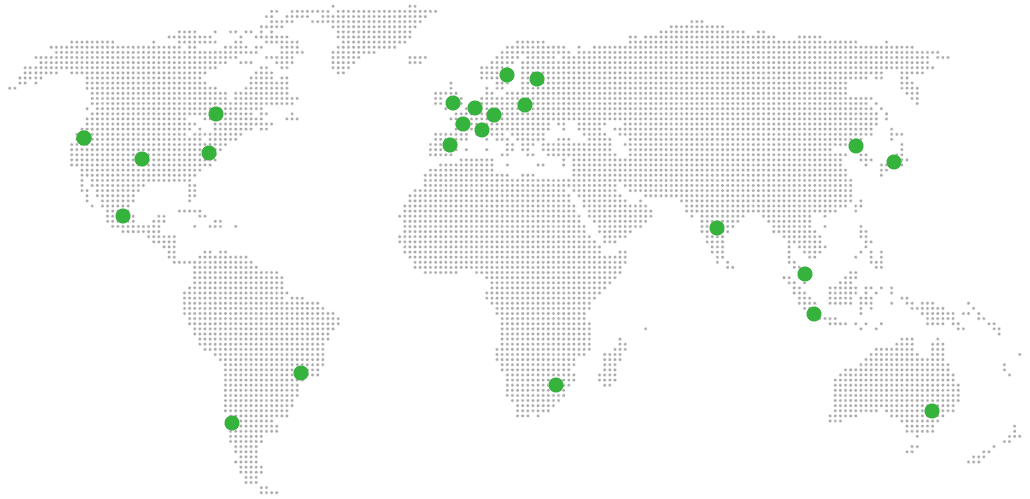
Global Reach Map

Try managed Immich for 7 days

No card. Cancel from the dashboard.