Fully Managed Audiobookshelf
as a Service

Deploy Audiobookshelf as a fully managed service starting at €9/mo. Get automated backups, SSL, updates, support and monitoring included.

Audiobookshelf is an open-source self-hosted audiobook and podcast server — libraries, players, mobile sync, metadata, private RSS feeds — combining the convenience of Audible with the ownership and control of files you actually keep. Started by advplyr in 2021, now at v2.35.0 with 12,800+ GitHub stars and 300+ contributors, it ships official apps for iOS and Android and a full web UI in a single Node.js server.

Free 7-day trial  99.9% Uptime SLA  No credit card  Cancel anytime

Free 7-day trial  99.9% Uptime SLA
No credit card  Cancel anytime

Audiobookshelf

Audiobookshelf

STARTING AT

€9/month
Automated Backups
Monitoring
Automated Updates
Auto SSL

USAGE

Unlimited
Human Support
Custom Domains
Terminal Access
File Manager Access
Deploy in your region 21 locations worldwide
GermanyFinlandNetherlandsUKSwedenUnited StatesCanadaSingaporeJapanAustraliaBrazilSouth Africa+9 more →
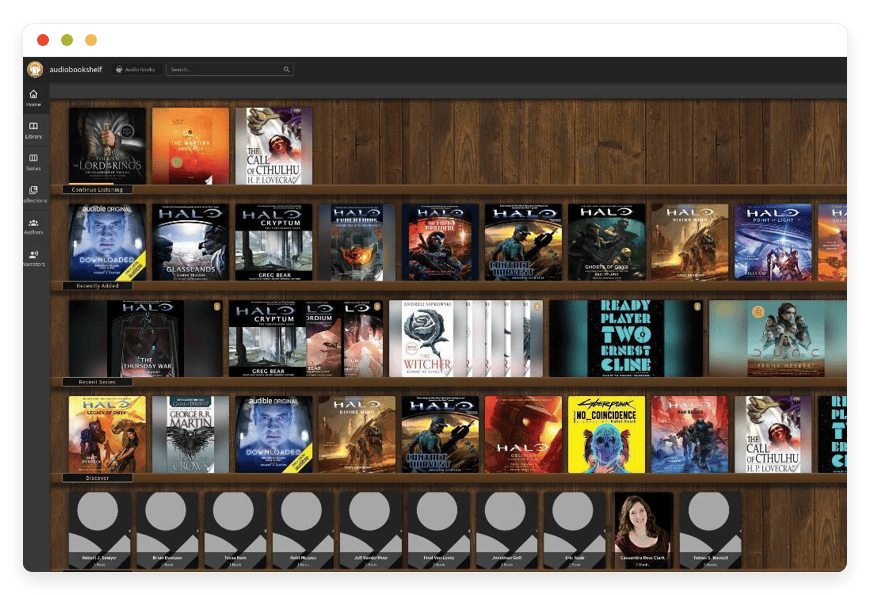
Audiobookshelf Preview Image

ABOUT THE SOFTWARE

What is Audiobookshelf

Audiobookshelf is an open-source self-hosted audiobook and podcast server. It catalogues, streams, and syncs progress across iOS, Android, and the web. You own the files, the metadata, and the database — there is no subscription, no DRM lock-in, no quiet removal of titles.

The project started in 2021 under advplyr (Nick Hibma) and is released under the GPL-3.0 license. The codebase is Node.js on the server with a Vue.js web client and Capacitor-based mobile apps. A single Docker container is the canonical install path, and metadata providers cover Audible, Google Books, iTunes, OpenLibrary, and Audnex.

It is the practical answer to two things at once: replacing Audible at the household or team level, and giving a podcast producer or archive an RSS-native hosting target that they actually own. The server reads ID3 and M4B metadata, embeds covers, detects chapters, and serves a private RSS feed for podcast libraries. Listening progress, bookmarks, and sleep timers sync over a Socket.IO WebSocket between every signed-in device.

FEATURES

What Audiobookshelf does

Audiobookshelf catalogues, streams, and tracks two distinct media types — audiobooks and podcasts — across separate libraries on the same server. The web player, the iOS app, and the Android app all share progress, bookmarks, and sleep-timer state over a single signed-in account.

Audiobook library with rich metadata

Per-library metadata provider selection across Audible, Google Books, iTunes, OpenLibrary, and Audnex; v2.33+ surfaces an Audible match confidence score on the match dialog.

iOS and Android apps with offline sync

Open-source companion apps cache books and episodes locally and sync listening progress over Socket.IO when the device next has connectivity. No third-party tracking.

Web player with chapters and bookmarks

Browser-based player with chapter list, bookmarks, sleep timer, playback-speed control, skip-silence, and an embedded ebook reader for EPUB, PDF, CBR, and CBZ files.

OpenID Connect single sign-on

The authentication system added in v2.26 supports OIDC with refresh-token rotation and an autoLaunch="1" redirect that drops users straight into your identity provider.

Podcast library with auto-download

Subscribe to RSS feeds, fetch new episodes on a configurable cron schedule, store files locally, and re-emit your own private RSS feed for paid subscribers.

Multi-user accounts with separate progress

Per-user library scoping via the librariesAccessible array, admin and user roles, independent listening progress, and role-based download permissions per account.

Built-in M4B tools

Merge multiple MP3 chapters into a single M4B with embedded metadata, edit chapters with online lookup, and write tags back to the source files in place.

Scheduled backups and send-to-Kindle

Backups run daily, weekly, or on a custom schedule and capture /config plus /metadata/items and /metadata/authors. Send-to-Kindle delivers any ebook in the library to a registered Kindle email.

WHAT'S ALWAYS INCLUDED

Every app. Fully managed.
Nothing extra to pay for.

Every app you deploy includes the full managed service — security, backups, updates, and support from day one.

Automatic updates and patches

Apps run the latest stable version. Security patches applied silently, with rollback if needed.

Daily off-site backups

Multiple daily backups in redundant off-site locations. One-click restore if anything goes wrong.

24/7 uptime monitoring

Continuous monitoring with instant alerting. We respond before you notice.

SSL, firewall, DDoS protection

Auto-renewing SSL, hardened firewall rules, DDoS mitigation on every deployment.

Performance and scaling

We monitor resource usage continuously. When your app needs more headroom, we flag it and upgrade with your explicit approval.

Dedicated engineering support

Real engineers on chat. DNS, SMTP & migration help. All included in €9.

WHY MANAGED

Why teams pick managed Audiobookshelf

On March 3, 2026, Audible launched its Standard tier at $8.99/month — the catch is that titles disappear when the membership lapses. Pair that with the Kindle USB-download removal a year earlier, and the "you don't own what you bought" message lands hard enough that buyers are now hunting for a way out.

The buyer who lands here usually wants Audiobookshelf running by the weekend, not in three weekends of evening tinkering. Self-hosting it sounds simple — pull the Docker image, mount a volume, point a browser at port 13378. In practice the operational work starts after that and never quite ends: a reverse proxy that handles the Socket.IO WebSocket upgrade correctly, TLS certificates that auto-renew, the AUDIOBOOKSHELF_UID and AUDIOBOOKSHELF_GID values matching the file ownership on the audio drive, daily backups of the SQLite database that capture the file consistently, monitoring that pages someone when the scan worker dies overnight.

The gotcha most installs hit first is Cloudflare. Put Audiobookshelf behind the orange-cloud proxy and the WebSocket connection dies after roughly 100 seconds of idle time. The web client surfaces it as a 525 SSL error or a library that spins forever; GitHub Issue #4329 and a March 2026 Lemmy thread in r/selfhosted both walk through the same diagnosis a year apart, on different versions. The fix is well-known, but the default install does not warn you.

We run Audiobookshelf with the edge proxy holding WebSocket idle connections for 3,600 seconds, the Cloudflare DNS record set to DNS-only rather than Proxied for the app subdomain, and a three-volume layout where /config and /metadata live on fast SSD. Backups capture only /config plus /metadata/items and /metadata/authors per the upstream documentation, so daily snapshots stay small no matter how many gigabytes of audio the library grows to.

REVIEWS

Hear from customers ​like you​​​​​​​

Successful businesses and professionals around the world rely on DANIAN every day

USE CASES

Three teams who run Audiobookshelf on DANIAN

These are representative team types we set up most often. Each starts with the same flat €9 plan.

MULTI-GENERATIONAL HOUSEHOLD

Replacing six Audible memberships with one library, after the Standard-tier announcement

Germany region. Two libraries: a parent library with full Audible-matched audiobooks at the de.audible.com provider, and a children's library scoped to read-aloud picture books with OpenLibrary metadata. Cover-art aspect ratio set to 1.0 for clean grid display on the iOS app. Six per-user accounts, four with download permission.

INDEPENDENT PODCAST PRODUCER

Twelve years of episodes, served from a server she actually owns

UK region. Podcast library in read-only mode hosting ~600 episodes (~25 GB), with auto-generated RSS served to paid subscribers via a private feed URL. Edge proxy WebSocket idle timeout pre-tuned at 3,600 seconds so progress sync doesn't drop on the iOS app during mid-walk listening sessions.

HOMESCHOOL CO-OP

Curriculum audio across twelve families, no third-party tracking

Sweden region. Twelve families, thirty students aged eight to sixteen. Per-user library scoping means each student sees only the grade-appropriate library a parent enabled. OpenLibrary as metadata provider for LibriVox-sourced public-domain readings. Daily off-site backup retains three months of listening-progress history for parent accountability.

COMPARISON

Four ways to run Audiobookshelf

There are four honest ways to listen to audiobooks and podcasts on your own terms. One rents access from a SaaS. One rents a server and operates the software yourself. One buys hardware and runs it from home. One is the path this page describes.

 PATH1 USER5 USERS 10 USERSWHAT IT MEANS IN PRACTICE
Audible Premium Plus

$14.95/mo$74.75/mo$149.50/moTitles disappear from the Standard tier on cancellation; Premium Plus keeps purchased credits but no family plan exists, so every concurrent listener needs their own membership.
Self-host on a VPS

~$24/mo~$24/mo~$24/mo + DB tuningA $24/month production-class VPS plus 4–8 hours of monthly ops time. WebSocket-aware reverse proxy, TLS auto-renewal, backup pipeline, monitoring, and AUDIOBOOKSHELF_UID/GID matching are yours to configure.
Home server
~$700 one-timesame hardwaresame hardwareA Synology DS923+ or HP ProLiant ML30 Gen10 at roughly $700 one-time plus 10–15 W of continuous draw. Backups still need to leave the building, ISP TOS may forbid serving traffic, and a failed disk is your weekend.
DANIAN Managed Audiobookshelf€9/mo€9/mo€9/moFlat €9 regardless of users. Backups, SSL, monitoring, WebSocket-aware proxy, daily off-site snapshots, and engineering support included. No per-seat charges and no overage.

BY INDUSTRY

Audiobookshelf for specific industries

Four industries place specific demands on an audiobook and podcast server. Each gets its own per-library settings, metadata provider, and backup posture. The platform is the same; the configuration is not.

For an independent podcast producer, the platform is half RSS host and half episode archive. Audiobookshelf serves a podcast library with mediaType: podcast and provider: itunes, generates an RSS 2.0 feed with the iTunes namespace extension (itunes:author, itunes:duration, itunes:explicit), and re-emits the producer's own catalogue via a private URL that paid subscribers point a podcast app at.

We harden the SSRF request filter for the producer's CDN so the server only fetches assets from approved hosts, and we serve the private feed at a long, unguessable path so the URL itself acts as the access token. A five-year back-catalogue of weekly 50 MB episodes lands at about 13 GB — comfortably within the storage profile of the flat plan.
For a co-op or small private school, the server doubles as a curriculum library. Per-user scoping via librariesAccessible means each student sees only the library a parent enabled, and the OIDC SSO added in v2.26 binds login to the co-op's identity provider — refresh-token rotation included.

We disable the root user after provisioning, target WCAG 2.1 AA on the player controls, and configure FERPA-style data minimisation by turning off third-party analytics on the player. MP3 at 128 kbps lands at roughly 60 MB per hour, so a 200-hour history-and-foreign-language curriculum sits around 12 GB; FLAC masters for archival readings scale to about 3 GB per hour.
For a small public library or community oral-history project, the server is a preservation surface. We catalogue with Dublin Core and DCMI metadata terms, keep a metadata.json file inside every book folder so the archive remains portable, and align backups with PREMIS preservation events — capture date, fixity, integrity check.

Archived collections run in read-only library mode with disableWatcher: true so accidental file edits cannot corrupt the catalogue. Two hundred oral-history interviews at ninety minutes each, encoded as 64 kbps MP3, occupy about 8 GB; FLAC masters for archival fidelity push the same collection toward 50–500 GB depending on retention policy.
For drivers, sailors, oil-rig technicians, and remote-field researchers, the platform must work when the network does not. The iOS and Android apps cache full books locally and reconcile listening progress when the device next has connectivity.

We raise the server-side WebSocket ping interval so flaky LTE doesn't churn token refreshes, leave the JWT access-token grace window at the v2.26+ default, and size each user's offline download budget around 5 GB per week. A heavy listener at 40 hours per week and 60 MB per hour consumes roughly 2.4 GB weekly — well inside that budget.

FAQ

Frequently asked questions

Everything teams ask before signing up — answered straight, without sales speak.

Three groups: technical setup, migration, and how DANIAN works as a service.

01

Technical and configuration

No. AAX files carry Audible's DRM and cannot be played directly. The standard path is to convert AAX to M4B using Libation or OpenAudible against an Audible account you already own, then drop the resulting M4B into the watched folder. The resulting file keeps chapters, metadata, and cover art intact. Issue #4236 covers the related xHE-AAC discussion.
Yes — that's the default model. Each library carries its own mediaType (book or podcast), provider (Audible, Google Books, iTunes, OpenLibrary, Audnex), and folder root. You can have a dedicated audiobook library and a dedicated podcast library on every instance; you can add more later through the web UI under Settings → Libraries. Per-user permissions control which libraries each account can see.
Each library picks a primary provider. For self-published audiobooks the OpenLibrary or Google Books providers usually return cleaner matches than Audible. From v2.33 onwards, Audible matches carry a confidence score on the match dialog, so it's easier to spot a wrong hit before applying it. For titles with no metadata anywhere, you can edit the metadata in place from the item details view or drop a metadata.json file into the book folder.
A documented edge case (Issue #4963) skips books that sit deeper than the standard Author/Series/Book layout — for instance, Author/Series1/Series2/Book/file.m4b. The first scan misses them silently. The workaround is to rename the author folder once, which forces Audiobookshelf to re-evaluate the tree on the next scan and pick up the previously missed entries. We watch for this on initial provisioning and flag it in support.
Yes. The Android app on Google Play and the iOS app via TestFlight cache books and episodes locally, play them without a connection, and reconcile progress over Socket.IO when the device next has connectivity. Each user can configure per-library download permissions; admins can cap the per-account download budget if storage matters.
Yes. Listening progress is keyed per user, not per item — the API exposes mediaProgress as a per-user array. Two members of the same household reading the same book see independent bookmarks, sleep-timer state, and last-position values. Sleep timers do not bleed across accounts.
Audiobookshelf reads two environment variables on container start — AUDIOBOOKSHELF_UID and AUDIOBOOKSHELF_GID — not the linuxserver.io-style PUID and PGID. We pin both to the same values that own your audio files on the storage backend, so newly written cover.jpg files and metadata caches inherit the right ownership instead of being created as root. Issue #394 walks through the original cover-as-root bug.

02

Migration and onboarding

We can activate your app on your own custom domain/subdomain. Examples: mydomain.com, anyword.mydomain.com.
Or, on our randomized free subdomain. Example: 963.apps.danian.cloud
If you wish to use a custom domain/subdomain, select that option when ordering your app (or notify us later). We will send you the required DNS records and if needed, our tech team will modify them for you.
21 datacenter locations across six continents. You choose the region at provisioning. Application data sits in the region you choose; pick whichever is closest to your users or matches your data-residency preference.
Yes. Request a region migration from the dashboard and we run the move in the background. The system emails you when the migration completes; total transfer time depends on data volume but typical instances finish in a few hours. There is no extra charge for a region change.
Yes. Full data export is available at any time, in a portable format you can bring to any infrastructure.
Audiobookshelf reads the same ID3 and M4B metadata that Plex and Booksonic use, so the audio files migrate cleanly. The folder layout differs — Audiobookshelf prefers Author/Title or Author/Series/Title — so the actual work is a one-time rsync or move into the right shape.
Audible files carry DRM and need a conversion pass first. The standard tool is Libation, which authenticates against your Audible account and exports DRM-free M4B copies of titles you've purchased. The exported files include chapters, cover art, and metadata; once they land in the watched folder, Audiobookshelf catalogues them like any other audiobook. The conversion runs on your own machine; we don't touch your Audible credentials.
No. Libby and OverDrive loans carry time-limited DRM scoped to the library that lent them. Once a loan expires, the file is gone — which is the point of library lending. Only DRM-free files imported from purchases you actually own (Libro.fm, Downpour, direct from the author, Bandcamp, your own narration work) catalogue cleanly into Audiobookshelf.
No. Audiobookshelf reads existing ID3 and M4B metadata in place and lets you override any field per item from the web UI. For libraries where the file tags are unreliable, a metadata.json file dropped into the book folder takes precedence — useful for self-published or hand-curated collections where the upstream metadata is incomplete.
The Settings → Backups screen produces a full database export as a single ZIP. The archive includes user accounts, listening progress, bookmarks, library configurations, and metadata caches. The audio files themselves are yours throughout; we never hold them as a condition of paying for the service.

03

Billing, support, and platform

€9 covers everything we do for that app: hardware in the region you choose, daily off-site backups with one-click restore, automatic security patches and version upgrades, 24/7 monitoring, SSL and firewall, and engineering support on Email/LiveChat. There are no setup fees or hidden line items. For more info see our Pricing page.
If you decide to continue, we charge €9/app/month from day 8. If you don't, the trial ends and you can export your data. No card is required for the trial, and we never auto-charge you without explicit consent.
No. The €9/month is flat regardless of how many users log into your app. Add 5 users or 50; the price doesn't change.
24/7 Live chat and email support, both staffed by engineers who run the systems. We handle DNS configuration, SMTP setup, app integrations, performance tuning, troubleshooting, and migration help. Response time is typically under an hour. There is no tier system — every customer gets the same support.
Yes. Cancel from the dashboard. We don't charge a cancellation fee, we don't lock data, and we will export your data to you on request before deletion. data to you on request before deletion.
Every customer instance is backed up daily to a separate region from the primary. We test restores. You can request a restore at any backup point within the retention window — usually 7 days for daily backups.
Your application data sits in the region you choose at provisioning — 21 datacenter locations across six continents. Account-level data (billing, account email, support ticket history) is processed centrally. Application data region is picked by you, per app.
99.9% uptime SLA on every app, every tenant. Service credits are documented at danian.co/service-level-agreement. The status page is located at status.danian.co.
When your tenant approaches the resource ceiling — the base tier holds 1 vCPU/RAM, 30 GB storage — we notify you. Resource upgrades happen with your explicit consent; we will not upgrade your tenant or charge you without it.
We wait. We don't suspend the app or delete your data on the first failed charge. We email you, you fix the card on file, and we continue.
Invoices can be downloaded from the billing dashboard in PDF the day each charge succeeds. EU VAT is added where applicable and the VAT-reverse-charge regime applies for VAT-registered businesses with a valid number.
150+ open-source apps across automation, team chat, file sync, analytics, AI, password management, email marketing, dev tools, project management, smart home, CMS, and federated social. See the full catalog →
Yes. Every instance comes with a web-based terminal and a file manager in your DANIAN management dashboard. Useful for managing your data and customizations.
Resources scale with your usage. If your app needs more vCPU, RAM, or storage, we add it — and we ask first before any change to your plan. €9 is the floor; resource-heavy workloads may price higher, but you'll always know in advance.
Yes. We have both a Partner program and an Affiliate program available. Anybody can sign up.
No contract. No minimum commitment. Cancel anytime from the dashboard with one click. The 7-day free trial requires no credit card. After the trial converts to paid, you can still cancel at any month without notice or penalty.

DEPLOY IN YOUR REGION

21 datacenter locations on six continents

Pick the region closest to your users.

United States, Germany, Finland, Singapore, Australia, Brazil, Canada, Netherlands, UK, Spain, Italy, France, Sweden, Malaysia, India, Japan, Mexico, Poland, South Korea, Chile, South Africa and more coming soon
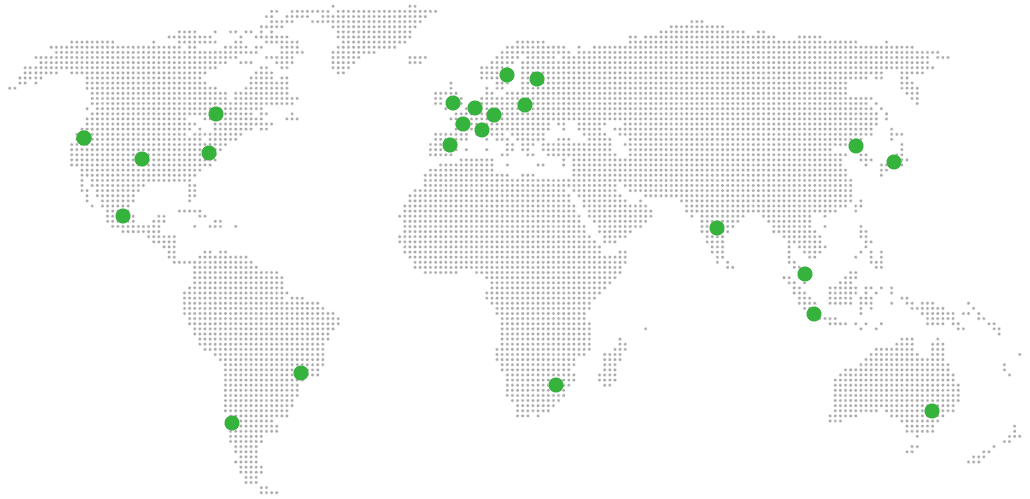
Global Reach Map

Try managed Audiobookshelf for 7 days

No card. Cancel from the dashboard.