Fully Managed
AdGuard Home
as a Service

Deploy AdGuard Home as a fully managed service starting at €9/mo. Get automated backups, SSL, updates, support and monitoring included.

AdGuard Home is an open-source network-wide ad and tracker blocker that runs as a DNS server. It blocks ads and trackers across every device on a network — laptops, phones, smart TVs, IoT — without per-device clients, and combines the convenience of a hosted DNS filter with the privacy of running the query log on your own instance.

Free 7-day trial  99.9% Uptime SLA  No credit card  Cancel anytime

Free 7-day trial  99.9% Uptime SLA
No credit card  Cancel anytime

AdGuard Home

AdGuard Home

STARTING AT

€9/month
Automated Backups
Monitoring
Automated Updates
Auto SSL

USAGE

Unlimited
Human Support
Custom Domains
Terminal Access
File Manager Access
Deploy in your region 21 locations worldwide
GermanyFinlandNetherlandsUKSwedenUnited StatesCanadaSingaporeJapanAustraliaBrazilSouth Africa+9 more →
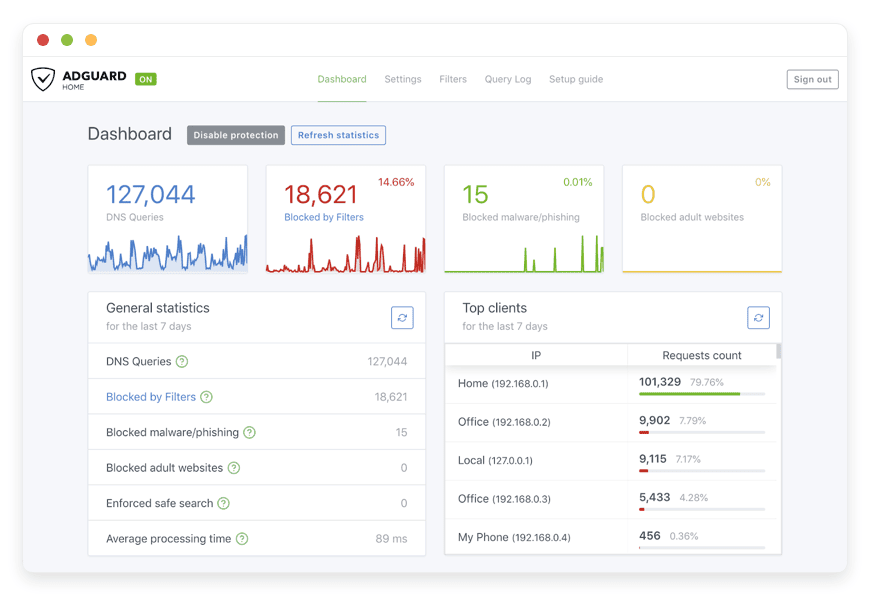
AdGuard Home Preview Image

ABOUT THE SOFTWARE

What is AdGuard Home

AdGuard Home is an open-source network-wide DNS server that blocks ads, trackers, malware, and adult content at resolution time. Every device on the network — phones, laptops, smart TVs, IoT — queries it instead of an ISP or third-party DNS, and any blocked domain returns NXDOMAIN.

The project is maintained by AdGuard Software Limited under GPL-3.0 and written in Go, with the source on GitHub at AdguardTeam/AdGuardHome. The repository has around 34,100 stars and 2,300 forks. First public release was 16 October 2018; the project has shipped ten minor versions and dozens of patch releases since.

AdGuard Home is distributed as a single Go binary plus an embedded web UI. Minimum spec is 256 MB of RAM and one CPU thread; idle memory sits around 50–80 MB. The binary speaks plain DNS, DNS-over-TLS, DNS-over-HTTPS, and DNS-over-QUIC on the same port set. It can optionally run as the network's DHCP server, which is what makes MAC-based client identification work.

FEATURES

What AdGuard Home does

AdGuard Home is one binary that does a small number of things well: filter DNS, enforce per-client rules, expose encrypted DNS endpoints to client devices, and report on what got blocked. The eight features below are what the project ships out of the box on the current stable release.

DNS-level ad and tracker blocking

Sinkholes ad and tracker domains at resolution time so every device sees them as non-existent. No per-device client needed — browsers, mobile apps, smart TVs, and IoT all benefit.

Custom filtering rules and allowlists

AdGuard syntax supports $client, $ctag, and $dnsrewrite rules. Add per-device allowlists, rewrite local domains to LAN IPs, or scope a rule to one subnet.

Optional DHCP server

AdGuard Home can act as the network's DHCP server. That is what enables MAC-based client identification and what pairs hostnames to leases automatically.

Query log with privacy controls

Configurable rotation interval, anonymisation of the client IP host bits, ignore-list for domains you do not want recorded, and on-disk JSON storage you fully control.

Parental controls and SafeSearch enforcement

Built-in adult-content category plus forced SafeSearch on Google, Bing, DuckDuckGo, and YouTube Restricted Mode. Applied per-client so kids' devices can have stricter rules than adults'.

Encrypted DNS for clients (DoH, DoT, DoQ)

Run AdGuard Home itself as a DNS-over-HTTPS, DNS-over-TLS, and DNS-over-QUIC endpoint. iOS, Android, Firefox, and Chrome clients query over TLS with no plaintext DNS on the wire.

Per-client settings and statistics

Each client (by IP, MAC, hostname, or DoH ClientID) gets its own filter profile, allowlist, query log retention, and dashboard panel.

Filter list management

Subscribe to AdGuard DNS filter, EasyList, HaGeZi, OISD, and any host-syntax or AdBlock-syntax list. Update interval set per list. Toggle individual lists without restart.

WHAT'S ALWAYS INCLUDED

Every app. Fully managed.
Nothing extra to pay for.

Every app you deploy includes the full managed service — security, backups, updates, and support from day one.

Automatic updates and patches

Apps run the latest stable version. Security patches applied silently, with rollback if needed.

Daily off-site backups

Multiple daily backups in redundant off-site locations. One-click restore if anything goes wrong.

24/7 uptime monitoring

Continuous monitoring with instant alerting. We respond before you notice.

SSL, firewall, DDoS protection

Auto-renewing SSL, hardened firewall rules, DDoS mitigation on every deployment.

Performance and scaling

We monitor resource usage continuously. When your app needs more headroom, we flag it and upgrade with your explicit approval.

Dedicated engineering support

Real engineers on chat. DNS, SMTP & migration help. All included in €9.

WHY MANAGED

Why teams pick managed AdGuard Home

On 11 March 2026, AdGuard shipped v0.107.73 as an emergency hotfix for CVE-2026-32136, a CVSS 9.8 authentication bypass that gave any unauthenticated attacker full admin on an exposed instance. Managed hosting is what would have prevented that.

Running AdGuard Home is not the install. It is the operational work that follows. Filter lists need to be refreshed against HaGeZi, OISD, and the AdGuard DNS filter without breaking the in-flight query stream. SSL certificates on the DoH and DoT endpoints need to renew before clients fail closed. Upstream resolvers need to fail over when Quad9 drops a route. None of that work is in the AdGuard Home README. All of it is what €9 covers.

The other failure mode that hits DIY operators on day one is the systemd-resolved port 53 conflict. Every mainstream Linux distro that ships with systemd already binds 127.0.0.53:53 — AdGuard Home cannot bind 0.0.0.0:53 until you disable the stub listener, repoint /etc/resolv.conf, and reload systemd-resolved. Get any step wrong and the host loses DNS, which means it cannot pull filter list updates, which means the resolver runs on stale blocklists until someone notices. We have already lost an afternoon to it so you do not have to.

REVIEWS

Hear from customers ​like you​​​​​​​

Successful businesses and professionals around the world rely on DANIAN every day

USE CASES

Three teams who run AdGuard Home on DANIAN

These are representative team types we set up most often. Each starts with the same flat €9 plan.

PRIVACY-CONSCIOUS HOUSEHOLD

Replacing the family's DNS without sending the kids' browsing to a third party

Two parents, two children aged 8 and 12, about ten devices including a smart TV and a Switch. Region: Germany. Configuration: SafeSearch enforced on Google, Bing, DuckDuckGo, and YouTube; per-client rules with $ctag=device_phone so the parents bypass social-media filters on their own phones while the kids' tablets stay locked.

DISTRIBUTED MICRO-AGENCY

Centralised DNS for an 8-person remote team without a US DNS service in the loop

Eight-person design and research agency, fully remote, employees across Germany, Spain, and Portugal. Region: Spain. Configuration: Tailscale tailnet with AdGuard Home as the MagicDNS upstream; one DoH ClientID per employee so each laptop shows up by name in stats. Alerts route to Slack on threat-list hits.

SHORT-TERM RENTAL OPERATOR

Guest WiFi filtering across 5 apartments without a guest's DNS log leaving Europe

Five-apartment short-let operator in Lisbon and Porto. Region: Finland. Configuration: one AdGuard Home instance, each property's travel router pointed in via WireGuard, per-property ClientIDs, HaGeZi Pro plus the adult-content filter, query log set to anonymise the last octet at write time.

COMPARISON

Four ways to run AdGuard Home

The choice for most teams is between a hosted DNS filter, running AdGuard Home yourself on a VPS, running it on a higher-end home server, and a managed instance. The math below shows monthly cost across 1, 5, and 10 households or sites. DANIAN lands flat at €9 regardless of scale.

 PATH1 HOUSEHOLD5 HOUSEHOLDS 10 SITESONGOING OPS TIME
Proprietary SaaS DNS filter
(NextDNS Pro reference)
~€1.55/mo~€7.75/mo~€155/mo0 hrs
Self-host
on a $24/mo production-class VPS
€100–280 effective€500–1,400 effective€1,000–2,800 effective1–2 hrs/mo per instance
Higher-end home server
(business-grade mini-PC ~€800)
€210–667 effectiveNot viableNot viable2–4 hrs/mo
DANIAN Managed AdGuard Home€9€9€9 per instance0 hrs/mo

Path 1 (proprietary SaaS) is genuinely cheaper for one household at the entry tier — about $1.99/month against €9. The trade-off is that the DNS query log lives on the SaaS provider's infrastructure, not yours, and that is the trade-off most privacy-curious buyers actively want to avoid. The price advantage also flips at the small-business tier, where per-employee or per-config block billing scales fast.

Path 2 (VPS) buys you control but bills around $44/month of infrastructure ($24 production-class VPS + $5 object-storage backup + $15 monitoring) plus the operator time to patch the v0.107.x release line, renew certificates, and audit access. At €60–120/hour freelance sysadmin rates, that is €60–240/month in time alone.

Path 3 (home server) only works at one site, requires business-grade internet with a static IP and reliable uplink (about €40–80/month), and assumes two to four hours per month of operator attention. We exclude single-board computers from this row deliberately: AdGuard Home with heavy filter lists loaded has invoked the OOM-killer on 1 GB Pi 4s during filter updates, which is not what a production resolver should be doing.

Path 4 (DANIAN) flattens all of the above into €9/month per instance, applies the patches, and answers chat when something looks wrong.

BY INDUSTRY

AdGuard Home for specific industries

AdGuard Home shows up in industries where DNS-level filtering and DNS-query privacy are the actual purchase rationale, not a generic checkbox. The four below are the ones where managed hosting changes the math — and where the configuration choices made by default match the operational reality of the buyer.

Schools and daycares have an operational duty to filter what minors can reach on the network. Most are not running per-device MDM; a few are, but the gaps — smart boards, early-years tablets, BYOD parent devices on parent-evening WiFi — are where DNS-level filtering does the work.

By default the managed instance ships SafeSearch enforcement on Google, Bing, DuckDuckGo, and YouTube Restricted Mode, with HaGeZi's NSFW, Gambling, and Anti-Piracy lists subscribed. Each classroom VLAN gets its own ClientID, and filter list updates run hourly.

A 180-pupil primary school in Manchester runs managed AdGuard Home to enforce SafeSearch and block adult and gambling categories across about 120 school-issued Chromebooks plus the staff WiFi, without per-device MDM enrolment on the early-years tablets. At 100 queries per second on plain UDP DNS, AdGuard Home uses under 5% CPU on Pi 4-class hardware; a 200-device school comfortably fits one VM.
An operator running guest WiFi is the data controller for that network. The operational standard for any public-by-invitation network is a duty of care: reasonable measures against malware distribution, content unsuitable for shared spaces, and the basic privacy of guest traffic.

The default configuration runs a separate AdGuard Home client profile per SSID or VLAN. The guest network gets stricter filtering than the staff network. HaGeZi's Threat Intelligence Feeds plus the Phishing URL Blocklist run on the guest profile. Adult-content category is blocked on guest WiFi. Query log retention is capped at 24 hours with the client IP host bits anonymised at write time.

A 12-room boutique guesthouse in Lisbon runs managed AdGuard Home to filter malware and phishing on guest WiFi, with a separate filtering profile on the staff and POS network that permits business categories blocked on the guest side. The AdGuard Home binary is around 30 MB; minimum spec is 256 MB RAM and one CPU thread, so a 5-property operator can run one instance per region without scaling concerns.
Small law firms, journalism teams, and privacy-focused consultancies operate under a client-confidentiality standard that goes beyond standard small-business practice. The failure mode is not malware. It is metadata leakage: a third-party DNS service learning that the firm queried opposing-counsel domains, case-research databases, or court filings.

The default configuration ships DoT and DoH upstreams only — no plaintext DNS leaves the VPS — and disables the query log or caps it at 24 hours with IP anonymisation, depending on the client's preference. DNSSEC validation runs on every response.

A six-lawyer immigration-law firm in Berlin runs managed AdGuard Home so the domains queried during case research never leave the firm's own infrastructure. The instance speaks DNS-over-HTTPS on port 443, DNS-over-TLS on port 853, and DNS-over-QUIC on ports 784, 853, and 8853 simultaneously.
Small clinics and mental-health practices process patient data and operate under stricter confidentiality standards than most small businesses. DANIAN does not provide attested compliance with any clinical-data framework and does not sign data-protection agreements that imply attestation; buyers who specifically need an attested certificate today are not the right fit.

The default configuration deploys one dedicated AdGuard Home instance per practice (no multi-tenant), DoT-only upstreams, and query log disabled.

A three-clinician psychotherapy practice in Vienna runs managed AdGuard Home on the in-office WiFi so domains queried from the waiting-room iPad and the clinicians' laptops are filtered for malware and trackers, without a third-party DNS provider seeing per-patient browsing patterns. Idle memory on the instance sits between 50 and 80 MB.

FAQ

Frequently asked questions

Everything teams ask before signing up — answered straight, without sales speak.

Three groups: technical setup, migration, and how DANIAN works as a service.

01

Technical and configuration

AdGuard Home logs every DNS query by default, and the log stays on the device running AdGuard Home — the project itself sends nothing back to AdGuard. On a DANIAN instance, the log lives on your VM. We default rotation to 24 hours and enable the AnonymizeIP function, which zeroes the host bits of the client IPv4 or IPv6 address. You can disable the query log entirely from the admin UI without restart.
We run AdGuard Home as a managed service with 24/7 monitoring, but no DNS server should be a single point of failure. We configure a secondary DNS on the router's DHCP scope (Quad9 9.9.9.9 or Cloudflare 1.1.1.2) so the worst case degrades to "no filtering" rather than "no internet." Clients fall over automatically — they do not wait for ours to come back.
It depends on what AdGuard Home knows about the network. MAC-based identification only works when AdGuard Home is also the network's DHCP server. Otherwise, the resolver matches by IP, by hostname (pulled from /etc/hosts or runtime reverse-DNS), or by ClientID when the client uses encrypted DNS. We help you pick the right scheme for your topology during onboarding.
Yes. AdGuard Home speaks DNS-over-HTTPS, DNS-over-TLS, and DNS-over-QUIC on the same instance. We provision a wildcard TLS certificate from Let's Encrypt so each device can use its own ClientID embedded in the DoH URL (for example, https://kids.agh.your-domain.example/dns-query) or the DoQ host (quic://kids.agh.your-domain.example). That means per-device filter profiles without a VPN.
AdGuard Home blocks at the DNS level. That eliminates most smart-TV telemetry, app analytics, and tracking pixels because those run on dedicated ad domains. YouTube ads are served from the same domain as YouTube content, so DNS-level blocking cannot remove them without breaking YouTube. The same is true of some in-app ads where the ad server and the content server share a domain.
We enable SafeSearch from the admin UI. It rewrites Google, Bing, DuckDuckGo, and YouTube DNS responses to point at their restricted variants. The side effect on YouTube is that YouTube Restricted Mode also disables comments and hides some videos — this is YouTube's behaviour, not AdGuard Home's. If that is not the trade-off you want, leave YouTube SafeSearch off and keep it for the search engines only.
Yes. We tag clients with $ctag values (device_pc, device_phone, device_tablet, child, guest) and write custom rules scoped to those tags. For example, ||example.org^$ctag=child blocks example.org only for clients tagged as child devices. Tagging happens per-client in the admin UI.
Yes — natively, with no sidecar. We default to tls://dns.quad9.net, https://dns.quad9.net/dns-query, and quic://dns.adguard-dns.com running in parallel-query mode, with DNSSEC validation on. The instance never speaks plain UDP DNS to an upstream resolver. Pi-hole still needs a cloudflared sidecar for encrypted upstreams; AdGuard Home does not.

02

Migration and onboarding

We can activate your app on your own custom domain/subdomain. Examples: mydomain.com, anyword.mydomain.com.
Or, on our randomized free subdomain. Example: 963.apps.danian.cloud
If you wish to use a custom domain/subdomain, select that option when ordering your app (or notify us later). We will send you the required DNS records and if needed, our tech team will modify them for you.
21 datacenter locations across six continents. You choose the region at provisioning. Application data sits in the region you choose; pick whichever is closest to your users or matches your data-residency preference.
Yes. Request a region migration from the dashboard and we run the move in the background. The system emails you when the migration completes; total transfer time depends on data volume but typical instances finish in a few hours. There is no extra charge for a region change.
Yes. Full data export is available at any time, in a portable format you can bring to any infrastructure.

03

Billing, support, and platform

€9 covers everything we do for that app: hardware in the region you choose, daily off-site backups with one-click restore, automatic security patches and version upgrades, 24/7 monitoring, SSL and firewall, and engineering support on Email/LiveChat. There are no setup fees or hidden line items. For more info see our Pricing page.
If you decide to continue, we charge €9/app/month from day 8. If you don't, the trial ends and you can export your data. No card is required for the trial, and we never auto-charge you without explicit consent.
No. The €9/month is flat regardless of how many users log into your app. Add 5 users or 50; the price doesn't change.
24/7 Live chat and email support, both staffed by engineers who run the systems. We handle DNS configuration, SMTP setup, app integrations, performance tuning, troubleshooting, and migration help. Response time is typically under an hour. There is no tier system — every customer gets the same support.
Yes. Cancel from the dashboard. We don't charge a cancellation fee, we don't lock data, and we will export your data to you on request before deletion. data to you on request before deletion.
Every customer instance is backed up daily to a separate region from the primary. We test restores. You can request a restore at any backup point within the retention window — usually 7 days for daily backups.
Your application data sits in the region you choose at provisioning — 21 datacenter locations across six continents. Account-level data (billing, account email, support ticket history) is processed centrally. Application data region is picked by you, per app.
99.9% uptime SLA on every app, every tenant. Service credits are documented at danian.co/service-level-agreement. The status page is located at status.danian.co.
When your tenant approaches the resource ceiling — the base tier holds 1 vCPU/RAM, 30 GB storage — we notify you. Resource upgrades happen with your explicit consent; we will not upgrade your tenant or charge you without it.
We wait. We don't suspend the app or delete your data on the first failed charge. We email you, you fix the card on file, and we continue.
Invoices can be downloaded from the billing dashboard in PDF the day each charge succeeds. EU VAT is added where applicable and the VAT-reverse-charge regime applies for VAT-registered businesses with a valid number.
150+ open-source apps across automation, team chat, file sync, analytics, AI, password management, email marketing, dev tools, project management, smart home, CMS, and federated social. See the full catalog →
Yes. Every instance comes with a web-based terminal and a file manager in your DANIAN management dashboard. Useful for managing your data and customizations.
Resources scale with your usage. If your app needs more vCPU, RAM, or storage, we add it — and we ask first before any change to your plan. €9 is the floor; resource-heavy workloads may price higher, but you'll always know in advance.
Yes. We have both a Partner program and an Affiliate program available. Anybody can sign up.
No contract. No minimum commitment. Cancel anytime from the dashboard with one click. The 7-day free trial requires no credit card. After the trial converts to paid, you can still cancel at any month without notice or penalty.

DEPLOY IN YOUR REGION

21 datacenter locations on six continents

Pick the region closest to your users.

United States, Germany, Finland, Singapore, Australia, Brazil, Canada, Netherlands, UK, Spain, Italy, France, Sweden, Malaysia, India, Japan, Mexico, Poland, South Korea, Chile, South Africa and more coming soon
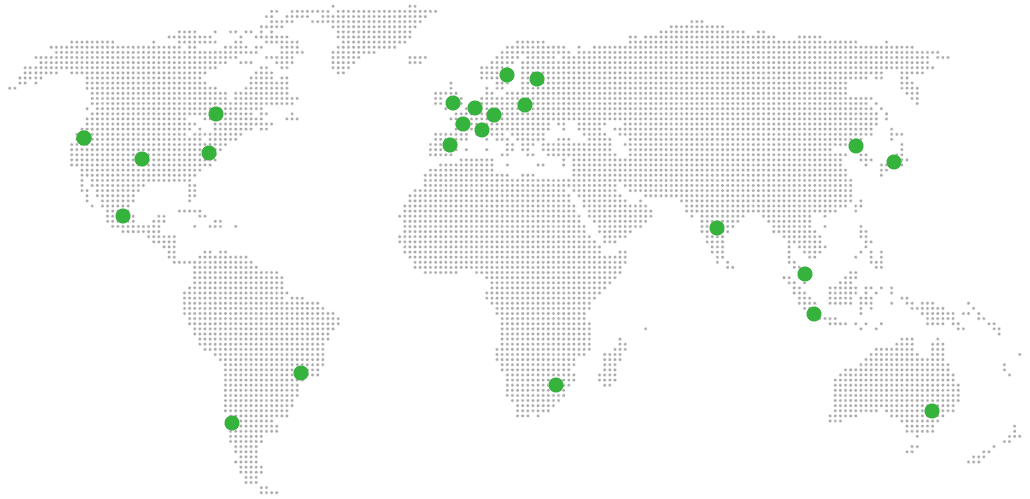
Global Reach Map

Try managed AdGuard Home for 7 days

No card. Cancel from the dashboard.