
Open-source stack for research labs in 2026
The research lab’s open-source stack in 2026 — notebooks, data, and collections you control
A small research lab can replace five paid tools with five open-source apps. The set covers shared notebooks, file storage, a protocol wiki, a digital collections catalogue, and team chat. We run each for €9 a month. Five apps cost €45 a month, flat, with no per-seat pricing.
The short version
- Five open-source apps cover a lab’s notebooks, data, collections, protocols, and chat.
- JupyterHub runs shared notebooks; Nextcloud holds your data; Omeka S catalogues collections; BookStack is the wiki; Mattermost is chat.
- We host each for €9 a month, in the region you choose, with daily off-site backups.
- The five together cost €45 a month, flat, no matter how many people you add.
- This is a data and collaboration stack, not a lab information system or a statistics suite.
Who this is for — and what it does not do
This stack fits a small lab tired of per-seat invoices and institutional storage limits. It suits teams that want notebooks, files, a wiki, a collections catalogue, and chat. It is not a domain-specific research platform. The next sections are honest about that.
Three gaps matter before you commit.
First, there is no lab information management system here. If you track samples, reagents, plates, or chain-of-custody, you need a dedicated LIMS. None of these five apps does that job.
Second, there is no statistics engine. JupyterHub runs notebooks, and you bring your own libraries — pandas, R, NumPy, whatever your field uses. The stack adds no statistical compute of its own beyond what you write and run in a notebook.
Third, there is no LaTeX editor and no reference manager. For typesetting papers or managing citations, your existing tools still do that work.
What you do get is the everyday layer: where the data sits, where the analysis runs, where the protocols live, how the collection is catalogued, and how the team talks. That layer is where the per-seat costs and the storage caps usually bite.
The five-tool stack
Each app below does one job well and replaces a specific paid tool. We run all five on the same €9 flat rate, in the region you choose. The order moves from where analysis happens to how the lab keeps in touch day to day.
JupyterHub — shared notebooks and compute
JupyterHub gives a whole lab one place to run notebooks. Project Jupyter built it for companies, classrooms, and research labs, and it carries a BSD license. It spawns a private notebook server for each user on shared hardware, so nobody installs anything locally.
Each person logs in and gets their own workspace — JupyterLab, classic Notebook, or RStudio. Sign-in plugs into accounts you already use, including GitHub. An admin sets resource limits per user and shuts down idle servers, so one heavy job does not starve the rest.
The honest part is compute. JupyterHub shares whatever the underlying instance has. At the €9 baseline, that is enough for shared notebooks, teaching, and light-to-moderate analysis. Training large models, holding big datasets in memory, or running GPU work needs a larger instance. Tell us the workload and we size it; we do not pretend a small box is a cluster.
It replaces per-seat hosted notebook plans, where every new student or collaborator adds to the bill. Here the seat count does not change the price. See our page on JupyterHub for shared notebooks for setup details.
Nextcloud — research data and sharing
Nextcloud is where your lab’s files live. It is an open-source content platform under an AGPL license, and it replaces Dropbox or Box for shared storage. You get folders, sync clients, link sharing, and version history, all on storage you control.
A lab uses it for the unglamorous but constant work: raw data, processed outputs, figures, and manuscripts in progress. You share a folder with a collaborator at another institution by sending a link, with an optional password and expiry date. Desktop and mobile clients keep local copies in sync.
Version history matters in a lab. When someone overwrites a results file, you roll back to the prior version instead of emailing around for a copy. Permissions let you keep a dataset read-only for students while staff retain edit rights.
It replaces per-seat file-sync subscriptions that charge for every account. Business plans for the hosted tools run around $15 per user each month, and a ten-person lab pays for ten seats whether or not they fill them. On our side the price is €9 flat for the app. Our page on Nextcloud for research data covers regions and storage.
Omeka S — digital collections and exhibits
Omeka S is the tool most labs have not met, and it solves a real problem. It is an open-source publishing platform for digital collections, built by the Digital Scholar group under a GPL license. Libraries, museums, and university projects use it to catalogue and publish structured collections online.
This is not file storage, and the difference matters. Nextcloud holds files in folders; Omeka S describes items. Each item — a specimen photo, a scanned document, an interview, a dataset — gets proper metadata through resource templates. You define the fields once, then every record stays consistent and searchable.
From those records you build public-facing sites and exhibits. One install can run several sites, so a project, a teaching collection, and an archive can each have their own page. Omeka S speaks linked open data, so your records can connect to catalogues and authorities elsewhere on the web.
A lab reaches for Omeka S when a folder of images and a spreadsheet of captions stops being enough. It replaces hosted archive and collections platforms, which are sold as institutional licenses and often cost four figures a year. We run it for €9 a month, in the region you choose.
BookStack — protocols and the lab wiki
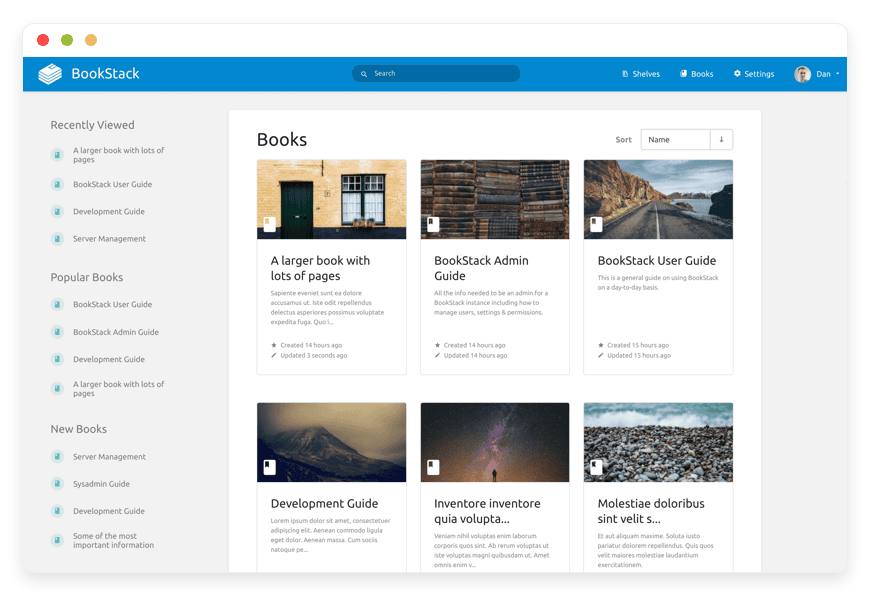
BookStack is the lab’s wiki. It is a self-hosted documentation platform under an MIT license, and it replaces Confluence or a shared Notion space. Pages are organised into shelves, books, and chapters, so a growing protocol library stays findable.
Labs run on documented procedure. BookStack holds your protocols, standard operating procedures, equipment guides, safety notes, and onboarding for new students. You write in a plain editor or Markdown, and every page keeps a version history. When a protocol changes, the old version is still there for anyone reproducing past work.
Permissions are per shelf and per book. You can keep draft methods private to staff and publish approved protocols to the whole group. Search runs across everything, so a new student finds the autoclave instructions without asking three people.
It replaces per-seat wiki subscriptions. Confluence Standard runs about $64 a month for ten seats, and the cost climbs with each new account. Our price is €9 a month for the app, regardless of how many people read or edit. Our page on BookStack for lab protocols has the setup steps.
Mattermost — lab chat
Mattermost is the lab’s chat. It is an open-source messaging platform and a direct Slack alternative; the self-hostable Team Edition carries an MIT license. You get channels, threads, file sharing, search, and integrations, on a server you run.
A lab uses it to keep day-to-day talk out of email and off personal messengers. Channels map to projects, instruments, or reading groups. Threads keep a question and its answers together, and search brings back that protocol tweak someone mentioned two months ago. Bots and webhooks can post job results or alerts into a channel.
Team Edition fits a small group well. It is meant for teams under a few hundred users without single sign-on, which describes most labs. Paid Enterprise features add single sign-on and advanced controls if a department later needs them.
It replaces Slack, which charges per active user. Slack Pro runs about $87.50 a month for ten seats, and the bill grows every time you add a member. Our price is €9 a month, and adding people does not change it. Channels, history, and files stay on storage you control, not on a free tier that quietly hides old messages.
How the five fit together
The five apps overlap cleanly without stepping on each other. Data sits in Nextcloud, analysis runs in JupyterHub, the catalogue lives in Omeka S, procedure lives in BookStack, and the team talks in Mattermost. Each holds one kind of thing, so nothing competes for the same job.
A typical week moves between them. A student pulls a raw dataset from a Nextcloud folder into a JupyterHub notebook, runs the analysis, and saves figures back to Nextcloud. The method they followed is written up in BookStack, linked from the project channel in Mattermost. When the work produces something worth publishing — a set of annotated specimens, a document archive — it goes into Omeka S as a described, searchable collection.
The apps stay separate on purpose. You are not locked into one vendor’s idea of how a lab works. If you only need three of the five, you run three and pay for three. Each runs in its own container, so a problem in one does not touch the others.
Links tie them together where it helps. A BookStack protocol page can point at the Nextcloud folder with the data and the Omeka S record for the resulting collection. The glue is plain URLs, not a proprietary integration you have to maintain.
What the stack costs
Five apps at €9 each is €45 a month, flat. That number does not move when you add a postdoc, a visiting student, or a collaborator. The paid tools these replace charge per seat or per institution. Their total climbs with every account and each September intake.
| Tool | Replaces | Typical paid cost | On DANIAN |
|---|---|---|---|
| JupyterHub | Hosted notebook plans | Per seat, scales with users | €9/month flat |
| Nextcloud | Dropbox or Box | ~$15 per user / month | €9/month flat |
| Omeka S | Hosted collections platforms | Institutional license, often four figures / year | €9/month flat |
| BookStack | Confluence | ~$64 / month for 10 seats | €9/month flat |
| Mattermost | Slack | ~$87.50 / month for 10 seats | €9/month flat |
| Five apps | — | Scales per seat and per institution | €45/month flat |
Paid-tool prices reflect published business plans at June 2026; per-seat tools bill per account, and Confluence Standard and Slack Pro figures use list pricing at ten seats.
The shape of the comparison is the point. A ten-person lab on the paid tools pays for ten seats in three of these categories, plus an institutional archive license, and the figure grows as the group does. The same five apps on our side cost €45 a month and stay there.
We add nothing for headcount. The €9 covers the hardware, the patching, daily off-site backups, monitoring, and support with a person who answers. Your operational time stays near zero, because we run the servers and you use the apps.
The trade is real and worth naming. You give up the deepest enterprise features of the paid tools, and for some teams those features matter. For a lab that mostly needs the apps to run, the flat price and the data control are the better deal.
The honest limits
Three limits decide whether this stack is right for you. JupyterHub gives only as much compute as its instance. The set is not a LIMS, not a statistics package, and not a writing-and-citation suite. Knowing the edges up front saves a migration you regret.
Compute is the first limit. The €9 baseline runs shared notebooks and ordinary analysis without trouble. Heavy training runs, large in-memory datasets, and GPU work need a bigger instance, and that costs more than the baseline. We will size it with you, but a small instance has a real ceiling, and we say so.
Scope is the second limit. If sample tracking, instrument scheduling, or formal data-management workflows are core to your lab, this stack does not replace a purpose-built system for those. It sits alongside one.
Fit is the third limit. A lab that needs single sign-on across everything, or strict access rules tied to a specific framework, may want tools built around that need. For most small labs, the five apps here cover the daily work and the per-seat pain. For a few, a specialised platform is the better call, and that is a fair outcome.
Where your data lives
Your data sits in the region you choose, across 21 datacenter locations on six continents. We back up every app daily, off-site. Each app runs in its own container, isolated from other tenants. You can export everything and leave whenever you want, with no per-seat lock-in.
Control is the reason most labs move off SaaS, so we keep it plain. You pick where each app runs when you set it up. The data for that app stays in that region, not scattered across a vendor’s network you cannot see.
Backups run daily to separate storage, because a backup on the same machine is not a backup. If something breaks, we restore from a recent copy. Each app is walled off in its own container, so one tenant’s load or fault does not reach yours.
Leaving is built in. Every app here is open-source, so your notebooks, files, collections, protocols, and messages export in standard formats. If you ever move off our hosting, you take the data and the apps with you. We do not hold your work to keep your business.
How to start
Start with one app, not five. Pick the tool that hurts most right now — the storage cap, the notebook bill, or the wiki seat count. Run it free for seven days, with no card. See how it fits before you add the next.
The order does not matter much; the habit does. Many labs begin with Nextcloud, because shared storage touches everyone on day one. Others start with JupyterHub if a notebook subscription just renewed, or with BookStack if onboarding a new cohort is the immediate pressure.
Deploy the first app, move a real project onto it, and give it two weeks. Two weeks is long enough to know whether it holds up under actual use, not a demo. If it works, add the second app and connect the two.
You do not run the servers at any point. We handle the hosting, the updates, the backups, and the monitoring, and you reach a person when you need one. Browse the catalogue to see which of the 150-plus apps your lab already wants, then start a free 7-day trial with no card.
FAQ
What does this stack not do?
It is not a lab information management system, a statistics package, or a writing and citation suite. JupyterHub runs notebooks, but you bring your own analysis libraries. For sample tracking, formal data management, LaTeX, or reference management, you keep a dedicated tool. This is the data and collaboration layer, not a domain platform.
Can I run just one app, or do I need all five?
You can run any one of the five on its own. Each is a separate app at €9 a month, with no bundle requirement. Many labs start with Nextcloud or JupyterHub and add others later. You pay only for the apps you actually deploy, and you can add or drop them over time.
Can we add other apps beyond these five later?
Yes. The catalogue has 150-plus open-source apps, each at €9 a month. Start with these five and add more when a new need comes up. You pay only for the apps you deploy, and adding one does not change the price of the rest.
How much compute does JupyterHub give at €9?
The €9 baseline covers shared notebooks, teaching, and light to moderate analysis for a small team. It does not provide cluster-grade compute. Training large models, holding big datasets in memory, or GPU work needs a larger instance, which costs more. Tell us the workload and we size the instance to match.
Does this stack support reproducible research and version history?
In part, yes. BookStack and Nextcloud keep version history, so an overwritten protocol or results file rolls back. JupyterHub holds the notebooks behind an analysis, and you can store them in Nextcloud or Git. For full reproducibility you still manage your own pinned environments, which the stack does not do for you.
Can students, staff, and outside collaborators have different permissions?
Yes. Nextcloud and BookStack set permissions per user and per group. You can keep a dataset read-only for students while staff keep edit rights, and publish approved protocols while drafts stay private. Outside collaborators get access to a single folder or page, not the whole system.
Can the lab sign in with our institution's single sign-on?
It depends on the app. JupyterHub signs in through accounts you already use, including GitHub and other OAuth providers. Mattermost Team Edition does not include single sign-on, which sits in its paid tier. Org-wide sign-on across all five apps is not part of the €9 baseline, and we tell you where it stops.
Does this work for a team spread across several institutions?
Yes. The apps run in your chosen region and are reachable from anywhere over the web. A collaborator at another institution signs in and works in the same Nextcloud, BookStack, or Mattermost. You control who gets an account and what each person can see, so nothing ties the lab to one campus network.
What does the whole stack cost versus our current tools?
Five apps at €9 each is €45 a month, flat, regardless of team size. The paid tools these replace bill per seat or per institution, so a ten-person lab pays for ten seats in several categories plus an archive license. Our price does not rise when you add people.
Is there a free trial, and do you ask for a card?
Yes. Every app runs free for seven days, and we ask for no card to start. You deploy one app, put a real project on it, and see how it fits. If it works you keep it, and if not you walk away with no commitment.
Where does my data live, and can I get it out?
Your data lives in the region you choose, across 21 datacenter locations on six continents. We back up each app daily to separate, off-site storage. Every app is open-source, so your files, notebooks, collections, and messages export in standard formats. If you leave our hosting, you take the data and the apps with you.
Is our data isolated from other customers on shared hardware?
Yes. Each app runs in its own container, separate from every other customer. One tenant's load, crash, or fault does not reach yours. Your files and databases are not shared with anyone else on the hardware, and you pick the region where that container runs.
Who owns the data, and will you use or sell it?
You own it. The data in your apps is yours, and we host it rather than claim it. We do not sell it, mine it, or feed it to advertising. Because every app is open-source, you can export everything and take it with you whenever you want.
How do backups work, and can you restore a deleted file?
Yes, we can restore. We back up every app daily to separate, off-site storage. If you delete or break a file, we recover it from a recent copy. A backup on the same machine is not a backup, so we keep yours elsewhere and restore from the latest good copy.
What exactly is Omeka S for?
Omeka S publishes digital collections. Unlike a file store, it describes items one by one with structured metadata, then builds public sites and exhibits from those records. Libraries, museums, and university projects use it for archives and curated collections. A lab reaches for it when a folder of images and a caption spreadsheet stops being enough.
How hard is it to switch from our current tools?
Switching is gradual, one app at a time. You import files into Nextcloud, recreate protocols in BookStack, and point notebooks at the new JupyterHub. Most labs move a single project first, confirm it works over two weeks, then migrate the rest. We help with setup over chat, so you are not doing it alone.
Do we need a sysadmin to run this?
No. We run the servers, apply updates, take daily off-site backups, and monitor each app around the clock. You use the apps through your browser and reach a person when something needs attention. Your operational time stays near zero, which is the point of paying for managed hosting.
Who handles updates and security patches?
We do. We apply app updates and security patches, run the servers, and monitor each app around the clock. You never log into a server or run a command. When an app ships a fix, we roll it out, so your job is to use the app, not maintain it.
What support do we get, and how do you respond?
You reach a real person over chat when something needs attention. We help with setup, answer questions about the apps, and step in when an app misbehaves. We do not run a phone queue or a ticket maze. For most questions you get a human reply, not a bot.
Can we self-host these apps ourselves instead of paying you?
You can. Every app is open-source, so nothing stops you running it on your own server. What you take on is the work: provisioning, updates, patches, backups, monitoring, and the time when something breaks. We charge €9 an app to carry that, and if your lab has the skills, doing it yourself is a fair call.
How is this different from renting a VPS and installing the apps?
A plain VPS gives you an empty server, and you still install and run every app yourself. With us the app is set up, patched, backed up, and monitored, and you reach a person when you need one. A VPS is cheaper per month but costs you time and skill. We trade a flat €9 an app for the work you would otherwise do.
What happens to our apps and data if we stop paying or you shut down?
Your data and apps stay portable by design. Every app is open-source, so your files, notebooks, collections, protocols, and messages export in standard formats. If you stop paying, you move the apps and data to your own server or another host. We do not hold your work to keep your business, and you are never locked in.
What to do this week
Pick the one tool whose bill or limit annoys you most. Stand it up on a 7-day trial and put a real project on it. If it holds, you have the first piece of a €45-a-month lab stack. It does not charge per person.
The case for this stack is not that it does everything. It does not, and the limits above are real. The case is narrower and stronger: for the daily work of a small lab, five open-source apps cover it, you control the data, and the price stays flat as the group grows.
That last point is what the paid tools cannot match. Their bills rise with every new student and every new collaborator; ours does not. See pricing if you want the full breakdown, or pick one app and try it this week.





