
OpenClaw on Mattermost: the complete guide
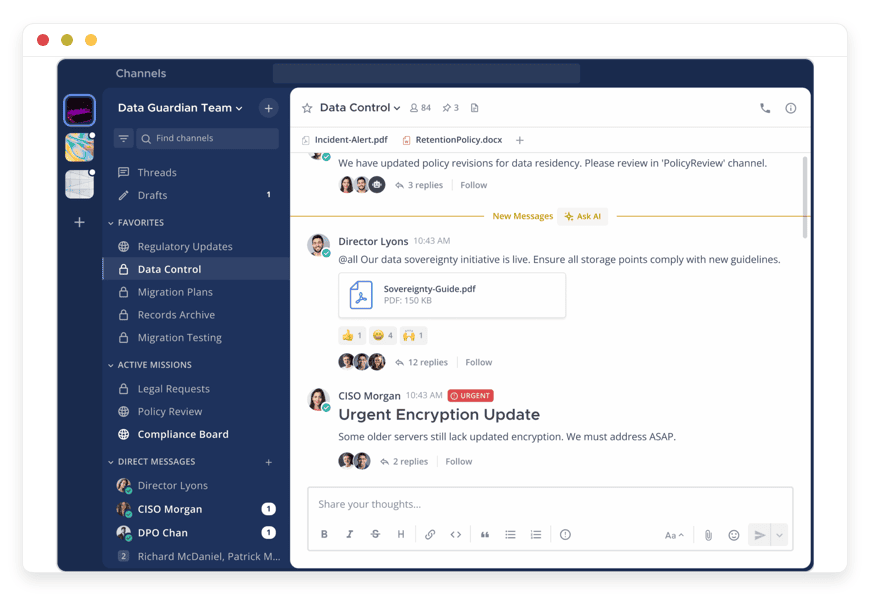
OpenClaw, the open-source personal AI assistant that runs on your own hardware, ships an official Mattermost plugin. Install it, hand it a bot token, and the assistant appears in your workspace. That is where most guides stop. The plugin's own documentation describes a much deeper surface: three chat modes that decide when the agent listens, a pairing flow that gates every stranger out of your direct messages, preview streaming that edits answers into place as they form, opt-in slash commands, clickable buttons with cryptographic verification, per-channel policy overrides, multi-account setups, and loop protection for the day two bots meet in one channel. This guide walks the whole surface, then organizes it into a channel layout worth having.
If you are still choosing a chat home for agents in general, start with our guide to a private chat platform for AI agents. This page is the OpenClaw deep end.
TL;DR
- OpenClaw connects through an official plugin, installed with one command, using a bot token and your server's base URL.
- Chat modes decide when it listens: mention-only by default, every message, or a trigger prefix, set globally or per channel.
- Strangers who DM the bot receive a pairing code; nobody reaches the assistant until you approve it.
- Replies stream into a preview post that finalizes in place, so long generations do not flood the channel.
- The plugin is defensive by design: channel access defaults to an allowlist, private network addresses are blocked, and bot-to-bot loops are cut automatically.
How OpenClaw reaches Mattermost
OpenClaw reaches chat apps through its gateway, a persistent process that holds your channel connections and routes every conversation to your agent. Mattermost support comes as an official plugin rather than a bundled one, which in practice means a single install command and no manual downloads: the plugin system fetches @openclaw/mattermost from the npm registry and applies the change to a running gateway. Once active, the plugin talks to your Mattermost server with a bot account over its API and keeps a WebSocket open for live events. Text works everywhere; media support varies by channel, and Mattermost carries it. The project moves quickly, with frequent releases, so the behavior described here follows the current official documentation rather than any single version number.
The connection in five steps
The step-by-step version with the exact console clicks lives in our knowledge base: connect OpenClaw to Mattermost Team Edition. Compressed, the path is five steps.
- Install the plugin: one command fetches it from the registry. Local checkouts work too if you prefer building from source.
- Create a bot account in Mattermost, copy its token, and add the bot to the rooms it needs to follow, team by team.
- Copy your server's base URL. The plugin is forgiving about format: a trailing API path is stripped automatically.
- Either run the non-interactive channel command with the token and URL as flags, or write the minimal configuration block: enabled, bot token, base URL, and the direct-message policy. Environment variables can carry the same two values if you prefer them over config files.
- Check channel status with the probe flag to confirm the connection, then send the bot a direct message.
One compatibility note saves an hour of confusion: if your Mattermost server sits on a private or LAN address, the gateway's SSRF guard blocks it by default. One configuration flag marks the network as intentional, and the connection goes through.
The three chat modes
Every other channel behavior builds on one decision: when does the agent respond? OpenClaw calls this the chat mode, and Mattermost offers three.
Oncall is the default. In channels, the agent wakes only when mentioned; direct messages always get answers. This is the right mode for shared rooms where the assistant is a resource, not a participant.
Onmessage answers every message in every channel it belongs to. Reserve it for a dedicated ops room where the assistant is the point, because it turns each message from every member into agent work.
Onchar triggers on a message prefix, with the greater-than and exclamation marks as defaults. Type the prefix, get the agent; type normally, stay undisturbed. Explicit mentions still work in this mode.
Two refinements matter in practice. Per-channel overrides let you mix modes: mention-gated globally, always-on in one named channel, prefix-triggered in another. And thread participation carries memory: after the agent replies in a thread, follow-up messages in that same thread keep the conversation flowing without a new mention for a full week, even across gateway restarts. A configuration flag turns that off if you prefer explicit mentions every time.
Designing the channel layout
The same three room shapes apply as with any agent on Mattermost, and the same default wins: private channels for the rooms where work happens. What OpenClaw adds is that the policy layer maps cleanly onto the room layer. Direct messages are governed by the DM policy, channels by the group policy, and both accept allowlists of user IDs, so the layout you draw in Mattermost is the access-control diagram the gateway enforces.
Access groups tidy the allowlists as the team grows: named groups of user IDs, referenced everywhere an ID list is accepted, so admitting a new operator is one edit in one place rather than a sweep through every policy line. The rename hazard is worth naming too: username-based matching exists but ships disabled and is labeled dangerous in the configuration for exactly the reason allowlists prefer IDs, that usernames change and IDs do not.
A layout that suits OpenClaw's always-available character: one private channel in oncall mode as the front door, where the team mentions the assistant for anything from summaries to research; one private ops channel in onmessage or prefix mode, where the assistant watches a stream it cares about; and direct messages for personal, paired conversations. Because per-channel mention overrides exist, the always-on room can be exactly one channel ID wide and nothing else changes. If output should reach a wider audience, post digests outward rather than opening the agent up: outbound delivery accepts channel names, channel IDs, and usernames as targets, which makes scheduled digests to a public announcements channel a one-line job.
Direct messages: pairing instead of exposure
What happens when someone the assistant has never met sends it a direct message? With the default policy, they receive a pairing code and nothing else. The conversation starts only after you approve it, either through the CLI pairing commands or in the gateway settings under the channel access requests screen. Pending requests hold their codes; a full queue tells the sender to wait rather than silently dropping them.
The alternatives are an allowlist, where only listed user IDs get through with no pairing step, and open, which admits anyone. Open is rarely the right choice for an assistant with tools and file access. Pairing is the mode that treats access as a decision you make per person, and it is the mode we would leave on.
Threads, sessions, and streaming answers
Channel replies can stay flat or move into threads, controlled by the reply mode. The default keeps things as they are: replies land where the question landed, and a conversation already inside a thread stays there. Thread-first mode starts a thread under each new top-level post and routes the whole conversation into a thread-scoped session, which pairs naturally with per-chat-type overrides: channels threaded, direct messages flat and rolling, or the reverse.
Choosing between the modes is a channel-design decision more than a technical one. Partial mode suits research rooms, where a growing draft is reassurance the agent is working. Progress mode suits ops channels, where activity without draft text keeps the room clean while long jobs run. Block mode earns its keep when answers are long reference documents, because completed sections persist as their own posts instead of being overwritten by the final message.
The visible magic is preview streaming, on by default. While the agent thinks, calls tools, and drafts, Mattermost shows a single preview post that updates in place, then finalizes into the complete answer when it is ready. Instead of a channel flooding with chunks, one message grows into the response. Block mode keeps finished sections as separate posts, progress mode shows activity without draft text, and off disables it entirely. If a stream cannot finalize because someone posted after it, the answer arrives as a fresh post, so nothing is ever lost.
Slash commands and buttons
Native slash commands are opt-in: one flag registers the agent's commands on every team the bot joins, from status and model switching to starting a new session, with skill commands available as their own triggers. The callbacks are verified against tokens Mattermost issues at registration, and stale tokens stop being accepted without a restart. The reachability rule is the one to respect: the Mattermost server must be able to reach the gateway's callback URL, and a quick request to that URL should return a method-not-allowed response, not a missing page.
Buttons complete the picture. Enable the inline-buttons capability and the agent can ask questions with clickable options; a click passes the same access checks as a message, the chosen option replaces the buttons with a confirmation line, and the selection reaches the agent as an answer. Verification is HMAC-based and automatic for agent-built buttons. The failure modes are documented and mechanical: buttons render as boxes when malformed, clicks from unlisted source IPs are rejected, and identifiers with punctuation break Mattermost's action router.
A week inside the layout
Monday. The ops channel, prefix mode, collects a daily digest the agent assembled overnight: repositories it watched, a build that failed, a reminder that a domain renews this week. Nobody mentioned anything; the room exists to be watched.
Tuesday. A colleague from another team wants in. They DM the bot, receive a pairing code, and forward it with a plea. The request sits in the access queue until you decide, and the assistant has said nothing to them in the meantime. You approve the code, and their DMs work from that moment.
Wednesday. The front-door channel earns its keep: a mention pulls the agent into a thread about a flaky test, the preview post grows while it reads the repository, and the final answer lands as one finalized message. The channel above the thread stays quiet.
Thursday. Hermes, sharing the same workspace from its own bot account, answers a research question next door. The two assistants trade nothing, because the loop budget would cut the conversation anyway.
Friday. The digest channel, public and read-only in practice, carries the week's summary outward. The work happened in private rooms; the output, chosen message by chosen message, is the only thing the wider workspace sees.
What security looks like here
The plugin's defaults read like a checklist of what agents get wrong elsewhere. Direct messages require pairing by default. Channel access defaults to an allowlist policy, mention-gated. Allowlists take user IDs, the stable identifier, rather than usernames, which can be renamed. The SSRF guard blocks private network targets unless you explicitly allow them. Inbound downloads are capped by default, with a configurable per-file limit that fails the send when exceeded instead of passing the original through. And when two bots share a channel, loop protection counts their exchanges and silences one side when a budget is exceeded, with the default set to stop fast loops while letting slow agent replies through. The gateway security documentation covers the full access model for everything past the channel layer.
Token care closes the loop. The bot token authenticates the plugin to Mattermost, and anyone holding it speaks with your bot's voice in every room it belongs to. Keep it in the gateway's configuration store rather than scattered in scripts, rotate it if it leaks, and remember that adding the bot to a channel is itself an access decision: the policy layer filters who can talk to it, not which rooms it reads.
Two servers, two agents, one workspace
Two patterns expand from here. Multiple accounts let a single OpenClaw serve several Mattermost servers at once, each with its own bot token and URL, which is how you bridge a personal workspace and a company one from one assistant. And multiple agents share one workspace the way any bots do: each as its own account. Pair OpenClaw with Hermes Agent on Mattermost or the Pi bridge, give each its own channel, and let the bot-loop budget guarantee they take turns instead of talking forever. The pairing concept from the DM section matters more as agents multiply: every bot you add is another door, and pairing is how you keep the doors answered by you. For the full head-to-head, ourHermes Agent vs OpenClaw comparisoncovers the differences in depth.
Hosting the two halves
OpenClaw itself is famously light to host: the gateway coordinates work while the models run as APIs, so a Raspberry Pi from the project's own install guide handles it, with a one-time hardware cost in the tens of dollars. The Mattermost half is the part that has to stay up, stay current, and sit in a jurisdiction you picked, and that is what our flat €9 monthly covers: Team Edition deployed to any of 21 datacenter regions, with backups, monitoring and updates included, a trial week that asks for no card, and export on demand if you ever move on. The pairing of a Pi in your house with a managed Mattermost in your chosen jurisdiction is a complete private stack for under a coffee subscription a month.
Both halves stay yours. The assistant's session state lives on hardware you control, the chat history lives in your Mattermost database, and the export tools on both sides mean a better offer elsewhere is a migration, not a hostage negotiation.
When it breaks: the failures the docs predict
| Symptom | Usual cause | Fix |
|---|---|---|
| Silent in channels | Oncall mode, no mention | Mention the bot, or set its chat mode per channel |
| Auth errors at start | Wrong token, URL, or disabled account | Recheck both; env vars apply only to the default account |
| Cannot reach LAN server | SSRF guard blocking private IPs | Flag the private network as intentional |
| Slash commands rejected | Stale or partial command registration | Check registration logs; set an explicit callback URL |
| Buttons dead on click | Gateway unreachable or source IP unlisted | Allowlist the Mattermost server IP; check the proxy |
| Callback resolved to localhost | No explicit callback URL set | Set an externally reachable URL |
The pattern is consistent: transport and identity problems live between Mattermost and the gateway, policy problems live in configuration, and the logs name which side is failing. Probe channel status first; it distinguishes a dead connection from a working one that is simply waiting to be mentioned.
Questions people ask about this setup
What exactly is the OpenClaw Mattermost plugin?
An official channel plugin, installed with one command from the npm registry, that connects a self-hosted OpenClaw gateway to your Mattermost server through a bot account.
How do the chat modes differ?
Oncall answers mentions in channels and all direct messages, and is the default. Onmessage answers every channel message. Onchar answers messages that start with a trigger prefix, with mentions still honored.
Can one channel be always-on while others stay mention-only?
Yes. Per-channel mention overrides exist precisely for this: keep the global mode mention-gated and disable the mention requirement for the single channel that should answer everything.
What happens if a stranger messages the bot?
With the default pairing policy, they receive a pairing code and no conversation. The assistant starts talking to them only after you approve the request.
How do I approve a pending pairing request?
Through the CLI pairing commands, which list and approve requests by code, or in the gateway settings under channel access requests.
Do answers arrive all at once or as they form?
Preview streaming is on by default: one post updates in place while the agent works and finalizes into the complete answer. Block and progress modes are available, and streaming can be switched off.
Can OpenClaw hold conversations in threads?
Yes. The reply mode controls it: flat by default, or thread-first, where each top-level post starts a thread carrying its own session. Per-chat-type overrides mix the two.
What do the registered slash commands do?
They cover status, model selection and listing, new sessions, help, thinking and reasoning toggles, verbosity, and queue inspection, plus one command per skill when enabled. Registration is opt-in with one flag.
Can the agent ask questions with buttons?
Yes, with the inline-buttons capability enabled. Options render as clickable buttons, clicks pass the same access checks as messages, and the selection reaches the agent as the answer.
How do I stop two bots replying to each other endlessly?
Loop protection is built in: exchanges beyond a configurable budget in a time window silence one side for a cooldown. A stricter bot-post mode requires mentions between bots specifically.
Can one assistant serve two Mattermost servers?
Yes. Multi-account configuration holds several servers, each with its own token and URL, and a default account setting for when none is specified.
Why does the gateway refuse my internal server address?
The SSRF guard blocks private network targets unless told otherwise. One flag marks the network as intentional, and the connection proceeds.
Is there a limit on file sizes?
Inbound downloads carry a default cap in single-digit megabytes, configurable upward or downward; oversized transfers fail the operation rather than passing through unchecked.
Is a Raspberry Pi enough to host the agent?
Yes, and the project documents it directly. The models run as cloud APIs, so the gateway's own workload fits a modest Pi, with a one-time hardware cost and no monthly fee for the box itself.
Where do the conversations end up?
In the Mattermost database on your rented server, in the region you selected. The gateway keeps its own session state on its own hardware, and no message routes through a third-party chat cloud.
What does the Mattermost side cost?
Our managed Team Edition is a flat monthly figure, region of your choice, trial included, cancel or export whenever you like. Current numbers are always on the hosting page.
Try managed Mattermost hosting for 7 days
Sources
- OpenClaw documentation, Mattermost channel (plugin install, chat modes, pairing, threading, streaming, commands, buttons, troubleshooting)
- OpenClaw documentation, chat channels overview
- OpenClaw documentation, pairing flow
- OpenClaw documentation, gateway security
- OpenClaw documentation, Raspberry Pi install
- OpenClaw release notes
- DANIAN knowledge base, connecting OpenClaw
- DANIAN, the Hermes Agent deep guide
- DANIAN, the private chat platform for AI agents
- DANIAN, managed Mattermost Team Edition


