Open-source stack for law firms in 2026
The law firm's open-source stack in 2026
Documents, signatures, and matter notes you own — five open-source tools a small firm can run for €9 each per month, instead of a stack of per-seat subscriptions.
Most small firms reach a point where the software bill stops making sense. You pay per seat for cloud storage, per seat again for e-signature, per seat for an internal wiki, per seat for chat, and then a separate quote-based contract for a legal document system. Every new lawyer adds to all of them at once. And the client files — the most confidential thing the firm holds — sit on infrastructure run by vendors you cannot point to on a map.
There is a different shape for this. Five mature open-source tools cover client files, e-signature, the document archive, matter notes, and team chat. You can run all five for €45 a month — €9 per app, flat, no matter how many people use them. Open-source means the firm can read the code, run it anywhere, and leave with its data — no vendor holds the exit. This piece walks through each tool, what it replaces, what it honestly does not do, and the math against the subscription bundle.
Who this list is for — and what it doesn't do
This is a documents, signatures, notes, and chat stack. It is not a legal practice-management system, and reading it as one will lead to a bad decision. Be clear about the line before any tool gets installed.
What this stack does not do. No trust or IOLTA accounting. No court-deadline docketing or calendaring. No matter billing or time tracking. No conflict checks. No legal-specific case workflow.
If the firm needs those, keep a dedicated practice-management product — Clio, PracticePanther, or similar — and run these tools alongside it. They handle the documents, the signing, and the internal knowledge. They do not run the practice.
The firms this fits are the ones already paying for general-purpose storage, e-signature, a wiki, and chat as separate subscriptions, and who want tighter control over where client documents live and who can open them. If that is the firm, the five tools below replace four or five line items and put the files on infrastructure you choose. Compare the cost on the pricing page once you have read the list.
The five tools
Each tool below gets a short capsule, the proprietary product it displaces, the team size it suits, the switching effort, and an honest limitation. The price is the same for every one: €9 per app, per month, with hardware, updates, daily off-site backups, monitoring, and human support included.
1. Nextcloud — client files and sharing
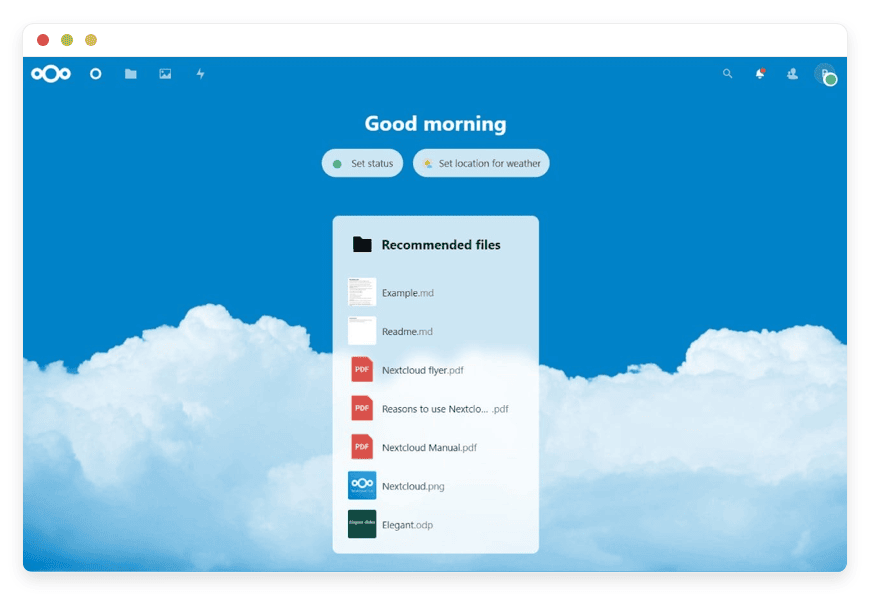
Nextcloud is open-source file sync and sharing, licensed under the AGPL. It is the part of the stack a firm touches most: shared folders per matter, desktop sync for each lawyer, secure links to send a document to a client, and granular control over who can open what. It replaces general-purpose cloud storage — the Dropbox or Google Drive account the firm has outgrown.
For a firm, the useful detail is access control. You decide which folders a paralegal sees, which a contract lawyer sees, and which stay with the partners. Files are stored on the instance DANIAN runs in the region you choose, not pooled with other companies on a consumer storage account. You can revoke a share link the moment a matter closes.
Best for: any firm size, from two lawyers up. It is the foundation the other tools sit beside.
Switching effort: moderate. Moving existing files in is a copy job; the desktop client takes a few minutes per person.
Honest limitation: Nextcloud's built-in document editing is capable but not Microsoft Word. Firms wedded to Office workflows will keep Office and use Nextcloud for storage and sharing.
See Nextcloud for client files on the catalog for setup detail.
2. DocuSeal — engagement letters and signatures
DocuSeal is open-source document signing, also AGPL-licensed. You build a signing form from a PDF, drop in signature and date fields, send it to the client, and collect the signed copy. It replaces the per-seat e-signature subscription most firms run for engagement letters and retainers.
DocuSeal records who signed, in what order, and when, and stores that record with the document — tamper-evident signing metadata you can produce later. Whether an electronic signature is legally valid for a given document depends on your jurisdiction and the matter; that is a question for the firm, not the software. What the tool gives you is a verifiable record of the signing event, kept on your own instance.
Best for: firms sending more than a handful of signature requests a month.
Switching effort: low. Rebuild your common templates once; sending is quick after that.
Honest limitation: the proprietary e-signature products have deeper third-party integrations and notarisation add-ons. DocuSeal covers the core signing job without per-document caps.
See DocuSeal for signatures for the field-builder walkthrough.
3. Paperless-NGX — the document archive
Paperless-NGX is open-source document management with built-in OCR, under the GPL. You scan or drop in a document; it reads the text, assigns a date and a correspondent, applies tags, and files it. Months later you find any letter in seconds by searching its contents. It replaces the scanning-and-archive function a firm otherwise buys as part of a legal document system.
For a firm, the value is retrieval and history. Every incoming letter, signed agreement, and filed exhibit becomes full-text searchable. Each document keeps a record of when it was added and what changed. The archive sits on your instance, not a vendor's cloud where the contents can be mined.
Best for: firms with a paper intake problem or years of PDFs nobody can find.
Switching effort: moderate. The OCR import of a back catalogue runs in the background; tagging rules are worth setting up early.
Honest limitation: Paperless-NGX is an archive and finder, not a co-editing platform. Pair it with Nextcloud — active files in Nextcloud, the settled record in Paperless-NGX.
See Paperless NGX for document archive for OCR and tagging setup.
4. BookStack — matter notes and internal knowledge
BookStack is an open-source wiki, MIT-licensed, organised the way a firm already thinks: shelves, books, chapters, pages. It holds matter notes, research memos, precedent clauses, intake checklists, and the internal procedures that otherwise live in one partner's head. It replaces the internal-wiki subscription — Confluence or similar.
The fit for a firm is structure plus permissions. A shelf per practice area, a book per matter, pages for research and call notes. You control which lawyers can read or edit each shelf, so client-sensitive notes stay with the people on the matter. Precedent clauses and standard letters live in one book, so a lawyer reuses the firm's own language instead of rewriting it each time. Everything is searchable and versioned, so you see what a note said last month.
Best for: firms of three or more where knowledge is scattered across inboxes and documents.
Switching effort: low to moderate. Start with one practice area; let it grow as people use it.
Honest limitation: BookStack is documentation, not a database. It will not track matter status as structured records — that is the practice-management product's job.
5. Mattermost — team chat
Mattermost is open-source, self-hostable team chat. Channels per matter or practice area, direct messages, file sharing, and search over the history. It replaces the per-seat chat subscription — Slack being the common one — and keeps the firm's internal conversations on infrastructure the firm controls.
For a firm, the point is that privileged discussion about a matter does not pass through a consumer chat vendor. You run a channel per active matter, keep the conversation searchable, and retire the channel when the matter closes. Integrations can post a Nextcloud share or a signed-document notice straight into the matter channel, so the team sees activity without leaving chat. Message history stays on your instance, in your chosen region.
Best for: firms that have outgrown email threads for internal coordination.
Switching effort: low. Create the channels, invite the team, and the habit forms within a week.
Honest limitation: some advanced administration features in Mattermost sit in paid editions. The team edition covers a small firm's day-to-day chat without them.
How they fit together
Mapped onto a single matter, the five tools form a clean lifecycle. The combination is the point — each tool does one job, and the seams between them are short.
- Intake: a new client's documents land in a matter folder in Nextcloud, shared only with the lawyers on the matter.
- Engagement: the retainer goes out through DocuSeal; the signed copy and its signing record come back and file straight into Nextcloud.
- Archive: settled documents and incoming correspondence move into Paperless-NGX, where OCR makes them findable for the life of the matter.
- Knowledge: research, call notes, and the matter's running record live in a BookStack book, versioned and permissioned.
- Coordination: the team talks in a Mattermost channel for that matter, kept off any consumer chat service.
A firm does not have to adopt all five at once. The two most common starting pairs are Nextcloud plus DocuSeal — files and signing, the immediate per-seat pain — or Nextcloud plus Paperless-NGX, if the archive is the bigger problem. Add the others as the habit takes hold.
The advantage over four disconnected subscriptions is that the seams are short. A signed retainer files into the same store the matter folder already lives in. A document archived in Paperless-NGX is one search away from the note about it in BookStack. Nothing has to be re-uploaded from one vendor's cloud into another's.
What this costs versus the subscription bundle
Here is the same firm, priced two ways. The table lists each open-source tool, the proprietary product it displaces, that product's published small-firm price, and the DANIAN price. All subscription figures are list prices on the cheapest annual tier, verified in June 2026.
| Open-source tool | Replaces | Proprietary price (annual list) | Region option | DANIAN |
|---|---|---|---|---|
| Nextcloud | Dropbox Business | $15 / user / mo (3-user min) | Pick the region | €9 / app flat |
| DocuSeal | DocuSign | $25 / user / mo (Standard) | Pick the region | €9 / app flat |
| Paperless-NGX | Legal DMS archive | Quote-based | Pick the region | €9 / app flat |
| BookStack | Confluence | $5.42 / user / mo (Standard) | Pick the region | €9 / app flat |
| Mattermost | Slack | $7.25 / user / mo (Pro) | Pick the region | €9 / app flat |
Open-source stack vs. the proprietary equivalents — small-firm tiers, June 2026.
Now the math at five lawyers. Four of these subscriptions on their cheapest annual plans add up per person: Dropbox Business at $15, DocuSign Standard at $25, Confluence Standard at about $5.42, and Slack Pro at $7.25. That is $52.67 per lawyer, per month — about $263 a month for five people, paid a year in advance.
The legal-specific document system most firms run alongside these — NetDocuments or iManage — is quote-based and usually the largest line of all. It is not in the $263; it sits on top of it.
The same five jobs, run on open-source software DANIAN manages, cost €45 a month: €9 per app, flat. And the two bills grow differently. Every new hire adds about $53 a month to the subscription bundle and nothing to DANIAN — the €9 is per app, not per seat. A firm of three pays €45; a firm of thirty pays €45, until it adds an app.
One honest gotcha worth knowing on the subscription side: DocuSign's Standard and Business Pro annual plans cap each user at roughly 100 signature envelopes a year, with overage fees of a few dollars per envelope past that. A firm that sends a lot of engagement letters can blow through the cap. DocuSeal has no per-document limit.
There are quieter traps in the per-seat model too. Dropbox Business requires a three-user minimum, so a two-lawyer firm pays for three seats it does not use. Confluence's small-team plans bill for a fixed user band rather than your actual count. Flat per-app pricing has none of these floors: one app is €9, five are €45. Browse all 150+ apps in the catalog to see what else maps to a subscription you already pay.
Figures mix US-dollar subscription list prices with DANIAN's euro pricing; the gap is large enough that exchange-rate movement does not change the conclusion. €45 is roughly US$48–50 at mid-2026 rates.
On confidentiality and control
For a law firm, the strongest reason to run this stack is not the price — it is control over the client file. Three things change when the software is open-source and managed on infrastructure you choose.
You choose where the files live. Application data is hosted in the region you pick, across 21 datacenter locations on six continents. A firm that wants client documents in a particular jurisdiction can put them there and tell a client exactly where they sit.
The instance is isolated, and you can see inside it. Each app runs in its own hardened container, separated from other tenants — not pooled into a shared consumer account. You get a file manager and a terminal for your own instance, so you can see exactly what is on the disk. That visibility is unusual in managed hosting, and for a firm it is a real trust signal: you are not asked to take the storage on faith.
Nobody is mining the documents. These are open-source tools with no advertising business behind them. There is no vendor incentive to read client files to sell something. And because everything stores data in open formats, you are never locked in — if the firm wants to leave, it exports its files, documents, notes, and message history and moves on.
Control also covers the unhappy cases. Every instance is backed up daily to a separate location, so a deleted file or a failed disk does not mean a lost client record. The firm can ask for a restore. And the backups are never quietly deleted because a card expired — a card fails, we wait.
What DANIAN does on top of that is the operations work: patching each app monthly, taking daily off-site backups, monitoring for problems, and answering by email when a human is needed. The firm keeps the control; the running is handled.
How to start
The mistake is trying to move everything in one weekend. Pick the single tool that solves the loudest problem and run it for two weeks before adding the next.
- If the per-seat storage and e-signature bill is the pain: start with Nextcloud, then add DocuSeal.
- If a pile of paper and unfindable PDFs is the pain: start with Paperless-NGX, then add Nextcloud for active files.
- If internal knowledge keeps getting lost: start with BookStack on one practice area.
Deploy one app, move a real matter's documents into it, and use it for 14 days with the people who will actually live in it. If it holds up, add the next tool. Each one is €9 a month with a 7-day free trial, so the firm can test before it commits.
Start with one app on a 7-day free trial
Frequently asked questions
Grouped by what firms ask most: how the stack fits, how client data is handled, and what it costs to run.
Scope and fit
Is this a replacement for Clio or PracticePanther?
No. This stack covers documents, signatures, matter notes, and team chat. It does not handle trust or IOLTA accounting, court-deadline docketing, matter billing, time tracking, or conflict checks. A firm that needs those should keep a dedicated practice-management product and run these tools alongside it.
How is this different from running the software on our own server?
Running it yourself means owning the patch cycle, the backup discipline, and the late-night fixes. DANIAN does that part: we patch, back up, monitor, and stay on call. You get the same open-source software without the operations work.
What is the best open-source software stack for a small law firm?
A practical five-tool stack covers the core jobs: Nextcloud for client files, DocuSeal for e-signature, Paperless-NGX for the document archive, BookStack for matter notes, and Mattermost for team chat. Managed by DANIAN, the five run for €45 a month total, €9 per app.
Can a small law firm self-host Nextcloud, DocuSeal, and Paperless-NGX?
Yes. All three are open-source and can be self-hosted on the firm's own server, which means owning the setup, security updates, and backups. If the firm would rather not run servers, DANIAN hosts and manages each app for €9 a month instead.
Is open-source software safe to use for confidential client files?
Open-source tools are widely used in professional settings, and being open means the code can be inspected rather than taken on trust. For a firm, safety comes from controlling who can open files, choosing where they are stored, and keeping the data exportable. These tools support all three.
How does this compare to Microsoft 365 or Google Workspace?
Microsoft 365 and Google Workspace are integrated suites from a single vendor, which suits firms that want everything in one place. This stack trades that integration for control: open-source tools, data in the region you choose, flat per-app pricing, and the freedom to export and leave.
Do we need an IT person to run these tools?
No. DANIAN runs the apps for you: monthly patching, daily off-site backups, monitoring, and support over chat or email. The firm uses the software and decides who can see what; the server work is handled. A technical person helps for custom setups but is not required.
Are e-signatures from DocuSeal legally valid?
That depends on your jurisdiction and the type of document, and it is a question for the firm rather than the software. DocuSeal records who signed, in what order, and when, and stores that tamper-evident signing record with the file. This is operational information, not legal advice.
Your data, confidentiality, and control
Where do our client files physically sit?
In the region you choose. Application data is hosted in the datacenter location you pick, across 21 locations on six continents. You select the region per app when the instance is set up, and you can ask to move it later.
Can DANIAN staff read our client files?
Access is limited to what is needed to run and support the apps. We do not read or mine your client files, and these open-source tools have no advertising business that would profit from the contents. You set the permissions inside each app, so a file is seen only by the people you choose.
How is our client data protected?
Connections to each app use encrypted transport. Each app runs in its own isolated container, separate from other customers, and is patched monthly. Data is backed up daily to a separate location, and you choose the region where it is stored. You set who can open each file inside the app.
How often is our data backed up, and can we restore it?
Every instance is backed up daily to a separate location, so a deleted file or a failed disk does not mean a lost record. If you need an earlier version back, you ask us and we restore it. The backups are never quietly deleted because a payment failed.
Who owns the data in these apps?
The firm does. These are open-source tools that store data in open formats, so nothing is locked inside a proprietary system. You can export your files, documents, notes, and message history whenever you want, and take them elsewhere.
Can we export our data and leave?
Yes. Every tool here is open-source and stores data in open formats. You can export your files, documents, notes, and message history and move them elsewhere. There is no proprietary lock-in holding your client records hostage.
What happens to our files if we cancel?
You can export everything before you go, in open formats you can use elsewhere. If a card fails, we wait and contact you rather than deleting anything. Your client records are not held hostage to keep you paying.
Pricing, trial, and support
What does €9 per app, per month include?
Hardware, security updates, daily off-site backups, monitoring, and human support over chat or email. The price is flat per app and does not change with the number of users. Five apps cost €45 a month whether three people use them or thirty.
How much does the whole five-app stack cost?
€45 a month for all five — €9 per app, flat. That price covers hardware, security updates, daily off-site backups, monitoring, and human support. It does not change with the number of lawyers, so a firm of three and a firm of thirty pay the same.
Does the price increase as the firm adds lawyers?
No. DANIAN charges €9 per app, not per user, so adding lawyers does not raise the bill. The subscription tools these replace charge per seat, so each new hire adds to every one of them. Flat per-app pricing is the main reason the gap widens as the firm grows.
Is there a free trial?
Yes. Each app comes with a 7-day free trial and no card is needed to start. You can deploy one tool, move a real matter's documents into it, and decide whether it fits before paying anything.
Can we add more apps later?
Yes. The catalog has 150+ open-source apps, each at the same €9 a month with the same terms. A firm can start with one or two and add others — a CRM, a help desk, a password manager — as needs grow, without renegotiating anything.
What support do we get with DANIAN?
Support is over chat and email, answered by a person rather than a bot. The team handles patching, backups, monitoring, and the configuration changes that need a human touch. When something breaks, we aim to fix it before it disrupts the firm's work.
What to do this week
Pull last month's software invoices and find the per-seat lines: storage, e-signature, the internal wiki, chat. Add them up at the firm's current headcount, then add the headcount you expect in a year. That number is what the subscription path costs as the firm grows.
Then pick one tool from this list — Nextcloud is the usual first move — and run it on a trial with one real matter. Five tools at €9 each is €45 a month, flat, with the client files on infrastructure you choose and a record you can export any time. The firm keeps control of the documents. DANIAN keeps them running.
Sources, verified 15 June 2026
Dropbox Business Standard, $15/user/month billed annually, 3-user minimum — dropbox.com pricing.
DocuSign Standard, $25/user/month billed annually, with a per-user annual envelope cap and overage fees — docusign.com pricing.
NetDocuments and iManage publish no list pricing; both are quoted per firm through sales.
Confluence Standard, about $5.42/user/month billed annually — atlassian.com pricing.
Slack Pro, $7.25/user/month billed annually — slack.com pricing.
Tool sources: nextcloud.com · docuseal.com · docs.paperless-ngx.com · bookstackapp.com · mattermost.com.