Open-source stack for gaming communities 2026
This is a guide to the open-source tools a gaming or esports community can run for itself: voice, chat, a forum, an owned stream, and a status page. The whole set costs €45 a month when DANIAN runs it, at €9 per app. The thread that ties it together is ownership. You hold the rules, the data, and the home your members gather in, instead of renting them from a platform that can change the terms.
Most communities reach this point the same way. A clan, an esports org, or a large server grows past what free Discord covers, and the cracks start to show. Discussion scrolls away in chat and Google never sees it. Moderation runs on someone else's terms. The stream lives on a platform that owns the audience. At a certain size, a community wants its own voice, its own forum, and its own stream, on infrastructure it controls.
TL;DR
- Five apps cover the core: TeamSpeak for voice, Matrix and Element for chat, Discourse for a forum, Owncast for streaming, and Uptime Kuma for a status page.
- Run all five managed by DANIAN for €45 a month, at €9 per app, with backups, patching, monitoring, and 24/7 chat included.
- Four of the five are open source. TeamSpeak is free-to-self-host proprietary software; Mumble is the open-source voice alternative if that matters to you.
- Owncast streams one channel, not many. It is built for your official feed, not for a roster of separate streamers.
- Free Discord is still cheaper for a small community. This stack earns its keep once you actually want to own the home.
Who this stack suits, and who it doesn't
This is for the person who runs a community and wants to own it, not operate servers. A clan leader, an esports manager, a Discord admin who has outgrown the platform. You are comfortable picking a tool and inviting your members; you do not want to patch software or read server logs at 2am. That gap is what a managed stack closes.
It is not for the admin who enjoys server work and wants root access. If you have someone on the team who likes running a box, owns the patch cycle, and is happy being on call, self-hosting on a server you rent is a genuinely good path, and a cheaper one. The honest line runs through who does the operational work, not who is more technical.
The five tools, one at a time
TeamSpeak Server: low-latency voice
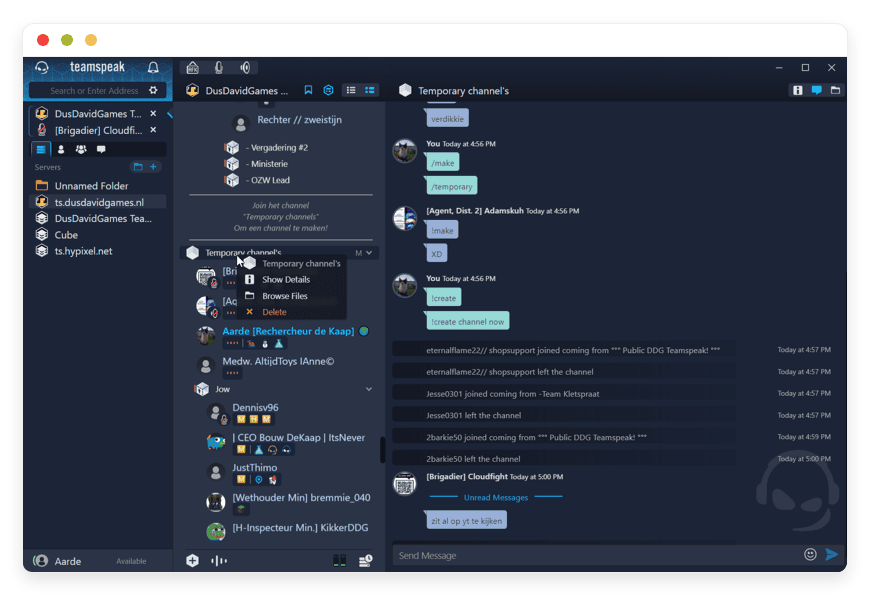
TeamSpeak has carried gaming voice for two decades, and rosters still reach for it first. It is built for low-latency, push-to-talk audio that stays clear when a full team is talking at once. The operator controls every channel and permission group, so a clan can structure voice exactly how it scrims and plays. You run it on your own server and set your own rules, and no platform can move your members or change the terms underneath you.
One honest limitation matters here. TeamSpeak is the single tool in this lineup that is not open source: it is free-to-self-host proprietary software, not GPL or MIT code. Free use is capped at 32 concurrent users, called slots, on one server. A free Non-Profit License lifts that to 512 slots, but TeamSpeak grants it to established non-commercial communities and may ask for a public site and demonstrable activity, per TeamSpeak's own licensing terms. Commercial use, or anything past those caps, needs a paid annual license. If an open licence is a hard requirement, Mumble is the BSD-licensed voice alternative and we can run that instead. Either way, we host it at €9 a month, patched, backed up, and monitored. Teamspeak for voice covers the setup in full.
Matrix + Element: text chat and DMs
Matrix is an open standard for chat, and Element is the app most members will use to reach it. Together they give you channels, threads, and direct messages that feel familiar to anyone leaving Discord. The difference is federation: your server can talk to the wider Matrix network, the way email crosses providers, and one-to-one messages are end-to-end encrypted by default. The homeserver and the client are open source under the AGPL, so the code stays open and the data stays yours.
The honest limitation is the learning curve. Matrix is not a pixel-for-pixel Discord clone, and the homeserver-and-identity model takes a short adjustment for members and admins. Voice and video work for one-to-one and small group calls, but heavy roster voice still belongs on TeamSpeak, which is why both sit in this stack. For day-to-day text, announcements, and DMs that you own and can export, Matrix is the anchor. We run the homeserver and keep it patched, so the resource cost of Matrix is our problem, not yours. Matrix + Element for chat has the details.
Discourse: the forum and announcement home
Discourse is where a community's knowledge stops disappearing. It is a forum: structured categories, long threads, search, and a front page that survives past the moment a message was posted. Guides, rule changes, recruitment threads, and event recaps live somewhere permanent instead of scrolling out of a chat channel. It has run serious communities for over a decade and is open source under the GPL, with no feature locked behind a proprietary wall, per the Discourse project.
The honest limitation is that a forum is a different rhythm from chat. Chat is fast and disposable; a forum rewards posts that are meant to last, and it takes a little culture-building to get members posting there. The payoff is two-sided. Your discussion becomes a searchable library, and because Discourse pages are public web pages, search engines can index them, so old threads pull new members in over time. Discord chat does none of that. Your full database exports on request, so you are never locked in. Discourse for your forum walks through it.
Owncast: your own match and event stream
Owncast lets a community broadcast its own stream instead of renting an audience from Twitch. You point broadcasting software like OBS at your Owncast server, and it serves a live video page with built-in chat that you own end to end. It is open source under the MIT licence, and it can plug into the Fediverse so followers on Mastodon and similar networks can find your stream, per the Owncast project. For an official match feed, a tournament stream, or a community event, it gives you a feed nobody else controls.
The honest limitation is in the name: Owncast is single-channel. It broadcasts one stream from one source, like your org's official feed. It is not a multi-streamer platform where dozens of members each run their own channel, the way Twitch works. If your goal is many separate creators, Twitch still does that job, and Owncast does not replace it. The other trade is bandwidth: a public stream with many viewers can move a lot of data, so it can pass the 1,000 GB of traffic included with each app, with extra billed at €0.03 per GB. For one owned stream, it is the right tool, hosted at €9 a month.
Uptime Kuma: a status page members can check
Uptime Kuma answers the question every community asks during an outage: is it down for everyone, or just me. It is a self-hosted monitor that checks your servers on a schedule and publishes a clean status page your members can read. It watches websites, voice and game servers, and more, and it can send alerts to chat, email, and dozens of other channels. It is open source under the MIT licence and is one of the most-used self-hosted monitoring tools around, per its project repository.
The honest limitation is that a monitor checks from where it runs. A single instance watching your other apps cannot reliably report on a total outage of itself, which is the one moment members most want a status page. The sensible pattern is to keep the status page separate from the things it watches, so it stays up when the rest does not. Run that way, it turns a flurry of "is the server down" messages into a page you point people at. We host and monitor it for €9 a month, like the rest.
How the pieces fit together
The five tools cover one job each, and they layer in the order a community grows. Voice and chat come first, because that is what members do every day: TeamSpeak for talking during games, Matrix and Element for everything typed. A forum follows once discussion outgrows chat, and Discourse becomes the place rules, guides, and announcements live for good. Owncast arrives when you want to broadcast your own events, and Uptime Kuma ties it together by telling everyone when something is down.
You do not have to deploy all five at once, and most communities should not. Start with the one or two that hurt most, run them for a couple of weeks, and add the next when you feel the gap. Each app is its own €9 line item, so the stack grows at your pace and you only pay for what you run.
What it costs
| Tool | What it replaces | DANIAN price | Best for |
|---|---|---|---|
| TeamSpeak Server | Discord voice, third-party TeamSpeak hosts | €9/mo | Clans and rosters that live in voice |
| Matrix + Element | Discord text chat and DMs | €9/mo | Communities that want owned, federated chat |
| Discourse | Discord announcements, scattered forums | €9/mo | Communities that want searchable discussion |
| Owncast | Twitch, for an owned stream | €9/mo | Orgs that want one official feed they control |
| Uptime Kuma | A paid status-page service | €9/mo | Any community running its own servers |
At €9 per app, the five-app set costs €45 a month, all in. That figure covers hosting, security patching, daily off-site backups, monitoring, and 24/7 chat for every app, with 1,000 GB of traffic included per app and your choice of region across 21 datacenters on six continents. Pick the region closest to your players for the lowest latency.
Discord's base tier is genuinely free, so €45 is not a saving against an empty Discord bill, and it would be dishonest to pretend otherwise. The fair comparison is against what a growing community pays once free Discord stops being enough. Nitro seats run $9.99 each. Server boosts to reach Level 3 land between roughly $42 and $70 a month, per Discord's own pricing. Discord takes a 10% cut on any paid memberships, premium moderation bots add their own fees, and a third-party voice host charges around $0.15 to $0.50 per slot. Stitch those together with a stream on a platform that owns your audience, and €45 for a stack you own stops looking expensive.
The honest counterpoint stays true: if your community is small and content inside free Discord, free Discord is cheaper, and that is the right call. This stack earns its place when ownership, search, and moderation on your own terms start to matter more than a zero on the invoice. See pricing
How to start
Pick the one tool that solves your sharpest problem today. If voice keeps failing under load, start with TeamSpeak. If discussion keeps vanishing, start with Discourse. Deploy it, move a slice of your community over, and run it for 14 days before you judge it. That is long enough to feel whether members actually use it and whether the daily rhythm fits.
If it sticks, add the next tool. If it does not, you have spent €9 and a fortnight, not a migration. We deploy each app, keep it patched, back it up daily off-site, and monitor it, and a named human answers on chat when you need one. We will not move your members, change your rules, or delete your data on a failed payment. Browse the catalog
Common questions
Cost and what you get
How much does the full gaming-community stack cost?
At €9 per app, the five-app set costs €45 a month, all in. That price covers hosting, security patching, daily off-site backups, monitoring, and 24/7 chat for every app, with 1,000 GB of traffic included per app. You can also run fewer apps and pay €9 for each one you keep.
Discord is free, so why pay anything at all?
Discord's base tier is genuinely free, so €45 a month is not a saving against an empty Discord bill. You pay for ownership: your own forum, your own moderation, your own stream, and data you can export. If your community is small and content on free Discord, staying free is the right call.
What does the €9 per app include?
Each app includes 1 vCPU and RAM, 30 GB of storage, and 1,000 GB of monthly traffic. The price also covers security patching, daily off-site backups, monitoring, and 24/7 chat with a named human. There are no per-seat fees and no usage calculator to watch.
Will voice or streaming push me past the included traffic?
Each app includes 1,000 GB of traffic per month, and extra traffic is billed at €0.03 per GB. Voice uses little bandwidth, so a voice server rarely gets close. A public Owncast stream with many viewers can exceed 1,000 GB, so heavy broadcasters should expect some overage.
The tools and what they replace
Which tool replaces Discord voice?
TeamSpeak handles voice in this stack, with low latency and channel permissions a clan can control. Matrix and Element also carry voice and video for one-to-one and small group calls. For most rosters that want push-to-talk and clear audio under load, TeamSpeak is the better fit.
Is TeamSpeak open source?
No. TeamSpeak is the one tool here that is not open source. It is free-to-self-host proprietary software, not GPL or MIT code. The other four tools are open source. If an open licence is a hard line for you, Mumble is the BSD-licensed voice alternative we can run instead.
How many people can a free TeamSpeak server hold?
A default TeamSpeak server is free for up to 32 concurrent users, called slots. A free Non-Profit License raises that to 512 slots, but it is granted to established non-commercial communities and may ask for a public site. Commercial use, or anything larger, needs a paid annual license.
Can members each run their own stream like on Twitch?
No. Owncast is single-channel: it broadcasts one stream from one source, like your official match or event feed. It is not a multi-streamer platform where dozens of members each run a channel. For one owned stream you control end to end, Owncast fits; for many creators, Twitch still does that job.
Do I need all five apps to start?
No. Most communities start with one app and add others as they grow. Voice and chat usually come first, then a forum once discussion outgrows chat, then a stream and a status page. Each app is a separate €9 line item, so you only pay for what you run.
Ownership, moderation, and your data
Who moderates a community I run myself?
You do. You set the rules, appoint your own moderators, and keep the logs. No outside platform can suspend your community, change your terms, or move your members. That control is the main reason clans and esports orgs move off free tools once they reach a certain size.
Can Google find and index my forum?
Yes. Discourse pages are public web pages that search engines can index, so your guides and announcements show up in search. Discord chat is locked inside the app and invisible to Google. A forum you own turns past discussion into a library that brings new members in over time.
Can I get my data out if I decide to leave?
Yes. The open-source apps store data you can export, over SFTP or as a download, on request. Discourse exports its full database, and the other apps keep their data on your instance. The software is yours to take elsewhere: we operate it, we do not lock it up.
Is my app isolated from other customers?
Each app runs in its own hardened container with its own CPU, RAM, and storage allocation and isolated networking. The boundaries between containers are real. The underlying servers are shared, which is how the €9 price works, but your app's resources belong to your app.
What happens if a platform changes its rules?
When you own the stack, a platform's policy change does not reach you. There is no rug-pull, no surprise paywall on a feature you depend on, and no risk of your community being removed by someone else's decision. You upgrade on your own schedule, or not at all.
Setup, running, and fit
Do I need to be technical to run this stack?
No. We deploy, patch, back up, and monitor every app, and a named human answers on chat when you need help. You manage your community, not the servers. Changes that need a person, like a resource bump, go through support; the day-to-day is yours to run.
When is self-hosting the better choice?
Self-hosting wins when you have someone who enjoys server work, wants root access, and is happy owning patching and on-call. A 2 vCPU production-class server runs about $24 a month plus your time. If that person and that appetite exist on your team, run it yourself.
When is staying on free Discord still the right call?
Free Discord is the right call when your community is small, casual, and fine with the trade-offs: no owned forum, no exported data, moderation under someone else's terms, and chat that Google cannot see. Many communities never outgrow it. Move only when those limits start to cost you.
How long until the apps are live?
Most apps activate quickly after you sign up. Some setups, like a custom domain or specific configuration, need a human touch and can take longer. We aim for a quick turnaround and tell you if something will take time. You are not waiting in a queue.
Who do I contact when something breaks at 2am?
You reach us on 24/7 chat or email, and a named human replies, not a ticket queue. We monitor every instance and usually catch problems before members notice. When you do report something, you get a person who can fix it, not a bot.
Can I keep using Discord while I migrate?
Yes. Matrix can bridge to Discord, so you can run both in parallel and move at your own pace. Many communities keep Discord active while they stand up a forum and voice server, then shift activity over once members settle in. There is no hard cutover required.
The takeaway
A gaming community grows up the day it decides to own its home instead of renting it. Voice, chat, a forum, a stream, and a status page are the five pieces, and four of them are open source while the fifth is yours to self-host. Run them yourself if you have the appetite, or run them managed for €45 a month and spend your time on the community rather than the servers. Either way, the rules, the data, and the audience stay with you. Start a 7-day free trial
Sources: TeamSpeak licensing (teamspeak.com); the Matrix and Element projects (element.io); the Discourse project (discourse.org); the Owncast project (owncast.online); Uptime Kuma (github.com/louislam/uptime-kuma); Discord pricing (discord.com/nitro). Pricing for third-party services changes; figures were current at the time of writing.