Open-source Raindrop.io alternatives in 2026
Raindrop.io is a good bookmark manager, and at about $3 a month for Pro it is cheap. It is also a service that keeps your saved web inside one company's account. This guide is for people searching "self-hosted Raindrop alternative". You have decided you want to own your bookmarks. The open question is which tool to pick and what it costs to run.
Four projects are worth your time: Linkwarden, Linkding, Shaarli, and Shiori. We host the first two for €9 a month. We will also tell you where each one is weaker than Raindrop, not only where it wins.
The short version
- Linkwarden is the closest self-hosted match for Raindrop: collections, tags, highlights, plus full-page archiving you hold.
- Linkding is the fast, minimal option. Shaarli and Shiori are lightweight classics for a single user.
- All four are open source and free to run. Raindrop Pro costs about $3 a month, so you would switch for ownership, not to save that.
- Pocket shut down on 8 July 2025 and its data was deleted later that year. That is the clearest argument for keeping your own copy.
- We host Linkwarden or Linkding for you at €9 a month, one instance for your whole household or team.
Why own your bookmarks in 2026
The reason to leave a bookmark SaaS is rarely price. It is that the service can vanish and take your saved web with it. Pocket had more than 30 million users and Mozilla still closed it. The pattern repeats. Each time, people who never kept their own copy lose years of reading.
Pocket shut down on 8 July 2025. Mozilla allowed exports for a few months, then deleted the data in November. The wider category has the same history. Delicious, the original social bookmarking site, changed owners several times before fading. Omnivore, a newer read-later app, was bought by an AI company in 2024 and its hosted service was switched off. You can read Mozilla's own shutdown notice for the Pocket timeline.
Raindrop is not in that boat today. It has been steady since 2013 and is run by an independent maker who has shipped consistently for over a decade. That track record is real, and worth crediting. Even so, your collections and your saved pages live on someone else's servers under someone else's terms. A price change, an acquisition, or a quiet shutdown is always one announcement away.
Self-hosting changes the one thing that matters here. The data and the page archive sit where you can reach them. You can back them up, inspect them, and move them to another tool whenever you want. Ownership is not a feeling; it is a copy of the files on hardware you or your provider controls.
What an alternative really means here
There are three ways to read the word "alternative", and they are not the same. You can pick a cheaper SaaS and keep renting. You can run open-source software yourself and own it outright. Or you can pay someone to run that open-source software for you, which keeps the ownership and drops the upkeep.
This guide is about the second and third paths. Every tool below is open source, so the code is yours to run, inspect, and export from. The only real choice is whether you host it on your own machine or have us host a private instance for you. The features are identical either way. The difference is who does the patching, the updates, and the backups.
That framing matters because most "alternative to Raindrop" lists quietly assume you will sign up for another hosted account somewhere. The point of self-hosting is to stop doing that. So we are comparing tools you control, and the price math reflects running software, not renting a seat.
What full-page archiving actually saves
The single biggest difference between these tools is whether they save the page or only the link. A plain bookmark stores a URL. When that URL rots, and a large share of links do over a few years, the bookmark points at nothing. Archiving stores the content itself, so the saved article outlives the original.
Linkwarden is built around this. For every link it captures a full HTML copy, a screenshot, and a PDF, and it can also store a single-file snapshot that bundles the page into one document. If the source goes offline, you still have the text, the layout, and a readable version. This is the feature Raindrop puts behind its Pro tier, and in Linkwarden it ships by default.
Linkding takes a lighter approach. It can save a local HTML copy of a page, or hand the job to the Internet Archive and store a link to the public snapshot. That covers the "I want the article to survive" case without the heavier storage that full multi-format archiving needs. Shaarli and Shiori focus on the link and a short note, so if archiving is your reason for switching, they are not the tools to reach for.
Link rot is not rare. On news and reference pages, the share of dead links reaches double digits within a few years. Each archive format covers a different kind of loss.
The HTML copy keeps the text for reading and search. The screenshot records how the page looked the day you saved it. The PDF prints and travels well, and the single-file snapshot folds the whole page into one document. Between them, a saved page survives a redesign, a paywall, or a takedown.
The shortlist
Four tools cover the range from "Raindrop, but mine" to "the smallest thing that stores a link". Each capsule says who builds it, the license, our price if we host it, and who it suits.
Linkwarden — the closest match
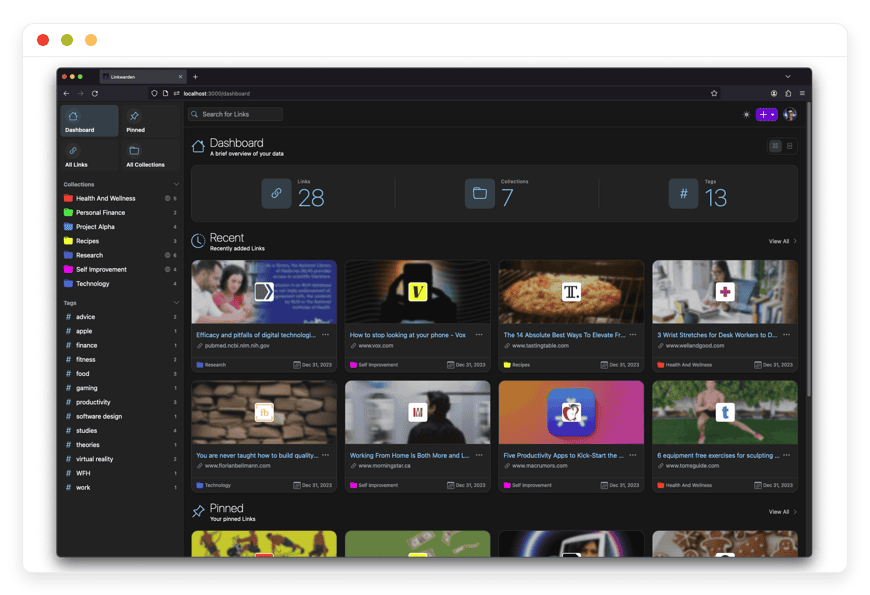
Linkwarden is the nearest thing to Raindrop you can run yourself. It keeps collections, tags, and highlights, and adds a reader view with annotations. The permanent page copy that Raindrop charges Pro users for is built in, saved as full HTML, a screenshot, and a PDF. Built by an independent team, licensed AGPL-3.0, around 18,000 GitHub stars. Best for: people who want Raindrop's shape with the archive under their own control.
Under the hood it runs as a Docker container with a PostgreSQL database, and uses Meilisearch for fast full-text search across saved pages. It supports single sign-on through more than fifty providers, has a browser extension, and added official iOS and Android apps in December 2025. It also subscribes to RSS feeds to pull in links on its own, supports Floccus for two-way browser-bookmark sync, and exposes an API for scripting. We host it for €9 a month — see managed Linkwarden hosting.
Linkding — fast and minimal
Linkding does one job and does it fast. You save a link, tag it, and find it again, with no visual grid and no clutter. It archives pages as a local HTML file or to the Internet Archive, imports browser exports, and ships Firefox and Chrome extensions. Written in Python by Sascha Ißbrücker, MIT-licensed, around 10,000 GitHub stars and more than five million Docker pulls. Best for: people who found Raindrop heavier than they needed.
The daily workflow is a bookmarklet or extension that saves the current page in one click, pulling the title and description automatically. It has Markdown notes, a read-it-later flag, basic sharing to other users or guests, and a REST API for anyone who wants to script against it. Tag autocomplete and bulk editing keep large libraries manageable, and a shared-bookmark view lets a small group pool links. If that sounds right, Linkding for minimalist bookmarks is the one to try.
Shaarli — the veteran
Shaarli is the elder of this group. It started in 2011 as a personal link log you host on any basic PHP server, with no database to run, because links live in flat files. It supports Markdown notes, tags, RSS feeds, and a plugin system. Single-user by design, Zlib-licensed, and still maintained by a community team. Best for: one person who wants something tiny, durable, and close to maintenance-free.
Because it stores everything in plain files rather than a database, Shaarli is unusually easy to back up and move: copy the data directory and you have the lot. It runs on shared hosting where Docker is not an option, which makes it a fit for very low-powered or restricted servers. The trade-off is scope. A plugin system and a REST API extend it, and themes change the look, but the core stays deliberately small. It is a link log with notes, not a page archive or a team workspace.
Shiori — a simple binary
Shiori is a single file written in Go, built as a plain Pocket-style tool. You run one binary, open the web interface or the command line, and save links with a readable copy attached. It is light on memory and quick to deploy, with SQLite by default or a full database if you want one. MIT-licensed, around 11,000 GitHub stars. Best for: a minimal, self-contained store for one person or a small group.
The command-line side is the draw for technical users: you can add, search, and export bookmarks from a script or a terminal without opening a browser. Because it is one binary with an embedded database option, the deploy is about as light as self-hosting gets. Like Shaarli, it keeps a readable copy of saved pages rather than the multi-format archive Linkwarden produces. A bookmarklet and a simple API cover saving from the browser or a script.
What you give up, honestly
Raindrop has had more than a decade of polish, and it shows. Its mobile apps and browser extensions are mature and cover every platform. The self-hosted options are catching up, not pulling ahead, and you should expect rougher edges.
Linkwarden shipped official mobile apps in December 2025 and has a browser extension, but the surrounding ecosystem is younger than Raindrop's. Linkding's interface is plain on purpose, which some people love and some find spare. Shaarli and Shiori are bare-bones: they store and retrieve links well and do little beyond that. None of the four matches the visual card view that makes Raindrop pleasant to browse.
Raindrop's AI tagging and its full-text search across saved pages are also further along than most self-hosted tools, though Linkwarden has both. So here is the plain version. If you want the most finished product and you trust the account model, Raindrop Pro at $3 a month is a fair deal, and we will say so rather than pretend otherwise. The case for switching is ownership, not polish.
Day to day: how you actually save a link
Features matter less than the small action you repeat every day: getting a page into your library without friction. Here is how each tool handles that, next to Raindrop's polished capture.
Linkwarden gives you a browser extension and the December 2025 mobile apps, so you save from the toolbar or the phone share sheet. Linkding ships Firefox and Chrome extensions plus a bookmarklet that works in any browser. Both pull the title and a description on their own. Shaarli and Shiori lean on a bookmarklet: one button in your bookmarks bar that saves the current page.
Raindrop still leads here. Its extensions and apps are more refined, and its mobile experience is the smoothest of the set. If a frictionless phone workflow is the thing you cannot give up, weigh that before you switch. For most people the self-hosted capture is good enough, and the trade buys a library you own.
How the four compare
| Tool | Close to Raindrop? | Our price | GitHub stars | Run it yourself | Switching effort |
|---|---|---|---|---|---|
| Linkwarden | Yes — collections plus archiving | €9/mo | ~18k | Docker + Postgres | Low (HTML import) |
| Linkding | Partly — minimal store | €9/mo | ~10k | Docker | Low (HTML import) |
| Shaarli | No — a personal link log | €9/mo | Since 2011 | PHP, flat files | Medium |
| Shiori | No — a simple store | €9/mo | ~11k | Single Go binary | Medium |
Moving your library across
Switching tools is only worth it if your existing links come with you. The good news is that the bookmark world shares one common format. Raindrop, Pocket exports, and every major browser can produce a Netscape HTML bookmark file, and that file is what the self-hosted tools read.
In Linkwarden and Linkding, you export from your current tool, then upload the HTML file under settings. Your links and folder structure come across in one pass. Linkwarden can also ingest single-file page snapshots if you have them, which helps if you already keep your own archives. The import is not always perfect on tags and nested folders, so check a sample after it runs.
Getting back out is the part that earns trust. Each of these tools exports your data in a standard format whenever you ask, so you are never locked in. That is the real test of ownership: not whether moving in is easy, but whether moving out is. With a hosted SaaS, the answer depends on the vendor staying willing. With software you control, the answer is always yes.
The real cost comparison
Raindrop Pro is about $3 a month, or roughly $28 a year on annual billing. That is cheap, and it is less than our €9 a month. So do not switch to shave a few dollars off a subscription. The numbers that actually decide this are different ones.
Running one of these yourself is also cheap on paper. A small VPS at $5 to $10 a month handles Linkwarden or Linkding without strain, and the software costs nothing. The expense that is easy to underrate is your time: the first setup, the monthly updates, the backup you have to test, and the database that has to keep running. That is the part we take on.
Take a concrete case. A household of four wants one shared bookmark library with page archiving. On Raindrop Pro, collaboration sits across paid accounts, and the saved pages still live in Raindrop's storage. On a self-hosted Linkwarden instance, all four people share one library, and the archive is yours. Run it yourself for the price of a small VPS plus a couple of hours a month, or have us run it.
For €9 a month we run one private instance for you. We patch it, back it up off-site every day, and reply when something breaks. One instance covers your whole household or your team, with no per-seat charge stacking up the way per-user SaaS does. We will not raise your price because you saved more links, and if you leave, your export is one click and your data leaves with you.
See managed Linkwarden hosting.
How to pick: three questions
The four tools sort cleanly once you answer three things about how you save links. Work through them in order and one option usually stands out.
Do you need the page saved, or just the link? If you want the page itself to survive, the article, the recipe, the document that might disappear, you need archiving, which means Linkwarden or Linkding. If you only need the address back, any of the four works, and Shaarli or Shiori are lighter.
One person, or a group? Linkwarden handles shared collections and team members. Shaarli and Shiori are single-user at heart. Linkding sits in between, with basic sharing to other users or guests.
Run it yourself, or have it run? If you enjoy server work and have an hour or two a month, self-host on a small VPS and keep full control. If you would rather the updates and backups be someone else's job, that is what our €9 a month buys.
Common questions
Is there a self-hosted alternative to Raindrop.io?
Yes. Linkwarden is the closest match. It keeps collections, tags and highlights, and adds full-page archiving you control. Linkding, Shaarli and Shiori are lighter options. You can run any of them yourself, or we can host one for you at €9 a month.
What is the best self-hosted bookmark manager in 2026?
For most people leaving Raindrop, Linkwarden. It saves a full copy of each page as HTML, a screenshot and a PDF, so saved links survive even when the original goes offline. If you want something minimal and fast, Linkding is the better pick.
Linkwarden vs Linkding: which should I choose?
Linkwarden archives whole pages, has a reader view, and suits teams that share collections. Linkding is a fast, single-purpose bookmark store with a clean interface and a small footprint. Pick Linkwarden for archiving and collaboration; pick Linkding for speed.
Did Pocket shut down, and what replaces it?
Yes. Mozilla closed Pocket on 8 July 2025 and deleted saved data later that year. For read-later plus bookmarks, Linkwarden covers most of what Pocket did, because it saves a readable copy of each article. Shiori was built as a simple Pocket-style tool.
How much does it cost to self-host a bookmark manager?
The software is free and open source. Running it yourself means a small server, usually a VPS at $5 to $10 a month, plus your time for setup, updates and backups. We run a private instance for you at €9 a month, with no server to manage.
Can I import my Raindrop or Pocket bookmarks?
Yes. Linkwarden and Linkding both import the standard HTML export that Raindrop, Pocket and browsers produce. You upload the file in settings and your links and folders come across. Moving in later, or moving out again, stays in your hands.
Do I need to know Docker to run these?
For Linkwarden, Linkding or Shiori, some command-line comfort helps, since most setups use Docker. Shaarli runs on a plain PHP host without Docker. If none of that sounds fun, we set up and run a private instance for you, and you never touch a server.
Will my saved links survive if a service disappears?
That is the main reason to self-host. With a hosted service, your library lives in someone else's account. With Linkwarden you hold the data and the page archive, so a shutdown or a price change does not erase years of saved reading.
Can I share bookmarks with my family or team?
Yes. Linkwarden is built for shared collections, so a household or a team works from one library with its own members. Linkding offers basic sharing to other users or guests. One instance covers everyone at a flat price, with no per-seat charge.
Is Raindrop.io open source?
No. Raindrop.io is a proprietary service, so you cannot run it on your own server or read its code. The alternatives in this guide are open source, which means you can host them yourself and export your data whenever you want. That difference is the whole reason to switch.
What is the best free alternative to Raindrop.io?
All four tools here are free to self-host, so the best one depends on your need. For a free tool closest to Raindrop, Linkwarden wins on features. For the simplest free setup, Linkding or Shiori take minutes to run. Raindrop also has a free tier if you are fine staying on a hosted account.
Is Linkwarden free?
Yes, if you run it yourself. Linkwarden is open source under the AGPL-3.0 license, so self-hosting costs nothing beyond a server. The project also sells a hosted cloud plan for people who do not want to self-host. We run a private instance for you at €9 a month.
Can these bookmark managers save a full copy of a web page?
Yes, some of them. Linkwarden saves each page as HTML, a screenshot, and a PDF, so the content survives if the original goes offline. Linkding can store a local HTML copy or use the Internet Archive. Shaarli and Shiori keep the link and a short note rather than a full archive.
Does full-text search work across saved pages?
On Linkwarden, yes. It runs a search engine called Meilisearch that indexes the text of your archived pages, so you can find a page by a phrase inside it. Linkding searches titles, tags, and notes. Shaarli and Shiori search the link and its description rather than the full page text.
Does Linkwarden have a mobile app?
Yes. Linkwarden added official iOS and Android apps in December 2025, alongside its browser extension. You can save links from your phone and read your archive on the move. Raindrop has had mobile apps longer, so expect them to feel more polished for now.
Do these support AI tagging like Raindrop?
Linkwarden has AI-assisted tagging that suggests tags for saved links. The others rely on manual tags, which keeps them simple and predictable. Raindrop's AI features are further along, so if automatic tagging is central to how you work, weigh that before switching.
Can these replace Pocket as a read-it-later app?
Yes, to a large degree. Linkwarden saves a readable copy of each article and has a reader view, which covers the main thing Pocket did. Linkding has a read-it-later flag, and Shiori was built as a Pocket-style tool. None matches Pocket's polished reading apps, but your saved articles are yours.
Can I self-host a bookmark manager on a Raspberry Pi or a NAS?
Yes. The lighter tools fit this well: Shiori is a single Go binary, Shaarli runs on plain PHP, and Linkding has a small footprint. Linkwarden is heavier because it runs PostgreSQL and a search engine, so it wants more memory. A Raspberry Pi 4 or a modern NAS handles the lighter three with ease.
Which open-source bookmark manager uses the fewest resources?
Shiori and Shaarli are the lightest. Shiori is one Go binary with an embedded database, and Shaarli stores links in flat files with no database at all. Linkding is also light for what it does. Linkwarden needs the most, because it runs PostgreSQL and a search engine for its archive.
Why pay €9 a month when I can self-host for free?
Because the software is free but your time is not. Self-hosting means you handle setup, updates, security patches, and backups you have to test. For €9 a month we run a private instance and take that work off your plate. If you enjoy server admin, self-hosting is the cheaper path.
Is Linkwarden better than Raindrop?
It depends on what you value. Linkwarden wins on ownership: you hold the data and the page archive. Raindrop wins on polish, with more refined apps and a nicer browsing view. If owning your library matters more than a finished interface, Linkwarden is the better fit.
Is my data private when I self-host a bookmark manager?
Yes, more so than a shared SaaS account. When you self-host, your links and saved pages sit on a server you control, not in a provider's shared database. No third party indexes your reading. With our managed plan, we run a private instance for you rather than a shared account.
What happens to my bookmarks if I cancel or stop hosting?
You export them and take them with you. Every tool here produces a standard HTML file of your links on request, so nothing is locked in. On our managed plan, your export is one click and your data leaves with you. That is the test of real ownership: leaving is easy.
Can I import bookmarks from Pinboard or other services?
Usually, yes. Linkwarden and Linkding read the standard HTML bookmark file that Pinboard, browsers, and most services export. Your links come across in one pass, and tags and folders tend to map over too. Check a sample after import, since nested folders do not always survive.
What to do this week
You do not have to commit to anything today. A few small steps tell you whether self-hosting fits how you save links.
- Export your Raindrop or Pocket library now. It is an HTML file from the settings menu, and having the export is worth doing even if you stay put.
- Try Linkwarden first. Use the public demo, or spin it up on a spare machine for an afternoon.
- If Linkwarden feels like more than you need, try Linkding for something faster and plainer.
- When you would rather it just run, we host Linkwarden or Linkding at €9 a month.
You can start a 7-day trial and import your export on the first day. Either way, the point holds: the version of your saved web that survives is the one you own.
Sources: Raindrop Pro pricing page; Mozilla Pocket shutdown notice; Linkwarden, Linkding, Shaarli and Shiori on GitHub.