
Open-source Adobe Acrobat alternatives in 2026
TL;DR
- Adobe Acrobat Pro costs $19.99 per month on an annual plan, or $29.99 month-to-month. The price is per named user, so a five-person team pays five times over.
- Stirling PDF is an open-source PDF toolbox: merge, split, OCR, compress, convert, redact, sign, and password tools, all in a browser. It has 78,000+ GitHub stars and an MIT license.
- The privacy difference is the point. Your files are processed on your own instance, not uploaded to a third-party web tool.
- DANIAN runs Stirling PDF for €9/month, flat, for the whole team. We patch it, back it up, monitor it, and answer the chat.
- Honest caveat: Acrobat still wins on deep in-place text editing and high-end print production. Stirling covers the everyday 90%.
Why people are leaving Adobe Acrobat in 2026
Adobe Acrobat Pro costs $19.99 per month on an annual plan, billed monthly, and $29.99 if you pay month-to-month. The team plan is $23.99 per seat per month. Acrobat Standard is cheaper at $14.99, but it leaves out the tools most people actually came for. The bill is per person, and it recurs every month you keep it.
Two things push small teams to look elsewhere. The first is the per-seat math. A solo Acrobat Pro plan is $239.88 a year. A five-person team on the business plan is $1,439.40 a year, and the number climbs with every hire. Most of those seats run a handful of routine tasks a month — a merge here, an OCR there, the occasional compress before emailing.
The second is where the files go. Acrobat's online tools and the free web converters people reach for — the ilovepdf and Smallpdf type — process your document on someone else's server. For a holiday flyer, that is fine. For a signed contract, an invoice with bank details, a patient record, or a financial statement, you are handing a copy of a sensitive file to a third party every time you merge or compress it.
Picture a three-person design studio that processes client documents all week. Every contract scanned, every deck exported to PDF, every set of invoices merged passes through a tool somewhere. On Acrobat, that is three seats and, for the web tools, files moving through Adobe's cloud. The studio is paying per head for software it uses in bursts, and routing client material through infrastructure it does not control. Both of those are fixable.
Adobe is steadily adding paid layers on top, too. The AI Assistant is a separate charge, and the newer Acrobat Studio tier sits above Pro at $24.99 a month. None of that is wrong — Acrobat is a deep product with thirty years behind it — but a small team paying per seat for occasional PDF jobs is paying for a lot of capability it never touches.
What “alternative” actually means here
“Alternative to Acrobat” splits into three real options, and they are not the same decision. One is a cheaper proprietary editor, which is still a monthly subscription and still routes files through a vendor's cloud. The second is self-hosting an open-source tool yourself. The third is paying someone to run that open-source tool for you at a flat price.
The open-source software itself is free in both the second and third cases. The difference is who owns the server, the patching, the backups, and the 2am problem. Self-hosting trades a subscription for your own time. Managed open-source trades it for a flat monthly fee and keeps the file-privacy benefit intact — the documents still sit on infrastructure you control.
A cheaper proprietary editor solves the price problem but not the privacy one. Self-hosting solves both but adds operational work. Managed open-source is the option that solves both and hands the operational work to someone else. DANIAN is that third option, and this guide is written from that seat.
What follows leads with one open-source tool for the everyday PDF jobs, then names two more for the one job it does not fully cover.
The shortlist
Stirling PDF — the everyday PDF toolbox
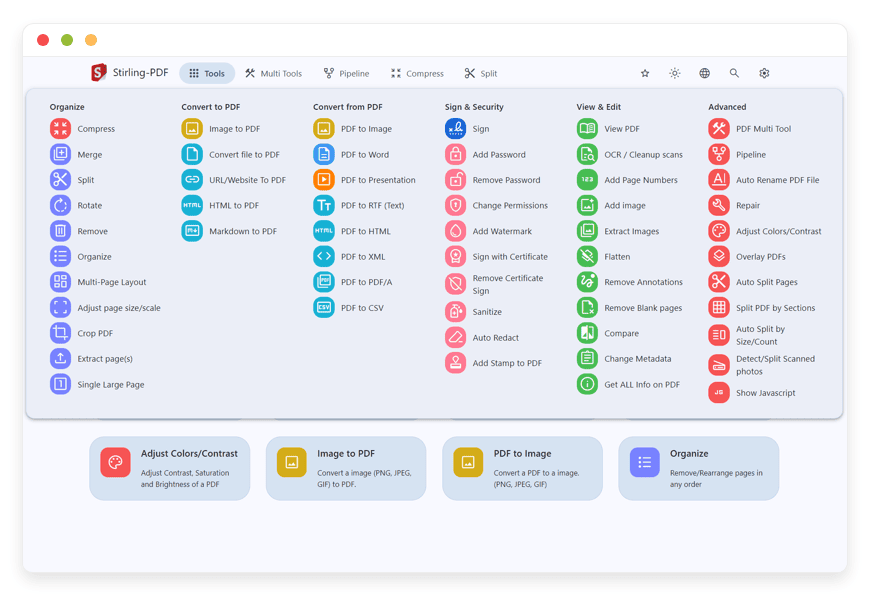
Stirling PDF is a browser-based PDF workstation with more than 50 distinct operations. It was started in 2023 by a UK developer who did not want to pay Adobe just to sign a document, and it now carries 78,000+ GitHub stars and funding from Open Core Ventures. The license is MIT, and the project ships across more than 40 languages with hundreds of contributors.
DANIAN runs it for €9/month. Best for the routine PDF tasks a small team does in a browser — merging, OCR, conversion, redaction, and the rest.
Documenso — sending documents out for signature
Documenso is an open-source electronic-signature platform, licensed under AGPLv3, with around 12,700 GitHub stars. You upload a PDF, place signature and date fields, send it, and recipients sign — the same loop as the big proprietary signing tools, with the source on GitHub and the signed contracts on your own infrastructure.
Best for sending documents to other people and getting back a sealed, legally-binding signed file with a record of who signed and when.
DocuSeal — signing workflows with an API
DocuSeal is another open-source signing platform, known for a developer-friendly API and a feature-complete signing flow. It covers reusable templates, multi-party signing, and webhook integrations, which makes it a fit for teams that want signing wired into their own tools rather than driven by hand.
DANIAN runs both Documenso and DocuSeal, so the choice is about which signing experience suits your workflow, not about what is available.
What Stirling PDF actually does
Stirling PDF wraps three mature open-source engines — LibreOffice for conversions, Tesseract for OCR, and qpdf for the low-level PDF work — behind one clean interface. Everything runs on your instance. The task list below is what people search for, so it is worth being specific rather than vague.
- Organise: merge several PDFs into one, split a file by page range, rotate pages, extract pages, add page numbers, and watermark.
- Convert to and from PDF: images such as PNG, JPEG, and TIFF; Office files including Word, Excel, and PowerPoint; plus HTML and Markdown, in both directions.
- Compress: reduce file size for archiving or email without wrecking the visible quality.
- OCR: turn a scanned, image-only PDF into searchable, selectable text.
- Secure: add or remove passwords, and redact to permanently remove sensitive content from a page.
- Sign: apply a signature to a PDF.
- Edit metadata: change titles, authors, and other document properties, and repair files that have gone corrupt.
A few of these deserve a real-world note. The OCR is solid on clean scans and handles multiple languages; very poor scans still benefit from a higher-resolution source. Office conversion is good for everyday documents, though a heavily designed file with complex layout can shift, the same way it would in any converter. Batch work is where Stirling earns its place — merging, watermarking, or compressing twenty files in one pass is faster and cheaper than doing it by hand in a desktop app.
A small team does not need much hardware for this. Around 2 GB of RAM handles routine work; OCR and Office conversions are the heaviest jobs, so batch-scanning stacks of contracts wants a little more headroom. On a managed instance, that sizing is our problem, not yours.
If you want to see the managed version, here is managed Stirling PDF hosting.
Adobe Acrobat vs managed Stirling PDF — at a glance
The table sets Acrobat Pro against a Stirling PDF instance run by DANIAN. The honest reading: Stirling matches Acrobat on the everyday tasks and on file privacy, Acrobat keeps an edge on deep editing and print production, and the cost gap is large once more than one person is involved.
| Task or feature | Adobe Acrobat Pro | Stirling PDF, managed by DANIAN |
|---|---|---|
| Pricing model | Per named user / seat | One flat price per instance |
| Cost, 1 person (annual) | $19.99/mo → $239.88/yr | €9/mo → €108/yr, whole team |
| Cost, 5 people (annual) | $23.99/seat → $1,439.40/yr | €9/mo → €108/yr, unchanged |
| Where files are processed | Desktop, plus Adobe's cloud for online tools | On your own instance; files don't leave |
| Merge, split, rotate, compress | Yes | Yes |
| OCR (scanned → searchable) | Pro tier only | Yes |
| Redaction | Pro tier only | Yes |
| Convert to/from Word, Excel, PPT | Yes | Yes |
| Add / remove passwords | Yes | Yes |
| Sign a PDF | Yes | Yes |
| Send-for-signature workflow | Yes | Use Documenso or DocuSeal |
| Deep in-place text editing | Yes, with paragraph reflow | Limited |
| High-end print production / preflight | Yes | No |
| Source code | Closed | Open (MIT), 78,000+ stars |
| Who patches and backs it up | You | DANIAN |
The math vs an annual Acrobat subscription
Acrobat is priced per person; a managed Stirling PDF instance is priced per instance. That single difference is the whole cost story. Below is the comparison at one, five, and ten people, using Adobe's published rates and DANIAN's €9 flat price for one instance that the whole team shares.
- One person, Acrobat Pro annual: $19.99 × 12 = $239.88/year. Month-to-month it is $29.99 × 12 = $359.88/year.
- Five people, Acrobat Pro for teams: $23.99 × 5 × 12 = $1,439.40/year.
- Ten people, Acrobat Pro for teams: $23.99 × 10 × 12 = $2,878.80/year.
- Managed Stirling PDF on DANIAN: €9 × 12 = €108/year (about $116), flat, no matter how many people use it.
One Stirling PDF instance serves a whole small team, because these are document jobs done in a browser, not a per-person editor that has to live on every desk. The bill does not move when you add the sixth person or the sixteenth. Against five Acrobat seats, a single managed instance is roughly a tenth of the annual cost — and the files never leave your server.
Take the three-person studio from earlier. On Acrobat Pro for teams, that is $23.99 × 3 × 12 = $863.64 a year, with client files moving through a vendor's web tools along the way. The same studio on a managed Stirling PDF instance pays €108 a year, total, and processes every document on its own server. The gap is not marginal, and it widens with each person added.
Watch the month-to-month trap on the Acrobat side. The flexible plan looks convenient at $29.99, but over a year it is $120 more than the annual commitment for the same software. The AI Assistant is another line on top. None of those add-ons exist on a flat €9 instance, where the price you see is the price for the year.
There is an honest line to draw here. Acrobat Pro is per-person desktop software with full offline editing, and Stirling PDF is a shared web app. For the document-processing tasks in the table, a shared instance genuinely covers a small team. For one designer who needs deep in-place editing all day, an Acrobat seat may still earn its keep.
You can also run Stirling PDF yourself. On a roughly $24/month production-class VPS, the software is free and the cost is the box plus your own time for patching, backups, and updates. If you have someone in-house who enjoys that work, it is a reasonable path. The €9 managed price exists for the teams who would rather not own any of it.
How DANIAN runs Stirling PDF
The €9 covers the parts of self-hosting that are easy to start and tedious to keep up. You pick the region for your instance from 21 datacenter locations across six continents, close to where your team works. We deploy it, put it behind a login, and run it from there. Your job is to use the tools; the operations are ours.
That means we apply security patches and version updates as the project ships them, take daily off-site backups, and monitor the instance so problems usually get caught before they reach you. You can point it at your own custom domain. When you have a question, you reach a named person by email, not a ticket queue or a bot.
Two promises matter more than the feature list. We will not upgrade your resources or change your bill without asking you first. And the software and your files stay yours — if you ever leave, you export your documents and walk, because the open-source app was never locked to us in the first place.
If your volume grows — a busy month of scanned contracts, a large batch conversion job — the instance can be given more CPU or RAM, with your say-so before anything changes. For most small teams that day never comes; the base €9 instance handles routine PDF work without thinking about it. The point of the managed model is that capacity, patching, and recovery are decisions you never have to make alone.
Where Stirling PDF doesn't replace Acrobat
A fair comparison names what the open-source tool does not do. Stirling PDF covers the everyday 90% of PDF work. The remaining 10% is real, and for some teams it is the part that matters most. If your day is built around it, keep an Acrobat seat for that person and run Stirling for everyone else.
Four gaps are worth naming. Acrobat's in-place content editing, with full-page paragraph reflow, lets you edit the text of a PDF almost like a word processor; Stirling is lighter here. High-end print production — preflight checks and print-ready output for a commercial press — is Acrobat territory. So is built-in validation for document accessibility. And the AI Assistant in Acrobat Studio, which summarises and answers questions about a document, has no direct match in Stirling.
It is also fair to credit the polish. Acrobat has decades of refinement, a mobile app, and tight ties into the rest of the Adobe suite. If you live inside that ecosystem, leaving it has a cost beyond the subscription. The case for Stirling is not that Acrobat is bad — it is that most small teams are buying far more Acrobat than their actual PDF work requires.
Signing — where Stirling stops and Documenso starts
Stirling PDF can apply a signature to a PDF. That is different from a signing workflow. “Send this contract to a client, have them sign it, and get back a sealed file with a record of who signed and when” is a process, and a dedicated tool does it better than a general PDF toolbox.
That is what Documenso and DocuSeal are for. Both are open-source signing platforms that handle sending a document out, collecting legally-binding signatures, tracking who has signed, and sealing the result. DANIAN runs both at the same €9 flat price. For the signing side of the work, see Documenso for signature workflows.
A common setup is to use both. Stirling PDF prepares the document — merge the appendices, redact what should not be shared, compress it for sending. Then the signing tool takes over for the part that needs a sealed, tracked signature. Each tool does the job it is built for, and neither charges per seat.
How to pick — three questions to ask yourself
The decision is rarely Acrobat or nothing. It is usually about which jobs belong on a shared, file-private instance and which still need a desktop seat. Three questions sort most teams quickly.
- Do your documents need to stay on infrastructure you control? If contracts, invoices, and records can't pass through a third-party web tool, a managed open-source instance is the cleaner answer.
- Are you paying per seat for tools the team uses occasionally? If most seats run a few PDF jobs a month, a flat-priced shared instance ends the per-head math.
- Does anyone need deep editing or print production every day? If yes, keep an Acrobat seat for that person and run Stirling for the rest. The two are not mutually exclusive.
FAQ
What is the best open-source alternative to Adobe Acrobat?
For everyday PDF work, Stirling PDF is the strongest open-source option. It is a self-hostable toolbox that merges, splits, converts, compresses, OCRs, redacts, and signs PDFs in a browser, under an MIT license. For sending documents out to be signed, pair it with Documenso or DocuSeal. DANIAN runs any of the three for €9/month.
Is Stirling PDF a real replacement for Adobe Acrobat Pro?
For most teams, yes. Stirling PDF covers the everyday 90% of PDF tasks — merge, split, convert, compress, OCR, redact, password, and sign. It does not match Acrobat's deep in-place text editing, high-end print production, or built-in accessibility checks. If one person needs those daily, keep an Acrobat seat for them and run Stirling for the rest.
Is Stirling PDF really free?
The software is open source under the MIT license, and the PDF tools are all in the self-hosted app. There is a separately-sold hosted edition with extras like single sign-on, but the toolset itself is free to run. DANIAN charges €9/month to operate an instance for you.
Does Adobe Acrobat have a free version?
Adobe Acrobat Reader is free, but it is a viewer. It opens, prints, annotates, and lets you fill and sign forms. Editing text, OCR, redaction, compression, and converting to and from Office formats all need a paid plan — Acrobat Standard or Pro. The tasks people most often want sit behind the paywall.
How much does Adobe Acrobat cost per year?
Acrobat Pro is $19.99 per month on an annual plan, which bills to $239.88 a year. Month-to-month it is $29.99, or $359.88 a year. Both prices are per named user, so a five-person team pays five times over. A managed Stirling PDF instance is €9 a month, flat, for the whole team.
Is Stirling PDF cheaper than Adobe Acrobat for a team?
Yes, and the gap widens with headcount. Acrobat is priced per person; on the Acrobat Pro teams plan, five seats are $1,439.40 a year and ten are $2,878.80. A managed Stirling PDF instance is €9 a month — about €108 a year — and that figure does not move as you add people. The team shares one instance.
Are my files uploaded anywhere?
No. Stirling PDF processes documents on your own instance, in memory during the task, and does not ship them to a third-party web service. That is the core reason to run it instead of a free online PDF converter for anything sensitive.
How is Stirling PDF different from free online tools like Smallpdf or iLovePDF?
The difference is where the file is processed. Smallpdf and iLovePDF upload your document to their servers, process it there, and delete it within an hour or two. Stirling PDF on your own instance never sends the file to a shared third-party service. For a public newsletter that gap is minor; for a contract or a medical record it is the whole point.
Is Stirling PDF safe to use for confidential documents?
It suits them well, because the file stays on your own instance rather than a shared public tool. You choose the region the server runs in, the instance is isolated to you, and documents are processed in memory during the task. On a managed instance, DANIAN patches and backs up the server, so the security basics are handled.
Can Stirling PDF do OCR and redaction?
Yes. OCR turns scanned, image-only PDFs into searchable text using the Tesseract engine, and redaction permanently removes sensitive content from a page. On Adobe Acrobat, both of those sit in the Pro tier, not in Standard.
Can Stirling PDF edit the text inside an existing PDF?
Lightly. Stirling can add text, stamps, watermarks, and page numbers, and it can OCR a scan into selectable text. What it does not do is full in-place editing with paragraph reflow, where you retype a line and the layout adjusts like a word processor. That deep editing is the part of Acrobat worth keeping a seat for.
Can it convert PDFs to and from Word and Excel?
Yes. Conversion runs in both directions across Office formats — Word, Excel, and PowerPoint — plus images, HTML, and Markdown. The conversions are handled by a bundled LibreOffice engine, which is the heaviest part of the workload.
Can Stirling PDF compress large PDF files?
Yes. Compression cuts a PDF's file size for email or archiving while keeping the visible quality intact. It runs in batch, so you can shrink twenty files in one pass instead of one at a time. Reducing file size is one of the most common reasons people reach for a PDF tool, and it needs no subscription.
Does Stirling PDF handle PDF forms?
Partly. Stirling can flatten a filled form so its fields become fixed, unlock locked form fields, and set permissions for who may fill a form. Building rich interactive forms from scratch, with scripted fields and validation, is closer to Acrobat's strength. For filling and locking existing forms, Stirling is enough.
Does Stirling PDF support digital signatures and certificates?
Yes, and it separates two things. A visual signature adds a drawn, typed, or image signature to a page. A certificate signature uses an X.509 certificate to prove who signed and that the file has not changed. Stirling does both. For sending a document to other people and collecting their signatures, use Documenso or DocuSeal.
What about signing a contract and sending it to someone?
Stirling PDF signs a PDF, but for sending a document out and getting back a sealed, signed file, run a dedicated tool. Documenso and DocuSeal are open-source signing platforms built for that, and DANIAN hosts both at €9/month.
Does Stirling PDF have an API for automation?
Yes. Stirling PDF exposes a REST API, so PDF tasks can be wired into a script or an automation tool instead of clicking through the interface. A common pattern is calling it from a workflow engine like n8n to merge, stamp, or convert files automatically. DANIAN can run both the PDF tool and the automation engine.
What operating systems does Stirling PDF run on?
All of them, because it runs in the browser. Stirling PDF is a web application, so you reach it from Windows, macOS, Linux, or ChromeOS with nothing to install locally. On a DANIAN-managed instance, the software runs on a server we operate, and you open it from any modern browser.
Do I need to install anything to use Stirling PDF?
On a DANIAN-managed instance, no. Stirling PDF runs on a server we operate, and you open it in a browser at your own address. There is nothing to install or update on your machine. If you self-host instead, you install it once from a container image and then maintain it yourself.
How does this compare to running it on my own server?
You can self-host Stirling PDF on a roughly $24/month production-class VPS; the software is free, and the cost is the server plus your own time for patching, backups, and updates. DANIAN runs all of that for €9/month flat, with a named human.
Who should keep using Adobe Acrobat instead of Stirling PDF?
Anyone whose day depends on the last 10%. If you edit PDF text in place constantly, prepare print-ready files for a commercial press, run document-accessibility checks, or lean on Acrobat's AI assistant and mobile app, keep that seat. The honest case for Stirling is that most small teams buy far more Acrobat than their work needs.
What to do this week
List the PDF tasks your team actually runs. If they are the everyday set — merge, split, OCR, compress, convert, redact, password, sign — a managed Stirling PDF instance covers them at €9/month flat, with files that stay on your own server. Keep an Acrobat seat only for the person who needs deep editing or print production every day.
The fastest way to test the fit is to run a real document through it. Start a 7-day free trial — no card — and put your own PDFs through a managed instance before you decide.
Sources: Adobe Acrobat pricing; Stirling PDF on GitHub; stirlingpdf.com; documenso.com. Prices verified June 2026 and change over time.





