Open-source Kindle Unlimited alternatives 2026
A guide to self-hosted reading libraries with Kavita and Komga.
TL;DR
- Kavita and Komga read book and comic files you already own. They do not give you Kindle Unlimited's catalogue, and there is nothing to borrow.
- Kindle Unlimited is 11.99 USD a month, Marvel Unlimited 9.99 USD, Comixology Unlimited 5.99 USD. All three rent access you lose when you stop paying.
- Kavita is the generalist: ebooks, comics, manga and light novels in one reader. Komga is the comics and manga specialist.
- Both read on any device through a browser and through reading apps over OPDS. Both are free and open source.
- Managed by us, either app is 9 EUR a month with 30 GB of storage. Larger libraries cost more; the storage math is below.
What these tools are, and what they are not
Kavita and Komga are reading servers for files you already own. They organise your DRM-free ebooks and comics and let you read them on any device. They do not replace Kindle Unlimited's library or its store. There is no catalogue to browse and nothing to borrow. The audience is people who already hold books and comics as files.
That distinction matters before you switch anything. A subscription rents you reach into a huge shelf for as long as you pay. A reading server gives you a home for the shelf you own. One is access; the other is ownership. If you have no files and want millions of titles on tap, a subscription is the right tool, and self-hosting will not stand in for it.
Why people look past Kindle Unlimited in 2026
The pull is ownership, not price alone. Kindle Unlimited costs 11.99 USD a month, up from 9.99 after a 2023 increase. You can hold up to 20 borrowed titles at once, and they leave your account when the catalogue changes or you cancel. The reading is real; the library is rented.
Comics work the same way. Marvel Unlimited is 9.99 USD a month for roughly 30,000 issues, with new ones arriving about three months after print. Comixology Unlimited is 5.99 USD a month and lives inside the Kindle app now, United States only, with borrowing capped per account. Pay for years and you still own none of it.
Three things push readers toward their own server. Titles vanish from catalogues without warning. Prices climb on a schedule you do not set. And files you bought stay locked to one company's app. A library you host answers all three: the files are yours, the cost is flat, and no vendor can pull a book off your shelf.
What "alternative" means here
An alternative to a rental catalogue is a reader for files you own. That is the honest framing, and it shapes everything below. You supply the books and comics; the server stores, sorts and displays them. The work the subscription did, finding you new titles, is now on you.
Getting files is easier than it sounds. Public-domain sources like Project Gutenberg and Standard Ebooks are free and unprotected. Some publishers and comic shops sell EPUB and CBZ files with no copy protection, which you keep for good. Comic and book bundles often ship plain files too. Anything you legally hold as an open file drops straight into Kavita or Komga.
You have two ways to run that reader. Self-host it on your own hardware and own the whole stack, including the patching and the backups. Or have it run for you and keep only the part you care about, which is reading. The rest of this guide covers both apps and what each path costs.
The shortlist
Kavita — the generalist
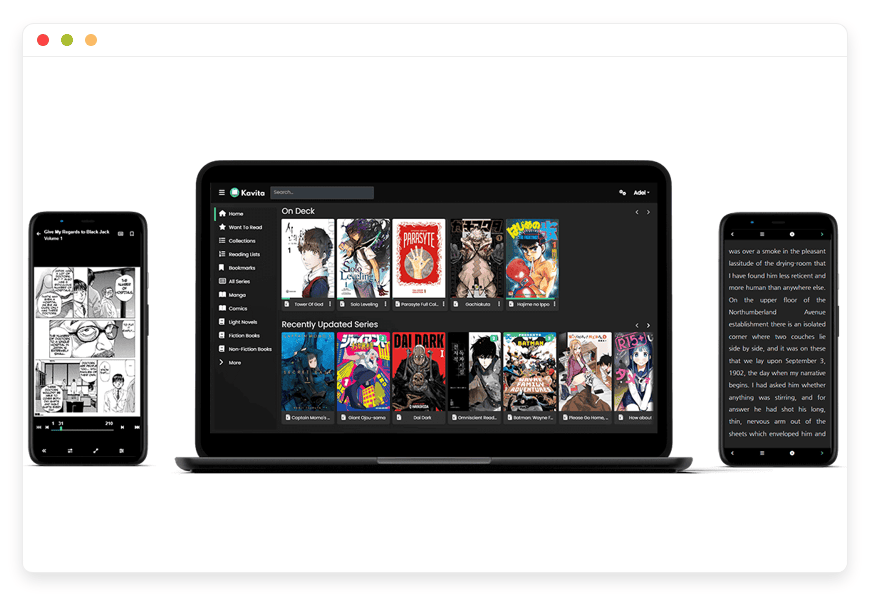
Kavita is a self-hosted reading server for ebooks, comics, manga and light novels. It is built in .NET, runs over 8,000 stars on GitHub, and ships releases most months. It is licensed GPL-3.0. Managed by us it is 9 EUR a month. Best for a mixed shelf of ebooks and comics.
Two features earn it a place. It reads EPUB and PDF properly and has a real text mode for novels, which comic-first servers lack. And it can send a title straight to a Kindle or Kobo, so the e-reader you already use still works. Its metadata scraping for manga is strong, so series art and details fill in on their own.
Komga — the comics and manga specialist
Komga is a self-hosted server built for comics and manga, and it does that one job cleanly. It is written in Kotlin, in development since 2019, and runs over 4,000 stars on GitHub. It is licensed MIT. Managed by us it is 9 EUR a month. Best for a comics-first collection.
Komga's strength is being stable and predictable. Its model is plain: one folder is one series, sorted by filename. Its REST API rarely breaks between releases, so any tooling you build keeps working. It speaks OPDS version 2 as well as version 1, and its integration with reading apps like Mihon is among the best in this space.
One gap to name plainly: neither app handles audiobooks. Kindle Unlimited bundles some listening, and that needs a separate server. Audiobookshelf is the open-source option for audiobooks and podcasts, and we host it too, so the audio side of your shelf is covered.
Kavita vs Komga: which one for your collection
The choice comes down to what you read. Kavita spans formats, so a shelf of novels, PDFs and a few comic runs all open in one reader with one login. Komga concentrates on comics and manga, with metadata and a reader tuned for panels and pages. Neither is better in the abstract; they fit different shelves.
A useful rule of thumb. If ebooks are most of your library, or you want one server for everything, run Kavita. If your library is comics and manga and you care about clean series management, run Komga. Some readers run both, with Kavita for books and Komga for comics. On a managed plan that is two apps at 9 EUR each.
Getting your library onto the server
Loading a library is mostly drag and drop. You upload files through the web interface or sync a folder, and the server scans them into shape. Comics and manga go in as CBZ or CBR files; ebooks go in as EPUB or PDF. Both apps watch their folders and pick up new files on their own.
Organisation rewards a little tidiness. Komga reads one folder as one series, so a clean folder per title keeps it sorted. Kavita reads folders and embedded metadata together, which forgives a messier shelf. Both read the ComicInfo.xml tags many comics already carry, so issue numbers and series names line up with no manual work.
Metadata fills the gaps. Cover art, descriptions and series details scrape in from public sources, with Kavita strong on manga and both solid on comics. You can fix anything by hand. The first scan of a big library takes a while; after that, only new files need a look.
Reading on the devices you already have
The web reader is the simplest path and works on any screen. For phones and tablets, reading apps connect to your server over OPDS and download issues for offline reading. On Android, Mihon and Paperback are common picks for comics and manga. KOReader runs on e-ink devices and handles ebooks well.
The setup is a one-time step. You add your server's address, your username and your password to the app, and your library appears. From there you browse, download and read as if the files were local, because once downloaded they are. Progress syncs back to the server, so your place follows you between the app and the browser.
Komga's reading-app support is a particular strength, including OPDS version 2 for newer clients. Kavita covers the same ground with OPDS version 1, which every common reading app speaks. For most readers the difference is invisible; both put your library on the device in your pocket.
How the options compare
| App | Serves | License | GitHub stars | OPDS / reading apps | Managed price | Best for |
|---|---|---|---|---|---|---|
| Kavita | Ebooks, comics, manga, light novels | GPL-3.0 | over 8,000 | OPDS v1; send-to-Kindle/Kobo; Mihon, Paperback, KOReader | 9 EUR / month | Mixed shelves |
| Komga | Comics, manga (basic EPUB) | MIT | over 4,000 | OPDS v1 and v2; Mihon, Paperback, YACReader | 9 EUR / month | Comics-first collections |
The subscriptions sit in a different column, because they sell access rather than a place to read your files. Here is the trade in one view.
| Option | Monthly cost | What you get | Do you own it? |
|---|---|---|---|
| Kindle Unlimited | 11.99 USD | Borrow up to 20 of ~5M titles | No |
| Marvel Unlimited | 9.99 USD | ~30,000 Marvel issues, 3-month delay | No |
| Comixology Unlimited | 5.99 USD | Borrow comics and manga, US only | No |
| Kavita or Komga, managed | 9 EUR | Read files you own, any device, 30 GB | Yes |
The numbers are close for one small library. The difference is what survives a price hike or a catalogue cut. Files on your own server do.
Run it over years, not months. Three years of Kindle Unlimited runs past 430 USD, and you own nothing at the end. Three years of a managed reader leaves you owning every file on the shelf. Rent buys access that ends; hosting buys a library that stays.
What the subscriptions still do better
Honesty cuts both ways, so here is where the rental model wins. A subscription hands you millions of titles with nothing to set up. It surfaces new books and series you would never have found alone. And it carries new releases you cannot legally get as open files yet.
A self-hosted server does none of that finding for you. You decide what goes on the shelf, and an empty server stays empty until you fill it. If you read widely and lean on recommendations, or you want this week's release the day it drops, a catalogue earns its fee. The server is for the library you have chosen, not the one an algorithm picks. For many readers the right answer is both: keep a subscription for discovery, and host the keepers you want to own.
What it costs to host your own library
A library grows, so storage is the number to watch. On our plan each app includes 30 GB, which holds a large ebook collection or a few hundred comics. Above that, storage is 0.50 EUR per GB each month. Ebooks are small; scanned comics and manga are not, and a long run adds up fast.
Two worked examples. A 50 GB library is 20 GB over the included 30, so 10 EUR of storage on top of the 9 EUR base, about 19 EUR a month. A 200 GB library is 170 GB over, so 85 EUR of storage on top of the base, about 94 EUR a month. The base price is flat; the storage scales with the shelf.
That math points to an honest limit. If your collection runs to several hundred gigabytes or into terabytes, a managed plan stops being the cheap option. A reader with that much data, and the skills to run a box at home, is better off self-hosting on their own hardware. Managed earns its keep for moderate libraries where you would rather read than run a server.
How to pick: three questions to ask yourself
What does my shelf hold? Mostly ebooks points to Kavita. Comics and manga point to Komga. A real mix points to Kavita, or to both apps if you want each tool doing what it does best.
How big will it get? Add up your files in gigabytes and run the storage math above. Under 30 GB fits the base plan. A few hundred gigabytes managed gets expensive, and self-hosting starts to make more sense.
Do I want to run the server, or just read? Running it yourself means owning updates, backups and the occasional 2am fix. Having it run for you means you upload files and read. Both are valid; they cost you different things, time or money.
Frequently asked questions
Do Kavita and Komga replace Kindle Unlimited's catalogue?
No. Kindle Unlimited rents you access to a catalogue you never own. Kavita and Komga read files you already have on disk. There is no store to browse and nothing to borrow. You bring your own books and comics, and the server organises and reads them.
What is the best open-source alternative to Kindle Unlimited?
There is no single best one, because it depends on your shelf. Kavita is the strongest all-rounder, reading ebooks, comics and manga in one place. Komga is the best pick for a comics and manga collection. Both are free and open source, and both read files you already own.
What is the difference between Kavita and Komga?
They are built differently and aim at different shelves. Kavita is written in .NET and reads ebooks, comics, manga and light novels, with metadata from AniList. Komga is written in Kotlin, focuses on comics and manga, and adds OPDS version 2 and a stable API. Kavita is broader; Komga is more focused.
Should I pick Kavita or Komga?
Pick by what your library holds. Kavita reads ebooks, comics, manga and light novels in one place, so it fits a mixed shelf. Komga is built for comics and manga and does that one job well. If your collection is mostly comics, Komga is the cleaner choice.
Where do the files come from if I do not own any yet?
From places that sell or give away files without copy protection. Public-domain libraries like Project Gutenberg and Standard Ebooks are free. Some publishers and comic shops sell unprotected EPUB and CBZ files you keep. Anything you legally own as an open file works; locked store files do not.
Can I add my existing Kindle books to Kavita or Komga?
Only if the files have no copy protection. Most Kindle purchases are locked to Amazon and will not load into either server. Files you own without protection, such as DRM-free EPUB or CBZ, drop straight in. Some shops sell unprotected versions of the same titles that you keep and can host.
Is it legal to host my own ebooks and comics?
Hosting files you legally own, for your own reading, is normal and fine. The limits are about sharing and copy protection: do not distribute copyrighted files to others, and do not strip protection you have no right to remove. This is general information, not legal advice. When unsure, check the licence on your files.
What file formats do they handle?
Both read CBZ and CBR, the standard comic and manga formats, plus PDF. Kavita adds a proper EPUB reader and a text mode for light novels, so it covers ebooks too. Komga can show EPUB files but treats prose as a series, so it suits comics better.
Can I read webtoons and manhwa, the long-strip comics?
Yes. Kavita has a built-in webtoon reader that scrolls vertically, which suits manhwa and long-strip comics. Komga handles vertical scrolling in its web reader too. For the smoothest long-strip reading on a phone, an app like Mihon over OPDS is hard to beat. Your long-strip series read the way they should.
Will Kavita or Komga organise and tag my library automatically?
Mostly, yes. Both scan your folders, sort files into series, and pull cover art and details from public metadata sources. Kavita leans on AniList for manga; both read the ComicInfo tags many comics already carry. You can correct anything by hand. A tidy folder layout up front saves you cleanup later.
Can I read on my phone or tablet?
Yes. Both have a web reader that opens in any browser. Both also speak OPDS, the open standard that reading apps use to connect to a library. Apps like Mihon, Paperback, YACReader and KOReader can browse your server and download issues to read on the go.
Can I read comics on an iPhone or iPad?
Yes. Panels is a popular iOS reader that connects to both Kavita and Komga over OPDS, downloads issues, and syncs your progress back to the server. Chunky and YACReader are other iOS options. You can also open the web reader in Safari on any iPhone or iPad without installing anything.
Do Kavita and Komga have an official mobile app?
Neither ships its own phone app. Instead they speak OPDS, the open standard, so you pick a reading app you like. On Android that is often Mihon or Paperback; on iOS, Panels. The web reader also works in a phone browser. You are not tied to one company's app, which is part of the point.
Can I send a book to a Kindle or Kobo e-reader?
Kavita has a send-to-device feature for Kindle and Kobo, so a title lands on the e-reader you already use. For other devices, the OPDS feed lets a reading app pull files down directly. Komga relies on OPDS and reading apps rather than a built-in send button.
Can I read when I am offline?
Yes, through a reading app. The web reader needs a connection, but OPDS apps such as Mihon, Paperback or KOReader download issues to the device first. Once a file is on your phone or tablet, you read it on a plane or anywhere with no signal.
Is my reading position synced across devices?
Yes. Both track where you stopped and sync it back to the server. Start a chapter in the web reader at your desk and pick it up on your phone later. Through OPDS-connected apps, progress carries across the browser and the reading apps you use.
Can several people in my household use one server?
Yes. Both support separate accounts, so each reader gets their own login. Reading progress is tracked per person, so your place in a book is not overwritten by someone else. You can also limit which libraries a given account sees, which helps with younger readers.
Do these tools handle audiobooks?
No. Kavita and Komga read text and images, not audio. Kindle Unlimited bundles some audiobook listening, and that part needs a different server. Audiobookshelf is the open-source option for audiobooks and podcasts. We host it too, so the audio side of your shelf has a home as well.
How is this different from Plex or Jellyfin?
Plex and Jellyfin are built for video first. They can list comics, but the reading is basic, with no panel navigation, no long-strip scroll, and no progress sync across devices. Kavita and Komga are built for reading, with proper comic and ebook readers. Use a media server for video; use these for books.
What about Calibre or Calibre-Web?
Calibre-Web is a solid choice when your shelf is mostly ebooks and you already run Calibre. It is weaker for comics and manga, which is where Kavita and Komga are built to shine. For a mixed library, Kavita usually wins; for comics, Komga does. Match the tool to the shelf.
Are Kavita and Komga free?
Yes. Both are free and open-source software, licensed GPL-3.0 and MIT. You can download and run either at no cost on your own hardware. What you pay for on a managed plan is the hosting, the patching, the daily backups and the support, not the software itself. The apps stay free.
How much storage do I need, and what does it cost?
Each app on our plan includes 30 GB, which holds a large ebook library or a few hundred comics. Above that, storage is 0.50 EUR per GB each month. A 50 GB library runs about 19 EUR a month all in; a 200 GB library runs about 94 EUR a month.
How many gigabytes does a comic or manga library usually take?
It varies with scan quality, but rough numbers help. A single comic issue is often 20 to 80 MB; a manga volume runs 50 to 150 MB. Ebooks are tiny, usually 1 to 5 MB each. So a few hundred comics can fit in the included 30 GB, while a few thousand will need more.
Do I need Docker to use Kavita or Komga?
Only if you self-host. Run them yourself and the usual route is a Docker image you install and update. On a managed plan you never touch Docker or the operating system; we run the container and keep it patched. Your side is uploading files and reading. The plumbing is ours to maintain.
Do I need to be technical to run this managed?
No. Managed means we run the server, patch it, monitor it, and back it up off-site daily. Your part is uploading files and reading them. There is no operating system to maintain and no update to schedule. Email or chat us when you want a change and a human replies.
Can I read my library from anywhere, not just at home?
Yes. On a managed plan your server is online already, so you reach it from any network with your login. There is no port to forward and no home connection to expose. Open the web reader in a browser, or connect a reading app over OPDS, wherever you happen to be.
Can I host my library in Europe, close to me?
Yes. Pick the region nearest your readers when you set up the app, from 21 locations across six continents. A closer region means faster page turns and large-file downloads. Your application data lives in the region you choose, not wherever a vendor decides.
Can I run Kavita and Komga at the same time?
Yes, and some readers do. You might run Kavita for ebooks and Komga for comics, each pointed at its own files. On a managed plan that is two apps, so 9 EUR each, 18 EUR a month together. They run side by side without interfering, and you read from whichever fits the moment.
Can I switch from Kavita to Komga later, or back?
Yes, because your files are plain files. Point the other server at the same folders and it builds its own library from them. The catch is reading progress, which does not carry between the two apps. Your books and comics move freely; where you stopped reading you would set again in the new app.
What happens to my library if I stop paying?
You keep every file, because they live as plain files you uploaded. Nothing is locked to the service. You can download your data and move it to your own machine or another host. The reader is the convenience; the books are yours and stay yours.
What to do this week
Start by sizing your shelf. Add up your ebook and comic files in gigabytes, and decide whether the collection is books-first, comics-first, or a real mix. That one answer tells you whether Kavita or Komga fits, and about how much storage you need.
Then try one without committing. Spin up the app that matches your shelf, upload a slice of your library, and read on your phone and your laptop for a few days. If it feels right, point the rest of your files at it. You can start a 7-day trial with no card.
One more reason to have it run for you rather than self-host the hard way. We back up every instance off-site, every day, so a dead drive does not cost you the library you built. We patch the server and watch it around the clock. You read; we keep the copy safe and the lights on.
If a mixed library is your case, managed Kavita hosting gives you one reader for books and comics. If you live in comics and manga, Komga for comics and manga is the tighter fit. Either way, the files stay yours, the price stays flat, and no vendor can take a book off your shelf.