Fully Managed Kavita
as a Service

Deploy Kavita as a fully managed service starting at €9/mo. Get automated backups, SSL, updates, support and monitoring included.

Kavita is an open-source self-hosted digital library — comics, manga, webtoons, EPUB, PDF — combining the convenience of Kindle and ComiXology with the security and control of running your own server.

Free 7-day trial  99.9% Uptime SLA  No credit card  Cancel anytime

Free 7-day trial  99.9% Uptime SLA
No credit card  Cancel anytime

Kavita

Kavita

STARTING AT

€9/month
Automated Backups
Monitoring
Automated Updates
Auto SSL

USAGE

Unlimited
Human Support
Custom Domains
Terminal Access
File Manager Access
Deploy in your region 21 locations worldwide
GermanyFinlandNetherlandsUKSwedenUnited StatesCanadaSingaporeJapanAustraliaBrazilSouth Africa+9 more →
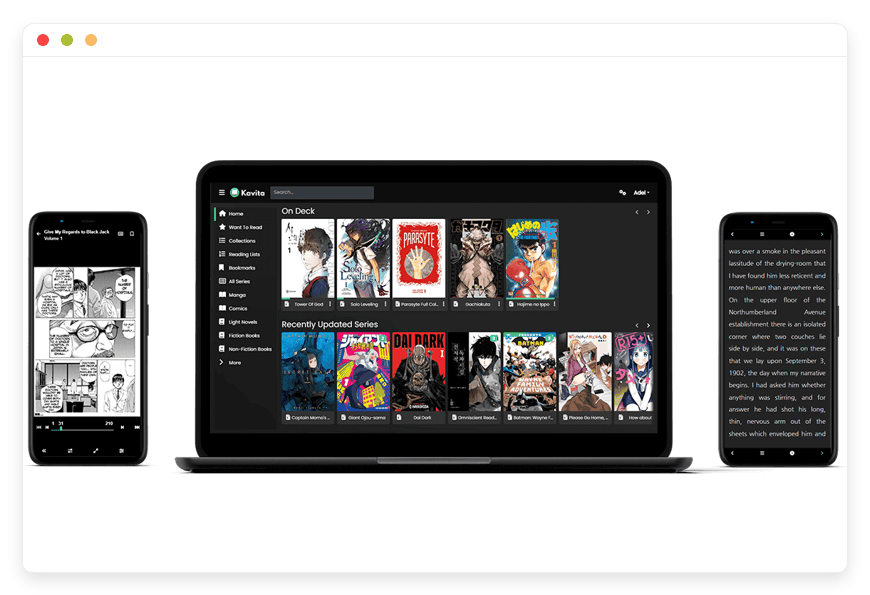
Kavita Preview Image

ABOUT THE SOFTWARE

What is Kavita

Kavita is an open-source reading server for comics, manga, webtoons, light novels, EPUB, and PDF — with built-in web readers, OPDS, and reading-progress sync. Lightning fast, privacy-friendly, and entirely yours.

Built by Joe Milazzo (majora2007) and a community of contributors under the Kareadita organisation, Kavita is licensed GPL-3.0 and written in .NET 8.

The project is in active development (10.6k GitHub stars, 586 forks, weekly merge cadence) and is still officially labelled beta software ahead of its 1.0 milestone. Features land based on a public voting system; recent additions include OIDC single sign-on, the annotation system with Obsidian export, and a Mihon extension that syncs chapter progress back to the server.

Kavita supports a wide format set out of the box: ZIP, RAR, RAR5, CBR, CBZ, CB7, CBT, TAR.GZ, 7Z, EPUB2, EPUB3, PDF, and raw image folders for webtoons. Metadata is read from ComicInfo.xml inside CBZ/CBR archives and from the OPF inside EPUB files — folder structure provides defaults, internal metadata overrides them.

One thing to know: Kavita uses the NetVips image library for cover generation, and NetVips requires a CPU that supports the SSE4.2 instruction set. Most Intel Core i3/i5/i7/i9 (2011 and later), modern Xeon, and AMD Ryzen / Bulldozer-and-later CPUs are fine. Older Pentium, Celeron, Atom, and pre-Bulldozer AMD silicon will crash on startup or render black-and-white covers.

FEATURES

What Kavita does

Kavita is a complete reading server, not a file shelf. Built-in readers for every supported format, OPDS for the apps you already use, smart filters, annotations, multi-user accounts, and a rich REST API for anything else you want to build on top.

Format-specific readers

Hand-built readers for image-based media (CBZ, loose images), EPUB, and PDF. Single-page, double-page, and webtoon scrolling modes; left-to-right and right-to-left direction; immersive and fullscreen modes.

Reading-progress sync

Read on desktop, continue on phone, finish on tablet. Progress saves in-page rather than per-page, so you resume close to where you left off across devices. KOReader has dedicated progress-sync integration.

ComicInfo and OPF metadata

Reads ComicInfo.xml inside CBZ/CBR archives and OPF inside EPUB files. Smart filters bind to the side nav and dashboard. Series, volumes, chapters, collections, reading lists, and want-to-read all support metadata-driven sorting.

Send-to-Kindle and OPDS clients

One-click send to a registered Kindle email or any OPDS-aware device. Per-user device list with verified addresses; works alongside the Kindle ecosystem rather than against it.

OPDS and OPDS-PS feeds

Standard OPDS v1 plus the Page Streaming extension. Works with Mihon, Paperback, KOReader, Aidoku, CDisplayEx, Moon+ Reader, and Yomu. Per-user authentication keys, encoded reading progress, and pagination across feeds.

User and library management

Per-user accounts with their own progress, bookmarks, and homepages. Role-based abilities, per-library access, and an age-rating ceiling for child accounts. Built-in logins or OIDC; both work side by side.

Annotations and bookmarks

Highlight EPUB text with rich notes, bookmark images in CBZ, and export to Obsidian for downstream notetaking. Shareable across users on your server with moderation tools.

REST API and webhooks

Full REST API documented at /swagger and consumed by every Kavita client. Webhooks for scan-complete and series-added events plug into Mylar, Kapowarr, Komf, ComicTagger, and other parts of the ecosystem.

WHAT'S ALWAYS INCLUDED

Every app. Fully managed.
Nothing extra to pay for.

Every app you deploy includes the full managed service — security, backups, updates, and support from day one.

Automatic updates and patches

Apps run the latest stable version. Security patches applied silently, with rollback if needed.

Daily off-site backups

Multiple daily backups in redundant off-site locations. One-click restore if anything goes wrong.

24/7 uptime monitoring

Continuous monitoring with instant alerting. We respond before you notice.

SSL, firewall, DDoS protection

Auto-renewing SSL, hardened firewall rules, DDoS mitigation on every deployment.

Performance and scaling

We monitor resource usage continuously. When your app needs more headroom, we flag it and upgrade with your explicit approval.

Dedicated engineering support

Real engineers on chat. DNS, SMTP & migration help. All included in €9.

WHY MANAGED

Why teams pick managed Kavita

Amazon removed the Kindle "Download & Transfer via USB" option on February 26, 2025, and is now tightening Send-to-Kindle for older devices. Readers with DRM-free collections are moving to self-hosted libraries — and most of them want the library, not the server admin job.

Running Kavita yourself is straightforward until it isn't. The container starts in seconds; the first library scan completes in minutes. Then the operational reality lands: the host's CPU needs SSE4.2 or covers break, the reverse proxy needs the right WebSocket Upgrade headers or SignalR drops, the SQLite database starts logging "database is locked" on non-SSD storage under multi-user load, and the scanner caches series identity in a way that turns a bulk rename into a phantom-series problem unless you know to run a Force Scan plus cache wipe afterward.

Then there are the kinds of incidents that don't show up on a release-notes page. On May 14, 2026 the Kavita team shipped v0.9.0.2 as a critical-vulnerability hotfix with a same-day-update strongly-advised banner. Self-hosters had to find the news, schedule downtime, and confirm the patch landed. Our managed customers were patched the same day with no action on their side.

The pattern with self-hosted reading servers is that the work isn't on day one — it's on day 200, when your library has grown past 500 GB, a family member is reading on three devices at once, OPDS is feeding two phone apps, and Kavita's overnight backup needs to land off-site without filling the same disk the library lives on. The infrastructure that quietly handles all of that is exactly what gets de-prioritised when the alternative is reading the next chapter.

REVIEWS

Hear from customers ​like you​​​​​​​

Successful businesses and professionals around the world rely on DANIAN every day

USE CASES

Three teams who run Kavita on DANIAN

These are representative team types we set up most often. Each starts with the same flat €9 plan.

6-PERSON HOUSEHOLD

Replacing the Kindle ecosystem after the February 2025 USB removal

Region picked close to home for the partner and kids; OPDS feeds Mihon on three Android phones and KOReader on two e-ink devices. Two libraries — text EPUB and image-based manga — with age-rating profiles for the two younger readers. Folder watcher catches new files dropped in via SFTP after the parents convert a Calibre import overnight.

 14-PERSON WEBTOON STUDIO

Editor preview library for colorists and beta readers

Three separate libraries on the same instance: raw line art (writers only), color drafts (writers + colorists), and approved chapters (full studio plus contracted beta readers). OIDC pinned to the studio's Microsoft Entra so freelance access expires with the contract. Annotations exported to Obsidian for the next revision pass.

 COMMUNITY MANGA READING CLUB

40 members across three continents reading the same backlog

Single Kavita instance in a region close to the highest-density member group; member accounts created from a Google Workspace OIDC tenant the organiser already runs for the club's mailing list. Shared want-to-read list and reading clubs feature; per-member reading progress so the discussion thread always knows who's caught up. Send-to-Kindle for the members who prefer e-ink.

COMPARISON

Four ways to run Kavita

Kavita isn't a one-to-one replacement for a paid reading subscription — but for readers with files they already own, the math against renting access to a curated catalog is straightforward. Compare the four real paths.

 PATHCOST AT 1 READERCOST AT 5 READERSCOST AT 10 READERSOPERATIONAL REALITY
Kindle Unlimited subscription
(proprietary, rental access)
$11.99/mo$59.95/mo$119.90/moPer-seat pricing. 20-title borrow cap per reader. Curated subset of the catalog only. Sideloading purchased books got harder after Feb 2025; older devices are losing wireless delivery in 2026.
Self-host Kavita on a VPS
~$44/mo + time~$44/mo + time~$44/mo + time$24/mo production-class VPS + $5/mo object storage backup + $15/mo monitoring. Plus 1–2 hours/month for patching, scanner re-runs, certificate renewal, OIDC misconfig, and the occasional database-lock incident on multi-user load.
Self-host on home server hardware
~€210/mo~€210/mo~€210/moSynology DS923+ NAS (~€650 amortised) or HP ProLiant ML30 Gen10 (~€1,200). Plus €17–32/mo electricity, €40–80/mo business-grade internet with static IP, €10–20/mo off-site backup target, and 2–4 hours/mo of operational time.
DANIAN Managed Kavita€9/mo€9/mo€9/moFlat rate. Unlimited readers on your instance — your bill doesn't change when you add the household, the team, or the community. Hardware, patches, backups, SSL, monitoring, OIDC help, and chat support included.

BY INDUSTRY

Kavita for specific industries

Reading servers look the same on the install screen and very different at month six. The shape of the library, the size of the user base, and what each user is allowed to see drive the per-industry choices below.

Small public libraries and community reading collectives use Kavita to lend public-domain ebooks, local-author collections, and donated comic archives to patrons who prefer reading on phones and tablets rather than physical loans. The relevant operational standard is the IFLA framework for community-library digital lending — open access by default, age-appropriate restrictions on a per-collection basis, no DRM.

We configure per-user borrow caps through Kavita's role and library-access settings (a patron's account can be capped at 20 simultaneously-open titles like a typical lending limit), enable OPDS so members can browse from KOReader on a borrowed e-ink device, and pick a region close to the patron base. A 200-patron community typically runs 150–400 GB of content across roughly 6,000 titles; we size storage and backup retention to match.
Japanese-language programs, K-12 graphic-novel curricula, and comics-arts schools run Kavita to give students a curated reading library accessible from school-issued tablets, home laptops, and OPDS apps. The relevant standard is COPPA in the US and equivalent under-13 privacy provisions elsewhere; in practice that means per-grade age-rating profiles (G / PG / PG-13 / R+) and library-level access so a Year 7 group sees a different catalog than a Year 11 group from the same login wall.

We integrate OIDC with the school's existing Google Workspace or Microsoft Entra tenant so there's no separate password for students or staff to manage. A typical school deployment serves 60–300 students; reading-progress data tells the teacher who's on which chapter without students having to self-report.
Webtoon studios, small-press comic publishers, and self-publishing graphic novelists use Kavita as an internal preview library for editors, colorists, letterers, and beta readers. The relevant operational concern is contract-bound access — a freelancer's preview rights end when the contract does, and the studio's unreleased work cannot leak.

We scope the instance behind a custom domain (preview.studio.com), pin OIDC to the studio's identity provider so role membership in Entra or Okta controls Kavita access, and configure separate libraries for line-art drafts, color-pass drafts, and approved chapters with different role visibility per library. Annotations on specific panels export to Obsidian for the next revision round; a typical 12-person studio runs 80–200 GB of working files.
Translation teams working on manga, manhwa, and light-novel chapters use Kavita as an editor-preview surface for collaborative review. The relevant workflow concern is separation of stages: a raw scanner shouldn't be editing the QC-approved pile, and a translator shouldn't be looking at the QC pile until it's their turn.

We provision three library mounts at /raws (raw scans, scanners + translators only), /drafts (typeset working files, translators + redrawers + typesetters), and /final (QC-approved, all members) with library-level role access enforcing the separation. Scan-on-add is disabled on /drafts so a redraw doesn't trigger 200 phantom scans. A typical group of 8–20 members runs 20–80 GB of active working files plus a frozen archive of shipped chapters.
Households with 4–12 readers across one or more houses run Kavita as a shared digital library: parents' EPUB collection, kids' graphic novels filtered by age rating, one teenager's manga library, grandma's PDF magazines. The relevant operational concern is privacy between household members — a parent's reading history isn't business of the kids, and vice versa — combined with the practical reality that a household library has to keep working when the person who set it up is on holiday.

We provision per-person accounts with their own reading progress, bookmarks, and homepage; set the Kavita base URL to a personal subdomain (books.familyname.com); turn the folder watcher on so a new file dropped into the import folder shows up at dinnertime without a manual scan. Storage tiers range from 50 GB for a text-only family to several terabytes for a serious comic-collecting household.

FAQ

Frequently asked questions

Everything teams ask before signing up — answered straight, without sales speak.

Three groups: technical setup, migration, and how DANIAN works as a service.

01

Technical and configuration

Yes. Kavita uses the NetVips image library for cover generation, and NetVips needs SSE4.2 instructions. Older Pentium, Celeron, Atom, and pre-Bulldozer AMD CPUs crash on startup or render black-and-white covers. We provision every Kavita instance on hardware verified to support SSE4.2 (and most of the broader AVX2 set), so the problem never reaches you. If you've tried Kavita on a cheap VPS and hit this, that's the cause.
We track the Kareadita/Kavita release feed and apply stable releases automatically inside our maintenance window. When the v0.9.0.2 security hotfix shipped on May 14, 2026 with a critical vulnerability advisory, every DANIAN customer instance was patched the same day. We pin to the official container, never to nightly builds, so feature regressions don't land on a working library.
Kavita expects one folder per series at the library root. For comics, ComicInfo.xml inside the CBZ overrides folder-based parsing; for EPUB, the internal OPF metadata wins.
A common Kavita gotcha. The scanner caches series identity after the first scan, so a rename of "Vol 01" to "Volume 1" creates a duplicate rather than updating the original. The fix is a Force Scan (not a Quick Scan) plus a covers-cache wipe. We do this in one click from the customer dashboard. If a rename leaves orphaned reading-list entries pointing at the old name, we re-link them rather than asking you to rebuild lists.
Yes. Kavita exposes an OPDS feed at /api/opds/{API-Key} and an OPDS Page Streaming (OPDS-PS) variant for image-aware clients. We set the public hostname in Kavita's general settings so OPDS URLs use your custom domain and not the internal docker hostname. Mihon and the Kavita Mihon extension (Kareadita/tach-extension) sync chapter progress back to Kavita; Paperback and KOReader use OPDS plus the Kavita API key from your profile.
Per-user accounts get their own reading progress, bookmarks, want-to-read lists, and homepage. Roles control admin abilities, library access, and an age-rating ceiling per library — useful for households with kids or schools with mixed age groups. Built-in logins, OIDC, or both work side-by-side. We turn on email-based invites so you don't manually create accounts.
Yes. Kavita's OIDC implementation handles standard Authorization Code flow with PKCE. Common pitfalls are HTTPS-only redirect URLs and clock skew between Kavita and the IdP — the v0.9.0.2 release relaxed Kavita's URL validation so non-standard issuer paths now connect cleanly. We configure the IdP client, the Kavita admin OIDC tab, and the optional auto-provision flag so a first-time login creates the local user record automatically.
Both are fine self-hosted reading servers. Komga is comic-and-manga-first with a one-folder-equals-one-series rule and a slightly more stable public API. Kavita handles a wider mix (text EPUB plus comics plus light novels), with smart filters, annotation export, and Kavita+ external metadata integration. Mixed libraries are easier on Kavita; pure comic collections work well on either. Some customers run both; we host either or both at €9 per app.

02

Migration and onboarding

We can activate your app on your own custom domain/subdomain. Examples: mydomain.com, anyword.mydomain.com.
Or, on our randomized free subdomain. Example: 963.apps.danian.cloud
If you wish to use a custom domain/subdomain, select that option when ordering your app (or notify us later). We will send you the required DNS records and if needed, our tech team will modify them for you.
21 datacenter locations across six continents. You choose the region at provisioning. Application data sits in the region you choose; pick whichever is closest to your users or matches your data-residency preference.
Yes. Request a region migration from the dashboard and we run the move in the background. The system emails you when the migration completes; total transfer time depends on data volume but typical instances finish in a few hours. There is no extra charge for a region change.
Yes. Full data export is available at any time, in a portable format you can bring to any infrastructure.
If you had a habit of downloading purchased Kindle books to your computer and sideloading them, that workflow died on February 26, 2025 — and the April 2026 changes are tightening it further on older devices. Kavita doesn't replace the Kindle store itself, but it does give you a home for the EPUB, PDF, and DRM-free files you already own, with a built-in reader that works on any browser plus OPDS for native apps. Send-to-Kindle from Kavita still works for the books that remain compatible.
Yes, with one structural note. Calibre stores books in author/title-versioned folders; Kavita expects series-per-folder. You point a Kavita library at the same files, choose the EPUB scanner profile, and Kavita reads the embedded OPF metadata. For series grouping, calibre:series and calibre:series_index tags in the OPF carry across natively.
Roughly 1,000–5,000 files per minute depending on file type (CBZ scans faster than EPUB, which scans faster than PDF). A 100 GB mixed library typically completes its first scan within 20–40 minutes. We schedule the first scan off-peak to avoid hitting the SQLite write contention that older Kavita versions exhibited on non-SSD storage — and we run on SSD-backed storage anyway, so the older "database is locked" error class doesn't fire.

03

Billing, support, and platform

€9 covers everything we do for that app: hardware in the region you choose, daily off-site backups with one-click restore, automatic security patches and version upgrades, 24/7 monitoring, SSL and firewall, and engineering support on Email/LiveChat. There are no setup fees or hidden line items. For more info see our Pricing page.
If you decide to continue, we charge €9/app/month from day 8. If you don't, the trial ends and you can export your data. No card is required for the trial, and we never auto-charge you without explicit consent.
No. The €9/month is flat regardless of how many users log into your app. Add 5 users or 50; the price doesn't change.
24/7 Live chat and email support, both staffed by engineers who run the systems. We handle DNS configuration, SMTP setup, app integrations, performance tuning, troubleshooting, and migration help. Response time is typically under an hour. There is no tier system — every customer gets the same support.
Yes. Cancel from the dashboard. We don't charge a cancellation fee, we don't lock data, and we will export your data to you on request before deletion. data to you on request before deletion.
Every customer instance is backed up daily to a separate region from the primary. We test restores. You can request a restore at any backup point within the retention window — usually 7 days for daily backups.
Your application data sits in the region you choose at provisioning — 21 datacenter locations across six continents. Account-level data (billing, account email, support ticket history) is processed centrally. Application data region is picked by you, per app.
99.9% uptime SLA on every app, every tenant. Service credits are documented at danian.co/service-level-agreement. The status page is located at status.danian.co.
When your tenant approaches the resource ceiling — the base tier holds 1 vCPU/RAM, 30 GB storage — we notify you. Resource upgrades happen with your explicit consent; we will not upgrade your tenant or charge you without it.
We wait. We don't suspend the app or delete your data on the first failed charge. We email you, you fix the card on file, and we continue.
Invoices can be downloaded from the billing dashboard in PDF the day each charge succeeds. EU VAT is added where applicable and the VAT-reverse-charge regime applies for VAT-registered businesses with a valid number.
150+ open-source apps across automation, team chat, file sync, analytics, AI, password management, email marketing, dev tools, project management, smart home, CMS, and federated social. See the full catalog →
Yes. Every instance comes with a web-based terminal and a file manager in your DANIAN management dashboard. Useful for managing your data and customizations.
Resources scale with your usage. If your app needs more vCPU, RAM, or storage, we add it — and we ask first before any change to your plan. €9 is the floor; resource-heavy workloads may price higher, but you'll always know in advance.
Yes. We have both a Partner program and an Affiliate program available. Anybody can sign up.
No contract. No minimum commitment. Cancel anytime from the dashboard with one click. The 7-day free trial requires no credit card. After the trial converts to paid, you can still cancel at any month without notice or penalty.

DEPLOY IN YOUR REGION

21 datacenter locations on six continents

Pick the region closest to your users.

United States, Germany, Finland, Singapore, Australia, Brazil, Canada, Netherlands, UK, Spain, Italy, France, Sweden, Malaysia, India, Japan, Mexico, Poland, South Korea, Chile, South Africa and more coming soon
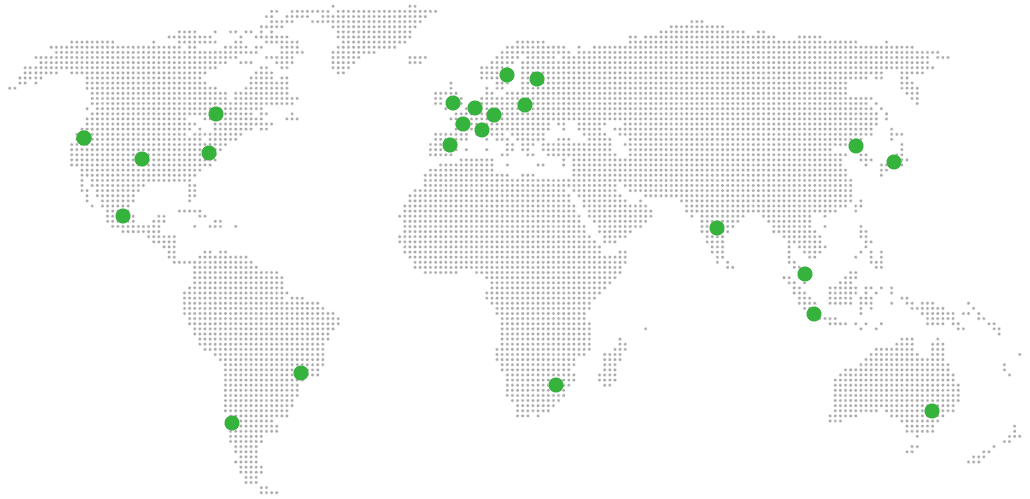
Global Reach Map

Try managed Kavita for 7 days

No card. Cancel from the dashboard.