Fully Managed Komga
as a Service

Deploy Komga as a fully managed service starting at €9/mo. Get automated backups, SSL, updates, support and monitoring included.

Komga is an open-source media server for comics, manga, BDs, magazines, and ebooks — combining the convenience of a cloud reader with the security and control of self-hosted infrastructure. Built in Kotlin on the JVM, MIT-licensed version. It speaks OPDS to native readers, syncs progress to Kobo and KOReader, and serves a web reader of its own.

Free 7-day trial  99.9% Uptime SLA  No credit card  Cancel anytime

Free 7-day trial  99.9% Uptime SLA
No credit card  Cancel anytime

Komga

Komga

STARTING AT

€9/month
Automated Backups
Monitoring
Automated Updates
Auto SSL

USAGE

Unlimited
Human Support
Custom Domains
Terminal Access
File Manager Access
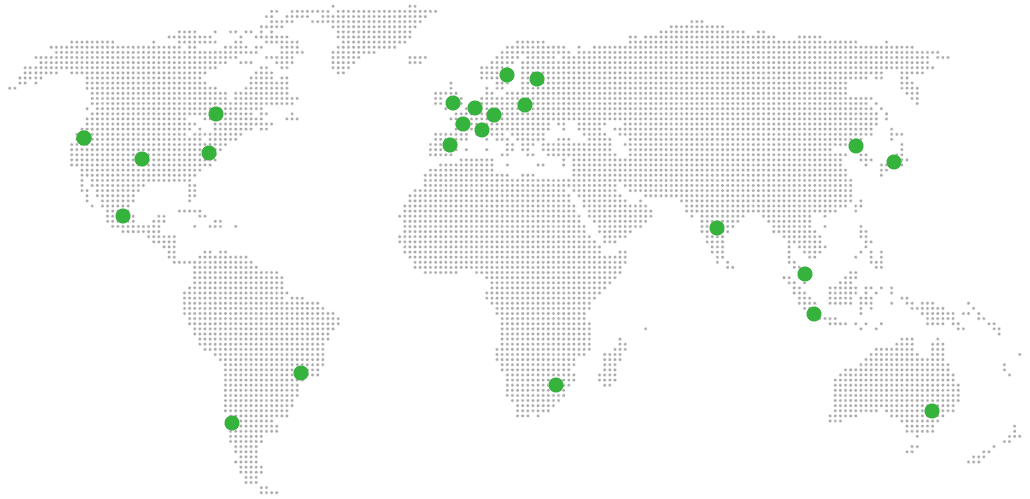
Deploy in your region 21 locations worldwide
GermanyFinlandNetherlandsUKSwedenUnited StatesCanadaSingaporeJapanAustraliaBrazilSouth Africa+9 more →
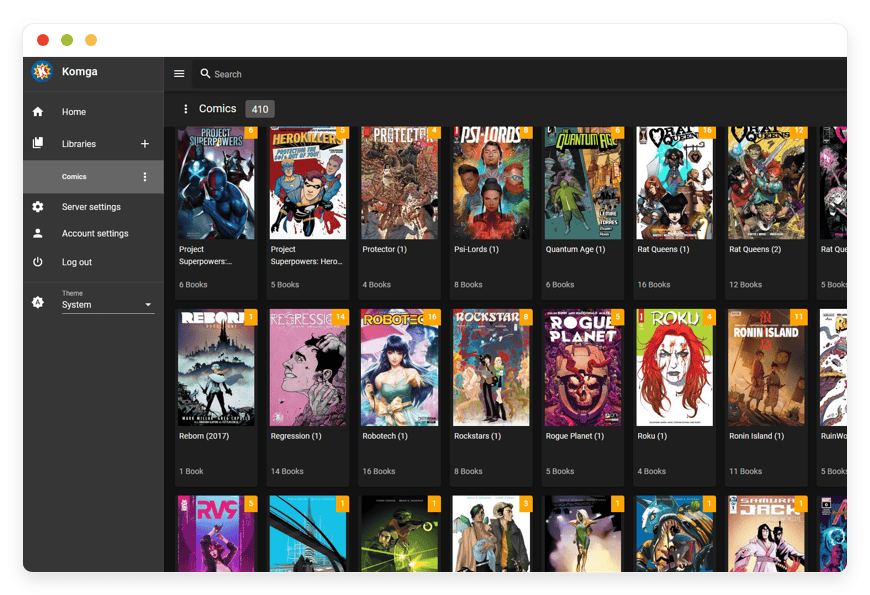
Komga Preview Image

ABOUT THE SOFTWARE

What is Komga

Komga is a self-hosted media server for comics, manga, BDs, magazines, and ebooks. You give it CBZ, CBR, PDF, and EPUB files; Komga scans them, reads embedded metadata, and serves them through a web reader and OPDS feeds to native apps.

Komga is written in Kotlin on the JVM and uses an embedded SQLite database. The project is MIT-licensed and maintained by Gauthier Roebroeck — the GitHub user "gotson" — with 158 contributors and around 6,300 stars on github.com/gotson/komga. It runs on Java 17 or later, and the application itself sits around 200–400 MB of resident memory at idle, with storage scaling as your library grows.

The reading paths Komga exposes are deliberately broad. The built-in web reader works in any modern browser. The OPDS feeds (v1.2 and v2.0) connect to Panels and Chunky on iOS, Mihon and Tachiyomi via the official Komga extension, KOReader on e-ink, and many others. Native Kobo Sync and KOReader Sync push read progress back to dedicated devices. ComicInfo.xml metadata embedded in CBZ archives is read on scan; the third-party Komf sidecar adds online metadata fetching from MangaDex, AniList, and MangaUpdates when you need it.

FEATURES

What Komga does

Komga handles the full lifecycle of a personal or institutional digital library — ingestion, organisation, metadata, multi-user access, and cross-device reading. The capabilities below are what the application itself provides; everything operational sits on us.

Library scanning and watching

Point a library at any directory; Komga scans on add, on schedule, and watches the filesystem for new files. CBZ, CBR, ZIP, RAR, PDF, and EPUB are detected automatically.

OPDS v1.2 and v2.0

Catalog feeds for native reader apps — Panels, Chunky, Paperback forks, KyBook, CDisplayEx, KOReader, Moon+ Reader — plus the OPDS-PSE page-streaming extension for low-bandwidth single-page delivery.

Mihon / Tachiyomi extension

Official Komga extension for Mihon and Tachiyomi and their forks. Streams chapters via OPDS-PSE, syncs progress, and surfaces collections and read lists as filterable categories.

Multi-user accounts with restrictions

Per-reader accounts with library-level access, age-rating restrictions, and arbitrary label restrictions (allow-list or block-list). Useful for households and institutions alike.

Web reader

Browser-based reader for comics, BDs, manga, and EPUBs. Vertical and right-to-left layouts, double-page mode, fit-to-width, and Divina rendering for image-based EPUBs.

Kobo Sync and KOReader Sync

Push books to a Kobo e-reader, or sync read progress with KOReader on Kindle, PocketBook, and reMarkable. Komga handles the auth and progress endpoints natively.

ComicInfo.xml metadata

Komga reads embedded ComicInfo.xml from CBZ and CBR files on scan — series, number, title, summary, age rating, authors, tags. EPUB metadata is parsed from the OPF manifest the same way.

Read progress and read lists

Per-user progress tracking across devices and clients. Manual read lists for series ordering, collections for grouping unrelated series, and bookmarks for the spot you left off.

WHAT'S ALWAYS INCLUDED

Every app. Fully managed.
Nothing extra to pay for.

Every app you deploy includes the full managed service — security, backups, updates, and support from day one.

Automatic updates and patches

Apps run the latest stable version. Security patches applied silently, with rollback if needed.

Daily off-site backups

Multiple daily backups in redundant off-site locations. One-click restore if anything goes wrong.

24/7 uptime monitoring

Continuous monitoring with instant alerting. We respond before you notice.

SSL, firewall, DDoS protection

Auto-renewing SSL, hardened firewall rules, DDoS mitigation on every deployment.

Performance and scaling

We monitor resource usage continuously. When your app needs more headroom, we flag it and upgrade with your explicit approval.

Dedicated engineering support

Real engineers on chat. DNS, SMTP & migration help. All included in €9.

WHY MANAGED

Why teams pick managed Komga

On February 26, 2025, Amazon removed the "Download & Transfer via USB" option for Kindle books. Purchased ebooks can no longer be backed up to a computer. Komga is the answer: own the files, serve them from your own infrastructure, read them on any device.

The event was foreseeable and not isolated. Amazon shut down the Comixology app on December 4, 2023, folding all comics into the Kindle library. Marvel Unlimited's $9.99 monthly subscription locks readers into Marvel's catalog. Kindle Unlimited at $11.99/month is one login per household. The pattern is clear: digital comic and ebook libraries are increasingly rented, not owned. Komga inverts that — your files, your server, your readers, your progress.

Running Komga yourself is not difficult. Running it in production is. The signature failure mode is JVM heap exhaustion during library scans, worst on large PDFs: Apache PDFBox holds page buffers in memory, the JVM defaults to reserving roughly 25% of host RAM, and a 150 MB PDF can crash the analysis worker repeatedly until you set JAVA_TOOL_OPTIONS=-Xmx by hand. GitHub issue #784 documents the exact symptom; issues #899 and #904 show users on 16 GB boxes still hitting OutOfMemoryError because the heap cap wasn't pinned. The SQLite database needs WAL mode on a local filesystem — not NFS, not a network share — or you'll see startup checks fail and database locking errors.

REVIEWS

Hear from customers ​like you​​​​​​​

Successful businesses and professionals around the world rely on DANIAN every day

USE CASES

Three teams who run Komga on DANIAN

These are representative team types we set up most often. Each starts with the same flat €9 plan.

6-PERSON MANGA SCANLATION COLLECTIVE

Coordinating releases across translators, typesetters, and QC readers

Germany region for sub-30 ms latency to most of Europe. Library labelled per status — drafts, QC, public — with the public label exposed via OPDS-PSE for Mihon and Tachiyomi readers. Komf sidecar pulls cover art from MangaDex. Per-user accounts gated to the public label until release.

SMALL CULTURAL INSTITUTION ARCHIVE

Periodicals and a comics special collection, served to staff and patrons

Singapore region for an Asia-Pacific patron base. Two libraries — staff (full read/write) and patrons (read-only, age-rated). PDF-A masters on bulk storage, ComicInfo.xml metadata. OPDS catalog served to KOReader on e-ink devices in the reading room. Snapshots retained 90 days.

INDIE COMIC PUBLISHER

Pre-launch review copies sent to journalists, retailers, and convention press

Datacenter region near the US distribution network. Reviewer accounts gated by per-title labels; each reviewer sees only assigned titles. Embargo dates encoded in ComicInfo.xml. Daily off-site backups encrypted with the publisher's own key. Custom press subdomain on the dashboard.

COMPARISON

Four ways to run Komga

Komga itself is free — the bill comes from how you choose to run it. The four paths below compare what a household, archive, or studio actually faces. DANIAN's row is flat €9 per month regardless of reader count, because the server is the same whether one reader uses it or ten do.

Path 1 is the rented-content trap most buyers are trying to leave: Marvel Unlimited at $9.99 per reader per month gives access to Marvel's catalog, not your own files. Five readers in a household is $49.95/month, ten is $99.90 — linear with people. Kindle Unlimited at $11.99/month and a per-reader Shonen Jump at $2.99/month follow the same arithmetic. None of them serve your CBZ archive or your purchased EPUBs.

 PATH1 READER5 READERS 10 READERSOPERATIONAL TIME / NOTES
Marvel Unlimited
Proprietary cloud reader, Marvel catalog only
$9.99/mo$49.95/mo$99.90/mo0 hours/mo. Not your files.
Self-host on a VPS
$24 production-class VPS + backup + monitoring
~$44/mo~$44/mo~$44–60/mo1–2 hours/mo for patching, JVM tuning, certs (€60–240/mo at sysadmin rates).
Home server
HP ProLiant ML30 Gen10 (€800–1,500) amortised + electricity + business internet + off-site backup
€210–667/mo*€210–667/mo*€210–667/mo*2–4 hours/mo. Static IP required.
DANIAN Managed Komga€9/mo€9/mo€9/mo0 hours/mo. Heap tuned, DB on local SSD, daily backups.

* Effective cost including hardware amortisation, ~€0.30/kWh electricity, €40–80/mo business internet with static IP, and €120–480/mo of operational time. Marvel Unlimited price: marvel.com/unlimited, current as of May 2026.

The 1/5/10 reader columns are illustrative — Komga itself supports unlimited users on a single instance. Self-hosted Komga competitors like BookFusion price per household ($7.99/mo for ~3 readers, $14.99 for ~6); content subscriptions multiply per reader. If you have a developer in-house, Coolify on a $24 production-class VPS is a genuinely good DIY path.

BY INDUSTRY

Komga for specific industries

Komga sits at the intersection of long-term file preservation, cross-device reading, and metadata standards. Four industries put specific demands on each axis — and the configuration we run for them differs in concrete ways.

Public libraries, university libraries, and small archives use Komga to expose digitised periodicals, special collections, and comic holdings to patrons over OPDS. The relevant operational standard is the OAIS reference model (ISO 14721:2025), which defines six mandatory archive responsibilities — ingest, archival storage, data management, administration, preservation planning, and access — and three information-package types (SIP, AIP, DIP). Komga handles the access layer. The DANIAN configuration: SQLite database and library on local NVMe to satisfy WAL's local-filesystem requirement, daily snapshots retained for 90 days, OPDS exposed to the patron network with age-rating restrictions enabled per library.

A typical workflow: a 12,000-issue periodical scan is ingested as PDF-A masters, ComicInfo.xml metadata is generated externally, and patrons read the collection through KOReader on e-ink devices in the reading room. A 12,000-volume archive usually occupies 400–600 GB depending on scan resolution.
Schools and universities that operate digital reading collections face accessibility requirements that statutory regulation increasingly enforces. The relevant operational standard is EPUB Accessibility 1.1 (a W3C Recommendation, identified in ONIX codelist 196 value 04) with WCAG 2.2 Level AA conformance. Komga's EPUB reader respects the structural and semantic markup the standard requires; complex image-only EPUBs are routed through the Divina renderer. The DANIAN configuration: a JVM heap pinned at 2 GB to handle large textbook PDFs, the EPUB reader exposed to students through OPDS, per-class label restrictions for course-specific reading lists.

A typical workflow: a graphic-narrative literature course publishes a 60-title reading list as a single Komga collection; students read in the web reader or sync to personal Kobo devices. Conformance is documented per title via embedded accessibility metadata in the EPUB OPF manifest.
Indie publishers, small studios, and self-publishing creators use Komga to distribute review copies and manage internal catalogues. The relevant operational standards are ComicInfo.xml — the metadata schema originally from ComicRack, now governed by The Anansi Project on GitHub, with versions 1.0 and 2.0 maintained — and ONIX for Books for trade-distribution feeds. Komga reads embedded ComicInfo.xml on scan and respects embargo dates encoded in the metadata. The DANIAN configuration: a custom press subdomain with TLS, per-reviewer label restrictions issued at the user level, ComicInfo.xml templates exposed in the file manager for the editorial team.

A typical workflow: a 24-title quarterly catalogue is tagged with reviewer labels at the file level; each of 40 reviewers sees only the four titles assigned to them; embargo lifts automatically when ComicInfo.xml dates pass. Komf can optionally cross-reference titles against external databases for QA.
Translation collectives and scanlation groups distribute releases via OPDS to mobile reader apps — predominantly Mihon, Tachiyomi, and their forks. The relevant operational standard is the OPDS Page Streaming Extension (OPDS-PSE) 1.1, maintained by The Anansi Project, which defines the rel="http://vaemendis.net/opds-pse/stream" link relation and the pse:count and pse:lastRead attributes that make page-by-page streaming possible. Komga implements OPDS-PSE natively. The DANIAN configuration: the official Komga extension for Mihon and Tachiyomi is the recommended client, the JVM heap is sized for typical 50–80 MB CBZ scans, RAR-to-CBZ background conversion is kept enabled for inbound rar releases, and Komf is provisioned alongside for MangaDex and AniList cover art.

A typical workflow: a group of six translators ships a chapter through QC, marks it public, and 4,000 OPDS-PSE subscribers see it within the next library scan cycle.

FAQ

Frequently asked questions

Everything teams ask before signing up — answered straight, without sales speak.

Three groups: technical setup, migration, and how DANIAN works as a service.

01

Technical and configuration

Komga supports OPDS v1.2 and v2.0. On iOS, Panels and Chunky both work. On Android and most platforms, Mihon and Tachiyomi connect through the official Komga extension. KOReader on Kobo, Kindle, PocketBook, and reMarkable works over OPDS v1. Kobo Sync and KOReader Sync handle progress sync natively. CDisplayEx, Moon+ Reader, and KyBook are also cited by users.
Komga reads embedded ComicInfo.xml from CBZ and CBR files on scan — series, number, title, summary, age rating, authors, tags. It does not write ComicInfo.xml back to files; metadata you edit in the UI lives in the Komga database. For automatic ComicInfo.xml generation from online sources, the third-party Komf sidecar pulls from MangaDex, AniList, MangaUpdates, and Comic Vine, and writes the file directly into your archives. We run Komf alongside Komga for any customer who asks.
CBZ (ZIP-based), CBR (RAR-based), PDF, and EPUB are supported. 7z is not — extract and rezip. RAR5 and solid-RAR depend on native libraries that exist on Linux amd64 but not on arm or macOS. We run amd64 Linux containers, so RAR5 works for our customers, and Komga's background job converts CBR to CBZ automatically using DEFLATE with no compression for faster reads.
Komga ships a first-generation web EPUB reader. It handles text EPUBs cleanly, supports read-progress saving (added in v1.9.0), and routes image-only EPUBs through the Divina renderer. Complex EPUBs with heavy scripting or experimental CSS sometimes render imperfectly — Komga's project policy is that no ebook format other than EPUB will be added, so manuscript-grade rendering improvements come through EPUB upstream work.
Komga is the stronger fit for comics and manga collections: tighter OPDS-PSE support, better directory handling, and the Mihon and Tachiyomi extension. Kavita is closer to a generalist for mixed text-heavy libraries with light novels and prose ebooks. Both are free and self-hosted, and both run well on DANIAN — we host either.
Yes. Native Kobo Sync pushes progress to Kobo devices. KOReader Sync handles e-ink on Kindle, PocketBook, and reMarkable. OPDS-PSE includes the pse:lastRead attribute, which the official Mihon and Tachiyomi extension uses to sync chapter position. Web-reader progress is per-user and visible across all client paths.
Yes. Per-user accounts support age-rating restrictions and label restrictions on an allow-list or block-list basis. A household with children typically uses age ratings; institutions with staff-only collections use labels. Restrictions apply to OPDS feeds, the web reader, and search — a restricted user simply cannot see the content.
Komga scans on library add, on a schedule (configurable per library), and via filesystem watching for new files. Manual rescans are available from the library action menu. One gotcha worth knowing: mergerfs needs func.getattr=newest set, or new files aren't detected reliably. We set that for any customer running a mergerfs-pooled library on DANIAN.
Komga is a JVM application — Kotlin on Spring Boot. The default Java heap is roughly 25% of host RAM, which is fine for a small library but fails on large PDFs (documented in Komga GitHub issue #784). We pin JAVA_TOOL_OPTIONS=-Xmx deterministically — typically 1 GB for small libraries, 2–4 GB for PDF-heavy or 10,000-volume archives — and keep the SQLite database on local NVMe so the WAL mode that Komga enables by default doesn't break on networked storage.

02

Migration and onboarding

We can activate your app on your own custom domain/subdomain. Examples: mydomain.com, anyword.mydomain.com.
Or, on our randomized free subdomain. Example: 963.apps.danian.cloud
If you wish to use a custom domain/subdomain, select that option when ordering your app (or notify us later). We will send you the required DNS records and if needed, our tech team will modify them for you.
21 datacenter locations across six continents. You choose the region at provisioning. Application data sits in the region you choose; pick whichever is closest to your users or matches your data-residency preference.
Yes. Request a region migration from the dashboard and we run the move in the background. The system emails you when the migration completes; total transfer time depends on data volume but typical instances finish in a few hours. There is no extra charge for a region change.
Yes. Full data export is available at any time, in a portable format you can bring to any infrastructure.
Yes — Komga reads files in place. Point a library at your existing folder structure (Calibre library, Kavita library, raw CBZ folder) and Komga indexes what's already there. There's no Calibre-database import path, but the files themselves and any embedded ComicInfo.xml or EPUB metadata move across cleanly. If you're coming from Kavita, the file layout typically requires no changes.
Depends on library size and file types. A 2,000-volume CBZ collection scans in 10–20 minutes on tuned hardware. PDF-heavy collections are slower because Komga extracts page counts and thumbnails on the first pass.
Komga doesn't import read-progress from other servers natively. From Kavita, the read-status sidecar files can be replayed against the Komga API after import — we've scripted this for one customer migrating a 3,000-volume library. KOReader Sync and Kobo Sync re-establish progress automatically once devices reconnect.

03

Billing, support, and platform

€9 covers everything we do for that app: hardware in the region you choose, daily off-site backups with one-click restore, automatic security patches and version upgrades, 24/7 monitoring, SSL and firewall, and engineering support on Email/LiveChat. There are no setup fees or hidden line items. For more info see our Pricing page.
If you decide to continue, we charge €9/app/month from day 8. If you don't, the trial ends and you can export your data. No card is required for the trial, and we never auto-charge you without explicit consent.
No. The €9/month is flat regardless of how many users log into your app. Add 5 users or 50; the price doesn't change.
24/7 Live chat and email support, both staffed by engineers who run the systems. We handle DNS configuration, SMTP setup, app integrations, performance tuning, troubleshooting, and migration help. Response time is typically under an hour. There is no tier system — every customer gets the same support.
Yes. Cancel from the dashboard. We don't charge a cancellation fee, we don't lock data, and we will export your data to you on request before deletion. data to you on request before deletion.
Every customer instance is backed up daily to a separate region from the primary. We test restores. You can request a restore at any backup point within the retention window — usually 7 days for daily backups.
Your application data sits in the region you choose at provisioning — 21 datacenter locations across six continents. Account-level data (billing, account email, support ticket history) is processed centrally. Application data region is picked by you, per app.
99.9% uptime SLA on every app, every tenant. Service credits are documented at danian.co/service-level-agreement. The status page is located at status.danian.co.
When your tenant approaches the resource ceiling — the base tier holds 1 vCPU/RAM, 30 GB storage — we notify you. Resource upgrades happen with your explicit consent; we will not upgrade your tenant or charge you without it.
We wait. We don't suspend the app or delete your data on the first failed charge. We email you, you fix the card on file, and we continue.
Invoices can be downloaded from the billing dashboard in PDF the day each charge succeeds. EU VAT is added where applicable and the VAT-reverse-charge regime applies for VAT-registered businesses with a valid number.
150+ open-source apps across automation, team chat, file sync, analytics, AI, password management, email marketing, dev tools, project management, smart home, CMS, and federated social. See the full catalog →
Yes. Every instance comes with a web-based terminal and a file manager in your DANIAN management dashboard. Useful for managing your data and customizations.
Resources scale with your usage. If your app needs more vCPU, RAM, or storage, we add it — and we ask first before any change to your plan. €9 is the floor; resource-heavy workloads may price higher, but you'll always know in advance.
Yes. We have both a Partner program and an Affiliate program available. Anybody can sign up.
No contract. No minimum commitment. Cancel anytime from the dashboard with one click. The 7-day free trial requires no credit card. After the trial converts to paid, you can still cancel at any month without notice or penalty.

DEPLOY IN YOUR REGION

21 datacenter locations on six continents

Pick the region closest to your users.

United States, Germany, Finland, Singapore, Australia, Brazil, Canada, Netherlands, UK, Spain, Italy, France, Sweden, Malaysia, India, Japan, Mexico, Poland, South Korea, Chile, South Africa and more coming soon
Global Reach Map

Try managed Komga for 7 days

No card. Cancel from the dashboard.