Open-source document management in 2026
THE SHORT VERSION
- DocuWare and M-Files price per named user on annual terms. The smallest DocuWare cloud tier still bills for four seats, used or not.
- Paperless-NGX is a free, open-source document archive. Scan or email a document, it reads the text, files it, and makes it searchable in seconds.
- It is GPL-licensed, with roughly 42,000 GitHub stars and nine years of work behind it.
- Managed on DANIAN, one Paperless-NGX instance is €9 a month. That includes 30 GB and the whole team on one login, with no per-seat charge.
- It is not an enterprise document platform. No sign-off chains, no retention schedules, no e-discovery. If you need those, a vendor platform is the better fit.
Why teams are leaving DocuWare in 2026
Most teams do not leave DocuWare over features. They leave over the per-user bill. DocuWare and M-Files both price by named seat, on annual terms, and the entry cloud tier bills for four users whether or not four people log in. At a renewal, that math gets hard to defend.
The search usually starts at a renewal date. A small office reviews the invoice and notices it is paying for a stack of features it rarely touches — approval routing, electronic forms, signing volume — to get the one thing it uses every day: a searchable record of scanned paper.
DocuWare does not publish a public price list, and its cloud tiers are defined by user count and storage rather than features. Its named-user pricing starts near £57 (about $71) per user per month and slides toward £20 at higher volumes, per DocuWare's own pricing pages. The entry tier covers four users and 20 GB on a twelve-month term. A four-person office near the top of that range pays roughly $280 a month — about $3,400 a year — for an archive a free tool can keep.
M-Files prices the same way: per named user, quote-gated, aimed at larger document operations. The pattern is the same in both cases. Not a feature gap, but a price that scales with headcount, for a job that does not.
What an open-source alternative actually means
"Alternative" gets used loosely. Here it means one of three things: self-host the open-source tool yourself, pay someone to run it for you, or move to a cheaper proprietary tool. Each carries a real cost. The honest comparison is per-seat SaaS against per-app managed open source.
Self-host it yourself. Paperless-NGX ships as a set of containers — the app, a PostgreSQL database, Redis, and an OCR worker. You can run that on a production-class VPS for around $24 a month, plus your own hours for patching, backups, and updates. A real option if you have someone who likes that work.
Pay a managed host. Same software, someone else runs the containers. You get the tool without the on-call. That is what €9 a month on DANIAN buys: the server, security, updates, daily backups, and a human on chat.
Switch to a cheaper SaaS. Plenty of lighter document tools exist. They still bill per user, and you still do not own the data. This path solves the price for a year and reintroduces it at the next round of seats.
The first path costs time. The third keeps the per-seat model you were trying to leave. For most small teams, the managed middle path is the one they actually wanted.
Three open-source apps for a document workflow
A document workflow is more than an archive. You file finished paper, you sync and share working files, and sometimes you need a signature. Three open-source tools cover those jobs: Paperless-NGX for the archive, Nextcloud for sync, DocuSeal for signing. Each runs on DANIAN for €9 a month.
Paperless-NGX — the searchable archive
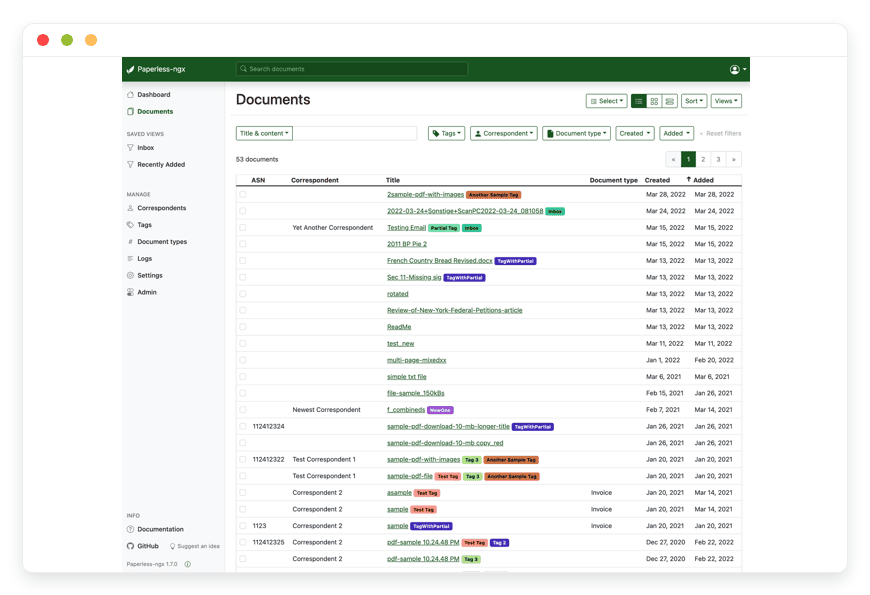
Paperless-NGX sits at the center of this. You feed it scanned paper or PDFs, it runs OCR with the open-source Tesseract engine, and it files each document with tags, a correspondent, and a type. Everything becomes full-text searchable. It is built by a community team, GPL-licensed, with roughly 42,000 GitHub stars. Best for a private, searchable record of everything you would otherwise keep in a filing cabinet.
Documents are saved as PDF/A, a format meant for long-term keeping, with the original file kept untouched alongside it. A machine-learning step suggests tags and correspondents by learning from how you have filed before. It supports several users with roles, so a team shares one instance. Full project detail lives in the Paperless-NGX documentation.
Nextcloud — file sync and sharing
Paperless-NGX archives finished documents. It is not where you draft and share working files. That is Nextcloud. It syncs folders across devices, shares links, and handles the live files a team edits day to day. It is AGPL-licensed, with around 36,000 GitHub stars. Pair it with Paperless-NGX when you need both a working drive and an archive — see Nextcloud for file sync. Best for the shared drive that replaces Dropbox or Box.
DocuSeal — signatures, when you need them
Paperless-NGX stores signed documents. It does not collect signatures. DocuSeal does. You upload a PDF, drop in signature and date fields, and send it out for signing. It is AGPL-licensed, with about 16,000 GitHub stars, and stands in for DocuSign. It is a separate app, not part of Paperless-NGX, so you add it only when signing is part of your flow. Best for contracts and forms that need a legally binding signature.
How Paperless-NGX handles documents day to day
The daily loop is simple. Get a document in, let the software read and file it, find it later in one search. Paperless-NGX calls the intake step "consumption." You can scan to a watched folder, forward an email, or upload from your phone, and the document flows in on its own.
Intake. Point a scanner at a watched folder and Paperless-NGX picks up new files for you. Or connect an email inbox with rules, so invoices forwarded to a dedicated address get filed without a click. Or upload from the mobile app while a receipt is still in your hand.
Reading. It runs Tesseract across each document, adding a searchable text layer even to image-only scans. Tesseract reads more than 100 languages, so a mixed pile of paper still becomes searchable.
Filing. A machine-learning step proposes a correspondent, a document type, and tags, learning from your past filing. You confirm or correct, and it gets more accurate over time.
Finding. Search the full text across everything, then filter by tag, correspondent, date, or type. The thing you scanned two years ago surfaces in about a second.
Two habits make the loop stick. Saved views let you pin the searches you run often — this month's invoices, anything tagged for taxes — so they sit one click from the dashboard. And because intake runs on its own, the routine becomes pointing paper at the scanner and forgetting it. The filing happens whether or not you are watching.
One honest note: the tagging needs a little training data first. Your opening few dozen documents involve more correcting than confirming. After that, it settles into quiet accuracy.
Where Paperless-NGX stops
Paperless-NGX is a personal and small-business archive, not an enterprise document platform. It searches and files very well. It does not route documents for human sign-off, enforce retention schedules, or support e-discovery. If your reason for buying is one of those, a vendor platform is the right fit — and worth its price.
The specific gaps are worth naming:
- No human approval routing. DocuWare's workflow module moves a document through review and sign-off in sequence. Paperless-NGX has workflows that trigger actions on the pipeline, but not a chain of human approvers.
- No retention scheduling or legal hold. If records must expire on a fixed schedule, or be held for a case, Paperless-NGX will not enforce that for you.
- No e-discovery. There is no built-in case-management or production tooling for legal discovery.
- No single sign-on in the core app. It has multi-user accounts with roles, but the core does not ship a built-in SSO connector.
- A security caveat from the project itself. Paperless-NGX stores documents in clear text on disk. The project says plainly: do not run it on a host you do not trust. That makes where you run it matter.
So the split is clean. If you need sign-off chains, retention rules, or e-discovery, DocuWare and M-Files earn their per-user price. For a team that needs a private, searchable archive and not the rest, Paperless-NGX covers the job. Knowing which one you are is most of the decision.
Paperless-NGX and DocuWare, side by side
The contrast comes down to how you are billed and what you own. DocuWare bills per seat, on an annual term, on infrastructure it runs. Paperless-NGX on DANIAN bills €9 per app, monthly, with the whole team on one instance and the data in a region you choose. Here is the shape of it.
| DocuWare Cloud (entry) | Paperless-NGX on DANIAN | |
|---|---|---|
| Pricing model | Per named user, plus a storage tier | Per app, flat |
| Entry price | ~$71/user/mo (£57), sliding to ~£20 at volume | €9/app/mo |
| Smallest plan | 4 users, 20 GB, 12-month term | 1 app, 30 GB, monthly |
| Whole-team cost | Bills every named seat | One shared instance, no per-seat charge |
| Commitment | 12 months, auto-renew | Monthly, with a 7-day free trial |
| Where data sits | DocuWare's cloud | Your region, one of 21 locations |
A scanned archive grows over time. A typical Paperless-NGX install runs 5 to 10 GB once you have fed it real documents. Every app on DANIAN includes 30 GB, which holds a small office's archive for a long while. Past that, storage is €0.50 per GB per month. We will not upgrade your resources or bill an overage without asking first.
A practical example: a busy scanning operation adding documents daily might reach 60 GB in a couple of years. The extra 30 GB would add €15 a month — still one bill, with no per-seat math underneath it. You can put a document through Paperless-NGX yourself first; start a 7-day trial and scan something in.
The wider shortlist lines up the same way against the proprietary tools each app replaces:
| App | Replaces | Typical SaaS cost | On DANIAN | GitHub stars | Region | Switching effort |
|---|---|---|---|---|---|---|
| Paperless-NGX | DocuWare, M-Files | ~$71/user/mo, 4-seat floor<sup>1</sup> | €9/mo, one shared instance | ~42,000 | Pick from 21 locations | Moderate — import by scan, email, or upload |
| Nextcloud | Dropbox, Box, Google Workspace files | ~$15–24/user/mo<sup>2</sup> | €9/mo | ~36,000 | Pick from 21 locations | Moderate — sync client, then migrate files |
| DocuSeal | DocuSign, Adobe Acrobat Sign | ~$25–45/user/mo<sup>2</sup> | €9/mo | ~16,000 | Pick from 21 locations | Low — upload a PDF, drop in fields |
<sup>1</sup> DocuWare's published per-user pricing starts near £57 ($71) and slides toward £20 at higher volumes; the entry tier bills for four seats on a twelve-month term. <sup>2</sup> List pricing for the named SaaS, per user — verify current rates. DANIAN bills per app, not per seat, and multi-user is built into each app.
Getting your documents out of DocuWare
Migration is the real question behind any switch. Moving from DocuWare to Paperless-NGX means exporting your documents from the vendor, then feeding them through intake so each one gets read and filed. It is not instant, but it is a known path, and you keep the originals the whole way through.
DocuWare lets you export your stored documents, and the other vendor platforms do the same — your files are yours to take. What comes out is the document files themselves, usually as PDFs, sometimes with a sidecar describing tags and dates. From there, Paperless-NGX takes over through the same intake it uses every day: drop the exported files into the consumption folder in batches and it works through them in turn, running OCR, adding a text layer, and proposing a type and tags for each.
The old metadata is the fiddly part. Tags and correspondents from the previous system do not always map cleanly onto the Paperless-NGX model, so it pays to set up your tag and correspondent lists before a large import, then let the machine-learning step learn from the first corrected batch. Bring in a few hundred documents, fix the filing on those, and the rest sort with far less hand-holding.
One practical tip: import in stages rather than all at once. A staged import lets you confirm the tagging is landing the way you want before you commit the whole archive, and it keeps the reading queue from backing up. Treat the first week as setup, not the finished system, and the back-catalogue takes care of itself from there. Keep the old platform read-only until the import checks out — there is no rule that says you must cancel it on day one, and a short overlap costs little next to a botched cutover.
What it means to own the archive
Ownership is the quiet reason most teams make this move. With Paperless-NGX on your own instance, the documents sit in a database and a file store you control, in a region you picked. You can back them up, export them, or move them out — without asking a vendor's permission or waiting on a plan tier to allow it.
On a per-seat platform, your archive lives in the vendor's cloud, on the vendor's terms. If you stop paying, access to the documents stops with it. That is the part that turns a renewal into a quiet form of pressure: the longer the archive sits there, the more leaving it costs. A self-hosted archive flips that around.
The files are stored as PDF/A — an open, long-term format — with the originals kept beside them. The text and tags live in a PostgreSQL database you can dump and restore yourself. Nothing about the format depends on Paperless-NGX continuing to exist, which is the whole point of building on open standards rather than a vendor's proprietary store.
On DANIAN, that ownership comes without the upkeep. Your instance is backed up daily, kept on current versions, and runs in one of 21 locations you choose at signup. If you ever decide to leave, nothing holds the documents hostage: pull a backup, take your files, and go. We would rather earn the next month than lock you into it. That is the trade the per-app price reflects — you are not renting access to your own records by the head, you are paying one flat fee to have someone run the box while the archive itself stays yours.
How to pick: three questions to ask
The choice is not really Paperless-NGX versus DocuWare. It is whether your job is archiving or process. Three questions sort it. Answer them honestly and the right tool is obvious — and you avoid paying enterprise prices for a filing cabinet, or outgrowing a filing cabinet you needed to be a workflow engine.
- Do documents need to move through people, or just to be found? If they need review and sign-off in sequence, that is a workflow platform's job. If you mostly need to file and find, that is an archive.
- Do you have a regulator-driven retention or legal-hold rule? If records must expire on a schedule or be held for a case, you need software that enforces it. Paperless-NGX does not.
- Who is going to run it? If you have someone who likes managing containers, self-hosting is cheap. If you would rather not, a managed instance at €9 removes the on-call without removing the ownership.
Frequently asked questions
Is Paperless-NGX really free?
Yes. Paperless-NGX is open source under the GPL, free to download and run. You pay only for the infrastructure under it. Self-hosting costs server time and your own hours. A managed instance on DANIAN is €9 a month, which covers the server, updates, daily backups, and support.
What is the best open-source alternative to DocuWare?
For most small teams, Paperless-NGX. It covers the job people actually use DocuWare for — scan, OCR, tag, and search a private archive — without per-seat billing. It is GPL-licensed, with roughly 42,000 GitHub stars. It is not a full workflow platform, so if you need approval routing, DocuWare still fits.
What is the difference between Paperless-NGX and DocuWare?
DocuWare is an enterprise document platform with approval routing, forms, and signing, billed per user. Paperless-NGX is a searchable archive: scan, read, tag, find. If you need sign-off chains and retention rules, DocuWare fits. If you need a private archive, Paperless-NGX covers it for far less.
What is the difference between a document management system and a document archive?
A document management system moves documents through people — review, approval, sign-off, retention rules. A document archive stores finished documents so you can find them again. DocuWare is the former; Paperless-NGX is the latter. Many teams pay for a management system but only ever use the archive underneath it.
Is Paperless-NGX cheaper than DocuWare?
Almost always, yes. DocuWare bills per named user on an annual term, with a four-seat floor near $71 each. Paperless-NGX is free software; on DANIAN one shared instance is €9 a month for the whole team. A four-person office can go from roughly $280 a month to €9.
Can a whole team use one Paperless-NGX instance?
Yes. Paperless-NGX has multi-user accounts with roles, so several people share one instance. On DANIAN you pay €9 for the app, not per person. That is the core difference from DocuWare and M-Files, which bill for every named seat on the plan.
Can Paperless-NGX replace DocuWare for a small business?
For the archiving job, yes — scanning, OCR, tagging, and full-text search across everything. A small office that mainly needs to file and find documents will not miss much. What it cannot replace is sign-off routing, retention scheduling, or e-discovery. If those are why you bought DocuWare, keep it.
Will my scanned documents be searchable?
Yes. Paperless-NGX runs OCR with the Tesseract engine on every document, including image-only scans, and adds a searchable text layer. It reads more than 100 languages. After intake, you can search the full text of everything and filter by tag, correspondent, type, or date.
What file formats does Paperless-NGX support?
It takes in PDFs, images such as PNG and JPEG, and common office files, running OCR on each. It stores documents as PDF/A, a format built for long-term keeping, while keeping your original file untouched alongside it. That mix covers most scanned paper and digital documents a small office handles.
Can Paperless-NGX read handwritten documents?
Not reliably. The OCR engine, Tesseract, is built for printed text, not handwriting. It reads typed and printed documents in more than 100 languages very well, but handwritten notes will not index well. For a paper archive of invoices, letters, and forms, that limit rarely matters in practice.
How do I get my documents into Paperless-NGX?
Three ways, and you can mix them. Scan to a watched folder and it picks up new files on its own. Forward email to a dedicated address with rules. Or upload from the mobile app. Paperless-NGX calls this step consumption, and once it is set up, intake runs without you watching.
Can I import my documents from DocuWare?
Yes, in stages. Export your documents from DocuWare — usually as PDFs — then feed them through the same intake folder. Paperless-NGX runs OCR and proposes tags for each. Old tags do not always map across, so set up your tag list first and import a few hundred at a time.
How much storage do I need?
A typical archive runs 5 to 10 GB after real use. Every app on DANIAN includes 30 GB, which suits most small offices for years. Beyond that, storage is €0.50 per GB per month, and we never bill an overage without asking. A heavy scanning operation should budget for steady growth.
Where are my documents stored?
In a region you choose at signup, on one instance that is yours alone — not pooled with other customers' files. There are 21 locations to pick from, so you can keep the archive close to where your team works. You control who has an account and what each role can see.
Does DANIAN back up my documents?
Yes. Every managed instance is backed up daily as part of the €9 a month, so a failed disk or a mistaken deletion does not cost you the archive. You can also pull your own copy whenever you want. Backups are included, not a separate line item or a higher tier.
Can I export my data out of Paperless-NGX?
Yes, fully. Documents are stored as PDF/A with the originals kept beside them, and the tags and text live in a PostgreSQL database you can dump and restore. Nothing depends on Paperless-NGX continuing to exist. That portability is the point of building on open formats rather than a closed vendor store.
What happens to my documents if I stop paying?
You take them with you. Because the archive runs on your own instance, you can pull a backup at any time — the PDF/A files, your originals, and the database. Nothing holds the documents hostage. We would rather earn the next month than lock you in, so the exit stays open.
Does Paperless-NGX support single sign-on (SSO)?
The core app has multi-user accounts with roles, so a team shares one instance, but it does not ship a built-in SSO connector. If central sign-on is a hard requirement for your team, that is worth raising before you commit, since it shapes how you set access up.
Do I need technical skills to use Paperless-NGX?
To use it, no — scanning, searching, and tagging are point-and-click. To run it yourself, yes: self-hosting means containers, patching, and backups on a production-class VPS. The managed option exists precisely so you can use the tool without running the server. On DANIAN that is the €9 a month.
What if I would rather host it myself?
That is a fair option. Paperless-NGX runs as a set of containers on a production-class VPS for around $24 a month. You take on patching, backups, and updates in exchange. If you would rather skip the on-call and keep the ownership, a managed instance at €9 does that instead.
When should I choose DocuWare instead of Paperless-NGX?
When your reason for buying is process, not storage. If documents must move through a chain of human approvers, expire on a fixed retention schedule, or support legal e-discovery, DocuWare is built for that and earns its per-user price. Paperless-NGX is an archive; it does not enforce those rules.
What to do this week
If you are staring at a per-user renewal, you do not have to decide everything today. Put one tool through its paces. Scan a stack of paper into Paperless-NGX, search for something, and see whether the archive is the part you were actually paying for. Then decide.
A short plan:
- See managed Paperless-NGX hosting and what €9 a month includes.
- Scan twenty real documents and run a search. Seven days is enough to know.
- If you also need a shared drive, add Nextcloud. If you need signatures, add DocuSeal.
- If your reason for buying is sign-off chains or retention rules, stay on your vendor platform. It is the right tool, and switching would cost you more than it saves.
Own the archive. Pay for one app, not one bill per person.