
Give SaaS customers an SFTP ingest endpoint
The short version
- If your SaaS needs data from customers, the standard enterprise pattern is an SFTP ingest endpoint: each customer uploads into their own folder over SSH, and your platform picks files up on arrival. The NHS, Michelin, and major banks run this exact pattern for suppliers.
- Building it yourself means a server, per-customer user management, arrival detection, and audit. On managed SFTPGo hosting the whole endpoint is a configuration exercise: one instance, unlimited customer logins, folders per customer, webhooks when files land.
- The pricing matters as your customer count grows: per-credential SFTP services bill per login, so 50 customers means 50 billable accounts. The flat lane stays €9 a month regardless of how many customers drop files.
- One instance handles the awkward cases too: accounting and ERP systems that only speak FTPS, quotas per customer, and an audit log of every upload for compliance conversations.
The problem every data-hungry SaaS hits
Somewhere between your tenth and your fiftieth customer, ingestion breaks. Early on, a customer emails a spreadsheet, or uploads through a form, or shares a Drive folder, and somebody on your team drags the file into the pipeline. It works right up until it does not: attachments get stripped by mail filters, Drive links expire, forms time out on hundred-megabyte exports, and every format arrives slightly different because a human touched it.
The customers who hurt most are the ones whose systems already export files automatically. Accounting packages, point-of-sale suites, and inventory platforms can often be scheduled to push an export somewhere, but the "somewhere" they speak is almost always FTP, FTPS, or SFTP, not your REST API. If you give them nothing, their operator exports manually and forgets. The data arrives late, or not at all, and your product takes the blame.
This is why the oldest boring standard in file transfer is also the standard answer. An SFTP ingest endpoint is a single host your customers connect to with a simple client or an automated schedule, each seeing only their own folder, dropping files that your platform consumes the moment they land.
What an ingest endpoint actually is
Strip the jargon and it is four things. A host: an address like ingest.yourproduct.com speaking SFTP over SSH. Accounts: one login per customer, so the compromise of one credential exposes one customer's folder and nothing else. Folders: each customer lands in their own directory, which your platform maps to their workspace. And arrival handling: something that notices a completed file and starts your import job.
The pattern is mature enough that the biggest organizations on earth publish instructions for it. Healthcare systems, manufacturers like Michelin, banks, and retailers all operate supplier-portals whose upload lane is SFTP, and they publish supplier-facing guides saying exactly this: connect with any SFTP client, drop your file in your folder, done. Your SaaS can offer the same lane to its customers without building any of the machinery those organizations built.
The four building blocks on SFTPGo
Everything in the list above maps to a native feature of SFTPGo, the open-source transfer server, which is what makes the ingest endpoint a configuration exercise rather than a project:
| Ingest need | SFTPGo feature | What you configure |
|---|---|---|
| One host for all customers | Single instance, SFTP and FTPS on standard ports | Point a subdomain at the instance |
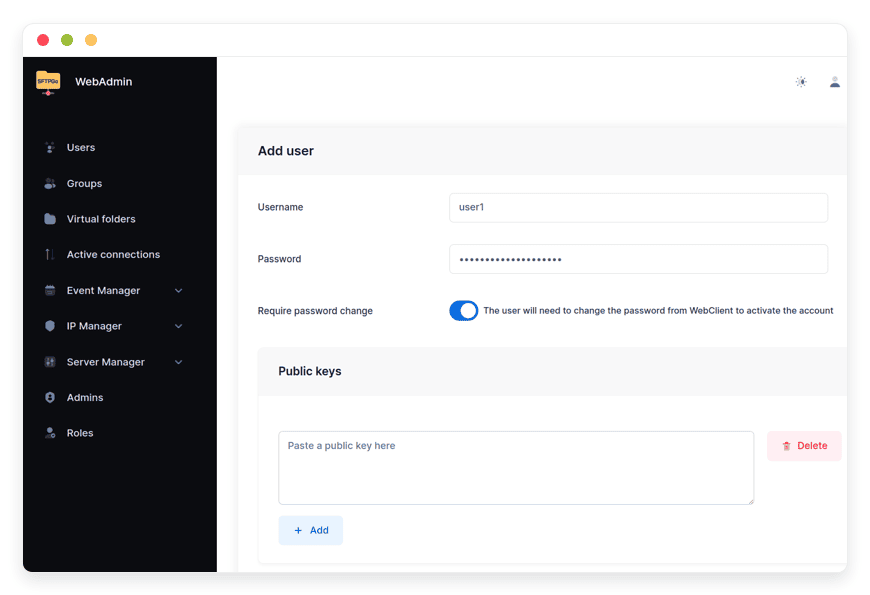
| One login per customer | Database-backed users with own home directories | Create a user per customer, issue credentials |
| Folder isolation and shared intake | Virtual folders with per-user read or write permissions | Map each customer's drop folder into your intake view |
| Process on arrival | Event rules with HTTP webhooks | POST to your import API when a file lands |
The webhook is the piece that turns storage into product. When a customer's export lands, SFTPGo posts the file name, path, size, and uploading user to your endpoint. Your queue picks it up, validates, imports, and the customer sees their data refreshed with no human in the loop. Because the payload identifies the user, one handler serves every customer.
The awkward customers: ERPs that only speak FTPS
A real deployment pattern, anonymized from live ones: a vendor whose customers' back-office systems could schedule exports, but only over FTPS, the TLS-wrapped cousin of FTP. SFTP purists dislike FTPS; enterprise software departments love it, because it shipped with their system in 2011 and it still works.
SFTPGo serves both from one process, SFTP on its standard port and explicit FTPS on another, so the endpoint accepts the modern customer with an SSH key and the legacy one with a schedule-and-forget FTPS job alike. The classic failure mode, transfers that connect and then stall, is a passive-mode setting, and it is a five-minute fix on the server side. The step-by-step for that exact case, along with folder setup and user provisioning, is in the SFTPGo knowledge base.
Why not a form, an API, or a Drive folder
An upload form is fine for ten customers and a human watching the inbox. It fails on automation: the scheduled export from a customer's system cannot fill in a browser form. A customer-facing API is the right end state for a product, but it is a project: authentication, client generation, docs, rate limits, and the customer still has to write code against it. The customers who most need automation are the ones least able to build it.
SFTP sits in the middle and has for two decades: every operating system ships a client, every scheduling tool on earth can call one, and enterprise systems speak it natively. It is also the answer to the shared-drive problem, where a folder link expires quietly and a nightly export fails for three weeks before anyone notices. The ingest endpoint is yours, the credentials are per customer, and the audit log records every arrival.
The vendor math: per credential versus flat
Here is the cost shape that matters for a SaaS company specifically. Your customer count is your credential count: every customer that connects is a login on the endpoint, and a growing SaaS adds logins every week.
Commercial per-credential services price that growth directly: the entry plans cap credentials (20 on one widely used service's $150 tier) and force upgrades as you sign customers. The flat-price managed lane bills the instance, not the logins: 10 customers or 400, the base stays €9 a month with storage metered beyond the included 30 GB. A vendor whose average customer drops a 50 MB nightly export holds well under 2 GB for 40 customers; the metered overage is smaller than a coffee. The full pricing comparison across the market, with tier tables and workload math, is its own piece: managed file transfer pricing compared.
For the build-versus-buy question, the engine is open source and free to self-host; what you are choosing is who answers at 3 a.m. The honest breakdown of every path, from a $24 VPS to the vendor SaaS, is in the real cost of running SFTPGo.
Security posture your enterprise buyers will ask about
Selling an ingest endpoint to businesses means fielding security questionnaires. The answers exist and they are boring, which is the point: transfers encrypted by SSH or TLS, per-customer credentials that cannot see each other's folders, optional two-factor and single sign-on on the admin side, brute-force blocking built in, and a per-user audit trail of every login and upload. Files can live in your own S3-compatible bucket rather than on the instance, if the data-residency answer needs to be "our bucket, our region."
The managed lane adds the operational answers: daily backups, automatic security updates, monitoring, and a 7-day trial to point a security reviewer at. When the questionnaire arrives, the endpoint is a strength instead of an apology.
Who this pattern fits
It fits any SaaS whose customers' data starts life as a file: analytics platforms ingesting point-of-sale and accounting exports, reconciliation tools taking bank statements, logistics products consuming carrier manifests, marketing platforms receiving campaign assets, fintech parsing statements and invoices. It does not fit products whose data is genuinely real-time or event-shaped; for those, an API is the right lane, and the file endpoint is the fallback for the customers who cannot build against one. Publishers run the same intake pattern at raw-media scale, and the newsroom view of large-file intake is the companion piece.
If your customers also receive files back, reports, enriched exports, or generated documents, the same instance serves that direction too: a read-only folder per customer, or a one-time secure share link from the web client. One endpoint, both directions, and the full tour of the server behind it is a separate read.
Frequently asked questions
How does SFTP ingest work for SaaS products?
A host your customers connect to over SFTP, each with their own login and folder, where they drop files your platform automatically consumes. It is the standard enterprise pattern for supplier and customer data intake: the upload side is trivial for any customer system, and the receiving side gets clean, per-customer, auditable files.
Why would a SaaS offer SFTP instead of just an API?
Because the customers who most need automated data delivery are often the least able to write API integrations. Accounting systems, point-of-sale suites, and inventory platforms export files on a schedule over FTP-family protocols natively, but cannot call your REST API without custom development. SFTP meets them where their software already is.
How do customers connect to the endpoint?
With any SFTP client: the command line on every OS, FileZilla, WinSCP, Cyberduck, or their system's built-in scheduler. They enter the host address, their username and password or SSH key, and they see only their own folder. No software to install beyond what they already have.
Can each customer only see their own files?
Yes. Each customer is a separate user with a separate home directory, and the isolation is enforced by the server, not by convention. Virtual folders can additionally map each customer's drop zone into your internal intake view with exactly the permissions you choose, without giving customers any view of each other.
How does my platform know a file has arrived?
Event rules with webhooks. When a file finishes uploading, the server posts a JSON payload with the file name, path, size, and uploading user to your endpoint. Your queue or workflow tool picks it up and starts the import. Polling a directory is also possible, but the webhook is the clean pattern.
What if a customer's system only supports FTPS?
SFTPGo serves SFTP and explicit FTPS from the same instance on separate ports, so legacy schedulers and modern clients work against one endpoint. The one classic FTPS failure, a transfer that connects and then stalls, is a passive-mode setting fixed on the server side in minutes.
How many customer logins can one endpoint take?
The software is comfortable with hundreds of active users on modest hardware; the practical limit is operational, not technical. On the flat-price managed plan, users are unlimited: your cost scales with stored data, not with customer count, which is the right axis for a growing SaaS.
Does an ingest endpoint satisfy audit requirements?
The server logs every login and every transfer per user, which is what most audit and SOC-style conversations ask for: who uploaded what, and when. Combined with encrypted transfer, per-customer isolation, and brute-force blocking, the endpoint answers the standard security questionnaire without custom work.
Can files land directly in our own S3 bucket?
Yes. S3-compatible storage is a first-class backend, per user and per folder, so customer files can stream into your bucket in your region while the endpoint itself stays small. Azure Blob and Google Cloud Storage work the same way.
What happens if a customer uploads a huge file overnight?
Completed transfers are what trigger events, so a half-uploaded file never starts your import. Per-user quotas cap storage abuse, and bandwidth limits keep one customer's nightly dump from crowding the others. The webhook fires once the file is fully written.
How is this different from a shared Drive or Dropbox folder?
Permissions, audit, and automation. A shared folder link expires, grants broad visibility, has no per-customer credentials, and no arrival events. An ingest endpoint is your host, your accounts, per-customer isolation, and a machine-readable event when a file lands. It is infrastructure you own rather than a borrowed folder.
Who manages the endpoint day to day?
On the managed lane, the provider runs the server: updates, backups, monitoring, and support, while you manage users and folders from the web admin or REST API. Self-hosting the same software is free, but the operations become your job; the cost comparison between the paths is linked from this article.
Can we brand the endpoint with our own domain?
Yes. Point a subdomain like ingest.yourdomain.com at the instance and the TLS certificate is issued and renewed automatically. Your customers see your brand, not the host's, from day one.
How do we migrate customers from an existing FTP server?
Recreate the accounts and folder layout on the new endpoint, move or repoint the data, and cut customers over one at a time by having them change the host address in their schedule. Because SFTP and FTPS clients are interchangeable, most customers change one line of configuration.
What does an endpoint cost for a SaaS with many customers?
On per-credential commercial services, cost grows with customer count: entry tiers cap logins and force upgrades. On the flat-price managed lane the base is €9 a month with unlimited users and storage metered beyond 30 GB, so a vendor with hundreds of small customers pays for data volume, not for popularity.
Sources
- Feature set: protocols, users, virtual folders, event webhooks, quotas: github.com/drakkan/sftpgo README (viewed October 2026)
- The enterprise supplier-portal pattern (SFTP upload guides as the intake standard): public supplier documentation of major healthcare and manufacturing organizations, observed in search results October 2026
- Pricing and inclusions: danian.co/sftpgo and danian.co/pricing


