After Skiff - self-hosted private docs in 2026
Where private docs landed after Skiff shut down
In short
- Notion bought Skiff on 9 February 2024, then switched off Skiff Pages, Drive, Calendar, and Mail on 9 August 2024. Only mail forwarding ran on, until 9 February 2025.
- Skiff had close to 2 million users when it was acquired. None of those accounts moved to Notion. Everyone had to export and leave.
- This is a pattern, not bad luck. A small privacy product gets bought, the team moves on, and your documents end up on a countdown clock someone else controls.
- For the documents-and-drive side of Skiff, three open-source tools cover the ground: CryptPad, Nextcloud, and Etherpad. They use three different privacy models, and the difference decides which one you want.
- The encrypted-email side is out of scope here. DANIAN does not run a managed email server, so a dedicated encrypted-email service is the right tool for that part.
- Run by DANIAN, each of the three costs €9 per app, per month, in the region you choose.
What actually happened to Skiff
Notion announced it had acquired Skiff on 9 February 2024. Skiff was a privacy-focused suite built by Andrew Milich and Jason Ginsberg in 2020: encrypted documents (Pages), file storage (Drive), a calendar, and email (Mail). Within months, the standalone products were scheduled to close.
The first plan was a six-month wind-down. After user pushback, the messaging softened to a longer window. In practice the apps went dark on 9 August 2024, and only automatic mail forwarding survived to 9 February 2025. After that date, access ended: emails, files, contacts, and events.
Two details are worth holding onto. Skiff accounts were never converted into Notion accounts, so users had to export their data and move it somewhere else. And Skiff had stored files on IPFS, a distributed file system, which was part of its appeal. None of that machinery mattered once the deadline arrived. The product was gone, and the data was the user's problem to rescue.
Why your privacy product keeps getting acquired
Skiff is one instance of a repeating story. A small, well-regarded privacy tool earns attention, raises money, and then gets bought by a larger platform that wants the people more than the product. The service is wound down. The team is absorbed. Users are the loose end.
The economics drive it. In a deal like this, the product is the team, and the running service is overhead the buyer has no plan to keep. That is rational for the buyer. It is expensive for you, because the migration window, the export format, and the deadline are all set by the acquirer, not by you. People who relied on the forwarding window found that out when it ended early for some of them.
The defensive lesson is simple. Keep your documents in software you can run yourself, in formats you can export, so a corporate deal somewhere else is an inconvenience and not an eviction. Open-source, self-hostable tools give you that footing. Managed hosting gives you the same footing without the server work.
What “alternative” actually means here
“Private” means three different things, and Skiff blurred them together. Some people want a host that literally cannot read their files. Some want to own the server their data sits on. Some just want collaborative editing with no third party in the middle. The three tools below each answer a different one of those questions.
1. The host cannot read it. Encryption happens in your browser, and the server only ever holds scrambled data. This is called zero-knowledge, and CryptPad works this way. It is the closest match to what made Skiff Pages feel private.
2. You own the server. Your data lives on an instance you control, in a region you choose. It is encrypted at rest, and you can turn on end-to-end encryption for specific folders. The server software can still read your files in normal operation. Nextcloud works this way, and trades a little secrecy for a lot of breadth.
3. You own the server, and the content is plain. There is no third party in the document, because the server is yours, but the content is stored in readable form. Etherpad works this way. The privacy comes from ownership and the absence of a vendor, not from the host being unable to read the text.
Knowing which of these you need saves you from picking the wrong tool. Most regret in this category is someone choosing for ownership when they needed secrecy, or paying the cost of zero-knowledge when plain ownership was the actual job.
Reading a privacy claim
Skiff's lesson is not only about acquisitions. It is also about taking the word “private” at face value. The three tools here are honest about their models, but many products are vaguer. A few questions tell you what a privacy claim is really worth.
Ask who holds the encryption keys. If the host holds them, the host can read your data, whatever the marketing says. Ask where encryption happens, in your browser or on the server. Browser-side encryption is the stronger claim, because the server only sees scrambled data.
Ask what happens to your data if the company is sold. Open-source software you can run yourself answers that question for you. Ask whether you can export everything, in formats other tools can open. If any of these answers is unclear, treat the privacy claim as marketing.
The shortlist
CryptPad — the closest thing to Skiff Pages
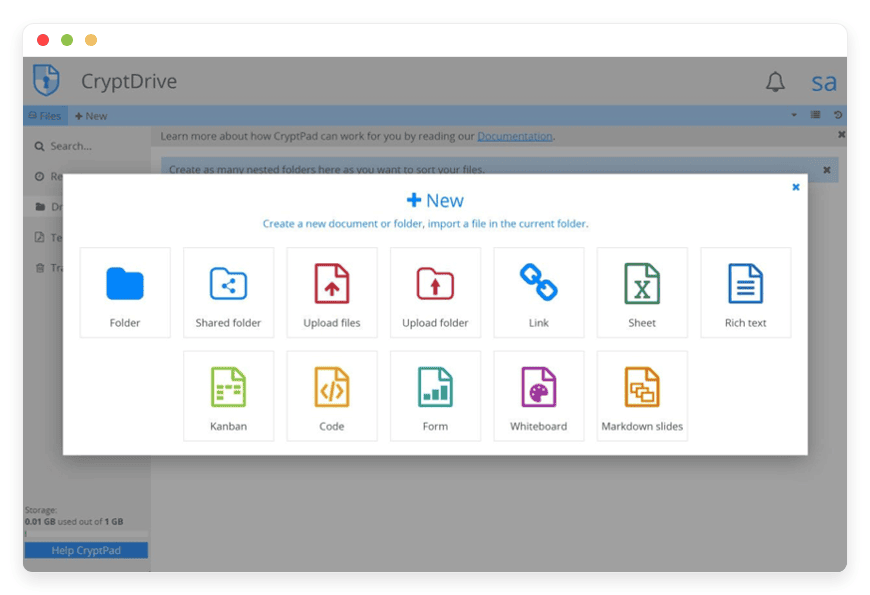
CryptPad is an encrypted-by-design document suite: rich text, spreadsheets, slides, forms, and more. Every document is encrypted in your browser before it reaches the server, so the stored data is unreadable to whoever runs the instance. It is open source under the AGPLv3 licence, built by the team at XWiki.
Editing is real-time, driven by an engine called ChainPad, so several people can work in the same document at once. The honest caveat is the one CryptPad makes itself: it is private, not anonymous, and your host still serves you the application code. That means the model protects your content from a server breach, but you should still run it somewhere you trust.
CryptPad is the right pick when your first requirement is that the host cannot read what you write. Managed by us, it runs at €9 per app, per month.
See managed CryptPad.
Nextcloud — files, drive, and calendar you run
Nextcloud is the most widely deployed self-hosted files-and-drive platform, with around 35,000 stars on its main code repository. It covers file sync and sharing, plus calendar, contacts, and an office layer. That is much of what Skiff Drive and Skiff Calendar did, in one place you control. It is open source under the AGPLv3 licence.
On privacy, be clear-eyed. Nextcloud encrypts data at rest by default and offers optional end-to-end encryption for folders you choose, but it is not zero-knowledge the way CryptPad is. Its strength is ownership and breadth, not secrecy from the host. It is also a heavier piece of software, built on a PHP stack, so it does more and asks for more in return.
Nextcloud is the right pick when you want your drive, calendar, and contacts on infrastructure you own. Managed by us, it runs at €9 per app, per month.
See Nextcloud for files and drive.
Etherpad — fast, real-time collaborative documents
Etherpad is a real-time collaborative text editor that has been around since 2008. There are no logins needed to start a document, every keystroke is attributed to its author, and the full edit history is preserved. Wikimedia, universities, and public-sector bodies have run it for years. It is open source under the Apache 2.0 licence.
This is the lightest of the three, and the quickest to put in front of a group. It is good at no-friction shared editing and exports to common document formats. It is not encrypted the way CryptPad is, and it should not be sold as if it were. Etherpad's privacy story is ownership: the server is yours, and no vendor sits in the middle of the document.
It is the right pick when fast shared editing is the actual job and speed matters more than secrecy.
See managed Etherpad.
Side by side
The same three tools, lined up against the part of Skiff each one stands in for, and the privacy model each one uses.
| Tool | Stands in for | Privacy model | Licence | Managed price |
|---|---|---|---|---|
| CryptPad | Skiff Pages | Host cannot read it (browser-side encryption) | AGPLv3 | €9/app/month |
| Nextcloud | Skiff Drive and Calendar | You own the server; at-rest plus optional end-to-end | AGPLv3 | €9/app/month |
| Etherpad | Skiff Pages (real-time) | You own the server; ownership, not encryption | Apache 2.0 | €9/app/month |
Prices are the DANIAN base tier. Licences and project details are verified against each project's own site, linked through this article.
How to pick: three questions
The choice comes down to three questions, asked in order. Answer the first one that is a hard yes, and you have your tool. If two of them are yes, the higher question wins, because it is the harder requirement to satisfy later.
- Does the host need to be unable to read your documents? If yes, CryptPad. Its browser-side encryption is the whole point, and it is hard to bolt on afterwards.
- Do you want files, calendar, and contacts in one place you own? If yes, Nextcloud. It is the broadest of the three and the closest to a full workspace.
- Is quick, no-login real-time editing the actual job? If yes, Etherpad. It is the fastest to start and the easiest to share with people who will not make accounts.
One honest aside on doing it yourself. All three are open source, so you can run any of them on your own hardware. A developer who is comfortable on the command line can self-install on a $24 production-class VPS and keep the bill low. The trade is real: you then own the updates, the backups, the certificate renewals, and the 2am page when something breaks. Managed hosting is the same software with that work taken off your desk, and that is what the €9 buys. If you have an engineer in-house who enjoys that work, self-hosting is a fair choice and we would not pretend otherwise.
Moving your documents in
Switching tools is mostly about the export, not the import. Skiff let you download your Pages, Drive files, and calendar before the shutdown. If you saved that export, the files are standard formats, and standard formats move cleanly. The same logic applies to wherever your documents sit today.
For CryptPad, create a document of the right type and paste or import your content. Rich text, spreadsheets, and slides each have a matching CryptPad app. Because encryption happens in your browser, the upload is encrypted as it lands. Start with your most sensitive documents, since those gain the most from the model.
For Nextcloud, the desktop sync client is the fastest route in. Point it at a local folder, and your files copy up on their own. Calendar and contacts import from standard .ics and .vcf files, the same ones Skiff exported. Folder structure and sharing links you rebuild once, inside Nextcloud.
For Etherpad, there is almost nothing to migrate. You create a pad, paste your text, and share the link. It suits the documents you want live again quickly, not a long archive. For anything you need to keep private at rest, one of the other two fits better.
What you give up
Moving from one suite to three tools is not free, and pretending otherwise would be dishonest. Skiff put documents, drive, calendar, and mail behind a single login. Splitting that across CryptPad, Nextcloud, and a separate mail service means more than one account to manage. That is the real trade for owning your data instead of renting it.
There are ways to narrow the gap. Nextcloud alone covers files, calendar, and contacts, so it can carry most of the suite on its own. Pairing Nextcloud for the drive with CryptPad for sensitive documents covers two needs with two tools. The mail piece stays separate either way, which is the honest shape of the trade.
The email piece
One caveat is worth stating plainly. Skiff Mail was a large part of why people used Skiff, and none of the three tools here replaces it. DANIAN does not run a managed encrypted email server, so encrypted email is out of scope for this page.
For that side, a dedicated encrypted-email service is the right tool. Proton Mail and Tuta are the usual destinations people move to from Skiff Mail, and either will handle the email job far better than a document tool pretending to. This page is about the documents, drive, and calendar that Skiff also did, which is the part we can run for you.
Where the data sits
For a privacy decision, location is part of the picture. With a managed instance, you pick the region at setup, from 21 datacenter locations across six continents. That choice is yours, not a default someone else picks for you. It matters when your own rules say data should stay in a particular part of the world.
Self-hosting gives you the same control, with more work. You choose the provider and the location yourself, and you carry the setup. The managed version keeps the regional choice and removes the setup. Either way, the data does not have to live wherever a vendor decided to put it.
How DANIAN runs these
With DANIAN, the software is yours and the operations are ours. The €9 per app, per month covers updates, daily off-site backups, monitoring, and a named person when something needs attention. You pick the region from 21 datacenter locations across six continents, so the data sits where you want it.
Concretely, that means a few things you would otherwise own. When an app ships a security update, we apply it, so you are not tracking release notes. Backups run off-site every day, so a bad import is recoverable. If something breaks, the same person who set it up is the one who answers.
Two promises sit underneath that. We will not upgrade your resources or charge you without asking first. If a card fails, we wait, and we do not delete your data. You can also leave on your own terms, because the data is exportable and the open-source app is yours to take elsewhere. The point of this whole exercise is that no acquisition, ours or anyone else's, should be able to evict you from your own documents.
Common questions
When did Skiff shut down?
Skiff's apps shut down on 9 August 2024. Notion had acquired Skiff on 9 February 2024. Automatic mail forwarding ran until 9 February 2025, and then access ended. After that, exported data was the only copy users kept.
Why did Notion shut down Skiff?
The deal was about the team, not the product. Notion wanted Skiff's people, and the standalone apps were overhead it had no plan to keep. This is common when a large platform buys a small privacy tool. The service winds down, and users become the loose end.
Can I still recover my Skiff data?
Not from Skiff itself, because the service is gone. If you exported your documents, files, and calendar before the deadline, those files are yours to import. If you did not export in time, that data is no longer reachable. The lesson is to keep documents in formats you can export.
Does DANIAN replace Skiff Mail?
No. DANIAN does not run a managed encrypted email server, so none of these three tools replaces Skiff Mail. For encrypted email, a dedicated provider such as Proton Mail or Tuta is the right tool. This page covers the documents, drive, and calendar side of Skiff.
Is there a single replacement for Skiff?
No, because Skiff combined documents, drive, calendar, and mail in one product. The closest single tool is Nextcloud, which covers files, calendar, and contacts. For browser-side encrypted documents, CryptPad is the nearest match to Skiff Pages. Email needs a separate service, since none of these hosts encrypted mail.
Which tool is closest to Skiff Pages?
CryptPad. It is encrypted by design: documents, spreadsheets, and slides are encrypted in your browser, and the server stores data it cannot read. That browser-side model is the same idea that made Skiff Pages feel private, applied to an open-source suite you can run anywhere.
What does zero-knowledge encryption mean?
Zero-knowledge means the host cannot read your data. Encryption happens in your browser, so the server only ever stores scrambled content. The keys stay with you, not with whoever runs the server. CryptPad works this way, which is why a host breach does not expose your documents.
What is the difference between zero-knowledge and end-to-end encryption?
They overlap, but they are not identical. End-to-end encryption protects data in transit between you and the people you share with. Zero-knowledge goes further: the host that stores your data cannot read it at rest either. CryptPad is zero-knowledge; Nextcloud offers optional end-to-end encryption on chosen folders.
Can a hosting provider read my files?
It depends on the tool, not the provider. With CryptPad, no, because files are encrypted in your browser before they reach the server. With Nextcloud, the software can read files in normal operation, though they are encrypted at rest. With Etherpad, content is stored in readable form, so the server can read it.
Is CryptPad really private if DANIAN hosts it?
Yes, in the sense that matters. CryptPad encrypts each document in your browser before it reaches the server, so the stored data is unreadable to whoever runs the instance. CryptPad describes itself as private, not anonymous. The host still serves the app code, so pick a host you trust.
Is Nextcloud's encryption the same as CryptPad's?
No, and the difference matters. Nextcloud encrypts data at rest by default and offers optional end-to-end encryption for chosen folders, but it is not zero-knowledge across the board. Its strength is ownership and breadth, with files, calendar, and contacts on infrastructure you control.
Is Etherpad encrypted?
No, Etherpad does not encrypt your documents the way CryptPad does. Its privacy comes from ownership: the server is yours, and no vendor sits in the document. Content is stored in readable form, so do not treat it as a secrets vault. It is the right tool for fast, no-login shared editing.
Is self-hosting more private than a cloud service?
It can be, because you control the server and no vendor sits in the middle. The privacy gain is ownership: your data is not on a platform that can change or close. It does not encrypt anything by itself, so the tool's own model still matters. Managed hosting keeps that ownership while removing the server work.
Is CryptPad free and open source?
Yes. CryptPad is open source under the AGPLv3 licence, built by the team at XWiki. You can run it yourself at no licence cost, or pay someone to run it for you. With DANIAN, a managed instance is 9 euro per app, per month.
Is Nextcloud a good fit for a small business?
Yes, and it is the broadest of the three tools here. It gives a small team files, calendar, contacts, and an office layer in one place. It runs on a PHP stack and does more, so it asks for a little more in return. Managed by DANIAN, you get that breadth without running the server.
Can I move from Skiff to Nextcloud easily?
Yes, if you saved your Skiff export. The desktop sync client is the fastest way to copy files into Nextcloud. Calendar and contacts import from standard .ics and .vcf files, the same ones Skiff produced. You rebuild folder structure and sharing links once, inside Nextcloud.
What does it cost to run one of these with DANIAN?
9 euro per app, per month, at the base tier. That covers updates, daily off-site backups, monitoring, and a named person. You pick the region from 21 datacenter locations across six continents. A trial runs for 7 days, so you can test the real thing before paying.
Do I need technical skills to use managed hosting?
No. DANIAN installs the app, applies updates, runs backups, and monitors it for you. You use the application through your browser, the same as any hosted product. A developer can self-host instead, but the managed option is built for people who would rather not.
Can I choose where my data is stored?
Yes. You pick the region at setup, from 21 datacenter locations across six continents. The data sits where you choose, not where a vendor defaults it. This matters when your own rules say data should stay in a particular part of the world.
How long does it take to get started?
A managed app is usually ready the same day you ask for it. You pick the app and the region, and DANIAN handles the install. A trial runs for 7 days, so you can test the real thing first. Put your own documents in front of it, not a demo file.
Can I get my data out if I leave?
Yes. All three tools use open, exportable formats. Nextcloud syncs and exports your files, CryptPad exports your documents, and Etherpad exports to common document formats. Daily backups run on our side, and you can download or sync your data and leave on your own schedule.
What happens to my data if DANIAN shuts down or is acquired?
You are not trapped, which is the whole point of this approach. The apps are open source, and your data is exportable at any time. You can take the app and the data to another host, or run it yourself. No acquisition, ours or anyone else's, should be able to evict you from your documents.
What to do this week
If Skiff's shutdown is the nudge, the move is to put your documents somewhere you cannot be evicted from. Pick CryptPad if the host must not be able to read them. Pick Nextcloud if you want files and calendar in one place you own. Pick Etherpad if fast shared editing is the job. Handle email separately, with a dedicated encrypted-email service.
Then test before you commit. Start a 7-day trial on DANIAN and put one of these in front of your real documents, not a demo file. A week is enough to know whether it fits how you actually work.
This is practical guidance on software options, not legal advice.
Sources: Notion's acquisition announcement via TechCrunch; Skiff's own data-migration page for the sunset dates; and the CryptPad, Nextcloud, and Etherpad project sites for licences and feature detail.