After Authy desktop — self-hosted 2FA in 2026
On 19 March 2024, Twilio shut down the Authy desktop apps for Windows, macOS, and Linux. Anyone who read two-factor codes on a computer was pushed to a phone. Two years on, this is where those codes landed.
This is a landscape piece, not a setup guide. It covers three things. What changed. Why people wanted a code manager they own. And the two self-hosted tools that answer that today. The tone on Twilio stays neutral. Companies retire products, and the more useful question is what you do next.
THE SHORT VERSION
- The Authy desktop apps reached end-of-life on 19 March 2024 and stopped receiving support, brought forward from a planned August date.
- The lesson was control: a vendor removed the place people read their codes, and users had no say.
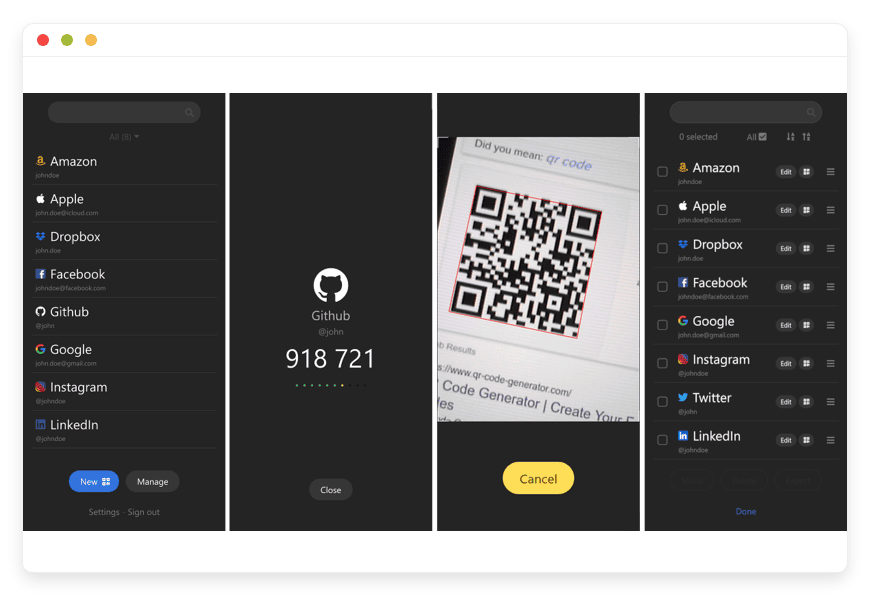
- 2FAuth is a self-hosted web app that manages your codes and runs in any browser, on a server you choose.
- Vaultwarden stores a code beside each password, so one vault holds both.
- Moving off Authy is manual — there is no clean export, so you re-enrol each account by hand.
- DANIAN runs either app for €9 per month, with patching, daily off-site backups, and monitoring included.
What Authy actually shut down
Authy is a two-factor service owned by Twilio. For years it stood out for one reason. It had a desktop app when almost no rival did. You could read a rotating six-digit code on the same screen you were signing in on. No reaching for a phone.
That is the part that went away. On 19 March 2024, the Authy desktop apps for Windows, macOS, and Linux reached end-of-life. Twilio stopped supporting them and removed the downloads. Users were told to switch to the mobile apps. The date was pulled forward from an earlier plan to retire the apps in August 2024, so the warning window was short.
Twilio framed the move as a way to focus on products with growing demand. That is a fair business call. The mobile apps stayed, are still maintained, and still sync codes between devices. For desktop users, though, the practical result was plain. The surface they relied on was gone. The only supported path now ran through a phone.
Two smaller details made it sting. Authy never gave people a tidy way to export their codes to another app. So leaving was harder than it should have been. And some users who moved to mobile found that a handful of codes did not carry over cleanly. They were left with broken logins to fix one account at a time.
Why people wanted a code manager they control
The frustration was not really about a phone versus a laptop. It was about who decides. When a single vendor owns the app, the account, and the sync, that vendor can remove any part of it on its own timeline. You adapt, or you lose access.
A self-hosted code manager moves that decision back to you. The app runs on a server you pick, and the database sits where you put it. No upstream product roadmap can pull the desktop surface out from under you. If you want to read codes in a browser tab, you can, because you run the thing that serves that tab.
This is a control story, not a price story. Authy was free, and the self-hosted route is not about saving money on a subscription. It is about owning the workflow: a place to read your codes that answers to you, and a database you can back up and restore on your own terms.
This matters beyond a single person's logins. A small business that read codes on Authy's desktop app felt the same forced move. It came on a vendor's timeline, with no say in it. Self-hosting the code manager — or paying a host to run it — means the next roadmap decision inside some other company stops being your problem. The tool changes when you decide it changes.
There is a second, quieter gain. Authy's missing export is what made leaving it hard, and an open app does not repeat that mistake. Once your codes sit in 2FAuth or a Bitwarden-compatible vault, you control the export. You can move them again whenever you like, in a standard form any authenticator reads. The lock-in that made this migration a chore does not follow you.
What "self-hosted 2FA" actually means
Self-hosted two-factor means you run the software that holds your codes yourself, on a server you control, instead of relying on a vendor's app. You reach it over the web, you own the database, and no one can retire it on you. It comes in two shapes, set by one choice: codes kept apart from your passwords, or sitting next to them?
The first shape is a dedicated code manager. It holds only your two-factor secrets and generates the rotating codes. It runs as a web app, so you reach it from any browser. 2FAuth is the clearest example.
The second shape is a password manager that also stores codes. Each saved login can carry its own two-factor secret. The vault then shows the password and the current code together. Vaultwarden works this way.
Both shapes share one honest trade. You gain control, and you take on the job of protecting access to the instance. A web app that holds your codes is a target, so it needs a strong login, ideally its own second factor, and a real backup routine. The next sections cover how each tool handles that, and what a managed host takes off your plate.
Protecting a code manager comes down to four habits. Give the instance a strong, unique login that nothing else shares. Turn on its own second factor, so a password is not the only guard on your codes. Keep the software patched, since a code surface is worth attacking. And back the database up off the server, then check that the backup actually restores. None of this is exotic. But all of it is now yours to own, or to hand to a host that runs it for you.
On security, plainly. A code manager you reach over the web is only as safe as the access around it. Self-hosting puts that protection in your hands, along with the responsibility for it. A managed host runs the server and the backups; you still own who can sign in.
The shortlist: two tools you can run yourself
Two open-source apps cover the ground Authy left. Both are self-hosted, both are reachable from a browser, and both are in the DANIAN catalogue at the same €9 per month.
2FAuth — a self-hosted code manager with a web UI
2FAuth is a web app, built by an independent developer known as Bubka, that manages your two-factor accounts and generates their codes. It is open source under the AGPL-3.0 licence and has gathered roughly 4,000 stars on GitHub, with active releases through 2026. It generates standard TOTP and HOTP codes, plus Steam Guard codes, following the same algorithms every authenticator uses.
Because it is a web app, you open it in a browser on any device. That is exactly the desktop-friendly habit Authy took away. It is built for personal use: one instance holds one user account, not a shared team vault. You add an account by scanning its QR code, and you can sort accounts into groups. If you prefer a hardware key to a password, it supports security-key login with a device such as a Yubikey. It can encrypt the stored data, an option you switch on, and it logs you out after a spell of inactivity.
Day to day, the experience is close to what desktop users missed. You open a tab, the codes are listed and counting down, and you copy the one you need. No phone in hand, no camera, no app-switching on a small screen. For someone signing in at a desk all day, that is the whole point.
One honest limit shapes a move from Authy. 2FAuth imports from Google Authenticator, Aegis, and 2FAS, but not from Authy, because Authy never exposed your secrets in a portable form. Best for someone who wants their codes in a browser tab, on a server they control, kept separate from their passwords. See managed 2FAuth hosting for the version we run for you.
Vaultwarden — passwords and codes in one vault
Vaultwarden is a lightweight server, written in Rust, that speaks the same protocol as Bitwarden. It works with every official Bitwarden client: the browser extensions, the desktop apps, and the mobile apps. You keep the interface you already know and simply point it at your own server.
Its relevance here is the two-factor feature. Vaultwarden can store a code beside each login, generating the rotating six-digit value inside the vault. In the hosted Bitwarden product that sits behind a paid tier; Vaultwarden enables it for everyone. So one vault can hold a password and its code together, shown side by side when you sign in.
There is one rule worth stating: do not store the code for the vault's own login inside the vault. Keep that single second factor in a separate app, so a locked vault never locks you out of itself. Best for someone who wants one place for passwords and codes, opened from the Bitwarden apps they already run. Vaultwarden also stores your two-factor codes, which makes it a natural fit if you are already thinking about a password manager.
How the options compare
If you would rather see the difference at a glance, the table lines up Authy's mobile app against the two self-hosted options. It compares what each one stores, where you read your codes, and who runs the server. None of it is a score. It is just the shape of each tool.
| Authy (mobile app) | 2FAuth (self-hosted) | Vaultwarden (self-hosted) | |
|---|---|---|---|
| What it stores | Two-factor codes | TOTP, HOTP, and Steam codes | Passwords plus codes |
| Where you read codes | Phone only | Any browser | Any browser and Bitwarden apps |
| Who runs the server | Twilio | You, or a host you pick | You, or a host you pick |
| Getting your data out | No clean export | Database you back up | Standard Bitwarden export |
| Source | Closed source | Open, AGPL-3.0 | Open, AGPL-3.0 |
| Run by DANIAN | — | €9 / month | €9 / month |
The migration reality: re-enrolling is manual
Set this expectation before you start. Leaving Authy for any new app is a manual job, because Authy never handed you a portable copy of your secret keys. There is no file to import and no one-click move. You rebuild your set of codes one account at a time.
For each account, the steps are the same. Sign in to the service, open its security settings, remove the existing two-factor entry, then add it again and scan the fresh QR code into your new app. The service issues a new secret, your new app stores it, and that account is migrated. Repeat for the next one.
It helps to know the size of the job. Most people have between ten and thirty accounts with two-factor turned on, and only a handful matter daily. Budget an evening for the important ones: email, bank, password manager, work logins. Let the rest follow over a week or two. You are not racing a deadline, because Authy's mobile app keeps working while you move.
A few habits make this less painful:
- Keep both running in parallel. Do not delete anything from your phone until each account works in the new app. There is no rush to switch all of them in one sitting.
- Start with what you use most. Move your email, your bank, and your password manager first. The long tail of rarely-used accounts can follow over a week.
- Save your recovery codes. Every service offers backup codes when you set up two-factor. Store them somewhere safe before you change anything, so a mid-migration mistake never locks you out.
- Decide where the new app lives first. Stand up 2FAuth or Vaultwarden, secure the login, then begin re-enrolling. Migrating into an instance you have not protected yet is the wrong order.
Done gradually, the work is dull rather than hard. The payoff is a set of codes in a place you run, which is the thing the desktop shutdown took away.
Where DANIAN fits
Running a code manager yourself is real work after the migration is done. The app needs security patches, the server needs monitoring, and the backups need to run and be tested. Skip any of those and the convenience quietly turns into risk.
DANIAN runs 2FAuth or Vaultwarden for you at €9 per app, per month. That price covers the server, security patching, daily off-site backups, monitoring, and support from a named human when something is off. You pick the region closest to you, from locations on six continents, so the app stays quick wherever you sign in. We keep the instance current.
Here is the honest split. We run the server and protect the infrastructure; you still control who signs in to your instance and the second factor on it. We will restore from backup if a server is lost. We will not read or move your stored data, and we will not change your plan without asking. A managed host removes the operations work, not your ownership of access.
A few things sit outside that price, and it is fairer to name them. We do not migrate your codes for you; re-enrolling each account is yours to do, since only you can sign in to your services. We do not write custom features into the app. A single-user app stays single-user, too: 2FAuth holds one account per instance by design. What you get is the operations work handled, on software you could run yourself if you chose to.
How to pick
Three questions settle it for most people.
- Codes on their own, or beside passwords? Separate points to 2FAuth. Together points to Vaultwarden.
- Do you already run a password manager? If you want one tool for both jobs, Vaultwarden folds the codes in. If your passwords live elsewhere and you only need a code surface, 2FAuth is the smaller, cleaner choice.
- Who should run the server — you, or someone else? If you have the time and the habit for patches and backups, self-host either app on a small server. If you would rather not, a managed host runs it for the price of a couple of coffees a month.
Questions people ask
Is Authy shutting down completely?
No. Only the Authy desktop apps for Windows, macOS, and Linux were retired, on 19 March 2024. The Authy mobile apps for iOS and Android are still supported and still sync your codes. What ended was the option to read your codes on a computer, which is the gap a self-hosted manager fills.
Did the Authy desktop app really stop working?
Yes. The Authy desktop apps for Windows, macOS, and Linux reached end-of-life on 19 March 2024. Twilio stopped supporting them, pulled the downloads, and directed everyone to the mobile apps. The shutdown was brought forward from a planned August 2024 date, so many users had little warning.
Why did Twilio shut down the Authy desktop app?
Twilio said it wanted to focus on products with growing demand. The desktop apps were retired ahead of an earlier August 2024 plan, so the warning window was short. The reasoning is a fair business call. The practical result was that desktop users lost the surface they relied on and were pushed to a phone.
Can I still use Authy on my phone?
Yes. The Authy mobile apps were not part of the shutdown. They are still maintained, still issue your codes, and still sync between devices. If a phone-only authenticator suits you, Authy mobile is fine. The reason to move is to read codes on a computer and to own where they live.
Can I export my codes from Authy into 2FAuth?
Not directly. Authy never offered a clean export of your secret keys, and 2FAuth imports from Google Authenticator, Aegis, and 2FAS rather than Authy. Moving over means re-enrolling each account by hand: open each service, remove the old code, and scan a fresh QR into the new app.
How do I move from Authy to 2FAuth?
There is no import from Authy, so the move is manual. Stand up 2FAuth first and secure its login. Then, for each account, sign in to the service, remove the old two-factor entry, and scan a fresh QR code into 2FAuth. Keep Authy running until every account works, and start with the ones you use most.
What is the best alternative to Authy in 2026?
It depends on what you want. For a code manager you reach from any browser, 2FAuth is the closest match to the old desktop habit. To keep passwords and codes in one place, Vaultwarden stores a code beside each login. Both are open source and run on a server you control, so no vendor can retire them on you.
What is 2FAuth?
2FAuth is a self-hosted web app that manages your two-factor codes. It is open source under the AGPL-3.0 licence and built by an independent developer known as Bubka. It generates standard TOTP, HOTP, and Steam Guard codes, and you reach it from any browser. It is built for one person per instance, not a shared team vault.
What is the difference between 2FAuth and Vaultwarden?
2FAuth stores only your two-factor codes. Vaultwarden is a password manager that can also hold a code beside each login. Pick 2FAuth if you want codes kept separate from passwords. Pick Vaultwarden if you want one vault for both, opened from the Bitwarden apps you already use.
Is 2FAuth free and open source?
Yes. 2FAuth is open source under the AGPL-3.0 licence, so the code is public and free to run yourself. You pay only for the server it runs on, or for a managed host that runs it for you. DANIAN runs 2FAuth for €9 per month, with patching, backups, and monitoring included.
Can Vaultwarden store two-factor codes?
Yes. Vaultwarden can store a two-factor code beside each saved login and generate the rotating value inside the vault. In the hosted Bitwarden product this sits behind a paid tier; Vaultwarden enables it for everyone. One rule matters: do not keep the code for the vault's own login inside the vault.
Does Vaultwarden work with the Bitwarden apps?
Yes. Vaultwarden speaks the same protocol as Bitwarden, so every official Bitwarden client works with it. That includes the browser extensions, the desktop apps, and the mobile apps. You keep the interface you already know and point it at your own server instead of the hosted service.
Is a self-hosted 2FA manager safe if it runs in a browser?
It can be, but the responsibility shifts to you. A web app that holds your codes is a surface you have to protect with a strong login and the instance's own second factor. 2FAuth can also encrypt its database. You decide who reaches the instance and how it is backed up.
Should I store my two-factor codes in my password manager?
It is a reasonable choice, with one caveat. Keeping passwords and codes together is convenient and works well for most people. The exception is the password manager's own login: keep that second factor in a separate app, so a locked vault never locks you out of itself. If you would rather keep codes fully apart from passwords, a separate manager like 2FAuth is the cleaner split.
Is SMS two-factor as safe as an authenticator app?
No. SMS codes can be intercepted or redirected through a SIM-swap, and they depend on your mobile network. An authenticator app generates codes on a device you hold, with nothing sent over a network to intercept. A self-hosted manager like 2FAuth keeps those codes on a server you control, which takes the vendor out of the picture as well.
Do I still need my phone with a self-hosted code manager?
No. That is the point Authy removed. A self-hosted manager runs as a web app, so you read your codes from any browser on a laptop or desktop. Your phone becomes one more way in, not the only way in. You reach the same instance from every device you own.
Is self-hosting two-factor authentication a good idea?
It depends on whether you value control enough to take on the upkeep. Self-hosting means no vendor can retire your code surface or change the rules, and the database is yours to back up and move. The cost is the work: a strong login, a second factor on the instance, patches, and tested backups. If that appeals, self-host; if not, a managed host carries it for €9 per month.
What happens to my codes if the server goes down?
Your secret keys live in a database, so a restore from backup brings them straight back. This is why backups matter more than anything else for a code manager. When DANIAN runs the instance, we back it up daily, off-site, so a lost server does not mean lost codes.
Can I self-host 2FAuth myself?
Yes. 2FAuth is built to be self-hosted, and you can run it on a small server you control. The trade is upkeep: you handle the security patches, the backups, and the monitoring. If you would rather not own that work, a managed host runs the same open-source app for the price of a couple of coffees a month.
What is included in managed 2FAuth hosting?
DANIAN runs 2FAuth for €9 per month, and the price covers the parts you would otherwise manage. That means the server, security patching, daily off-site backups, monitoring, and support from a named human when something is off. You still control who signs in to your instance and the second factor on it. We run the infrastructure; you keep ownership of access.
How much does managed 2FAuth hosting cost?
DANIAN runs 2FAuth for €9 per month. That covers the server, security patching, daily off-site backups, monitoring, and support from a named human. Running it yourself instead means a small production-class server at roughly $24 per month, plus your own time for patches and backups.
Can I move my data out if I leave a managed host?
Yes. Because 2FAuth and Vaultwarden are open source, your data is never locked to one host. You can export your codes in a standard form and move them to another server, or run the app yourself. A managed host saves you the operations work; it does not take ownership of your data.
What to do this week
The desktop shutdown was a small reminder of a large fact: when you do not run the tool, you do not decide when it changes. Two open-source apps put that decision back in your hands. 2FAuth keeps your codes in a browser tab on a server you control. Vaultwarden keeps passwords and codes in one vault you control.
Whichever you choose, start the migration now rather than later, because it is manual and the long tail takes time. Save your recovery codes, stand the new app up, and move your most-used accounts first. If you would rather skip the patching and backups, DANIAN runs either app for €9 per month. Start a 7-day trial and move your first account this week.
Sources: Twilio Authy desktop end-of-life notice (help.twilio.com); 2FAuth project and documentation (github.com/Bubka/2FAuth, docs.2fauth.app); Vaultwarden project (github.com/dani-garcia/vaultwarden). Operational guidance only. You remain responsible for the access credentials and second factor on your own instance.