Fully Managed Vaultwarden
as a Service

Deploy Vaultwarden as a fully managed service starting at €9/mo. Get automated backups, SSL, updates, support and monitoring included.

Vaultwarden is an open-source password manager — a Rust re-implementation of the Bitwarden server API — combining the responsiveness of cloud password management with the control of self-hosted infrastructure. It works with every official Bitwarden client: browser extension, desktop, iOS, Android, and the bw command-line tool.

Free 7-day trial  99.9% Uptime SLA  No credit card  Cancel anytime

Free 7-day trial  99.9% Uptime SLA
No credit card  Cancel anytime

Vaultwarden

Vaultwarden

STARTING AT

€9/month
Automated Backups
Monitoring
Automated Updates
Auto SSL

USAGE

Unlimited
Human Support
Custom Domains
Terminal Access
File Manager Access
Deploy in your region 21 locations worldwide
GermanyFinlandNetherlandsUKSwedenUnited StatesCanadaSingaporeJapanAustraliaBrazilSouth Africa+9 more →
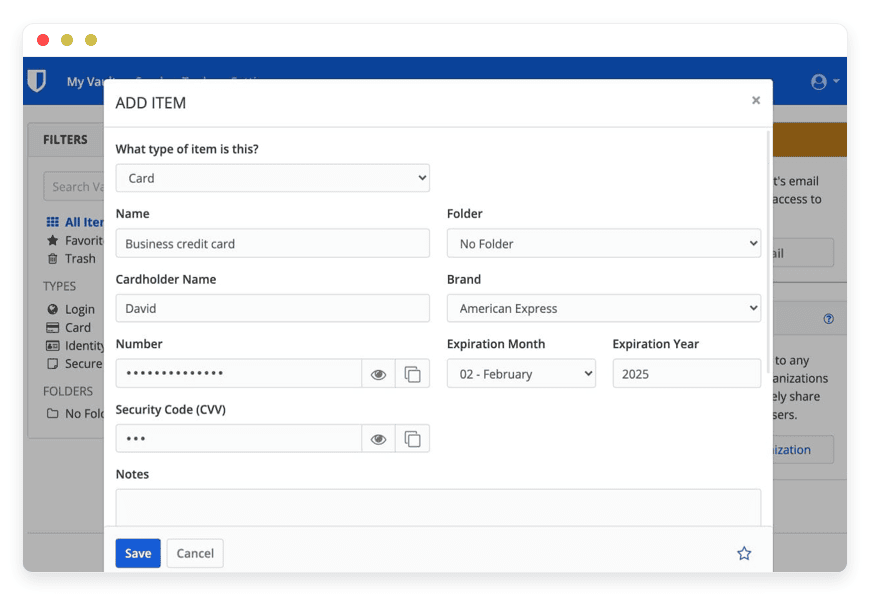
Vaultwarden Preview Image

ABOUT THE SOFTWARE

What is Vaultwarden

Vaultwarden is a Rust re-implementation of the Bitwarden server API, compatible with every official Bitwarden client. Same vault, same clients, your server — without per-seat pricing on premium features.

Vaultwarden is licensed AGPL-3.0 and maintained by Daniel García on GitHub at dani-garcia/vaultwarden. The project has accumulated more than 57,000 stars on GitHub by mid-2026 and is the de-facto self-hosted Bitwarden server for teams who want a lighter footprint than the official multi-container deployment.

The project runs as a single container, supports SQLite, MariaDB, MySQL, and PostgreSQL as backing stores. By comparison, Bitwarden's own standard self-hosted edition requires a multi-container stack and at least 4 GB of allocated Docker memory. Features that Bitwarden's cloud paid plans gate behind per-user pricing — TOTP code storage, file attachments, organizations, Send — are available in Vaultwarden without per-seat metering. SSO via OpenID Connect arrived natively in v1.35.0 in December 2025; SAML and SCIM remain out of scope.

FEATURES

What Vaultwarden does

Vaultwarden delivers the Bitwarden feature surface that matters to most teams: vault, organizations, collections, Send, attachments, TOTP, and SSO — without the per-user pricing gates Bitwarden cloud applies on its paid plans.

Bitwarden client compatibility

Works with every official Bitwarden client — browser extensions for Chrome, Firefox, Safari, Edge; desktop apps for macOS, Windows, Linux; iOS and Android; and the bw command-line tool. Same vault format, same encryption model.

OpenID Connect SSO

Native SSO via OpenID Connect, added in v1.35.0 (December 2025). Compatible with Keycloak, Authentik, Microsoft Entra ID, Google Workspace, Okta, GitLab, Auth0, and FusionAuth via standard .well-known discovery.

Mobile push notifications

Real-time vault sync to iOS and Android via the Bitwarden push relay. We register the installation ID and key on your behalf and point the relay at the EU or US endpoint that matches your server region.

Vault import from 50+ formats

Import existing vaults from LastPass, 1Password, KeePass, KeePassXC, Dashlane, Roboform, NordPass, and roughly 50 other formats — including the standard Bitwarden encrypted JSON export from Bitwarden cloud or another Vaultwarden instance.

Organizations and collections

Group team members into organizations, share credentials through collections, and apply role-based access — owner, admin, manager, user — with per-collection permissions. Free in Vaultwarden; gated behind the Teams or Enterprise tier in Bitwarden cloud.

Hardware-key 2FA

WebAuthn, FIDO2, YubiKey OTP, and Duo Universal Prompt — plus TOTP and email-based codes as fallback. We configure the Yubico client ID and secret key on your server during onboarding so hardware-key enrolment works on day one.

Bitwarden Send

Time-bound, password-protected credential and file sharing. Useful for handing a one-off password to a contractor or a client without permanently adding them to a collection. Maximum view count and expiry are configurable per Send.

Argon2id key derivation

Argon2id is the default key-derivation function for new vaults, with operator-tunable memory, iteration count, and parallelism. We set memory and iteration counts above the Bitwarden client default and document the choice on your support page.

WHAT'S ALWAYS INCLUDED

Every app. Fully managed.
Nothing extra to pay for.

Every app you deploy includes the full managed service — security, backups, updates, and support from day one.

Automatic updates and patches

Apps run the latest stable version. Security patches applied silently, with rollback if needed.

Daily off-site backups

Multiple daily backups in redundant off-site locations. One-click restore if anything goes wrong.

24/7 uptime monitoring

Continuous monitoring with instant alerting. We respond before you notice.

SSL, firewall, DDoS protection

Auto-renewing SSL, hardened firewall rules, DDoS mitigation on every deployment.

Performance and scaling

We monitor resource usage continuously. When your app needs more headroom, we flag it and upgrade with your explicit approval.

Dedicated engineering support

Real engineers on chat. DNS, SMTP & migration help. All included in €9.

WHY MANAGED

Why teams pick managed Vaultwarden

In January 2026, Bitwarden raised its Premium individual plan from $9.99 to $19.80 per year — the first price increase in the company's ten-year history — and added new restrictions to the free tier. Teams looking at the renewal math found a Rust-based, Bitwarden-compatible server already running in production at thousands of organizations.

Self-hosting Vaultwarden looks like a Saturday afternoon when you read the docs. The single container starts up cleanly, the official Bitwarden clients point at it without modification, and the admin page lets you create the first invitation in under a minute. The work that does not look like a Saturday afternoon is the part that arrives later: mobile push notifications, the operational gotcha most teams discover the week after launch.

What we ship by default on every Vaultwarden instance:
  • ADMIN_TOKEN stored as an Argon2id PHC hash, generated via the vaultwarden hash command — never plaintext.
  • A Fail2Ban filter on the Invalid admin token log line, with a low retry threshold and an extended ban window — and the same approach on /identity/connect/token to slow client-side brute force.
  • ICON_BLACKLIST_NON_GLOBAL_IPS set to true, which mitigates the SSRF class of issues the favicon fetcher has historically exposed.
  • Closed signups by default — SIGNUPS_ALLOWED="false" with invitation-only access — and optional domain allowlists where you ask for them.


REVIEWS

Hear from customers ​like you​​​​​​​

Successful businesses and professionals around the world rely on DANIAN every day

USE CASES

Three teams who run Vaultwarden on DANIAN

These are representative team types we set up most often. Each starts with the same flat €9 plan.

12-PERSON LEGAL PRACTICE

Cross-border partnership replacing a per-seat password manager

Finland region for GDPR data residency. Closed signups with invitation-only access. SSO via Microsoft Entra ID with SSO_ONLY enforced, except a separate master-password recovery flow for each of the five equity partners. YubiKey 5C NFC mandatory for partner accounts; Argon2id memory tuned to 128 MiB. One Vaultwarden organization, 18 collections — one per active matter, plus shared collections for court-filings portals and document-management accounts. Emergency access with a 72-hour grace period mirrors the firm's existing partnership continuity rules.

30-PERSON DIGITAL AGENCY

Per-client collections with revocable contractor access

Brazil region for sub-30 ms latency to Brazilian e-commerce clients. SSO via Google Workspace. Push relay on the US endpoint to match the team's international device mix. One collection per active client — 47 currently — with role-based access: account managers read-only, lead developers edit, only the CTO Owner. Bitwarden Send enabled for short-lived credential handoffs to freelancers. The audit log captures every view, exported weekly to the agency's BI dashboard for the quarterly access review.

8-PERSON DEV CONSULTANCY

SSO-wired production secrets vault for a small senior team

Finland region. Domain-restricted signups via SIGNUPS_DOMAINS_WHITELIST. WebAuthn-only 2FA policy at the organization level — TOTP disabled. Two collections: Production secrets (CI/CD tokens, cloud provider API keys, signing keys) restricted to the three senior engineers; Client work shared with the full team. The bw command-line tool fetches deploy credentials from the production collection in build runners; Authentik handles SSO across this and other DANIAN-managed apps the team runs.

COMPARISON

Four ways to run Vaultwarden

Vaultwarden, Bitwarden cloud, a self-managed VPS, or a home server — four real paths with different price curves and different operational footprints. The honest tally lands DANIAN below the alternatives at almost every team size.

 PATH1 SEAT5 SEATS 10 SEATSYOUR TIME
Bitwarden cloud (Teams)
Proprietary SaaS · $4/user/month
$4/mo$20/mo$40/moNone — fully hosted
Self-hosted on a VPS
~$24/mo production-class VPS · you operate it
$24/mo + ops$24/mo + ops$24/mo + ops~3–6 hrs/month — patching, backups, monitoring, DB tuning at 25+ users
Home server
Synology DS923+ or HP ProLiant ML30 Gen10
€650–2,000 hardware+ €17–32/mo power+ €20–40/mo internet~5–10 hrs/month — single point of failure on the closet
DANIAN Managed Vaultwarden€9/mo€9/mo€9/moNone — we operate it

At three seats on Bitwarden Teams, the SaaS path equals DANIAN's flat rate. Every seat above that, the DANIAN column saves money — and unlike Bitwarden Teams, all premium features (TOTP, attachments, organizations, Send) are included at no extra per-user cost. Bitwarden pricing reflects May 2026 rates published at bitwarden.com/pricing/. Re-verify quarterly.

BY INDUSTRY

Vaultwarden for specific industries

Different industries put different demands on a password manager — partnership continuity for legal practices, contractor offboarding for agencies, multi-factor enforcement for MSPs under NIS2, identity-provider integration for SaaS teams. Vaultwarden plus a configured DANIAN instance maps to each.

Legal practices in the EU and UK answer to GDPR Article 32 on the security of processing — "ongoing confidentiality, integrity, availability and resilience of processing systems" — and to national bar duties of confidentiality such as France's RIN Article 2 secret professionnel and Germany's BORA §2. Password management sits directly inside the confidentiality limb.

Our default configuration for legal practices: deployment in your chosen EU region (Germany, Netherlands, France, Finland, Spain, Sweden, Poland, Italy, UK, etc), closed signups with invitation-only access, one Vaultwarden collection per active matter, Argon2id memory tuned higher than the default for partner accounts, hardware-key 2FA mandatory for partners. Partner-level emergency access with a 72-hour grace period mirrors traditional law-firm continuity practice if a senior partner is incapacitated or unreachable.

Practices we onboard typically run 8 to 25 seats with 12 to 20 active-matter collections per partner at steady state. The largest collection load comes from M&A and IP work; litigation teams tend to keep fewer, longer-lived collections per matter.
Agencies act as data processors under GDPR Article 32 for their clients, and inherit PCI-DSS 4.0 Requirement 8 obligations from any e-commerce client whose card-data environment they touch — 12-character minimum passwords and MFA on all card-data-environment access have been mandatory since 31 March 2025.

Our default configuration for agencies: one Vaultwarden collection per active client, contractor and freelancer access through revocable group membership, Bitwarden Send enabled for short-lived credential handoffs, audit log retention extended for compliance review. SSO via Google Workspace or Microsoft Entra ID where the agency already runs one, otherwise a closed-signups model with manual invitations. The audit log captures every credential view so the quarterly access review has real evidence rather than a screenshot.

Typical agency teams run 10 to 40 staff seats and 20 to 80 active client collections, with a contractor turnover cycle of 30 to 90 days. The contractor cycle is the work — we handle it through SSO group changes rather than ad-hoc password rotation, which keeps the audit trail consistent.
MSPs operating in the EU and classified as important entities under the NIS2 Directive must comply with Article 21(2)(j), which requires multi-factor or continuous authentication where appropriate. Penalties under NIS2 Article 34(5) for important entities reach €7,000,000 or 1.4% of total worldwide annual turnover, whichever is higher. NIS2 was transposed into national law by EU member states by 17 October 2024.

Our default configuration for MSPs: a dedicated Vaultwarden organization per MSP with per-customer collection isolation, WebAuthn mandatory for engineer accounts, the admin panel restricted to your NOC subnet via reverse-proxy IP allowlist, event logging retained for 365 days via EVENTS_DAYS_RETAIN, and a documented onboarding pattern. New customer onboarding: dedicated org, vault import from the customer's legacy manager, hardware-key enrolment, time-bound collection access during active engagements only.

MSPs we support typically manage 25 to 200 customer credential silos per engineer seat. The audit log and the customer-isolation model are what make this scale legible to the MSP's own clients and auditors.
Early-stage SaaS teams answer to SOC 2 trust-services criterion CC6.1 on logical access controls once enterprise customers start asking, to GDPR Article 32 from day one if any user resides in the EU, and to emerging NIS2 obligations once the team crosses the 50-employee or €10M revenue thresholds in covered sectors.

Our default configuration for SaaS teams: SSO wired to your existing identity provider via OpenID Connect — Keycloak, Authentik, Google Workspace, Microsoft Entra ID, Okta — with a WebAuthn-only 2FA policy at the organization level. A separate Vaultwarden organization is configured for CI/CD secrets, accessed via the bw command-line tool from build runners using long-lived service-account credentials we rotate on a documented schedule.

Typical startup deployments run 5 to 25 seats and park 30 to 80 items in the production secrets collection. Offboarding flips the SSO group and access evaporates the same day — which matters for the auditor question that always comes during the SOC 2 readiness pass.

FAQ

Frequently asked questions

Everything teams ask before signing up — answered straight, without sales speak.

Three groups: technical setup, migration, and how DANIAN works as a service.

01

Technical and configuration

Yes. Vaultwarden re-implements the Bitwarden Client API, so the official Bitwarden browser extension, desktop apps, iOS app, Android app, and bw command-line tool all connect unmodified. Your team points its existing clients at your DANIAN-hosted server URL on first login and continues using the apps it already knows. The vault format and the encryption model are the same — only the server changes.
TOTP, WebAuthn, FIDO2, YubiKey OTP, Duo Universal Prompt, and email-based codes. TOTP and WebAuthn work out of the box. YubiKey OTP needs a Yubico client ID and secret key, which we pull from yubico.com/getapikey/ and set on your server during onboarding. Duo Universal Prompt is configured against your existing Duo tenant. We turn TOTP into a fallback rather than a default once hardware keys are issued to the team.
Vaultwarden added native OpenID Connect SSO in v1.35.0, released December 2025. It works against Keycloak, Authentik, Google Workspace, Microsoft Entra ID, Okta, GitLab, Auth0, and FusionAuth via standard .well-known discovery. We configure SSO_AUTHORITY, SSO_CLIENT_ID, and SSO_CLIENT_SECRET on your server and walk through the test flow with you.

Honest limits: Vaultwarden does not implement SAML, does not provide SCIM provisioning, and does not match Bitwarden Enterprise's full policy and account-recovery feature set. The master password is still required to decrypt the vault after SSO sign-in — Vaultwarden adopts the Trusted Device model only partially. If SAML or SCIM is a hard requirement for your audit story, Bitwarden Enterprise is the right answer, and we will tell you so.
Both are licensed AGPL-3.0. The difference shows up in resource shape and feature gating. Vaultwarden runs as a single container, idles at 10 to 30 MB of RAM, and stores data in SQLite, MariaDB, MySQL, or PostgreSQL. The official Bitwarden standard self-hosted edition runs a multi-container stack and Bitwarden's own deployment docs require at least 4 GB of RAM allocated to Docker. The lighter Bitwarden Lite variant, renamed from Bitwarden Unified in late 2025, can run with a 200 MB memory limit but still needs an external database. Vaultwarden also includes features that Bitwarden's cloud paid tiers gate behind per-user pricing — TOTP storage, attachments, organizations, Send — without per-seat licensing.
Vaultwarden is an actively maintained project — for example, the May 2026 v1.36.0 release closed six advisories alone, including two SSO CSRF issues, two SSO binding issues, a user enumeration issue, and an icon-endpoint SSRF. We watch the upstream release feed and the GitHub security advisories tab, run the new image against an internal canary stack first, and roll patches to customer servers on a tested cadence. Severity-1 advisories are applied within 24 hours of upstream release; routine patches follow within 7 days. The full operator-level patch policy is documented on support.danian.co.
Three layers. First, ADMIN_TOKEN is stored as an Argon2id PHC hash — mandatory practice since Vaultwarden v1.28 — generated through the vaultwarden hash command on the server, never as plaintext in environment variables. Second, the /admin endpoint is restricted at the reverse-proxy layer to with a rate limit. Third, we run the Fail2Ban filter documented on the Vaultwarden wiki against the Invalid admin token log line, with a low retry threshold and an extended ban window. The same approach applies to the /identity/connect/token authentication endpoint to slow client-side brute force.

02

Migration and onboarding

We can activate your app on your own custom domain/subdomain. Examples: mydomain.com, anyword.mydomain.com.
Or, on our randomized free subdomain. Example: 963.apps.danian.cloud
If you wish to use a custom domain/subdomain, select that option when ordering your app (or notify us later). We will send you the required DNS records and if needed, our tech team will modify them for you.
21 datacenter locations across six continents. You choose the region at provisioning. Application data sits in the region you choose; pick whichever is closest to your users or matches your data-residency preference.
Yes. Request a region migration from the dashboard and we run the move in the background. The system emails you when the migration completes; total transfer time depends on data volume but typical instances finish in a few hours. There is no extra charge for a region change.
Yes. Full data export is available at any time, in a portable format you can bring to any infrastructure.
Through the standard Bitwarden export flow. In the Bitwarden web vault, go to Tools, then Export Vault, and pick the JSON or encrypted JSON format. In your new DANIAN-hosted Vaultwarden web vault, go to Tools, then Import Data, and pick the Bitwarden (json) format. Vault entries, folders, organizations, and collections come across cleanly. Attachments are not embedded in the JSON export and need to be re-uploaded individually for items that have them — this is a Bitwarden export limitation, not a Vaultwarden one. Most teams complete the migration in an afternoon.
Yes. The Vaultwarden web vault accepts more than 50 import formats, including LastPass CSV, 1Password 1pif and CSV, KeePass 2 XML, KeePassXC CSV, Dashlane, Roboform, and NordPass. TOTP seeds survive the migration when the source format includes them — LastPass and 1Password generally do; some browser-based exports do not. We run an import dry run on a staging instance before pointing your team at the production server so any format quirks surface before users see them.

03

Billing, support, and platform

€9 covers everything we do for that app: hardware in the region you choose, daily off-site backups with one-click restore, automatic security patches and version upgrades, 24/7 monitoring, SSL and firewall, and engineering support on Email/LiveChat. There are no setup fees or hidden line items. For more info see our Pricing page.
If you decide to continue, we charge €9/app/month from day 8. If you don't, the trial ends and you can export your data. No card is required for the trial, and we never auto-charge you without explicit consent.
No. The €9/month is flat regardless of how many users log into your app. Add 5 users or 50; the price doesn't change.
24/7 Live chat and email support, both staffed by engineers who run the systems. We handle DNS configuration, SMTP setup, app integrations, performance tuning, troubleshooting, and migration help. Response time is typically under an hour. There is no tier system — every customer gets the same support.
Yes. Cancel from the dashboard. We don't charge a cancellation fee, we don't lock data, and we will export your data to you on request before deletion. data to you on request before deletion.
Every customer instance is backed up daily to a separate region from the primary. We test restores. You can request a restore at any backup point within the retention window — usually 7 days for daily backups.
Your application data sits in the region you choose at provisioning — 21 datacenter locations across six continents. Account-level data (billing, account email, support ticket history) is processed centrally. Application data region is picked by you, per app.
99.9% uptime SLA on every app, every tenant. Service credits are documented at danian.co/service-level-agreement. The status page is located at status.danian.co.
When your tenant approaches the resource ceiling — the base tier holds 1 vCPU/RAM, 30 GB storage — we notify you. Resource upgrades happen with your explicit consent; we will not upgrade your tenant or charge you without it.
We wait. We don't suspend the app or delete your data on the first failed charge. We email you, you fix the card on file, and we continue.
Invoices can be downloaded from the billing dashboard in PDF the day each charge succeeds. EU VAT is added where applicable and the VAT-reverse-charge regime applies for VAT-registered businesses with a valid number.
150+ open-source apps across automation, team chat, file sync, analytics, AI, password management, email marketing, dev tools, project management, smart home, CMS, and federated social. See the full catalog →
Yes. Every instance comes with a web-based terminal and a file manager in your DANIAN management dashboard. Useful for managing your data and customizations.
Resources scale with your usage. If your app needs more vCPU, RAM, or storage, we add it — and we ask first before any change to your plan. €9 is the floor; resource-heavy workloads may price higher, but you'll always know in advance.
Yes. We have both a Partner program and an Affiliate program available. Anybody can sign up.
No contract. No minimum commitment. Cancel anytime from the dashboard with one click. The 7-day free trial requires no credit card. After the trial converts to paid, you can still cancel at any month without notice or penalty.

DEPLOY IN YOUR REGION

21 datacenter locations on six continents

Pick the region closest to your users.

United States, Germany, Finland, Singapore, Australia, Brazil, Canada, Netherlands, UK, Spain, Italy, France, Sweden, Malaysia, India, Japan, Mexico, Poland, South Korea, Chile, South Africa and more coming soon
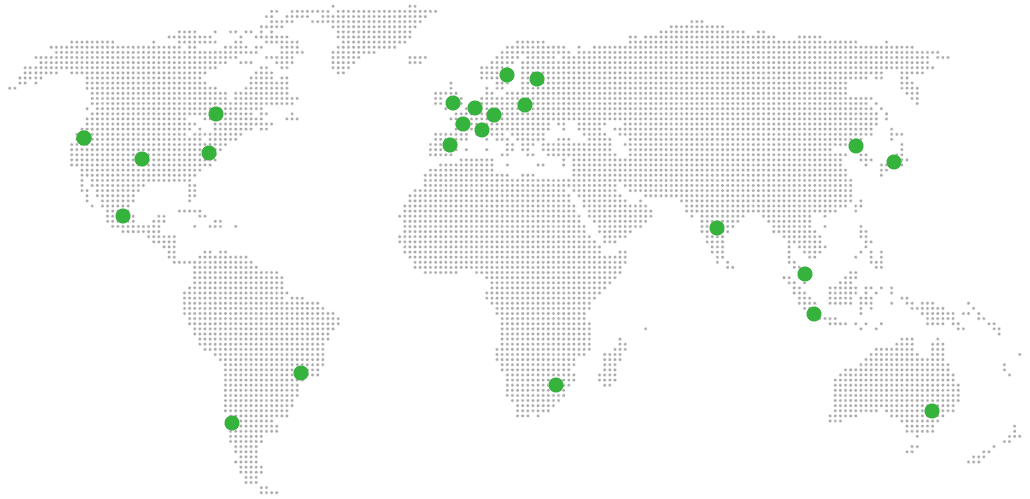
Global Reach Map

Try managed Vaultwarden for 7 days

No card. Cancel from the dashboard.