SFTP for healthcare and laboratory intake
The short version
- Healthcare file exchange is document exchange at heart: result batches, referral packets, claim files, and study archives moving between known counterparties on a known schedule. Email attachments and consumer share links were never built for that rhythm, and counterparties keep asking for something sturdier.
- SFTP gives every partner its own credentials and its own folder on one endpoint. Transfers ride encrypted protocols by default, access is scoped per partner and revocable in minutes, and each arrival can fire an event that starts your import process.
- Scope honesty belongs up front: a transfer service moves files securely, it does not run a compliance program. Regulations such as HIPAA govern organizations; the endpoint contributes the encrypted-transport and access-control layer, and the compliance decisions stay with your team.
- A managed SFTPGo instance on DANIAN costs a flat €9 a month with 30 GB of storage included, which is why small laboratories and clinic groups run partner exchange on it instead of per-seat file-transfer services.
The document lanes in clinic-to-lab exchange
Most healthcare transfer work falls into five repeating lanes, and none of them is casual sharing: a known sender pushes a known file type to a known receiver on a schedule. Mapping the lanes first is what turns a pile of emailed attachments into an exchange you can operate.
| Lane | Direction | Typical payloads | Who connects |
|---|---|---|---|
| Result delivery | Laboratory to provider | Result PDFs and batch exports, cumulative reports | Provider systems on a schedule, or the lab drops per clinic |
| Referral and order intake | Provider to laboratory | Referral packets, order files, specimen manifests | Each referring practice or their system |
| Imaging batches | Imaging center to clinic | Study exports shared as archive files between facilities | Imaging partners and receiving clinics |
| Claims and remittance | Provider to clearinghouse and back | Claim and remittance batches in X12 formats such as 837 and 835 | Billing systems and clearinghouse endpoints |
| Retention archive | Laboratory to storage | Monthly result archives kept for retention windows | Internal jobs only |
None of these lanes needs a shared folder where everybody sees everything. Each one is a directed flow between two named parties, which is exactly the shape SFTP access control is built around.
A folder per referring practice
Referral intake becomes orderly the moment each practice gets its own credentials and its own upload folder. The laboratory's import job sweeps the intake tree on a schedule, every file arrives already attributed to its sender, and a compromised credential exposes one folder rather than the whole exchange.
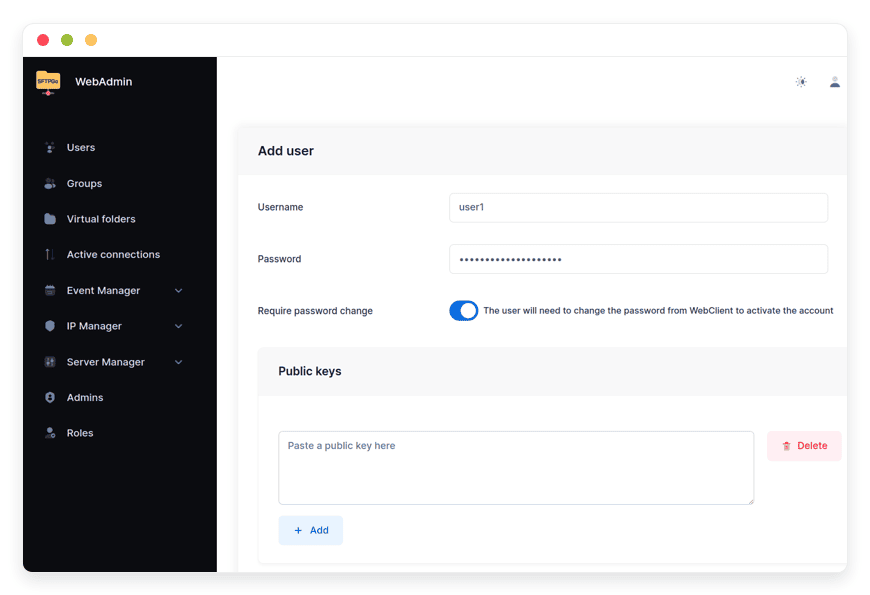
On SFTPGo the mechanism is per-user home directories and quotas, and directories can be mapped into several user spaces at once when an operator needs one view over many intake folders; the setup is walked through in the virtual folders guide. Connections arrive on the instance's designated port, authentication can require key files instead of passwords, and repeated failed logins trip brute-force protection on the instance.
Delivering results to practices with no SFTP software
Not every small practice can connect with an SFTP client, and an exchange design has to answer for them too. The answer on SFTPGo is the built-in WebClient: staff sign in with a browser to upload or collect files, and for one-off delivery a secure download link goes to a recipient who never needs an account at all.
That link path matters for result delivery specifically. A laboratory can drop a result package into a clinician's folder and send a link with an expiry, keeping the file on the endpoint instead of attaching patient documents to an email thread. Sending those links is covered in the WebClient sharing walkthrough.
From file arrival to import without anyone watching
The moment a referral lands, work can start on its own. SFTPGo event rules watch for uploads and can call a webhook or run a filesystem action, so the import job, the notification, or the routing step fires at arrival time instead of waiting for the nightly sweep.
The pattern pairs well with automation platforms: a workflow receives the webhook, files the document where it belongs, and alerts the desk that owns it. We mapped that end to end in the SFTPGo and n8n walkthrough, and the event mechanics on the instance side are documented in the file-arrival webhook article.
The boundaries: what stays on other rails
An honest design knows where SFTP stops. Realtime clinical integration belongs to interface engines speaking HL7 or FHIR, live imaging traffic belongs on DICOM between modalities and PACS, and a payer that mandates a specific clearinghouse rail takes precedence over any file lane. SFTP carries the document and batch layer of the exchange, which is a large layer, but a defined one.
The same honesty applies to compliance. A transfer endpoint provides encrypted transport, individual credentials, scoped folders, and event logs; it does not certify anything. Mapping those controls onto obligations under HIPAA or its equivalents elsewhere is the organization's assessment to make, with its own compliance staff, and no vendor page should decide it for them.
What a 28-connection laboratory exchange costs
Take a regional laboratory archetype: 25 referring clinics, 2 imaging partners, and 1 billing clearinghouse, so 28 partner connections in total. Credentials and connections are not metered, so the entire exchange runs on one instance priced for the storage and traffic it actually uses.
Say the results archive holds 220 GB. On managed SFTPGo hosting that month looks like this:
| Component | Amount |
|---|---|
| Instance, any number of partner credentials | €9 per month |
| Storage: first 30 GB included, then €0.50 per GB per month | 190 GB extra, so €95 |
| Traffic: 1,000 GB per month included, then €0.03 per GB | Results traffic well inside the included amount |
| Total for the whole partner network | €104 per month, about €3.70 per connection |
Add daily backups to storage in a separate region with self-serve restores from the management dashboard, monitoring, and updates of the unmodified community edition, and the operating picture is complete. The trial runs seven days with no card, and operator walkthroughs for every piece mentioned here live in the SFTPGo knowledge base.
Replacing an aging FTP server in a staged way
Plenty of laboratory and billing interfaces still point at an FTP box that predates the people now managing it. The replacement does not have to happen in one night: practices and instruments move over in waves, the old server stays up during the transition, and each counterparty switches when its schedule allows.
Partners locked to FTP with TLS keep working during and after the move, because the same instance answers FTPS as well as SFTP; enabling it is a short configuration step described in the FTPS guide. The full cut-over plan, with the sequencing and the rollback thinking, is laid out in the migration guide.
The same intake shape in neighboring fields
Nothing about this pattern is healthcare specific. It is the same document-intake architecture that supplement brands use for certificates of analysis from contract manufacturers, mapped in the COA intake guide, and the same partner-exchange logic that wholesale distributors apply to price lists and order files. A team that learns the folder-per-partner shape once can reuse it for every regulated document lane it inherits.
Frequently asked questions
What is SFTP used for in healthcare?
Moving structured documents between organizations: laboratories delivering result batches to clinics, practices sending referrals and specimen lists to labs, billing systems exchanging claim and remittance files with clearinghouses, and archives kept for retention. It replaces email attachments and consumer share links for traffic that repeats on a schedule between named parties.
Can a laboratory deliver results to clinics over SFTP?
Yes, and it is one of the most common patterns. Each clinic connects with its own credentials to its own delivery folder, or the clinic's system pulls on its own schedule. Either way the result batch never travels as an email attachment, and delivery is attributable to a specific credential.
How do referring practices send orders and specimen lists to a lab?
Each practice gets credentials scoped to a single intake folder. Files land attributed to their sender, quotas keep any one practice from crowding the others, and the lab's import process sweeps the intake tree on a schedule or fires at arrival time through a webhook.
Does SFTP work for imaging studies?
For batch exchange, yes: study exports travel as archive files between facilities on a schedule. Live traffic between modalities and PACS workstations stays on DICOM, which is a different protocol for a different job. The boundary is clean: DICOM for the imaging network, SFTP for the organizational exchange.
Can claims and remittance batches move over SFTP?
Yes. Claim and remittance batches in standard X12 formats such as 837 and 835 have moved between providers and clearinghouses over SFTP connections for years, and many clearinghouses still standardize on it. Where a payer mandates a specific rail, that mandate wins; otherwise the file lane works like any other partner exchange.
Does SFTP make an organization HIPAA compliant?
No, and no transfer product honestly can. HIPAA and its equivalents regulate organizations and their overall safeguards, not tools. An endpoint contributes the controls counterparties tend to require, like encrypted transport and per-partner credentials; the compliance assessment itself belongs to your organization.
How is access to patient files controlled?
Per credential and per folder. Every partner, system, and staff member can hold individual credentials limited to specific directories, with quotas and optional key-only login. Access changes are minute-scale work, and revoking a partner touches nothing else on the endpoint.
Are the transfers encrypted?
Yes, by protocol. SFTP rides SSH, FTPS rides TLS, and WebClient downloads ride HTTPS, so files are encrypted in transit on every lane the server speaks. Backups run daily to storage in a separate region.
What happens if someone keeps guessing at passwords?
Brute-force protection watches failed login attempts and slows then blocks the offending source, and key-only authentication removes password guessing entirely. Combined with per-folder scoping, a persistent attacker ends up with a locked-out credential and a narrow view.
How do small practices without SFTP software receive results?
Through the WebClient, in a browser. Staff sign in to upload or collect files without installing anything, and for one-off delivery the lab can send a secure download link with an expiry, so the recipient needs no account at all.
Can an arriving file start our import process by itself?
Yes. Event rules watch the filesystem and can call a webhook or run a filesystem action the moment a file lands, which replaces the nightly-sweep pattern for lanes that deserve faster turnaround. The webhook can hand off to any HTTP endpoint, automation platforms included.
Where do monthly result archives go as they accumulate?
They stay on the same endpoint, growing into billed storage at €0.50 per GB per month, or they can move to object storage through an S3-compatible backend while staying reachable through the same credentials. Retention windows measured in years stop being a storage-planning problem either way.
What does a healthcare file exchange like this cost per month?
On DANIAN, €9 flat for the instance plus storage beyond the included 30 GB. The 28-connection laboratory example above with a 220 GB archive lands at €104 a month, credentials unmetered. Traffic includes 1,000 GB monthly, with €0.03 per GB beyond it.
We still run an old FTP server for a lab interface. Do we cut it over all at once?
No. Counterparties can move in waves while the old endpoint stays up, and partners that only speak FTP with TLS keep connecting through FTPS on the new instance. The staged plan with rollback thinking is in the migration guide linked above.
Sources
- SFTPGo protocols, WebClient sharing, event rules, and storage backends: SFTPGo official documentation, docs.sftpgo.com (viewed November 2026)
- Per-user folders, quotas, brute-force protection, and FTPS setup: danian.co knowledge base articles in the SFTPGo category (viewed November 2026)
- Managed instance inclusions, pricing, and trial terms: danian.co/sftpgo and danian.co/pricing (viewed November 18, 2026)
- Migration sequencing and staged cut-over: danian.co/articles/post/migrating-from-ftp-to-sftp (viewed November 2026)