
Reselling managed BookStack in 2026
How agencies resell managed BookStack without becoming a hosting company
Managed BookStack lets an agency sell client wikis and documentation as a recurring line, without running servers. You pay €9 per client instance and set your own retail price, usually €25 to €60 per month. There is no per-seat licence to pass on. Here is the model, the math, and the honest gaps.
TL;DR
- Each client gets an isolated BookStack instance for €9 per month at the standard price.
- Agencies in this model resell at €25 to €60 per month, depending on setup and support.
- At 20 clients, that is €320 to €1,020 per month in gross margin before your time.
- BookStack has no per-seat read or write licence, so client headcount does not raise the bill.
- What is not live yet: a single console for many instances, and a formal commission tier.
The agency math — wikis and docs as a recurring line
The model is simple. You buy one managed BookStack instance per client at €9 per month, then resell it inside a docs package at €25 to €60. The margin sits between your cost and your retail price. Setup and support are separate, and we cover those below.
Most agencies already touch their clients’ documentation. You write the help pages, build the onboarding guide, or clean up a messy knowledge base. Reselling a managed wiki turns that work into a line item that renews every month.
The cost side is fixed. One client instance is €9 per month, and that price does not change with the number of users. The retail side is yours to set. Agencies in this model land between €25 and €60 per client, based on how much structure and support they add.
Here is the math at 20 clients, before your own time:
| Line | Low retail (€25) | High retail (€60) |
|---|---|---|
| Your cost (20 × €9) | €180 | €180 |
| Client revenue (20 × retail) | €500 | €1,200 |
| Gross margin | €320 | €1,020 |
| Per client, after cost | €16 | €51 |
Reseller margin at 20 client instances, monthly. Cost is the €9 standard price per instance.
Two honest adjustments. Setup is real work, so most agencies charge a one-time fee for migration and structure on top of the monthly. Support is your time, not ours; we keep the server healthy, but the content questions come to you.
Recurring revenue is the point. A one-off website project ends; a hosted wiki renews every month with almost no extra work from you. Ten clients on a docs line is a small but steady base that does not depend on winning the next pitch.
Try it before you sell it — managed BookStack at €9/month, with a 7-day free trial.
Pricing the setup fee, not just the subscription
The €9 monthly is only half the pricing. Migrating a client’s existing documentation into a clean BookStack structure is real work, and it is a one-time fee, separate from the subscription. Charge for the structure and the move, then let the monthly line renew on its own.
The subscription is the easy number. It renews, it is predictable, and it covers the running cost plus your margin. The setup fee is where the real first-month revenue sits.
Migration is billable work. Pulling pages out of Notion or a pile of documents, sorting them into shelves and books, and rewriting the messy parts takes hours. Quote it as a fixed project fee, not an open hourly tab, so the client sees the number upfront.
A simple split works well. Charge a one-time setup fee for the migration and structure, then the monthly line for hosting and upkeep. A small wiki might be a few hours of setup; a tangled knowledge base can be a multi-day project. Price the move on the mess, not the page count.
You can fold the monthly into an existing retainer or bill it as its own line. A standalone line is easier to defend at renewal, because the client can see exactly what the wiki costs. A retainer bundle hides it, which helps until the client starts trimming costs.
What your client is paying for now — the per-seat problem
Most documentation tools bill per user, every month. A wiki that costs nothing to read on BookStack costs a per-seat fee on Confluence or Notion. As the client’s team grows, that bill climbs. A flat €9 instance does not. That gap is the reseller’s opening.
Per-seat pricing punishes growth. Every new hire who needs to read the handbook adds to the monthly bill. The numbers below use public list prices as of June 2026, for a documentation use case.
| Platform | 10 people | 25 people | How it bills |
|---|---|---|---|
| Confluence Standard | about $64 | about $160 | per user |
| Notion Plus | about $100 | about $250 | per user |
| GitBook (1 site) | about $185 | about $365 | per site, plus per user |
| Document360 (Professional) | from about $199 | from about $199 | per project |
| Managed BookStack (DANIAN) | €9 | €9 | flat, per instance |
Public list prices for each vendor’s documentation tier, June 2026. Currency differs by vendor, so read these as order-of-magnitude, not an exchange-rate comparison.
Two fair caveats. At 10 users or fewer, Confluence has a free tier, so a tiny client may not feel the pinch yet. And a client already deep in Jira will likely keep Confluence, because the two are built to sit together.
The switch gets easier to justify as the team grows. At ten people the gap is real; at thirty or fifty it is the difference between a flat €9 line and a bill in the hundreds every month. Frame the saving at the client’s likely headcount in a year, not just today.
What reselling a wiki actually requires
A wiki is not just an app. Self-hosting BookStack means running PHP, a MySQL database, email delivery, certificates, updates, and backups, for every client. That is a sysadmin role you did not plan to hire for. Managed hosting removes the pager and keeps the part clients pay you for.
BookStack itself is approachable. It runs on PHP and a MySQL database, and the writing interface needs no special skill. The operations around it are the hard part.
Each client instance needs patching when a new version ships. It needs database backups that you can actually restore. It needs a valid certificate so the login page is not flagged. Miss one, and the 2am call is yours.
Backups are the part people underestimate. A backup that has never been restored is a guess, not a safety net. For every client you would test restores, store copies off the main server, and keep enough history to recover from a mistake noticed late. We do that across instances so you do not carry it per client.
Your client does not want any of that. They want their documentation on their own domain, at docs.theirbrand.com. They want controlled logins and roles, content they can export, and one person to call when something breaks. Managed hosting covers the operations so you keep the relationship.
The DANIAN setup today — honest about the gaps
Here is what works now, and what does not. We run an isolated BookStack instance per client, in the region you choose, patched and backed up. What is not live yet is a single console for many instances and a formal commission tier. We would rather say that plainly than oversell it.
What works today:
- An isolated BookStack instance per client, in its own container, on its own domain.
- Your choice of region across 21 datacenter locations on six continents.
- Patching on each upstream release, and a daily off-site backup in a separate datacenter.
- A named human when you or your client gets stuck.
One promise on that last point. We will not change a client’s resources or charge more without your say-so.
What is not live yet:
- A self-serve console for managing many client instances from one screen.
- A formal commission tier; €9 is the standard price, not a partner discount.
- Client-branded invoices from us; you bill your client directly.
The workaround is straightforward. You are our customer, and you own the client relationship, the price, and the billing. We run the instances underneath. If you reach the point where you need a console to manage them, that conversation is what shapes the roadmap. Tell us.
Past a handful of clients? See our Partner page.
Why BookStack — and where it pairs with Nextcloud
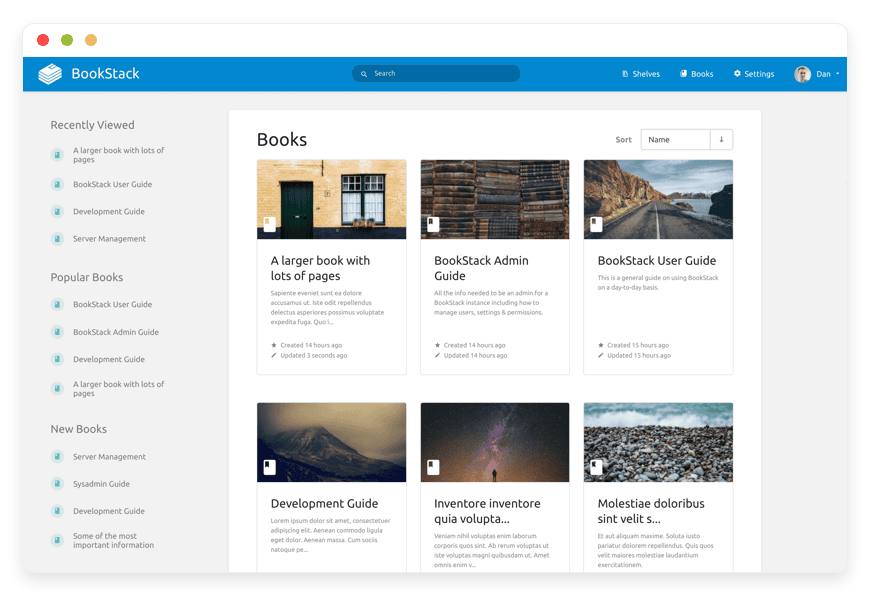
BookStack wins on structure. It organises documentation into shelves, books, chapters, and pages, which is how clients think about a knowledge base. It is narrow on purpose: documentation, done well. For files that sit alongside the docs, managed Nextcloud runs on the same €9 floor.
Structure is the selling point. Shelves hold books, books hold chapters, chapters hold pages. A new team member can find the onboarding guide without a search safari. BookStack is open-source under the MIT licence, has more than 16,000 stars on GitHub, and a decade of steady releases behind it.
The narrow focus is a feature. BookStack does documentation, not project management, so there is less to explain and less to misuse. Basic word-processing skills are enough to keep a wiki tidy.
Search is the quiet feature that sells it. BookStack indexes every page, so a client’s team finds an answer by typing a word, not by remembering which document holds it. There is also an API behind it, which matters later if a client wants the wiki wired into other tools.
BookStack also takes light branding. You can set the client’s logo and name and pick the interface colour, so the wiki reads as theirs rather than a generic tool. It is not a full white-label, but the client’s team sees their own brand at the top of every page.
Many docs jobs come with files. Contracts, brand assets, exported reports. Managed Nextcloud gives the client file storage and sharing on the same €9 floor, so you can sell two lines inside one relationship.
Selling the wiki? Add Nextcloud for files on the same €9 floor.
Moving a client’s docs across — the migration
Migration is mostly sorting, not technical work. You export the client’s current pages, decide on a shelf-and-book structure, and rebuild it inside BookStack. The writing tools are familiar, so the slow part is deciding where things go. Done once, the structure pays off every time someone searches.
Start with the structure, not the content. Map the documentation into shelves, then books, then chapters and pages. A shelf might be Onboarding, a book inside it Week one, and the pages the day-by-day steps. Agree the map with the client before you move anything.
Then move the content in passes. Bring the high-traffic pages over first, so the wiki is useful on day one. Clean up formatting as you go, because most exported content needs a tidy. Leave the rarely-touched pages for a second pass, or archive them.
Set the permissions while you build. BookStack has roles, so you can let most staff read and a smaller group edit. Get this right during the migration and the client’s team lands in a wiki that already fits how they work.
The editor is approachable throughout. There is a standard visual editor, a Markdown mode for people who prefer it, and image and file attachments. None of that needs a developer. The skill you are selling is judgment about structure, not technical setup.
How to pitch the wiki to your client
Sell the outcome, not the software. Your client does not care that it is BookStack; they care that their team stops losing answers and the bill stops climbing with headcount. Lead with owned content, a flat cost, and one place for the truth. Name the tool last.
Open with the pain they already feel. Documentation scattered across chat, drives, and email. A per-seat bill that grows every time they hire. New staff asking the same questions because nobody can find the handbook.
Then offer the swap. One wiki on their own domain, structured so answers are findable. A flat monthly cost that does not rise with the team. Content they own and can export, not rent from a platform that can change its pricing.
Expect one objection: we already pay for Notion. The answer is that Notion is a workspace and this is documentation. If they only use Notion for docs, the wiki is cheaper and cleaner. If they live in Notion for projects, keep both, and let the wiki carry the part that should be permanent.
Keep your own role clear. You build and maintain the structure, and you are their single point of contact. The hosting runs underneath, handled, so neither of you thinks about servers. That is the line you are charging for.
When this works — and when the SaaS is the better call for your client
This model is not for every client. It works when the client wants owned documentation, a single point of contact, and predictable cost. It does not work when the client needs an all-in-one workspace, a branded public help center with AI search, or is already committed to Jira and Confluence.
Fit is worth checking before you pitch. The model rewards clients with a real documentation need and a per-seat tool they have outgrown. It frustrates clients who wanted an all-in-one workspace and got a wiki instead. A short honest read of the client saves a refund later.
Good fit:
- You manage the client on a retainer and want a recurring line that is not just your labour.
- The client’s team is growing, so per-seat pricing keeps climbing.
- The client wants to own the content and have one contact, not a vendor portal.
Poor fit:
- The client needs one tool for docs, tasks, and databases; that is Notion’s territory.
- The client wants a polished public help center with built-in AI search; GitBook or Document360 fit better.
- The client already runs Jira and Confluence together; the switching cost rarely pays off.
Be honest about fit, and you avoid resentment later. A client who belongs on Notion was never going to pay your wiki line anyway. Sell the model to the clients it actually serves.
Frequently asked questions
Do I need to be a developer to resell BookStack through DANIAN?
No. We run the server, the database, patching, and backups; you handle the wiki structure and the client relationship. Your part is content and design work you already do. Setup uses the same dashboard for every client, and a named human when you get stuck.
What does it cost me per client, and what can I charge?
Each client instance is €9 per month at the standard price. Agencies in this model resell at €25 to €60 per month, depending on setup work and support. That leaves €16 to €51 of gross margin per client, before your own time. There is no per-seat fee to pass on.
Is each client’s wiki actually separate, or are they sharing one install?
Separate. Every client gets their own BookStack instance in its own container, with its own data, users, and custom domain. The hardware underneath is shared, which is how €9 works, but the boundaries between instances are real. One client cannot see another client’s pages.
Can I put it on the client’s domain and keep my agency as the contact?
Yes for the domain: each instance runs on a custom domain or subdomain you choose, such as docs.theirbrand.com. You stay the contact and the biller. A self-serve console for managing many client instances from one screen is not live yet, so today you set each one up with us.
How is this cheaper for my client than Confluence or Notion?
Confluence and Notion bill per user every month. A 25-person client on Notion Plus pays about $250; on Confluence Standard, about $160. BookStack has no per-seat licence, so the same instance costs a flat €9 however many of their staff read or edit. You set the retail price.
What happens to my client’s documentation if we stop using DANIAN?
It stays the client’s. BookStack is open-source under the MIT licence, and the content exports out. We keep a daily off-site backup and can hand over a full export on request. The wiki belongs to whoever owns the instance, not to us, and not to a proprietary platform.
Does BookStack replace everything my client uses Notion for?
No, and that is worth saying upfront. BookStack is documentation: shelves, books, chapters, and pages, with search and permissions. It does not do Notion’s databases, boards, or project tracking. If a client lives in Notion for project management, BookStack covers the docs, not the workspace.
If BookStack is free and open-source, why pay DANIAN to run it?
BookStack is free under the MIT licence; you pay us to run it, not to use it. The price covers the server, updates, daily backups, and a custom domain per client. You could host it yourself, but then the patching and the 2am restore are your job, not ours.
Can I try BookStack before I take on a paying client?
Yes. Every app comes with a 7-day free trial, BookStack included. Spin up an instance, build a sample wiki with a few shelves and pages, and show a client what their docs would look like. Nothing is charged until you decide the model works for you.
How fast can I get a client’s wiki running?
The instance itself deploys in minutes, not days. You pick a location, we stand up BookStack, and it is ready for content. The time that follows is yours: building the shelves, importing existing docs, and setting permissions. A simple wiki can be live and handed over the same day.
Does BookStack support single sign-on for a client’s team?
Yes. BookStack supports OIDC, SAML, and LDAP, so a client’s staff can log in with the accounts they already use. It also supports multi-factor login for tighter access. You decide per client whether to wire it to their identity provider or keep local accounts.
Can clients edit the wiki themselves, or does it all run through me?
Clients edit directly. BookStack has roles and permissions, so you choose who can write, who can only read, and who can manage the wiki. Most agencies set the client’s team as editors and keep an admin seat for themselves. The day-to-day writing does not have to come back to you.
Who handles BookStack updates and security patches?
We do. When BookStack ships a new version, we test and apply it across the instances we run, so you are not tracking releases. The same goes for the server underneath and its security updates. You keep selling and supporting clients while the upgrade cycle stays off your desk.
How do I move a client off Confluence or Notion into BookStack?
You export their content from the old tool, then rebuild it in BookStack as shelves, books, and pages. Most teams treat this as a clean-up, not a copy: drop the dead pages and keep what matters. For a large space, we can help with the import and you charge a setup fee.
Can I brand the wiki with a client’s logo and colours?
Yes. BookStack lets you set a custom logo, name, and colours, and each instance runs on the client’s own domain. To the client’s staff, it reads as their internal tool. A full reseller dashboard under your own brand is on the roadmap, not live today, so we are honest about that gap.
Do my clients each need their own DANIAN account?
No. You hold the account and the instances sit under it; your client never needs a DANIAN login. You pay us the flat per-instance price and bill the client whatever you set. As far as the client sees, the wiki and the invoice both come from your agency.
How should I split a setup fee from the monthly price?
Treat them as two separate things. The monthly price covers hosting and your ongoing margin, usually €25 to €60 per client. The setup fee is one-time and covers the real work: migrating content and building the structure. Pricing the build separately keeps the recurring line clean and easy to defend.
Can I resell other apps to the same client beside the wiki?
Yes. The catalog runs more than 150 open-source apps at the same flat per-app price. A client on a managed wiki often needs file storage too, so Nextcloud is a natural pair. You can build a small stack of owned tools per client and bill the whole thing as one line.
Can I choose which location a client’s wiki runs in?
Yes. You pick the location when you set the client up, from 21 datacenter locations across six continents. The instance and its data sit in the location you choose. For a client who wants their docs kept close to home, you select the nearest one and that is where it stays.
Is there a cap on pages, wikis, or users per client?
There is no per-seat or per-page licence, so a client’s headcount and page count do not change the price. Each instance gets its own resources, and a busy wiki can be given more as it grows. The flat fee covers the software; what scales is the instance behind it, not the bill.
What support do my clients get, and who do they contact?
Your clients contact you; you contact us. You stay the face of the service, and we back you with support on the hosting side. When something breaks at the server level, that is ours to fix. The client questions about their own content and structure stay with your agency.
How is a managed wiki better than a shared drive for client docs?
A shared drive is flat files; a wiki is structure. BookStack organises docs as shelves, books, and pages, with full-text search and per-page permissions. New staff can find an answer instead of asking around. For a client whose handbook lives in scattered files, that structure is the whole point.
What to do this week
Start with one client, not a rollout. Pick a client whose documentation is a mess and who pays per seat for it. Price the line at your €9 cost plus a retail margin. Spin up an instance, build the shelves, and migrate the content. If the model holds, the console conversation comes next.
Pick one client first. The best candidate has scattered documentation and a per-seat tool they grumble about. One win is easier to sell internally than a plan.
Price it before you build it. Your cost is €9 per month per instance; set a retail figure you can defend, somewhere in the €25 to €60 range. Add a one-time setup fee for migration if the content is large.
Then do the work you already know. Spin up the instance, build the shelves and books, and move the content across. Put it on the client’s domain and add the line to their next invoice.
If the model holds across two or three clients, you will feel the need for a console to manage them. That is the right moment to tell us, because that demand is what shapes what we build next.
Treat the first client as your template. Once one migration and one structure are done, the second is faster, and your setup fee starts to look like clean margin. The pattern is what turns a single sale into a line of business.
Sources
- BookStack — https://www.bookstackapp.com/
- BookStack on GitHub — https://github.com/BookStackApp/BookStack
- Confluence pricing — https://www.atlassian.com/software/confluence/pricing
- Notion pricing — https://www.notion.com/pricing
- GitBook pricing — https://www.gitbook.com/pricing
- Document360 pricing — https://document360.com/pricing/





