
Open-source Toggl Track alternatives in 2026
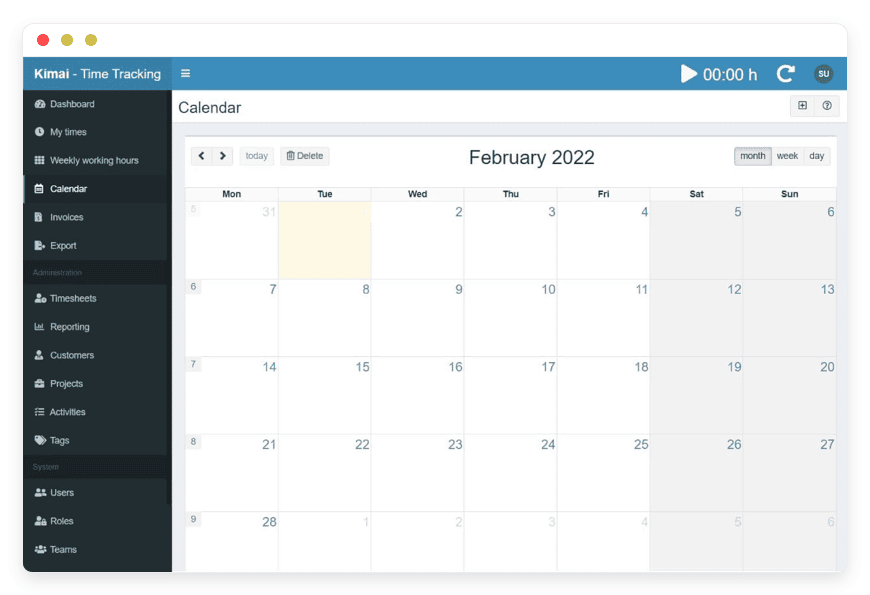
Open-source alternatives to Toggl Track in 2026
Toggl Track is a clean time tracker with a per-user price. That price is also the reason teams start looking elsewhere once they grow. This guide covers the open-source options that keep the tracking and drop the per-seat bill. Kimai is the one most freelancers and agencies should try first, and the cost math is the reason why.
The short version
- Toggl Track charges per user: $9/user/month on Starter, $18 on Premium, billed annually. A 10-person team on Starter pays $1,080 a year.
- The most complete open-source replacement is Kimai: multi-user tracking, billable rates, reports, and built-in invoices, under the AGPL-3.0 license.
- Self-hosting Kimai is free as software, but a production server, backups, monitoring, and your own hours still cost money.
- Managed by DANIAN, one Kimai instance is €9/month flat — no per-seat fee, however many people log time.
- The honest trade: Toggl's native mobile apps and 100+ integrations are better; Kimai wins on flat cost and data you own.
Why teams leave Toggl Track in 2026
Toggl Track is a good product sold on a per-user model. Starter is $9 per user per month and Premium is $18, both on annual billing (toggl.com). The bill grows with the team, not with how much you track. For a busy agency, that is usually the trigger to look at open-source.
The free tier is real. Up to five users get timers, projects, and reports at no cost, and a solo freelancer can run on it for years.
The cost appears when you need billable rates, which sit on Starter. Profit reporting and timesheet approvals sit one tier up, on Premium. It also appears the moment the team passes five people.
The math is easy to underrate. At three users, Starter is $27 a month, or $324 a year. At ten users, it is $90 a month, or $1,080 a year.
Annual plans are charged up front, so a ten-seat team writes one $1,080 cheque on day one. Premium doubles both figures, to $54 and $180 a month.
There is a second cost that buyers miss: workspaces. Each Toggl plan includes one workspace per organization. If you split work across two client divisions or regions, you may pay for two organizations. A ten-person team split that way can pay $90 plus $90 a month on Starter (toggl.com).
Cash flow is the other one. Annual billing is cheaper per seat, but it lands as a single charge. A growing studio that adds three seats mid-year pays a pro-rated top-up now and a larger renewal later.
None of this is hidden, and none of it is unique to Toggl. It is how per-seat SaaS adds up once a team is past its early days.
The pattern underneath is plain. Per-seat pricing rewards the vendor when your team grows, which is when budgets are tightest. Owners who watch a $30-a-month tool become $300 a month look for a line item that does not move with headcount.
None of that money buys the data, either. Your entries live on Toggl's cloud, exportable but not owned. A flat price you can self-host answers both problems.
Three kinds of Toggl alternative
"Alternative" splits three ways, and they are not the same trade. You can switch to a cheaper per-seat SaaS, self-host an open-source app on your own server, or pay someone to host that open-source app for you. Each keeps a different mix of cost, control, and effort. The right one depends on which you care about most.
A cheaper SaaS
Clockify's free tier covers unlimited users. Its paid tiers, for invoicing and approvals, run about $4 to $10 per user per month (clockify.me). Harvest is free for one seat and two projects, then bills per user (getharvest.com).
The trade with a cheaper SaaS is real but narrow. You spend less per seat, and you still do not own the records or escape the per-seat model. For a team that wants a lower bill and does not care about ownership, Clockify's free tier is a fair landing spot. For a team that wants to own the data, it solves the wrong half of the problem.
Self-host open-source
The software is free. A production-class VPS at about $24 a month, plus object-storage backups near $5 and monitoring near $15, is roughly $44 a month in infrastructure.
Add one to two hours a month for patching, updates, and backup checks. The real figure lands closer to €100–€280 a month once your time has a price. This works well if you have someone in-house who likes the work.
Running it yourself is real work, not a one-time install. You patch the operating system and the app, renew TLS certificates, watch the database, and test that backups restore.
Sending invoice emails means configuring an SMTP relay that does not land in spam. None of it is hard for someone who already does this. For everyone else, it is the part that quietly eats evenings.
Managed open-source
Someone runs the open-source app for you. You keep the data and the export; they keep the patch cycle, the backups, and the monitoring. This is the path for teams that want to own their tools without running a server.
DANIAN does this for Kimai, at €9 a month for one instance. What managed hosting does not do is write your code or replace a developer. It runs an existing open-source app well, in the region you pick, for a flat fee.
The open-source shortlist
For replacing Toggl with software you own, Kimai is the most complete option. It is built for freelancers, agencies, and companies, with projects, rates, reports, and invoices in one place. A few other open-source trackers fit narrower needs. Here is the short version, Kimai first.
A serious Toggl replacement needs four things. Core tracking covers timers, manual entry, projects, and reports. Data ownership means the records live where you control them, with a clean export. Billing means rates and invoices, plus an API so the tracker fits the rest of your stack.
Kimai — the one we host
Kimai is a multi-user, web-based time tracker built in PHP and Symfony, licensed under the AGPL-3.0. It has roughly 4,700 GitHub stars and a long development history (github.com/kimai/kimai). It handles solo freelancers and companies with hundreds of users on the same code. DANIAN hosts it for €9 a month.
You track time by customer, project, and activity, using a timer, punch-in and punch-out, or manual entry. You set hourly rates per customer or project, then generate invoices from the tracked hours in PDF or DOCX. Timesheets export to CSV, XLSX, PDF, or HTML, and you can lock entries so past records cannot change.
Reports filter by user, customer, project, tag, or period. Sign-in works with Google Workspace, Azure AD, or Authentik over SAML or LDAP, and you can switch on two-factor with TOTP. A read-and-write JSON API lets other tools talk to Kimai. Best for small teams and agencies that bill by the hour and want to keep the data.
A few more details matter for real use. Kimai is translated into more than 30 languages, and you can add custom fields to entries, customers, or projects. You can track expenses against a customer or project for billing, and entries support breaks, holidays, and vacation. A plugin marketplace adds reporting, extra exports, and integrations (kimai.org/documentation).
Kimai is honest about its shape. It does not do automatic activity tracking — no screenshots, no keystroke capture — so for proof-of-work monitoring, Cattr is closer. The core project does not ship native desktop or phone apps. And it needs a database and a web server, which is the part DANIAN takes off your plate.
Other open-source options
Kimai is not the only one, and a couple of others are worth knowing if your needs are narrower. None of these are in our catalog today, so they are self-host unless noted — but they are honest picks for the right job.
- Solidtime — a newer open-source tracker with a modern interface, projects, and invoicing. Best for teams who want a cleaner UI and do not need Kimai's plugin depth.
- Cattr — open-source and self-hosted, with desktop apps that capture screenshots and detect activity. Best for teams that want proof-of-work tracking, not just timers.
- Traggo — a minimal, tag-based tracker for one person or a small team, without invoicing. Best for someone who wants the lightest possible self-hosted timer.
Billing: Kimai's invoices, or pair with Invoice Ninja
Kimai's built-in invoicing covers most freelancers and small teams. If you want a dedicated billing system with online payments and client records, DANIAN also hosts Invoice Ninja — a source-available invoicing app for freelancers and agencies. Export your hours from Kimai and bill in Invoice Ninja, or keep everything inside Kimai. Either way, the data stays with you.
What each option costs
Here is the money, side by side, at two team sizes. Toggl's price scales with seats. Kimai on DANIAN is one flat fee for the instance, whatever the headcount.
The gap is modest at three users and wide at ten. The figures below use Toggl's annual rates.
| Option | Pricing model | 3 users / month | 10 users / month | Per year at 10 | Own the data |
| Toggl Track Starter | $9 / user / month | $27 | $90 | $1,080 | No |
| Toggl Track Premium | $18 / user / month | $54 | $180 | $2,160 | No |
| Kimai on DANIAN | €9 / month flat | €9 | €9 | €108 | Yes |
Toggl rates from toggl.com/track/pricing (annual billing; monthly is about 10% higher). The DANIAN price is per Kimai instance — Kimai itself has no per-user fee. Toggl bills in dollars and DANIAN in euros; even read at par, a flat €9 beats per-seat pricing from the second user up.
At three users, the difference is about $27 a month against €9. At ten, it is $90 against €9. Over a year, that is $1,080 against €108, and Premium widens the gap to $2,160.
Clockify and Harvest soften the per-seat sting. Clockify's free tier is unlimited, and Harvest is free for one seat. But both keep the subscription and the cloud. Kimai on DANIAN removes both: one flat price, and data you can export and keep.
A concrete case: a six-person design studio that bills by the hour. To get profit reporting and timesheet approvals, the studio needs Toggl Premium — $18 per user, or $108 a month, about $1,296 a year. The same studio on Kimai with DANIAN pays €9 a month, about €108 a year. The feature gap is small for this team; the price and ownership gap is not.
The flat price also buys a predictable line item. €9 is €9 whether the team is three people or ten, and whether they log 40 hours or 400. There is no usage meter to watch and no seat count to reconcile at renewal. For planning, a fixed number beats a calculator.
Owning the data is not just a slogan here. Kimai stores everything in a standard MySQL database, and you can export timesheets, customers, and invoices whenever you want. If you ever leave DANIAN, you take the database and the files with you, to another host or your own server. That is the practical difference between renting a tracker and owning one.
Where Toggl still wins: its native iOS and Android apps with offline tracking are more polished than anything in the Kimai ecosystem. It also connects to 100+ tools out of the box. If a slick phone app and a long integration list matter more than cost or ownership, Toggl is the better buy. This guide is for the teams where the per-seat bill is the bigger problem.
How to pick: three questions
The choice is seldom about features alone. Three questions usually decide it, and they sort most freelancers and agencies into a clear path within minutes. Answer them before you migrate, because moving time data twice is worse than choosing once.
- How many people log time? One to five, and you do not need billable rates? Toggl Free or Clockify Free is $0 — stay there. Six or more, or you bill clients by the hour? Per-seat pricing starts to hurt, and flat-priced Kimai pulls ahead fast.
- Do you need to own the data? If a client contract or your own policy says the records must sit where you control them, a shared SaaS cloud is the wrong home. Self-hosted or managed Kimai keeps the database yours, with a full export whenever you want it.
- Who keeps the server running? If you have someone who likes patching Linux, self-host Kimai for the price of a VPS. If you do not, managed hosting trades €9 a month for never touching the server, the backups, or the update cycle.
For most freelancers, the answer is Toggl Free, or Kimai self-hosted if you enjoy servers, or managed Kimai if you do not. For most agencies past five people, managed Kimai usually pays for itself in the first few months. The per-seat bill it replaces was the largest number on the page. The studio that needs polished phone apps and a long integration list is the exception — that team stays on Toggl.
What switching involves
Moving off Toggl is mostly data and habits, not engineering. The data comes over by export and import. The habit — start the timer, pick the project — is the same in Kimai. The work is in mapping your projects and rates once, and getting the team to log in to a new address.
Start by exporting your Toggl entries to CSV from the reports screen. In Kimai, recreate your customers, projects, and activities, then import the entries and map the columns. Spot-check a week against Toggl's totals so you trust the numbers. This is an afternoon for a small team, longer if you have years of history to bring across.
Then set hourly rates per customer or project, and generate one invoice from real hours to confirm the template and the numbers. Add your team over SAML if you use Google Workspace or Azure AD. From there, the daily flow is ordinary: a timer, a project, a weekly report. The DANIAN side — patching, backups, monitoring — runs without you.
The effort scales with your history, not your headcount. For a freelancer, the whole switch is an afternoon. For a ten-person agency, plan half a day and pick a quiet week, so nobody is mid-invoice while you move.
FAQ
What is Kimai?
Kimai is a free, open-source time-tracking app you can run on your own server or have hosted for you. It records hours by customer, project, and task, sets billable rates, and produces invoices and exports. It is built in PHP and Symfony and is licensed under the AGPL-3.0.
Is Kimai free?
Kimai is open-source under the AGPL-3.0, so the software costs nothing to run. You still pay for somewhere to host it — your own server, or managed hosting. DANIAN hosts one Kimai instance for €9 a month, with patching, backups, and support included.
What is the best open-source alternative to Toggl Track?
Kimai is the most complete open-source alternative for most people, covering timers, projects, billable rates, reports, and invoices in one app. Solidtime suits teams who want a more modern interface, Cattr fits those who need screenshot-based monitoring, and Traggo is a lightweight tag-based option. To replace Toggl feature-for-feature, start with Kimai.
Is Kimai better than Toggl Track?
It depends on what you weigh. Kimai wins on cost and data ownership: one flat price instead of a per-user bill, and records you can export and keep. Toggl wins on polish, with native mobile apps and more than 100 integrations. If price and ownership matter more than a slick phone app, Kimai is the better fit.
Is Clockify or Kimai the better choice?
Both can start at no cost: Clockify has a free tier for unlimited users, and Kimai is free to self-host. The difference is ownership. Clockify keeps your data on its cloud under a per-feature subscription, while Kimai puts the database in your hands. Pick Clockify for zero setup, Kimai to own the records.
Is Kimai a good Toggl alternative for freelancers?
Yes. A solo freelancer gets timers, manual entry, projects, billable rates, and invoices, which is enough to track work and bill clients from one place. If you enjoy running a server, you can self-host it for free. If you would rather not, managed Kimai is €9 a month with no per-user fee.
Is Kimai a good fit for agencies and teams?
Yes, and the cost gap is largest here. Kimai handles many users on one instance, with per-customer rates, approvals through entry locking, and reports by user, project, or client. Because the managed price is flat rather than per seat, a ten-person agency pays the same as a three-person one.
How does Kimai compare to Toggl on cost at ten users?
Toggl Track Starter is $9 per user per month, so ten users cost $90 a month, or $1,080 a year billed up front. Kimai on DANIAN is €9 a month flat for the instance, however many people log time — about €108 a year.
Does DANIAN charge per user for Kimai?
No. DANIAN hosts one Kimai instance for €9 a month, and that price does not change with the number of people logging time. A team of three and a team of twenty pay the same flat fee. This is the main saving against Toggl, whose Starter and Premium plans both bill per user.
How much does it cost to self-host Kimai?
The software is free, but the hosting is not. A production-class VPS runs about $24 a month, with roughly $5 for backups and $15 for monitoring — near $44 a month before your time. Add one to two hours a month for updates and backup checks, and the real cost climbs once your hours have a price.
Is managed Kimai hosting worth it compared to self-hosting?
If your time is worth more than a few euros an hour, usually yes. Self-hosting means you own the patching, backups, monitoring, and the occasional broken update. Managed hosting trades €9 a month for never doing any of that. Self-host if you have someone who enjoys the work; otherwise the flat fee is cheaper than the hours.
What does €9 a month include with DANIAN?
It covers one Kimai instance in the region you choose, with patching, daily off-site backups, monitoring, and support from a named person. There is no per-user fee. You can start with a 7-day trial, and you can export your data at any time.
Does Kimai offer a free trial?
DANIAN offers a 7-day trial of managed Kimai, so you can import a month of data and bill a client before you commit. The Kimai software itself is free to download and self-host with no trial limit. Either way, you can test it on real work before paying anything.
What license is Kimai released under?
Kimai is released under the AGPL-3.0, a widely used open-source license. The source is public, you can self-host it, and there is no per-seat licence fee for the software itself. You pay only for hosting — your own server, or a managed host like DANIAN.
Does Kimai support single sign-on (SSO)?
Yes. Kimai works with SAML and LDAP, so your team can sign in through Google Workspace, Microsoft Entra ID (Azure AD), or Authentik. You can also switch on two-factor authentication with a TOTP app. Sign-in setup is part of what DANIAN configures on a managed instance.
Does Kimai have an API and integrations?
Kimai has a read-and-write JSON API, so other tools can pull or push time data. It does not match Toggl's library of one-click integrations, which is one of Toggl's real advantages. If your workflow depends on many native connectors, check the API covers them before you switch.
Does Kimai automatically track activity or take screenshots?
No. Kimai records time through timers and manual entry, with no screenshots, no keystroke logging, and no automatic activity capture. If you need proof-of-work monitoring, Cattr is the open-source option built for that. Kimai is for teams that track time, not surveil it.
Does Kimai have a mobile app?
Kimai's interface is browser-based, so it works on a phone through any browser. The official project does not ship polished native apps; the iOS and Android apps are community-built. Toggl's native mobile apps, with offline tracking, are more refined if that matters to you.
Can Kimai send invoices?
Yes. Kimai has built-in invoicing that turns tracked hours and rates into invoices, with PDF and DOCX templates. For a dedicated billing system with online payments, pair it with Invoice Ninja, a source-available invoicing app that DANIAN also hosts.
Can I export my data out of Kimai?
Yes, at any time. Timesheets and reports export to CSV, XLSX, PDF, and HTML, and the records sit in a standard MySQL database you can take with you. There is no proprietary format and no exit fee. If you leave DANIAN, your data moves to another host or your own server.
Can I move my Toggl data into Kimai?
Yes, with some manual work. Export your entries from Toggl as CSV, then import them into Kimai and map the columns to customers, projects, and activities. Check that the totals match. Rates, clients, and tags usually need a quick one-time setup afterwards.
What to do this week
If Toggl's per-seat bill is the problem, the fix is a week of work, not a quarter. Try Kimai on a real instance, bring over a month of data, and bill one client from it. If it holds up, switch. If it does not, you have lost a week, not a year.
Start a trial and deploy one Kimai instance. Export last month's entries from Toggl as CSV, import them, and confirm the totals match. Set your hourly rates, then generate one invoice from real hours.
If the numbers and the workflow feel right, point the rest of the team at it. If you want a dedicated billing layer, add Invoice Ninja alongside it.
Two cautions before you commit. Import a full month, not a single day, so the totals are a fair test. And keep Toggl running in parallel for that week, so you are never without a record while you compare.
If Kimai holds up across a real billing cycle, the switch is safe. If it does not, you have learned that cheaply.





