Open-source Notion alternatives in 2026
TL;DR
- Notion's May 2025 pricing change ended the standalone AI add-on. Full AI now sits inside the Business plan at $20 per user per month — a 10-person team pays $2,400 a year, AI included.
- No single open-source tool replaces every Notion job. Pick the two that actually matter to your workflow.
- BookStack handles team docs and knowledge bases. Wiki.js suits a developer wiki with Git sync. HedgeDoc covers real-time collaborative Markdown. TriliumNext Notes is for a personal hierarchical knowledge base.
- Managed via DANIAN: €9 per app per month, all included. Running two of these apps costs €18 a month — and the bill stays flat as the team grows.
- For the database side of Notion (the Airtable-style feature), the closest open-source matches are NocoDB and Baserow. We cover those in a separate post.
Why people are leaving Notion in 2026
Notion's May 2025 restructure removed the standalone AI add-on (formerly $8 to $10 per user per month) and moved full AI access into the Business plan at $20 per user per month billed annually. A 10-person team on Business now pays $200 a month, or $2,400 a year. The 25-person team pays $6,000 a year. See Notion's pricing page for the live numbers.
The per-seat math has been creeping for years, but the bundling change forced a decision. Teams happy on Plus at $10 plus a $10 AI add-on were paying around $100 a month for 5 people. The same setup today routes through Business at $100 a month for 5 people — same headline cost, but with no path back if AI usage drops.
The renewal cycle is where the bigger question shows up. End-of-year reviews put every per-seat tool back on the table. Teams that grew from 4 seats to 14 seats during the year suddenly see a Notion bill of $3,360 instead of $960. The flexibility that made Notion attractive at 4 seats looks expensive at $336 per seat per year. Most teams use maybe 30% of what they're paying for.
The second pressure point is data ownership. Notion runs on infrastructure customers don't control. Workspace data is processed by Notion's AI subprocessors. For most teams that's fine. For teams whose customers or auditors ask where the workspace lives, the answer generates follow-up work that doesn't generate revenue.
The third pressure point is lock-in. Notion's database structure, linked relations, and synced blocks don't export cleanly into anything else. The richer the workspace, the harder the leaving. Teams that have been on Notion for three or four years discover this when they try to migrate — and often stay because the cost is real.
Each pressure on its own is survivable. Stacked, they're why the “open-source alternative to Notion” search is busy again in 2026.
What “alternative” actually means here
Notion does four jobs in one product, and no single open-source tool does all four well. The path that actually works is to pick the two jobs that matter most for your team, run a dedicated open-source tool for each, and accept that the integrations between them will be lighter than Notion's single surface delivers.
The four jobs are:
- Pages and documents — structured long-form writing, internal handbooks, project briefs, meeting notes that need to persist.
- Wiki — searchable, linked, versioned knowledge that the whole team contributes to.
- Notes — fast-capture Markdown that doesn't need a hierarchy yet, often shared as a link to one or two collaborators.
- Lightweight project database — Airtable-style tables, kanban boards, calendar views, with linked relations.
The whole point of Notion as a product is the surface that spans those jobs, and that surface is what the open-source ecosystem doesn't reproduce. For most teams the two that matter are pages-and-docs plus notes (or wiki plus notes, if engineering is the main audience). The project-database side is genuinely better served by a dedicated tool — covered later.
A small benefit of the unbundled approach: each tool stays focused. BookStack does documentation well because it doesn't try to be a database. HedgeDoc does collaborative notes well because it doesn't try to be a wiki. The trade-off is that you maintain three or four logins instead of one. At €9 per app per month, the math works out long before the friction does.
The shortlist — four open-source tools that replace four Notion jobs
These four apps from DANIAN's catalog map cleanly to Notion's pages, wiki, notes, and personal-KB use cases. Each is mature, actively maintained, and shipping releases in 2026. Each is licensed for free self-hosting. Each pairs naturally with one other on the list — BookStack plus HedgeDoc, or Wiki.js plus HedgeDoc — for a team that wants docs and notes covered without buying back the whole Notion bundle.
BookStack — Team documentation and knowledge bases
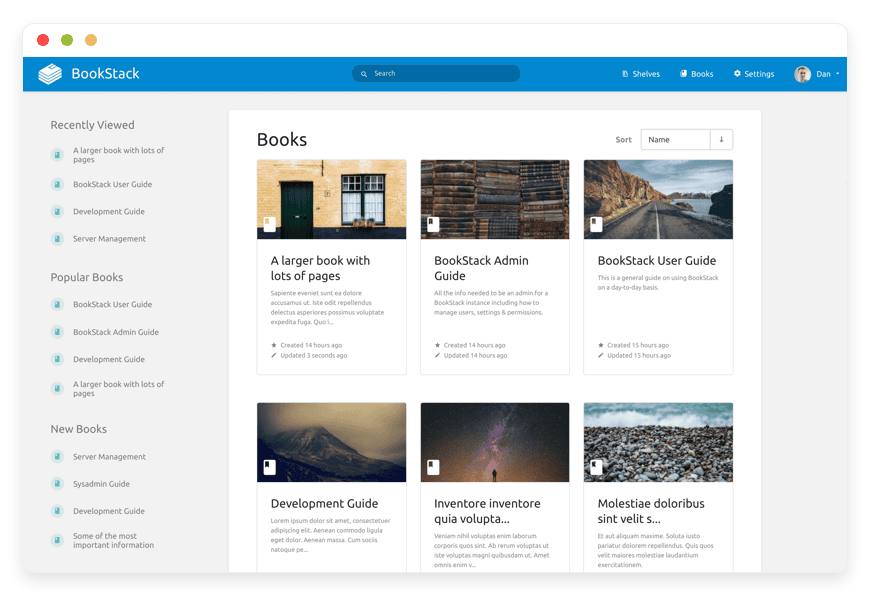
BookStack is the right pick if Notion is mostly your team's internal documentation surface.
It's a PHP/Laravel application released in 2015, MIT-licensed, with roughly 18,500 GitHub stars and 11 years of active development.
The project migrated from GitHub to Codeberg in April 2026.
See the official BookStack site for the live feature list.
The organising metaphor is real-world books. Shelves contain Books, Books contain Chapters, Chapters contain Pages. After a 15-minute orientation, non-technical team members can find and edit content without thinking about the structure. The page editor is WYSIWYG by default with an optional Markdown mode and live preview. Diagrams.net is built in for inline flowcharts and sequence diagrams.
What BookStack replaces in Notion: the company handbook, the onboarding docs, the SOPs, the project briefs that need to stay legible after the author has moved on. What it doesn't replace: the database side, the calendar and kanban views, or the synced-block trick that lets one Notion block appear on three pages.
Authentication covers the cases SMBs run into — email/password, SAML2, OIDC, LDAP, and the usual social providers (Google, Microsoft, GitHub). Multi-factor auth is built in and can be enforced per role. A full REST API is included.
We offer managed BookStack hosting at €9/month — hardware, security patching, daily off-site backups, monitoring, SMTP, and ticket support, all included. Start a 7-day BookStack trial — no card required.
Wiki.js — Developer-friendly wiki with Git sync
Wiki.js is the right pick if engineering is the main audience and your documentation already lives in Markdown files in a repo.
It's a Node.js application licensed under AGPL-3.0, with roughly 28,000 GitHub stars, and runs on PostgreSQL, MySQL, MariaDB, SQLite, or MS SQL Server.
See js.wiki for the current feature matrix.
The defining feature is the Git sync module. Wiki.js stores Markdown content in its database and pushes it to a GitHub, GitLab, Bitbucket, or Azure DevOps repository on a schedule. The wiki becomes reviewable through pull requests, auditable through commit history, and recoverable through git clone if the wiki server ever dies. For engineering-led documentation, this is the workflow that fits the rest of the toolchain.
Authentication is broad — over 20 strategies including LDAP, SAML, Azure AD, Okta, OAuth2, and OpenID Connect, plus the usual social providers. Editors include Markdown (with live preview), a WYSIWYG visual builder for non-technical contributors, and a plain HTML mode for imported pages.
What Wiki.js replaces in Notion: the engineering wiki, the API documentation, the runbook collection, the architecture decision records. What it doesn't replace: the marketing team's collaborative editing of a draft, or the personal scratch-pad use case.
The 2.x line is current and stable. A 3.x rewrite has been in development. For production work in 2026, the 2.x line is the target.
HedgeDoc — Real-time collaborative Markdown notes
HedgeDoc is the closest open-source match for Notion's “share a doc link and collaborate live” workflow.
Formerly known as CodiMD, it's an AGPL-3.0 web app with roughly 6,000 GitHub stars and an active maintainer team.
See hedgedoc.org for the current release.
Each note has a URL. Open it, edit it, share the URL with two or twelve collaborators, and everyone types in the same document with live cursor positions. Permissions are per-note — public, link-only, signed-in users, or specific people. Version history is per-note. Slides render directly from the same Markdown via reveal.js. A sprint planning note becomes a sprint planning presentation without a separate tool.
What HedgeDoc replaces in Notion: the live meeting note, the shared draft of an external email, the design review where three people are typing at once, the post-incident retro doc. What it doesn't replace: hierarchical knowledge management or a personal long-term knowledge base.
System requirements are light — HedgeDoc runs comfortably on a low-tier VPS and even on a Raspberry Pi. PostgreSQL is the standard database. HedgeDoc 2 is in active development as a complete rewrite. The 1.x line is the production choice today.
Managed HedgeDoc for collaborative notes is €9/month and covers the same operations stack — patching, backups, monitoring, support. Try HedgeDoc free for 7 days — no card required.
TriliumNext Notes — Personal hierarchical knowledge base
TriliumNext is the answer for one specific question: where do I put 10,000 notes I want to keep for a decade?
It's an AGPL-3.0 cross-platform application, an actively-maintained community fork of the original Trilium Notes project.
The original maintainer transferred the repository to the community in 2024.
See the TriliumNext repository for current status.
The organising structure is a deep tree. Notes can have multiple parents (the project calls this “cloning”). The same note about Bash scripting can sit under “OS / Linux” and “Programming / Scripting” without duplication. The editor is WYSIWYG with Markdown autoformat, syntax highlighting, math support, and inline drawing. Search is fast across very large knowledge bases — the project's own design target is 100,000+ notes used over multiple decades.
What TriliumNext replaces in Notion: the personal workspace where you keep meeting notes, research, journal entries, code snippets, and reference material — the second-brain use case. What it doesn't replace: team collaboration. TriliumNext is single-user by design. The web interface of a server installation lets one user access their tree from any browser, but it isn't a team workspace and isn't trying to be.
For teams, this is the wrong tool. For a founder, a researcher, a consultant, or anyone whose personal knowledge management is the bottleneck, this is the strongest open-source option on the market. Our managed TriliumNext Notes plan is €9/month and runs in the datacenter region you choose.
The cost math — at 5, 10, and 25 users
Notion charges per user; DANIAN charges per app. As the team grows, the bills diverge fast — Notion scales linearly with headcount, while the per-app bill stays flat regardless of how many people log in. The table below shows monthly cost at 5, 10, and 25 users, on Notion Plus (no AI), Notion Business (with AI), and DANIAN running 2 or 3 apps.
| Team size | Notion Plus (no AI) | Notion Business (with AI) | DANIAN, 2 apps |
|---|---|---|---|
| 5 users | $50 / month | $100 / month | €18 / month |
| 10 users | $100 / month | $200 / month | €18 / month |
| 25 users | $250 / month | $500 / month | €18 / month |
Annual numbers for the same setups:
| Team size | Notion Plus (no AI) | Notion Business (with AI) | DANIAN, 2 apps |
|---|---|---|---|
| 5 users | $600 / year | $1,200 / year | €216 / year |
| 10 users | $1,200 / year | $2,400 / year | €216 / year |
| 25 users | $3,000 / year | $6,000 / year | €216 / year |
Source for the Notion column: the Notion pricing page as of May 2026. DANIAN's €9 base price covers hardware, security patches, daily off-site backups, monitoring, SMTP, DNS, and ticket support. See the DANIAN pricing page for the resource ceiling and add-on rates.
The honest reading of the table: at 5 users on Notion Plus, the gap is real but not life-changing — $50 a month versus €18 a month for two apps. At 10 users on Business with AI, the gap opens to $200 a month versus €18. At 25 users on Business, you're comparing $500 a month to €18 for the same two open-source apps that don't care how many people log in.
The trade-off you're buying: integration looseness, three or four logins instead of one, and a migration project to move the existing content. The trade-off Notion is selling: one surface, one bill that scales with headcount, and AI that lives inside the workspace. Pick the trade-off that matches the team you actually have.
The shortlist as a comparison table
The same four apps laid out side by side, with the data you'd want before picking. Switching effort is rated from the perspective of a non-developer team lead — “low” means a 1–2 day setup; “medium” means a weekend project with one technical person on call.
| App | License | GitHub stars | Replaces in Notion | Switching effort | DANIAN price |
|---|---|---|---|---|---|
| BookStack | MIT | ~18,500 | Pages, docs, internal knowledge base | Low — WYSIWYG editor; book/chapter/page hierarchy; SAML/OIDC SSO | €9 / app / month |
| Wiki.js | AGPL-3.0 | ~28,000 | Engineering wiki, API docs, runbooks | Medium — Markdown plus Git sync workflow; richer auth setup | €9 / app / month |
| HedgeDoc | AGPL-3.0 | ~6,000 | Notes, meeting docs, collaborative drafts | Low — paste a URL and start typing; per-note permissions | €9 / app / month |
| TriliumNext | AGPL-3.0 | Active community fork | Personal hierarchical knowledge base | Medium — single-user; tree-and-clone model takes 30 minutes to learn | €9 / app / month |
What about the database side of Notion?
This is the job none of the four apps above handle. Notion's databases — tables with typed columns, filtered views, kanban and calendar projections, linked relations between tables — are a genuinely useful surface. The closest open-source matches are different tools entirely.
The two that come up most often are NocoDB and Baserow.
NocoDB turns a SQL database into a no-code spreadsheet interface, with grid, kanban, gallery, form, and calendar views. It's actively developed, MIT-licensed for the core, and aimed at teams that want Airtable's surface without Airtable's pricing.
Baserow is similar in shape but built from scratch as a no-code database, with a free MIT-licensed self-hosted edition and a paid premium add-on for advanced features. Baserow tends to feel more polished out of the box. NocoDB tends to feel more flexible if you already have data in MySQL or PostgreSQL.
Both are in DANIAN's catalog at €9 per app per month. We will cover the Airtable replacement question — and how NocoDB and Baserow differ at the row count and use case you're at — in a dedicated post. For now: if your Notion workspace leans heavily on databases, plan to add one of these to the docs-plus-notes pair above.
How to pick — three questions to ask yourself
The four apps above don't compete with each other — they cover four different jobs. The picking framework is which jobs matter to your team, not which app is “best.” Three questions usually settle it, in order of how much they narrow the field. Answer them honestly, including for the parts of Notion you currently use but don't actually need.
1. Is this a team workspace or a single-user knowledge base?
If team: BookStack, Wiki.js, or HedgeDoc — pick one or two. If solo: TriliumNext.
2. Do you need real-time collaborative editing in the same document?
If yes: HedgeDoc is the only one of the four built for live multi-cursor editing. BookStack and Wiki.js are async — one person edits, others read, comments handle the conversation. That's fine for a knowledge base, wrong for a meeting note.
3. How structured does your knowledge need to be?
If it needs to be browsable like a handbook with shelves, books, chapters, pages: BookStack. If it needs to be queryable like a wiki with backlinks, page rules, and Git history: Wiki.js. If it's flat and fast and shared via URL: HedgeDoc. If it's a deep personal tree you'll grow for years: TriliumNext.
Most teams that come off Notion land on a two-app combination — BookStack plus HedgeDoc for non-technical teams, Wiki.js plus HedgeDoc for engineering-led teams. The personal-KB and database sides usually come second.
FAQ
How do these four apps compare to Notion's pricing?
A 10-person team on Notion Business (with AI) pays $200 per month, or $2,400 per year, per the Notion pricing page. The same team running two of the open-source apps above on DANIAN pays €18 per month, or €216 per year. Notion charges per seat; DANIAN charges per app — the gap widens as the team grows.
Can these tools actually replace Notion's database feature?
No. None of BookStack, Wiki.js, HedgeDoc, or TriliumNext have an Airtable-style database surface. For that workflow the closest open-source matches are NocoDB and Baserow, both in DANIAN's catalog at €9 per app per month. We cover them in a separate post focused on Airtable alternatives, since the buyer question is different.
What about migrating existing Notion content?
Notion exports pages as Markdown plus CSV. BookStack and Wiki.js both import Markdown reasonably well — expect a manual cleanup pass on heavy database content (which doesn't translate) and on embedded synced blocks (which export as duplicated content). HedgeDoc imports flat Markdown files directly. TriliumNext has its own import tools, though Notion-to-Trilium isn't a one-click pipe. Plan for a weekend of cleanup on a 100-page workspace.
How does the AI side compare?
None of the four apps include built-in AI features comparable to Notion Agent or Ask Notion. The trade-off is honest. If AI search across your workspace is the headline feature you're paying for, Notion Business at $20 per user per month is the cleaner buy. If AI sits closer to “occasional useful summary” than “core workflow,” external tools (Claude, ChatGPT, Perplexity) called against exported content cover most of the gap.
Are these tools production-ready in 2026?
Yes, with one note. BookStack, Wiki.js 2.x, and HedgeDoc 1.x are stable production lines with active maintenance and routine security releases. TriliumNext is a community-led fork of an established project; the codebase is mature and migration from the original Trilium is direct. Wiki.js 3.x and HedgeDoc 2 are in development and worth tracking. The current 2.x and 1.x lines are what to run today.
Where does the app data live on DANIAN?
You pick the region per app from 21 datacenter locations across six continents. The choice is yours per deployment — same-country to your office, close-to-customers in another region, or whatever the workload needs. We will not upgrade your resources or move your region without your explicit consent.
Does BookStack support real-time collaborative editing like Notion does?
No — BookStack does not support real-time multi-cursor editing the way Notion does. It uses auto-saved drafts, page revisions, and a draft-status indicator above the page name so two editors don't silently overwrite each other's work. If live co-editing is a must-have, HedgeDoc is the better pick from this list — it's purpose-built for real-time Markdown collaboration. Many BookStack teams accept the trade-off because the Shelves > Books > Chapters > Pages structure encourages one author per page and a clear review-and-merge rhythm, which suits long-lived documentation more than fast brainstorming sessions.
Can HedgeDoc actually present slides directly from a Markdown note?
Yes. HedgeDoc has a presentation mode built on reveal.js, so any Markdown note can be rendered as a slide deck by separating slides with --- and clicking the present button. You get speaker notes, fragments, and themes without leaving the editor. This is one of the clearest wins over Notion, which has no native slide output — you would normally copy content into Google Slides or PowerPoint. For team brainstorms, all-hands recaps, or workshop materials, HedgeDoc collapses “write the doc” and “build the deck” into one file at €9 per app per month on DANIAN.
Does Wiki.js really sync with a GitHub repository like a normal codebase?
Yes. Wiki.js 2.x can sync content bi-directionally with a Git repository on GitHub, GitLab, Bitbucket, Azure DevOps, or any standard Git host. Pages are stored as Markdown in the database and pushed to the remote on a configurable interval — every 5 minutes by default — and remote commits pull back into the wiki. This means engineering teams can keep documentation under version control next to the code it describes, raise pull requests against wiki content, and survive an instance rebuild because Git holds a second copy of every page. Authentication uses a deploy key or token you generate yourself.
How does TriliumNext compare to Obsidian for personal note-taking?
TriliumNext and Obsidian solve different problems. Obsidian stores notes as local Markdown files in a folder and is optimized for backlinks, a graph view, and a desktop plugin ecosystem. TriliumNext stores notes in a SQLite database with a hierarchical tree, note cloning (the same note placed under multiple parents without duplication), relation maps, and built-in scripting. It is designed to hold 100,000+ notes over decades. Pick Obsidian if you want plain Markdown files on disk and offline-first desktop use. Pick TriliumNext on DANIAN if you want a single-user knowledge base reachable from any browser at €9 per month, with structure that scales past what a flat folder comfortably holds.
What's the difference between BookStack and Wiki.js — which one should I pick for team docs?
Pick BookStack if your team includes non-technical writers and you want a fixed Shelves > Books > Chapters > Pages structure with a WYSIWYG editor, built-in diagrams.net, and MFA via TOTP. Pick Wiki.js if developers will own the wiki and want Git sync to GitHub, GitLab, Bitbucket, or Azure DevOps, a choice of Markdown, AsciiDoc, WYSIWYG, and HTML editors, and 20+ authentication strategies including SAML, LDAP, Azure AD, Auth0, and Okta. Both are production-ready and both run on DANIAN at €9 per app per month. You can also run them side by side — BookStack as the polished team handbook, Wiki.js as the deeper engineering reference — for €18 per month total.
How do I export my Notion pages into BookStack or Wiki.js?
Notion lets you bulk-export an entire workspace as “Markdown & CSV” or as HTML from Settings → Workspace → Export. BookStack and Wiki.js both accept Markdown or HTML at the page level, so the practical flow is: export from Notion, then import page-by-page or via the BookStack REST API for larger jobs. Internal Notion links rewrite as relative paths in the export, which usually need a search-and-replace pass to match your new URL structure. There is no official one-click “Notion → BookStack” importer in either project, so plan a half-day for a small workspace and a few days for a 1,000-page archive.
Can I migrate my Notion attachments and images, not just the text?
Yes, but it's a manual step in most cases. Notion's “Markdown & CSV” export packs attached images and files into a folder next to each Markdown file with relative paths. BookStack and Wiki.js both let you re-upload those assets when you import a page, and Wiki.js can store assets in its database or offload them to S3-compatible object storage. HedgeDoc accepts pasted or uploaded images that land in its uploads folder. The realistic time cost is rewriting asset paths from Notion's export structure to whatever the destination app expects — scriptable with a short Python or Node script, but not automatic out of the box.
At what team size does switching from Notion to one of these apps start saving real money?
The economics tip pretty fast. A 10-person team on Notion Business pays $200 per month — $2,400 a year. The same team running two open-source apps on DANIAN pays €18 per month — €216 a year — flat, because we charge €9 per app per month rather than per user. At 25 people on Notion Business that's $500 per month and $6,000 a year; on DANIAN it's still €18 per month for two apps, or €27 per month for three. The crossover happens around 3–4 paid Notion seats once you account for the time you would otherwise spend running the servers yourself.
Is self-hosting one of these worth it for a 3-person startup?
Yes, often more so than for a big team. A 3-person team on Notion Business pays $60 per month — $720 a year — and every new hire adds $20 per month on the annual plan. The same trio running BookStack and HedgeDoc on DANIAN pays €18 per month total and stays at €18 per month whether you grow to 5, 15, or 50 people. Startups also tend to outgrow Notion's database limits and AI tier choices fastest, so the move gets harder the longer you wait. The honest trade-off: you give up Notion's polished mobile app and bundled AI, and you gain flat pricing and your own data.
What databases do these four apps run on, and does the choice matter?
BookStack runs on MySQL or MariaDB. Wiki.js supports Postgres, MySQL, MariaDB, SQLite, and MSSQL — Postgres is the recommended default. HedgeDoc 1.x runs on Postgres. TriliumNext uses an embedded SQLite database file, which is part of why it can comfortably hold 100,000+ notes on modest hardware. On DANIAN you don't provision the database server separately; each app ships with a sensible engine attached, and we handle patching and daily off-site backups of both the app and its database so you don't end up with a backed-up app pointed at an unrecoverable schema.
Can I put my app on a custom domain with HTTPS on DANIAN?
Yes. Every app on DANIAN gets a working subdomain immediately, and you can point your own domain — for example docs.yourcompany.com or wiki.yourcompany.com — at it with a CNAME or A record. HTTPS is included; certificates are issued and renewed for you, so there is no manual certbot scheduling to keep track of. This applies equally to BookStack, Wiki.js, HedgeDoc, and TriliumNext. If you later change domains, you can update the DNS and we will re-issue. We will not change your domain configuration or rotate certificates without a prompt from you.
Can I choose the exact region where my app and data live?
Yes. DANIAN offers 21 datacenter locations across six continents, and you choose the region per app at deploy time. You can put BookStack in one region and HedgeDoc in another if, for example, you want documentation closer to your engineering team and meeting notes closer to your headquarters. The region you pick becomes the primary location for that app's database, files, and daily off-site backups. We will not migrate your app to a different region without your explicit consent — region changes are an opt-in operation initiated by you from the dashboard.
What happens to my data if I cancel my DANIAN plan?
You keep your data. DANIAN trials run 7 days with no card required, and paid plans can be cancelled from the dashboard at any time. Before an app shuts down, you can use each app's native export: BookStack exports books and pages as PDF, HTML, plain text, or Markdown; Wiki.js writes Markdown directly to your Git remote if Git storage is enabled; HedgeDoc exports individual notes as Markdown; TriliumNext exports a portable .zip backup of the whole tree. We will keep your daily off-site backups accessible during the cancellation window so you can pull a clean copy on the way out.
Am I locked into DANIAN if I want to migrate elsewhere later?
No. The four apps in this guide are open source under MIT (BookStack) or AGPL-3.0 (Wiki.js, HedgeDoc, TriliumNext) and run as standard Docker images, so you can take the same app to your own server at any time. The data lives in standard formats — MySQL or Postgres dumps, SQLite files, Markdown exports, image folders — and each app ships a native export. DANIAN's role is hosting and operations: hardware, security patching, daily off-site backups, monitoring, SMTP, DNS, and ticket support. We don't add proprietary layers on top of the apps that would tie you to us specifically.
Can I run BookStack as a public-facing help center for my customers?
Yes. BookStack has a configuration option to make the whole instance publicly viewable, and a role and permission system that can expose specific Shelves > Books to anonymous visitors while keeping internal handbooks private. Many teams run a single BookStack instance with two zones: a public help center at help.yourcompany.com and an internal team handbook at handbook.yourcompany.com on the same app. Combined with full-text search across books, chapters, and pages and a clean URL per page, it is a reasonable substitute for paid help-center products. The trade-off vs a dedicated support tool is no built-in ticket form — pair it with a contact form if you need one.
What to do this week
Three steps before the next Notion renewal lands. The whole exercise is timeboxed to a weekend, and the worst outcome is you discover the current Notion setup is the right one — useful information to have before the auto-renewal hits the card.
First: audit the workspace. Open Notion, list every database and every page that genuinely earns its seat cost. Most teams find that 60% of the workspace is meeting notes and draft documents that don't need a database engine behind them.
Second: pick the two jobs that matter. Pages-plus-notes is the common landing spot. Wiki-plus-notes if engineering is the main audience. Add a database tool only if databases are doing real work in your current Notion setup.
Third: start a trial. Each of the four apps deploys on DANIAN with a 7-day free trial and no card. Spin up the docs tool and the notes tool. Move one project's content into it. Decide before the Notion renewal date. See managed pricing for the full catalog for the per-app rates and the add-on math.
The unbundling isn't free. You trade Notion's single surface for two or three logins. You spend a weekend on migration. You lose the synced-block trick. In exchange you keep the documentation when the team grows, you keep the pricing flat when headcount doubles, and you keep the data on infrastructure where the region is your choice — which is what most teams searching “open-source alternative to Notion” are actually looking for.