
Open-source push notifications in 2026 (ntfy)
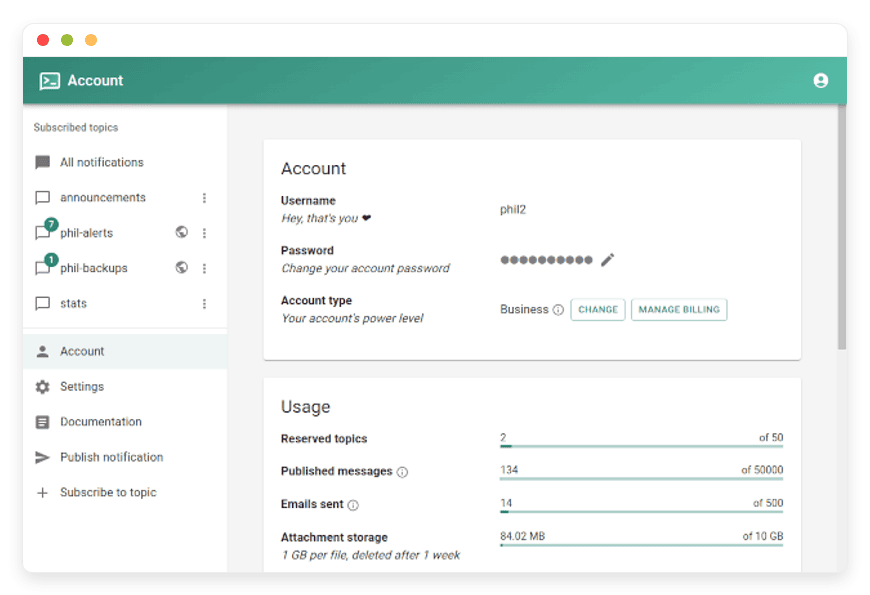
ntfy sends alerts from your scripts and servers to your phone — on a server you control.
A backup script fails at 3am. A cron job finishes. A server crosses 90 percent disk. You want to know on your phone, now, not the next time you open a dashboard. That is the one job ntfy does, and it does it with a single line of curl.
ntfy, pronounced notify, is an open-source push notification server. You publish a short message with one HTTP request, and it arrives as a push notification on your phone or desktop. It replaces Pushover and Pushbullet for sending your own alerts to your own devices. Managed by us, it runs for €9 per month on a server you control.
TL;DR
- ntfy is an open-source push notification server: publish with an HTTP request, receive on Android, iOS, or the web app.
- It replaces Pushover, a one-time $4.99 purchase per platform, and Pushbullet Pro at $4.99 per month, for getting your own alerts to your own phone.
- It is a developer and automation tool, not a polished consumer messaging app. The iOS app is basic.
- Honest cost read: against Pushover and against $5 hosted plans, ntfy does not win on price. It wins on ownership and integration.
- Managed ntfy at DANIAN is €9 per month: your own instance, in the region you choose, running next to your other apps.
Why people leave hosted notification services
Hosted notification services are cheap and they work. Pushover costs $4.99 once per platform for an individual, with no subscription, and $5 per user per month for its Teams tier. Pushbullet Pro is $4.99 per month, or $39.99 per year. Both are fine for most people who just want a ping on their phone.
The reason to move is rarely price. It is ownership. Your topics and messages live on someone else's server, behind their rate limits and their free-tier caps. Pushbullet's free tier stops at 100 messages a month. If you already run your own tools, putting the notification server on infrastructure you control keeps the whole pipeline in one place. On a server you control, the topic names stay private and the messages are not sitting in a third party's database.
The second reason is consolidation. If your monitoring, your cron jobs, and your web-change watchers all live on managed open-source apps, a managed notification server sits naturally beside them. One vendor, one bill, one place to look. See managed ntfy hosting →
What open-source push notifications mean here
There are three honest paths, and they suit different people. The proprietary path is Pushover or Pushbullet: someone else runs the server, you receive through their app, you pay them. The self-hosted path is open-source software like ntfy or Gotify, installed on a box you own. The managed path is the same open-source software, run for you — patched, backed up, and monitored on your own subdomain, so you get the ownership without the upkeep.
One clarification matters before you choose. ntfy is for sending your own alerts to your own devices. It is not built to notify thousands of your end users at scale, and it is not a replacement for a transactional push platform like Amazon SNS. It is also not a polished consumer inbox. It is a developer and automation tool, and that is its strength.
The shortlist
ntfy
ntfy is an HTTP-based pub-sub notification server: publish with PUT or POST, subscribe over a stream. It was created by Philipp Heckel, who is binwiederhier on GitHub, and a community of contributors. It is dual-licensed under Apache 2.0 and GPLv2, has around 30,000 GitHub stars, and is the open-source app we host. Best for: getting your own server and script alerts to your phone.
The feature set is small and sharp. You get message priorities from min to max, tags and emojis, click actions that open a URL, and file attachments. Delivery is near-instant over a held-open connection, and messages you miss while offline are cached on the server, so they arrive when your device reconnects. There are apps for Android, on Google Play and F-Droid, iOS, and the browser. You can read more on the project site, the GitHub repository, and the documentation.
Gotify
Gotify is the main alternative: a smaller, simpler self-hosted notification server, focused on Android and the web. It has fewer features than ntfy and no first-party iOS app, which makes it a clean fit for an Android-only homelab that wants minimal moving parts. We host ntfy rather than Gotify, because ntfy covers more platforms and integrates with more tools.
How ntfy works: one HTTP request
The whole model is a topic and a request. A topic is a named channel; you pick a name, subscribe to it in the app, and publish messages to it. No account is needed for basic use. On a shared server the name is the only secret, so pick something nobody can guess, or run a private instance with login required.
Publishing is a single curl line. The simplest form sends plain text to a topic:
<code>curl -d "Backup complete" ntfy.sh/your-topic</code></pre>
<p>
Headers add structure. A title, a priority, and tags turn a bare ping into something you can triage at a glance:
<code>curl -H "Title: Disk space low" \
-H "Priority: high" \
-H "Tags: warning" \
-d "Disk at 92% on web-01" \
ntfy.sh/disk-alerts</code></pre>
<p>
You can attach a file, such as a log or a report, with one more flag:
<code>curl -T report.pdf -H "Filename: report.pdf" ntfy.sh/reports</code></pre>
<p>
In a real script you branch on the result. A backup job posts a quiet success or an urgent failure, so the urgent one cuts through Do Not Disturb when it has to:
<code>if borg create ::backup-$(date +%F) /data; then
curl -H "Tags: white_check_mark" -d "Backup OK" ntfy.sh/backups
else
curl -H "Priority: urgent" -H "Tags: rotating_light" \
-d "BACKUP FAILED on db-01" ntfy.sh/backups
fi</code></pre>
<p>
It is not a curl-only tool. Any language with an HTTP library works the same way. In Python, a deploy script can post the moment a release finishes:
<code>import requests
requests.post("https://ntfy.sh/deploys",
data="v2.4.1 shipped to production",
headers={"Title": "Deploy done", "Tags": "rocket"})</code></pre>
<p>
Access control is where a server you own pays off. On the public service the topic name is the only thing standing between your alerts and anyone who guesses it. On your own instance you can require login, default every topic to deny, and hand out a read or write token per topic. Sensitive alerts — logins, payment events, anything you would not want a stranger reading — belong behind that kind of rule, not on a guessable public name.
On a managed or self-hosted instance, you swap ntfy.sh for your own server URL. Everything else is identical. Any tool that can make an HTTP request, in any language, can publish.
Real use cases worth setting up
The value shows up in small, concrete jobs. These are the ones worth wiring up first, because each one replaces a habit of checking a screen with a push that finds you.
- Backup finished or failed. Add a curl line to the end of your backup script. Success posts a quiet message; failure posts an urgent one you cannot miss.
- Cron job done. A long-running nightly task pings you when it completes, so you know the morning report is ready before you open it.
- Disk space threshold. A short check publishes a high-priority alert when a volume crosses 90 percent, hours before it fills.
- SSH login. A login hook posts who connected and from where, so an unexpected session reaches you immediately.
- Deploy or pipeline finished. A GitHub Actions step publishes when a build passes or fails, with a click action that opens the run.
- Service back up. Pair a down alert with a recovery alert, so the same channel tells you both when a service fails and when it returns to normal.
Two integrations are worth calling out because they pair with apps we already host. Uptime Kuma can alert via ntfy → using its built-in ntfy notification type: a site goes down, the alert is on your phone in seconds. ChangeDetection watches a web page and publishes to an ntfy topic when the content changes, so a price update or a stock change reaches you without polling. ntfy also has documented integrations for Grafana, Home Assistant, Node-RED, and Watchtower.
What each path actually costs
Here is the honest comparison. The numbers are current as of June 2026; check the linked pricing pages before you commit, since they change.
| Option | Who hosts it | Recurring cost | Where topics live | Caps | You run it? |
|---|---|---|---|---|---|
| Pushover | Their cloud | $4.99 once per platform ($5/user/mo Teams) | Pushover servers | Free monthly API allowance | No |
| Pushbullet Pro | Their cloud | $4.99/mo or $39.99/yr | Pushbullet servers | Free tier 100 messages/mo | No |
| ntfy.sh (hosted) | Project cloud, shared | Free tier, or from $5/mo | Shared ntfy.sh server | Rate limits on free tier | No |
| Self-hosted ntfy | Your box | A few $/mo VPS + your time | Your server | None | Yes |
| Managed ntfy (DANIAN) | We run it | €9/mo | Your instance, your region | None | No |
Read the table plainly. If raw price is the only axis, a one-time $4.99 Pushover license is the cheapest answer over any multi-year span, and a $5 hosted plan undercuts our €9. We will not pretend otherwise.
Put three years on it. A single Pushover license is $4.99 once, call it about $15 if you buy it on all three platforms, and then nothing. Pushbullet Pro at $39.99 a year is roughly $120 over three years. Managed ntfy at €9 a month is about €324 over the same span. On price alone that is not close, and we are not going to dress it up.
What €9 buys is different. You get your own ntfy instance, on your own subdomain, in the region you choose across 21 locations. There is no per-message metering and no per-device licensing. We patch it, back it up, monitor it, and stay on chat. And it sits beside your other managed apps, so the server that fires your alerts lives with the server you are alerting about.
So the comparison is not €9 versus $5. It is "own the pipeline and run nothing" versus "pay the least and either accept a shared server or run your own." Both are valid. We are honest about which buyer each one suits.
Where ntfy stops
An honest tool review has to say what the tool is not. ntfy delivers a message to your devices; it does not manage what happens next. There is no on-call schedule, no escalation if you miss an alert, no acknowledgement step, and no automatic hand-off to a colleague at 3am. If you need a rota, escalation policies, and incident tracking, that is the job of a dedicated paging tool such as PagerDuty, and ntfy is not a substitute for one.
The iOS app is the other honest gap. It works, but it is less polished than the Android client, and the maintainer has been open that iOS development is limited. If your phone is an iPhone and you want a refined notification inbox, test the free ntfy.sh app first, or keep Pushover for that one device, since its iOS client is stronger. On Android and the web, ntfy is excellent.
Finally, scale. ntfy is built for sending your own alerts to your own handful of devices, not for pushing notifications to thousands of customers. The moment your use case is application-to-person push at product scale, you have left ntfy's lane and want a transactional push platform instead. Knowing that boundary up front saves you from picking the wrong tool and blaming it later.
How to pick: three questions
Three questions settle it quickly.
- Do you just want alerts on your own phone, and not care whose server? Buy a Pushover license. It is $4.99 once, it is simple, and it is the right tool for that need.
- Do you want to own the pipeline, with private topics on your own domain and no caps, but not run a server? Use managed ntfy at €9 per month.
- Do you have someone who enjoys server work and a spare box? Self-host ntfy for a few dollars a month. It is genuinely easy to run.
And one disqualifier: if you need to push notifications to thousands of your own customers, ntfy is the wrong tool. That is a transactional push job, not a personal-alerts one.
Frequently asked questions
What ntfy is and does
What is ntfy?
ntfy is an open-source push notification server. You publish a message with a single HTTP request, and it arrives on your phone or desktop. It runs on a server you control, or on the public ntfy.sh service. Managed ntfy at DANIAN costs €9 per month.
How do I send a notification with ntfy?
You send one HTTP POST or PUT request to a topic. A plain curl line works: post your message text to your-server slash your-topic. Headers add a title, a priority from min to max, tags, or a file attachment. Any language with an HTTP library can publish.
What is a topic in ntfy?
A topic is a named channel you publish to and subscribe from. You pick the name and start using it, with no account or setup step. On a shared server, topic names are public, so choose an unguessable name or run a private instance with login required.
Which devices can receive ntfy notifications?
ntfy has apps for Android, on both Google Play and F-Droid, plus iOS and a browser web app. You subscribe to a topic in the app and messages arrive as push notifications. The Android and web apps are the most capable; the iOS app covers the basics.
Switching, setup, and integrations
How is ntfy different from Pushover or Pushbullet?
Pushover and Pushbullet run on their own servers, and you receive through their apps. ntfy does the same job but is open source and self-hostable, so the server can be yours. The trade-off is polish: Pushover is a tidier consumer product, while ntfy is a developer tool.
Can ntfy send alerts from Uptime Kuma?
Yes. Uptime Kuma has a built-in ntfy notification type. You enter your ntfy server URL and topic, and a down or recovery event publishes straight to your phone. DANIAN hosts Uptime Kuma too, so both can run on the same managed account at €9 each.
Can ntfy tell me when a website changes?
Indirectly, through ChangeDetection. ChangeDetection watches a web page and fires a notification when the content changes; it can publish that alert to an ntfy topic. You then get the change on your phone, without polling the page yourself or keeping a browser tab open.
What else integrates with ntfy?
ntfy has documented integrations for Grafana, Home Assistant, GitHub Actions, Node-RED, Watchtower, Sonarr, and Radarr, among others. Anything that can run a curl command or post to a webhook can publish to a topic. That covers most monitoring tools, cron jobs, and deployment pipelines.
Do I need an account to use ntfy?
No, not for basic use. You pick a topic name, subscribe in the app, and publish to it. Accounts and access control matter once you want private topics or a locked-down server. That is when you require login and assign read or write permissions per topic.
Cost and ownership
How much does ntfy cost?
Self-hosting ntfy is free software; you pay only for the server, often a few dollars a month on a small VPS plus your own time. The public ntfy.sh service has a free tier and paid plans from $5 a month. Managed ntfy at DANIAN is €9 per month.
Is ntfy cheaper than Pushover?
Not on raw price. Pushover is a one-time $4.99 purchase per platform, with no monthly fee, which is hard to beat over time. ntfy wins when you want to own the pipeline and keep topics on a server you control, not when you count only the smallest spend.
Why pay DANIAN €9 a month instead of self-hosting ntfy?
Because €9 buys the managed layer: we patch, back up, monitor, and stay on chat, so you run zero ops. Self-hosting ntfy is genuinely easy, so if you enjoy server work and have a spare box, do that instead. We are for people who want the result without the upkeep.
Do I own my data with managed ntfy?
Yes. Your instance is yours: your topics, your messages, your subdomain, in the region you choose across 21 locations. There is no per-message or per-device metering, and nothing is shared with other tenants. If you leave, you take your data and configuration with you.
Limits, security, and fit
Is ntfy a replacement for an app push service like Amazon SNS?
No. ntfy is for sending your own alerts to your own devices, such as server warnings, cron results, and monitoring events. It is not built to notify thousands of your end users at scale. For application-to-person push to customers, a transactional push platform is the right tool.
How good is the ntfy iOS app?
It handles the basics but is less polished than Android. The maintainer has said iOS development is limited and the app is bare-bones. If iOS is your only device and you need a refined inbox, test it first, or consider Pushover, which has a stronger iOS client.
Are ntfy topics secure?
On a shared server, the topic name acts as the secret, so anyone who knows the name can read or publish. Choose a long, unguessable name, or run a private instance with login required and per-topic permissions. A server you control with access rules is safer for sensitive alerts.
Can I use my own domain and priorities with managed ntfy?
Yes. Managed ntfy runs on your own subdomain, and you can publish with the full feature set: priorities from min to max, tags and emojis, click actions, and file attachments. You point your scripts and tools at your server URL instead of the public one.
What to do this week
Pick one alert you keep missing — a failed backup, a full disk, a site going down — and wire it up. If you want to own the server without running it, start there with us. We will not meter your messages or charge per device, and a human answers on chat.





