
Open-source personal CRM in 2026 (Monica)
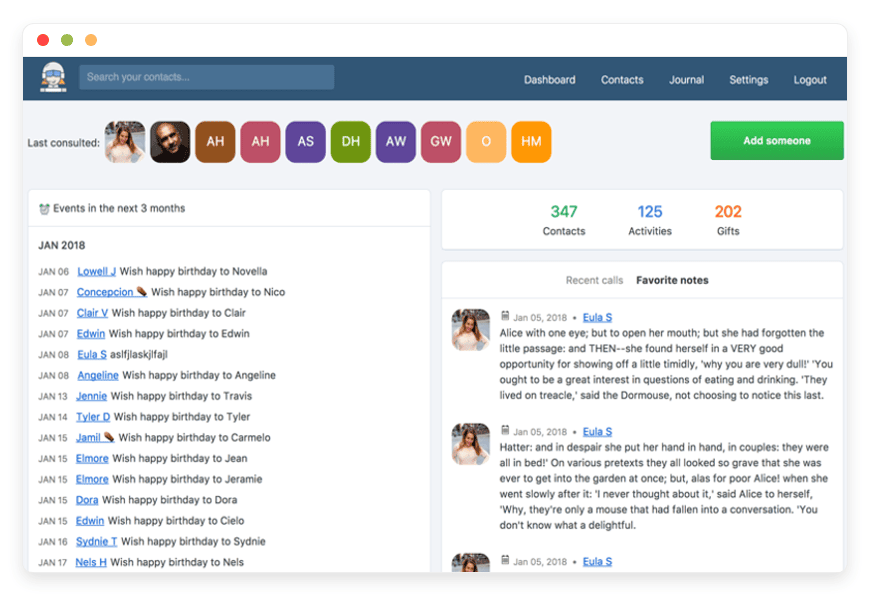
Open-source personal CRM in 2026 — Monica for staying in touch on your own terms
In short
- A personal CRM tracks the people in your life — birthdays, how you met, what you last talked about. Monica does this as open-source software you can run yourself.
- The popular cloud options keep those notes on their own servers. Dex runs about $12 a month, UpHabit $19.99, Clay around $10.
- Monica is free and open-source under the AGPL-3.0 license, with 22,000+ GitHub stars and full JSON export. The notes stay yours.
- Managed by DANIAN, Monica is €9 a month in the region you choose — below Dex and UpHabit, level with Clay, and slightly above Monica's own $9 hosted plan.
- Honest caveat: Monica has no email sync, no calendar sync, and no native mobile app. Want automation? A cloud tool fits better. Want to own the data? Monica wins.
Why people are leaving cloud personal CRMs in 2026
A personal CRM holds some of the most sensitive notes you keep: who you met, what you discussed, a friend's health, a contact's family. The cloud tools store all of it on their servers. In 2026, more people are asking one plain question — do I want this data on someone else's machine?
The pricing is easy to find. Dex is about $12 a month billed annually, with a $20 Professional tier. UpHabit's Business plan is $19.99 a month, or $119.99 a year. Clay starts around $10 a month billed annually. Each keeps your relationship history in its own cloud, in its own format, under its own pricing and its own data practices.
None of these are bad products. They sync your inbox, pull job changes from LinkedIn, and run as polished apps. The question is not quality — it is custody. When the notes are about people you love, custody matters more than it does for a spreadsheet.
There is a second reason people move. Personal CRMs come and go: a well-liked one gets acquired and shut down every few years, and its users are left to migrate. Owning the software means the tool does not leave when a company changes direction.
Some people have a sharper version of this concern. A journalist's contacts may include sources who could be harmed by a breach at a third-party company. A therapist, a doctor, or a community organiser keeps notes that should never sit in a vendor's cloud. For them, self-hosted or managed Monica is not a preference — it removes the third-party risk entirely.
What "open-source personal CRM" actually means here
"Alternative" can mean three different things, and they are not the same. You can run the software yourself, pay the project to host it, or have a managed provider run it for you. All three give you the same open-source app. What differs is who keeps the machine running.
- Self-hosted: you install Monica on a server you control. The software is free. You pay for the server — a small VPS runs about $5 to $10 a month — and you own the upkeep: updates, backups, the database.
- Vendor-hosted: Monica's makers run a hosted version at monicahq.com for $9 a month. Same software, no maintenance, run by the people who build it.
- Managed open-source: a provider like DANIAN runs Monica for you at €9 a month, handles patching and backups, and lets you choose the region your data sits in.
The honest trade-off, up front: an open-source personal CRM gives you ownership and privacy. It does not give you the heavy automation the commercial tools lead with. That gap is the whole decision, and the rest of this post is about whether it is the right trade for you.
Monica, in plain terms
Monica is a personal relationship manager — a CRM for your private life rather than a sales team. It was built by François Briatte to remember the details of friends and family, and it is now maintained by a community of contributors. It does one thing: help you keep track of the people you care about.
What it stores: each contact gets a profile with addresses, phone numbers, important dates, family relationships, work history, even food preferences and how you first met. You log interactions — "called Mum, she is moving house" — set reminders to reach out, and keep a journal. It emails you reminders for the dates you ask it to watch.
The facts that matter: Monica is open-source under the AGPL-3.0 license. The code is public on GitHub with more than 22,000 stars and active development. It has a REST API for automation and full data export in JSON, so you are never locked in. Best for: anyone who wants to be a more present friend, sibling, or partner, and wants those notes on infrastructure they control.
See managed Monica hosting →See managed Monica hosting →See managed Monica hosting →
Staying in touch, the mechanic
The point of a personal CRM is not storage — it is the nudge. Monica's core loop is simple. You decide how often you want to be in touch with someone — every week for a close friend, every few months for an old colleague — and Monica watches the clock. When you are overdue, it tells you. You make the call, log a line about it, and the timer resets.
This is the mechanic that turns good intentions into actual contact. Most of us mean to stay in touch, and then six months pass. A cadence you set, plus a reminder that lands in your inbox, closes that gap. Monica also emails you ahead of birthdays and the dates you mark, so you are never caught out by an anniversary you meant to remember.
None of this is automatic the way an inbox sync is. You still type the cadence and log the interaction by hand. What you get back is a quiet system that keeps the people who matter from slipping off the list — held in notes only you can read.
What Monica does not do (read this before you switch)
Monica is honest about being a focused tool, and so is this post. If you switch expecting the automation of a commercial personal CRM, you will be disappointed. Here is the gap, plainly.
- No email or calendar sync. Monica does not read your inbox or pull events from your calendar. Every interaction is entered by hand.
- No LinkedIn integration and no automatic enrichment. It will not pull job-title changes or fill in contact details from the web. What you type is what it knows.
- No native mobile app. Monica runs in a browser; on a phone it works through the mobile browser, and the layout is only partly responsive. Data entry on a small screen is fiddly.
- Import is manual. Monica reads CSV in its own format. There is no one-click importer from a sales CRM or a vCard export, so moving an existing contact list takes some hand-work.
- It is not a sales CRM. No pipeline, no deals, no marketing automation, no team collaboration. It tracks relationships, not revenue.
If those gaps are deal-breakers, Dex or Clay will serve you better — they exist precisely to automate this work. Monica's answer is different: it trades automation for privacy and ownership. You do the data entry; in return, the data is yours.
The cost picture (and where DANIAN does and doesn't win)
Here is the honest money comparison. DANIAN at €9 a month is cheaper than the proprietary tools that hold your data, level with the cheapest of them, and more expensive than running Monica yourself. The table shows it without spin.
| Option | Type | Monthly cost | Where your data lives | Full export | Open source |
|---|---|---|---|---|---|
| Dex | Cloud, proprietary | ~$12 (annual) | Dex's servers | Partial | No |
| Clay | Cloud, proprietary | ~$10 (annual) | Dex's servers | Partial | No |
| UpHabit | Cloud, proprietary | $19.99 | UpHabit's servers | One-tap export | No |
| Monica, self-hosted | Open source | Server only ($5-10) | Your server | Full JSON | Yes (AGPL-3.0) |
| Monica, monicahq.com | Open source, vendor-run | $9 | The makers' servers | Full JSON | Yes (AGPL-3.0) |
| Monica, managed by DANIAN | Open source, managed | $9 | The region you choose | Full JSON | Yes (AGPL-3.0) |
The math, stated plainly. At today's rates €9 is about $10.30. That sits below Dex's $12 and well below UpHabit's $20, and it is roughly the same as Clay and as Monica's own hosted plan. If price were the only axis, self-hosting wins: the software is free and a small server is a few dollars a month.
So why pay DANIAN at all? Two honest reasons, and only two. First, you do not want to run a server: no patch cycle, no backup discipline, no 2am database problem. We handle that, and there is a human available when you need one. We run the server; we do not read what is on it, and we will not change your plan or charge you without asking. Second, you want to choose where the data sits and run Monica beside your other apps on one account and one bill. If neither of those is true for you, monicahq.com's own $9 plan or a self-hosted instance is a fine call — and we would rather say so than pretend otherwise.
Moving your notes in, and out
Ownership is only real if you can leave. So the mechanics of moving data in and out of Monica are worth stating plainly.
Getting contacts in takes some work. Monica imports CSV files in its own format, and it offers a REST API if you want to script the load. There is no one-click importer from a sales CRM and no vCard button, so a large existing list means some mapping by hand. For most people the practical path is to add contacts as you go, starting with the handful you actually keep meaning to call.
Getting your data out is the part that matters for ownership, and here Monica is generous. You can export everything — contacts, notes, interactions, journal — as JSON, at any time, with no gatekeeping. Because the software is open-source, that export is not a dead file. You can stand up your own Monica server and load it, or hand it to monicahq.com, and keep working. A DANIAN-hosted instance has no exit toll: the door is open in both directions.
Contacts and calendar beyond Monica
Monica is for relationship notes, not for syncing your address book across devices. If you also want contacts and a calendar that talk to your phone and laptop, that is a different job — and there is an open-source answer for it too.
Nextcloud runs your contacts and calendar over the open CardDAV and CalDAV standards, so your phone, laptop, and mail client all stay in sync from a server you control. Many people pair the two: Nextcloud for the address book and calendar your devices read, Monica for the human notes you keep about those people. Both run on the same €9-a-month managed footing.
Run Nextcloud for contacts and calendar →
How to pick: three questions to ask yourself
The decision comes down to three honest questions. Answer them before you move anything.
- Automation or ownership? If you need your inbox, calendar, and LinkedIn pulled in automatically, pick a cloud tool — that is what they are for. If you would rather type your own notes and keep them private, Monica fits.
- Will you run a server, or do you want it run for you? Self-hosting is cheapest and gives you total control, but it is real work. Managed hosting costs more than the server alone and removes the work. Be honest about which you want.
- How sensitive are these notes? If your contacts include people who could be harmed by a breach at a third-party company — sources, patients, vulnerable family — self-hosted or managed Monica keeps the data off other companies' servers entirely.
Frequently asked questions
What Monica is
What is a personal CRM, and how is it different from a sales CRM?
A personal CRM tracks the people in your life — birthdays, how you met, what you last discussed — so you stay in touch. A sales CRM tracks deals, pipelines, and revenue for a business. Monica is firmly the first kind: built for friends and family, not for closing sales.
What can Monica actually track?
Monica stores a profile for each contact: addresses, phone numbers, important dates, family relationships, work history, and notes on how you met. You log interactions, set reminders to reach out, and keep a journal. It emails you reminders for the dates you ask it to watch.
Is Monica really free?
Yes. Monica is open-source software under the AGPL-3.0 license, so the application itself is free to run. Self-hosting costs only your server. The makers also run a hosted version at monicahq.com for $9 a month, and DANIAN runs a managed version for €9 a month.
Who builds Monica, and is it still maintained?
Monica was created by François Briatte and is now maintained by a community of contributors. The code is public on GitHub, where it has more than 22,000 stars and active development. The tool does not vanish when one company pivots or shuts down.
What Monica does not do
Does Monica sync my email and calendar?
No. Monica does not read your inbox or pull events from your calendar. Every interaction is entered by hand. That is a real limitation if you want automatic logging — and it is also why the data stays only what you chose to put in, on infrastructure you control.
Does Monica have a mobile app?
Not a native one. Monica runs as a web application, so on a phone you reach it through the mobile browser. The layout is only partly responsive, and several reviewers note that data entry on a small screen is awkward. If a polished mobile app matters most, Dex fits better.
Does Monica enrich contacts from LinkedIn automatically?
No. Monica has no LinkedIn integration and no automatic enrichment. It will not pull job-title changes or fill in details from the web. What you type is what it knows. Tools like Dex and Clay lead with this automation; Monica trades it for privacy and ownership.
Can I import my existing contacts?
Partly. Monica reads CSV files in its own format, and it offers a REST API for programmatic import. There is no one-click importer from a sales CRM or a standard vCard export, so moving a large contact list usually takes some manual work upfront.
Owning your data
Where does my data live if DANIAN runs Monica?
In the region you choose. DANIAN runs across 21 datacenter locations on six continents, so you pick where your Monica instance sits. Your relationship notes stay on that managed instance, not spread across a third-party company's cloud the way a commercial personal CRM stores them.
Can I export my data and leave?
Yes, at any time. Monica supports full data export in JSON, so your contacts, notes, and history are portable. Because the software is open-source, you can move a DANIAN-hosted instance to your own server, or to monicahq.com, without losing anything. You are never locked in.
Who can see my relationship notes?
Only you. Your Monica instance runs in its own isolated container, separate from other customers. We run the server and keep it patched and backed up; we do not read what is on it, and we do not sell data to anyone. The notes are yours.
What happens to my data if I stop paying?
We wait, and we do not delete your data the moment a card fails. If you decide to leave, you export everything in JSON first and take it with you. Because Monica is open-source, your exported instance keeps working on your own server or on monicahq.com. Nothing is stranded.
Cost and fit
Is DANIAN cheaper than Dex or UpHabit?
Yes, on price and on ownership. DANIAN is €9 a month, about $10 at today's rates, below Dex at roughly $12 and well below UpHabit at $19.99. You also own the data, which the cloud tools do not give you. Clay sits at a similar price to DANIAN.
Why pay DANIAN €9 when monicahq.com hosts Monica for $9 and self-hosting is free?
Two honest reasons. You do not want to run a server — we handle patching, backups, and monitoring, with a human available. And you want to choose your region and run Monica beside your other apps on one bill. If neither applies, monicahq.com or self-hosting is the better call.
When should I not use Monica?
When you need automation more than ownership. If you want your inbox, calendar, and LinkedIn pulled in automatically, or a sales pipeline, pick a commercial tool built for that — Dex, Clay, or a business CRM. Monica is for people who want private relationship notes they control, entered by hand.
Can I run Monica alongside other open-source apps?
Yes. Many people pair Monica with Nextcloud: Nextcloud syncs the contacts and calendar your devices read, while Monica holds the human notes about those people. DANIAN runs both at €9 a month each, in the region you choose, on one account with one bill and one place for support.
What to do this week
If staying in touch on your own terms matters to you, the next step is small. Pick the path that matches your answers above, and try it before you commit a single contact list.
- If you want to own the data without running a server, start a trial of managed Monica and add five contacts you keep meaning to call.
- If you also need a synced address book and calendar, add Nextcloud alongside it.
- If you would rather self-host, Monica's own documentation walks through it — and monicahq.com is there if you want the makers to host it.
Whatever you pick, the point holds: your relationship notes are some of the most personal data you keep, and you can choose to own them.





