Open-source Google Keep alternatives in 2026
Why people leave Google Keep in 2026
TL;DR
- Google Keep is free and fast, but every note lives inside your Google account, in Google's cloud, in a format that does not travel cleanly.
- Memos is an open-source, markdown quick-capture app with more than 45,000 GitHub stars, licensed MIT.
- Meemo is a smaller, more minimal markdown notes app for people who want something simple and finished.
- We run either one for €9 per month per instance, in the region you choose, with daily off-site backups and support.
- You give up Keep's image text extraction, voice notes, and Google glue; you gain notes you own and can export.
Google Keep works well and costs nothing. The friction is ownership. Every note sits inside your Google account, in Google's cloud, in a structure you cannot move cleanly to another tool. For people who want their notes on their own instance, that single dependency is the reason to start looking.
Keep is fast for capture. It syncs across devices in real time and shares lists with other people. For a lot of users it is enough, and there is no shame in staying. The case for leaving is not that Keep is bad. It is that Keep is not yours.
Your notes are tied to one company's account. Attachments count against your Google account storage quota. The app, the sync, and the storage all belong to Google, and you rent the convenience month to month at no cash cost.
There is an export path. Google Takeout will hand you an archive of your notes in HTML or JSON. What it will not give you is the running system. That stays in Google's cloud, tied to your account, in a shape that is awkward to rehost.
The trigger here is not a price increase. Keep is free, and it stays free. The itch is the slow realisation that none of it is yours to move, and that one account holds the keys to years of notes.
Free has a quiet cost. Because there is no bill, there is also no friction stopping the pile from growing for a decade inside a system you cannot fully export. The longer you stay, the more it costs to leave — not in money, but in the effort of untangling years of notes.
There is a work angle too. If your Keep notes live in a personal Google account and you change jobs or devices, the notes travel with that login, not with you. Move to a new account and the history does not come along by default. An instance you own removes that coupling, because the notes are tied to the app, not to a sign-in you might lose.
Owning your notes buys three things. Your text stays portable, in a format you can read anywhere. You stop depending on a single account that could change its terms. And the notes outlast any one vendor's product decisions. That is what sends people looking for an open-source alternative.
What "alternative" actually means here
An alternative to Google Keep can mean three different things. It can mean another free cloud app from a big vendor. It can mean open-source software you install and run yourself. Or it can mean that same open-source software, run for you on your own instance. This post is about the last two.
The three paths look like this:
- Another free cloud notes app. This swaps one vendor for another. The model does not change, and neither does the ownership question.
- Self-host the open-source app. You own the data and the app. You also own the patching, the backups, the certificate renewals, and the uptime.
- Managed open-source. You own the data and the app; we run the server. That is what we do, at €9 per month per instance.
Managed and self-hosted suit different people. Self-hosting fits anyone who likes running a server and wants total physical control of the box. Managed fits anyone who wants the open-source app without the operations around it. Both are honest answers; they just cost you different things.
Running it yourself means more than the install. You own the operating system patches, the database backups, the certificate renewals, the monitoring, and the day the disk fills at 2 a.m. None of it is hard on its own. Together it is a standing chore that never quite ends, and that is the part a managed instance takes off your plate.
We will be an honest broker about this. If you enjoy running servers, self-hosting is a fair path, and the hardware for a notes app this light is cheap. The cost is your time, and we will come back to that below.
The shortlist
Two apps in our catalogue do the Keep job: Memos and Meemo. Both keep markdown notes you own and search. Memos is the larger, actively developed project and the better starting point for most people. Meemo is smaller and minimal by design, for those who want less.
Memos — the markdown quick-capture timeline
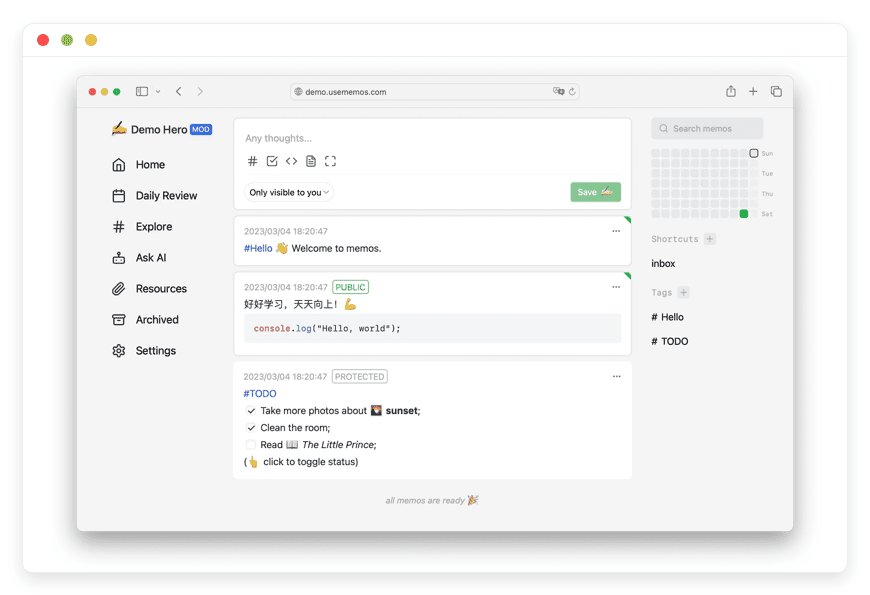
Memos is an open-source notes app built for fast capture. You open it, type, and you are done — no title, no folder, no template. Notes are written in markdown and stored in your own database, so they stay portable. It carries more than 45,000 GitHub stars and ships under the MIT license.
Memos comes from the usememos open-source project. It runs on a Go backend with a web front end, and the Docker image is about 20 MB. That small footprint is part of why it is cheap to run.
Capture is the point. You get a timeline of short notes, tags written as #hashtags, full-text search, and the option to pin what matters. There are no folders to choose before a thought is worth saving.
Day to day it feels like a private feed. You write a line, it drops to the top with a timestamp, and you move on. Markdown means a checklist, a code snippet, or a link renders the way you would expect. There is nothing to file and nothing to name.
Notes are stored in SQLite by default, with MySQL and PostgreSQL as options. Because the text is markdown, it stays readable outside the app, and a backup is a copy of a file. There is zero telemetry, so the data path is yours from start to finish.
Memos also exposes an API, so it fits into a wider setup if you want that. You can post notes from a script, a shortcut, or another tool, and pull them back out the same way. Most people never need this. For the ones who do, it ties the capture box into a small personal workflow. The notes are not walled off from everything else.
It also holds up as the pile grows. Full-text search covers thousands of notes without folders. Tags group what belongs together, and pinning keeps the few things you reach for daily near the top. The model rewards typing first and organising later, which is how quick notes pile up in practice.
You reach Memos from any browser. Community mobile clients exist too, such as Moe Memos for iOS and Android, if you prefer a native app for capture on the go.
Best for: a private, fast quick-capture stream that replaces the "jot it down now" job Keep does today.
Meemo — a smaller, simpler personal notes app
Meemo is a lighter, more minimal open-source notes app. It keeps personal notes in markdown, sorts them with hashtag categories, and adds full-text search so nothing gets lost. It is a small project, licensed MIT. Upstream development has wound down, so treat it as a simple, finished tool rather than one that keeps changing.
Honesty about scale matters here. Meemo has a few hundred GitHub stars, far fewer than Memos. Its repository is archived, which means upstream feature work and patches have stopped.
Here is what that means in plain terms. The app is stable and does what it does. It will not gain new features, and security maintenance now rests with whoever runs it.
When we host Meemo, we run it in an isolated container, patch the layers we control, and back it up daily off-site. What we cannot do is ship the upstream code fixes the project itself would once have made. That is a fair thing to know before you pick it.
Who is it for, concretely? Someone who wants one quiet place for personal notes, likes that it will not change under them, and does not want to run it themselves. If you would rather your tools stayed still once they work, a finished app is a feature, not a flaw.
Best for: someone who wants a minimal, unchanging personal-notes tool and would rather have it run and backed up for them.
For most people leaving Keep, Memos is the safer pick. Meemo suits the person who wants something small on purpose.
Google Keep vs Memos vs Meemo
Keep wins on polish, photo text extraction, and its tie into Gmail, Docs, and Calendar. Memos and Meemo win on ownership, markdown portability, and a flat managed price. The table below shows where each one fits, so you can read it by what matters to you.
| Feature | Google Keep | Memos | Meemo |
|---|---|---|---|
| Price | Free; storage counts against your Google account | Free, open source (MIT) | Free, open source (MIT) |
| Managed by us | Not applicable | €9/month per instance | €9/month per instance |
| Where your notes live | Google's cloud, tied to your account | Your own database, on your server or a managed instance | Your own instance |
| Region choice | Google's regions, not yours to pick | The region you choose (21 datacenter regions) | The region you choose |
| Note format | Plain text and checklists; no markdown | Markdown | Markdown |
| Search and tags | Labels, colours, search | #tags, full-text search, pin | Hashtag categories, full-text search |
| Image text (OCR) | Yes, cloud OCR on photos | No | No |
| Voice notes and reminders | Voice notes with transcription; time and location reminders | No | No |
| Gmail, Docs, Calendar glue | Yes | No | No |
| Real-time collaboration | Yes, shared notes and lists | Built for personal notes | Built for personal notes |
| Export and portability | Archive via Google Takeout | Markdown; your database, fully portable | Markdown, portable |
| Source code | Closed | Open (MIT) | Open (MIT) |
| Maturity | Google-maintained | Active; 45,000+ stars | Small; archived upstream |
Read the table by what you would miss. If photo text extraction or voice capture is part of your day, Keep keeps an edge, and switching has a real cost. If you mainly type quick notes and want to own them, Memos and Meemo close the gap. They add a portable format Keep does not offer.
Be specific about the trade. Keep's photo text extraction is genuinely useful if you snap receipts, whiteboards, or business cards and want the words back. Voice capture and location reminders lean on Google's services in the same way. If those are daily habits, name that cost before you switch — neither app here brings them.
How we run Memos and Meemo
With a managed instance, you do not touch a server. We deploy your app, put it on your own subdomain or a custom domain, and keep it patched and backed up. You write notes; we keep the lights on. Support is chat and email, answered by a named person.
Setup is light on your side. You pick the app and a region, we provision the instance, and you sign in from a browser within minutes. Your notes sit in an isolated container, not in a shared pool, so one customer's data never mixes with another's.
The €9 covers the server, security updates, daily off-site backups, monitoring, and support. There are no per-seat fees and no usage calculator to read.
Updates are part of the deal. When the app ships a new version, we test it and roll it to your instance. You are not chasing releases or patching a server yourself. If something breaks, monitoring usually catches it before you do, and a person looks at it.
You pick the region for your instance, from 21 datacenter regions across six continents. Put it near you, or near the people you share with.
Some changes still need a human on our side, such as a resource bump, a region move, or a tricky import. Email us or open a ticket and we will handle those.
We will not raise your resources or your bill without asking first. If a payment fails, we wait, and we do not delete your data. If you leave, your notes leave with you.
Moving your notes from Keep
Moving off Keep starts with Google Takeout, which exports your notes as an archive of HTML or JSON files. That gives you the content, not the running system. From there you bring the text into Memos or Meemo, and we can help with a bulk import if the archive is large.
Google Takeout is the official export. You select Keep, request the archive, and download a folder of your notes as HTML and JSON, with attachments alongside. It is a clean snapshot of what you have written. What it is not is a live system you can point an app at, so a little reshaping is normal.
In practice you turn that archive into markdown notes and load them into Memos or Meemo. Short note collections are quick to move by hand. Larger ones are better scripted, so the text, tags, and dates land in the right places rather than as one flat lump.
Set expectations on what moves. Your note text and most structure come across cleanly. Labels become tags or hashtags depending on the app. What does not come across is anything that lived in Google's cloud rather than your notes: image text extraction, voice transcriptions, and reminders. Those stay behind with Keep.
If your Keep history is large, send us the archive and we will handle the bulk import for you. That is one of the changes that still needs a human on our side. You start with your notes already in place, not a blank instance.
How to pick — three questions
Three questions sort this fast: how you capture, whether you lean on photos and voice, and who else edits your notes. Answer them honestly and the right pick is usually clear. Memos suits pure quick capture; Meemo suits a small, fixed personal-notes tool.
- Do you mostly jot quick notes, or build longer structured pages? For quick notes, Memos or Meemo fit well. For a larger, structured knowledge base, a heavier note-taking tool is the better match.
- Do you rely on Keep's photo text extraction or voice capture? If those are part of your daily routine, that is the real cost of leaving Keep. Neither app here replaces them.
- Does anyone else edit your notes in real time? Keep's shared lists are good at this. Memos and Meemo are built for personal notes, not live collaboration.
Questions people ask
What is Memos?
Memos is an open-source, self-hosted notes app built for fast capture. You type a short note in markdown and it joins a timeline, with #hashtag tags, full-text search, and pinning. It is licensed MIT, carries more than 45,000 GitHub stars, and stores your notes in a database you control.
What is Meemo?
Meemo is a small, minimal open-source notes app for personal notes. It keeps notes in markdown, groups them with hashtag categories, and adds full-text search. It is licensed MIT. Its upstream development has wound down and the repository is archived, so treat it as a stable, finished tool.
Best open-source alternative to Google Keep?
For quick capture like Keep, Memos is the strongest open-source pick for most people, with markdown notes and fast search. Meemo suits anyone who wants something smaller and fixed. If you need long, structured pages rather than quick notes, a heavier note-taking tool is the better fit.
What is the difference between Memos and Meemo?
Both keep markdown notes you own. Memos is the larger, actively developed project, built around a fast capture timeline with tags and search. Meemo is smaller and more minimal, and its upstream development has wound down. For most people leaving Keep, Memos is the better starting point.
Is Memos really free?
Yes. Memos is open source under the MIT license, with no seat fees and no paid tier in the product. The software costs nothing. What we charge for is running it: €9 per month per instance, including the server, updates, daily backups, and support. You can also self-host it yourself for free.
How much does managed hosting cost?
Managed Memos or Meemo is €9 per month per instance. That flat price covers the server, security updates, daily off-site backups, monitoring, and support. There are no per-seat fees and no usage meter. The app itself is free and open source; what you pay for is having it run and kept up.
Can I try it before paying?
Yes. You can start a 7-day free trial with no card required. Deploy one instance, move a week of notes across, and see whether it fits how you work. If it sticks, it is €9 a month. If it does not, you walk away having lost nothing but a little time.
Does Memos support markdown?
Yes. Memos is markdown-native. You write notes in markdown, so headings, checklists, code blocks, and links render the way you expect, and the text stays readable outside the app. Because your notes are plain markdown in a database you control, a backup is a copy of a file.
Can I attach images to notes?
Yes. Memos lets you attach images and files to a note, and recent versions preview images, audio, and more inline. One honest limit: Memos stores the image, it does not read text out of it. Keep's photo text extraction has no equivalent here, so plan for that if you rely on it.
Does Memos work offline?
Memos runs in your browser against your instance, so it works best with a connection. The interface is responsive and works full-screen on a phone or desktop, and community clients like Moe Memos help with capture on the go. Treat reliable offline editing as the exception, not a core feature.
Is there a desktop app for Memos?
You use Memos in any desktop browser, and that is the main desktop experience. There is no separate first-party desktop application; the web interface is responsive and works full-screen. Community apps such as Moe Memos focus on mobile, so on a laptop the browser is the way in.
Can I get my notes on my phone?
Yes. You reach your instance from any browser, on any device. Memos also has community mobile clients, such as Moe Memos for iOS and Android. There is no first-party app on every store, but the web app is responsive and works on a phone.
Can multiple people use one instance?
Yes. One Memos instance can have several user accounts. Each note has a visibility setting: private to you, shared with logged-in users, or public by link. It is not live co-editing like Keep's shared lists, though. Memos is built around personal notes you can selectively share, not real-time collaboration.
What database does Memos use?
By default Memos uses SQLite, which keeps a single instance simple and easy to back up. If you want an external or managed database, it also supports MySQL and PostgreSQL. On a managed instance we handle the database for you, so you do not pick or tune it yourself.
Is my data private on a managed instance?
Yes. Your notes run in their own isolated container, in the region you choose, with no telemetry from the apps themselves. We do not read your notes, and we do not sell or share them. Daily off-site backups are encrypted, and if you leave, we delete your instance and its data on request.
Will I lose Google Keep's image text extraction?
Yes. Keep's photo text extraction, voice notes, and location reminders all rely on Google's cloud, and neither Memos nor Meemo replicates them. If those features are central to how you work, that is the honest cost of leaving Keep. If you mainly type quick notes, you will not miss them.
Can I move my notes out later?
Yes. Memos and Meemo store notes in markdown, in a database you control, so your text stays portable. Export it whenever you want. The app is open source and yours; we run the instance, and you can leave with your notes at any time.
How do I export notes from Google Keep?
Use Google Takeout. Pick Keep, request the archive, and download your notes as HTML and JSON, with attachments alongside. That gives you the content, not a running system. From there you reshape the text into markdown and load it into Memos or Meemo. We can run the bulk import for you if the archive is large.
Is Google Keep being discontinued?
No. Google Keep is not being discontinued. It is actively maintained and comes with your Google account, and with Google Workspace for business. That said, Google has a long history of changing or retiring products, and has trimmed some Keep features over time. Owning your notes is insurance against that risk.
What about running it on my own server?
Memos is light enough to run on a small server or a Raspberry Pi, so the hardware is cheap. The real cost is your time: setup, updates, backups, and keeping it reachable and secure. We handle that for €9 a month. If you enjoy running servers, self-hosting is a fair choice.
What if I need more than quick notes?
Memos and Meemo are built for quick notes, not long structured pages or a full knowledge base. If you need nested documents, backlinks, or a wiki-style workspace, a heavier note-taking tool is the better match. That is a different kind of app, and one we cover in a separate guide.
What happens if I stop paying?
We do not delete your data the moment a payment fails. We email you, hold the instance, and give you time to update the card or export your notes. If you decide to leave, your notes leave with you. We would rather you go cleanly than lose anything.
What to do this week
If Keep's quick capture is the part you would miss, Memos covers it and keeps your notes in markdown you own. Start a 7-day trial, deploy one instance, and move a week of notes across. If it sticks, keep it for €9 a month. If it does not, you have lost nothing but a week.
Meemo is there if you want something smaller and you are comfortable with a finished, unchanging tool. Either way, the notes are yours, and you can take them with you.
Start a 7-day free trial — no card
Sources