
Open-source Miro alternatives in 2026
Open-source alternatives to Miro in 2026 — WBO and the Nextcloud whiteboard for a board you own
TL;DR
- Miro's free plan stops at three editable boards in one workspace. Past that, every plan bills per member.
- Miro Starter runs $8 to $10 per member each month. Business runs $20 to $25 per member.
- Two open-source boards remove the per-seat meter: WBO, a focused real-time whiteboard, and the whiteboard built into Nextcloud.
- DANIAN runs either one for €9 a month, flat. No per-member fee, across 21 datacenter locations on six continents.
- The honest catch: these are boards you own, not a swap for Miro's templates, AI, and integrations.
Why teams look past Miro in 2026
Miro's free plan caps you at three editable boards in one workspace. Past that, every plan bills per member — $8 to $10 each on Starter, $20 to $25 on Business. A 15-person team on Starter pays about $120 a month on the annual plan. The board itself never becomes yours.
The three-board cap is the first wall teams hit. Miro's pricing page is explicit: on the free plan, only three boards stay active and editable at once. A growing team fills that in a few weeks. Archiving older boards to free a slot gets old fast.
It helps to see what the free tier really gives you. You get unlimited members, those three editable boards, 5,000-plus templates, and 160-plus integrations. You also get 10 AI credits a month for the whole team, and five Talktrack recordings. For a small group testing the water, that is plenty. For a team that works on the board every day, the three-slot cap arrives fast.
The second wall is the billing model. Miro charges by member, not by usage. Add a teammate and the monthly line grows, whether or not they open a board that week. The gap between the annual and month-to-month price is real too: Starter is $8 per member on the annual plan, $10 if you pay month to month.
One more detail sits in the billing. The lowest Starter price holds only if you commit to a year up front. Pay month to month and every member costs more. That is normal for hosted tools, but it is fair to know before you size a plan.
The third pressure is ownership. Boards live on Miro's servers. On the free tier, export is basic, and the higher-resolution exports start on Starter. None of that is unusual for hosted software. It is the trade you make when you rent the tool instead of running it.
So three triggers push teams to look elsewhere: the board cap, the per-seat math at headcount, and the wish to keep the work on infrastructure they control.
What "alternative" means here — and what it doesn't
An open-source alternative replaces the part of Miro most teams actually use: a shared board for sketching, diagramming, and brainstorming. It does not replace Miro's 5,000-plus templates, its AI features, or its 160-plus integrations. Naming that line honestly matters more than the price does.
There are three kinds of "alternative", and they are not the same thing. The first is a cheaper hosted whiteboard. You still rent it, and most charge per seat once you grow. The second is self-hosting an open-source board yourself. You own it, and you also run it.
The third is managed open-source. You own the software, and someone else runs the server. That is what DANIAN does at €9 a month per app. The board is yours; the operations are ours.
Owning the board changes a few things. There is no per-seat meter, so growth does not raise the bill. There is no product sunset to fear, because the code is public and yours to keep. And the data sits where you put it, on a region you choose, not on a vendor's default cloud.
Here is the part a sales page usually skips: some teams should stay on Miro. Lean on its template library every day, and you would miss it.
Run sprint ceremonies through its facilitation tools — voting, timers, estimation — and an open board falls short. Depend on its Jira, Azure DevOps, or Asana sync, and the switch costs more than it saves.
The teams that switch well use Miro as a freeform canvas. They open a handful of boards, sketch in real time, draw diagrams, and run the odd workshop. For that, a board you own does the job — and the per-member bill stops growing.
The shortlist
Two open-source boards in the DANIAN catalog cover the common cases. Both are real-time, and both let many people draw at once. One is a standalone board you point your team at. The other comes inside Nextcloud, a wider collaboration suite.
WBO — a plain board you own
WBO, short for "whitebophir", is a focused open-source whiteboard. Many people draw on one large board at once, in real time, and the board's state is always saved. It does freehand, shapes, lines, text, and images — and little else, on purpose. It carries 2.6k GitHub stars and an AGPL-3.0 licence.
WBO was built by Ophir Lojkine and is developed in the open on GitHub. People use it for teaching, design sketches, architecture diagrams, and quick brainstorms. There is a public demo board you can open without an account, which makes the model easy to judge before you commit.
Under the simple surface there is enough to work with. Every change syncs live, so a remote pair can sketch the same diagram at once. The board persists on its own, with no save button to remember. Access can be gated with tokens, and you can hand someone an editor or a moderator role. The interface is translated into many languages.
What WBO leaves out is the point. There is no template gallery, no app marketplace, and no agile tooling. You get a clean, unlimited board that loads fast and stays yours. For a team that wants exactly that, it is a strong fit.
DANIAN runs WBO for €9 a month. You get the board on a domain you choose, patched and backed up, with support behind it.
See managed WBO whiteboard hosting for the details.
Nextcloud Whiteboard — a board next to your files
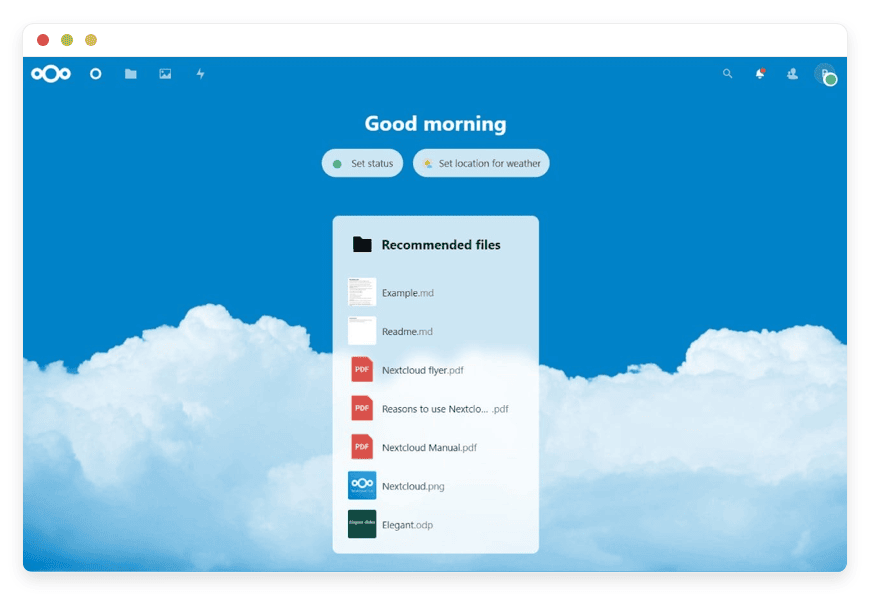
Nextcloud Whiteboard is the official board built into Nextcloud. It is a real-time canvas for sketching, planning, and brainstorming, with shapes, text, and connectors. Whiteboards save as files next to your documents, and you can open one inside a Nextcloud Talk call. It arrived with Nextcloud Hub 9.
This path fits teams already on Nextcloud — or moving to it — for files, calendar, contacts, and chat. The board becomes one more file type, shared like any other. That €9 covers Nextcloud itself, with the whiteboard as one feature among many. Nextcloud's own write-up covers how it slots into the suite.
Inside the suite, the board behaves like the rest of Nextcloud. You create a whiteboard from the files view or straight from a chat, share it the way you share a document, and pick a starting template such as a SWOT grid. Edits sync in real time, and the board keeps working semi-offline, saving your changes on the device and syncing them when the connection returns.
There is a catch when you self-host it. The whiteboard needs a separate real-time collaboration server — a WebSocket backend — running alongside Nextcloud and reachable from every browser. The project's setup notes are clear that this service is required. It is where most do-it-yourself setups stall.
DANIAN runs that collaboration server as part of managed Nextcloud, at the same €9 a month. You get the whole suite, the board included, without wiring the backend yourself.
See Nextcloud with its built-in whiteboard.
What you give up, stated plainly
An open-source board is not a smaller Miro. It is a different tool with a narrower job. Before you switch, it is fair to name what you leave behind, because for some teams these are the features that earn Miro its price. Four gaps matter most.
- The template ecosystem. Miro ships thousands of ready-made frameworks, from retro boards to customer-journey maps. WBO has none, and the Nextcloud whiteboard offers a small set. You build your own structure, or paste an image of one.
- The AI features. Miro can summarise a board, generate a diagram, or draft content on the canvas. Neither open-source board does that. If AI on the board is part of your workflow, this is a real loss.
- Deep integrations. Miro syncs with Jira, Azure DevOps, Asana, and many other tools. WBO does not integrate; the Nextcloud whiteboard connects to other Nextcloud apps, not to outside trackers. Cross-tool sync is a gap.
- The facilitation suite. Voting, timers, estimation, private mode, and video calls make Miro strong for run-of-show workshops. An open board can host the same discussion, but you run the ceremony yourself.
If two or more of those gaps would hurt, an open-source board is the wrong move, and this post will not pretend otherwise. If they do not, read on — the rest is upside.
WBO vs Nextcloud Whiteboard vs Miro — at a glance
The table below lines up the three side by side. The short version: Miro is the richer platform; WBO and the Nextcloud whiteboard are boards you own at a flat price. Where Miro charges per member, DANIAN charges per board.
| Feature | Miro | WBO on DANIAN | Nextcloud Whiteboard on DANIAN |
|---|---|---|---|
| Pricing model | Per member, $8–$25/member/mo | €9/month | €9/month |
| Cost at 15 members | ~$120–$375/month | €9/month | €9/month |
| Editable boards | 3 on Free; unlimited on paid | Unlimited | Unlimited |
| Source code | Closed | Open (AGPL-3.0, 2.6k stars) | Open (AGPLv3) |
| Self-hostable | No | Yes | Yes |
| Real-time, multi-user | Yes | Yes | Yes |
| Templates and integrations | 5,000+ templates, 160+ integrations | None — a plain board | Templates; works with Nextcloud apps |
| Where it runs | Miro's cloud (regional hosting on higher tiers) | Region you choose (21 locations) | Region you choose (21 locations) |
| Who runs it | Miro | DANIAN | DANIAN |
| Switching effort | — | Low — point the team at a new board | Low–medium — needs Nextcloud |
The cost math vs Miro at 5 and 15 members
Miro bills per member; DANIAN bills per board, flat. At five members, Miro Starter runs about $40 a month on the annual plan, or $50 month to month. At fifteen, it is about $120 or $150. The same board on DANIAN is €9 a month at either size.
| Team size | Miro Starter | Miro Business | WBO or Nextcloud Whiteboard on DANIAN |
|---|---|---|---|
| 5 members | $40/mo annual ($50 monthly) | $100/mo annual ($125 monthly) | €9/month |
| 15 members | $120/mo annual ($150 monthly) | $300/mo annual ($375 monthly) | €9/month |
The dollar gap is not really the headline. The model is. Miro's price tracks your headcount. DANIAN's tracks the number of boards you run, which for a whiteboard is one.
Add a person to the team, and Miro's monthly line grows. The €9 board does not move. Over a year, a 15-seat Starter plan is roughly $1,440 on the annual price; the managed board is €108. The per-member figures come straight from Miro's pricing page, checked in June 2026.
Stretch that to three years and the shape holds. The 15-seat Starter plan is about $4,320 over three years on the annual price; the managed board is €324. Headcount only widens the gap, because Miro's number climbs with every seat while the board's does not. None of this counts Miro's higher tiers, where the per-member price roughly doubles.
How DANIAN runs both
DANIAN hosts WBO and Nextcloud for €9 per app each month. That covers the server, security patches, daily off-site backups, monitoring, and 24/7 support from a named person. For the Nextcloud whiteboard, it also covers the collaboration server the board needs. Your time on operations: none.
- You pick the region. The board runs in one of 21 datacenter locations across six continents, close to your team. Latency to your users is the reason the choice exists.
- We patch the app and the underlying server on the normal release cycle, and back the board up daily, off-site. A backup on the same machine is not a backup, so ours sits elsewhere.
- For Nextcloud, we run and maintain the whiteboard collaboration server — the WebSocket backend real-time sync depends on — so it stays reachable.
- A custom domain, like board.yourcompany.com, is part of setup. Message us and we wire the DNS records with you.
- If you leave, the data is yours. The board state and any files export over SFTP or as a download.
The work is the same whether you run WBO or Nextcloud. The price is the same too: €9 per app, per month, no matter how many people draw on the board.
How to pick — three questions
The choice comes down to three questions: how much of Miro you actually use, whether you already run Nextcloud, and how much you value owning the board itself. Answer those three honestly, and the right path is usually clear within a minute.
How do you use Miro — as a canvas or as a platform? If it is a canvas for sketching and diagrams, an open-source board fits. If you depend on templates, AI, agile tooling, and integrations, stay on Miro.
Are you already on Nextcloud, or heading there? If yes, the built-in whiteboard adds a board with nothing new to learn. If no, WBO is the lighter, standalone choice.
How many people, and how fast are you growing? The more seats you add, the more a per-member meter costs. A €9 flat board saves more the larger your team gets.
A note on switching from Miro
Switching whiteboards is not like switching email. There is no clean export that turns a Miro board into a WBO or Nextcloud board, because the formats differ. The honest plan is to treat the move as a fresh start for new work, not a one-for-one migration of old boards.
In practice, that means a short overlap. Keep Miro for the boards you cannot rebuild, and run new sessions on the open board. For most teams, active boards turn over within a quarter, and the Miro archive stops mattering soon after. If you drop back to three boards or fewer, the leftovers can sit on Miro's free tier, so the overlap can cost nothing. At that point you cancel the paid seats and keep the flat €9 line.
If a board is worth saving, export it from Miro as an image or PDF and drop it onto the new canvas as a backdrop. It is not editable, but it keeps the reference in front of the team. New thinking happens on the board you own.
FAQ
What is the best open-source alternative to Miro?
It depends on how you work. For a standalone board, WBO is the simplest open-source option: real-time, multi-user, and deliberately minimal. If your team already runs Nextcloud, its built-in whiteboard adds a board with nothing new to learn. Both remove Miro's per-member bill; neither matches its templates, AI, and integrations.
What's the difference between these and Miro's cloud?
Miro is a hosted platform with templates, AI, and 160-plus integrations, billed per member. WBO and the Nextcloud whiteboard are open-source boards you own, billed per board when DANIAN runs them. You trade Miro's ecosystem for an unlimited, flat-priced board on infrastructure you control.
What's the difference between WBO and the Nextcloud whiteboard?
WBO is a standalone board and nothing more. You point your team at one web address and start drawing. The Nextcloud whiteboard lives inside the Nextcloud suite, next to your files, calendar, and chat. Pick WBO for a focused board; pick Nextcloud if you want the board alongside the rest of your tools.
Can I migrate my Miro boards to WBO or Nextcloud?
Not as a direct import. The board formats differ, so there is no one-click transfer from Miro. The honest approach is a fresh start: run new sessions on the open board, and keep Miro only for boards you cannot rebuild. To save a reference, export a Miro board as an image or PDF and drop it onto the new canvas as a backdrop.
Are WBO and the Nextcloud whiteboard really free?
The software is open-source and free to run yourself. WBO is AGPL-3.0; the Nextcloud whiteboard ships with Nextcloud, which is AGPLv3. Running it in production still costs a server, patching, and backups. DANIAN covers all of that for €9 a month per app.
How much does it cost to host a whiteboard with DANIAN?
€9 a month, per app, flat. That price does not change with the number of people on the board. There is no per-member fee and no separate setup charge. A 7-day trial runs without a card, so you can test it before you pay.
Can I self-host a Miro alternative myself?
Yes. Both WBO and the Nextcloud whiteboard are open-source and built to run on your own server. You install the app, then handle patching, backups, and uptime yourself. If you would rather not run that yourself, DANIAN hosts either one for €9 a month.
How does this compare to running it on my own VPS?
You can run either app yourself on a production-class VPS at about $24 a month. Add backups, monitoring, patching, and the Nextcloud whiteboard's collaboration server, plus your own time. If you have someone who enjoys that work, self-hosting is a fair path. If not, €9 a month buys the same board without the upkeep.
Does the Nextcloud whiteboard need a separate server to run?
Yes, when you self-host it. The whiteboard needs a separate real-time collaboration server — a WebSocket backend — running alongside Nextcloud and reachable from every browser. This is where most do-it-yourself setups stall. DANIAN runs that collaboration server as part of managed Nextcloud, so you do not wire it yourself.
Do I need to be technical to use a managed board?
No. You get a working board on your own web address, and you use it in the browser like any whiteboard. The parts that need a server person — setup, patching, the Nextcloud collaboration backend — are ours. If you can change a DNS record with guidance, you can run this.
Is WBO open source, and what licence is it under?
Yes. WBO is open-source under the AGPL-3.0 licence, developed in the open on GitHub. The Nextcloud whiteboard ships with Nextcloud, which is also AGPLv3. An open licence means you can read the code, run it anywhere, and keep using it on your own terms.
How many people can collaborate on one board at once?
Both boards are real-time and multi-user, so many people can draw at the same time. There is no per-seat licence capping the count. The practical limit is the server's resources, not a price tier. If a board gets busy, more resources are a chat away.
Do WBO and the Nextcloud whiteboard work on phones and tablets?
Yes. Both run in a web browser, so they open on a laptop, tablet, or phone without an install. WBO's freehand drawing works well with a touchscreen or stylus. For Nextcloud, the whiteboard opens in the mobile browser alongside the rest of the suite.
Can I run more than one whiteboard?
Yes. Each app you host is €9 a month, so you can run several boards or several apps side by side. Some teams run one WBO board for the whole company; others run a separate instance per client or project. You add or remove apps as your needs change.
What kind of access do I get to my board?
You get the running app on a domain you choose, plus terminal and file access scoped to your app's container through the dashboard. You can export the board state and any files whenever you want. Resource changes and region switches go through chat, usually within the hour.
How secure is a self-hosted whiteboard with DANIAN?
Each app runs in its own isolated container, on a server we patch on the normal release cycle. WBO gates access with tokens and editor or moderator roles; Nextcloud uses its own sharing permissions. Backups run daily, off-site, so a bad day does not cost you the board. You own the data, and it is not mined or resold.
Where is my whiteboard data stored?
In the datacenter region you choose. DANIAN runs across 21 datacenter locations on six continents, and you pick the one closest to your team. The board's data lives there, on infrastructure you control, not on a shared vendor cloud. Latency to your users is the reason the choice exists.
Can I use my own domain?
Yes. Your board runs on a subdomain you choose, like board.yourcompany.com. Setting up the custom domain is part of onboarding; message support and we handle the DNS records with you. There is no extra charge for a custom domain.
Can clients or guests join a board without an account?
It depends on the app. WBO can share a board by link, and you can gate access with tokens when you need to. The Nextcloud whiteboard follows Nextcloud's sharing, so you invite people to a board as you would to a file. Neither charges per guest.
Is a managed whiteboard a good fit for a small business or agency?
Yes. You pay €9 for the board, not a fee per person, so cost does not climb as you hire. That suits a small business watching every subscription. An agency can run a separate board per client and keep the work apart, each at €9 a month.
Is a self-hosted whiteboard good for a distributed team?
Yes. The board syncs in real time, so people in different places sketch on the same canvas at once. You can run it in a region near most of your team to keep it responsive. And the flat €9 price holds whether the team is five people or fifty.
What happens to my boards if WBO or Nextcloud shuts down?
The software is open-source, so it does not disappear if a company changes course. The code is public and yours to keep running, on DANIAN or anywhere else. There is no vendor that can switch the product off and strand your boards. That durability is a large part of why teams choose open-source.
What happens if I want to leave?
The data is yours. Board state and files export over SFTP or as a download, on demand. The apps are open-source, so you can take WBO or your whole Nextcloud and run it anywhere — your own server or another host. Nothing is locked to DANIAN.
What to do this week
Pick the path that matches how you work. If you want a plain board you own, start with WBO. If you already lean on Nextcloud, turn on its whiteboard. Either one runs for €9 a month, with a 7-day trial and no card.
Open the public WBO demo first, to see how little stands between you and a working board. Then start a trial, deploy your choice, and put a real session on it — a sprint sketch, an architecture diagram, a brainstorm. Give it seven days, and decide. You can start a 7-day trial without a card.
Whichever you choose, the upkeep is ours and the price does not move with your headcount. You draw on the board; we keep the server patched, backed up, and reachable.
Sources





