
Open-source Audible alternatives in 2026
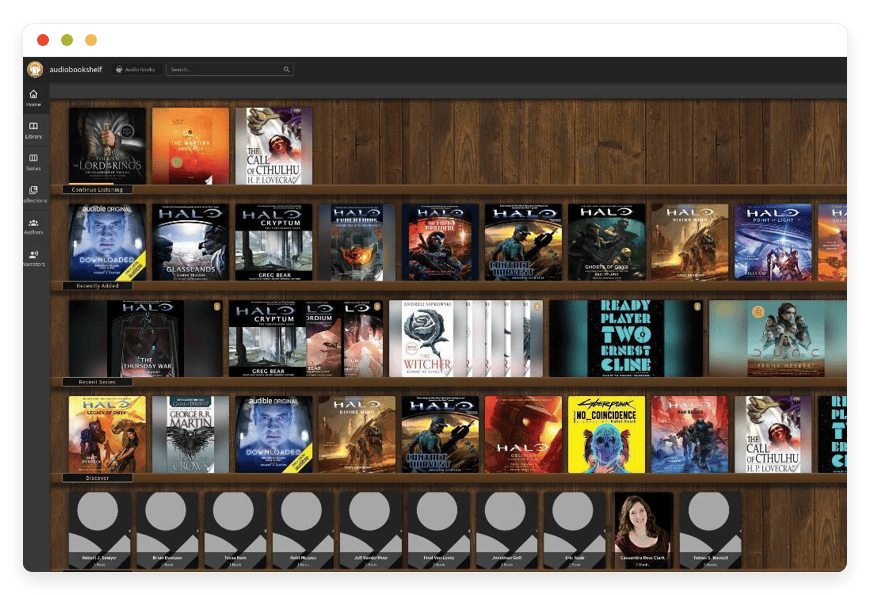
Open-source alternatives to Audible in 2026 — own your audiobook library
The short version
- Audiobookshelf streams audiobooks you already own — DRM-free files you bought, ripped, or downloaded — to phone apps that sync your place across devices. It is not a way to replace buying books from Audible.
- Audible Premium Plus costs $14.95 a month for one credit. A new Standard tier arrived in March 2026 at $8.99. Credit-bought titles stay locked to Audible’s apps.
- Managed Audiobookshelf hosting runs €9 a month. That covers 30 GB of storage — roughly 50 to 100 audiobooks.
- Storage is the variable that matters. A 100 GB library costs €44 a month; a 300 GB library costs €144. Past a few hundred GB, your own disk wins.
- Audiobookshelf is free and open source under the GPL-3.0 licence. Pay for managed hosting only if you would rather not run the server yourself.
Why people are leaving Audible in 2026
Audible’s pricing is fine on its own terms. The friction is the model. You pay every month, you receive one credit, and the files you buy stay inside Audible’s apps. For a listener with a growing collection, renting access to your own reading starts to chafe.
The numbers, plainly. Audible Plus is $7.95 a month and streams the Plus Catalog with no credits. Premium Plus is $14.95 a month and adds one credit for any premium title. In March 2026 Audible added a Standard tier at $8.99, a response to Spotify’s audiobook plan.
One credit buys one book a month. A steady listener pays about $179 a year for roughly twelve titles. That math is reasonable if you treat the membership as a book club.
The catch is ownership. Titles you buy with a credit are yours to keep after you cancel. But they arrive as DRM-wrapped files that play only in Audible and Amazon apps. You never get a portable file you can move to any player.
None of this makes Audible a bad service. The catalog is deep, the exclusives are real, and the narration is often excellent. This post is not about replacing the store. It is about where your files live once you own them.
What “alternative” actually means here
Read this part before anything else. Audiobookshelf is a server, not a store. It streams audiobook files you already have. It does not sell books, and it cannot hand you Audible’s catalog. If you own no audiobook files of your own, this is not your tool yet.
So where do owned files come from, within the law? DRM-free retailers sell them outright — Libro.fm and Downpour are two. Humble Bundle runs audiobook bundles. LibriVox offers public-domain recordings for free. Audiobook CDs you own can be ripped to files. Podcast episodes download as plain audio.
What this guide will not cover is removing DRM from files where you do not hold that right. Stripping Audible’s protection is its own legal question, and not one DANIAN weighs in on. Audiobookshelf is at its best with files that are already free of DRM.
From there, two honest paths exist. You can run Audiobookshelf yourself on your own hardware, for free. Or you can pay someone to run it, which is the €9-a-month managed option. Both paths end with the same app on your phone.
Who should skip Audiobookshelf entirely? Anyone who mainly wants a buffet of new releases to browse and stream. That is what a store and a streaming catalog are for. Keep Audible, or add Audible Plus, and enjoy it.
The open-source shortlist
A handful of open-source projects cover this space. One is the clear pick for most people, and three others fit narrower needs. Audiobookshelf leads because it is purpose-built, actively developed, and ships maintained mobile apps. The rest are worth knowing before you commit to anything.
Audiobookshelf — the pick for most people
Audiobookshelf is a self-hosted audiobook and podcast server, built by a developer who goes by advplyr and a steady open-source community. It streams every common audio format, syncs your place across devices, and supports multiple users. The licence is GPL-3.0. Managed hosting at DANIAN is €9 a month.
Best for: anyone who wants an Audible-style app for a library they own.
It carries more than 12,000 GitHub stars and updates often. It fetches cover art and metadata, edits chapters, and can merge loose files into a single m4b. It also handles podcasts, with auto-download and RSS. Basic ebook reading is built in. You can read more at audiobookshelf.org or on GitHub.
Jellyfin — one server for all your media
Jellyfin is a free, open-source media server best known for video and music. It can hold an audiobook library too, and many people run it for everything at once. It is not purpose-built for audiobooks, so chapter handling and series views are weaker than Audiobookshelf’s.
Best for: households already running Jellyfin who want a single server for all media.
Storyteller — read along while you listen
Storyteller solves a narrower problem: it aligns an ebook with its audiobook so the text highlights as the narrator reads. The model is Audible’s Immersion Reading, on files you own. It is MIT-licensed, with its own iOS and Android apps.
Best for: language learners and anyone who reads and listens at once.
It complements Audiobookshelf rather than replacing it. Plenty of people run both — one for the library, one for read-along titles.
Booksonic — the older option
Booksonic is an older audiobook server built on the Subsonic project. It still works, and some people still run it. But development is on hold, and the last release landed in January 2022. It is GPL-3.0 and free.
Best for: existing Subsonic users — though most new setups now choose Audiobookshelf instead.
For a dedicated audiobook server with mobile apps that stay current, Audiobookshelf is the pick. The rest of this guide focuses on it, and on what running it actually costs.
→ See managed Audiobookshelf hosting
Audiobookshelf versus Audible, side by side
The honest comparison is not feature-for-feature. Audible is a store with a player; Audiobookshelf is a player for files you own. The table below sets the two next to each other on the dimensions that actually decide it: cost, ownership, apps, and who keeps the server running.
| Feature | Audible (Premium Plus) | Audiobookshelf — self-hosted | Audiobookshelf — managed at DANIAN |
|---|---|---|---|
| Monthly cost | $14.95 (1 credit) | Free software; your hardware and time | €9 (30 GB storage) |
| What you own | Credit titles kept, but DRM-locked to Audible apps | Your DRM-free files, portable | Your DRM-free files, portable |
| Where books come from | The Audible store | You supply them | You supply them |
| Mobile apps and sync | Polished, one-tap install | Official and third-party apps, progress sync | The same apps, progress sync |
| New releases and catalog | Yes — the whole point | No store | No store |
| Who runs the server | Audible | You patch, back up, and update | We patch, back up, and update |
The trade is clear. Audible gives you a store and zero maintenance. Audiobookshelf gives you ownership and portable files, at the cost of either your time or €9 a month.
The storage question — what an owned library costs
Audiobooks are large files, and storage is where a managed plan adds up. A ten-hour book runs roughly 300 to 600 MB, depending on bitrate. The €9 base plan includes 30 GB, which holds about 50 to 100 books. Past that, storage costs €0.50 per GB each month.
| Library size | Storage over the 30 GB base | Total monthly cost |
|---|---|---|
| 30 GB (included) | — | €9 |
| 100 GB | 70 GB | €44 |
| 200 GB | 170 GB | €94 |
| 300 GB | 270 GB | €144 |
Base €9 plan plus €0.50 per GB over the included 30 GB. Prices exclude any local tax.
Read the bottom of that table honestly. At 300 GB, managed hosting costs €144 a month — more than Audible. Per-GB managed storage is priced for convenience, not for bulk archives.
So there is a crossover point. Below roughly 150 GB, paying €9 to €70 a month to never touch a server is an easy call. Above a few hundred GB, running Audiobookshelf on your own disk costs less, if you are willing to own the upkeep.
Bandwidth rarely bites. The base plan includes 1,000 GB of transfer a month, and streaming a book moves only a few hundred MB. Most listeners never reach the cap; beyond it, transfer is €0.03 per GB.
You also pick the region your server runs in, across 21 datacenter locations on six continents. Closer means lower latency to your phone app.
The mobile experience — the Audible-like part
The reason Audiobookshelf feels like Audible is the apps. You listen on your phone during a commute, then pick up on a laptop at home, with your place kept in sync. Variable speed, sleep timers, chapter navigation, and offline downloads all work the way regular listeners expect.
On Android, the official app is on Google Play and installs like any other. That path is simple.
On iPhone it is less tidy. The official app ships through TestFlight, which fills up because Apple caps beta testers at ten thousand. When it is full, you wait for a slot, sideload the app, or use a third-party client. Several good ones sit on the App Store, some free, and they sync progress back to your server.
That iOS friction is worth naming plainly. Audible installs in one tap; Audiobookshelf on iPhone sometimes needs a workaround. For most people a third-party client closes the gap, but it is not as smooth as a single store app.
Chromecast and a web player round it out. You can cast a book to a speaker, or just open the library in a browser.
How to pick — three questions to ask yourself
Before you move anything, answer three questions honestly. They decide whether Audiobookshelf fits, and whether you should self-host or pay for managed hosting. None of them is about features. They are about your files, your library size, and your appetite for running a server.
- Do you own DRM-free audiobook files, or buy from DRM-free stores? If no, Audiobookshelf would start as an empty shelf. Build the library first, or stay on Audible for now.
- How large is your collection? Under about 100 GB, managed hosting at €9 to €44 a month is the simple path. At 300 GB and up, your own disk is cheaper.
- Do you want to run a server? If you enjoy it, self-host for free. If you do not, pay €9 a month and skip the upkeep.
Frequently asked questions
Will Audiobookshelf play my existing Audible books?
Only if they are DRM-free. Audible titles, even ones you bought with credits, are wrapped in DRM and play only in Audible and Amazon apps. Audiobookshelf works with open files you ripped, bought DRM-free, or downloaded. It does not remove DRM from protected Audible files.
Can I buy audiobooks inside Audiobookshelf?
No. Audiobookshelf is a server for files you already own, not a store. There is no catalog to browse and no checkout. You add your own audiobook files, and it organizes, streams, and syncs them. For new releases you still use a store such as Audible or a DRM-free retailer.
What devices can I listen on?
A web player works in any browser. Android has an official app on Google Play. On iPhone you can use the official TestFlight app, sideload it, or pick a third-party App Store client. Chromecast is supported too. Your place syncs across all of them, per user.
How much storage do I need, and what does it cost?
A ten-hour audiobook runs about 300 to 600 MB. The base plan includes 30 GB, or roughly 50 to 100 books. Beyond that, storage is €0.50 per GB each month. A 100 GB library costs €44 a month; a 300 GB library costs €144.
Is Audiobookshelf free?
The software is free and open source, under the GPL-3.0 licence. You can run it yourself at no licence cost on your own hardware. Managed hosting at DANIAN is €9 a month, which covers the server, patching, daily backups, and monitoring, so you do not run it yourself.
Does Audiobookshelf handle podcasts too?
Yes. It manages podcasts alongside audiobooks, with search, auto-download of new episodes, and RSS support. Many people run it for podcasts even when their audiobook library is small. If your library is music rather than spoken audio, Navidrome is the better fit for that.
How do I move my audiobooks onto Audiobookshelf?
You upload files into a library folder, one folder per book or author. Audiobookshelf scans them, then fetches cover art and metadata for you. It reads common folder layouts, so a tidy structure imports cleanly. On managed hosting you add files through the web interface; nothing needs the command line.
What audio formats does Audiobookshelf support?
It plays the common audio formats: MP3, M4A, M4B, AAC, OGG, FLAC, OPUS, and WebM, among others. It reads embedded chapters in M4B files and can merge a set of MP3s into one chaptered M4B. So most files you already own play without any conversion first.
Does Audiobookshelf support multiple users?
Yes. You can create separate accounts for each family member, with its own login and its own listening progress. One person’s place in a book never overwrites another’s. Libraries can be shared or kept private per user. A single €9 plan covers the household, within its storage and resource limits.
Can I listen offline?
Yes. The Android and iPhone apps download titles for offline playback, so a flight or a tunnel does not stop a book. When you reconnect, your progress syncs back to the server. Downloads live on the device; streaming pulls from your library whenever you are online.
Does Audiobookshelf handle series and chapters?
Yes. It groups titles into series with reading order, and it reads embedded chapters so you can jump between them. A built-in editor lets you fix chapter marks or merge loose files into one chaptered M4B. Series and collections keep a large library easy to browse.
Can I read ebooks in Audiobookshelf?
Basic ebook reading is built in. It opens EPUB, PDF, CBR, and CBZ files in the browser, alongside your audiobooks. It is not a full ebook reader, and there is no page-audio read-along. For text that highlights as the narrator reads, Storyteller is the better-fit open-source tool.
Do I need any technical skills to use it?
No. On managed hosting at DANIAN, setup, updates, and backups are handled, so you use Audiobookshelf entirely through its web and phone apps. You upload files and listen; you never touch a server or the command line. Self-hosting it yourself does take some comfort with servers and maintenance.
Should I self-host Audiobookshelf or pay for managed hosting?
It comes down to whether you want to run a server. Self-hosting is free if you enjoy patching, backups, and updates on your own hardware. Managed hosting at DANIAN is €9 a month and handles all of that. Both paths give you the same apps and the same files.
What is included in managed Audiobookshelf hosting at DANIAN?
For €9 a month you get a running Audiobookshelf server with 30 GB of storage and 1,000 GB of monthly transfer. We handle setup, security patches, daily backups, and monitoring. You bring the files and do the listening. There is no setup fee, and you can begin on a 7-day trial.
Do you back up my audiobook library?
Yes. Managed plans include daily backups of your Audiobookshelf data, so a mistake or a failure does not lose your library or your listening progress. Your files stay yours throughout. Because the audiobooks are DRM-free, you can also keep your own copy and move it anywhere at any time.
Where are the servers located, and can I choose the region?
You pick the region your server runs in, across 21 datacenter locations on six continents. Choosing one close to you lowers latency to your phone app and speeds the first load of a book. The choice is yours at setup, and your library stays in the region you select.
Can I cancel and keep my audiobooks?
Yes. Your audiobooks are DRM-free files you own, not licences tied to DANIAN. If you cancel, you download your library and move it to your own disk or another server. Nothing locks the files to us. That portability is the whole point of running your own audiobook server.
Is Audiobookshelf cheaper than Audible?
It depends on your library size. Audible Premium Plus is $14.95 a month for one credit. Managed Audiobookshelf is €9 a month for 30 GB, holding 50 to 100 books. Past roughly 150 GB the per-GB storage adds up and your own disk wins; below that, managed hosting is cheaper.
Is there a limit to how large my library can be?
There is no cap on the number of titles; the limit is storage. A single Audiobookshelf app on DANIAN scales to 16 TB, which is thousands of audiobooks. Most listeners never approach it. Long before that point, holding the library on your own disk costs less than per-GB managed storage.
How do I get started with managed Audiobookshelf hosting?
You start a 7-day trial, with no card required to begin. Pick your region, then upload a few DRM-free audiobook files into a library. Open the web player or install the phone app, and your place syncs across both. After the trial, managed hosting continues at €9 a month.
What to do this week
Start small. If you already own DRM-free audiobook files, stand up one Audiobookshelf library and load a few books. Listen on your phone for a week, and see whether the apps and the sync match what you want. The decision after that is just self-host or managed.
If you like running servers, install Audiobookshelf on your own hardware. The software is free, and the project’s documentation covers setup, folder structure, and metadata.
If you would rather not, managed hosting is €9 a month, with a 7-day trial and no card required to start. You bring the files; the server, backups, and updates are handled.
And if your library is really music, not audiobooks, point it at the right tool. Navidrome for your music library does for songs what Audiobookshelf does for books.
Sources: Audible plans and pricing (audible.com); Audiobookshelf project site and GitHub (audiobookshelf.org, github.com/advplyr/audiobookshelf); Audiobookshelf documentation (audiobookshelf.org/docs). Prices verified June 2026 and change over time.





