
Open-source Asset Panda alternatives in 2026
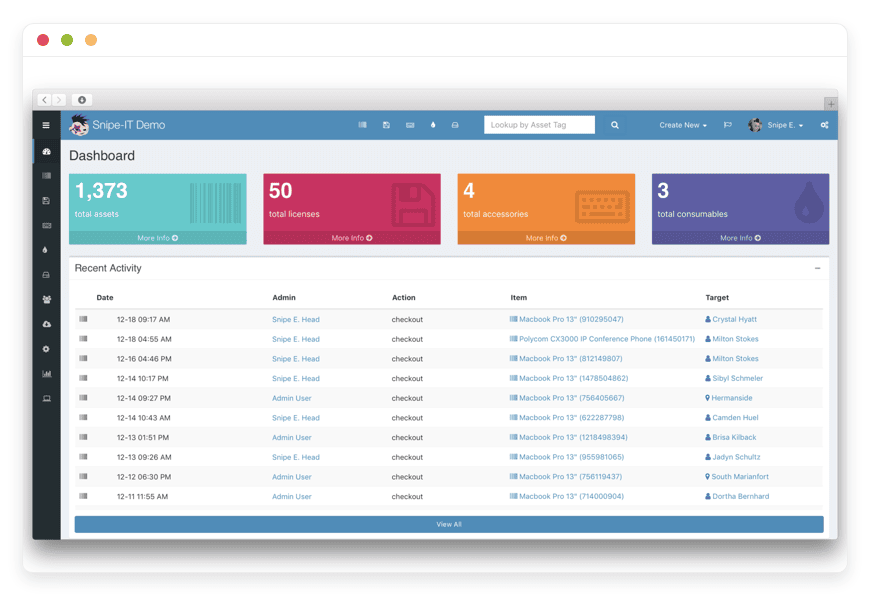
Open-source alternatives to Asset Panda in 2026
Asset Panda starts at $3,000 a year and prices per user and per asset. Snipe-IT does the same asset-tracking job as open-source software, and managed Snipe-IT hosting is €9 a month with no seat meter.
TL;DR
- Asset Panda starts at $3,000 per year for 5 users and 1,000 assets, billed annually, with per-user and per-asset fees on top.
- Snipe-IT is free, open-source IT asset management: hardware records, license tracking, check-in / check-out, and depreciation.
- Managed Snipe-IT hosting is €9 per month — about €108 per year — with no per-asset and no per-seat pricing.
- Snipe-IT tracks assets; it is not a help-desk or service-desk. Pair it with a ticketing app if you need support tickets.
- Have an in-house sysadmin who enjoys running a PHP and MySQL app? Self-host it free. If not, have it managed.
Why teams are leaving Asset Panda in 2026
Asset Panda is capable asset-tracking software. The reason small IT teams look elsewhere is the price and how that price is built. The Starter plan lists at $3,000 per year for 5 users and 1,000 assets, billed annually. Extra users and extra assets cost more on top.
The pricing is a hybrid: you pay per user and per asset. Full-user seats sit around $50 per user per month on the entry plan. View-only collaborator seats cost less. Asset volume is tiered, so the bill steps up as your device count crosses each band.
There is no full public price table. You request a quote, and the number depends on your seats, your asset count, the modules you turn on, and your contract length. Multi-year terms lower the effective rate, which also locks you in for longer.
The Business+ plan lists at $7,500 per year. Independent buyer data puts a 20-user deployment near $18,000 per year once seats and assets are counted. For a team tracking a few hundred laptops, that is a four-figure line item that grows every time you hire.
None of this means Asset Panda is bad. It means the model rewards the vendor when you grow, and a small team carrying 300 devices ends up paying enterprise-shaped prices for a job that open-source software does without a per-seat meter.
What an open-source alternative actually means here
An open-source alternative is not a cheaper version of the same SaaS. It is software you can run yourself, with the source code available, and no per-seat license. That changes the cost structure, not just the logo on the login page.
You have three honest paths. Keep paying a SaaS like Asset Panda, and the vendor runs everything for a recurring per-seat fee. Self-host open-source software, and you run it yourself for the price of a server plus your time. Or pay someone to host the open-source software for you, and you pay for hosting, not for licenses.
The third path is the one most small teams miss. You keep the freedom and the zero license cost of open source, but you hand the server work to someone else. The rest of this guide walks the open-source option with Snipe-IT, and is honest about when self-hosting beats paying for it.
Snipe-IT, the focused choice
Snipe-IT is a free, open-source IT asset manager. It has been in active development for over a decade, sits at roughly 13.9k stars on GitHub, and ships releases often. It is written in PHP on the Laravel framework and licensed under AGPL-3.0. The company behind it, Grokability, also sells commercial support.
Here is what Snipe-IT does, in concrete terms:
- Asset records: track each laptop, monitor, phone, or server, with model, serial number, purchase date, warranty, assigned user, location, and status.
- License tracking: record software licenses and seat counts, assign them to people or assets, and see what you have bought versus what is deployed.
- Check-in / check-out: assign an asset to a person, capture an acceptance signature, and check it back in when they leave or swap hardware.
- Accessories, consumables, and components: track keyboards, cables, RAM, and toner, the items that are not full assets but still cost money.
- Depreciation: apply straight-line depreciation so your records reflect what the hardware is actually worth over time.
- Physical inventory checks: schedule checks that reconcile the register against what is really on the shelf.
- Labels and scanning: print barcode or QR asset tags and scan them from a phone.
- API and import: a JSON REST API and CSV import, so you can move data in and sync with other tools.
That is a focused feature set, and the focus is the point. Snipe-IT does asset management and does not try to be ten other products at once. For an IT team that wants an accurate record of every device and license, it covers the daily jobs without a learning curve aimed at large operations.
What Snipe-IT is not
One thing to be clear about before you switch. Snipe-IT tracks assets. It is not a help-desk, a service-desk, or a full ITSM platform. There is no ticket queue, no incident workflow, and no service catalogue. If a user emails about a broken laptop, Snipe-IT records the laptop; it does not handle the conversation.
For support tickets, pair Snipe-IT with a dedicated help-desk app. Running an asset tracker and a separate help-desk side by side is a common and clean setup for a small IT team, and each tool stays good at its own job.
If you want one product that bundles a full service desk and asset management, that is a heavier category. The open-source option there is GLPI, which combines ITSM and asset management in one install, but it takes more to set up and run. Paid ITSM suites such as Freshservice include a service desk plus an asset module, but they price per agent: Freshservice asset features start at the Growth tier near $49 per agent per month, billed annually, so you pay for the whole platform seat by seat.
Snipe-IT trades that breadth for focus. You get asset management done well, and you do not pay for service-desk modules you may never open. If tickets matter, add a help-desk beside it rather than buying a per-agent suite to get the asset features.
The cost math: Asset Panda versus Snipe-IT
Here is the gap in plain numbers. Asset Panda's Starter plan is $3,000 per year. Managed Snipe-IT hosting is €9 per month, or about €108 per year. The software itself is free; you pay only to have it hosted. There is no per-asset fee and no per-seat fee on the Snipe-IT side.
Walk the Asset Panda side first. Starter is $3,000 per year for 5 users and 1,000 assets. Business+ is $7,500 per year. A 20-user deployment lands near $18,000 per year once seats and asset tiers are counted. Each extra full user and each band of assets adds to the total.
Now the Snipe-IT side. The software is free under AGPL-3.0. It has no license cost and no built-in cap on users or assets; the only ceiling is what your server can hold. One instance can carry your whole device fleet without a seat meter.
Running it costs either your own server time or a hosting fee. Self-hosting means a server plus a couple of hours a month, covered below. Managed by DANIAN, it is €9 per month, flat. Even the project's makers offer a hosted plan, and that starts near $40 per month; DANIAN runs the same open-source software for €9.
So at 5 users you replace a $3,000-per-year line item with a roughly €108-per-year one. The gap widens as you add people and devices, because €9 does not move when your headcount does. That is the whole case in one sentence.
Asset Panda, self-hosted Snipe-IT, and managed Snipe-IT
The same three options line up cleanly once you put them side by side. The axes that actually decide it are the pricing model, who runs the server, what happens to your data, and how the cost behaves as you add people and devices. Here they are:
| Feature | Asset Panda | Self-hosted Snipe-IT | Managed Snipe-IT (DANIAN) |
|---|---|---|---|
| Pricing model | Per user plus per asset, custom quote | Free, open source (AGPL-3.0) | Free software, flat €9/month to host |
| Cost at 5 users / 1,000 assets | From $3,000/year | Your server plus your time | €9/month (about €108/year) |
| Per-asset fees | Yes, tiered by volume | None | None |
| Per-seat fees | Yes, around $50+/user | None, unlimited users | None, unlimited users |
| Who runs the server | The vendor (their cloud) | You | DANIAN |
| Patching, backups, monitoring | Vendor handles | You handle | DANIAN handles |
| Your data | In the vendor's system | Your own database, full export | Your own instance, full export |
| Source and customisation | Closed | Open, REST API | Open, REST API |
| GitHub stars | — | ~13.9k | ~13.9k |
Asset Panda's genuine advantage is that the vendor runs it for you. Managed Snipe-IT gives you that same hands-off operation, on open-source software, for €9 a month instead of thousands a year. Self-hosting keeps the cost at the price of a server, if you have the hours to run it.
Self-host it yourself, or have it managed
Snipe-IT being free does not make it free to run. Someone has to host it, secure it, back it up, and keep it updated. You have two honest options: run it yourself, or pay someone to run it. Both are reasonable; they suit different teams.
Self-hosting Snipe-IT yourself
Snipe-IT is a PHP application that needs a web server and a MySQL or MariaDB database. To run it in production, you set up the pieces around it:
- a server, where a small cloud VM is enough for most teams,
- PHP and a web server, with TLS certificates kept current,
- a MySQL or MariaDB database, tuned and secured,
- scheduled tasks (cron) for notifications and maintenance jobs,
- an SMTP relay so the app can send email,
- off-site backups of the database and uploaded files,
- and an upgrade routine, because new releases ship often.
None of this is exotic. It is a steady, ongoing job. Budget setup time at the start, then a couple of hours most months for patching, backup checks, and the occasional upgrade that needs a careful hand. The reward is full control and a zero license cost.
Self-hosting fits a team with an in-house sysadmin who is comfortable on the command line and happy to own the patch cycle. If that describes you, the software is free, the control is total, and you should run it yourself.
Managed Snipe-IT, run by DANIAN
The managed path removes the server work. DANIAN runs your Snipe-IT instance for €9 per month. We host it, patch it monthly, monitor it, back it up daily off-site, and answer when something breaks. You pick the region it runs in, from 21 datacenter locations. Your operational time is zero. See managed Snipe-IT hosting for the details.
Two companions are worth running alongside it. Uptime Kuma for monitoring watches whether your services are reachable and alerts you the moment one is not. IT-Tools, a self-hosted set of everyday sysadmin utilities such as encoders, converters, and generators, is handy to keep on the same stack. Both are in the DANIAN catalogue at the same €9 floor.
→ See managed Snipe-IT hosting
How to pick: three questions to ask yourself
If you are choosing between Asset Panda, self-hosted Snipe-IT, and managed Snipe-IT, three questions settle most of the decision. They sort out whether you need a service desk on top of asset tracking, whether you have the hands to run a server, and whether per-seat pricing will hurt you later as the team grows.
- Do you need a service desk, or just asset tracking? If you need a ticket queue, Snipe-IT alone will not cover it. Pair it with a help-desk app, or look at a full ITSM. If you need an accurate asset record, Snipe-IT is purpose-built for exactly that.
- Do you have someone to run a server? Self-hosting is free but it is a real, recurring job. No spare sysadmin hours? Managed hosting hands that work off for €9 a month and you skip the patch cycle entirely.
- Will per-seat or per-asset pricing bite as you grow? Asset Panda's bill rises with users and devices. Snipe-IT's license cost stays at zero, and managed hosting stays at €9, whatever your headcount becomes.
Frequently asked questions
Is Snipe-IT really free?
Yes. Snipe-IT is open-source software under the AGPL-3.0 license, so the application costs nothing to download and run. You only pay for hosting if you choose a managed plan, or for the server and time if you self-host. There is no per-user or per-asset license fee.
What does managed Snipe-IT cost at DANIAN?
Managed Snipe-IT hosting is 9 euros per month, flat, which works out near 108 euros per year. There are no per-asset and no per-seat fees. Hosting, monthly patching, daily off-site backups, monitoring, and support are included, and there is a 7-day trial with no card required.
Snipe-IT vs Asset Panda: what is the main difference?
Both track IT assets. The difference is ownership and pricing. Asset Panda is closed software you rent per user and per asset, billed annually. Snipe-IT is open-source software you host yourself or have managed, with no per-seat license. You trade a recurring per-seat bill for software you control.
What are the best open-source alternatives to Asset Panda?
Snipe-IT is the most popular focused choice for IT asset tracking, and it is what DANIAN hosts. GLPI is the heavier option that also bundles a service desk, though it takes more to set up and run. For pure asset and license tracking, most small teams land on Snipe-IT.
Can Snipe-IT replace Asset Panda completely?
For asset tracking, yes: hardware records, license tracking, check-in and check-out, depreciation, and labels are all covered. What it does not replace is a service desk, because Snipe-IT has no ticket queue. If you only used Asset Panda to track assets, Snipe-IT covers the job.
Does Snipe-IT track software licenses?
Yes. You record each software license, its seat count, and the people or assets it is assigned to. That lets you see what you have purchased against what is deployed, and spot where you have bought too many seats or too few before a renewal lands.
How does Snipe-IT handle depreciation and asset value?
Snipe-IT uses straight-line depreciation. You set a purchase cost and a useful life for each asset model, and it works out the current book value over time. Reports show what your hardware is worth now, which helps with budgeting and with deciding when to replace ageing equipment.
Can I scan barcodes or use Snipe-IT on a phone?
Yes. Snipe-IT generates barcode and QR labels you can print and stick on equipment, then scan with a phone camera or a USB scanner to pull up the record. The web interface works in a mobile browser, and the JSON API supports scanner-based check-in and check-out workflows.
Can Snipe-IT track non-IT assets like vehicles or tools?
Yes. Snipe-IT is built for IT hardware, but custom fields let you track almost any asset: vehicles, power tools, audio-visual gear, furniture, or lab equipment. Teams outside IT use it for the same reasons, recording purchase dates, assigned owners, locations, and maintenance against each item.
Does Snipe-IT support multiple locations or sites?
Yes. You can define locations and assign each asset to one, then move assets between sites as they change hands. This suits an organisation with several offices, a school with multiple buildings, or a team that ships hardware to remote staff and needs to know where each device sits.
Can I set roles and permissions for different users?
Yes. Snipe-IT has user accounts with granular permissions, so you decide who can view, create, edit, or delete records, and who can only check items in and out. You can group users and limit access by area, which keeps the register accurate when several people share the system.
Does Snipe-IT send alerts for warranty or license renewals?
Yes. Snipe-IT can email you before a warranty lapses, when a software license is near its seat limit or expiry date, and when a scheduled inventory check is due. Those reminders help a small team stay ahead of renewals instead of finding out after a license or warranty has run out.
What can Snipe-IT integrate with?
Snipe-IT has a JSON REST API, LDAP and SAML single sign-on, and SCIM for user provisioning. Community scripts sync it with device-management tools such as JAMF and Kandji, and the API lets you connect it to your own systems. That covers most setups a small IT team runs.
Do I still need a help-desk tool alongside Snipe-IT?
Only if you handle support tickets. Snipe-IT tracks assets but is not a ticketing system, so teams that field user requests usually run a separate help-desk app beside it. If you do not need a ticket queue, Snipe-IT on its own is enough for asset management.
How many assets and users can Snipe-IT handle?
Snipe-IT has no built-in per-asset or per-user license limit. One instance handles your whole device fleet and as many staff as you need, bounded only by what your server can comfortably hold. That is the structural difference from per-seat, per-asset SaaS pricing.
Is my data secure with Snipe-IT?
On a managed plan, DANIAN runs each instance isolated from others, serves it over TLS, keeps daily off-site backups, and monitors it. Inside Snipe-IT, role-based permissions control who sees what. If you self-host, that hardening, patching, and backup discipline is yours to own. You decide who has access either way.
Can I export my data out of Snipe-IT later?
Yes. Your records live in your own MySQL database, and Snipe-IT exports assets, licenses, and users to CSV from the interface. On a managed plan you can request a full database copy. There is no lock-in: the data is yours, in open formats, whenever you want to move it.
Can I import my existing Asset Panda data?
Yes. Export your asset list from Asset Panda to CSV, then use Snipe-IT's CSV importer to bring records in. Many teams start by importing a sample, mapping the fields once, and then loading the full fleet. The JSON API also lets you sync with other tools later.
What is involved in self-hosting Snipe-IT myself?
Snipe-IT is a PHP app that needs a web server, a MySQL or MariaDB database, scheduled cron jobs, an SMTP relay for email, TLS certificates, and off-site backups. Plan for setup time plus a couple of hours a month for patching and upgrades, since releases ship often.
Is self-hosting or managed hosting better for Snipe-IT?
It depends on whether you have hands to spare. Self-hosting is free and gives total control, but you own the server, the patches, and the backups. Managed hosting hands all of that off for 9 euros a month. If you have a sysadmin who enjoys the work, self-host; if not, have it managed.
Is Snipe-IT a good fit for a small IT team or small business?
Yes. Snipe-IT suits teams tracking anywhere from a few dozen to a few thousand devices, and the lack of per-seat pricing means the cost does not climb as you hire. A small team that cannot spare hours for server upkeep is the clearest case for the managed plan at 9 euros a month.
What to do this week
If your Asset Panda renewal is coming up, you have time to test the alternative before you commit to another year. You do not have to migrate everything at once; a small trial with a sample of your fleet tells you most of what you need. A practical first week looks like this:
1. Export your current asset list to CSV. You will need it whichever path you choose.
2. Stand up a Snipe-IT instance, self-hosted on a spare VM or as a managed trial, and import a sample of your assets.
3. Set up one asset model, run one check-out, and add one license record to feel the daily workflow.
4. Decide whether you will run it yourself or have it managed, and whether you need a help-desk tool beside it.
If you would rather skip the server work, managed Snipe-IT hosting is €9 per month, with a 7-day trial and no card required. You can start a 7-day trial and import a sample fleet the same day.
Sources
- Asset Panda pricing — https://www.assetpanda.com/pricing/
- Snipe-IT project (GitHub) — https://github.com/grokability/snipe-it
- Snipe-IT documentation — https://snipe-it.readme.io/
- Freshservice pricing — https://www.freshworks.com/freshservice/pricing/





