Open-source customer-support stack in 2026
This is a working guide to building a customer-support setup out of open-source software you run, instead of per-seat SaaS you rent. Five live, hosting-ready tools cover the whole job: Chatwoot for live chat and an omnichannel inbox, FreeScout for email support, osTicket for structured tickets, BookStack for a help center, and Uptime Kuma for status monitoring. The pricing axis that matters: a proprietary helpdesk bills per agent every month, while DANIAN runs any of these apps for a flat €9 per app per month, no matter how many agents you have.
Before the shortlist, the honest framing. These are overlapping tools you choose from, not one merged product. A chat-first team and an email-first team will pick different starting points, and most teams run one or two of these apps, not all five.
The short version
- Open-source customer-support software replaces per-seat tools like Intercom, Zendesk, Help Scout, and Freshdesk with apps you own and host.
- Three inbox models, three tools: chat-first picks Chatwoot, email-first picks FreeScout, structured tickets pick osTicket. Most teams run one.
- The cost gap is structural. Zendesk Suite Team at $55 per agent is $165 at three agents and $440 at eight; osTicket on DANIAN stays €9, flat.
- This is a stack you assemble, not a suite. There is real setup and integration work, and no shared AI layer across the apps out of the box.
- DANIAN handles patching, daily off-site backups, monitoring, and 24/7 chat. Your operational time is zero hours per month.
Who this list is for — and who it isn't
This is for a small support team — roughly one to ten people — that is tired of per-seat math and wants to own its conversations, tickets, and help content. It fits a founder doing support between other jobs, an agency running support for clients, or a community admin who wants the data on infrastructure they control.
It is not for a team that needs heavy AI deflection on day one, a single vendor with a contractual SLA, or a setup with zero appetite for configuration. Proprietary suites ship an AI agent, cross-channel reporting, and SLAs out of the box. If a three-person team has no time at all to run software, the cheapest SaaS tiers are a fair trade, and this guide will tell you when to stay put.
What you're actually choosing
The honest part first: this is a set of separate apps, each with its own login and its own upgrade cycle. There is no single open-source product that bundles live chat, email, tickets, a help center, and a status page into a single tool. You pick the ones that match how your customers reach you, and you accept that combining them — say, turning a chat into a ticket — is integration work, not a built-in feature.
That trade buys two things SaaS will not give you: flat pricing that ignores headcount, and ownership of the data inside each app. DANIAN runs each app for you and keeps it patched and backed up, but it does not fuse them into one helpdesk. The skill is choosing the smallest set that does the job, then letting someone else run the servers.
The shortlist
Chatwoot — live chat and an omnichannel inbox
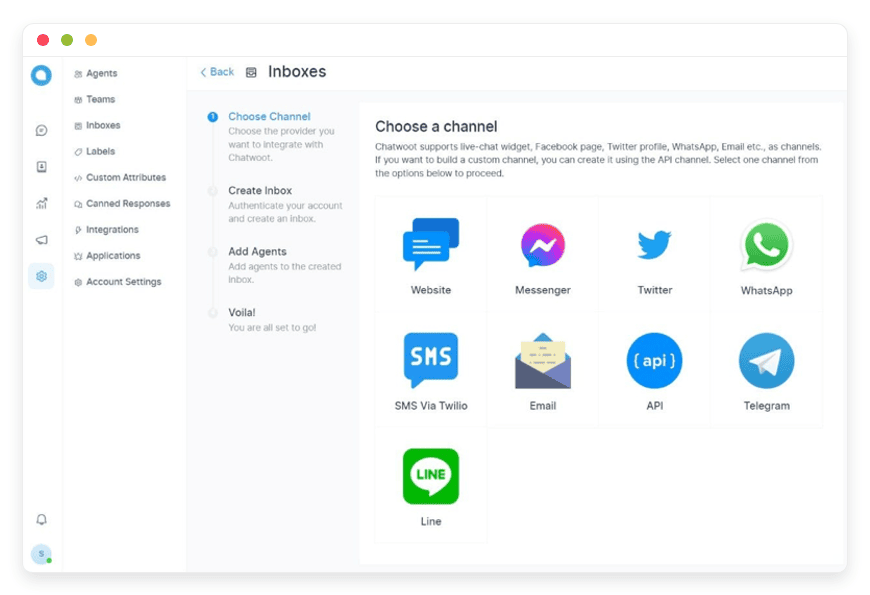
Chatwoot is the chat-first option. It puts a live-chat widget on your site and pulls email, WhatsApp, Instagram, Facebook, Telegram, and SMS into one shared inbox, with canned replies, team assignment, and reports. It is MIT-licensed at its core, with around 33,000 GitHub stars, and it is the open-source app teams reach for when leaving Intercom or Zendesk. Chatwoot ships its own AI agent, Captain, inside the app, with no per-resolution fee.
The honest gaps: Chatwoot is the heaviest app here to run, needing a database and a background-job worker, and a few governance features such as single sign-on sit under a separate commercial licence rather than the MIT core. It also appears elsewhere in our catalogue on its own page; here it earns its place as the chat front door of a wider support setup. See Chatwoot for live chat and inbox.
FreeScout — a shared email helpdesk
FreeScout is the email-first option: a shared mailbox that turns support email into a tidy team queue, with assignment, internal notes, collision detection, and saved replies. It looks and feels like Gmail, which keeps training time short. It is AGPL-licensed, lightweight enough to run on modest hardware, with around 4,300 GitHub stars, and it places no limit on agents, mailboxes, or tickets.
The honest gaps: FreeScout is email-led. Live chat, WhatsApp, and other channels come from add-on modules rather than the core, so it is not an omnichannel suite the way Chatwoot is. If most of your support already lives in a shared inbox, that focus is a feature, not a shortfall. See FreeScout for email support.
osTicket — structured ticketing
osTicket is the structured-ticket option. It turns email, web forms, and phone notes into tickets with custom fields, queues, and service-level rules — built around a form and a queue rather than a chat thread. It is GPL-licensed, written in plain PHP and MySQL, with around 3,800 GitHub stars, and it is used by more than 15,000 businesses. The hosted version of osTicket costs $12 per agent per month; self-hosted, the software is free, and on DANIAN it is €9 flat.
The honest gaps: the interface is classic and looks dated next to modern suites, and there is no live chat or omnichannel inbox. osTicket is the right pick when your support is form-driven and you care about routing, fields, and queues more than conversational chat.
BookStack — a help center your team owns
BookStack is the help-center and knowledge-base option. It organises articles as Shelves, Books, Chapters, and Pages, with a plain editor, Markdown support, built-in diagrams, full-text search, and per-page permissions. It is MIT-licensed, built by Dan Brown, with more than 16,000 stars and a reputation as the most-used wiki written in PHP. A public help center deflects tickets before they reach your inbox.
The honest gaps: BookStack has no built-in AI — no semantic search, no generated answers, no stale-article detection — and its reader themes look plain beside polished SaaS help centers. It is built to be a tidy, searchable place to write things down, and it does that one job well. See BookStack for a help center.
Uptime Kuma — monitoring and a status page
Uptime Kuma is the monitoring-and-status option. It checks your sites and services over HTTP, TCP, ping, DNS, Docker, and certificate expiry, alerts through more than 90 channels including Slack, Telegram, and email, and publishes real-time public status pages. It is MIT-licensed, built by Louis Lam, and one of the most-starred self-hosted projects on GitHub with roughly 88,000 stars. In one app it covers both the monitor and the status page that proprietary tools usually split into two products.
The honest gap matters here: Uptime Kuma checks from one location — the server it runs on — so if that server goes down, its alerts can go down with it. Distributed SaaS monitors check from several nodes around the world. The fix is to run your monitor on a separate instance from the apps it watches.
How the pieces fit together
The combinations that make sense follow how customers reach you. A product team running live support pairs Chatwoot for chat with BookStack for a public help center and Uptime Kuma for a status page. An email-led services firm pairs FreeScout for the shared inbox with BookStack and a status page. A team with formal, queue-based support runs osTicket with BookStack behind it.
Where these tools touch, you connect them yourself. You can route a Chatwoot conversation into an osTicket ticket, or surface BookStack articles inside either inbox, using each app's own integrations and API. That glue is genuine work, and it is yours to design. DANIAN's job is to keep each app patched, backed up, and reachable — not to weld them into a single product.
The cost math — per agent versus per app
The reason this comparison turns on price is that the structure differs. SaaS support tools bill per agent, so every new hire raises the monthly bill. DANIAN bills per app, so the line item is the same at three agents or eight. The table below uses each vendor's entry tier, at list annual-billing prices.
| Support job | Proprietary SaaS (entry tier) | At 3 agents | At 8 agents | On DANIAN (flat) |
|---|---|---|---|---|
| Live chat and inbox | Intercom Essential, $29/seat/mo | $87/mo | $232/mo | Chatwoot, €9/mo |
| Email helpdesk | Help Scout Standard, $25/user/mo | $75/mo | $200/mo | FreeScout, €9/mo |
| Structured tickets | Zendesk Suite Team, $55/agent/mo | $165/mo | $440/mo | osTicket, €9/mo |
| Help center | Notion Teams, ~$10/user/mo | ~$30/mo | ~$80/mo | BookStack, €9/mo |
| Status page | Statuspage Hobby, $29/mo flat | $29/mo | $29/mo | Uptime Kuma, €9/mo |
Two honest notes on that table. Intercom adds its Fin AI agent at $0.99 per resolution on top of seats, so the chat row understates a real bill once you turn AI on. Statuspage also has a free public tier, so the status row is only a saving once you need more subscribers or SMS alerts — the real win there is that Uptime Kuma also does the monitoring a status page does not.
A common starter stack — Chatwoot for chat, BookStack for a help center, Uptime Kuma for a status page — is three apps at €9 each: €27 per month, flat, at any team size. The proprietary equivalent (Intercom Essential, Notion Teams, Statuspage Hobby) starts near $146 per month at three agents and passes $341 at eight, before any AI-resolution fees. SaaS prices here are list, annual-billing, in US dollars; DANIAN bills €9 in euros, roughly $10. The structural point — per seat versus per app — holds whatever the exchange rate does.
The five at a glance
| App | Replaces | Best for | DANIAN price | Where it's hosted |
|---|---|---|---|---|
| Chatwoot | Intercom, Zendesk | Chat-first teams wanting one omnichannel inbox | €9/mo | Region you choose |
| FreeScout | Help Scout | Email-first teams wanting a shared mailbox | €9/mo | Region you choose |
| osTicket | Zendesk, Freshdesk | Teams needing form-driven tickets and queues | €9/mo | Region you choose |
| BookStack | Confluence, Notion, Zendesk Guide | Any team wanting a help center it owns | €9/mo | Region you choose |
| Uptime Kuma | Statuspage, uptime monitors | Teams wanting a monitor and a status page in one | €9/mo | Region you choose |
How to start
Pick one app, not five. Choose the inbox model you already use most — chat, email, or tickets — and deploy that first. Add a help center or a status page only when the first app is bedded in. Each app hosts in the region closest to your customers, across 21 datacenter regions on six continents.
Then give it 14 days. Import your past tickets and contacts, point a subdomain at it, send real replies through it, and see whether the team prefers it to what you had. A clean migration of under 10,000 tickets is usually a half-day. If it sticks, keep it at €9 a month; if it does not, you have lost a fortnight and learned something, not signed a year-long contract.
Common questions
Choosing the right tool
Which open-source customer-support tool should I start with?
Start with the support model you already use most. Chatwoot fits chat-first teams that want a live-chat widget and one inbox for email, WhatsApp, and social. FreeScout fits email-first teams that want a shared mailbox. osTicket fits teams that need structured, form-driven tickets with queues and service-level rules.
Do I need all five tools, or can I pick a few?
No. Most teams run one or two of these, not all five. A chat-first team might run Chatwoot plus BookStack for a help center. An email-first team might run FreeScout plus Uptime Kuma for a status page. At €9 per app per month, you add only what you need.
What is the difference between Chatwoot, FreeScout, and osTicket?
Chatwoot is an omnichannel inbox: live chat plus email and social messages in one place. FreeScout is a shared email mailbox that turns support email into a tidy team queue. osTicket is a structured ticketing system built around web forms, custom fields, and ticket queues rather than conversation threads.
When is an open-source support stack the wrong choice?
When you need heavy AI deflection today, a single vendor SLA, or zero setup appetite. Proprietary suites ship an AI agent, cross-channel reporting, and SLAs out of the box. If a three-person team has no time to run apps, the cheapest SaaS tiers are a fair trade. Self-hosting rewards teams that value ownership and flat pricing.
Cost and billing
How much does an open-source support stack cost versus per-agent SaaS?
Per-agent SaaS scales with headcount; DANIAN charges €9 per app per month, flat. Zendesk Suite Team at $55 per agent is $165 at three agents and $440 at eight. Running osTicket on DANIAN stays €9 whether you have three agents or eight. The structural difference is per seat versus per app.
Does the price change as I add support agents?
No. The €9 per app per month price does not move when you add agents. A proprietary helpdesk bills per seat, so a sixth or eighth agent raises the bill every month. With FreeScout on DANIAN you get unlimited agents on one app, and the line item stays €9.
Do I pay extra for AI features like Intercom's Fin?
Not from DANIAN. Chatwoot ships its own AI agent, Captain, inside the app, with no per-resolution fee added by us. Intercom bills its Fin agent at $0.99 per resolution on top of seats. The honest caveat: a few Chatwoot enterprise features sit under a separate commercial licence, not the MIT core.
Data, ownership, and hosting
Do I own my customer conversations and help-center content?
Yes. The open-source app is yours, and so is the data inside it — conversations, contacts, and help-center articles. DANIAN operates the app for you; we do not own or resell your content. You can pull a full database export or download your files on demand, any time.
Can I export my data or move away later?
Yes. Every instance backs up daily, off-site, and you can export the database or download files over SFTP whenever you want. There is a published guide for leaving DANIAN. Because these are standard open-source apps, you can move an export to another host without a rebuild.
Is my support data isolated from other customers?
Each app runs in its own hardened container with guaranteed CPU, RAM, and storage and isolated networking. The underlying servers are multi-tenant — that is how the €9 price works — but the boundaries between containers are real. The /trust page has the technical detail.
Where is my support data hosted?
In the region you choose, across 21 datacenter regions on six continents. Pick the location closest to your customers when the app is set up. Application data is hosted in that region. If you later need a different region, chat with us and we move it for you.
Setup and how the tools fit together
Is this one unified helpdesk or separate apps?
Separate apps, not one merged product. This is the honest part: you are choosing from overlapping open-source tools, each with its own login and upgrade cycle. DANIAN runs each app for you, but it does not fuse them into a single helpdesk. Most teams run one or two and keep it simple.
How do the tools work together?
Through integrations you set up, not a built-in fabric. You can connect a Chatwoot conversation to an osTicket ticket, or link BookStack articles into either inbox, using each app's own integrations and API. That glue is real work. DANIAN hosts and maintains each app; combining them is your call.
How hard is it to switch from my current SaaS?
Plan a few hours, not a project. Most of these tools import past tickets and contacts from CSV or an API, and osTicket and FreeScout both handle CSV imports. DANIAN deploys the app and you bring your data in. A clean migration of under 10,000 tickets is usually a half-day.
Who runs the servers, updates, and backups?
We do. DANIAN patches the app and server monthly, backs up daily off-site, monitors around the clock, and answers chat or email when you need a human. Your operational time is zero hours per month. You write the support replies; we keep the software running underneath them.
Channels and monitoring specifics
Do these tools handle WhatsApp, Instagram, and social messages?
Chatwoot does. It handles live chat plus WhatsApp, Instagram, Facebook, Telegram, and SMS in one inbox. FreeScout and osTicket are more email and ticket focused, with social channels added through modules rather than built in. If social messages are central to your support, start with Chatwoot.
What is the catch with self-hosted uptime monitoring?
Uptime Kuma checks from one location — the server it runs on. If that server goes down, the alerts can go down with it. Distributed SaaS monitors check from several global nodes instead. The fix is simple: run your monitor on a separate instance from the apps it watches.
Can I run just one app, like only a help center?
Yes. Each app is its own €9 per month line item, so you can run only BookStack for a help center, or only Uptime Kuma for a status page, with nothing else. There is a 7-day free trial, and you add more apps later only if you need them.
The bottom line
An open-source support stack is not a single product you switch on. It is two or three apps you choose by how your customers reach you, run for a flat €9 each, and own outright. The per-seat math is the reason to look, and ownership is the reason to stay: your conversations, tickets, and help articles sit on infrastructure you control, in the region you choose.
Be clear-eyed about the trade. You take on setup and the work of wiring apps together, and you give up the one-vendor AI deflection a Zendesk or Intercom ships by default. In return, the bill stops growing with your team. Pick the one tool that matches your support model, deploy it, and run it for a fortnight.
Sources: Chatwoot, FreeScout, osTicket, BookStack, Uptime Kuma; pricing from Intercom, Zendesk, Help Scout, and Statuspage, verified June 2026.