
Open-source alternatives to Calendly in 2026
THE SHORT VERSION
- Calendly bills per seat: $10 per seat on Standard, $16 on Teams, both on annual billing, and from $15,000 a year for Enterprise. Calendly lists the same figures in euros.
- At ten people, that is $100 to $160 a month, a bill that grows with every hire.
- Two open-source tools cover most of what teams use Calendly for. Neither is a one-to-one clone.
- EasyAppointments runs booking pages, services, providers, working hours, with two-way Google Calendar and CalDAV sync.
- Rallly handles group scheduling: propose times, people vote without an account, and everyone gets a calendar invite when you finalise.
- On DANIAN, each runs for €9 a month, flat, in the region you choose. No per-seat fee.
Why teams are leaving Calendly in 2026
Calendly is good at one thing: removing the back-and-forth of booking a meeting. The friction is the bill. Pricing is per seat, so the cost climbs with headcount. The booking record also lives in a United States SaaS. For a growing team, both of those become reasons to look around.
A typical trigger looks like this. A two-person team starts on the free plan, then adds a third colleague and a second meeting type, and lands on a paid plan. A year later the team is eight people, the booking link is everywhere, and the annual invoice has quietly become four figures. Nobody decided to spend that; it accrued one seat at a time.
The free plan allows one event type and one connected calendar. That suits a single person with a single meeting format. The moment you offer a discovery call and a longer session, you are on a paid plan.
Standard is $10 per seat per month on annual billing, or $12 monthly. Teams is $16 per seat on annual billing, or $20 monthly. Round-robin routing, Salesforce sync, and managed admin controls sit on Teams. Single sign-on with SAML, domain control, and a data-deletion API sit on Enterprise, which starts at $15,000 a year.
None of that is hidden, and none of it is unfair. It is simply seat-based. Five seats on Teams is $80 a month; ten is $160. The number you sign up at is rarely the number you pay a year later.
The compounding is the part teams underestimate. Twenty-five seats on Teams is $400 a month, or $4,800 a year. Most teams add seats faster than they remove them, so the line on the invoice points one way. A tool that felt cheap at three people rarely feels cheap at twenty-five.
The second reason is where the data sits. Booking history, invitee names, and meeting notes live on Calendly's servers in the United States. For some teams that is fine. For a clinic, a law practice, or a public body, keeping that record on infrastructure they control can matter more than the convenience.
What "alternative" actually means here
"Alternative" can mean three things, and the honest answer depends on which you want. You can self-host an open-source tool yourself. You can pay someone to run it for you. Or you can move to a cheaper proprietary tool. This guide is about the first two, using two specific open-source apps.
Self-hosting means you install the software on a server you control. A production-class VPS, two virtual CPUs and four gigabytes of memory, runs about $24 a month before backups and monitoring. The software is free; your time is not. Budget five to ten hours to set it up, then an hour or two a month to patch it, renew certificates, and check that backups actually restore. If you have a developer in-house who enjoys this work, it is a real option.
Managed hosting means someone runs that same open-source software for you. On DANIAN that is €9 per app per month. We patch, monitor, back up daily off-site, and answer chat when something breaks. Your operational time is zero. We will not change your plan or charge you more without asking first. You still own the software and the data, and you can keep everything in an EU region if that matters to you.
The third path, a cheaper proprietary tool, is worth a sentence. Several scheduling apps undercut Calendly on price. They solve the cost line, but not the data-location question, because your booking record still sits with a vendor. If owning the data is part of why you are looking, a cheaper SaaS does not answer it; self-hosting or managed open-source does.
The honest part comes next. Neither open-source tool below is a one-to-one Calendly clone. They split the job Calendly does into two, and each does one half well. So before the shortlist, here is the scoping.
EasyAppointments replaces Calendly's booking page, the part where someone picks a time with you or your staff. Rallly replaces Calendly's meeting polls, the part where a group votes on a time that works for everyone. If you only need one of those jobs, the fit is clean. If you need Calendly's exact combination, one-click meeting links, real-time two-way calendar sync, native Zoom or Microsoft Teams, and lead routing into a CRM, all in one product, neither is a full match. The closest single open-source app for that combined set is Cal.com, which DANIAN does not host today. If that exact set is your requirement, stay on Calendly or look at Cal.com directly. This guide will not pretend otherwise.
The two tools, and the job each one does
Here is what each one is, who builds it, and where it fits.
EasyAppointments: booking pages for you and your staff
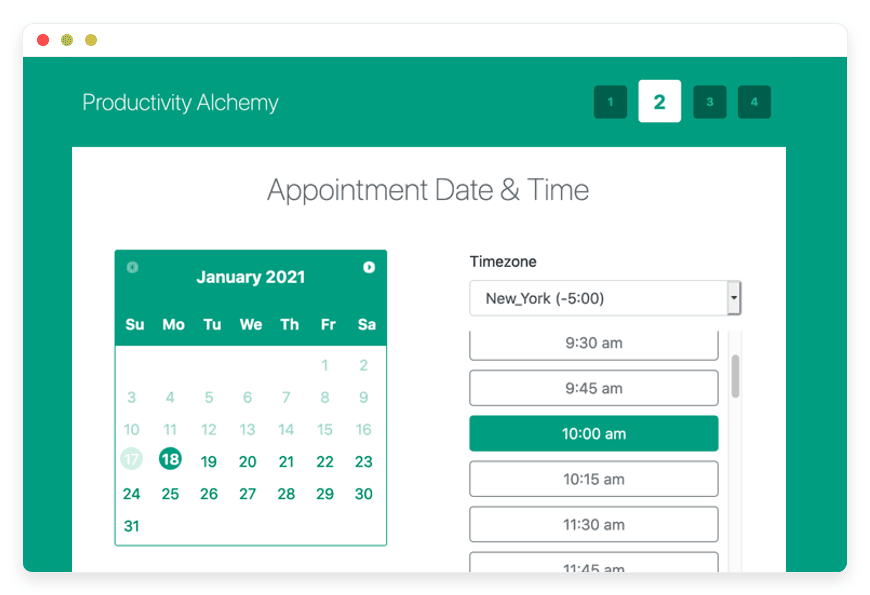
EasyAppointments is an open-source appointment scheduler. You define services, the staff who provide them, and each person's working hours. Clients open a public page, pick a service and an open slot, and book it. The project has run since 2014 and is used by organisations including Doctors Without Borders.
Who builds it: Alex Tselegidis maintains the project, now ten years old, with roughly 3,000 GitHub stars. The licence is GPLv3, and commercial use is allowed.
What it does well: booking that maps to a real business. A salon with four stylists, a clinic with three practitioners, a consultancy with two partners, each provider gets their own availability and their own synced calendar. The June 2026 release, version 1.6, added Jitsi and Google Meet links generated on each appointment.
Calendar sync, in practice: EasyAppointments syncs two ways with Google Calendar natively. Since version 1.5 it also syncs two ways over CalDAV, the open calendar standard, which reaches Apple Calendar, Thunderbird, Fastmail, and Outlook through a CalDAV connector. Three caveats matter. Each provider syncs with one calendar. Recurring events are not fully supported. And the sync runs from the app's side when bookings change, rather than polling your calendar every minute. There is no native one-click Microsoft 365 or Salesforce connector; CalDAV is the path to Outlook.
Setup and notifications: the booking page is customisable, confirmation and reminder emails are built in, and you run multiple services and providers from one screen. Single sign-on over LDAP has been supported since version 1.5. Optional paid extras such as SMS and payment collection exist, but the core booking system is free.
Best for: any business where clients book time with named staff, and where Google or a CalDAV calendar is already in use.
DANIAN price: €9 a month, flat, however many services and staff you add. There is no per-seat charge, because you are running one instance.
→ See managed EasyAppointments hosting
Rallly: find a time that works for the group
Rallly is an open-source group-scheduling tool. You propose several dates and times, share a link, and participants mark what works, with no account required. You see the overlap, pick the winner, and Rallly emails everyone a calendar invite. It is the most direct replacement for Doodle.
Who builds it: Luke Vella maintains Rallly, built on Next.js and PostgreSQL, with about 5,100 GitHub stars and more than 168,000 registered users. The licence is AGPLv3.
What it does well: consensus. A committee of eight, a cross-company call, a club, a family, anyone who needs to agree on one time without a chain of emails. Times show in each participant's own time zone, which removes the usual confusion across regions. Voting needs no login, so response rates stay high.
Calendar sync, in practice: this is where Rallly and Calendly differ most. Rallly does not read your calendar to show your free and busy time, and it does not block out conflicts. That feature is an open request on its roadmap, not something it does today. What it does do is generate a standard ICS invite when you finalise a date, which opens in Google Calendar, Outlook, and Apple Calendar. So "calendar sync" here means exporting the agreed time to everyone, not pulling your availability in.
Useful details: participants can comment on a poll, you can hide names for a blind vote, and a self-hosted instance can carry your own logo and colour. Organisers sign in with a magic link, and single sign-on through Google, Microsoft Entra ID, or a generic provider is available when you run it yourself.
Best for: picking one meetingtime across a group, where nobody wants accounts and the organiser does not need calendar-aware booking.
DANIAN price: €9 a month, flat, for unlimited polls and participants.
→ Set up Rallly for group scheduling
What each path costs at 3 and 10 people
The math is the clearest reason to switch, so here it is without spin. Calendly charges per seat. DANIAN charges per app. The two lines cross almost at once and never cross back.
A "seat" on Calendly is a person who owns a booking page or sends availability, not a person who books with you. On EasyAppointments there are no seats; staff are users inside the one instance you already pay €9 for.
At three people on Calendly Standard: 3 × $10 = $30 a month, or $360 a year. On Teams: 3 × $16 = $48 a month, or $576 a year. The same booking job on EasyAppointments at DANIAN is €9 a month, €108 a year.
At ten people on Calendly Standard: 10 × $10 = $100 a month, or $1,200 a year. On Teams: 10 × $16 = $160 a month, or $1,920 a year. On EasyAppointments at DANIAN it is still €9 a month.
At twenty-five people the gap is starker still. Calendly Standard is $250 a month, or $3,000 a year; Teams is $400 a month, or $4,800 a year. EasyAppointments at DANIAN remains €9. Against even a single Calendly Standard seat at $10, one app at €9 already costs less, and every seat after the first widens the gap.
Group polling is included on Calendly's paid seats, so Rallly mostly replaces a tool like Doodle rather than a separate Calendly line. Self-hosting either tool yourself runs about $24 a month for the server, plus your time, cheaper in cash than Calendly at ten seats, more expensive once you price the hours. Calendly lists the same per-seat figures in euros, so the gap is the same whether you count in dollars or euros.
Side-by-side
| What it is | Replaces (Calendly) | Calendly cost 3/10 people | DANIAN | Licence | GitHub stars | Switching effort |
|---|---|---|---|---|---|---|
| EasyAppointmentsopen-source booking pages | The booking page | $30/$100 a month (Standard) | €9/mo flat | GPLv3 | ~3,000 | Moderate — set up services and staff, connect a calendar, point a subdomain |
| Ralllyopen-source group polls | Meeting polls(and Doodle) | Included on paid Calendly | €9/mo flat | AGPLv3 | ~5,100 | Low — create a poll, share the link |
Calendly prices as published on calendly.com/pricing, June 2026. Both apps run in the region you choose, across 21 datacenter locations on six continents.
What Calendly still does better
Switching only makes sense if you know what you are trading away. Calendly is a mature product, and three things it does are genuinely hard to match with the two open-source tools here.
The first is real-time availability. Calendly reads your calendar and only offers times you are actually free, across every connected calendar at once. EasyAppointments syncs your booked slots out, but it is built around the working hours you define, not a live free-and-busy lookup across many calendars. Rallly does not read your calendar at all.
The second is the breadth of native connections. Calendly has one-click links for Zoom, Microsoft Teams, Salesforce, HubSpot, and Stripe, maintained for you. With the open-source tools you get Google and CalDAV sync plus Jitsi and Google Meet links, and anything beyond that is a manual setup or simply absent.
The third is that someone else runs it. On Calendly there is nothing to patch and nothing to back up. That is the job DANIAN takes on for the €9, but if you self-host either tool yourself, the upkeep is yours.
For a sales team that lives in Salesforce, or a recruiter routing leads across a rota, those gaps are real. The price math still favours leaving for most small teams; it comes down to which features you actually use.
How to pick: three questions to ask yourself
You do not need to compare every feature. Three questions decide it, and each one points at a single tool.
1. Do people book time with you, or are you coordinating one meeting across a group? If clients or patients pick a slot with you or your staff, that is EasyAppointments. If a group needs to agree on a single time, that is Rallly. Many teams want both, and two apps on DANIAN is €18 a month, still below three Calendly seats.
2. Does the booking need to respect your real calendar? EasyAppointments syncs two ways with Google and CalDAV, so a slot you book elsewhere blocks out the time. Rallly does not read your calendar at all; it collects votes. If "the time offered must be genuinely free" is a hard requirement, you want EasyAppointments, Calendly, or Cal.com, not a poll.
3. Which calendar and tools do you already live in? Google or any CalDAV calendar, Apple, Thunderbird, Fastmail, Outlook over CalDAV, works with EasyAppointments today. If you need a native Microsoft 365 button, native Microsoft Teams, or routing into Salesforce, neither open-source tool matches Calendly's Teams and Enterprise plans. That is the honest trade for €9 and your own data.
Moving over: what a switch involves
Neither move is a heavy migration, but they differ in effort.
EasyAppointments takes an afternoon. You create your services, add the staff who deliver them, and set each person's working hours. You connect Google Calendar or a CalDAV calendar, customise the booking page, and point a subdomain such as book.yourdomain.com at it. Then you test one booking end to end. Old Calendly bookings do not import directly, but those events already sit in your calendar, so nothing is lost. When the new page works, you share its link and retire the Calendly one.
Rallly takes minutes. There is nothing to migrate. You create your first poll, share the link, and collect votes. Past polls on whatever tool you used before simply stop being created.
For either tool, run it alongside Calendly for one real week before you cancel. Book a few real appointments or run one real group poll, confirm the calendar invites land where you expect, and check the reminder emails. If the week holds, cancel Calendly and keep the €9 line.
Questions teams ask
Is there a free open-source alternative to Calendly?
Yes. EasyAppointments and Rallly are both open-source and free as software, under the GPLv3 and AGPLv3 licences. The cost is hosting, not the software. You can run either on a server you control for the price of the server, or have it managed on DANIAN for 9 euros a month per app.
Can I self-host a Calendly alternative?
Yes. Both EasyAppointments and Rallly are built to run on a server you control. A production-class VPS with two virtual CPUs and four gigabytes of memory runs about 24 dollars a month, before backups and monitoring. Budget five to ten hours to set it up and an hour or two a month to maintain it.
What is the best open-source alternative to Calendly for a small team?
It depends on the job. If clients book time with you or your staff, EasyAppointments is the closest fit. If your team needs to agree on one meeting time, Rallly is the tool. Both are 9 euros a month flat on DANIAN, with no per-seat fee, so a small team is not charged more for growing.
Is EasyAppointments a true Calendly replacement?
For the booking-page job, yes. Clients pick a service and an open slot, and it syncs to your calendar. For Calendly's full set, native Outlook and Teams, Salesforce routing, one product for everything, no. EasyAppointments covers booking with Google and CalDAV sync, not the enterprise integrations.
What is the difference between EasyAppointments and Rallly?
EasyAppointments is a booking page: clients choose a time with you or your staff. Rallly is a group poll: you propose times and people vote on what works. One is for taking bookings; the other is for agreeing on a single meeting time across a group.
Does EasyAppointments sync with Google Calendar and Outlook?
Google Calendar syncs two ways, natively. Outlook connects through CalDAV, the open calendar standard, rather than a native button. Three caveats: each provider syncs one calendar, recurring events are not fully supported, and the sync runs when bookings change, not on a constant poll of your calendar.
Does EasyAppointments work with Apple Calendar?
Yes, through CalDAV, the open calendar standard, supported since version 1.5. The sync runs two ways, so a booking appears in Apple Calendar and a block you add there is respected. The same CalDAV path reaches Thunderbird, Fastmail, and Outlook. One calendar syncs per provider, and recurring events are not fully supported.
Can multiple staff members share one EasyAppointments booking page?
Yes. You define services and the providers who deliver them, and each provider gets their own working hours and their own synced calendar. A salon with four stylists or a clinic with three practitioners runs from one instance. There is no per-seat charge on DANIAN, because you pay for the instance, not the head count.
Can EasyAppointments take payments or send SMS reminders?
The core booking system is free and includes confirmation and reminder emails. Payment collection and SMS reminders are optional paid extensions you can add. Email reminders cover most needs; the paid extras are there if you take deposits or want text notifications. On DANIAN the base app is 9 euros a month either way.
Can I use my own domain for the booking page?
Yes. You point a subdomain, such as book.yourdomain.com, at your EasyAppointments instance, so the booking page lives on your own address rather than a shared one. This keeps the link on your brand. Setting it up is part of the initial configuration and takes a few minutes once the app is running.
What open-source tool replaces Doodle for group scheduling?
Rallly is the most direct open-source replacement for Doodle. You propose several dates and times, share a link, and participants mark what works without creating an account. You see where the overlap is, pick the time, and Rallly emails everyone a standard calendar invite. Times show in each participant's own time zone.
Can participants use Rallly without an account?
Yes. Anyone with the poll link can vote without signing up; only the organiser needs an account. Times show in each participant's own time zone. When you finalise a date, Rallly emails a standard calendar invite that opens in Google Calendar, Outlook, and Apple Calendar.
Does Rallly check my calendar for conflicts?
No. Rallly does not read your calendar to show your free and busy time, and it does not block out conflicts. That feature is an open request on its roadmap, not something it does today. Rallly collects votes on the times you propose, then sends a calendar invite once you finalise the chosen one.
How much do they cost on DANIAN versus Calendly at ten people?
Calendly Standard at ten seats is 100 dollars a month; Teams is 160 dollars. Each open-source app on DANIAN is 9 euros a month, flat, with no per-seat fee. Running both booking and polls is 18 euros a month, still below three Calendly Standard seats.
How much does it cost to run both booking and group scheduling?
Running both EasyAppointments and Rallly on DANIAN is 18 euros a month, flat, with no per-seat fee. That is two apps at 9 euros each. For comparison, three Calendly Standard seats are 30 dollars a month and ten are 100 dollars, and that is one product, not two separate scheduling jobs.
What is the difference between self-hosting and managed hosting for these tools?
Self-hosting means you run the software on a server you control: about 24 dollars a month for the server, plus your own time to set it up, patch it, and check backups. Managed hosting means someone runs that same software for you. On DANIAN that is 9 euros an app, with patching, monitoring, and daily off-site backups handled.
Where is my scheduling data stored?
With either tool you keep the data on infrastructure you choose, rather than on a scheduling vendor's servers. On DANIAN you pick the region from 21 datacenter locations across six continents, and you own both the software and the booking records. If keeping that data under your control matters, self-hosting or managed open-source answers it; a cheaper proprietary tool does not.
Are EasyAppointments and Rallly actively maintained?
Yes. EasyAppointments has run since 2014, has roughly 3,000 GitHub stars, and shipped version 1.6 in late May 2026. Rallly has about 5,100 GitHub stars and more than 168,000 registered users, with version 4.10.1 released in May 2026. Both are current, open-source projects with named maintainers, not abandoned code.
Do EasyAppointments and Rallly support single sign-on?
In part. EasyAppointments has supported single sign-on over LDAP since version 1.5. Rallly offers sign-in through Google, Microsoft Entra ID, or a generic provider when you run it yourself. Calendly puts SAML single sign-on on its Enterprise plan, which starts at 15,000 dollars a year, so the open-source tools cover this without an enterprise tier.
How do I move from Calendly to EasyAppointments?
Plan about an afternoon. Create your services, add the staff who deliver them, and set each person's working hours. Connect a Google or CalDAV calendar, customise the booking page, and point a subdomain at it. Old Calendly bookings already sit in your calendar, so nothing is lost. Run both for one week, then retire the Calendly link.
What if I need Calendly exactly: one-click links, deep sync, Teams or Salesforce?
Then be honest with yourself and keep it. Calendly Teams and Enterprise do native calendar sync, meeting links, and CRM routing in one product. The closest open-source single app is Cal.com, which DANIAN does not host today. For that exact set, those are the right answers.
What to do this week
Pick the job, not the brand. If clients book time with you, try EasyAppointments. If your problem is agreeing on one time with a group, try Rallly. If you need Calendly's full enterprise set, the honest move is to stay.
A 7-day trial is the cheapest way to find out. Deploy the app that matches your job, connect a calendar or create a poll, and run it against one real week of scheduling. If it holds, you have replaced a per-seat bill with a €9 line and kept your data on infrastructure you choose. If it does not, you have lost a week and learned something specific.
Start with the one job you have today. Add the second app only if you need it.
Sources
- Calendly pricing — calendly.com/pricing
- EasyAppointments — easyappointments.org
- EasyAppointments source and licence — github.com/alextselegidis/easyappointments
- Rallly — rallly.co
- Rallly source and licence — github.com/lukevella/rallly





