
Open-source NextDNS alternatives in 2026
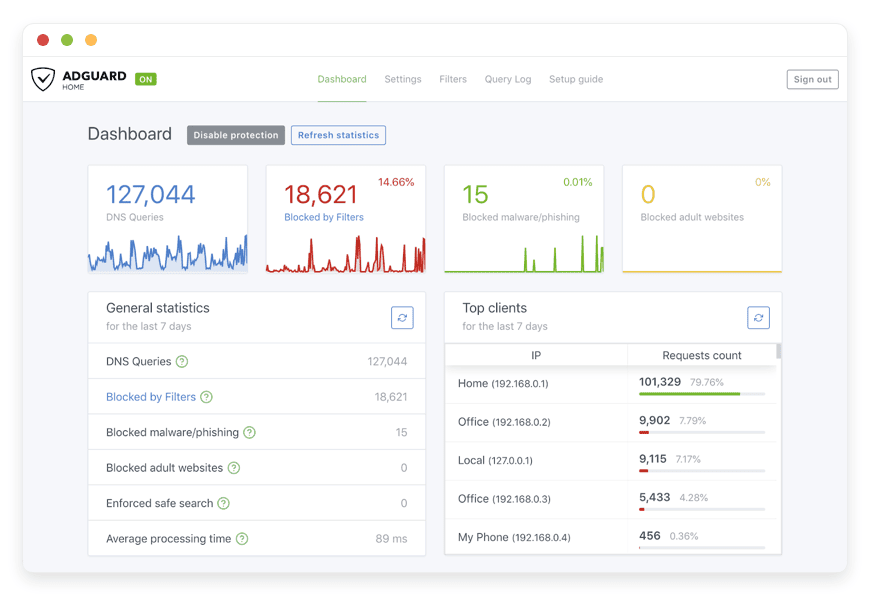
Open-source alternatives to NextDNS in 2026
The short version
- AdGuard Home is open-source DNS filtering you run yourself — a private resolver, not a shared cloud service.
- It blocks ads and trackers for every device on your network, and supports encrypted DNS so phones stay filtered off the network.
- NextDNS and AdGuard DNS route your queries through their resolvers; the win here is a resolver with no third-party filtering service in the path.
- Honest cost note: NextDNS Pro at about 1.99 dollars per month is cheaper than running a server. Pick AdGuard Home for control and no query caps, not to save a few dollars.
- Managed AdGuard Home hosting runs at €9 per month — one instance covers the whole household, with patching, backups, and the public endpoint handled.
AdGuard Home is the open-source tool most people reach for when they want to stop renting a DNS filtering service and run their own resolver instead. It blocks ads and trackers for a whole network, supports encrypted DNS for phones on mobile data, and the instance is yours. This guide covers what it does, where it beats hosted services like NextDNS, where hosted services are still the cheaper and simpler choice, and what running it actually involves.
One thing up front, because it changes the whole decision: this is not a story about saving money. NextDNS Pro costs about 1.99 dollars per month and its free tier covers 300,000 queries. Running your own resolver, managed, costs €9 per month. You move to AdGuard Home for control and for a resolver no filtering company sits in front of — not to shave a dollar.
Why people look past NextDNS in 2026
The reason people look past NextDNS in 2026 is rarely the price. It is that every DNS query leaves your network and resolves through someone else's servers. The pricing itself is genuinely cheap, and worth laying out plainly before the trade-off.
NextDNS gives you 300,000 queries a month for free. On a single phone that is plenty. On a router serving a household of 5 to 10 devices, reviewers hit that cap fast, because background apps and smart-home gear generate lookups all day. When you cross the limit, NextDNS keeps resolving names but stops filtering for the rest of the month — the blocking quietly switches off until the counter resets.
NextDNS Pro removes the cap at about 1.99 dollars per month, or 19.90 dollars a year, with unlimited queries and devices. The hosted alternatives sit in the same range. AdGuard DNS runs a free tier plus a Personal plan near 1.67 dollars per month and a Team plan near 9.99 dollars per month. Control D charges 3 dollars per month for its entry plan and 6 dollars for the next one up. None of these will break your budget.
So the honest framing is this. For one or two devices, a hosted plan is cheap, simple, and the right call. The people who move on want something a hosted plan cannot give them: their own resolver, with no shared filtering service in the path, no monthly query budget to blow through, and their own rules that travel with them.
What an alternative really means
The word alternative covers three different things here, and they are not interchangeable. Picking the right one saves you from solving a problem you do not have. Each trades convenience against control in its own way.
The first is another hosted DNS filtering service — Control D, CleanBrowsing, or AdGuard's own hosted DNS. You change a setting and you are filtered, but your queries still resolve through a company's servers under their policy. The second is self-hosting an open-source filter such as AdGuard Home: your resolver, your rules, and your maintenance. The third is managed open-source — someone runs AdGuard Home for you, yet it stays your own dedicated instance rather than a shared service.
Here is the part that trips people up, so it is worth stating directly. AdGuard Home is DNS-level filtering, not authoritative DNS hosting and not a domain registrar. It does not hold your domain's public records and it does not register domains. You use it by pointing your devices, or your router, at it as their resolver. To filter a phone when it leaves your Wi-Fi, you use its encrypted-DNS endpoints over DNS-over-HTTPS or DNS-over-TLS. The win is a private resolver you control, with no hosted filtering service logging your query stream.
The shortlist: four open-source filters
Four open-source filters cover almost every case. AdGuard Home is the one DANIAN runs managed, and the one most people should start with in 2026. The other three are genuine options, and each wins in a specific situation worth naming honestly.
AdGuard Home
AdGuard Home is a network-wide ad and tracker blocker written in Go, released under GPL-3.0, with roughly 32,000 GitHub stars. It blocks using the DNS sinkhole method — the same approach as Pi-hole — but ships more in the box: a clean web console, per-client rules, parental filtering, a query log, and built-in DNS-over-HTTPS, DNS-over-TLS, and DNS-over-QUIC with no extra software. Best for most people who want network-wide filtering plus encrypted DNS without bolting tools together. This is the one DANIAN hosts for €9 a month.
Pi-hole
Pi-hole is the original DNS sinkhole and still the most widely used, with more than 50,000 GitHub stars and an enormous community behind it. It is released under the EUPL and blocks ads using the same lists and method as AdGuard Home. The catch in 2026: encrypted DNS is not built in, so serving DoH or DoT means adding a second piece such as cloudflared or Unbound. Best for tinkerers who want the largest community and the most third-party guides, and do not mind the extra plumbing.
Blocky
Blocky is a single Go binary with a YAML config and no database — lightweight, stateless, and friendly to people who manage their setup as code. It reads the same block lists as Pi-hole, exposes Prometheus metrics for a monitoring stack, and supports encrypted upstreams. There is no guided web installer; you write a config file and start it. Best for infrastructure-minded users who want minimal resource use and metrics they can graph, and are comfortable in YAML.
Technitium DNS Server
Technitium is a full DNS server that also blocks ads, released under GPL-3.0. Beyond filtering it can act as an authoritative nameserver, a recursive resolver, and a host for your own DNS zones, with built-in encrypted DNS. It does more than a pure filter, which is the point and also the cost: there is more to learn, and it runs on the .NET runtime. Best for homelab users who want one tool to replace a filter plus a resolver plus manual zone files.
| Filter | Licence | Encrypted DNS | Community | Managed by DANIAN |
|---|---|---|---|---|
| AdGuard Home | GPL-3.0 | Built in (DoH/DoT/DoQ) | Large (~32k stars) | €9/mo managed |
| Pi-hole | EUPL | Add-on needed | Largest (~50k stars) | Self-host |
| Blocky | Apache-2.0 | Built in (upstreams) | Growing (~5k stars) | Self-host |
| Technitium DNS Server | GPL-3.0 | Built in (DoH/DoT/DoQ) | Smaller, homelab-focused | Self-host |
What each path actually costs
Three paths reach a filtered network, and they do not cost the same. Laid out honestly, the cheapest path in raw dollars is a hosted plan, and the value of running your own shows up in control rather than a smaller bill. Here is the full picture at each path.
Path 1 — a hosted DNS plan. NextDNS Pro is about 1.99 dollars a month; AdGuard DNS Personal is near 1.67; Control D starts at 3. You run nothing and you are filtered in minutes. The trade is that your queries resolve through their servers, and free tiers carry caps that switch filtering off mid-month on a busy network. For a small number of devices, this is the right, cheap answer.
Path 2 — self-host AdGuard Home. If you only want filtering on your home network and already own a NAS or a small home server, this is close to free: the software costs nothing and you pay for electricity. The cost climbs once you want encrypted DNS for phones off the network. That needs a public server, a domain name, and a certificate — a production-class VPS runs around 24 dollars a month before you add your own time for updates, certificate renewal, and uptime.
Path 3 — managed AdGuard Home from DANIAN. €9 per month for a dedicated instance that is yours, reachable over encrypted DNS, with the public address, domain, and certificate already set up. Patching, daily backups, and monitoring are handled, and your operational time is zero. One instance covers the whole household.
Put the numbers side by side and the comparison is fair rather than flattering. A hosted plan wins on raw price. Self-hosting on hardware you own wins if you only need home-network filtering and enjoy the upkeep. Managed AdGuard Home wins when you want encrypted DNS for phones, your own resolver with no filtering service in front of it, and no server to run — and at €9 a month it costs less than renting a VPS and doing the same work yourself. It costs more than NextDNS Pro. That gap buys ownership, not a discount.
How to choose: three questions
Three questions settle it without a spreadsheet. Answer them honestly and the right path is usually obvious, because each question maps to a real trade-off rather than a feature list.
How many devices, and how much traffic? One or two devices rarely trouble the NextDNS free cap, so a hosted plan is cheap and simple. A busy network that blows past 300,000 queries a month loses its filtering mid-month on the free tier — your own resolver has no such budget to exceed.
Do you want a third party's resolver in the path, or your own? A hosted service means trusting a company's logging policy and infrastructure with every lookup. Running AdGuard Home means the resolver is yours, and there is no filtering service sitting in front of your query stream.
Do you want to run the server yourself? If you own a NAS or home server and enjoy the work, self-host. If you want encrypted DNS for phones off the network and would rather not patch a public server or renew certificates, managed hosting does that for €9 a month.
Common questions
What is AdGuard Home?
AdGuard Home is open-source software that filters DNS for a whole network. It blocks ad and tracker domains before your devices reach them, runs its own web console, and supports encrypted DNS. You run it yourself or have it hosted; either way the instance is yours.
What is the best self-hosted DNS ad blocker in 2026?
For most people it is AdGuard Home: GPL-3.0, network-wide filtering, and built-in encrypted DNS with no add-ons. Pi-hole has the largest community, Blocky suits infrastructure-as-code setups, and Technitium adds a full DNS server. There is no single winner, but AdGuard Home fits the widest range of needs out of the box, which is why DANIAN hosts it for €9 a month.
Can AdGuard Home replace NextDNS?
For most home and small-team use, yes. AdGuard Home does the same network-wide ad and tracker blocking, with its own filtering rules and query log. The difference is where it runs: NextDNS is a shared cloud resolver, while AdGuard Home is a resolver you control.
AdGuard Home vs Control D — which should I pick?
Control D is a hosted filtering service: you change a setting and your queries resolve through its servers. AdGuard Home is software you run, so the resolver is yours and no filtering company sits in the path. Pick Control D for the least setup on one or two devices. Pick AdGuard Home when you want your own resolver, your own rules, and no metered query budget.
AdGuard Home vs Pi-hole — which is better?
Both block ads using the same DNS sinkhole method, so both work. AdGuard Home has a cleaner console and built-in encrypted DNS. Pi-hole has the larger community and more third-party guides. For a new setup in 2026, AdGuard Home needs fewer add-ons to reach the same result.
AdGuard Home vs uBlock Origin — do I need both?
They work at different layers, so running both is the strongest setup. AdGuard Home blocks ad and tracker domains for every device on the network, including phones, TVs, and gear that cannot run an extension. uBlock Origin runs inside a browser and catches in-page and first-party ads that DNS filtering cannot see, such as in-stream video. DNS for the whole network, a browser blocker for the last mile.
Is AdGuard Home free and open source?
Yes. AdGuard Home is released under the GPL-3.0 licence and the code is on GitHub, where it has around 32,000 stars. The software itself never costs anything. You pay only for the hardware or hosting it runs on, plus your own time if you self-host.
Does AdGuard Home support encrypted DNS (DoH and DoT)?
Yes. AdGuard Home can act as a DNS-over-HTTPS and DNS-over-TLS server, plus DNS-over-QUIC. That lets a phone keep using your filtered resolver over mobile data, not only on home Wi-Fi. To serve encrypted DNS publicly you need a domain name and a certificate, which managed hosting sets up for you.
Can I use AdGuard Home on my phone away from home?
Yes, through its encrypted-DNS endpoints. You point the phone at your AdGuard Home server using DNS-over-HTTPS or DNS-over-TLS, so filtering follows the device over mobile data. This needs a public address, a domain, and a certificate. Self-hosting means setting those up; managed hosting includes them.
Does AdGuard Home block ads on every device?
It blocks ads for any device that uses it as a resolver — phones, laptops, smart TVs, and other connected gear. Point a single device at it, or point your whole router so the network is covered. It works at the DNS layer, so no per-device software is required.
Does AdGuard Home block ads on smart TVs and IoT devices?
Yes, and this is where it earns its keep. Smart TVs, streaming sticks, and IoT gear cannot run a browser ad blocker, so DNS filtering is the only practical option. Point the device, or your whole network, at AdGuard Home and it blocks the ad and telemetry domains those devices call home to. It will not strip ads baked into a streaming app's own video feed, but it cuts most of the tracking.
Can AdGuard Home block ads inside mobile apps?
Partly. AdGuard Home blocks ads and trackers that apps load from known ad-serving domains, which covers a large share of in-app advertising. It cannot remove ads an app serves from its own first-party domain, because those share the domain the app needs to work. For a phone off your home network, point it at AdGuard Home's encrypted-DNS endpoint so the filtering follows the device.
Will AdGuard Home block YouTube video ads?
Mostly no. DNS filtering blocks ads served from separate ad domains, but YouTube serves video ads from the same domains as the videos, so a resolver cannot tell them apart. For in-stream video ads you still need a browser ad blocker. AdGuard Home handles the rest of the network.
Does AdGuard Home block malware and phishing domains?
It can, through the block lists you add. Add a malware and phishing list, such as one of the well-known security blocklists, and AdGuard Home stops devices from resolving those domains network-wide. Treat it as one layer, not a full antivirus: it blocks known bad domains at the DNS level but does not scan files or inspect traffic. The protection is only as current as the lists you enable.
Can AdGuard Home enforce safe search and block adult content?
Yes. AdGuard Home can force SafeSearch on major search engines and block adult-content categories using its blocking services and block lists, applied to the whole network or to specific clients. You can set stricter rules for a child's device than for the rest of the household. It is domain-level filtering, so it blocks known sites rather than scanning page content, but it covers the common cases well.
Does AdGuard Home work with a VPN?
It depends on where each one runs. A device VPN usually sends DNS through the VPN, which bypasses AdGuard Home unless the VPN is set to use it. The clean setups are running AdGuard Home as the resolver behind your VPN, or pointing devices at its encrypted-DNS endpoint so filtering applies wherever they connect. If filtering seems to stop when the VPN is on, check which resolver the VPN uses.
Is AdGuard Home authoritative DNS hosting or a domain registrar?
No. AdGuard Home filters and forwards DNS queries; it does not host your domain's public records and does not register domains. You point devices at it as their resolver. If you need authoritative DNS for a domain you own, that is a separate service from network-wide filtering.
How do I point my devices at AdGuard Home?
Set its address as the DNS server on a device, or set it once on your router so every device inherits it. For encrypted DNS on phones, you load a profile that uses the DNS-over-HTTPS or DNS-over-TLS endpoint. AdGuard Home can generate those profiles for you.
Do I need a static IP or domain to run AdGuard Home?
On your own network, no, devices reach it by its local address. You need a public address, a domain, and an SSL certificate only when you want phones to use it off the network over encrypted DNS. That public-endpoint step, plus keeping the certificate renewed, is the part most people find fiddly. Managed hosting gives you a ready encrypted-DNS endpoint and handles the certificate.
Can I run AdGuard Home on a Raspberry Pi?
Yes. AdGuard Home is a single Go binary and runs comfortably on a Raspberry Pi or any small always-on machine, which is one of its most common home setups. A Pi handles a typical household without strain. The catch is that it must stay on and reachable, and serving encrypted DNS to phones off the network still needs a public address, a domain, and a certificate, which managed hosting removes.
How much memory and processing power does AdGuard Home need?
Very little. The Go binary is light, so a low-power board or a small server runs it without strain for a typical home or small office. Memory use rises modestly with very large block lists and a long query log, but it stays within reach of modest hardware. If you would rather not size, patch, and monitor a machine yourself, managed hosting handles the sizing for €9 a month.
Does AdGuard Home slow down my internet?
No. In normal use it makes browsing feel faster, because it answers blocked domains instantly and caches the rest, so repeat lookups return quickly. Very large block lists use a little more memory but do not noticeably change speed on modern hardware. The one case to watch is the resolver becoming unreachable, which stalls name lookups; a managed instance is monitored so that does not happen quietly.
Does my internet break if AdGuard Home goes down?
If a device has only AdGuard Home as its resolver and the server stops, that device cannot resolve names until it recovers. The fix is a backup resolver, or a managed instance with monitoring so problems are caught early. Many people set a second DNS entry as a fallback.
How many devices can one AdGuard Home instance cover?
One instance covers a whole household or small office — typically dozens of devices on a normal connection. DNS queries are tiny, so a modest server handles a busy home without strain. There is no per-device query cap the way NextDNS applies one on its free tier.
What does AdGuard Home cost to run?
The software is free. On hardware you already own, like a NAS or a small home server, the only cost is electricity. For encrypted DNS reachable from anywhere you need a public server, a domain, and a certificate. Managed AdGuard Home hosting bundles all of that for €9 per month.
Is managed AdGuard Home cheaper than NextDNS?
No, and it is worth being clear about that. NextDNS Pro is about 1.99 dollars per month, below the €9 per month for managed AdGuard Home. You pick the managed route for a resolver you control and no query caps, not to save money over a cheap cloud plan.
What does managed AdGuard Home hosting include?
A dedicated AdGuard Home instance that is yours, reachable over encrypted DNS, with the public address, domain, and certificate set up. Patching, daily backups, and monitoring are handled, and a human answers. Your job is choosing filters and pointing devices at it.
Can I try managed AdGuard Home before I pay?
Yes. DANIAN runs a 7-day trial, so you can point a device or your router at a real instance, load your block lists, and confirm filtering and encrypted DNS work for you before paying anything. If it is not the right fit, you walk away. The €9 a month starts only when you decide to keep it.
Does AdGuard Home log my DNS queries?
It keeps a query log on your own instance so you can see what was blocked, and you control how long it is kept or whether it runs at all. The difference from a hosted service is that the log lives on a resolver you control, not on a filtering company's servers.
Is AdGuard Home safe to use?
Yes. AdGuard Home is open-source under GPL-3.0, so the code is public and widely reviewed, and by design it does not route your traffic through anyone else: the resolver is yours. The main risks are operational, such as exposing the admin console to the internet or letting the certificate lapse on a public endpoint. Keep the console private and patched, or use managed hosting where those defaults are set for you.
What is the difference between AdGuard Home and AdGuard DNS?
AdGuard DNS is a hosted resolver run by AdGuard — you point at their servers. AdGuard Home is the open-source software you run yourself, sharing much of the same code. Hosted is simpler and capped by plan; self-run gives you the resolver and the rules.
Can I keep my own block lists and rules?
Yes. AdGuard Home lets you add filter lists, write custom blocking and allow rules, and set per-client policies — for example, stricter filtering on a child's device. Your rules stay on your instance and move with you if you change where it is hosted.
Is AdGuard Home hard to maintain?
On your own hardware it needs occasional updates, certificate renewal for encrypted DNS, and attention if it stops. None of that is hard, but it is ongoing. Managed hosting removes it: updates, backups, and the certificate are handled, and monitoring flags a stalled instance early.
Can I move my settings if I stop using managed hosting?
Yes. AdGuard Home stores its configuration in a standard file, and your block lists and rules are portable, so nothing about the setup is locked to one host. If you leave DANIAN you can take your configuration and run the same open-source software elsewhere. The instance is yours either way; managed hosting runs it for you, it does not trap your settings.
Should I self-host AdGuard Home or pay for managed hosting?
Self-host if you own a NAS or home server, want filtering only on your home network, and enjoy running it. Choose managed if you want encrypted DNS for phones off the network, no server to patch, and someone on call. Both give you the same software and your own rules.
What to do this week
Pick by your situation, not by a leaderboard. If you run one or two devices and just want cleaner browsing, set up a hosted plan such as NextDNS and you are done in minutes — it is cheap and it works. If you want your own resolver and already own a NAS or home server, install AdGuard Home and point your router at it.
If you want AdGuard Home with encrypted DNS for phones, no public server to maintain, and someone on call when it matters, that is what the managed route is for. A 7-day trial lets you point a device at a live instance and see the query log fill up before you decide.
Two honest limits before you commit. AdGuard Home will not block every in-stream video ad — YouTube ads served from the video's own domain slip past any DNS filter, so a browser blocker still has a job. And it is filtering, not authoritative DNS hosting; it resolves and blocks, it does not run your domain's records. Within those lines, it is the cleanest way to put a resolver you control in front of your whole network.
See managed AdGuard Home hosting for the €9 plan. Pair it with Uptime Kuma for monitoring if you want a status check on your own services. Or start a 7-day trial and watch it work on your network first.





