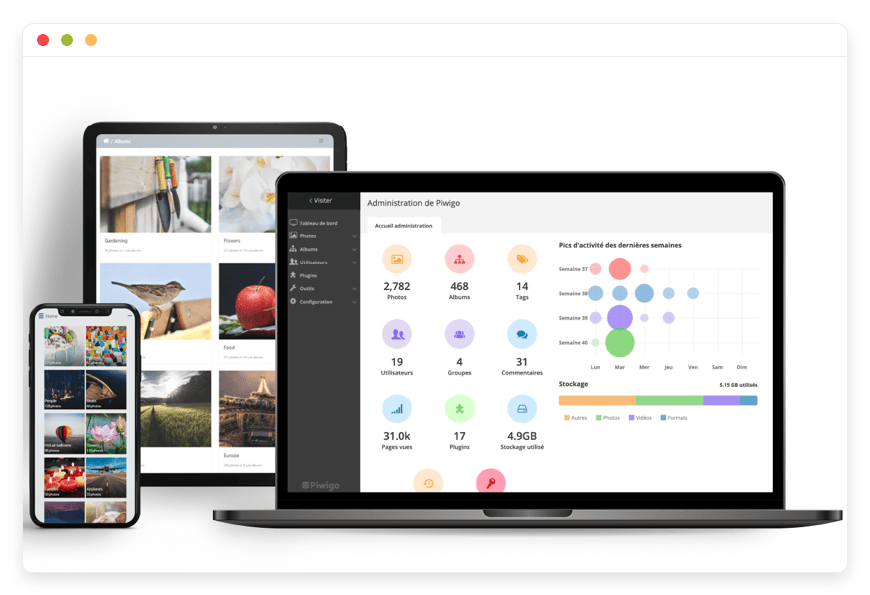
Fully Managed Piwigo
as a Service

Deploy Piwigo as a fully managed service starting at €9/mo. Get automated backups, SSL, updates, support and monitoring included.

Piwigo is an open-source photo gallery and digital asset manager — albums, tags, custom metadata, granular permissions, and a public-or-private presentation layer — combining the gallery experience of SmugMug or Flickr with the privacy, ownership, and team workflow of self-hosted infrastructure.

Free 7-day trial  99.9% Uptime SLA  No credit card  Cancel anytime

Free 7-day trial  99.9% Uptime SLA
No credit card  Cancel anytime

Piwigo

Piwigo

STARTING AT

€9/month
Automated Backups
Monitoring
Automated Updates
Auto SSL

USAGE

Unlimited
Human Support
Custom Domains
Terminal Access
File Manager Access
Deploy in your region 21 locations worldwide
GermanyFinlandNetherlandsUKSwedenUnited StatesCanadaSingaporeJapanAustraliaBrazilSouth Africa+9 more →
Piwigo Preview Image

ABOUT THE SOFTWARE

What is Piwigo

Piwigo is an open-source photo gallery and digital asset manager — albums, tags, custom metadata fields, fine-grained permissions, and a public-or-private presentation layer the team can curate. It runs on PHP and MySQL or MariaDB, and the project is documented to handle galleries past half a million photos.

Piwigo started life as PhpWebGallery in 2001, released its first version in April 2002, and was renamed Piwigo in 2009. The project is licensed under GPL v2.0, stewarded by the French Piwigo Association (non-profit, loi 1901, headquartered in Quetigny), and developed alongside a separate commercial entity, PigoLabs SAS, which operates the project's own hosted offering at piwigo.com.

The project's stated install base is "millions of people and thousands of organisations." Public users include the Carl R. Woese Institute for Genomic Biology at the University of Illinois, the London Parks & Gardens Trust, the Jazz-Club Trier archive, and a long tail of museums, camera clubs, sports federations, and university alumni associations. The plugin ecosystem is the largest in the self-hosted photo category — over 200 official and community extensions, including LDAP login, OAuth, Adobe Lightroom Publish, watermarking, expiry-date publication scheduling, and a community Flickr importer.

FEATURES

What Piwigo does

Piwigo is a curated gallery and digital asset manager, not a phone-camera-roll mirror. It is built for teams that want intentional organisation, granular permissions, custom metadata, and a public or team-facing presentation layer — museums, clubs, agencies, marketing teams, and university archives.

Albums and sub-albums

Unlimited hierarchical organisation. Albums can be public, members-only, group-restricted, or password-protected. Linked albums let a photo appear in multiple places without duplicating files.

Granular permissions

User, group, album, and tag-level access. Group-based permissions integrate cleanly with LDAP groups, Active Directory, and SAML provider claims.

Mobile apps

Official iOS and Android apps for browsing, contributing, and album-scoped upload. From Piwigo 16, API keys keep mobile auth working with two-factor enabled.

Video support

VideoJS plugin plus ffmpeg-driven thumbnail extraction handles MP4, WebM, and MOV uploads alongside photos in the same album hierarchy.

Tags and custom metadata

Free-form tagging plus custom metadata fields. IPTC and EXIF auto-import on upload. Map IPTC Caption-Abstract to the Piwigo description and IPTC Keywords to tags.

Plugin ecosystem

Over 200 official and community extensions. Notable: LDAP Login, OAuth, Lightroom Publish, Watermark, Expiry Date, External ImageMagick, Public Albums, Crypto Captcha, VideoJS.

Lightroom Publish

Adobe Lightroom Publish Service plugin treats Piwigo albums as publish destinations. Smart Collections push, update, and remove photos as the catalogue changes.

Multilingual

Piwigo interface localised in dozens of languages. Custom labels and album descriptions can be per-language. The browse experience adapts to the visitor's locale.

WHAT'S ALWAYS INCLUDED

Every app. Fully managed.
Nothing extra to pay for.

Every app you deploy includes the full managed service — security, backups, updates, and support from day one.

Automatic updates and patches

Apps run the latest stable version. Security patches applied silently, with rollback if needed.

Daily off-site backups

Multiple daily backups in redundant off-site locations. One-click restore if anything goes wrong.

24/7 uptime monitoring

Continuous monitoring with instant alerting. We respond before you notice.

SSL, firewall, DDoS protection

Auto-renewing SSL, hardened firewall rules, DDoS mitigation on every deployment.

Performance and scaling

We monitor resource usage continuously. When your app needs more headroom, we flag it and upgrade with your explicit approval.

Dedicated engineering support

Real engineers on chat. DNS, SMTP & migration help. All included in €9.

WHY MANAGED

Why teams pick managed Piwigo

On 30 September 2025, Google stopped enrolling new T-Mobile subscribers in the unlimited Google Photos storage perk — the final closing-off of the last consumer route to uncapped photo storage. Combined with the iCloud+ price hikes that landed across thirteen countries in 2024–2025 and Flickr Pro's climb to $82/year, the structural disappearance of cheap consumer photo storage is the 2025–2026 trigger that moves teams to managed Piwigo.

Running Piwigo yourself is a real PHP application with a real database and a real image-processing pipeline, and that pipeline has well-known sharp edges. The single most common self-hosting failure in the Piwigo forum is non-obvious: Debian and Ubuntu ship ImageMagick with conservative resource limits in /etc/ImageMagick-6/policy.xml — typically 16,000 px width and height ceilings and a 256 MiB memory cap. Panoramas, drone composites, archive scans, and museum-quality masters silently fail thumbnail generation with no error in the Piwigo UI. Users see a broken-thumbnail icon and try the upload again. The fix is editing the policy file, raising the PHP memory_limit in the right ini directory (which depends on whether you run mod_php, PHP-FPM, or CLI), and aligning post_max_size with upload_max_filesize the right way around. Each is a forum thread on its own. Stacked, they are an evening lost.

On every Piwigo instance we run, we set ImageMagick width and height ceilings to 256,000 px, ImageMagick memory to 1 GiB, PHP memory_limit to 512M, max_execution_time to 300 seconds, and force the External ImageMagick CLI binary as the graphics library so PDF, PSD, AI, TIFF, and HEIC files render — none of which the PHP wrapper handles. We patch the host monthly, run the Piwigo upgrade ourselves on each minor and major release (with a notice first), back the whole instance up off-site daily, monitor the application 24/7, and reply on chat with a human who has root on the platform. The €9/month covers all of it. There is no separate fee for the patches, no per-seat charge for adding photographers, and no storage-tier upgrade prompt at 10 GB.

REVIEWS

Hear from customers ​like you​​​​​​​

Successful businesses and professionals around the world rely on DANIAN every day

USE CASES

Three teams who run Piwigo on DANIAN

Curated gallery and DAM is a team workflow, not an individual workflow. The teams most likely to land on managed Piwigo are the ones already running a permission model, a metadata schema, or a public-facing presentation layer — and tired of either paying per seat for it or babysitting their own VPS.

8-STAFF MARITIME MUSEUM ARCHIVE

From a per-seat SaaS to a Spectrum-aligned, LDAP-bound photo collection

Two curators, three archivists, one photographer, one director, plus around fifteen external researcher accounts with read-only access. Region: Germany. LDAP integration against the museum's existing Active Directory. Custom metadata fields for Accession Number, Production Date, Collection, and Rights Statement URI. Default gallery visibility private until curator approval. Roughly 30 GB per major digitisation campaign at archive-master resolution.

300-MEMBER CAMERA CLUB

Replacing Flickr Pro after the annual renewal hit £52

One webmaster, six committee admins, three hundred contributing members. Region: UK. Three permission groups — Committee, Members, Guests. Monthly competition albums hidden from Guests until judging closes, then flipped to public. Watermark plugin on derivatives, originals untouched. Around 9.6 GB of new uploads per month at four entries per member at eight megabytes average.

1,500-PERSON MANUFACTURER

Internal marketing and HR asset library, SSO-gated, no public access

Two marketing admins, one HR admin, ~40 internal contributors, 1,500 employees as read consumers. Region: Sweden. SAML SSO via Microsoft Entra ID. Custom metadata: Asset Type, Use Rights, Embargo-Until Date. Two top-level albums on disjoint permission groups — HR-Headshots and Marketing-Assets. ~50,000 product, event, and plant photos at roughly 8 MB each, plus nightly sync of the Marketing album to a read-only S3 bucket.

COMPARISON

Four ways to run Piwigo

There are four honest paths to a working photo gallery for a team: pay the proprietary SaaS, self-host on a production-class VPS, run a home or office server, or use a managed Piwigo service. The cost math and the operational picture diverge sharply at five photographers.

 PATH1 ADMIN5-PHOTOGRAPHER TEAM 10-PHOTOGRAPHER TEAMOPERATIONAL PICTURE
SmugMug
$132/year
(Power, annual)
$420/year
(Pro, single account — team admin gated to Pro)
$420/year+
(Pro list; larger teams negotiate)
Hosted, but per-account. Multi-admin collaboration sits on the Pro plan. No granular group permissions, no LDAP, no custom metadata schemas, no plugin ecosystem.
Self-host on a $24/month production-class VPS
$44/month infrastructure ($24 VPS + $5 object-storage backup + $15 monitoring) plus 1–2 hours/month operator time — at €60–120/hour, that's €100–€280/month effective.samesameYou own everything. You also patch everything, tune ImageMagick policy.xml, align PHP memory limits, set up off-site backup, monitor uptime, renew TLS, and stay on call.
Home or office server
Hardware (e.g. Synology DS923+ ~€650 or HP ProLiant ML30 Gen10 ~€800–1,500) amortised over 36 months: €18–55/month + €17–32/month electricity + €40–80/month business internet with static IP + €10–20/month off-site backup + 2–4 hours/month operator time = €210–€667/month effective.samesameTotal physical control. Also: upstream provider's SLA on the home line, single-region exposure, and the same patching cadence as the VPS path.
DANIAN Managed Piwigo€9/month€9/month€9/monthPick the region. We patch, back up, monitor, run upgrades, and answer chat with a human. Zero operator hours on your side. Cancel from the dashboard.

BY INDUSTRY

Piwigo for specific industries

Piwigo's permissions, metadata schema, and presentation flexibility make it a fit for sectors that care more about organisation and access control than about silent phone-camera-roll mirroring. The five below are where we see Piwigo deployments hold up over years, not months.

Cultural institutions running Piwigo as their digital photo archive typically align with Spectrum 5.1 (the UK Collections Trust collections-management standard, adopted internationally) and use RightsStatements.org URIs to label reuse rights in IPTC Copyright Notice fields. ICOM CIDOC CRM-style metadata mapping is achievable through Piwigo's custom-field engine.

How we configure it. Custom metadata fields for Object Number (accession), Object Name, Production Date, and Production Place. Default new-album visibility set to "private until curator approval" via the standard album permissions plus the Expiry Date plugin. External ImageMagick forced as the graphics library so PSD, TIFF, and high-resolution archive masters generate thumbnails reliably.

Workflow. Cataloguer ingests a digitisation batch from the flatbed scanner output folder via FTP or the Piwigo sync plugin. Batch Manager bulk-tags with collection name and accession-number range. Curator reviews the "pending" album. On approval, visibility flips to public or embargoed-until-date.
Quantifiable: a major digitisation campaign typically produces around 30 GB of archive masters with sidecar XMP, easily picked up by the daily off-site backup.

Clubs affiliated with FIAP (Fédération Internationale de l'Art Photographique) or PSA (Photographic Society of America) operate under competition rules that require unmodified EXIF for entry verification and forbid public publication of entries before judging closes.

How we configure it. Per-album scheduled visibility — Committee-only to Members to Public — so the monthly competition cycle runs without manual permission flips. EXIF stripping disabled on competition uploads so entry verifiability is preserved. Watermark plugin applied to derivatives only; originals retained for archive use.

Workflow. Member uploads competition entries via the Piwigo iOS or Android app, or via the Lightroom Publish Service plugin. Album auto-tagged with the competition month. On judging close, visibility flips.
Quantifiable: a 300-member club running four entries per member per month at eight megabytes average generates roughly 9.6 GB of new content per month; a five-year club archive typically sits at 50,000–80,000 photos.

Sports clubs publishing matchday photos of members and minors operate under data-protection right-to-erasure obligations, plus national child-protection guidance for clubs running youth sections — for example, the UK NSPCC photography guidance for sports settings, which expects rapid takedown on parental request.

How we configure it. Expiry Date plugin for time-bound publication of matchday albums. User-tag visibility restricted to logged-in members so player names are not surfaced to anonymous visitors. Tag-and-batch-delete workflow that lets an admin remove a single player's photos from an entire season's archive in one filtered Batch Manager operation.

Workflow. Club photographer uploads matchday photos via the Android app; album auto-tagged with team and matchday. Parent submits an erasure request via the contact form. Admin filters Batch Manager on the player tag, selects "Delete on server" for that subset, and confirms.
Quantifiable: a club running eight teams at 30 matches per season at ~150 photos per match accumulates roughly 36,000 photos per season.

Higher-education institutions publishing alumni archives, yearbooks, and event photography align with FERPA in the United States and the equivalent right-to-erasure framework elsewhere. Long-term retention typically follows institutional records-management policies — NARA General Records Schedule for federally funded US institutions and JISC retention guidance in the UK.

How we configure it. OAuth plugin integration with the campus identity provider — Shibboleth, ADFS, Microsoft Entra ID, or Google Workspace — so alumni log in with their existing institutional credentials. Per-cohort album access keyed to graduation-year LDAP groups. Long-term retention bucket with versioned backups; reduced-resolution derivative published publicly while archive originals stay private.

Workflow. Alumni office uploads yearbook scans tagged by graduation year and major. Cohort-specific reunion albums opened only to that graduation year for the duration of the reunion event, then closed.
Quantifiable: a digitised 30-year yearbook archive at around 2,000 photos per year sits at roughly 80–120 GB.

Public-sector tourism and culture boards publishing reusable photography align with the Open Data Directive (2019/1024) and national open-licence schemes — Etalab Licence Ouverte in France, Open Government Licence v3 in the United Kingdom, or Creative Commons attribution licences by default elsewhere.

How we configure it. Photo licence field on every upload set to the chosen open licence. Licence string exposed in the IPTC Copyright Notice for downstream attribution. Commercial-reuse-friendly downloads enabled by default. Full-resolution downloads gated to logged-in journalists or partners; public visitors get a web-resolution derivative.

Workflow. Communications team commissions a regional photo shoot. Photographer delivers via the Lightroom Publish plugin into a "Q2-campaign" album. Comms team reviews, applies the "Open Licence" tag in Batch Manager, opens the album to public.
Quantifiable: a regional tourism board typically hosts 5,000–15,000 hero images at ~5 MB average; storage is small, but download bandwidth on a popular campaign image is the operational pressure point.

FAQ

Frequently asked questions

Everything teams ask before signing up — answered straight, without sales speak.

Three groups: technical setup, migration, and how DANIAN works as a service.

01

Technical and configuration

Debian and Ubuntu ship ImageMagick with conservative resource limits in /etc/ImageMagick-6/policy.xml — typically 16,000 px width and height ceilings and a 256 MiB memory cap. Panoramas, drone composites, and museum scans silently fail thumbnail generation with no error in the Piwigo UI. We override the defaults to 256,000 px width and height, 1 GiB ImageMagick memory, and 8 GiB disk on every Piwigo instance we run. This is the single most common Piwigo self-hosting failure on the official forum.
The PHP default of 128M demonstrably fails on the Piwigo Batch Manager and on the "regenerate all derivatives" admin action for galleries above ten thousand photos. We set memory_limit to 512M on every instance, max_execution_time to 300, and both upload_max_filesize and post_max_size to 256M. ImageMagick has its own separate memory ceiling that needs raising too — we set that to 1 GiB. Together these are the four knobs that fix the long tail of "upload mysteriously failed" forum reports.
Piwigo's official documentation states half a million photos is fine, and we've seen community reports of 200,000-plus production galleries. Performance pressure shifts to the database around fifty thousand photos. We tune innodb_buffer_pool_size on MySQL to fit the active working set in memory, run the periodic batch tasks during off-peak hours, and add a read-only database replica on larger plans. The Piwigo frontend itself paginates efficiently; the work is in the admin and batch operations.
Yes, via plugins. The LDAP Login plugin handles Active Directory and OpenLDAP authentication and maps LDAP groups to Piwigo groups. The OAuth plugin supports SAML providers including Microsoft Entra ID, Google Workspace, Okta, Auth0, and Keycloak. We pre-install whichever plugin the customer needs on first onboarding and walk through the metadata exchange on chat. Group-based permissions in Piwigo are mature, so mapping enterprise IdP groups to per-album access is straightforward.
Yes. The Lightroom Publish Service plugin is an official, actively maintained Piwigo integration. It treats a Piwigo album as a publish destination, so Lightroom collections push, update, and remove photos from the gallery as the catalogue changes. Smart Collections and the Publish Smart Service let photographers maintain a curated portfolio gallery without re-uploading. The plugin works against any Piwigo instance — self-hosted, our managed hosting, or the project's own piwigo.com.
Not in the silent always-on sense. Piwigo's official iOS and Android apps support manual upload and selecting batches to push into a specific album, but they do not stream every photo from the camera roll into the gallery in real time. If silent camera-roll mirroring is the primary requirement, Immich is the right tool. Piwigo is a curated gallery and digital asset manager — picked when intentional organisation, permissions, and a public or team-facing presentation layer matter more than passive backup. We host both.
Yes. Piwigo 16, released November 2025, replaced the older email-based one-time-password plugin with a TOTP-compatible authentication plugin that works with Google Authenticator, Authy, 1Password, and Bitwarden. Piwigo 16 also added API keys so the mobile apps can authenticate against accounts with 2FA enabled — the previous combination silently failed and was a long-standing forum complaint. We enable 2FA-capable on every fresh instance; admins choose whether to require it.

02

Migration and onboarding

We can activate your app on your own custom domain/subdomain. Examples: mydomain.com, anyword.mydomain.com.
Or, on our randomized free subdomain. Example: 963.apps.danian.cloud
If you wish to use a custom domain/subdomain, select that option when ordering your app (or notify us later). We will send you the required DNS records and if needed, our tech team will modify them for you.
21 datacenter locations across six continents. You choose the region at provisioning. Application data sits in the region you choose; pick whichever is closest to your users or matches your data-residency preference.
Yes. Request a region migration from the dashboard and we run the move in the background. The system emails you when the migration completes; total transfer time depends on data volume but typical instances finish in a few hours. There is no extra charge for a region change.
Yes. Full data export is available at any time, in a portable format you can bring to any infrastructure.
For Flickr there is a community Flickr-to-Piwigo plugin that imports albums, photos, and tags directly. For Google Photos, the standard path is a Google Takeout export, then a structured bulk upload preserving album folders and the JSON sidecar metadata. For SmugMug, the export route is downloading galleries via the SmugMug API or the built-in "Download All" option, then bulk uploading.
All four have community import tooling in the Piwigo extension catalogue with varying levels of completeness. The structural migration — albums, photos, tags, metadata — typically works first pass; user accounts and granular permissions often need a manual remap since the source platforms model them differently.

03

Billing, support, and platform

€9 covers everything we do for that app: hardware in the region you choose, daily off-site backups with one-click restore, automatic security patches and version upgrades, 24/7 monitoring, SSL and firewall, and engineering support on Email/LiveChat. There are no setup fees or hidden line items. For more info see our Pricing page.
If you decide to continue, we charge €9/app/month from day 8. If you don't, the trial ends and you can export your data. No card is required for the trial, and we never auto-charge you without explicit consent.
No. The €9/month is flat regardless of how many users log into your app. Add 5 users or 50; the price doesn't change.
24/7 Live chat and email support, both staffed by engineers who run the systems. We handle DNS configuration, SMTP setup, app integrations, performance tuning, troubleshooting, and migration help. Response time is typically under an hour. There is no tier system — every customer gets the same support.
Yes. Cancel from the dashboard. We don't charge a cancellation fee, we don't lock data, and we will export your data to you on request before deletion. data to you on request before deletion.
Every customer instance is backed up daily to a separate region from the primary. We test restores. You can request a restore at any backup point within the retention window — usually 7 days for daily backups.
Your application data sits in the region you choose at provisioning — 21 datacenter locations across six continents. Account-level data (billing, account email, support ticket history) is processed centrally. Application data region is picked by you, per app.
99.9% uptime SLA on every app, every tenant. Service credits are documented at danian.co/service-level-agreement. The status page is located at status.danian.co.
When your tenant approaches the resource ceiling — the base tier holds 1 vCPU/RAM, 30 GB storage — we notify you. Resource upgrades happen with your explicit consent; we will not upgrade your tenant or charge you without it.
We wait. We don't suspend the app or delete your data on the first failed charge. We email you, you fix the card on file, and we continue.
Invoices can be downloaded from the billing dashboard in PDF the day each charge succeeds. EU VAT is added where applicable and the VAT-reverse-charge regime applies for VAT-registered businesses with a valid number.
150+ open-source apps across automation, team chat, file sync, analytics, AI, password management, email marketing, dev tools, project management, smart home, CMS, and federated social. See the full catalog →
Yes. Every instance comes with a web-based terminal and a file manager in your DANIAN management dashboard. Useful for managing your data and customizations.
Resources scale with your usage. If your app needs more vCPU, RAM, or storage, we add it — and we ask first before any change to your plan. €9 is the floor; resource-heavy workloads may price higher, but you'll always know in advance.
Yes. We have both a Partner program and an Affiliate program available. Anybody can sign up.
No contract. No minimum commitment. Cancel anytime from the dashboard with one click. The 7-day free trial requires no credit card. After the trial converts to paid, you can still cancel at any month without notice or penalty.

DEPLOY IN YOUR REGION

21 datacenter locations on six continents

Pick the region closest to your users.

United States, Germany, Finland, Singapore, Australia, Brazil, Canada, Netherlands, UK, Spain, Italy, France, Sweden, Malaysia, India, Japan, Mexico, Poland, South Korea, Chile, South Africa and more coming soon
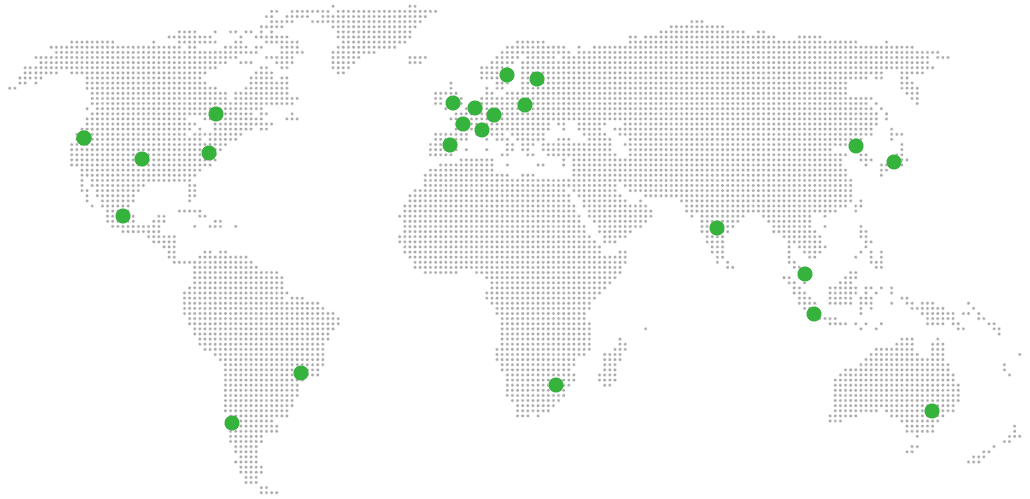
Global Reach Map

Try managed Piwigo for 7 days

No card. Cancel from the dashboard.