
Fully Managed Penpot
as a Service
Deploy Penpot as a fully managed service starting at €9/mo. Get automated backups, SSL, updates, support and monitoring included.
Penpot is an open-source design and prototyping platform — UI design, components, design tokens, prototypes, and real-time collaboration — combining the convenience of Figma with the security and control of self-hosted infrastructure. Files use open standards (SVG, CSS Grid, W3C design tokens), so what you draw stays portable across tools.
✓Free 7-day trial ✓99.9% Uptime SLA ✓No credit card ✓Cancel anytime
✓Free 7-day trial ✓99.9% Uptime SLA
✓No credit card ✓Cancel anytime

Penpot
STARTING AT
USAGE
 Germany
 Finland
 Netherlands
 UK
UK Sweden
 United States
 Canada
 Singapore
 Japan
Japan Australia
 Brazil
 South Africa+9 more →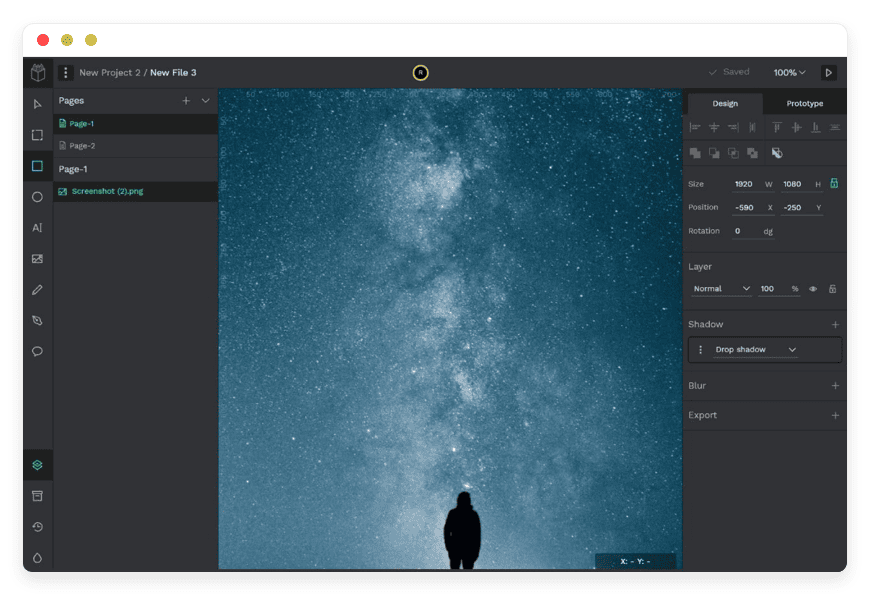
ABOUT THE SOFTWARE
What is Penpot
FEATURES
What Penpot does
WHAT'S ALWAYS INCLUDED
Every app. Fully managed.
Nothing extra to pay for.
Every app you deploy includes the full managed service — security, backups, updates, and support from day one.
WHY MANAGED
Why teams pick managed Penpot
REVIEWS
Hear from customers like you

No more maintenance headaches!
Finally, I can relax and not bother with maintenance. Each of the softwares that we run on DANIAN is automated and running stable for couple months already. They even assist us with modifying the DNS records. Once we needed to modify the config of Nextcloud so that we are able to upload higher than 5GB files and they assisted us fast. I also love their documentation!

Kevin Blackwell

Best managed service
I previously ran Peertube, Mastodon, Mattermost and Mirotalk on other providers before switching to DANIAN. I was tired of handling the updates and backups myself. Not only that the performance is "out of this world" fast, but their tech support is amazing. Since then I added 5-10 more Apps on my account. I also love how they add more softwares on their list constantly!

William Northfield

Love the personalized service!

George Adams
n8n runs excellent

David Hartmann

Smooth experience
I needed a way to manage the projects and files for my company. This was the first time I learn about opensource. I asked their support team and they assisted me immediately. I started with Openproject. Later I added Nextcloud. My team were able to get used to the apps fast.

Levi Nilsson

Bye GA

Wyatt Mitchell

Love the freedom
I wanted to use a crm for my startup. I signed up for the free trial. Tried out espocrm and dolibar and picked one. Their dashboard is very easy for a beginner. I recommend them and feel confident in choosing them.

Elias Koch
Wow just wow
After discovering DANIAN, I wished I'd found them sooner — their solution is excellent and deserves wider recognition. Very good solution!

Tyler Hollander
Professional tech support!

Bastian Engel
Their support team is the best!
I had a problem with my card and the subscription could not be renewed in time. I notified their support and surprisingly, they showed much understanding. They basically left my apps run until I solved the card issue. Other providers would have deleted my data in a heartbeat. This is the way to build client-vendor trust!
George Adams
Fair price and fast
4 months ago I activated n8n, Uptime kuma, Vaultwarden and Paperlessngx. So far everything is perfect. The performance of all apps is excellent. I contacted their support team couple times for using custom subdomains for the apps and they were fast and kind. I'm constantly recommending them to my network!

Atanas

Vaultwarden 10/10
I wanted to selfhost a passwords manager for my company but I didn't trust the mainstream providers. I tried out Vaultwarden for the free trial. I loved how their support team communicated with me professionally but still kind. I know that I can contact them whenever with whatever question I have. Recommended!

James Smith
Multiple locations options

Edward Nelson
Everything just works!
My focus is on my business, not running servers. I love that I can lauch any app without having to think about the tech behind it. Everything just works!

Tony Roy
Awesome support team!

Filip

Very proactive!
Today couple of the videos on my Peertube got viral. Before I even noticed, their support have notified me via email that they proactively upgraded my app with more cpu & ram so that it continues to work without any downtime. They left the upgraded app with the added resources for couple days until the traffic stabilizes. After that I had the possiblity to stay on the same plan or keep the upgraded plan. Out of gratitude I stayed on the upgraded one.

Luke Hall

Win-win!
I run a web design biz. After I perform the work for my clients, they constantly ask me for more software solutions. So I partnered with DANIAN. Not only I provide the requested softwares for my clients and get the increased revenue boost by delegating all to DANIAN, but also for those clients that wish to order directly from DANIAN, I send them an affiliate link. Win-win on all sides!

Luke Walker

Jeffrey Johnson
Awesome customer service
I needed to add analytics on my website but I didn't know anything about DNS. Their team guided me at all phases and they performed the changes for me. Additionally they were transparent and notified me of every change applied and steps performed.

Gabriele Marino

Good admin dashboard
Not only that I got Chatwoot, I also have access to the management dashboard. I love that I can view my hourly/daily usage and perform manual backups and restorations if needed. I don't need the level of control but it feels good to know that I have it if I need it.

Matthew Turner

Andreas Schmitt
Great service!
I configure custom Matomo tracking for my clients as a monthly service. Many of my clients were asking if they can selfhost Matomo instead of using the Cloud service. My employee recommended DANIAN. Basically, I can activate as much Matomo's in any of 20+ countries the same day. Additionally the affiliate revenue is a nice bonus.

Jacob Turner
Smooth experience
I was listing through youtube tuts on how to install Bookstack myself. Then randomly, I found their video playlist exactly for Bookstack. Got curious and went at their website. For the same price (or higher) that I would pay for just the VPS, with them I'm getting a fully managed Bookstack. It's a no-brainer decision!

Elias Gustafsson


Mason Hayes
Its a great service
Its a great service. I love the performance of my Mastodon community. It keeps on growing and I don't have any worries about backups, secuirity, updates, etc.

Vinícius Rocha

Very intuitive solution!
I wanted to use a nocode software for my company. A friend recommended them so I tried both Baserow and NocoDB, couple days later picked one.

Haruto Hashimoto


Henrik Otto
USE CASES
Three teams who run Penpot on DANIAN
These are representative team types we set up most often. Each starts with the same flat €9 plan.
8-PERSON DESIGN AGENCY · BERLIN
Renewed Figma quote crossed €5,000/year after the March 2025 changes
Replaced a 6-Designer plus 2-PM Figma Professional setup with one Penpot instance in the Germany region. OIDC against Google Workspace, S3 asset backend, registration disabled. Client deliverables now ship as open .penpot files — no proprietary file lock-in when a project hands off to the client's internal team. Yearly tool budget dropped from ~€4,800 to €108.
12-PERSON SAAS STARTUP · REMOTE
Wanted design tokens, code, and CI on the same git timeline
Runs Penpot in the France region. Raised PENPOT_HTTP_SERVER_MAX_BODY_SIZE to ingest existing Figma libraries via the community Penpot Exporter plugin; pipes W3C DTCG tokens into a Style Dictionary build; uses Penpot's MCP server to feed live design context to Cursor and Claude. One €9 line item replaces rotating-contractor seat math.
UX DESIGN SCHOOL · MADRID
Two cohorts of 80 students per semester, isolated workspaces
Two Penpot apps in the Spain region, one per cohort. LDAP login against the institutional directory, telemetry disabled, shared template libraries pre-seeded. Students take their .penpot files with them on graduation. Tool spend per semester: €18 total — versus per-student educational-tier paperwork at the dominant SaaS alternative.
COMPARISON
Four ways to run Penpot
The choice usually comes down to cost at scale, ops time, and how much control over the data you need. The table below names the specific alternatives — Figma's published seat math, a self-hosted VPS path, a home server, and managed Penpot on DANIAN — and shows the totals at 1, 5, and 10 users.
| PATH | 1 USER | 5 USERS | 10 USERS | WHAT YOU CARRY |
|---|---|---|---|---|
| Figma Professional Monthly billing, Full seats. After the March 11, 2025 change. | $16/mo | $80/mo | $160/mo | Per seat. Designer-only personas need Full seats; Dev Mode adds $12/seat. FigJam and Slides bundled whether you use them or not. |
| Self-host on a VPS $24/mo production-class VPS, plus your time. | ~$44/mo + time | ~$44/mo + time | ~$60/mo + time | $24 VPS + $5 object backup + $15 monitoring = $44. Add 1–2 hrs/month for patching, certificate renewal, secret rotation, backup verification, WebSocket proxy debugging. Penpot 2.11 renamed asset-storage variables — read the release notes before each bump. |
| Home server Synology DS923+ (~€650) or HP ProLiant ML30 Gen10 (~€800–1,500). | €210–667/mo | €210–667/mo | €210–667/mo | Hardware amortised + electricity + business internet with static IP + off-site backup target + 2–4 ops hours/month. A backup on the same machine is not a backup. |
| DANIAN Managed Penpot | €9/mo | €9/mo | €9/mo | Patching, monitoring, daily backups, S3 asset backend, OIDC/LDAP, custom domain, terminal access, human support. Customer ops time per month: 0 hours. |
BY INDUSTRY
Penpot for specific industries
Four sectors put specific demands on a design tool: client-facing agencies need clean handoff and zero lock-in, public-sector and civic teams need open standards in their procurement, regulated companies need control over where files sit, and education programs need persistent isolated workspaces across cohorts. Each gets a slightly different DANIAN configuration.
FAQ
Frequently asked questions
Everything teams ask before signing up — answered straight, without sales speak.
Three groups: technical setup, migration, and how DANIAN works as a service.
01
Technical and configuration
02
Migration and onboarding
03
Billing, support, and platform
DEPLOY IN YOUR REGION
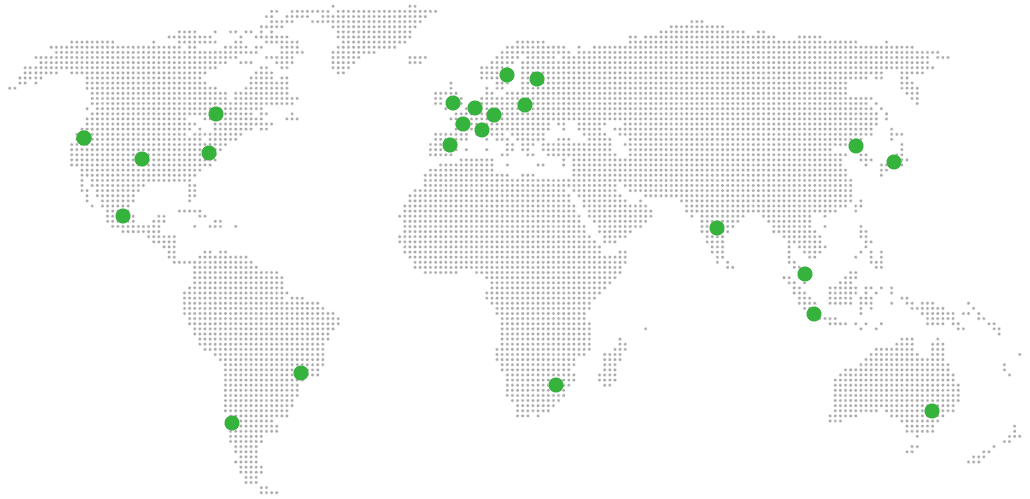
21 datacenter locations on six continents
Pick the region closest to your users.
United States, Germany, Finland, Singapore, Australia, Brazil, Canada, Netherlands, UK, Spain, Italy, France, Sweden, Malaysia, India, Japan, Mexico, Poland, South Korea, Chile, South Africa and more coming soon
Try managed Penpot for 7 days
SERVICES
COMPANY
RESOURCES
COMPARE


