Fully Managed Pairdrop
as a Service

Deploy Pairdrop as a fully managed service starting at €9/mo. Get automated backups, SSL, updates, support and monitoring included.

PairDrop is an open-source, browser-based peer-to-peer file transfer tool — files move directly between devices over WebRTC — combining the convenience of WeTransfer and AirDrop with the security and control of self-hosted infrastructure.

Free 7-day trial  99.9% Uptime SLA  No credit card  Cancel anytime

Free 7-day trial  99.9% Uptime SLA
No credit card  Cancel anytime

Pairdrop

Pairdrop

STARTING AT

€9/month
Automated Backups
Monitoring
Automated Updates
Auto SSL

USAGE

Unlimited
Human Support
Custom Domains
Terminal Access
File Manager Access
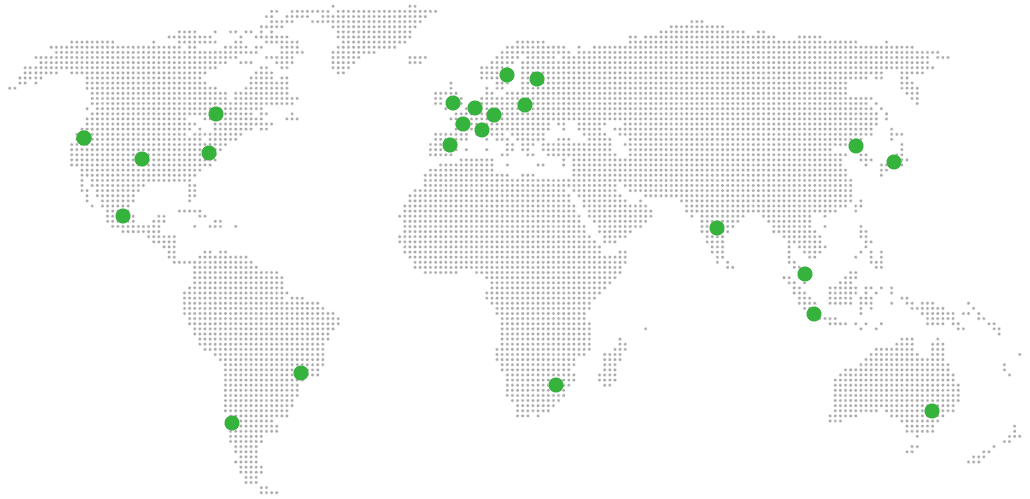
Deploy in your region 21 locations worldwide
GermanyFinlandNetherlandsUKSwedenUnited StatesCanadaSingaporeJapanAustraliaBrazilSouth Africa+9 more →
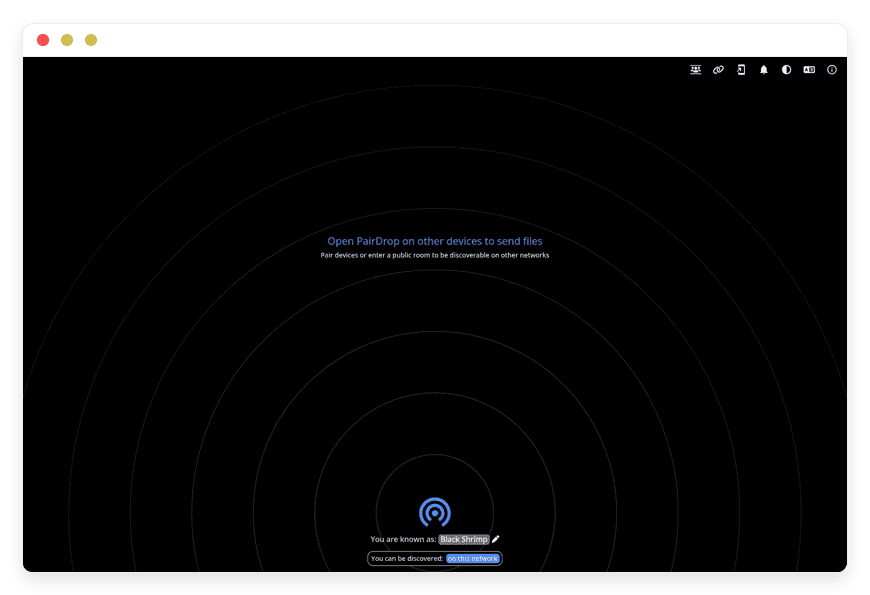
Pairdrop Preview Image

ABOUT THE SOFTWARE

What is Pairdrop

PairDrop is a browser-based peer-to-peer file transfer tool inspired by AirDrop. Files move directly between devices over an encrypted WebRTC channel — no upload to a server, no cloud copy, no third-party retention. Works across Linux, Windows, macOS, Android, iOS, and ChromeOS.

PairDrop is licensed under GPL-3.0 and maintained by schlagmichdoch on GitHub, where the project has reached 10,100 stars, 598 forks, and 1,344 commits since being forked from the original Snapdrop in 2022. The application is built on Vanilla JavaScript ES6, runs on a Node.js backend, uses WebRTC and WebSockets for signalling and transfer, and stores per-device pairing secrets in IndexedDB rather than on a server.

The signalling server brokers the initial handshake between devices and then steps out of the way. After that, file bytes flow directly peer-to-peer, encrypted in transit by WebRTC. PairDrop has no database, no user accounts, no link archive, and no server-side retention of file content. The official pairdrop.net instance is run by the maintainer; the same code runs identically on any self-host or managed deployment.

FEATURES

What Pairdrop does

Peer-to-peer file transfer in any modern browser. Pair devices once via 6-digit code and they find each other across networks. Drop into a 5-letter public room for ad-hoc transfers. Send from the OS Share menu. No upload, no download wait — files move in one step.

Encrypted peer-to-peer transfer

WebRTC handles encryption in transit. Files move directly between devices once the handshake completes — no server-side copy at any point.

Temporary public rooms

Enter a 5-letter code or scan a QR to join a public room. All devices in the room see each other. Rooms close when the last tab closes.

Multi-file with progress indicator

Transfer multiple files in one operation with a unified progress bar. Receiver downloads as a ZIP, or one-by-one to the gallery on mobile.

Audio and video preview

Inline preview for media files before download. HEIC/HEIF images auto-convert to a viewable format on receive.

Persistent device pairing

Pair via 6-digit code or QR. Paired devices recognise each other across networks via shared secrets stored in IndexedDB, indefinitely.

Send from OS Share menu

Right-click in Windows Explorer, share-extension in Nautilus on Ubuntu, native Share sheet on iOS and Android. Or use the CLI.

Installable PWA

Add to home screen on iOS, install as desktop PWA on Chrome and Edge. Persists pairing, supports notifications, works offline for UI.

Paste text or files

Paste a clipboard image, copied text, or a file directly into the PairDrop window and pick the recipient afterwards.

WHAT'S ALWAYS INCLUDED

Every app. Fully managed.
Nothing extra to pay for.

Every app you deploy includes the full managed service — security, backups, updates, and support from day one.

Automatic updates and patches

Apps run the latest stable version. Security patches applied silently, with rollback if needed.

Daily off-site backups

Multiple daily backups in redundant off-site locations. One-click restore if anything goes wrong.

24/7 uptime monitoring

Continuous monitoring with instant alerting. We respond before you notice.

SSL, firewall, DDoS protection

Auto-renewing SSL, hardened firewall rules, DDoS mitigation on every deployment.

Performance and scaling

We monitor resource usage continuously. When your app needs more headroom, we flag it and upgrade with your explicit approval.

Dedicated engineering support

Real engineers on chat. DNS, SMTP & migration help. All included in €9.

WHY MANAGED

Why teams pick managed Pairdrop

In July 2025, WeTransfer briefly updated its terms of service to grant itself a perpetual, sublicensable licence over uploaded content — language that read as authorising AI-model training on user files. The clause was rolled back within days after public outcry, but the migration to alternatives didn't reverse.

For teams who actually read the terms, the practical question shifted. Not "is the current terms-of-service language acceptable" but "what's the next platform we use after the next quiet revision." PairDrop is one of the small set of answers — file bytes never touch a third-party server because the transfer is peer-to-peer in the browser. There's nothing to revise the licence on, because there's nothing being stored.

The catch is that running PairDrop in production isn't quite "docker run and you're done." Two configurations break by default. First, devices on different networks can't transfer files at all until a TURN server is configured — the WebRTC handshake completes and then times out trying to relay through NAT. The official pairdrop.net runs a TURN server; a fresh self-host doesn't. Second, if the reverse proxy isn't passing the X-Forwarded-For header, every connecting client appears to come from the same IP, and PairDrop auto-discovery shows every visitor to every other visitor — a privacy leak that's silent until someone notices their device name on a stranger's screen.

REVIEWS

Hear from customers ​like you​​​​​​​

Successful businesses and professionals around the world rely on DANIAN every day

USE CASES

Three teams who run Pairdrop on DANIAN

These are representative team types we set up most often. Each starts with the same flat €9 plan.

12-PERSON DESIGN STUDIO

Migrating off WeTransfer Ultimate after the AI-clause backlash

Running on the France region with the URL drop.studio-name.com. Twelve laptops and phones paired persistently so devices find each other on coworking Wi-Fi and home office Wi-Fi equally. Moving roughly 40 GB of client mood boards, RAW exports, and rough cuts per month. Public rooms enabled for ad-hoc client sends.

5-PERSON ARCHITETURE PRACTICE

Sending 2 GB BIM files between two offices without a VPN

Vienna and Munich offices on a single instance, Germany region. Coturn TURN over TLS handles the cross-NAT transfers. Average 32 GB/month of Revit and DWG exchanges. PWA installed on the principal architect's iPad so client visits can pull the latest model from the office laptop on demand.

UNIVERSITY LAB IT

Inter-device transfer for 200 lab devices without SSO

Closed-network deployment on the campus subnet, public rooms disabled at the application layer. X-Forwarded-For configured per VLAN so a peer in Lab A doesn't appear to a peer in Lab B. Students and TAs drop assignment files between lab PCs and personal laptops, no account, no cloud round-trip. One €9 instance for the whole campus.

COMPARISON

Four ways to run Pairdrop

Each path moves files between devices. They differ in what you spend, what you operate, and what a third party holds. The cost columns show the same workload — a small team's file-transfer needs — priced at 1, 5, and 10 users.

 PATH1 USER5 USERS 10 USERSOPERATIONAL WORK
WeTransfer Ultimate
Per-seat SaaS, files held by vendor up to retention window. Terms have been revised mid-policy without notice.
$19/mo$95/mo$190/moNone on your side; full reliance on vendor's terms and data handling.
Self-host on a VPS
$24/mo production-class VPS plus a TURN server and reverse-proxy config. Coolify on a $24 VPS works if you have a developer in-house.
~$24/mo
+ 3–6 hrs/mo ops
~$24/mo
+ 4–8 hrs/mo ops
~$24/mo
+ 6–10 hrs/mo ops
TURN server, X-Forwarded-For setup, HTTPS renewal, version upgrades, on-call.
Home server
Synology DS923+ or equivalent on business internet with static IP and proper backup target.
~€210–600/mo~€220–620/mo~€230–650/moHardware, electricity, business internet with static IP, off-site backup, 2–4 hrs/mo time.
DANIAN Managed Pairdrop€9/mo€9/mo€9/moNone. Patching, monitoring, backups, TURN, HTTPS handled.

BY INDUSTRY

Pairdrop for specific industries

PairDrop's peer-to-peer model fits industries where the file is sensitive, the third-party retention is uncomfortable, and the workflow is laptop-to-laptop rather than file-server-to-portal. Five industries where the configuration is worth doing well.

The studio segment was the most visible mover off mainstream SaaS file-transfer tools after the July 2025 terms-of-service rewrite that briefly authorised model training on user uploads.

Operational standard most studios already hold themselves to: contractual non-disclosure on every client engagement, which sits awkwardly with a perpetual sublicensable third-party licence over file content.

DANIAN configuration: instance provisioned on a studio subdomain (drop.studio-name.com) with all paired devices persistent across home, office, and coworking Wi-Fi.

Workflow example: a 12-person studio moving RAW photo exports from the on-site shoot laptop straight to the editor's machine before either of them has finished coffee, no upload progress bar, no link-and-wait.

Quantifiable detail: roughly 30–50 GB/month of mood boards, RAW exports, and rough video cuts on a single €9 instance.
Architecture practices move BIM models, point clouds, and CAD drawings that routinely run 500 MB to 4 GB — file sizes that break free SaaS tiers, stall on shared corporate file portals, and lose context when chunked across email.

Operational standard: client agreements typically require sole custody of project IP through completion, which makes third-party SaaS retention windows a recurring contract review.

DANIAN configuration: bundled coturn TURN server over TLS on port 5349 so a paired laptop at one office and a paired laptop at a partner site connect through both NATs without a corporate VPN tunnel.

Workflow example: a 5-person practice exchanging weekly Revit federations and DWG sheet sets between Vienna and Munich, plus the principal's iPad pulling the current model on a site visit.

Quantifiable detail: roughly 32 GB/month, with individual transfers up to 4 GB sustained.
Engineering teams use PairDrop for the awkward middle ground that breaks every other tool: crash dumps too sensitive to drop in Slack, build artifacts too one-off to commit to S3, profiler traces and screenshots that need to be on the reviewer's machine in the next five minutes.

Operational standard: most engineering orgs have internal data-handling rules that discourage routing dumps through third-party SaaS file-transfer providers.

DANIAN configuration: IPV6_LOCALIZE="4" enabled so engineers behind the same Cloudflare-fronted /64 subnet auto-discover each other, plus the WebSocket fallback toggled on for engineers behind corporate VPNs that block WebRTC outright.

Workflow example: an engineer on the Linux laptop pairs with the QA engineer's Mac, drops a 600 MB heap dump straight across, both move on.

Quantifiable detail: a 10-person team typically does hundreds of small transfers per week at the same €9 cost as a single user.
University labs and school IT operate networks where students, teaching assistants, and staff need to move files between lab PCs and personal devices constantly, but where adding 200 SSO accounts and provisioning a cloud upload quota per user isn't realistic for a small IT team.

Operational standard: most institutional IT policies require that student-generated content stay inside the institution's network unless explicitly authorised — third-party SaaS uploads are functionally a policy violation.

DANIAN configuration: public rooms disabled at the application layer so the instance is local-network-only, X-Forwarded-For wired per VLAN so peers in different labs don't appear to each other, rate limit tuned for shared-IP egress.

Workflow example: a programming class submits weekly assignments by dropping the file from the lab PC to the TA's grading laptop on the same subnet.

Quantifiable detail: one €9 instance serves a 12-room lab with around 200 active devices.
Newsrooms and freelance publishing chains move source documents, interview audio, raw photography, and unedited video between reporters, photographers, fixers, and editors — workflows where 'who has a copy of this file' matters as much as the file itself, especially when sources are off-the-record.

Operational standard: editorial source-protection conventions discourage routing source material through any third-party platform that retains a copy.

DANIAN configuration: a custom subdomain (drop.publication.com), persistent device pairing so a reporter's phone in the field finds the desk editor's laptop after both reboot, daily off-site backup of the instance configuration.

Workflow example: a 6-person editorial team where a reporter in Berlin drops interview audio to a translator in Athens and a layout editor in Lisbon, all on the same instance, all peer-to-peer.

Quantifiable detail: typical newsroom does 50–100 file moves per week, no per-transfer accounting.

FAQ

Frequently asked questions

Everything teams ask before signing up — answered straight, without sales speak.

Three groups: technical setup, migration, and how DANIAN works as a service.

01

Technical and configuration

Because the WebRTC peer connection can't punch through both NATs without a TURN relay. Without a configured TURN server, two devices on different networks finish the signalling handshake and then time out trying to exchange data. The official pairdrop.net runs a TURN server; a fresh Docker pull does not. On managed PairDrop we ship a coturn TURN server alongside the app on port 5349 over TLS, with credentials rotated and the firewall punched for 3478, 5349, and the 10000–20000 relay range.
Almost always the X-Forwarded-For header isn't being passed by the reverse proxy. PairDrop's auto-discovery groups peers by the public IP the server sees. If the reverse proxy strips X-Forwarded-For, every client appears to come from the proxy's IP and everyone discovers everyone. We pin this in the nginx config: proxy_set_header X-Forwarded-For $remote_addr — and we set DEBUG_MODE briefly on first deploy to verify each peer's real IP is being read. After verification, debug logging goes off.
Two causes show up. First, the receiving browser tab going to sleep — we keep NoSleep enabled so the screen-wake lock holds for the duration of the transfer. Second, the relay path: when TURN is in play (cross-NAT, VPN active, blocked WebRTC), throughput drops and a marginal connection that survives a 50 MB file fails on a 2 GB one. We tune the TURN server with TLS and run it on our own infrastructure rather than a free public relay, so the path is stable for files up into the multi-gigabyte range.
Many consumer VPN clients block WebRTC outright to prevent IP leaks. PairDrop has an optional WebSocket fallback (WS_FALLBACK=true) that routes traffic through the server when WebRTC is unavailable. The fallback is honest about its trade-off: traffic is no longer peer-to-peer and is readable in transit by the server it routes through. We enable the fallback on instances where the customer wants it on, leave it off where they don't, and document the consequence either way.
Yes — but only over HTTPS with a trusted certificate, which is exactly what a fresh self-host doesn't give you. PWA install, persistent device pairing across browser restarts, display-name changes, and notifications all require TLS. We provision the instance with auto-renewed HTTPS at the edge, so the iOS Add-to-Home-Screen path works on the customer's own subdomain (drop.companyname.com), not on a generic shared host.
PairDrop runs no database. The signalling server brokers the handshake and then steps out of the way; file bytes flow peer-to-peer over WebRTC, encrypted in transit. We back up the instance configuration — environment variables, RTC config, reverse proxy config, custom branding — daily off-site, but we do not back up file contents because we never have them. If you need server-side file retention, PairDrop isn't the right tool; we run Nextcloud, XBackBone, and Cubby for that.
PairDrop stores a per-device shared-secret keypair in IndexedDB. Paired devices recognise each other independently of network state — same Wi-Fi, different country, behind a VPN, it doesn't matter. The IndexedDB store is browser-local, so a private-browsing session or a cleared site-data on the device resets pairing, which is the right behaviour for shared workstations.

02

Migration and onboarding

We can activate your app on your own custom domain/subdomain. Examples: mydomain.com, anyword.mydomain.com.
Or, on our randomized free subdomain. Example: 963.apps.danian.cloud
If you wish to use a custom domain/subdomain, select that option when ordering your app (or notify us later). We will send you the required DNS records and if needed, our tech team will modify them for you.
21 datacenter locations across six continents. You choose the region at provisioning. Application data sits in the region you choose; pick whichever is closest to your users or matches your data-residency preference.
Yes. Request a region migration from the dashboard and we run the move in the background. The system emails you when the migration completes; total transfer time depends on data volume but typical instances finish in a few hours. There is no extra charge for a region change.
Yes. Full data export is available at any time, in a portable format you can bring to any infrastructure.
Two different things. PairDrop is browser-to-browser at transfer time and stores no historical sends — no inbox, no link archive, nothing to migrate. If your team needs the WeTransfer-style send-link-and-let-it-sit-for-7-days workflow, the closer fits in our catalog are Nextcloud or Cubby. PairDrop is the right pick when 'I just need this file on the other laptop' is the actual job, and the seven-day storage is something you've been paying for but not really using.
Each device opens the new instance once, enters the 6-digit pairing code from another team device, and is paired persistently. Three minutes per device pair, no admin tool required. For larger fleets, we can pre-stage paired-device records on request — email us during onboarding.

03

Billing, support, and platform

€9 covers everything we do for that app: hardware in the region you choose, daily off-site backups with one-click restore, automatic security patches and version upgrades, 24/7 monitoring, SSL and firewall, and engineering support on Email/LiveChat. There are no setup fees or hidden line items. For more info see our Pricing page.
If you decide to continue, we charge €9/app/month from day 8. If you don't, the trial ends and you can export your data. No card is required for the trial, and we never auto-charge you without explicit consent.
No. The €9/month is flat regardless of how many users log into your app. Add 5 users or 50; the price doesn't change.
24/7 Live chat and email support, both staffed by engineers who run the systems. We handle DNS configuration, SMTP setup, app integrations, performance tuning, troubleshooting, and migration help. Response time is typically under an hour. There is no tier system — every customer gets the same support.
Yes. Cancel from the dashboard. We don't charge a cancellation fee, we don't lock data, and we will export your data to you on request before deletion. data to you on request before deletion.
Every customer instance is backed up daily to a separate region from the primary. We test restores. You can request a restore at any backup point within the retention window — usually 7 days for daily backups.
Your application data sits in the region you choose at provisioning — 21 datacenter locations across six continents. Account-level data (billing, account email, support ticket history) is processed centrally. Application data region is picked by you, per app.
99.9% uptime SLA on every app, every tenant. Service credits are documented at danian.co/service-level-agreement. The status page is located at status.danian.co.
When your tenant approaches the resource ceiling — the base tier holds 1 vCPU/RAM, 30 GB storage — we notify you. Resource upgrades happen with your explicit consent; we will not upgrade your tenant or charge you without it.
We wait. We don't suspend the app or delete your data on the first failed charge. We email you, you fix the card on file, and we continue.
Invoices can be downloaded from the billing dashboard in PDF the day each charge succeeds. EU VAT is added where applicable and the VAT-reverse-charge regime applies for VAT-registered businesses with a valid number.
150+ open-source apps across automation, team chat, file sync, analytics, AI, password management, email marketing, dev tools, project management, smart home, CMS, and federated social. See the full catalog →
Yes. Every instance comes with a web-based terminal and a file manager in your DANIAN management dashboard. Useful for managing your data and customizations.
Resources scale with your usage. If your app needs more vCPU, RAM, or storage, we add it — and we ask first before any change to your plan. €9 is the floor; resource-heavy workloads may price higher, but you'll always know in advance.
Yes. We have both a Partner program and an Affiliate program available. Anybody can sign up.
No contract. No minimum commitment. Cancel anytime from the dashboard with one click. The 7-day free trial requires no credit card. After the trial converts to paid, you can still cancel at any month without notice or penalty.

DEPLOY IN YOUR REGION

21 datacenter locations on six continents

Pick the region closest to your users.

United States, Germany, Finland, Singapore, Australia, Brazil, Canada, Netherlands, UK, Spain, Italy, France, Sweden, Malaysia, India, Japan, Mexico, Poland, South Korea, Chile, South Africa and more coming soon
Global Reach Map

Try managed Pairdrop for 7 days

No card. Cancel from the dashboard.