Fully Managed FindMyDeviceServer
as a Service

Deploy FindMyDeviceServer as a fully managed service starting at €9/mo. Get automated backups, SSL, updates, support and monitoring included.

FMD Server is the self-hostable backend for the FMD Android app — an open-source alternative to Google Find Hub. The location data never reaches Google. Patching, backups, TLS, monitoring, and human support are all included.

Free 7-day trial  99.9% Uptime SLA  No credit card  Cancel anytime

Free 7-day trial  99.9% Uptime SLA
No credit card  Cancel anytime

FindMyDeviceServer

FindMyDeviceServer

STARTING AT

€9/month
Automated Backups
Monitoring
Automated Updates
Auto SSL

USAGE

Unlimited
Human Support
Custom Domains
Terminal Access
File Manager Access
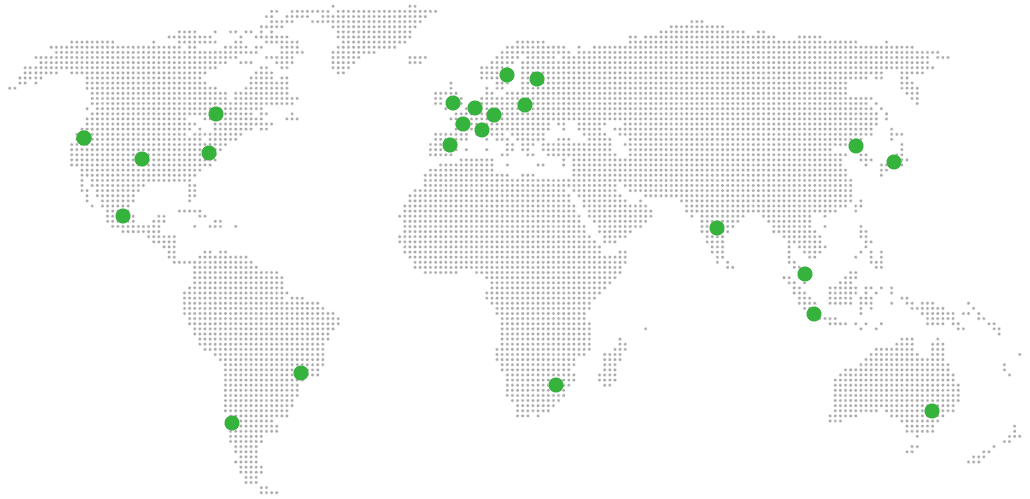
Deploy in your region 21 locations worldwide
GermanyFinlandNetherlandsUKSwedenUnited StatesCanadaSingaporeJapanAustraliaBrazilSouth Africa+9 more →
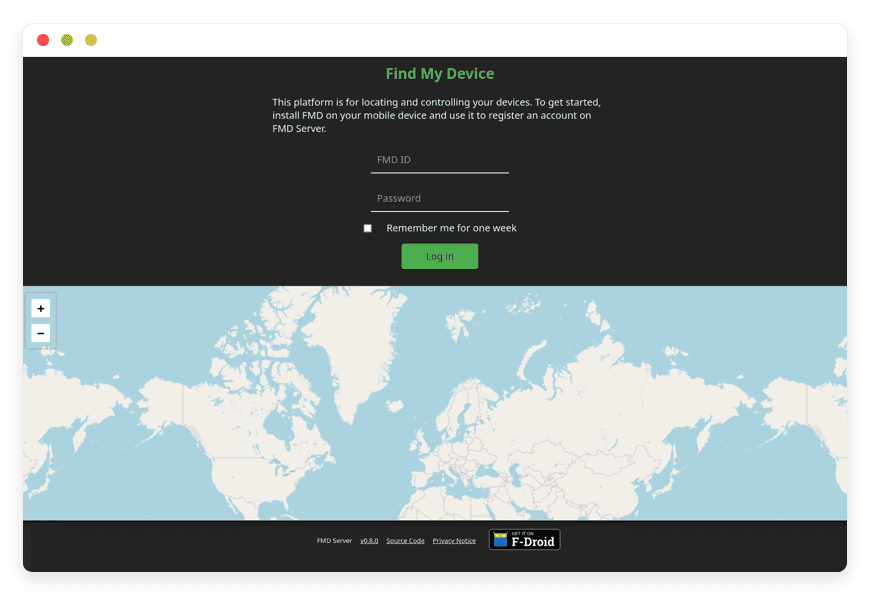
FindMyDeviceServer Preview Image

ABOUT THE SOFTWARE

What is FindMyDeviceServer

FMD Server is the open-source backend that powers the FMD Android app — a self-hostable alternative to Google Find Hub. It receives end-to-end encrypted location pings from your phones and serves a web interface where you can send remote commands.

The project is licensed GPL-3.0-or-later and maintained by the fmd-foss organisation on GitLab, originally created in 2021 by Nulide and now developed alongside maintainer Thore Göbel. The server is a small Go binary that stores data in SQLite — a migration from the earlier ObjectBox backend. Three official Docker images ship per release: Alpine (~55 MB), Debian (~160 MB), and a Distroless image at ~40 MB.

The upstream maintainers describe FMD as "a hobby project" and explicitly note they "can't guarantee that it will work when you need it the most." That is honest — it is also exactly the gap a managed offering fills. We run the same upstream binary, on production infrastructure, with the monitoring and backup discipline the project's own disclaimer warns is otherwise on you.

FEATURES

What FindMyDeviceServer does

FMD Server is the control plane for remote device commands. The Android client uploads end-to-end encrypted location data; the web interface sends signed commands back. Eight capabilities form the core of what the project ships today.

Locate device fmd locate

Two modes since 0.14.0. The gps command waits for accuracy to converge — the first fix is rough; the next 10 to 20 seconds dramatically improve it. fused uses Android's combined provider for faster, lower-battery fixes.

Lock the device fmd lock

Immediately locks the screen. An optional message displays on the lock screen so a finder can return it. Works without an active internet connection if the SMS channel is configured.

Remote wipe fmd delete

Factory-resets the phone. Requires Android Device Admin permission, which the FMD onboarding flow walks the user through. A separate delete password gates the command since 0.14.0.

UnifiedPush delivery

Commands push to the phone via UnifiedPush — no Google Play Services dependency. Works on GrapheneOS, CalyxOS, and LineageOS-without-GApps. ntfy is the most common distributor.

Ring the device fmd ring

Plays a loud sound at maximum volume and overrides silent mode. Useful when the phone is nearby but not visible. A ring long variant ships in 0.14 for prolonged playback.

Camera capture fmd camera

fmd camera front or fmd camera back quietly takes a picture and uploads it encrypted. Helps identify surroundings or a finder, without flash or shutter feedback.

SMS command channel

Every command also works over SMS, gated by a PIN or a whitelist of trusted numbers. No internet required on the phone. The original 2020 use case for FMD before the server existed.

End-to-end encryption

RSA-3072 keypair encrypted under an Argon2id-derived AES-GCM key. The server stores ciphertext only. Even the operator running the instance cannot read location data or pictures.

WHAT'S ALWAYS INCLUDED

Every app. Fully managed.
Nothing extra to pay for.

Every app you deploy includes the full managed service — security, backups, updates, and support from day one.

Automatic updates and patches

Apps run the latest stable version. Security patches applied silently, with rollback if needed.

Daily off-site backups

Multiple daily backups in redundant off-site locations. One-click restore if anything goes wrong.

24/7 uptime monitoring

Continuous monitoring with instant alerting. We respond before you notice.

SSL, firewall, DDoS protection

Auto-renewing SSL, hardened firewall rules, DDoS mitigation on every deployment.

Performance and scaling

We monitor resource usage continuously. When your app needs more headroom, we flag it and upgrade with your explicit approval.

Dedicated engineering support

Real engineers on chat. DNS, SMTP & migration help. All included in €9.

WHY MANAGED

Why teams pick managed FindMyDeviceServer

In May 2025, Google renamed Find My Device to Find Hub and added people-tracking as a top-level feature. By November 2025, JBL, Sony, and Nest devices were integrating into the crowdsourced Bluetooth mesh — over a billion Android devices contributing pings. Teams that do not want to be part of that have moved to a self-hosted alternative.

Self-hosting FMD Server is not particularly hard, but the steps that separate a working instance from a fragile one are also not the ones the upstream Docker docs spell out as required. The web interface needs HTTPS to load at all — that is a WebCrypto API constraint, not an FMD policy. The Android client uses HTTP and the upstream docs note plain HTTP is "highly discouraged in production." A reverse proxy with TLS termination is mandatory in practice.

Then there are the smaller knobs the docs surface only after you have already hit them. The container database directory must be readable and writable by UID 1000, or 65532 on the Distroless image — "Most errors such as permission denied are due to misconfigured permissions," per upstream. The project is still pre-1.0 and minor versions have introduced breaking changes; 0.11.0 required Android client 0.9.0 or later, and "latest" is not a tag to pin to. UnifiedPush command delivery depends on a distributor app like ntfy running in the background — if the OS kills it for battery reasons, server-pushed commands queue indefinitely.

REVIEWS

Hear from customers ​like you​​​​​​​

Successful businesses and professionals around the world rely on DANIAN every day

USE CASES

Three teams who run FindMyDeviceServer on DANIAN

These are representative team types we set up most often. Each starts with the same flat €9 plan.

SOLO GRAPHENEOS USER · BERLIN

One phone, one ntfy distributor, no Google Play Services

Single Pixel 8 running GrapheneOS without sandboxed Google Play — stock Find Hub does not work. ntfy sidecar on the same DANIAN instance handles UnifiedPush command delivery. Region: Germany. PIN-gated SMS fallback for offline cases. MaxSavedLoc capped at 100 to keep retention tight.

12-PERSON FIELD-SERVICE OPERATOR · NETHERLANDS

14 LineageOS phones, no Google Workspace, one shared instance

Field technicians carry company phones on LineageOS-without-GApps. Standard MDMs require Google Workspace and do not fit. Each phone registers against a shared instance with FMD_REGISTRATIONTOKEN rotated quarterly. Region: Netherlands. Dispatcher runs fmd locate gps when a tablet does not return at end of shift.

FAMILY OF FOUR · SWEDEN

Dropping a Life360 Platinum subscription for self-hosted devices

Two parents, two teens, mix of stock Pixels and a Fairphone on /e/OS. Each family member runs an account on the shared instance, gated by a token rotated annually. Region: Sweden. End-to-end encryption means the household admin cannot read another member's location history. Annual saving versus Life360 Platinum: roughly $300.

COMPARISON

Four ways to run FindMyDeviceServer

Google Find Hub is free in cash — but you pay with data. The four paths below are the realistic alternatives if that trade is not worth it. Monthly cost shown at 1, 5, and 10 devices.

 PATH1 DEVICE5 DEVICES10 DEVICESSETUP TIME ONGOING OPS
Proprietary SaaS
Prey Protection, per device
$1.95/mo$9.75/mo$19.50/mo15 min
None — data lives in Prey's cloud
Self-host on a VPS
$24/mo production-class VPS
~$44/mo + time~$44/mo + time~$44/mo + time5–10 hours1–2 hrs/month patching, TLS renewal, backups
Home server
Synology DS923+ or similar
€210–667/mo€210–667/mo€210–667/mo8–16 hours2–4 hrs/month + electricity + business uplink
DANIAN Managed FindMyDeviceServer€9/mo€9/mo€9/moMinutesZero

Prey Protection is the closest paid SaaS comparator — same feature surface (locate, lock, alarm, wipe, photo), priced per device with annual billing. VPS row uses the CONTENT_POLICY reference $24/mo production-class VPS plus $5 object-storage backup plus $15 monitoring. Home-server row amortises hardware over 36 months and includes the static-IP business internet typically needed for production hosting. Customer-side operational time is real cost — at a freelance sysadmin rate it is the biggest line in the home-server column.

BY INDUSTRY

FindMyDeviceServer for specific industries

FMD Server's privacy model and command surface make it a better fit in some industries than others. Four where source protection or data sovereignty pushes teams away from Google Find Hub and toward a self-hosted alternative — and where the managed-hosting defaults remove the operational friction.

The operational anchors are journalist source-protection norms (Council of Europe Recommendation CM/Rec(2000)7 on the right of journalists not to disclose sources) and GDPR Article 32 on security of processing. The threat model is concrete: a phone holding source contact lists ends up out of the reporter's hands and the org cannot afford for Google, the device finder, or anyone in between to see the location trail.

DANIAN sets FMD_REGISTRATIONTOKEN by default so registration is gated to the organisation, hardens the container per OWASP (read_only, cap_drop ALL, no-new-privileges), and caps MaxSavedLoc at 100 entries to keep retention tight. The delete password introduced in FMD 0.14.0 is set separately from the account password so a coerced login does not equal a coerced wipe. Workflow: a reporter loses a Pixel in the field — the editor logs in, sends fmd locate gps to converge on a real fix, and runs fmd delete if the device is unrecoverable. Retention cap and the two-password architecture are the substantive differences from a default install.
The operational anchor is ISO/IEC 27001 Annex A.8.10 on information deletion and A.7.9 on the security of off-premises assets. This is what auditors expect to see on a fleet of company-issued phones — not a certification DANIAN holds, an operational standard the customer's program will likely cite. The fit is strongest where the fleet runs LineageOS or another Google-free Android build, because standard MDMs require Google Workspace and do not apply.

DANIAN pins the 0.14.1-alpine image, runs the container hardened, backs up the SQLite database off-host daily, and deploys an ntfy sidecar so push delivery works without Google Play Services. Workflow: a driver's tablet does not return at end of shift — the dispatcher runs fmd ring long, then fmd lock with a custom return message, then fmd locate fused every four hours until the tablet is found. Background location upload intervals are configurable down to 15 minutes per device, balancing battery against recovery time. For larger fleets, the SQLite database stays small even at fifty-plus devices.
Privacy of student and staff data per the applicable national education-data protection regime — GDPR Article 32 for EU institutions, comparable rules elsewhere — restricts what device-location data may flow to third parties. Google Find Hub is a third party. A self-hosted locator on infrastructure the institution controls is the documented answer in several university IT policy reviews from 2024 and 2025.

DANIAN deploys one FMD Server instance per fleet, sets FMD_USERIDLENGTH=5 for shorter device IDs that are easier to track in a loan ledger, rotates the registration token each academic year, and keeps the container read-only. Workflow: a tablet is not returned at end of semester — IT issues fmd lock with a message pointing to the library return desk, runs fmd locate cell to confirm the device is still on campus, and runs fmd delete if seven days pass with no return. The seven-day policy lives in the institution's SOP; FMD itself runs no automatic actions — every command is operator-initiated, which is exactly what an auditor wants to see.
Attorney-client privilege, GDPR Article 32, and national bar association rules on client-data handling all push toward a self-hosted locator rather than a third-party SaaS. A phone containing client communications or case files cannot end up sending location pings to a vendor whose data-handling practices the firm has not vetted. For solo and small practices, full MDM is overkill — FMD Server is the minimum surface area that solves the device-loss case.

DANIAN enforces TLS-only access via Let's Encrypt, runs the OWASP-hardened container, and mounts the SQLite database on an encrypted host volume. FMD Server v0.11.0 and later support account brute-force lockout after five failed attempts with a ten-minute window; we also add fail2ban on failed-login IPs at the proxy layer. Workflow: a solo practitioner loses a phone with client files — logs in, runs fmd lock with a custom message, runs fmd locate gps for a real fix, runs fmd camera back to see the surroundings, and runs fmd delete if recovery is not viable. The brute-force lockout plus the proxy-layer fail2ban is the substantive hardening over a default install.

FAQ

Frequently asked questions

Everything teams ask before signing up — answered straight, without sales speak.

Three groups: technical setup, migration, and how DANIAN works as a service.

01

Technical and configuration

Yes. The Android client uses UnifiedPush instead of Firebase Cloud Messaging, so it runs on GrapheneOS, CalyxOS, and LineageOS-without-GApps as long as a UnifiedPush distributor is installed on the phone. ntfy is the most common choice. The upstream FAQ notes the distributor must be allowed to run in the background — otherwise commands queue at the server but do not push to the phone in real time.
The command is queued at FMD Server and pushed via UnifiedPush when the phone next comes online and the distributor wakes up. There is no guaranteed latency. On devices in deep Doze or with a frozen distributor, the command may not execute until the screen is unlocked. The SMS channel is the documented offline fallback for that exact case.
FMD Android 0.14.0 split the locate command into two modes. fmd locate gps waits until accuracy converges — the release notes call out that the first GPS fix is usually rough and subsequent fixes within 10 to 20 seconds are heavily improved. fmd locate fused uses Android's combined provider, which is faster and lighter on battery. Use fused for routine pings, gps when you need a real fix.
Yes. FMD Server is multi-user. Each device registers its own account, gated by FMD_REGISTRATIONTOKEN when an operator sets one — we do, by default. Per-account caps MaxSavedLoc and MaxSavedPic are configurable. Each account's data is encrypted under its own keypair, so even the operator cannot read across accounts.
A symmetric key is derived from the account password using Argon2id. The Android client generates an RSA-3072 keypair on first registration; the private key is encrypted with AES-GCM under that symmetric key and uploaded to the server. Locations and pictures are encrypted with RSA-OAEP under the public key before upload. Commands sent from the web UI are signed with RSA-PSS and carry a strictly-increasing timestamp to block replay.
FMD Server has no time-based retention. It keeps the most recent N locations and M pictures per account, configurable via MaxSavedLoc and MaxSavedPic. Default upstream values are 1000 locations and 10 pictures. We can tighten these on request — investigative-journalism setups commonly run with MaxSavedLoc: 100 to keep the trail short. Older entries are overwritten as new ones arrive.
No. fmd delete requires Android Device Admin permission. Without it, fmd lock, fmd ring, fmd locate, and fmd camera still work. On Android 15 and later, granting Device Admin requires opening the app's settings, tapping the three-dot menu, and selecting Allow restricted settings — this is documented in the upstream FAQ.
Commands sent over the SMS channel keep working — that path is independent of the server. Server-pushed commands queue until the UnifiedPush channel reconnects, and background location uploads retry. Our monitoring catches reachability issues before they reach the hours mark; the SLA covers 99.9% monthly uptime, and the on-call replies in chat when it does not.
The web UI runs cryptographic operations in the browser via the WebCrypto API, which is only available in a secure context — HTTPS, or http://localhost for development. The Android client carries its own crypto implementation and does not have that constraint, though upstream "strongly discourages" plain HTTP in production. We front every instance with TLS via Let's Encrypt. There is no plain-HTTP mode on DANIAN.
No. FMD Android is Android-only and there is no iOS client on the roadmap. The project is literally named FMD Android. If you need to locate iPhones too, FMD Server will not help — Apple's Find My is the only first-party path on iOS, and there is no comparable open-source alternative on that platform today.

02

Migration and onboarding

We can activate your app on your own custom domain/subdomain. Examples: mydomain.com, anyword.mydomain.com.
Or, on our randomized free subdomain. Example: 963.apps.danian.cloud
If you wish to use a custom domain/subdomain, select that option when ordering your app (or notify us later). We will send you the required DNS records and if needed, our tech team will modify them for you.
21 datacenter locations across six continents. You choose the region at provisioning. Application data sits in the region you choose; pick whichever is closest to your users or matches your data-residency preference.
Yes. Request a region migration from the dashboard and we run the move in the background. The system emails you when the migration completes; total transfer time depends on data volume but typical instances finish in a few hours. There is no extra charge for a region change.
Yes. Full data export is available at any time, in a portable format you can bring to any infrastructure.
There is no direct data import — Find Hub does not export location history in a useful format. The migration is operational: install the FMD Android app on each device from F-Droid or the Play Store, register each device against your DANIAN instance using the registration token, grant the permissions, then disable Find Hub network participation in Android Settings. New location history starts immediately.
An FMD account is a device account, not a person account. If multiple people need to see the same device, they share the account credentials. Most families and small teams run one account per device and share the web login among trusted people. Larger orgs split per-team accounts on the same instance, gated by the registration token.

03

Billing, support, and platform

€9 covers everything we do for that app: hardware in the region you choose, daily off-site backups with one-click restore, automatic security patches and version upgrades, 24/7 monitoring, SSL and firewall, and engineering support on Email/LiveChat. There are no setup fees or hidden line items. For more info see our Pricing page.
If you decide to continue, we charge €9/app/month from day 8. If you don't, the trial ends and you can export your data. No card is required for the trial, and we never auto-charge you without explicit consent.
No. The €9/month is flat regardless of how many users log into your app. Add 5 users or 50; the price doesn't change.
24/7 Live chat and email support, both staffed by engineers who run the systems. We handle DNS configuration, SMTP setup, app integrations, performance tuning, troubleshooting, and migration help. Response time is typically under an hour. There is no tier system — every customer gets the same support.
Yes. Cancel from the dashboard. We don't charge a cancellation fee, we don't lock data, and we will export your data to you on request before deletion. data to you on request before deletion.
Every customer instance is backed up daily to a separate region from the primary. We test restores. You can request a restore at any backup point within the retention window — usually 7 days for daily backups.
Your application data sits in the region you choose at provisioning — 21 datacenter locations across six continents. Account-level data (billing, account email, support ticket history) is processed centrally. Application data region is picked by you, per app.
99.9% uptime SLA on every app, every tenant. Service credits are documented at danian.co/service-level-agreement. The status page is located at status.danian.co.
When your tenant approaches the resource ceiling — the base tier holds 1 vCPU/RAM, 30 GB storage — we notify you. Resource upgrades happen with your explicit consent; we will not upgrade your tenant or charge you without it.
We wait. We don't suspend the app or delete your data on the first failed charge. We email you, you fix the card on file, and we continue.
Invoices can be downloaded from the billing dashboard in PDF the day each charge succeeds. EU VAT is added where applicable and the VAT-reverse-charge regime applies for VAT-registered businesses with a valid number.
150+ open-source apps across automation, team chat, file sync, analytics, AI, password management, email marketing, dev tools, project management, smart home, CMS, and federated social. See the full catalog →
Yes. Every instance comes with a web-based terminal and a file manager in your DANIAN management dashboard. Useful for managing your data and customizations.
Resources scale with your usage. If your app needs more vCPU, RAM, or storage, we add it — and we ask first before any change to your plan. €9 is the floor; resource-heavy workloads may price higher, but you'll always know in advance.
Yes. We have both a Partner program and an Affiliate program available. Anybody can sign up.
No contract. No minimum commitment. Cancel anytime from the dashboard with one click. The 7-day free trial requires no credit card. After the trial converts to paid, you can still cancel at any month without notice or penalty.

DEPLOY IN YOUR REGION

21 datacenter locations on six continents

Pick the region closest to your users.

United States, Germany, Finland, Singapore, Australia, Brazil, Canada, Netherlands, UK, Spain, Italy, France, Sweden, Malaysia, India, Japan, Mexico, Poland, South Korea, Chile, South Africa and more coming soon
Global Reach Map

Try managed FindMyDeviceServer for 7 days

No card. Cancel from the dashboard.