Fully Managed CalibreWeb
as a Service

Deploy CalibreWeb as a fully managed service starting at €9/mo. Get automated backups, SSL, updates, support and monitoring included.

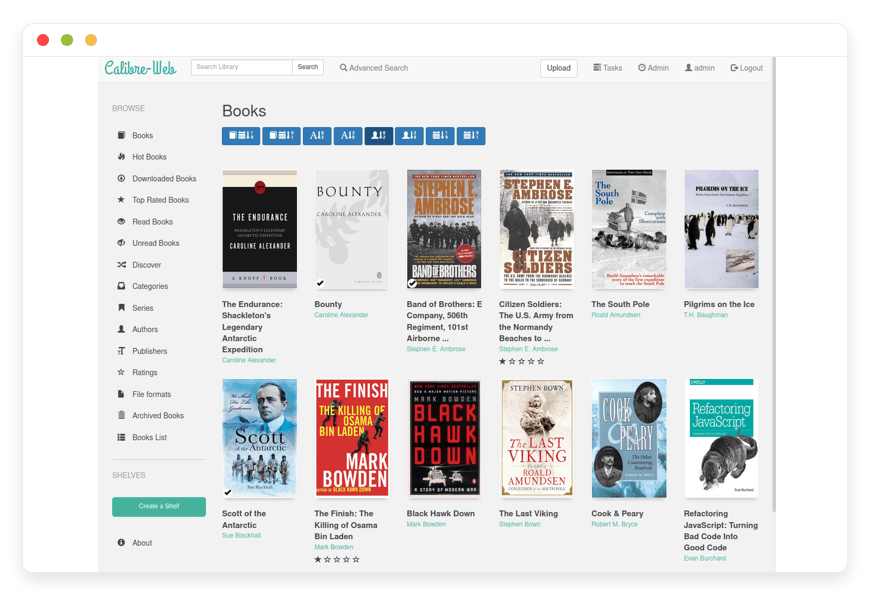
Calibre-Web is an open-source ebook library server — multi-user reading, OPDS catalogs, Send-to-Kindle, and in-browser EPUB — combining the convenience of cloud reading services with the control of self-hosted infrastructure.

Free 7-day trial  99.9% Uptime SLA  No credit card  Cancel anytime

Free 7-day trial  99.9% Uptime SLA
No credit card  Cancel anytime

CalibreWeb

CalibreWeb

STARTING AT

€9/month
Automated Backups
Monitoring
Automated Updates
Auto SSL

USAGE

Unlimited
Human Support
Custom Domains
Terminal Access
File Manager Access
Deploy in your region 21 locations worldwide
GermanyFinlandNetherlandsUKSwedenUnited StatesCanadaSingaporeJapanAustraliaBrazilSouth Africa+9 more →
CalibreWeb Preview Image

ABOUT THE SOFTWARE

What is CalibreWeb

Calibre-Web is an open-source web app that serves a Calibre ebook library — multi-user reading, OPDS feeds, Send-to-Kindle, in-browser EPUB and KEPUB, and per-user shelves — turning a local Calibre library into a multi-device, multi-reader service.

The project is licensed under GPL-3.0 and originated with developer Jan Czerniak. It has 17,200+ GitHub stars and an active maintainer line led by OzzieIsaacs. The codebase reads an existing Calibre library on disk — metadata.db plus the per-author folders — and exposes it over the web without altering the underlying Calibre file structure.

The UI ships in 28 languages and the reader handles EPUB, KEPUB, PDF, MOBI, AZW3, CBR, CBZ, FB2, and several others. Authentication covers local accounts, LDAP, OAuth with Google and GitHub, and OIDC. The default port is 8083 and the project's Docker image — published by both LinuxServer.io and the Calibre-Web-Automated fork — is the standard deployment shape in the self-hosting community.

FEATURES

What CalibreWeb does

Calibre-Web turns an on-disk Calibre library into a web service with multi-user accounts, reader apps over OPDS, in-browser reading, and integrations with Kindle and Kobo. Below: the capabilities that matter most for the people running it on DANIAN.

In-browser EPUB and KEPUB reader

Read directly in any modern browser with EPUB.js, with KEPUB support added in 0.6.25. Reading position, bookmarks, and progress sync back to your Calibre-Web account.

Kobo sync with on-the-fly KEPUB

Point your Kobo at the DANIAN-hosted sync endpoint and Calibre-Web converts EPUB to KEPUB at delivery time using the kepubify binary, so device-side formatting stays clean.

Per-user shelves and roles

Create as many user accounts as you need with granular permissions: read-only, upload, edit metadata, admin. Each account gets their own shelves with personal reading lists.

Goodreads and ISBNDB metadata

Pull cover art, author bios, series numbering, and publication metadata from Goodreads, ISBNDB, and Hardcover. Custom metadata columns for translation status, ARC delivery dates, and more.

OPDS catalog for reader apps

Expose your library to KOReader, Moon+ Reader, Librera, FBReader, and Foliate over the OPDS protocol. Per-user credentials, per-shelf permissions, optional anonymous mode.

Send-to-Kindle with auto-conversion

Add your @kindle.com address to your user profile and Calibre-Web converts any book to AZW3 or EPUB at send-time using the bundled Calibre ebook-convert tool.

LDAP, OAuth, OIDC sign-in

Bind to Active Directory or Authentik via LDAP, enable OAuth for Google and GitHub, or use full OIDC with auto-discovery for any identity provider on the Calibre-Web-Automated image.

Anonymous public-catalog browsing

Optional read-only mode lets unauthenticated visitors browse and read a chosen subset of the catalog while uploads and edits stay locked to named accounts behind sign-in.

WHAT'S ALWAYS INCLUDED

Every app. Fully managed.
Nothing extra to pay for.

Every app you deploy includes the full managed service — security, backups, updates, and support from day one.

Automatic updates and patches

Apps run the latest stable version. Security patches applied silently, with rollback if needed.

Daily off-site backups

Multiple daily backups in redundant off-site locations. One-click restore if anything goes wrong.

24/7 uptime monitoring

Continuous monitoring with instant alerting. We respond before you notice.

SSL, firewall, DDoS protection

Auto-renewing SSL, hardened firewall rules, DDoS mitigation on every deployment.

Performance and scaling

We monitor resource usage continuously. When your app needs more headroom, we flag it and upgrade with your explicit approval.

Dedicated engineering support

Real engineers on chat. DNS, SMTP & migration help. All included in €9.

WHY MANAGED

Why teams pick managed CalibreWeb

On February 26, 2025, Amazon removed the "Download & Transfer via USB" option from Kindle accounts. Books you purchased no longer leave Amazon's cloud — they live in it under license terms Amazon can change. Calibre-Web on DANIAN is the answer to that.

Running Calibre-Web yourself isn't just "install the Docker image". The work that doesn't appear in the README is what bites later: ImageMagick's policy.xml denying PDF cover extraction until you hand-edit it, the SMTP relay you need for Send-to-Kindle, the kepubify binary path for Kobo sync, the reverse-proxy headers for sub-path hosting, the worker timeout for large library scans, the off-site backup target that survives the disk it's backing up.

The specific failure that scares operators is metadata.db corruption. Calibre-Web and Calibre desktop both want to write to the same SQLite file. Run them simultaneously, or run either against an SMB or NFS share, and one ungraceful shutdown later you're looking at "file is not a database" in the logs and a library that won't open. The fix is straightforward in hindsight and painful at 11pm.

On DANIAN your Calibre-Web instance ships with the gotchas already solved. We run ImageMagick with the PDF policy patched, the Calibre conversion binaries pre-installed at the expected path, kepubify ready for Kobo sync, and an SMTP relay wired so Send-to-Kindle works the moment you add a @kindle.com address. The library sits on local SSD, never on a network share. Nightly metadata.db snapshots run with integrity checks. You get the app, not the operations work behind it.

REVIEWS

Hear from customers ​like you​​​​​​​

Successful businesses and professionals around the world rely on DANIAN every day

USE CASES

Three teams who run CalibreWeb on DANIAN

These are representative team types we set up most often. Each starts with the same flat €9 plan.

4-PERSON HOUSEHOLD · DACH REGION

Consolidating a 5,000-book family library after the Amazon USB change

Two parents on Kobo and Paperwhite, two teens on Moon+ Reader and KOReader. Region: Germany. Kobo sync endpoint enabled, kepubify path set, OPDS exposed at /opds, per-user Kindle email addresses on each profile. Single €9 plan covers all four readers.

HOMESCHOOL CO-OP · 28 STUDENTS

Classroom reading for 28 students aged 9–14, bound to the co-op IdP

1,500 curated titles — Gutenberg classics, OpenStax and CK-12 textbooks, language-learner readers. Region: Canada. LDAP bound to the co-op's Authentik instance, per-class shelves, anonymous browsing off, student role read-only. 12 shared tablets read over OPDS in Moon+.

INDIE AUTHOR · ~40 BETA READERS

Distributing Advance Reader Copies with per-reader access control

One unreleased title in 5 formats, plus the author's 12-book backlist. Region: Netherlands. Each beta reader gets a Calibre-Web account scoped to a single read-only shelf, OPDS gated by per-user credentials, Send-to-Kindle wired to each reader's @kindle.com address, ebook-convert pre-installed so one EPUB upload serves Kindle, Kobo, and PDF.

COMPARISON

Four ways to run CalibreWeb

Calibre-Web itself is free. The question is what surrounds it — backups, updates, SSL, monitoring, the time it takes to keep all of that working. Here's how the four real options compare for a household or small team library of around 5,000 books.

Proprietary cloud (BookFusion)Self-host on a VPSHome server (Synology DS923+)DANIAN managed
Monthly cost — 1 reader
$2.99–14.99$24/mo~$15/mo (electric + amortized hardware)€9/mo
Monthly cost — 5 readers
$14.99/mo (Power, 5 family)$24/mo~$15/mo€9/mo
Monthly cost — 10 readers
Custom / contact sales$24/mo~$15/mo€9/mo
Setup time30 minutes8–15 hours4–8 hours + hardware purchaseUnder 1 hour
Own DRM-free libraryYes (upload your files)YesYesYes
Off-site backupsVendor-handledYou configure and testYou configure and testDaily, integrity-checked
SSL + DDoSVendor-handledYou configureYou configure + dynamic DNSIncluded
Storage cap5–100 GB by planDisk sizeNAS disk sizeScales with plan
When something breaksVendor supportYou debugYou debugWe take care of it
Migration freedomExport via Calibre pluginYours alreadyYours already30-day export window on cancel

VPS pricing reflects a production-class virtual server with backup add-on. Home server cost includes electricity at typical EU/US rates and assumes 5-year hardware amortization. BookFusion Power plan supports up to 5 Family Sharing members; larger groups require custom plans.

BY INDUSTRY

CalibreWeb for specific industries

A self-hostable ebook library server lands differently in different contexts. The four below are the industries where Calibre-Web on DANIAN solves a specific, named operational problem rather than just being a generic catalog.

Distributing Advance Reader Copies under DMCA §1201 in the US and the EU InfoSoc Directive Article 6 means authors either apply DRM (and lose readers) or document the absence of it and rely on per-reader access control instead. The second approach is the one Calibre-Web supports cleanly.

On DANIAN we configure per-user shelves with read-only access for beta readers, gate the OPDS feed with per-user HTTP Basic credentials, enable Send-to-Kindle, and pre-install Calibre's ebook-convert binary so a single EPUB upload serves Kindle (AZW3), Kobo (KEPUB), PDF, and the in-browser reader. The author's typical workflow: upload one EPUB, invite reviewers by email, watch downloads from the dashboard. A normal ARC drop of 1 book × 4 formats × 60 readers totals roughly 1.5 GB of egress per launch, well inside the €9 plan envelope.
Schools and co-ops managing classroom collections operate under FERPA in the US and GDPR Article 8 on children's data in the EU, with the UK adding the Keeping Children Safe in Education code for online platforms. Reading data is sensitive; anonymous browsing of a student-facing catalog is usually wrong.

On DANIAN we bind Calibre-Web to the school's existing identity provider via LDAP for Active Directory or OIDC for Google Workspace for Education and Microsoft Entra, disable open registration, lock the student role to read-only, and configure per-class shelves so Year 5 sees Year 5 books. The librarian curates 800–2,000 titles in Calibre desktop and syncs to the DANIAN-hosted instance; students browse via OPDS in Moon+ Reader or KOReader on shared tablets. With Calibre-Web's default Gevent worker pool, 30 concurrent classroom readers run well within the starter plan.
EU non-profits serving the public from June 28, 2025 onward fall under the European Accessibility Act and EN 301 549, which requires digital services to meet WCAG 2.2 AA. EPUB 3's ARIA semantics, dyslexic-friendly font options, and consistent reading order are the technical means to that end.

On DANIAN we expose Calibre-Web's built-in EPUB.js reader with OpenDyslexic and Bookerly font options available in reader settings, enable anonymous read-only browsing for the public catalog while volunteer accounts stay gated, and use the 28-language UI for diaspora communities. The typical workflow: a volunteer scans an out-of-print local-history pamphlet, OCRs the text, uploads via Calibre desktop, and the public OPDS catalog refreshes. A 3,000-item archive of 20-page pamphlets uses roughly 6 GB of storage — well inside the entry-level plan.
Translation teams handling licensed source texts — Crossway ESV, SBL Greek, denominational study Bibles — often need display-only shelves alongside working areas where translators check out source files. The license terms typically prohibit downloadable reader copies of the source text while permitting in-browser reference.

On DANIAN we configure Calibre-Web with per-shelf role permissions: source-text shelves are display-only with OPDS disabled, translator working shelves allow read and edit metadata, and the public-facing shelf for congregants is read-only. Custom metadata columns track translation status — draft, peer-reviewed, final — across the 28-language UI. A typical denominational catalog of 400 source texts targeting 6 translation languages runs cleanly in a single instance, with role assignments handled in Admin → Users.

FAQ

Frequently asked questions

Everything teams ask before signing up — answered straight, without sales speak.

Three groups: technical setup, migration, and how DANIAN works as a service.

01

Technical and configuration

Yes. Send-to-Kindle from Calibre-Web is independent of Amazon's USB-download removal. We pre-configure the SMTP relay, your Kindle email address goes on your user profile, and Calibre-Web auto-converts to AZW3 or EPUB at send-time. Amazon's February 2025 change removed the path that let you pull files OUT of Amazon. Pushing files IN via your @kindle.com address still works.
Yes to both. We ship Calibre-Web with the kepubify binary at /usr/bin/kepubify so EPUB files convert to KEPUB on-the-fly when your Kobo syncs. You enable Kobo sync in Admin → Basic Configuration, register your Kobo against the DANIAN sync endpoint, and reading position, bookmarks, and annotations round-trip between the device and the library.
KOReader, Moon+ Reader, Librera, FBReader, ebookdroid, and Foliate all work with the Calibre-Web OPDS feed. Moon+ Reader and ebookdroid only show cover thumbnails when anonymous browsing is on, which is a quirk of how those clients fetch covers, not a Calibre-Web bug. Your OPDS feed is at https://[your-subdomain].danian.cloud/opds with the credentials you set per user.
Calibre-Web handles 30,000+ titles in real-world deployments without trouble. Performance is bound by the SQLite metadata.db, not the file count, so what matters is keeping the database on local SSD and avoiding network shares. The €9 plan covers the typical 5,000–15,000 book personal library comfortably. For larger archives we move you to a higher-resource plan and tune the worker pool.
Yes, but only as an editor, never simultaneously. On a vanilla install, opening Calibre desktop against the same library Calibre-Web is serving is one ungraceful shutdown away from a corrupted metadata.db. We strongly recommend editing in Calibre desktop, closing it, then letting Calibre-Web serve. If you need both running, talk to us about a desktop-to-DANIAN sync pattern that avoids the lock contention.
On a self-installed Calibre-Web you'd see "PDF extraction forbidden by ImageMagick policy" in the logs and have to hand-edit /etc/ImageMagick-6/policy.xml. We ship that fix pre-applied. PDFs uploaded to your DANIAN-hosted Calibre-Web extract their cover thumbnails on the first scan. If a specific PDF still won't generate a cover, it's usually a malformed or password-protected file, not the policy.
Yes. Calibre-Web supports OAuth with Google and GitHub out of the box, LDAP for Active Directory and Authentik, and full OIDC with auto-discovery on our default image. We enable the methods you choose during onboarding. For schools, agencies, and non-profits with existing single sign-on, this means readers use the credentials they already have.
By default we run the Calibre-Web-Automated fork, which is built on Calibre-Web 0.6.26 and adds automatic ingest, KOReader sync, OIDC with auto-discovery, and cover and metadata enforcement that writes changes into the ebook file rather than only the database. The standard janeczku fork is also available if you prefer a closer match to the upstream release. Both ship under GPL-3.0.
Yes. We turn on anonymous browsing in Admin → Basic Configuration so unauthenticated visitors can browse and read the catalog, then lock the upload and edit roles to named accounts. This is the pattern community libraries and faith-based publishers use to expose a public catalog without giving visitors write access. We also recommend rate-limiting at the edge if the public catalog gets meaningful traffic.

02

Migration and onboarding

We can activate your app on your own custom domain/subdomain. Examples: mydomain.com, anyword.mydomain.com.
Or, on our randomized free subdomain. Example: 963.apps.danian.cloud
If you wish to use a custom domain/subdomain, select that option when ordering your app (or notify us later). We will send you the required DNS records and if needed, our tech team will modify them for you.
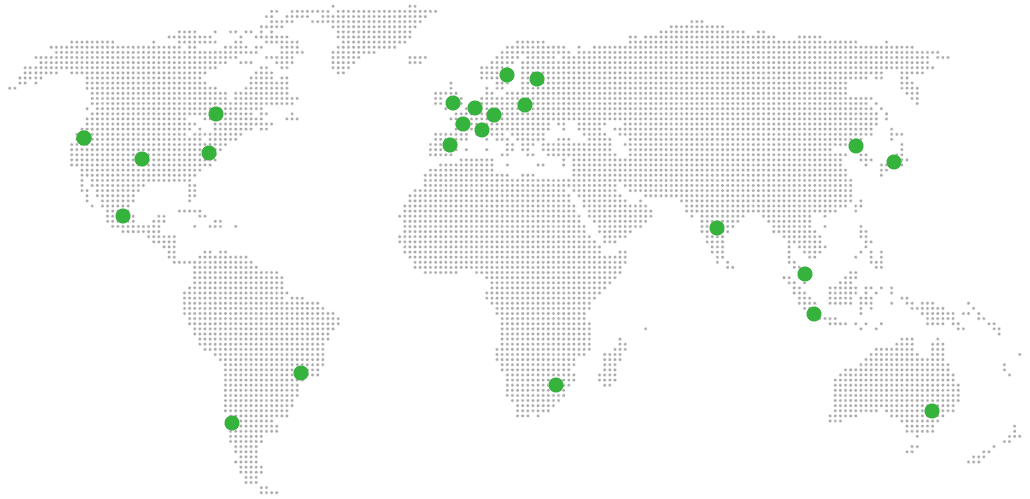
21 datacenter locations across six continents. You choose the region at provisioning. Application data sits in the region you choose; pick whichever is closest to your users or matches your data-residency preference.
Yes. Request a region migration from the dashboard and we run the move in the background. The system emails you when the migration completes; total transfer time depends on data volume but typical instances finish in a few hours. There is no extra charge for a region change.
Yes. Full data export is available at any time, in a portable format you can bring to any infrastructure.
BookFusion exposes a Calibre Cloud Plugin that exports your full library back to Calibre desktop. Install the plugin in Calibre, point it at your BookFusion account, sync the library down, then move the resulting folder to DANIAN. Tags, shelves, and custom metadata round-trip. The whole migration usually takes one evening for a 2,000-book library on a normal home connection.
Kindle Unlimited titles you read on subscription you don't own — there's no migration path for those. For Kindle books you purchased outright, the practical route until late 2024 was the Calibre DeDRM plugin against a Kindle still capable of USB download. After Amazon's February 2025 change, that path is closed for new devices.

03

Billing, support, and platform

€9 covers everything we do for that app: hardware in the region you choose, daily off-site backups with one-click restore, automatic security patches and version upgrades, 24/7 monitoring, SSL and firewall, and engineering support on Email/LiveChat. There are no setup fees or hidden line items. For more info see our Pricing page.
If you decide to continue, we charge €9/app/month from day 8. If you don't, the trial ends and you can export your data. No card is required for the trial, and we never auto-charge you without explicit consent.
No. The €9/month is flat regardless of how many users log into your app. Add 5 users or 50; the price doesn't change.
24/7 Live chat and email support, both staffed by engineers who run the systems. We handle DNS configuration, SMTP setup, app integrations, performance tuning, troubleshooting, and migration help. Response time is typically under an hour. There is no tier system — every customer gets the same support.
Yes. Cancel from the dashboard. We don't charge a cancellation fee, we don't lock data, and we will export your data to you on request before deletion. data to you on request before deletion.
Every customer instance is backed up daily to a separate region from the primary. We test restores. You can request a restore at any backup point within the retention window — usually 7 days for daily backups.
Your application data sits in the region you choose at provisioning — 21 datacenter locations across six continents. Account-level data (billing, account email, support ticket history) is processed centrally. Application data region is picked by you, per app.
99.9% uptime SLA on every app, every tenant. Service credits are documented at danian.co/service-level-agreement. The status page is located at status.danian.co.
When your tenant approaches the resource ceiling — the base tier holds 1 vCPU/RAM, 30 GB storage — we notify you. Resource upgrades happen with your explicit consent; we will not upgrade your tenant or charge you without it.
We wait. We don't suspend the app or delete your data on the first failed charge. We email you, you fix the card on file, and we continue.
Invoices can be downloaded from the billing dashboard in PDF the day each charge succeeds. EU VAT is added where applicable and the VAT-reverse-charge regime applies for VAT-registered businesses with a valid number.
150+ open-source apps across automation, team chat, file sync, analytics, AI, password management, email marketing, dev tools, project management, smart home, CMS, and federated social. See the full catalog →
Yes. Every instance comes with a web-based terminal and a file manager in your DANIAN management dashboard. Useful for managing your data and customizations.
Resources scale with your usage. If your app needs more vCPU, RAM, or storage, we add it — and we ask first before any change to your plan. €9 is the floor; resource-heavy workloads may price higher, but you'll always know in advance.
Yes. We have both a Partner program and an Affiliate program available. Anybody can sign up.
No contract. No minimum commitment. Cancel anytime from the dashboard with one click. The 7-day free trial requires no credit card. After the trial converts to paid, you can still cancel at any month without notice or penalty.

DEPLOY IN YOUR REGION

21 datacenter locations on six continents

Pick the region closest to your users.

United States, Germany, Finland, Singapore, Australia, Brazil, Canada, Netherlands, UK, Spain, Italy, France, Sweden, Malaysia, India, Japan, Mexico, Poland, South Korea, Chile, South Africa and more coming soon
Global Reach Map

Try managed CalibreWeb for 7 days

No card. Cancel from the dashboard.