
Open-source stack for freelance designers 2026
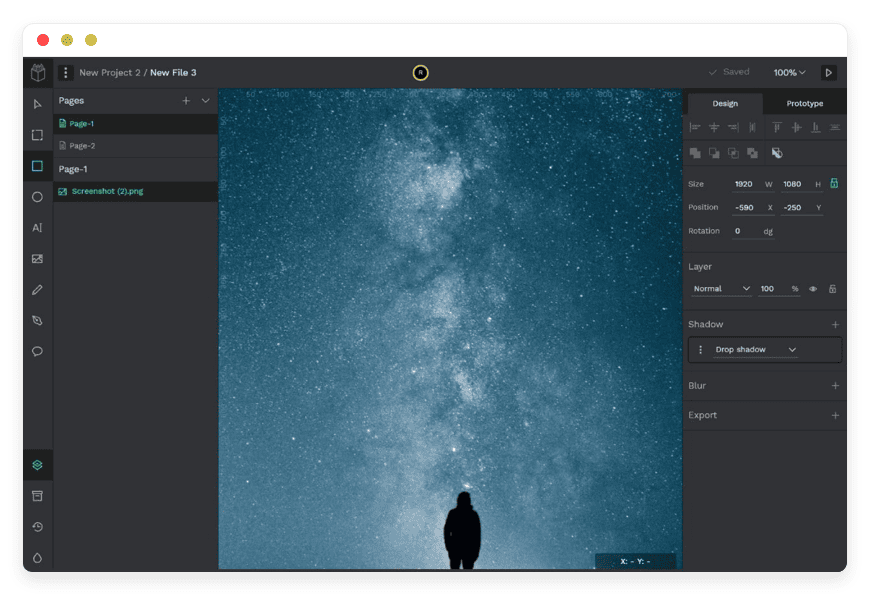
The freelance designer's open-source stack in 2026
Six open-source tools cover a freelance designer's core software: Penpot for design, Lychee for a portfolio, Documenso for contracts, Invoice Ninja for billing, Nextcloud for client file delivery, and Kimai for time tracking. Run all six managed at €9 each — €54 a month for a stack you own, in the region you choose.
The short version:
- Six apps replace a stack of design, portfolio, e-sign, invoicing, storage and time-tracking subscriptions.
- The same six SaaS tools at their lowest paid tiers run about $76 a month — and more once usage caps push you higher.
- Managed by us, the six apps cost €9 each: €54 a month, with daily off-site backups and your choice of region.
- Penpot covers UI/UX design and prototyping. It is capable, though Figma's plugin library and a few handoff features differ.
- You can start with one app, not six. €9 buys a single managed instance with a 7-day free trial and no card.
Who this list is for
This list is for the solo designer or two-person studio who runs their own tools and bills their own clients. The thread running through it is ownership: you keep the files, the portfolio, the contracts and the invoices, on software no one can re-price out from under you.
It fits a freelancer tired of per-seat creep and a pile of monthly subscriptions that each renew on their own date. It fits someone comfortable changing a DNS record with guidance, who does not want to run a server. It suits a designer who values keeping client work on infrastructure they control.
It is less useful in two cases. If you spend your day collaborating inside a large team's design account, the shared features there may matter more than ownership. And if you resell hosting to your own clients, that is a different job with different needs — this stack is about owning your tools, not reselling them. Designers who want full server access and enjoy running it themselves are also well served by doing exactly that.
The six tools, one by one
Penpot — design and prototyping
Penpot is an open-source platform for UI/UX work: wireframes, interface design, prototypes, design systems and design tokens. It is built by Kaleidos, carries more than 38,000 GitHub stars, and is released under the Mozilla Public License. It runs in the browser, and designs export to clean SVG, CSS, HTML and JSON, so a developer can read the output directly. Real-time collaboration is built in.
It replaces Figma. Figma's Professional plan is a Full seat at $16 a month on annual billing in 2026, after the 2025 shift to seat types; monthly billing is $20. A solo designer pays for one seat; a studio pays per editor.
Honest limitation: Penpot is a real design tool, not a stand-in. But Figma's plugin library is larger and older, and a few of Figma's developer-handoff conveniences work differently. Penpot has plugins now, though the catalogue is younger. If your workflow leans on a specific Figma plugin or its Dev Mode handoff, check that those map across before you move your files.
Best for a designer who wants to own their design files and is not tied to a particular Figma plugin. Switching effort is medium: import or rebuild your working files, and learn a few interface differences. On DANIAN it is managed Penpot for design at €9 a month.
Lychee — your portfolio
Lychee is a self-hosted photo gallery. You upload, organise, tag and share finished visual work in albums, with EXIF and IPTC metadata, full-screen viewing, and album sharing protected by a password. Responsive grid and justified layouts keep the work looking right on any screen. It is MIT-licensed, carries around 3,800 GitHub stars, and was built by photographers for image-led work.
It replaces a portfolio host — a Format, Pixpa or Squarespace site at roughly $10 to $16 a month — and the free-but-not-yours route of posting work on a social network.
Honest limitation: Lychee is a gallery, not a social network. It displays your work cleanly; it does not bring an audience the way a discovery feed with followers can. If being found inside a creative community matters more to you than owning the page, a social portfolio still has a role. Lychee is also image-focused. It shows finished pieces, not the working design files — those live in Penpot. Keep the two jobs apart.
Best for a designer who wants a clean, owned portfolio on their own domain. Switching effort is low: upload your images, arrange albums, point a domain. On DANIAN it is managed Lychee at €9 a month, on your own subdomain.
Documenso — client contracts
Documenso is an open-source e-signature platform. You upload a PDF, place signature and date fields, send it to a client, and collect a signature in the browser. Reusable templates and shareable signing links cut repeat work. It is AGPL-3.0 licensed and carries more than 12,000 GitHub stars. Each completed document carries tamper-evident signing metadata — a record of who signed, when, and a hash of the file that reveals any later change.
It replaces DocuSign. DocuSign's Personal plan is $10 a month on annual billing but caps you at five envelopes a month; its Standard plan is $25 a month per user. A self-hosted Documenso instance has no per-document cap.
Honest limitation: whether an electronic signature is enforceable for a given contract depends on the law where you and your client operate and on the type of agreement. That is not something a tool can promise on its own. Confirm your own requirements before you rely on it for high-stakes work. Documenso is also younger than DocuSign, and a few features, such as a built-in template store, are still arriving.
Best for a designer who sends client agreements often and dislikes per-document caps. Switching effort is low to medium: rebuild your common contracts as templates. On DANIAN it is managed Documenso at €9 a month.
Invoice Ninja — invoicing and payments
Invoice Ninja handles invoicing, quotes and payments for freelancers and small businesses. You build branded invoices, send quotes, accept card and bank payments through a client portal, track expenses, and manage projects and billable tasks. It carries around 9,300 GitHub stars. It is source-available under the Elastic License 2.0 — you can self-host and use it freely; the licence only stops someone repackaging it as a competing hosted product.
It replaces FreshBooks or QuickBooks. FreshBooks Lite is about $19 a month and caps you at five billable clients; QuickBooks Simple Start runs roughly $30 to $38 a month.
Honest limitation: Invoice Ninja is built around invoicing, not full double-entry accounting. It will send invoices and track payments well; it will not replace an accountant or a full bookkeeping ledger for complex tax work. It also overlaps with Kimai on time-tracking, which matters when you decide how many apps you actually need.
Best for a designer who wants to send polished invoices and get paid without a per-client cap. Switching effort is low: add clients, set up a payment gateway, import past invoices by CSV. Recurring invoices, automatic reminders and multi-currency billing help if you keep retainer clients or invoice across borders. On DANIAN it is Invoice Ninja for billing at €9 a month.
Nextcloud — client file delivery
Nextcloud is open-source file sync and share. You store files, sync them across devices, and send a client a share link — with a password, an expiry date, and your own branding. Nextcloud is a large platform that also does calendars, mail and document editing, but for a designer the job here is clean file delivery. It is AGPL-3.0 licensed, and it runs at tens of thousands of organisations.
It replaces Dropbox. Dropbox Plus is about $10 a month for 2 TB, but the client-facing controls a designer wants — password-protected links, link expiry, branded sharing — start on Dropbox Professional at roughly $17 a month. Nextcloud gives you those share controls at the base.
Honest limitation: Nextcloud does far more than file delivery. If you only need to send files, it is more platform than the job strictly requires — useful headroom for some, overkill for others. Large raw or video libraries also need room: the €9 base includes 30 GB, and a heavy library will want a storage add-on.
Best for a designer who delivers files to clients and wants share links they control. Switching effort is low: upload, set share rules, point a domain. On DANIAN it is Nextcloud for client file delivery at €9 a month.
Kimai — time tracking
Kimai is open-source time tracking for project work. You start a timer or enter hours, tag them by client, project and activity, and pull reports by any of those dimensions. It exports timesheets and can produce basic invoices in PDF or DOCX. It is AGPL-3.0 licensed, carries around 4,300 GitHub stars, and runs in any browser, including on a phone.
It replaces Toggl Track or Harvest. Toggl Track's Starter plan is $9 a month per user on annual billing; Harvest runs about $11 to $12. Toggl's free tier exists, but it drops billable rates and profitability reports.
Honest limitation: Kimai is built for tracking time, and its invoicing is basic next to Invoice Ninja's. Because Invoice Ninja already tracks billable tasks, the two overlap — a lean designer may run one of them, not both. Decide whether you want detailed time analytics in Kimai and full invoicing in Invoice Ninja as separate tools, or one tool doing a lighter version of each.
Best for a designer who bills by the hour and wants detailed time reports. Switching effort is low: set up clients and projects, and start tracking. You can set per-project rates and export timesheets a client can check against an invoice. On DANIAN it is managed Kimai at €9 a month.
How the six fit together
The six tools split into make, show and run-the-business. Penpot and Lychee handle the creative work — designing it, then displaying the finished result. Documenso, Invoice Ninja, Kimai and Nextcloud handle the admin — agreeing terms, billing, tracking time and delivering files. Few designers need all six on day one.
The creative pair does not overlap. Penpot is where the work is made; Lychee is where finished work is shown. One holds editable files, the other publishes images.
The money pair does overlap, and that is a real choice. Kimai tracks the hours; Invoice Ninja turns work into invoices and collects payment. Run both for depth, or run Invoice Ninja alone if light time-tracking is enough for you.
Documenso sits at the front of a project, when you agree terms. Nextcloud sits at the end, when you hand over the files. Together they bracket the client relationship without touching the design work in the middle.
A realistic minimum is three or four apps, not six. Design, portfolio and invoicing is a common start at €27 a month — Penpot, Lychee and Invoice Ninja. Add Documenso and Nextcloud as client work grows. You pay €9 per app you actually run, so the stack scales with you, not against you.
What running your own stack asks of you
Owning your tools is not free of effort, and it is fair to be honest about the trade. Renting SaaS means someone else runs everything and you pay for that every month. Self-hosting moves some of that work to you — though managed hosting is the line between "some" and "all."
What you still own is the in-app side. You set up each tool, configure it, and decide how your data is organised. You keep your own copies of anything irreplaceable, on top of the daily off-site backups we run. None of this needs a terminal, but it is real work.
What you hand to us is the infrastructure. We run the servers, apply security updates, and take daily off-site backups. We watch for outages and answer chat when something breaks. You never patch a server or read a log at 2am.
That split is the point of managed hosting — you own the data and config, we own the plumbing. If you would rather run the server yourself instead, you can, because these apps are open source. The trade then flips: full control, and every update and backup becomes yours to manage.
What the stack costs
At conservative entry tiers, the six SaaS tools total about $76 a month before any usage caps bite. The same six jobs, managed by us as open-source apps, cost €9 each — €54 a month, about $58. The gap widens once DocuSign's envelope cap, FreshBooks' client cap, or Dropbox's client-sharing upcharge push you to higher tiers.
| Function | Typical SaaS | SaaS entry price (USD/mo) | Managed open-source on DANIAN |
|---|---|---|---|
| Design | Figma Professional (Full seat) | $16 | Penpot — €9 |
| Portfolio | Format / Pixpa / Squarespace | $12 | Lychee — €9 |
| Contracts | DocuSign Personal (5 envelopes/mo) | $10 | Documenso — €9 |
| Invoicing | FreshBooks Lite (5 clients) | $19 | Invoice Ninja — €9 |
| File delivery | Dropbox Plus (2 TB) | $10 | Nextcloud — €9 |
| Time tracking | Toggl Track Starter | $9 | Kimai — €9 |
| Total | ~$76/month | €54/month (~$58) |
The SaaS column uses the lowest paid tier for each tool, billed annually, in US dollars, checked in June 2026. Real prices move with plan and region, so check each pricing page before you budget.
Three of those entry tiers are capped. DocuSign Personal stops at five envelopes a month. FreshBooks Lite stops at five billable clients. Dropbox Plus lacks the password-protected, expiring, branded share links a designer needs for client delivery. Hit any cap and the realistic figure climbs: DocuSign Standard at $25, FreshBooks Plus at $43, Dropbox Professional at $17. A busy freelancer's real bundle lands closer to $120 a month.
The DANIAN column is flat. €9 per app covers hardware, security updates, daily off-site backups, monitoring, and support from a person. There is no per-seat math, no per-document cap, and no per-client cap. We will not charge more because you used the app more, and we will not delete your data if a card fails.
Currency is worth naming: €54 is about $58 at mid-2026 rates, so the comparison holds even after conversion — and it holds at the entry tiers, before the caps. And you do not have to run all six. Three apps is €27 a month; four is €36. The bundle you build is the bundle you pay for.
How to start
Pick one app, not six. Start a 7-day free trial with no card, deploy the app on a subdomain, and use it on real work for a week before adding the next one.
- Choose the tool that hurts most right now — usually the one whose subscription renewed last, or the one with the cap you keep hitting.
- Start the 7-day free trial and pick the region closest to you or your clients.
- Move one real project into it: a live design file, a real client contract, a real invoice. Tools reveal themselves on real work, not demos.
- Check that you can get your data out — Penpot files, a Nextcloud download, an Invoice Ninja CSV. Owning your tools means being able to leave them.
- Add the next app only when the first one has earned its place. €9 each means the stack grows one decision at a time.
Start a 7-day free trial — no card, or browse the full catalogue first.
Questions designers ask
Which open-source tools cover a freelance designer's core software?
Six cover the essentials: Penpot for design and prototyping, Lychee for a portfolio gallery, Documenso for client contracts, Invoice Ninja for invoicing and payments, Nextcloud for client file delivery, and Kimai for time tracking. Run the ones you need at €9 each per month.
Is Penpot a real alternative to Figma for a solo designer?
For UI/UX design and prototyping, yes. Penpot is a capable design tool with real-time collaboration and clean code output. Figma's plugin library is larger and a few handoff features differ, so check that any plugin you depend on has an equivalent before moving your files.
Can Penpot import my existing Figma files?
Mostly, yes. A community plugin, Penpot Exporter, converts a Figma file into a Penpot file you then import. It carries over most layers, components and type. Some items, such as certain colour variables and prototype links, need manual fixes, so treat a large design system as a guided rebuild rather than a one-click move.
What can I use instead of DocuSign if I want to host it myself?
Documenso is a self-hosted, open-source e-signature tool. You upload a PDF, place signature fields, send a signing link, and collect a signature in the browser. Unlike DocuSign's entry plan, a self-hosted instance has no monthly envelope cap. On DANIAN it runs at €9 a month.
What does Documenso do for client contracts?
Documenso lets you send a PDF, place signature fields, collect a signature in the browser, and reuse templates. Each finished document carries tamper-evident signing metadata: who signed, when, and a hash that flags later edits. Whether a signature suits your contract depends on your local law, so confirm your own needs.
Are documents signed with Documenso legally binding?
It depends on the agreement and your jurisdiction. Many countries recognise electronic signatures under laws such as the US ESIGN Act or the eIDAS regulation. Documenso records tamper-evident metadata, who signed, when, and a file hash, but it offers no guarantee of legal validity. Confirm your own requirements before using it for high-stakes contracts.
Can a client sign a document without creating an account?
Yes. With Documenso you send a signing link, and the client opens it and signs in the browser. They do not need a Documenso account or any extra software. You keep the finished document and its signing record.
Is there an open-source alternative to FreshBooks or QuickBooks?
Invoice Ninja is the closest fit for freelancers. It builds branded invoices, sends quotes, accepts online payments, and tracks expenses and billable tasks. It is built around invoicing, not full double-entry accounting, so complex tax work still needs an accountant. On DANIAN it runs at €9 a month, with no per-client cap.
Do I need both Invoice Ninja and Kimai?
Not necessarily. Invoice Ninja handles invoicing and also tracks billable tasks; Kimai focuses on detailed time tracking and exports basic invoices. They overlap. Run both if you want deep time analytics and full invoicing as separate tools, or run Invoice Ninja alone for a lighter version of each.
What is a self-hosted alternative to Dropbox for sharing files with clients?
Nextcloud covers file sync and share, hosted by you. You upload files and send a client a link with a password, an expiry date, and your own branding. Those client-facing controls sit at the base, where Dropbox keeps some behind a higher tier. The €9 plan includes 30 GB; a large media library will want a storage add-on.
Do I need to know how to code to use these self-hosted apps?
No. On managed hosting you use each app through its normal web interface, the same as any SaaS tool. We handle the server, installation and updates behind the scenes. The most technical step you face is pointing a domain, and we guide you through it.
Do I need my own server to run these tools?
Not with managed hosting. Each app runs on our infrastructure, in its own isolated container, in the region you choose. You get terminal and file-manager access through the dashboard if you want it, without running a machine. If you prefer your own hardware, every app here is open source and can be self-hosted.
Is self-hosting worth it for a solo freelancer?
It is worth it when ownership and predictable cost matter more than someone else running everything. You stop paying per seat, escape usage caps, and keep your files on infrastructure you control. The trade is a little setup and the odd release note to read. Managed hosting removes the server work, so the effort stays small.
Is managed hosting the same as self-hosting?
Not quite — it is self-hosting with the server work removed. You own the app, the data and the configuration, exactly as you would on your own machine. We run the hardware, security updates, backups and monitoring. So you get the control of self-hosting without patching a server at 2am.
How much does the six-app stack cost compared with the SaaS versions?
The six SaaS tools at their lowest paid tiers total about $76 a month, billed annually, before usage caps push you higher. The same six apps managed by us cost €9 each — €54 a month, roughly $58. You pay only for the apps you actually run.
What access do I get to each app on DANIAN?
Each app runs in its own hardened container in the region you pick, across 21 datacenter locations on six continents. You get per-container terminal and file-manager access through the dashboard, daily off-site backups, and the ability to export your data and leave whenever you want.
Is self-hosted software secure?
It can be, and the setup here is built for it. Each app runs in its own hardened, isolated container, so one app cannot reach another. We apply security updates and take daily off-site backups. No setup is risk-free, so use strong passwords and keep your own copy of anything critical.
Who can see my files and data?
Your work sits in your own isolated container, and it stays yours. We do not sell your data or share it with advertisers. Our team accesses it only when needed to run the service or help with a support request. You can export everything and leave at any time.
Where is my data stored?
In the region you choose. We run across 21 datacenter locations on six continents. You pick the one closest to you or your clients when you deploy. Your app and its data then stay in that region.
Do these apps include automatic backups?
Yes. Every app includes daily off-site backups as part of the €9 monthly price. A bad change or accidental deletion can be rolled back from a recent copy. It is still wise to keep your own export of anything you cannot afford to lose.
What happens if one of these open-source projects is discontinued?
Your app keeps running and your data stays yours. The code is open source, so others can fork and maintain it if the original team steps away. You can always export your files and move them elsewhere. That independence from any single company is a core reason to own your tools.
Can I move my data out of these apps later?
Yes. Each app is open source and stores standard, exportable data. You can pull Penpot design files, a Nextcloud download, an Invoice Ninja CSV, or a Kimai timesheet. Export and leave whenever you want — owning your tools includes the freedom to walk away.
What happens to my apps if I stop paying?
You keep access through the period you have paid for. Before anything is removed, we give you a window to export your data. We will not delete your work the moment a card fails. The aim is a clean exit with your files, not a lockout.
What to do this week
A freelance designer's software does not have to be six monthly subscriptions you rent and never own. Six open-source apps cover the same ground — design, portfolio, contracts, billing, file delivery and time tracking — and you can run each for €9.
This week, pick the one tool whose renewal annoys you most and start a 7-day free trial. Move one real project into it. If it holds up, you own a piece of your stack that no per-seat increase can touch. Add the next app when it earns the spot, €9 at a time.
Sources, checked June 2026: pricing pages for Figma, DocuSign, FreshBooks, QuickBooks, Dropbox, Toggl Track and Format/Pixpa/Squarespace; project pages and repositories for Penpot, Lychee, Documenso, Invoice Ninja, Nextcloud and Kimai. List prices shown are the lowest paid tiers on annual billing in US dollars and vary by plan and region.





