Fully Managed
The Lounge
as a Service

Deploy The Lounge as a fully managed service starting at €9/mo. Get automated backups, SSL, updates, support and monitoring included.

The Lounge is an open-source web IRC client — a persistent browser-based client that stays connected to your IRC networks 24/7 — combining the convenience of IRCCloud with the security and control of self-hosted infrastructure.

Free 7-day trial  99.9% Uptime SLA  No credit card  Cancel anytime

Free 7-day trial  99.9% Uptime SLA
No credit card  Cancel anytime

The Lounge

The Lounge

STARTING AT

€9/month
Automated Backups
Monitoring
Automated Updates
Auto SSL

USAGE

Unlimited
Human Support
Custom Domains
Terminal Access
File Manager Access
Deploy in your region 21 locations worldwide
GermanyFinlandNetherlandsUKSwedenUnited StatesCanadaSingaporeJapanAustraliaBrazilSouth Africa+9 more →
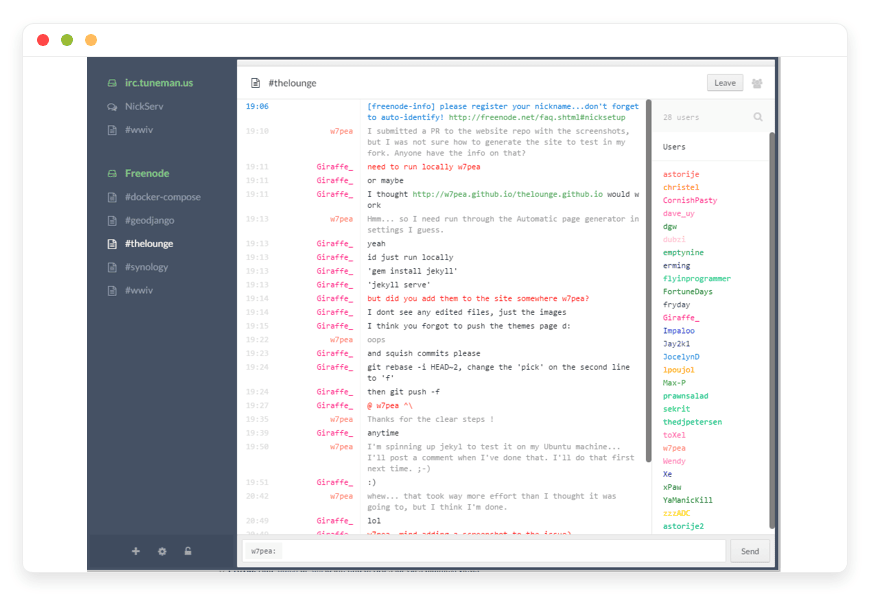
The Lounge Preview Image

ABOUT THE SOFTWARE

What is The Lounge

The Lounge is an open-source web IRC client that doubles as a persistent bouncer. You connect once; The Lounge holds the IRC sessions open and lets you reattach from any browser or phone with full scrollback.

The Lounge is MIT-licensed software maintained by a small community of contributors on GitHub. The project is a fork of the older "Shout" client by Mattias Erming and has been community-maintained since 2016. The repository at github.com/thelounge/thelounge sits at roughly 6,200 stars.

The architecture is Node.js on the server, Vue.js in the browser, with SQLite for message history. In private mode — the deployment we run on DANIAN — The Lounge acts as a bouncer and a client at the same time, which removes the need to run ZNC or Soju alongside a separate web client. Authentication options include local accounts with bcrypt hashing and LDAP for teams that already run a directory. Push notifications use the standard web push protocol with auto-generated VAPID keys. The Progressive Web App manifest lets users install the client on iOS, Android, and desktop home screens.

FEATURES

What The Lounge does

The Lounge bundles a persistent IRC bouncer and a modern web client into one process.
Below are the capabilities the project ships out of the box — every item verified against the upstream documentation.

Always-connected client

In private mode The Lounge stays connected to your IRC networks even when no browser is open. You get the full scrollback when you reattach — no missed messages, no rejoining channels.

Multi-device session sync

Open The Lounge on laptop and phone at the same time. Read state, scrollback, and channel list all sync in real time over the same socket.io connection.

SASL and CertFP authentication

Supports SASL PLAIN for password auth and SASL EXTERNAL for client TLS certificate auth (CertFP). The Lounge auto-generates per-network certificates so you do not shuffle PEM files.

Themes and plugin packages

Themes (Solarized, Dracula, and others) and plugins (giphy, shortcuts, closepms) install through thelounge install. The package system is the same as the upstream Debian and Docker builds.

Web and mobile responsive UI

The same Vue.js client works on desktop, tablet, and phone. Progressive Web App support means iOS, Android, and desktop home-screen installs without an app store dependency.

Push notifications

Standard web push with auto-generated VAPID keys. Configurable per channel — quiet busy channels, alert on highlights and direct messages without external services.

Multi-network support

Connect to Libera.Chat, OFTC, hackint, EFnet, Rizon, and any RFC-compliant IRC network simultaneously from one client. Each network has independent SASL credentials and channel lists.

LDAP authentication

Private-mode login can bind to an LDAP directory using searchDN, bindDN, and rootDN configuration. Useful for teams that already centralise password reset and provisioning through a directory.

WHAT'S ALWAYS INCLUDED

Every app. Fully managed.
Nothing extra to pay for.

Every app you deploy includes the full managed service — security, backups, updates, and support from day one.

Automatic updates and patches

Apps run the latest stable version. Security patches applied silently, with rollback if needed.

Daily off-site backups

Multiple daily backups in redundant off-site locations. One-click restore if anything goes wrong.

24/7 uptime monitoring

Continuous monitoring with instant alerting. We respond before you notice.

SSL, firewall, DDoS protection

Auto-renewing SSL, hardened firewall rules, DDoS mitigation on every deployment.

Performance and scaling

We monitor resource usage continuously. When your app needs more headroom, we flag it and upgrade with your explicit approval.

Dedicated engineering support

Real engineers on chat. DNS, SMTP & migration help. All included in €9.

WHY MANAGED

Why teams pick managed The Lounge

Running The Lounge means more than running The Lounge. The Node runtime needs to track upstream LTS, which moved from 18 to 20 to 22 in roughly two-year increments. The npm dependency tree — socket.io, express, cheerio, ldapjs, got, ua-parser-js — needs auditing after every supply-chain incident, and 2025 produced three of them: the qix/chalk-debug compromise in September, Shai-Hulud the same month, and Shai-Hulud V2 in November. The reverse proxy needs a long read timeout because the default sixty seconds silently kills idle IRC sessions, a footgun documented in the upstream reverse-proxy guide itself.

The single operational gotcha that ends self-hosted Lounge deployments the fastest is the WebSocket timeout. Default nginx configuration closes the socket.io connection after sixty seconds of inactivity, which on a quiet IRC channel happens overnight. Users wake up to a disconnected client, miss notifications, and lose the very property that made The Lounge worth running — persistence. The fix is one line — proxy_read_timeout 1d — but the symptom only shows up in production and the documentation is two clicks deep.

REVIEWS

Hear from customers ​like you​​​​​​​

Successful businesses and professionals around the world rely on DANIAN every day

USE CASES

Three teams who run The Lounge on DANIAN

These are representative team types we set up most often. Each starts with the same flat €9 plan.

OPEN-SOURCE PROJECT — 6 MAINTAINERS

Persistent presence on Libera.Chat without owning a Node host

One instance hosted in Germany covers the project's #main and #dev channels on Libera.Chat plus a sister channel on OFTC. Six maintainer accounts share the instance under LDAP, each with their own CertFP for SASL EXTERNAL. Daily backups capture the SQLite database that holds three years of scrollback.

14-PERSON DISTRIBUTED ENGINEERING TEAM

Migrating off Slack to lower the noise floor and keep history

Instance in Singapore for an APAC-distributed team. The Lounge connects to a private IRC network the team runs separately, plus public Libera channels for upstream support. prefetchStorage is off — link previews go straight from the user's browser rather than proxying through the instance. Scrollback retained at 30 days.

OPEN-SOURCE SECURITY COMMUNITY — 3 ADMINS

Replacing a ZNC bouncer with a modern web UI

Instance in Netherlands for a community with channels across hackint and Libera. CertFP-only SASL where networks support it. prefetch disabled to avoid metadata leaks to third-party hosts. The bouncer that the community used to share went down once a month; DANIAN's monitoring restarts on crash and a human gets paged if it does not recover.

COMPARISON

Four ways to run The Lounge

TEXT TEXT TEXT

DIMENSIONIRCCLOUD (PROPRIETARY)SELF-HOST ON VPSHOME SERVERDANIAN MANAGED
Monthly cost — 1 user
$5$24 production VPS~$8 electricity€9
Monthly cost — 5 users
$25$24 production VPS~$8 electricity€9
Monthly cost — 10 users
$50$24 production VPS~$8 electricity€9
Setup timeMinutes3–6 hours plus ongoing opsHalf a day for hardware setupMinutes
Lounge and OS updatesN/A (closed source)Your job — including Node 22 jumpYour job — and your power billWe handle it
WebSocket reliabilityVendor-managedYou tune proxy_read_timeoutYou tune it on home networkPre-tuned to 1-day timeout
Daily off-site backupsVendor-managedYou build the cron and the destinationYou build the cron and a remote targetIncluded
Custom domainNot availableYou configure DNS and SSLYou configure DNS, dynamic DNS, SSLYes (DNS assistance) & Let's Encrypt
Control over dataVendor holds itFullFullFull — export anytime
Open source clientNo — proprietaryYes — MIT licenseYes — MIT licenseYes — MIT license
Recommended forSingle users on a free tierOperators who enjoy Node opsTinkerers with a homelabTeams who want IRC to just work

VPS row assumes a $24/month production-class VPS plus your ongoing time for upgrades, security patching, backup verification, and incident response. Home-server row excludes the one-time hardware cost (a low-power mini PC or used ProLiant runs $200–400) and the network engineering involved in exposing port 443 from a residential connection.

BY INDUSTRY

The Lounge for specific industries

IRC's modern user base is specific. The verticals below are the ones that actually keep IRC alive in 2026 — open-source software, infosec research, academic systems work, sysadmin and DevOps communities, and ham radio. Each block covers a real configuration choice we make for that vertical.

Open-source projects host their community channels on Libera.Chat (formed in 2021 after the Freenode hostile takeover) and on OFTC, where Debian, the GNU project, Tor, postmarketOS, and many systems projects keep their dev channels. OFTC's published policy requires IRC operators to treat user privacy as default — a standard that matters when a project's bug-triage channel logs are public for archaeology but identities are not.

The DANIAN configuration for an OSS project enables private mode with multi-user accounts so multiple maintainers can share one instance. We pin SASL EXTERNAL where the network supports it, so per-maintainer CertFP credentials authenticate without password sharing. A typical maintainer workflow: triage incoming questions in #project from any device, switch to #project-dev for an ongoing patch review, and pick up at 7am from where the EU contributors stopped at 11pm UTC. Scrollback retention is set so a quarter of channel history survives even after the SQLite VACUUM, which uses around 2× current DB disk during cleanup.
Security communities keep IRC because the protocol is auditable end-to-end and the client source is inspectable. hackint and Libera both host security-research channels — disclosure coordination, CTF organisation, defensive engineering. The operational standard relevant here is the simple one: do not leak metadata to third-party hosts.

The DANIAN configuration for infosec turns off prefetch by default so link previews are not fetched server-side from arbitrary URLs that channel members post. prefetchStorage is also off — no proxied images cached on the instance. SASL is CertFP-only where the network supports it; password SASL is the fallback. A typical workflow: a researcher posts a disclosure draft link in a private channel, other researchers fetch it from their own browsers, the instance itself never touches the URL. The Lounge's logsMaxAgeDays can be set tightly here — some teams keep 14 days of scrollback on the instance, archive the rest off-site.
Systems research groups, free-software academic projects, and security labs maintain IRC presences on OFTC and Libera. The operational consideration is that group membership turns over (graduate students arrive and leave) and IT support is thin. The instance has to outlive any one person's tenure.

The DANIAN configuration uses LDAP binding to the group's existing directory, so user provisioning follows the lab's account lifecycle rather than living in a Lounge-specific user file. Storage retention is tuned to survive grant cycles — a research group publishing a protocol-analysis paper at year 4 of a 5-year grant wants the channel logs from year 1 still queryable. The SQLite database hosts that without needing an external indexer. Around 50 GB of scrollback covers most groups of 20 users running across 6 channels over multi-year horizons; we tune up from there.
The big sysadmin channels — #nginx, #bash, ##linux, #postgresql, #nixos — live on Libera and have for years. The relevant operational standard is the one that matters to anyone running infrastructure: backups have to actually restore. We have published incident notes from the day we tested backup restore on a customer's Lounge instance after a database corruption; the SQLite database came back cleanly in under 4 minutes.

The DANIAN configuration for sysadmin teams pins channel join lists in config.js so a fresh user account joins the team's default operational channels without manual setup. maxHistory is set generously because operational channels generate volume — a busy on-call rotation can produce 10,000+ lines per week in a single channel. The instance runs identd on port 113 for networks that require it; we handle the privileged-port binding so it does not need a rootful container.
Ham radio communities use IRC because they have used IRC since the 1990s and the migration cost to any other platform is higher than the gain. Channels for amateur packet radio, software-defined radio (#gnuradio on Libera), and regional ham clubs run on long-lived IRC networks. The operational consideration is small budgets and small operator counts.

The DANIAN configuration for a ham community is the simplest possible — one instance, public mode disabled, private mode with a handful of accounts. We disable image prefetch (radio communities post a lot of QSL card images that we do not need to proxy) and enable file uploads with a 5 MB cap for log file exchange and screenshot sharing. SASL is mostly PLAIN here because networks frequented by ham communities have not all adopted CertFP. The €9 monthly cost is at the threshold of what a small ham club's treasury can absorb without a fundraiser, which is exactly where DANIAN's pricing model lands.

FAQ

Frequently asked questions

Everything teams ask before signing up — answered straight, without sales speak.

Three groups: technical setup, migration, and how DANIAN works as a service.

01

Technical and configuration

Yes. The Lounge supports SASL PLAIN (password) and SASL EXTERNAL (client TLS certificate, often called CertFP) and auto-generates per-network certificates. We surface these in the network settings without requiring you to copy PEM files into the instance. LDAP authentication for the Lounge login itself is also supported and gets configured during onboarding when a team already runs a directory.
We run The Lounge behind a reverse proxy following the project's own guide. Both polling and websocket socket.io transports are enabled. The proxy_read_timeout is set to one day rather than the default sixty seconds — the default silently kills idle IRC sessions, which is the single most common self-host footgun documented in the upstream reverse-proxy guide. Connection: upgrade and X-Forwarded-Proto headers are set per the upstream template.
Yes. Themes (thelounge-theme-solarized, thelounge-theme-dracula-official) and plugins (thelounge-plugin-shortcuts, thelounge-plugin-giphy, thelounge-plugin-closepms, and others) install through the standard thelounge install command. We run these as the thelounge system user with the package cache pinned per instance, so a plugin install on one customer's instance does not affect another. Plugin upgrades follow the same cadence as The Lounge itself.
Persistent storage for the SQLite history database is included. Retention is tuned through storagePolicy, the cleanup mechanism The Lounge added in v4.4.3. Practical sizing depends on how many networks and channels you join and how long you want scrollback to survive. We tune defaults per customer rather than capping at a fixed number of megabytes — IRC databases grow slowly compared to media-heavy apps.
We handle the runtime bump and the application upgrade. When v4.5.0 raised the Node floor from 18 and 20 to 22, customers running on DANIAN saw no migration work — we cut Node 22 on the host, restarted the service, and verified the WebSocket path was still healthy. We do not push major upgrades blindly: each release is staged on an internal instance first so the SQLite schema migration and reverse-proxy headers are checked before rollout.
Yes. The Lounge supports message IDs (msgid tracking landed in v4.5.0), STATUSMSG indication, CHGHOST styled messages, echo-message handling, CertFP via SASL EXTERNAL, and WebIRC client IP forwarding for networks that issue WebIRC passwords. Network capabilities are negotiated automatically on connect; what works depends on what each network advertises.
The Lounge ships with a deep npm dependency tree. 2025 saw the qix/chalk-debug compromise (eighteen packages, 2.6 billion weekly downloads), Shai-Hulud (the first self-replicating npm worm, 500+ packages), and Shai-Hulud V2 in November. We pin the dependency manifest, run installs against locked versions, and patch the runtime when upstream advisories land — so customers do not own the supply-chain audit on a Sunday morning.

02

Migration and onboarding

We can activate your app on your own custom domain/subdomain. Examples: mydomain.com, anyword.mydomain.com.
Or, on our randomized free subdomain. Example: 963.apps.danian.cloud
If you wish to use a custom domain/subdomain, select that option when ordering your app (or notify us later). We will send you the required DNS records and if needed, our tech team will modify them for you.
21 datacenter locations across six continents. You choose the region at provisioning. Application data sits in the region you choose; pick whichever is closest to your users or matches your data-residency preference.
Yes. Request a region migration from the dashboard and we run the move in the background. The system emails you when the migration completes; total transfer time depends on data volume but typical instances finish in a few hours. There is no extra charge for a region change.
Yes. Full data export is available at any time, in a portable format you can bring to any infrastructure.
Yes. Reconnect The Lounge directly to each IRC network using your existing NickServ or SASL credentials. ZNC's per-network buffers do not migrate automatically — the log format is different — but ongoing scrollback starts the moment The Lounge connects. Most users run both in parallel for a few days, then turn ZNC off. The win is the modern web and mobile client without losing the persistent bouncer behaviour.

03

Billing, support, and platform

€9 covers everything we do for that app: hardware in the region you choose, daily off-site backups with one-click restore, automatic security patches and version upgrades, 24/7 monitoring, SSL and firewall, and engineering support on Email/LiveChat. There are no setup fees or hidden line items. For more info see our Pricing page.
If you decide to continue, we charge €9/app/month from day 8. If you don't, the trial ends and you can export your data. No card is required for the trial, and we never auto-charge you without explicit consent.
No. The €9/month is flat regardless of how many users log into your app. Add 5 users or 50; the price doesn't change.
24/7 Live chat and email support, both staffed by engineers who run the systems. We handle DNS configuration, SMTP setup, app integrations, performance tuning, troubleshooting, and migration help. Response time is typically under an hour. There is no tier system — every customer gets the same support.
Yes. Cancel from the dashboard. We don't charge a cancellation fee, we don't lock data, and we will export your data to you on request before deletion. data to you on request before deletion.
Every customer instance is backed up daily to a separate region from the primary. We test restores. You can request a restore at any backup point within the retention window — usually 7 days for daily backups.
Your application data sits in the region you choose at provisioning — 21 datacenter locations across six continents. Account-level data (billing, account email, support ticket history) is processed centrally. Application data region is picked by you, per app.
99.9% uptime SLA on every app, every tenant. Service credits are documented at danian.co/service-level-agreement. The status page is located at status.danian.co.
When your tenant approaches the resource ceiling — the base tier holds 1 vCPU/RAM, 30 GB storage — we notify you. Resource upgrades happen with your explicit consent; we will not upgrade your tenant or charge you without it.
We wait. We don't suspend the app or delete your data on the first failed charge. We email you, you fix the card on file, and we continue.
Invoices can be downloaded from the billing dashboard in PDF the day each charge succeeds. EU VAT is added where applicable and the VAT-reverse-charge regime applies for VAT-registered businesses with a valid number.
150+ open-source apps across automation, team chat, file sync, analytics, AI, password management, email marketing, dev tools, project management, smart home, CMS, and federated social. See the full catalog →
Yes. Every instance comes with a web-based terminal and a file manager in your DANIAN management dashboard. Useful for managing your data and customizations.
Resources scale with your usage. If your app needs more vCPU, RAM, or storage, we add it — and we ask first before any change to your plan. €9 is the floor; resource-heavy workloads may price higher, but you'll always know in advance.
Yes. We have both a Partner program and an Affiliate program available. Anybody can sign up.
No contract. No minimum commitment. Cancel anytime from the dashboard with one click. The 7-day free trial requires no credit card. After the trial converts to paid, you can still cancel at any month without notice or penalty.

DEPLOY IN YOUR REGION

21 datacenter locations on six continents

Pick the region closest to your users.

United States, Germany, Finland, Singapore, Australia, Brazil, Canada, Netherlands, UK, Spain, Italy, France, Sweden, Malaysia, India, Japan, Mexico, Poland, South Korea, Chile, South Africa and more coming soon
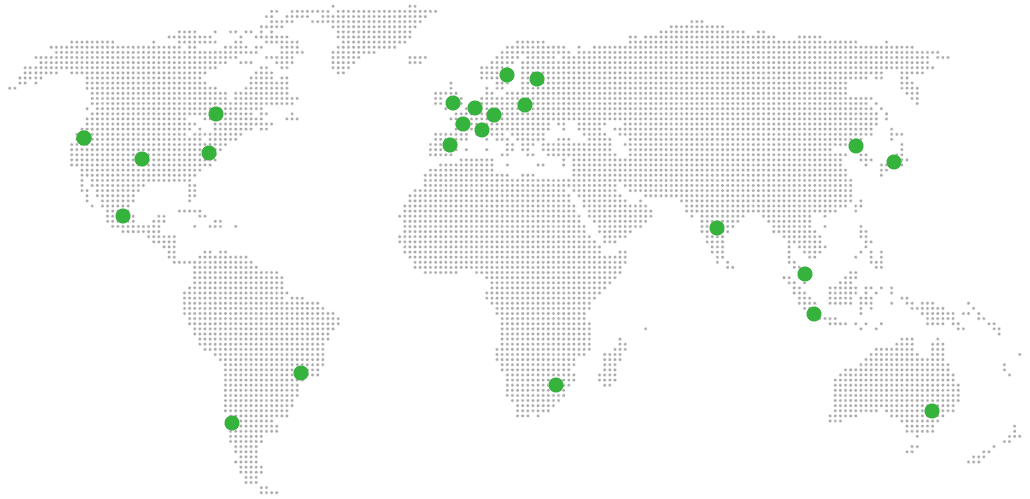
Global Reach Map

Try managed The Lounge for 7 days

No card. Cancel from the dashboard.