Fully Managed
OnlyOffice Docs
as a Service

Deploy OnlyOffice Docs as a fully managed service starting at €9/mo. Get automated backups, SSL, updates, support and monitoring included.

OnlyOffice Docs is an open-source office suite — Word, Excel, PowerPoint, and PDF editing with real-time co-authoring — combining the convenience of Microsoft 365 with the control of self-hosted infrastructure.

Free 7-day trial  99.9% Uptime SLA  No credit card  Cancel anytime

Free 7-day trial  99.9% Uptime SLA
No credit card  Cancel anytime

OnlyOffice Docs

OnlyOffice Docs

STARTING AT

€9/month
Automated Backups
Monitoring
Automated Updates
Auto SSL

USAGE

Unlimited
Human Support
Custom Domains
Terminal Access
File Manager Access
Deploy in your region 21 locations worldwide
GermanyFinlandNetherlandsUKSwedenUnited StatesCanadaSingaporeJapanAustraliaBrazilSouth Africa+9 more →
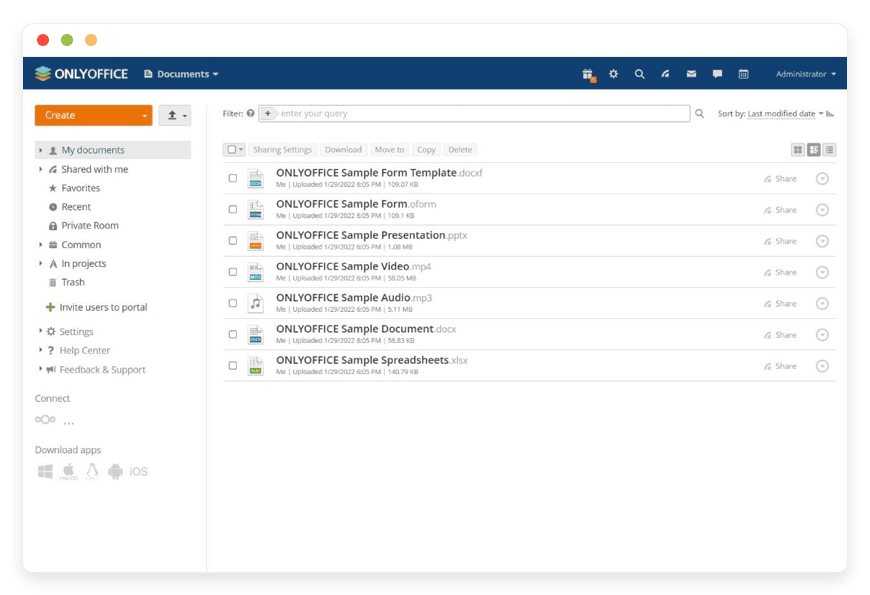
OnlyOffice Docs Preview Image

ABOUT THE SOFTWARE

What is OnlyOffice Docs

OnlyOffice Docs is an open-source office suite for collaborative editing of Word, Excel, and PowerPoint files, PDF editing, and real-time co-authoring.

The software is released under the GNU AGPL v3 license by Ascensio System SIA, a company registered in Riga, Latvia in 2009. OnlyOffice Docs uses OOXML formats (DOCX, XLSX, PPTX) as its internal storage rather than converting through ODF, which keeps Word and Excel round-trips clean for routine business documents. Editors render client-side on HTML5 Canvas; the documented capacity is roughly 75 connections per gigabyte of RAM.

The project lists more than 15 million users worldwide on its customers page. Public references include the Barcelona Supercomputing Center, the City of Lyon (which announced its Microsoft replacement in June 2025), the General Secretariat of Economic and Financial Ministries of France, Karlsruhe Institute of Technology, the University of Münster, the University of Zurich, the City of Hopewell in Virginia, Czech TV, SmartLynx Airlines, and Budweiser. The codebase ships in three editions — Community (AGPL, free), Enterprise (proprietary EULA), and Developer — all built from the same source.

FEATURES

What OnlyOffice Docs does

A full office suite, not just a viewer. Word, Excel, PowerPoint, and PDF editing with real-time co-authoring, granular permissions, and 40+ ready integrations with file-storage and collaboration platforms. These are app capabilities, separate from the DANIAN platform guarantees above.

Real-time co-editing

Fast mode (Google-Docs-style instant sync) or Strict mode (Word-style change-explicit). Concurrent editors see colored cursors, comments, and tracked changes. Optional audio and video calls through the Jitsi plugin.

PDF editor with forms and macros

Edit password-protected PDFs (with the password), build adjustable-field forms, run macros to add or delete pages, and apply trusted digital signatures from an Admin-Panel-uploaded certificate (since v9.3).

400+ spreadsheet functions

Including the 2026-added REGEXTEST, REGEXREPLACE, and REGEXEXTRACT functions, dynamic arrays, and Solver. Macros run in JavaScript rather than VBA; legacy Excel macros require porting during onboarding.

40+ integrations via SDK and WOPI

Official connectors for Nextcloud, ownCloud, Seafile, Confluence, Alfresco, Jira, Redmine, Odoo, SuiteCRM, WordPress, Moodle, Drupal, SharePoint, Plone, and Pipedrive. Every integration call signed with JWT.

Microsoft Office format fidelity

OOXML-native rendering: DOCX, XLSX, and PPTX are stored as-is rather than converted through ODF and back, which keeps round-trips with Microsoft Word and Excel clean for routine business documents.

AI assistant with any provider

Plug in OpenAI, Anthropic Claude, Google Gemini, Mistral, DeepSeek, Together AI, or Groq — or run locally with Ollama, LM Studio, or GPT4All. Disabled by default for security; no lock-in to one vendor.

Comments, track changes, versioning

Granular permissions (edit, review, comment, fill-in-forms, view-only), document comparison, and full restorable version history. Comments now display per-user colors with explicit start and end markers.

Plugin marketplace

Covers OCR, MathType, LanguageTool, DeepL translation, Zotero citations, Telegram, and dozens more. Plugins install per-instance. AGPL editions ship with the full marketplace at no extra cost.

WHAT'S ALWAYS INCLUDED

Every app. Fully managed.
Nothing extra to pay for.

Every app you deploy includes the full managed service — security, backups, updates, and support from day one.

Automatic updates and patches

Apps run the latest stable version. Security patches applied silently, with rollback if needed.

Daily off-site backups

Multiple daily backups in redundant off-site locations. One-click restore if anything goes wrong.

24/7 uptime monitoring

Continuous monitoring with instant alerting. We respond before you notice.

SSL, firewall, DDoS protection

Auto-renewing SSL, hardened firewall rules, DDoS mitigation on every deployment.

Performance and scaling

We monitor resource usage continuously. When your app needs more headroom, we flag it and upgrade with your explicit approval.

Dedicated engineering support

Real engineers on chat. DNS, SMTP & migration help. All included in €9.

WHY MANAGED

Why teams pick managed OnlyOffice Docs

On 4 December 2025, Microsoft announced that 365 Business Standard rises from $12.50 to $14 per user per month on 1 July 2026. On 19 May 2026 OnlyOffice removed the 20-connection cap from Community Edition. Self-hosting is suddenly viable at SMB scale — but only if the operational work is someone's job.

Running OnlyOffice Docs in production is not the same as installing it on a laptop. The setup that ships works for an evaluation; the setup that survives a year of real use is different. Patching cadence, JWT secret rotation, font installation for non-Latin scripts, log rotation (otherwise /var/log/onlyoffice/documentserver/ fills 40 GB in three weeks), worker-pool sizing for large XLSX bid sheets, and Redis-backed sessions for any high-availability setup — all of that is operator work that does not appear in the install guide.

The one gotcha that catches most self-hosters: hand-editing /etc/onlyoffice/documentserver/local.json to set a custom JWT secret. OnlyOffice's own help center warns the file is overwritten and the secret regenerated on the next restart unless the operator uses the documented JWT_SECRET environment variable. Every integration (Nextcloud, ownCloud, Confluence, custom WOPI clients) breaks on the next kernel patch with "the document security token is not correctly formed". We have seen this on customer migrations from self-hosted instances; it is the single most common reason teams move to managed.

What DANIAN ships by default: JWT secret injected through the environment-variable path, Cyrillic / Arabic / CJK font packs pre-installed, log rotation, worker pool sized to OnlyOffice's load-test baseline, and the same upgrade discipline (patches in 48 hours, minor versions within two weeks of upstream release) on every instance.

REVIEWS

Hear from customers ​like you​​​​​​​

Successful businesses and professionals around the world rely on DANIAN every day

USE CASES

Three teams who run OnlyOffice Docs on DANIAN

These are representative team types we set up most often. Each starts with the same flat €9 plan.

14-PERSON ARCHITECTURE FIRM

Subcontractor seat math killed the Microsoft 365 budget

12 permanent staff plus 8–15 rotating consultants on 2–6 week projects. Buying 25 Business Standard seats meant $350/month with consultant seats idle 70% of the time. Moved the document layer to OnlyOffice on DANIAN in the Germany region; paired with Nextcloud for storage. Subcontractors get project-room access for the engagement duration, no provisioned mailbox.

REGIONAL MINISTRY COMMUNICATIONS TEAM

Schrems II and the CLOUD Act became procurement blockers

Six staff drafting press releases, briefing notes, and the parliamentary Q&A spreadsheet across two languages. Procurement framework would no longer approve a US-headquartered office suite. OnlyOffice on DANIAN in the Finland region, integrated with the ministry's existing Nextcloud install. JWT secret rotation tied to staff offboarding events.

8-PARTNER LAW FIRM

Engagement-letter redlines and signed PDFs without per-seat math

Eight partners and four associates drafting matter files, engagement letters, and contracts. Documents retained 7 years on closed matters per the bar's professional-conduct rules. Moved off proprietary office suite for two reasons: predictable cost and explicit region control. OnlyOffice's PDF editor handles the signed-PDF export step with the Admin-Panel signing certificate.

COMPARISON

Four ways to run OnlyOffice Docs

The math turns on user count. Proprietary office suites scale linearly per seat; self-hosting and home servers fix the infrastructure but spend operator time. Managed OnlyOffice fixes both at one flat rate. Numbers below verify against published pricing pages.

Microsoft 365 Business Standard$24/month production VPS, you run itSmall business server at the officeManaged by DANIAN
1 user
$14/mo from 1 Jul 2026 = $168/yr~$44/mo infra + 1–2 hr ops time/mo€650 hardware + €18–55/mo amortised + €60–115/mo electricity & internet€9/mo flat
5 users
$70/mo = $840/yrSame $44/mo + DB tuning at 25+ usersSame hardware + 2–4 hr ops time/mo€9/mo flat
10 users
$140/mo = $1,680/yr$44/mo + scale-up + tuningSame + electricity creep + on-call discipline€9/mo flat
Updates & patchesVendorYou, on your scheduleYou, on your scheduleDANIAN, within 48 hours
BackupsVendor (account-level)You configure off-site targetYou configure off-site targetDaily off-site, included
SupportMicrosoft tiered supportNone — you are the supportNone — you are the supportHuman chat & email
Region choiceUS-headquartered vendorWherever you provisionYour office21 regions, six continents

Microsoft 365 pricing per the 4 December 2025 announcement (microsoft.com/en-us/microsoft-365/blog). VPS reference figure is a $24/month production-class droplet plus $5 object-storage backup and $15 monitoring. Home server reference is a Synology DS923+ amortised over 36 months with business-grade internet and off-site backup; ops time billed at €60–120 per hour.

BY INDUSTRY

OnlyOffice Docs for specific industries

Four industries where the demands on collaborative office software run beyond the standard SaaS shape — explicit retention, region control, integration with sector-specific tooling, or rotating-contributor workflows. We do not pretend every industry fits; this is where we have the most useful experience.

Rules of professional conduct on client confidentiality — and per-jurisdiction retention requirements typically at 7 years on closed matters — set the baseline for how matter documents are stored, edited, and signed. The Schrems II ruling (CJEU Case C-311/18, 16 July 2020) invalidated the EU–US Privacy Shield framework, which is the proximate reason many EU firms now prefer office software that does not transit to US-headquartered clouds.

What DANIAN configures for legal tenants: EU region placement (Germany or Finland are the common picks), admin-panel access restricted to an IP allowlist the firm controls. Pair OnlyOffice with Nextcloud or Seafile for matter-level document storage with explicit permissions per partner and associate.

Typical workflow: drafting a multi-party client engagement letter with four partners redlining over a 14-day cycle, then exporting to a digitally signed PDF using the Admin-Panel signing certificate from OnlyOffice 9.3. The DOCX round-trip with opposing counsel using Word stays clean.
The seat math hits hardest here. A firm with 12 permanent staff and 8–15 rotating MEP, structural, and civil consultants buys 25 Microsoft 365 Business Standard seats, but contractors sit idle 70% of the time. The NIS2 Directive (EU 2022/2555) captures firms working on critical infrastructure as essential or important entities, which raises the procurement bar on collaboration tooling.

What DANIAN configures for architecture and engineering tenants: per-project document rooms scoped to the engagement, JWT scoped per integration with the firm's BIM or project-management tool, and a raised converter worker pool to handle large XLSX bid sheets (200-page specification PDFs in the 40–80 MB range are typical).

Typical workflow: a mechanical consultant joins a 6-week project, gets read-write access to the project room only, edits the specifications XLSX collaboratively with the structural engineer, and is removed when the engagement ends — without ever consuming a permanent paid seat. OnlyOffice's documented capacity (~75 connections per gigabyte of RAM) sits well above what most projects need.

The NIS2 Directive transposition deadline was 17 October 2024; as of mid-2025 only 14 of 27 EU Member States had fully transposed it, which keeps regulatory pressure active across Germany, France, Ireland, and Spain. France's SecNumCloud framework (operated by ANSSI), Germany's BSI C5 catalogue, Belgium's BOSA standards, and Italy's AgID cloud qualification are the national equivalents most often referenced in public-sector RFPs. The US CLOUD Act (2018) is the explicit reason cited in both the Schleswig-Holstein migration (40,000+ Exchange mailboxes off Microsoft, completed 2 October 2025) and the City of Lyon's June 2025 Microsoft replacement.

What DANIAN configures for public-sector tenants: EU region placement (Germany, Finland, Poland, Sweden, etc), tightened per-agency retention windows. Important: DANIAN does not currently hold SecNumCloud, BSI C5, ISO certifications, or SOC attestations. Public-sector buyers whose procurement framework requires those attestations today should choose a provider that holds them. We sit at the smaller-scale end of the public-sector picture — universities, ministry communications teams, municipal departments under 500 staff.

Typical workflow: a regional ministry's communications team co-edits press releases, briefing notes, and the weekly parliamentary Q&A spreadsheet across 6 staff, integrated with the ministry's existing Nextcloud or OpenDesk file storage. The City of Lyon migration covers more than 10,000 employees serving over one million residents; we are useful for the next tier down.

Independent clinics and small group practices handling patient referral letters, care-pathway protocols, and consent PDFs face a specific exposure under the US CLOUD Act when using US-headquartered office suites — the practical reason a growing number of EU practices are now moving. The European Health Data Space Regulation entered into force in 2025; the NIS2 Directive captures medium and large healthcare providers as essential entities with potential administrative fines up to €10 million or 2% of worldwide turnover (Article 34).

What DANIAN configures for healthcare tenants: EU region placement with explicit residency commitment, storage-layer encryption enabled at the volume level, Admin-Panel-uploaded signing certificate for referral and prescription PDFs. We do not currently hold healthcare-specific attestations; clinics that require a formal Business Associate Agreement or specific national-equivalent certification (e.g. UK NHS DSP Toolkit, ISO healthcare standards) should choose a provider that does.

Typical workflow: a 6-clinician practice maintains patient referral letters, care-pathway protocols, and consent forms in OnlyOffice rooms scoped per clinician, with the PDF editor handling intake and consent capture. Documents stay in the EU region of the practice's choice and never transit to a US-headquartered cloud.

FAQ

Frequently asked questions

Everything teams ask before signing up — answered straight, without sales speak.

Three groups: technical setup, migration, and how DANIAN works as a service.

01

Technical and configuration

For most documents, yes. OnlyOffice uses OOXML (DOCX, XLSX, PPTX) as its internal format rather than converting to ODF and back, so round-trips with Microsoft Word are clean for routine business documents. Edge cases exist: deeply nested tables, VBA macros, and highly customised XLSX dashboards can need adjustment. We open imported documents in fast co-editing mode by default so you can verify fidelity before committing.
On version 9.4 (released 19 May 2026) there is no longer a Community Edition connection cap. We run the latest version across all customer instances. In practice we size each tenant to comfortably support 50 concurrent active editors on the default plan and scale RAM and worker count beyond that when projects need it. We tune the converter worker pool and document-cache TTL per workload, not as a one-size-fits-all default.
We inject the JWT secret through the documented environment-variable path (JWT_SECRET, JWT_ENABLED, JWT_IN_BODY) rather than hand-editing local.json — which OnlyOffice's own help center warns will be overwritten on restart.
OnlyOffice's macro engine is JavaScript, not VBA. Most workbooks open and behave correctly because the formulas and references survive the round-trip — but custom VBA modules do not run. If your workflow depends on a specific VBA routine, we can usually port it during onboarding, or document where the team should keep that file in Microsoft 365 for the rare quarterly run.
The OnlyOffice AI plugin is off by default on every DANIAN instance — for security, the operator must install the plugin and enter an API key before any document text is sent anywhere. Providers supported include OpenAI, Anthropic Claude, Google Gemini, Mistral, DeepSeek, Together AI, and Groq, plus local-only providers Ollama, LM Studio, and GPT4All. If you choose a local provider, no document content leaves your instance.
The official AGPL connectors at github.com/ONLYOFFICE remain compatible and we pin a known-good version. We co-locate the OnlyOffice instance with your file-storage app in the same region to keep latency under 10ms. Note: OnlyOffice formally suspended its 8-year partnership with Nextcloud on 1 April 2026, so the Nextcloud connector is now community-maintained rather than vendor-co-maintained. The integration still works; the level of cross-vendor support behind it has changed.
We run the latest stable version. We follow upstream's stable channel and upgrade within two weeks of a new minor release after running it on our test instances for at least seven days. Security patches inside a minor version land within 48 hours.
We pre-populate the fonts directory at /usr/share/fonts/truetype/onlyoffice-extra with the standard Cyrillic, Arabic, Hebrew, Thai, Korean, Japanese, and Chinese font packs on every instance. If your documents use a specific licensed font, send us the file during onboarding and we install it. Missing fonts at conversion time are the most common avoidable cause of PDF-export drift, and we close that gap before you see it.

02

Migration and onboarding

We can activate your app on your own custom domain/subdomain. Examples: mydomain.com, anyword.mydomain.com.
Or, on our randomized free subdomain. Example: 963.apps.danian.cloud
If you wish to use a custom domain/subdomain, select that option when ordering your app (or notify us later). We will send you the required DNS records and if needed, our tech team will modify them for you.
21 datacenter locations across six continents. You choose the region at provisioning. Application data sits in the region you choose; pick whichever is closest to your users or matches your data-residency preference.
Yes. Request a region migration from the dashboard and we run the move in the background. The system emails you when the migration completes; total transfer time depends on data volume but typical instances finish in a few hours. There is no extra charge for a region change.
Yes. Full data export is available at any time, in a portable format you can bring to any infrastructure.
Most teams migrate in stages: file storage first (we recommend pairing OnlyOffice with Nextcloud, ownCloud, or Seafile on DANIAN), then document editing for new files, then bulk-import historical archives once the team is comfortable. The DOCX, XLSX, and PPTX files round-trip cleanly. We help with the bulk import and the SSO/SAML setup; we do not pretend the calendar and email migration is in scope — that is a separate decision.
OnlyOffice Docs itself sits downstream of whatever authentication your host application provides — so the SSO experience depends on whether you pair it with Nextcloud, ownCloud, Seafile, or run it standalone via DocSpace. SAML and OAuth flows work cleanly through the host app on every integration we support. For DocSpace standalone we set up SAML during onboarding. LDAP is supported in DocSpace and via your host app's LDAP module.

03

Billing, support, and platform

€9 covers everything we do for that app: hardware in the region you choose, daily off-site backups with one-click restore, automatic security patches and version upgrades, 24/7 monitoring, SSL and firewall, and engineering support on Email/LiveChat. There are no setup fees or hidden line items. For more info see our Pricing page.
If you decide to continue, we charge €9/app/month from day 8. If you don't, the trial ends and you can export your data. No card is required for the trial, and we never auto-charge you without explicit consent.
No. The €9/month is flat regardless of how many users log into your app. Add 5 users or 50; the price doesn't change.
24/7 Live chat and email support, both staffed by engineers who run the systems. We handle DNS configuration, SMTP setup, app integrations, performance tuning, troubleshooting, and migration help. Response time is typically under an hour. There is no tier system — every customer gets the same support.
Yes. Cancel from the dashboard. We don't charge a cancellation fee, we don't lock data, and we will export your data to you on request before deletion. data to you on request before deletion.
Every customer instance is backed up daily to a separate region from the primary. We test restores. You can request a restore at any backup point within the retention window — usually 7 days for daily backups.
Your application data sits in the region you choose at provisioning — 21 datacenter locations across six continents. Account-level data (billing, account email, support ticket history) is processed centrally. Application data region is picked by you, per app.
99.9% uptime SLA on every app, every tenant. Service credits are documented at danian.co/service-level-agreement. The status page is located at status.danian.co.
When your tenant approaches the resource ceiling — the base tier holds 1 vCPU/RAM, 30 GB storage — we notify you. Resource upgrades happen with your explicit consent; we will not upgrade your tenant or charge you without it.
We wait. We don't suspend the app or delete your data on the first failed charge. We email you, you fix the card on file, and we continue.
Invoices can be downloaded from the billing dashboard in PDF the day each charge succeeds. EU VAT is added where applicable and the VAT-reverse-charge regime applies for VAT-registered businesses with a valid number.
150+ open-source apps across automation, team chat, file sync, analytics, AI, password management, email marketing, dev tools, project management, smart home, CMS, and federated social. See the full catalog →
Yes. Every instance comes with a web-based terminal and a file manager in your DANIAN management dashboard. Useful for managing your data and customizations.
Resources scale with your usage. If your app needs more vCPU, RAM, or storage, we add it — and we ask first before any change to your plan. €9 is the floor; resource-heavy workloads may price higher, but you'll always know in advance.
Yes. We have both a Partner program and an Affiliate program available. Anybody can sign up.
No contract. No minimum commitment. Cancel anytime from the dashboard with one click. The 7-day free trial requires no credit card. After the trial converts to paid, you can still cancel at any month without notice or penalty.

DEPLOY IN YOUR REGION

21 datacenter locations on six continents

Pick the region closest to your users.

United States, Germany, Finland, Singapore, Australia, Brazil, Canada, Netherlands, UK, Spain, Italy, France, Sweden, Malaysia, India, Japan, Mexico, Poland, South Korea, Chile, South Africa and more coming soon
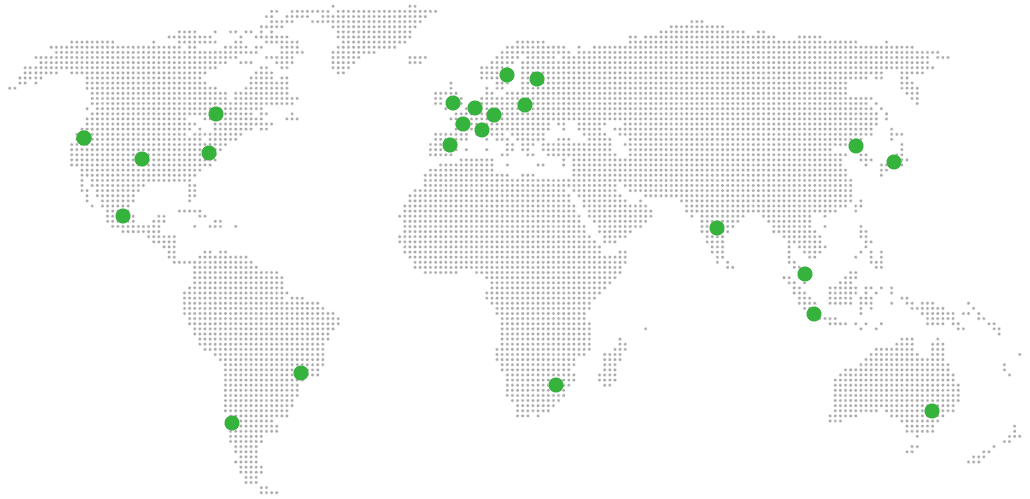
Global Reach Map

Try managed OnlyOffice Docs for 7 days

No card. Cancel from the dashboard.