
Fully Managed DbGate
as a Service
Deploy DbGate as a fully managed service starting at €9/mo. Get automated backups, SSL, updates, support and monitoring included.
DbGate is an open-source database manager, a browser-based client for Postgres, MySQL, SQL Server, MongoDB, Redis, SQLite and around twenty other engines, giving a small team one shared console instead of a per-seat desktop licence on every laptop.
✓Free 7-day trial ✓99.9% Uptime SLA ✓No credit card ✓Cancel anytime
✓Free 7-day trial ✓99.9% Uptime SLA
✓No credit card ✓Cancel anytime

DbGate
STARTING AT
USAGE
 Germany
 Finland
 Netherlands
 UK
UK Sweden
 United States
 Canada
 Singapore
 Japan
Japan Australia
 Brazil
 South Africa+9 more →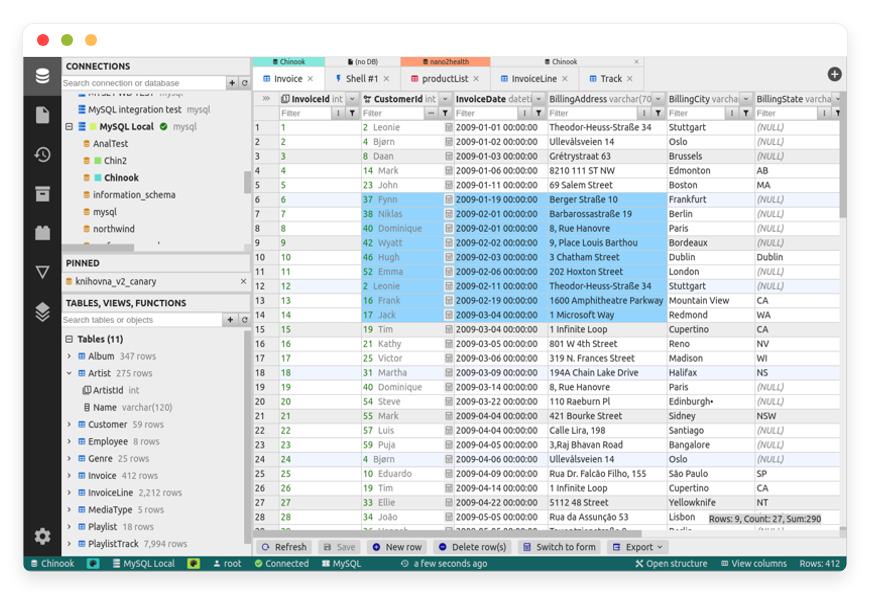
ABOUT THE SOFTWARE
What is DbGate
FEATURES
What DbGate does
WHAT'S ALWAYS INCLUDED
Every app. Fully managed.
Nothing extra to pay for.
Every app on DANIAN ships with the same operational baseline. You do not choose a backup add-on or a monitoring tier. Hosting, patching, backups, SSL, and support are part of the €9, and they apply to DbGate the same way they apply to everything else in the catalog.
WHY MANAGED
Why teams pick managed DbGate
REVIEWS
Hear from customers like you

No more maintenance headaches!
Finally, I can relax and not bother with maintenance. Each of the softwares that we run on DANIAN is automated and running stable for couple months already. They even assist us with modifying the DNS records. Once we needed to modify the config of Nextcloud so that we are able to upload higher than 5GB files and they assisted us fast. I also love their documentation!

Kevin Blackwell

Best managed service
I previously ran Peertube, Mastodon, Mattermost and Mirotalk on other providers before switching to DANIAN. I was tired of handling the updates and backups myself. Not only that the performance is "out of this world" fast, but their tech support is amazing. Since then I added 5-10 more Apps on my account. I also love how they add more softwares on their list constantly!

William Northfield

Love the personalized service!

George Adams
n8n runs excellent

David Hartmann

Smooth experience
I needed a way to manage the projects and files for my company. This was the first time I learn about opensource. I asked their support team and they assisted me immediately. I started with Openproject. Later I added Nextcloud. My team were able to get used to the apps fast.

Levi Nilsson

Bye GA

Wyatt Mitchell

Love the freedom
I wanted to use a crm for my startup. I signed up for the free trial. Tried out espocrm and dolibar and picked one. Their dashboard is very easy for a beginner. I recommend them and feel confident in choosing them.

Elias Koch
Wow just wow
After discovering DANIAN, I wished I'd found them sooner — their solution is excellent and deserves wider recognition. Very good solution!

Tyler Hollander
Professional tech support!

Bastian Engel
Their support team is the best!
I had a problem with my card and the subscription could not be renewed in time. I notified their support and surprisingly, they showed much understanding. They basically left my apps run until I solved the card issue. Other providers would have deleted my data in a heartbeat. This is the way to build client-vendor trust!
George Adams
Fair price and fast
4 months ago I activated n8n, Uptime kuma, Vaultwarden and Paperlessngx. So far everything is perfect. The performance of all apps is excellent. I contacted their support team couple times for using custom subdomains for the apps and they were fast and kind. I'm constantly recommending them to my network!

Atanas

Vaultwarden 10/10
I wanted to selfhost a passwords manager for my company but I didn't trust the mainstream providers. I tried out Vaultwarden for the free trial. I loved how their support team communicated with me professionally but still kind. I know that I can contact them whenever with whatever question I have. Recommended!

James Smith
Multiple locations options

Edward Nelson
Everything just works!
My focus is on my business, not running servers. I love that I can lauch any app without having to think about the tech behind it. Everything just works!

Tony Roy
Awesome support team!

Filip

Very proactive!
Today couple of the videos on my Peertube got viral. Before I even noticed, their support have notified me via email that they proactively upgraded my app with more cpu & ram so that it continues to work without any downtime. They left the upgraded app with the added resources for couple days until the traffic stabilizes. After that I had the possiblity to stay on the same plan or keep the upgraded plan. Out of gratitude I stayed on the upgraded one.

Luke Hall

Win-win!
I run a web design biz. After I perform the work for my clients, they constantly ask me for more software solutions. So I partnered with DANIAN. Not only I provide the requested softwares for my clients and get the increased revenue boost by delegating all to DANIAN, but also for those clients that wish to order directly from DANIAN, I send them an affiliate link. Win-win on all sides!

Luke Walker

Jeffrey Johnson
Awesome customer service
I needed to add analytics on my website but I didn't know anything about DNS. Their team guided me at all phases and they performed the changes for me. Additionally they were transparent and notified me of every change applied and steps performed.

Gabriele Marino

Good admin dashboard
Not only that I got Chatwoot, I also have access to the management dashboard. I love that I can view my hourly/daily usage and perform manual backups and restorations if needed. I don't need the level of control but it feels good to know that I have it if I need it.

Matthew Turner

Andreas Schmitt
Great service!
I configure custom Matomo tracking for my clients as a monthly service. Many of my clients were asking if they can selfhost Matomo instead of using the Cloud service. My employee recommended DANIAN. Basically, I can activate as much Matomo's in any of 20+ countries the same day. Additionally the affiliate revenue is a nice bonus.

Jacob Turner
Smooth experience
I was listing through youtube tuts on how to install Bookstack myself. Then randomly, I found their video playlist exactly for Bookstack. Got curious and went at their website. For the same price (or higher) that I would pay for just the VPS, with them I'm getting a fully managed Bookstack. It's a no-brainer decision!

Elias Gustafsson


Mason Hayes
Its a great service
Its a great service. I love the performance of my Mastodon community. It keeps on growing and I don't have any worries about backups, secuirity, updates, etc.

Vinícius Rocha

Very intuitive solution!
I wanted to use a nocode software for my company. A friend recommended them so I tried both Baserow and NocoDB, couple days later picked one.

Haruto Hashimoto


Henrik Otto
USE CASES
Three teams who run DbGate on DANIAN
Three shapes of team account for most DbGate instances we provision: agencies holding many client databases, analysts who need read access without a laptop licence, and small platform teams who want scripting switched off.
SIX-PERSON WEB AGENCY
One instance per client, connections pinned by us
Around twenty client databases across Postgres, MySQL and SQLite. Rather than one shared console, they run a separate instance per client with the connection list fixed at provisioning, so a developer working on one client cannot see another client's data at all.
FOUR-PERSON ANALYTICS TEAM
Read-only replica access instead of four desktop licences
An online retailer's analysts pull weekly figures from a MySQL reporting replica. The connection is marked read-only, so a mistyped statement cannot write to the replica, and the weekly export goes out as CSV to the finance spreadsheet.
THREE-PERSON PLATFORM TEAM
Scripting off, single database pinned, nightly restore point
A clinical data company keeps one instance pinned to a single database with shell scripting and shell connections disabled. Every change to subject data is made through the grid, where the generated statement is reviewed before it is committed.
COMPARISON
Four ways to run DbGate
The cost of a database client is a per-seat question everywhere except here. The comparison below prices the same job, giving a small team a working client for several databases, at one, five and ten people.
| Path | 1 person | 5 people | 10 people | What you take on |
|---|---|---|---|---|
| Desktop IDE licences (DataGrip) | $259 / user / yr | $1,295 / yr | $2,590 / yr | Per-seat and per-device. Installed on each laptop, so connection settings and credentials live on individual machines rather than in one managed place. |
| Self-host on your own VPS | $24/mo server | $24/mo server | $24/mo server | Licence-free, but you own the volume mapping, the patch cadence, the proxy websocket configuration and the certificate renewal. Budget a few hours a month. |
| Home server | ~$180 one-time | + electricity | + electricity | An N100-class mini PC draws roughly ten watts, about €20 a year to run. No off-site copy, no second site, and remote access is your problem to solve. |
| DANIAN managed DbGate | €9/month | €9/month | €9/month | Flat, regardless of how many people use the instance. Persistent volume, nightly off-site backup, patched image, certificate and proxy configured, human support included. |
The web-based comparators price differently again: DbGate's own Team Premium edition costs $150 per user per year, so a ten-person team pays $1,500. The point of the table is not that licences are expensive, it is that seat count stops being a budgeting variable.
BY INDUSTRY
DbGate for specific industries
A database client sits closer to regulated data than most software a small team runs. The four settings below share one requirement: access has to be narrow, attributable to a named person, and recoverable afterwards.
FAQ
Frequently asked questions
The questions below come from the upstream issue tracker, from the project's own documentation, and from what customers ask us during a trial. They are grouped into configuration, moving in, and how the platform itself works.
01
Technical and configuration
02
Migration and onboarding
03
Billing, support, and platform
DEPLOY IN YOUR REGION
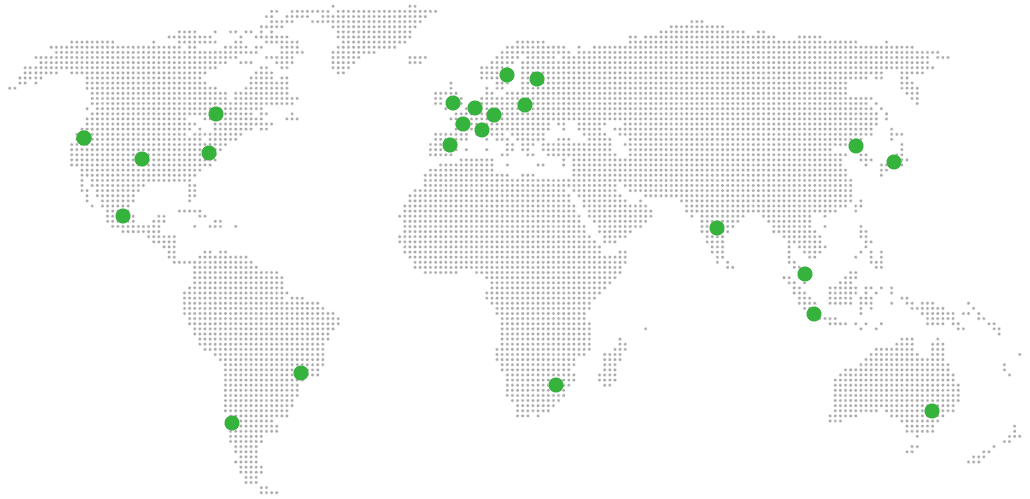
21 datacenter locations on six continents
Pick the region closest to your users.
United States, Germany, Finland, Singapore, Australia, Brazil, Canada, Netherlands, UK, Spain, Italy, France, Sweden, Malaysia, India, Japan, Mexico, Poland, South Korea, Chile, South Africa and more coming soon
Try managed DbGate for 7 days
SERVICES
COMPANY
RESOURCES
COMPARE


