Open-source Google Photos alternatives in 2026
TL;DR
- Google removed three Photos API scopes on 31 March 2025. Third-party apps can no longer read your full Google Photos library — only files they uploaded themselves.
- Immich is the closest open-source replacement: a phone auto-backup app, face and object search, and full-resolution originals you control. It reached its first stable release (v2.0.0) in October 2025 and has passed 100,000 GitHub stars.
- Lychee and Piwigo are galleries, not backup tools. They display and share photos well; they do not back up your phone or run smart search.
- Managed on DANIAN, all three run from €9/month. Photos are heavy, so storage is the real cost — we show the math at 50 GB and 250 GB below.
- This is a trade about ownership, not cheaper storage. On price per gigabyte, a consumer cloud tier still wins, and we say so plainly.
Why people are leaving Google Photos in 2026
Two changes pushed photo owners to look elsewhere through 2025 and 2026. On 31 March 2025 Google restricted its Photos API, breaking third-party tools that synced your library. At the same time, the cheap 2 TB storage many people relied on started moving behind an AI subscription bundle.
The Library API used to let approved apps read, organise, and back up your existing photos. On 31 March 2025 Google removed the read-only, sharing, and core library scopes. From the next day, calls that relied on them returned a permission-denied error. Apps can now touch only the photos they uploaded themselves. A new picker lets you hand-select images one batch at a time, but nothing can mirror your whole library in the background anymore. Services that offered Google Photos backup or sync had to re-engineer or shut down.
Two facts make the lock-in sharper. The Photos API never let apps download original quality. And the web interface only lets you grab a limited number of originals by hand. So the one reliable way to get every full-resolution file out is Google Takeout — an export tool, covered below, that is slow and clumsy by design.
Then there is price. The headline 2 TB plan that many people quote at about $9.99/month is now wrapped into Google's AI Pro tier alongside Gemini. Priced in euros, the 2 TB plan runs near €99.99 for the first year and renews around €219.99 — roughly €18 a month. The 100 GB and 200 GB tiers still exist at about €2–3/month, but the direction is clear: more storage now arrives bundled with an AI subscription you may not want.
None of this forces anyone off Google Photos. It removes the reasons to stay for people who already wanted to own their library.
What "alternative" actually means here
"Alternative" hides an important split. Immich is a true Google Photos analog — it backs up your phone and searches by face and object. Lychee and Piwigo are galleries: they organise and present photos you put there. Picking the wrong type is the most common migration mistake.
Google Photos does two jobs at once. It is a backup target — your phone uploads to it automatically — and it is a search engine for your own memories, finding faces, places, and objects on demand. Most "Google Photos alternative" lists ignore that these are separable.
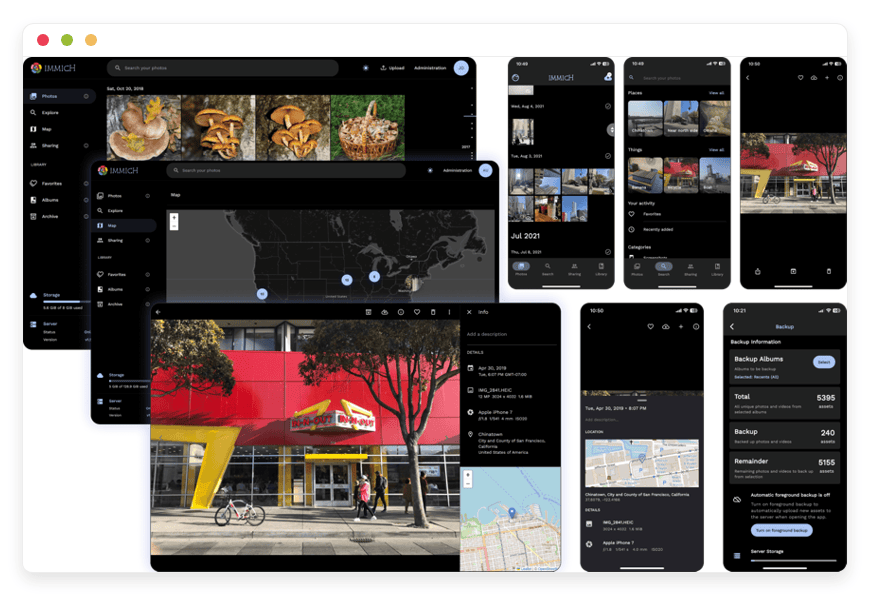
Immich does both jobs. It has iOS and Android apps that back up new photos in the background, and it runs face recognition and object and semantic search on your own server. That is why it is the headline here.
Lychee and Piwigo do the gallery half very well and skip the backup half entirely. There is no phone app that quietly uploads your camera roll, and there is no machine-learning search. You add photos deliberately, organise them into albums, and share them. For a curated portfolio or a family archive that is a feature, not a gap — but it is not a Google Photos replacement.
There is a second axis: who runs the server. You can self-host any of these on your own hardware, or you can have someone manage the instance for you. The software is identical either way. What changes is who patches it, backs it up, and answers the phone at 2am when an upgrade misbehaves.
The shortlist
Three open-source projects cover the range, from a full Google Photos replacement to a long-term archive. Here is what each one is, who maintains it, and the kind of person it suits.
Immich — the closest thing to Google Photos
Immich is a high-performance, self-hosted photo and video manager with mobile auto-backup and machine-learning search. It is licensed under AGPL-3.0, has passed 100,000 GitHub stars, and reached its first stable release (v2.0.0) in October 2025.
Best for anyone who wants the Google Photos workflow without Google.
Immich's mobile apps back up your camera roll in the background, the way Google Photos does. On the server, it builds face clusters and indexes objects, and it supports semantic search — you can type "red bicycle on a beach" and find the photo. It reads EXIF, plots locations on a map, handles RAW files, and supports multiple users and partner sharing.
The project began in 2022, is backed by FUTO, and now ships frequent updates.
It is free and open-source; an optional one-time server key, around $100, supports the project and adds a few extras, but it is not required.
Two honest notes: the machine-learning work runs on the instance, so a large library wants more processor and memory; and the team still recommends keeping an independent backup, because a photo manager is not a backup strategy on its own.
We run it as managed Immich hosting from €9/month.
Lychee — a clean gallery for sharing
Lychee is a good-looking, easy-to-run photo gallery built on PHP and Laravel. It is MIT-licensed with roughly 4,000 GitHub stars, and supports EXIF and IPTC metadata, albums, and public or password-protected sharing.
Best for presenting a curated collection from your browser.
Lychee is about display. You upload from your computer, a URL, or cloud storage, sort photos into albums, and share them with a link or behind a password. It shows EXIF and IPTC metadata cleanly and looks like a native app in the browser. What it is not: a phone-backup tool.
There is no app quietly uploading your camera roll, and no face or object search. If your goal is a sharp, private gallery you control — a portfolio, a club's photos, a project archive — Lychee is a light, pleasant choice.
We run it as managed Lychee galleries on the same €9 base.
Piwigo — the long-haul archive
Piwigo is a mature web photo gallery, in active development since 2002 and licensed under GPL v2. It has about 3,800 GitHub stars, 85 languages, hundreds of plugins, and is proven on libraries past 500,000 photos.
Best for organisations and large archives that need control and longevity.
Piwigo is the veteran. Two decades of development give it granular permissions, batch tools, a large plugin ecosystem, and a track record of running enormous collections without strain.
It is light on resources — around 1 GB of memory is enough. Like Lychee, it is a gallery and an archive, not a backup app: no auto-upload from your phone, and no machine-learning search.
Where it shines is controlled access and durability — a photography club, an association, a museum, a company image bank that several people manage and that has to be there in ten years.
For that job, Piwigo for photo archives is a steady pick.
Want the Google Photos experience without the lock-in? See managed Immich hosting.
A side-by-side view of where each one fits:
| Feature | Immich | Lychee | Piwigo |
|---|---|---|---|
| What it's for | Backup + search (Google Photos analog) | Gallery + sharing | Gallery + long-term archive |
| Phone auto-backup | Yes (iOS, Android) | No | No |
| Smart search (faces, objects) | Yes, on your instance | No | No |
| License | AGPL-3.0 | MIT | GPL v2 |
| GitHub stars | 100,000+ | ~4,000 | ~3,800 |
| Managed on DANIAN from | €9/month | €9/month | €9/month |
| Best for | Replacing Google Photos | Showing a curated set | Big, multi-user archives |
Immich vs Google Photos — at a glance
For the backup-and-search job, the comparison that matters is Immich against Google Photos itself. The two feel similar to use. They differ on who owns the files, where the search runs, and what happens to your tooling when a vendor changes the rules.
| Feature | Google Photos | Immich (managed on DANIAN) |
|---|---|---|
| Phone auto-backup | Yes | Yes (iOS, Android) |
| Full-resolution originals | Count against quota; originals only via Takeout | Stored as-is on your instance |
| Smart search (faces, objects) | Yes, in Google's cloud | Yes, on your own instance |
| Where your photos are read | Google's systems | Only your instance |
| Source code | Closed | Open (AGPL-3.0) |
| Getting your data out | Takeout export only | Download or SFTP, anytime |
| Third-party API access | Restricted since March 2025 | Full API — it's your server |
| Region | Google decides | Pick from 21 locations |
| Cost structure | Per-GB storage tiers | €9 base + €0.50/GB |
The last row is the honest one. Google's per-gigabyte storage is cheaper than ours, and we get to that next. Everything above the price line is what you are actually buying when you leave.
What storage actually costs
Photos are heavy, so storage is the real cost of self-hosting them — managed or not. DANIAN's €9 base includes 30 GB. Above that, storage is €0.50 per GB per month. At 50 GB you pay €19/month; at 250 GB, €119/month. Here is the honest comparison.
Every €9 app on DANIAN includes a processor, memory, 1,000 GB of traffic, and 30 GB of storage. For a photo library, 30 GB goes quickly, so the per-gigabyte rate is what matters. Storage above the included 30 GB is €0.50 per GB per month. The math is linear, with no tier jumps:
- A 50 GB library: €9 base + 20 GB × €0.50 = €19/month.
- A 250 GB library: €9 base + 220 GB × €0.50 = €119/month.
Now put that next to Google. A 50 GB library fits Google's 100 GB tier at about €2/month. A 250 GB library fits the 2 TB tier — roughly €10/month on promotion, nearer €18 on renewal. On price per gigabyte, Google wins, and it is not close. We are not going to pretend otherwise.
So what does the higher number buy? The software and the files are yours. The face and object search runs on your own instance rather than in Google's cloud. Your originals stay at full resolution, not locked behind an export tool. And no future policy change can shut your own tooling out of your own library — the thing that happened to third-party Google Photos apps in March 2025. For the photo owner who values those things, €19/month for a 50 GB library is a fair price for ownership. For someone who wants the cheapest possible 2 TB bucket, it is not, and they should stay on a consumer plan with a clear conscience.
There is a size where the trade tips. Past a few hundred gigabytes, the per-gigabyte cost starts to dominate, and a self-hosted box with cheap disks at home becomes the more economical way to own a very large library — if you are willing to run it. Managed hosting is the right tool up to that range, where you want ownership without operations.
One more honest note. Immich's machine-learning features lean on processor and memory, and a large library indexes faster with more of both. On DANIAN, a resource upgrade is +€9/month per additional processor-and-memory unit, and we never apply it without asking you first. Most small libraries never need it.
See what your own library would cost. Start a 7-day trial — no card needed.
Moving your library off Google Photos
Getting out of Google Photos means one tool: Google Takeout. It exports your full-resolution originals as a set of zip files with metadata attached. Immich then imports those archives — albums, dates, and locations included — using a free tool called immich-go.
Because the API no longer allows it, Takeout is the only way to pull every original out of Google Photos in bulk. The steps are straightforward, if slow:
- Open Google Takeout, deselect everything, then select Google Photos only.
- Choose the .zip format and a part size — 10 GB parts are a safe default.
- Create the export and wait. Google takes anywhere from a few hours to a couple of days to bundle a large library.
- Download the parts — files named takeout-001.zip, takeout-002.zip, and so on.
Each archive holds your photos plus a set of JSON files that carry the metadata Google attached — capture dates, GPS coordinates, album membership, favourites. Keep those JSON files; they are how the import rebuilds your timeline and albums.
To import, Immich has an official command-line tool, and the community maintains immich-go — a single small program built specifically for Google Takeout. It reads the archives, restores dates and locations from the JSON, recreates your albums, and detects duplicates by hashing files, so an overlapping export does not litter your library with copies. Run it once with a dry-run flag to preview, then again for real.
Three honest gotchas are worth planning for. First, the instance needs free space for the whole library before you import. Size your storage to the Takeout total, not to today's half-empty estimate. Second, run the import from a computer on a solid connection. It uploads every original to the server in turn. Third, the first machine-learning pass is processor-heavy and takes time on a large library. Faces and smart search fill in over hours, not seconds. A small library barely notices; a 200 GB one wants patience or a short-term resource bump. None of these is a blocker. They are the difference between a smooth migration and a surprised afternoon. After import, spot-check that dates, locations, and a few albums came through before you delete anything.
This part is a command-line job, and that is the honest catch: it is the one step that is not point-and-click. If the command line is not your thing, it is the kind of onboarding step our support can run with you. After it finishes, your phone backs up to the new instance going forward, and Google Photos becomes a copy you can keep or delete.
How to pick
The choice comes down to three questions: what job you need done, how big your library is, and whether you want to run the server yourself. Answer those honestly and the right tool is usually obvious.
- Do you need backup and search, or a gallery?
If you want your phone to back up automatically and you want to search by face and object, you want Immich. If you want to present and share photos you add deliberately, a gallery is the better fit — Lychee for something light, Piwigo for a big multi-user archive — and cheaper to run, because galleries are lighter. - How large is your library, and what is ownership worth to you?
Under a couple of hundred gigabytes, managed hosting gives you ownership at a predictable price. Well past that, the per-gigabyte cost grows, and a home server with cheap disks becomes the economical way to hold a very large collection. Be honest about your real size — Takeout will tell you. - Do you want to run the box, or have it run for you?
Self-hosting on your own hardware is satisfying if you enjoy it and have the time. If you would rather not own the patching, the backups, and the 2am upgrade, managed hosting exists for exactly that reason. The software you get is the same.
How DANIAN runs these
On DANIAN, Immich, Lychee, and Piwigo each run in an isolated container from €9/month. We patch them, monitor them around the clock, and back up every instance daily to a separate location. You pick the region; we keep the lights on.
A managed instance means the operational work is ours. We deploy the app, keep it patched, watch it, and take a daily off-site backup, so a bad disk is an inconvenience and not a loss. You reach a named person by email, not a queue. Resources scale only with your explicit consent, so there are no silent overage bills.
What is not ours: the one-time Takeout export, which only you can run from your Google account, and the import step, which is a command-line job we can help with. After setup, the day-to-day is the app you already wanted, without the server underneath it being your problem. If you decide to leave, your photos download over SFTP and the open-source app is yours to take anywhere.
FAQ
What is the best open-source alternative to Google Photos?
For most people it is Immich. It is the only one of the three that backs up your phone automatically. It also searches by face and object, like Google Photos. Lychee and Piwigo are galleries for photos you add by hand, not phone-backup tools. Pick by the job you need.
Is Immich better than Google Photos?
It depends on what you value. For the lowest price per gigabyte and zero setup, Google wins, and it is not close. Immich wins on owning your full-resolution originals and running search on your own instance. It also removes the risk of a vendor locking your tools out.
Is Immich really free?
Yes. Immich is free and open-source under the AGPL-3.0 licence, and you can run the full app at no licence cost. The project offers an optional one-time server key, around $100, that supports development and adds a few extras, but it is not required to use Immich fully.
Can I just self-host Immich for free instead of paying DANIAN?
Yes. Immich is free to run on your own hardware, and many people do. What DANIAN charges for is the operations: patching, daily off-site backups, monitoring, and a human engineer. If you have the time and the skills, self-hosting is a fair choice. If you would rather not, that is what €9 buys.
What's the difference between Immich and a gallery like Lychee or Piwigo?
Immich backs up your phone automatically and searches by face and object, like Google Photos. Lychee and Piwigo are galleries: you add photos deliberately, organise them, and share them. They do not auto-upload your camera roll or run machine-learning search. Pick by the job you need done.
Do I need to be technical to use Immich, Lychee, or Piwigo?
Not on a managed instance. We deploy the app, patch it, and keep it backed up. You use the photo app, not the server. You will change a DNS record or two to point your domain, with guidance. The one technical step is the first import from Google, which our support can run with you.
Do I need Docker or a server to run Immich on DANIAN?
No. Running Immich yourself means Docker, a server, and the upkeep that comes with them. On DANIAN there is none of that. You sign up, pick a region, and the instance is provisioned for you. You reach it in a browser and on the mobile app, and we keep the server side running.
Does Immich have a mobile app for iPhone and Android?
Yes. Immich has native iOS and Android apps. They back up your camera roll in the background, like Google Photos. New photos upload to your instance on their own. You browse your whole library, search it, and share from the phone. The apps are open-source and free from the app stores.
Can Immich recognise faces and search by what's in a photo?
Yes. Immich groups photos by face, so you can find everything with one person in it. It also indexes objects and supports semantic search. Type "red bicycle on a beach" and it finds the shot. All of this runs on your own instance, not in a shared cloud. It is the closest match to Google Photos search.
Will my full-resolution photos and videos be kept?
Yes. Immich stores your originals as-is, at full resolution. There is no quota-saving recompression and no "storage saver" tier quietly shrinking files. What you upload is what you keep, and what you can download later. The limit is the storage you pay for, not a policy on image quality.
Can I share albums with family and friends?
Yes. Immich supports shared albums and partner sharing. Family members see the same library, or a chosen slice. You can share an album by link, and protect it where the app allows. Lychee and Piwigo share well too, with public or password-protected albums. Sharing does not require the other person to pay.
Can I use my own domain name?
Yes. Each instance can run on your own domain or subdomain, such as photos.yourbusiness.com. You point a DNS record at the instance, and we handle the certificate so the address loads securely. If DNS is unfamiliar, support will walk you through the one or two records you need to change.
Can Immich pull my photos straight from Google Photos?
No, and nothing can since March 2025. Google restricted its Photos API so apps can access only files they created. The migration path is a one-time Google Takeout export of your originals, which Immich then imports with the immich-go tool — albums, dates, and locations included.
How much storage will my Google Photos library need?
Roughly as much as your library already uses on Google. The honest way to learn the number is to run a Google Takeout export, which reports the total. Phone photos average a few megabytes each; video is far heavier. A library of 20,000 photos and some clips often lands between 50 and 150 GB.
Can I keep Google Photos as a backup while I move?
Yes, and it is the safe way to switch. Nothing about importing into Immich touches your Google account. Run the Takeout export, import it, and use both for a while. Once dates, albums, and originals have come across, keep Google as a copy or close it. There is no rush.
Why is managed hosting more expensive than Google's storage?
Because you are paying for different things. Google's per-gigabyte storage is cheaper, plainly. Managed Immich costs €9 plus €0.50 per GB above 30 GB — €19/month at 50 GB — and that price buys software you own, search that runs on your instance, and freedom from vendor lock-out.
Where can I choose to host my photos?
You pick from 21 datacenter locations across six continents, one region per app. Put your photos close to your team, or close to the customers who view them. The region is your choice at signup, not ours. Latency to your instance depends mostly on that choice, so choose the location nearest your users.
Is my data private on a managed instance?
Your instance runs in its own isolated container, in the region you chose. The face and object search runs there, on your own instance, rather than in a shared cloud. We take a daily off-site backup, and you can export everything over SFTP whenever you want. We will not change your resources or bill you without your consent.
Should I still keep my own backup if DANIAN backs up daily?
It is wise, yes. We back up every instance daily to a separate location, which covers hardware failure. An independent copy of your most important photos covers everything else, including your own mistakes. The Immich project recommends the same. Think of our backup as the floor, and your own copy as extra insurance on top.
How big a library can I host?
Technically up to 16 TB per app, though the per-gigabyte cost makes managed hosting most sensible up to a few hundred gigabytes. Beyond that, a home server with cheap disks is the cheaper way to own a very large library. Run a Takeout export first to learn your true size.
What happens to my photos if I leave?
They stay yours. You can download everything or pull it over SFTP whenever you want, and the open-source app runs anywhere you take it. There is no proprietary format and no lock-in — the point of moving off Google Photos is not to repeat it.
What to do this week
If owning your photo library matters to you, the moving parts are smaller than they look. The lock-in that arrived in March 2025 only bites people who depended on Google's tooling; the way out is a Takeout export and the right app on the other side.
Start with one honest step: run a Google Takeout export of your photos. It is slow, so kick it off and let it bundle while you decide. The export also tells you your real library size, which decides everything else.
If you want the Google Photos workflow — phone backup and smart search — Immich is the replacement, and a managed instance gives you that without the server becoming your job.
If you want a gallery to show and keep photos, Lychee or Piwigo will do it for less.
Browse the full catalog to see all three, or deploy a managed Immich instance and import your Takeout when it is ready.