Open-source alternatives to Confluence in 2026
BookStack, Wiki.js, DokuWiki, and MediaWiki compared
TL;DR
- Confluence Cloud Standard lists at $5.42 per user per month on annual billing ($6.05 monthly), with a 10-user minimum that pegs the floor at $54.20/month even for a 1-person trial.
- At 25 users on Standard, that is $135.50/month. Premium roughly doubles it. Renewal cycles tend to bring further increases.
- BookStack, Wiki.js, DokuWiki, and MediaWiki cover the documentation, search, and shared-page workflows that most Confluence customers actually use day to day.
- Managed by DANIAN, any of the four runs at €9/month flat — break-even against Confluence Standard happens at roughly 2 users.
- Migration from Confluence is real work. The export tooling is fine; image paths, macros, and embedded content are where the friction lives.
Why teams are leaving Confluence in 2026
Confluence Cloud uses per-user pricing. The rate looks small on a slide and feels small at five users. It stops feeling small around twenty-five, where Standard runs $135.50 a month and Premium roughly doubles it. Renewal cycles tend to push the per-seat figure upward, and Atlassian's self-managed escape hatches are closing.
The Atlassian pricing page lists Confluence Cloud Standard at $5.42/user/month on annual billing and $6.05/user/month on monthly billing as of May 2026. Premium runs $10.44/user on annual and $11.55/user on monthly. Paid plans require a 10-user minimum, which means a 3-person team that needs Standard pays for ten regardless of headcount. A 25-person team on Standard pays $135.50/month. A 50-person team on Premium pays $522/month. Marketplace apps, Atlassian Guard for SAML SSO, and storage overages stack on top.
Three pressures push teams to look at alternatives.
First, the renewal cycle. Atlassian has a multi-year pattern of nudging list prices upward. A team that signed up at $5/user in 2023 has watched the per-seat figure drift in every renewal email since.
Second, the platform consolidation. Atlassian discontinued perpetual Server licenses in February 2021. Data Center, the last self-managed Atlassian path with cost predictability, is on an end-of-life path that closes in 2029. Cloud is now the only forward-looking Atlassian option, and Cloud is per-user.
Third, the "we use 20% of the features" realisation. Most Confluence-using teams write pages, search them, link them, and occasionally embed an image or a Jira ticket. The whiteboards, the AI features, the deep marketplace integrations, the page analytics — those are real, and they ship in the higher tiers, but the day-to-day usage of a typical SMB or department-level team rarely exceeds the basic wiki primitives.
If your team falls into that pattern, an open-source wiki at €9/month flat covers the same daily work for a small fraction of the seat-based bill.
What "alternative" actually means here
"Confluence alternative" has three different reads, and they pay off very differently. The first is SaaS-to-SaaS — swap Atlassian for Notion, ClickUp, or Slite, and trade one per-seat bill for another. The second is self-host — run open-source software yourself on a VPS. The third is managed open-source, the path this post focuses on.
The first read is SaaS-to-SaaS. Notion, ClickUp, Slite, Document360 — same business model, different vendor. You trade Atlassian's per-seat math for someone else's. The bill changes shape but not character.
The second read is self-host. Pick one of the open-source wikis below, run it on a VPS, install the database, configure backups, and own the patching forever. The license is free; the operational time is not. A production-grade VPS costs around $24/month plus backup and monitoring, and a competent person spends a few hours a month keeping the stack current.
The third read is managed open-source. Same software as path two, run for you on infrastructure you don't have to think about, billed flat per app. That's what DANIAN does at €9/month per instance — and that's the path this post focuses on, because it's the one that delivers the open-source pricing without the open-source operational tax.
The four projects below are the ones we run for Confluence-leaving teams most often. They are not the only options. They are the four that cover the realistic range of team needs without forcing you into either a hobbyist niche or an enterprise-only commitment.
The shortlist — four open-source wikis we manage
BookStack — the easiest one to live with
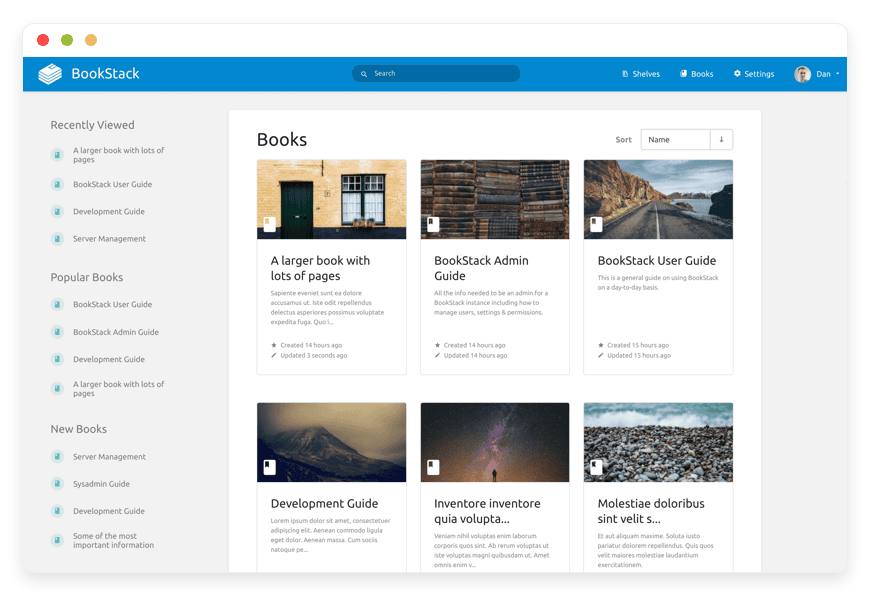
BookStack is the closest thing to "Confluence's daily feel" in the open-source world. The structural model is Books → Chapters → Pages, which maps cleanly onto how most teams already organise documentation. The page editor is a WYSIWYG by default, with a built-in Markdown editor available for contributors who prefer it.
The project has been actively developed since July 2015, is licensed under MIT, and now lives primarily on Codeberg with GitHub kept as a mirror after the April 2026 migration. It crossed 10,000 GitHub stars in 2022 and continues to grow. BookStack is built on PHP and Laravel with a MySQL database. Authentication covers OIDC, SAML2, LDAP, plus social providers and two-factor. Diagrams.net is built into the editor — one of the small features that keeps non-technical contributors happy.
If your Confluence usage is "team writes pages, organises them in a hierarchy, searches them, embeds the occasional image" — BookStack will replace it with the smallest amount of training. We deploy it as managed BookStack hosting at €9/month per instance, with patches, backups, and monitoring handled.
Best for: non-technical or mixed-technical teams who care about a clean editor and a familiar structure.
Wiki.js — Markdown, Git, and a modern feel
Wiki.js is what an engineering team usually picks. It runs on Node.js, stores content in PostgreSQL, MySQL, MariaDB, MS SQL Server, or SQLite, and offers Markdown, Visual Builder, and HTML editors side by side. Pages can be synced to GitHub, GitLab, BitBucket, or Azure DevOps, which gives you a Git-tracked documentation history outside the wiki itself — useful for engineering teams that want the docs in version control next to the code.
The current stable line is 2.5.x; v3 is in development. Wiki.js is AGPLv3, has roughly 28,300 GitHub stars, and ships authentication for LDAP, SAML, CAS, Auth0, Okta, Azure AD, generic OAuth2, OIDC, plus the usual social providers. Granular per-page permissions cover read-only sections, private spaces, and external collaborators.
The trade-off versus BookStack is that the editor is more powerful and more configurable, which also means it's more for editors who like configuration. Marketing teams sometimes find it heavier than they need; engineering teams usually find it exactly right. We run it as Wiki.js for Markdown teams, same €9/month flat, same managed scope.
Best for: engineering or technical teams who want Markdown, Git sync, and per-page permission rules.
DokuWiki — flat-file simplicity, twenty years strong
DokuWiki is the project that hasn't tried to keep up with web fashion since 2004, and it's better for it. There is no database. Pages are plain text files in a directory. Backups are a directory copy. Migrations are moving a folder. The architecture removes an entire category of failure mode — no schema upgrades, no DB corruption, no separate backup pipeline for content versus media.
The trade-off shows up in the UI: it's dated, the syntax is custom rather than Markdown, and real-time collaborative editing isn't there. The plugin ecosystem is large but inconsistent — some plugins haven't been touched in years, and stacking many of them is fragile. What you get in return is a wiki that is genuinely hard to break.
The project is GPLv2, written in PHP, with built-in access controls and authentication connectors for LDAP and OAuth-style providers. The release cadence is slow on purpose. DokuWiki is the steady pick for a team that wants documentation that will still work in ten years with the same shape it has today. We deploy it as managed DokuWiki hosting at €9/month per instance.
Best for: small teams who want zero database overhead and don't care about a modern editor.
MediaWiki — the engine behind Wikipedia
MediaWiki is the platform Wikipedia and the rest of Wikimedia run on. It scales to billions of pages and hundreds of millions of monthly readers. Localised in over 350 languages. PHP-based, runs on MariaDB or MySQL primarily, with PostgreSQL and SQLite as supported alternatives. Latest stable release is the 1.45.x line as of May 2026.
What MediaWiki gives you that nothing else on this list does is depth. ParserFunctions, Templates, Categories, Lua scripting, a vast extension ecosystem, deeply customisable permissions and namespaces, and the ability to scale to public-facing reference content with thousands of editors. What it costs you is configuration time. The default install is bare; getting MediaWiki to a polished internal-team experience requires installing and configuring extensions for visual editing, modern auth, and theme. The documentation is famously labyrinthine.
For an internal team of fifteen replacing a Confluence space, MediaWiki is overkill. For a community building a public reference site, a museum cataloguing collections, or a research group with thousands of cross-linked pages and contributors, MediaWiki is the only option on this list that's been proven at that scale.
Available with DANIAN - managed MediaWiki hosting.
Best for: public reference projects, communities, federations, and organisations that need extension depth more than editor polish.
The four side by side
Below is the comparison most readers want before they go any further. The cost row uses Confluence Cloud Standard at 25 users on annual billing as the reference, since that's where most teams notice the per-seat math and start looking. DANIAN's row stays flat at €9/month per app at every scale.
| Feature | BookStack | Wiki.js | DokuWiki | MediaWiki | Confluence Std (25 users) |
|---|---|---|---|---|---|
| License | MIT | AGPLv3 | GPLv2 | GPLv2 | Proprietary |
| Editor | WYSIWYG + Markdown | Markdown + Visual Builder + HTML | Custom syntax | WikiText + Visual Editor | WYSIWYG |
| Storage | MySQL | PostgreSQL/MySQL/MariaDB/MS SQL/SQLite | Flat files (no DB) | MariaDB/MySQL primary | Atlassian-managed cloud |
| GitHub stars | ~16,000+ | ~28,300 | ~3,800 | ~21,000 (mirror) | — |
| Initial release | 2015 | 2016 | 2004 | 2002 | 2004 (Cloud later) |
| Cost @ 25 users | €9/mo managed | €9/mo managed | €9/mo managed | €9/mo managed | $135.50/mo |
| Region choice (DANIAN) | 21 datacenter locations | 21 datacenter locations | 21 datacenter locations | 21 datacenter locations | Atlassian-determined |
| Migration effort from Confluence | Medium | Medium | High (custom syntax) | High (different model) | — |
Star counts are approximate as of May 2026 and rounded to the nearest hundred. BookStack's primary repository moved to Codeberg in April 2026 with GitHub maintained as a mirror; the figure above reflects the GitHub mirror count.
Break-even between Confluence Standard and a managed open-source wiki at €9/month flat happens at roughly 2 users. A team of 25 saves around €120/month. A team of 50 saves around €260/month. Premium widens the gap further.
If you want to see the full price list with no per-seat tax and no minimum, see DANIAN pricing.
How to pick — three questions to ask yourself
Three questions filter the four projects above into the right pick for your team. Editor polish matters most for non-technical contributors. Storage architecture matters for engineering workflows that want Git or grep. The internal-versus-public distinction matters for scale and extension depth. Walk these in order and you usually end up at one obvious answer.
1. How polished does the editor need to be for non-technical contributors?
If your marketing team, your operations lead, and your CEO will all be writing pages, BookStack's WYSIWYG is the path of least resistance. If contributors are mostly engineers who already write Markdown, Wiki.js fits better. DokuWiki's custom syntax adds friction here; MediaWiki's WikiText adds even more. The Visual Editor extension helps MediaWiki, but installing and tuning it adds setup cost.
2. Do your engineers want Git-backed documentation, or do they want files they can grep?
Wiki.js's Git sync is genuinely useful — pages live as Markdown in a Git repo, which means engineers can review documentation changes the same way they review code. DokuWiki's flat-file storage gives you something different but equally useful: every page is a text file you can grep, version with rsync, or back up by tarballing a directory. Both beat a database-only wiki for engineering workflows. BookStack and MediaWiki sit on databases; their backups go through the database, which DANIAN handles.
3. Is this content internal only, or part of it public-facing at scale?
If part of your wiki will be public reference content, MediaWiki is the safest pick. The platform is genuinely battle-tested at scale, the extension ecosystem covers SEO, anti-spam, multilingual variants, and template-driven structured content. For pure-internal team docs, MediaWiki is overkill and BookStack or Wiki.js will serve you better.
What you actually lose by leaving Confluence
The honest answer matters here, because the price comparison hides a real cost. Confluence ships native Jira integration, hundreds of templates, whiteboards, marketplace apps, and a growing AI feature set. The four open-source projects above cover the daily writing-and-searching workflow well, and partially cover the rest. The gap is real for some teams and small for others.
Native Jira integration. If your team lives in Jira and embeds Jira issues, sprint boards, and roadmaps inside Confluence pages multiple times a day, leaving Confluence breaks that pattern. The open-source wikis above can link out to Jira and embed via iframe, but the inline-card experience is gone. For Atlassian-deep stacks, this is the friction point that keeps Confluence in place even when the per-seat math is uncomfortable.
Templates and whiteboards. Confluence ships hundreds of templates (meeting notes, project briefs, OKR pages) and whiteboards (Premium and above). The four open-source projects all support templates in some form, but the polish gap is real on the whiteboard side — there is no direct open-source equivalent that matches Confluence's whiteboard editor today.
Marketplace apps. Atlassian's marketplace has thousands of paid apps for advanced reporting, diagram drawing, custom workflows, and analytics. Most have no direct open-source counterpart. Some are replaceable (draw.io ships built into BookStack and is available as a Wiki.js extension); some are not.
AI features. Confluence has been adding AI summarisation, page generation, and search assistants. The open-source projects are catching up at varying paces — BookStack ships an LLM extension via its repo for vector-based search, and Wiki.js has community AI plugins — but the polish gap is real today.
The honest read: if your team uses three or more of those Confluence-only features daily, leaving will feel painful even when the bill drops. If your team mostly writes and searches pages, the loss is small and the savings are real.
Migrating off Confluence — what's straightforward and what isn't
Confluence's data-export options are decent. Each space exports to HTML, PDF, or Confluence's own XML format, and the XML preserves page hierarchy, links, attachments, and most metadata. The friction shows up after export, in three places: image and attachment paths, macros, and per-page permission rules. None of those is a deal-breaker, but they cost time.
Image and attachment paths. Confluence stores attachments with internal IDs and references them via Confluence-specific URLs. When you import HTML into BookStack or Wiki.js, the references break. Cleanup is mostly scriptable but rarely zero-effort. For a 500-page space, plan a half day to a day depending on image volume.
Macros. Confluence macros — info panels, status badges, table-of-contents, expandable sections, embedded Jira issues, and the rest — don't have direct equivalents. Some translate to plain HTML or Markdown extensions; others have no clean equivalent and need to be rewritten as ordinary content. Pages heavily built on macros need page-by-page review.
Permissions and page restrictions. Confluence's per-page permission model is granular. The open-source projects have permission systems but the model differs. A direct port doesn't work; you usually rebuild the structure once on the new platform with simpler rules.
For a typical 500-page Confluence space, the realistic migration window is one to two weeks of part-time work with a competent operator and at least one technical reviewer. A 5,000-page space is a multi-month project and benefits from a phased migration where the most-trafficked spaces move first while the long tail stays read-only on Confluence during the transition. None of the four projects ships a polished automated Confluence importer; we help DANIAN customers who want a hand with the import, but we don't pretend it's painless.
How DANIAN runs these for you
The €9/month flat per instance covers what an operator does for a wiki — and a few things they often forget. Patching, daily off-site backups, monitoring, region choice across 21 datacenter locations, custom domain, per-container access through your dashboard, and 24/7 support from a real person who can actually edit DNS or fix SMTP. No per-seat tax. No surprise upgrades.
We patch security updates monthly. We back up the application data daily, off-site. We monitor the instance 24/7 and intervene before most issues surface on the user side. We answer email and support tickets with a real person — not a bot, not a tier-1 script, the person who can actually edit your DNS or fix your SMTP setup. The base plan covers 1 vCPU, 1 GB RAM, 30 GB storage, and 1,000 GB/month outbound traffic, which is sized for typical SMB documentation workloads.
You pick the deployment region from 21 datacenter locations across six continents. You access the application through a custom domain and your dashboard, with per-container terminal and file-manager access for configuration tasks you want to handle yourself. Resource upgrades happen with your explicit consent — we don't silently upgrade or charge for overage. Card failed? We wait. We don't delete your data.
FAQ
How does Confluence Cloud Standard at $5.42/user/month compare with €9/month flat at 5, 10, and 25 users?
Confluence Standard at 5 users is $27.10/month (still hits the 10-user minimum, so really $54.20). At 10 users, $54.20/month. At 25 users, $135.50/month. DANIAN runs your wiki at €9/month flat regardless of user count. Break-even against Confluence Standard happens at roughly 2 users; at 25, the difference is roughly €120/month.
Can I migrate my Confluence content into BookStack or Wiki.js?
Yes, with caveats. Confluence's space export to HTML or XML preserves most page content and hierarchy. What breaks: image and attachment paths, macros, page-level permissions, and embedded Jira content. Plan one to two weeks of part-time work for a 500-page space. Larger migrations are typically phased over months.
What about Jira integration?
This is the genuine gap. Confluence's inline Jira issue cards have no direct open-source equivalent. You can link out to Jira from any of the four wikis and embed via iframe, but the in-page issue panel disappears. For teams that live in Jira-Confluence integration daily, this is often the deciding factor and the reason to stay.
Is open-source enough for a regulated industry?
Open-source code does not by itself answer regulatory questions. What matters is the operator's controls: where the data sits, who has access, how backups are encrypted, how access is logged. DANIAN runs each customer instance in a container with isolated access, encrypted backups, and customer-chosen region. Buyers with specific certified-attestation requirements should evaluate accordingly.
What if my team already knows Markdown?
Wiki.js is the natural fit. Markdown is the default editor; the Visual Builder is available for non-technical contributors. Pages can be synced to a Git repository for version-controlled documentation that lives next to your code. BookStack also has a Markdown editor, but its WYSIWYG is the more-used path. DokuWiki uses its own syntax; MediaWiki uses WikiText.
What if I just want to keep Confluence?
Stay. Confluence is a real product with real strengths, and "the alternative is cheaper" is not always the right answer. If your team uses Jira-Confluence integration daily, depends on Confluence templates and whiteboards, and the per-seat math fits your budget, there is no strategic reason to move. The right time to evaluate alternatives is when the renewal email arrives with a price increase your finance team flags, or when you realise most of your pages are simple text and search.
How much does Confluence Cloud actually cost for a 25-person team in 2026?
Confluence Cloud Standard runs $5.42 per user per month on annual billing in 2026, or $6.05 monthly. For 25 users, that is $135.50 per month on Standard, before any marketplace add-ons. Premium roughly doubles it at $10.44 per user per month, putting 25 users at $261. Atlassian also enforces a 10-user minimum, so even a smaller pilot pays for ten seats.
How much did Confluence Cloud go up in October 2025?
Atlassian announced the change on August 19, 2025, with new prices taking effect October 15, 2025. Confluence Cloud Standard moved from $5.16 to $5.42 per user per month on annual billing. Premium moved from $9.92 to $10.44. Renewals generally see further rises year over year, and Atlassian has signaled a long-term shift to per-resource billing on top of per-user pricing.
Does the €9 per app per month price stay flat as my team grows?
Yes. DANIAN charges €9 per app per month on managed hosting, and that price does not change with the number of people who log in. A team of 5 pays €9. A team of 50 pays the same €9 for the same app. The pricing is per app, not per seat, which is structurally different from Confluence Cloud's per-user model.
How do I export my Confluence pages before Atlassian shuts down Server or Data Center?
Atlassian discontinued Confluence Server in February 2021 and has set Data Center end-of-life for 2029. Both products support a Space Export from the space tools menu, which produces an XML or HTML archive containing pages, attachments, and history. For Cloud users, the Atlassian Cloud Migration Assistant generates the same archive. Save the export before any tier change. Most open-source wiki importers, including the BookStack Confluence wizard, work from those archives.
What happens to attachments, images, and embedded diagrams during a Confluence-to-BookStack import?
The community import wizards, including the confluence-to-bookstack-wizard project on GitHub, pull attachments and inline images into BookStack as page assets. Embedded draw.io diagrams need extra work. They are stored as XML inside Confluence pages, and you can either export each one as PNG or SVG before migration, or re-create them in BookStack's built-in diagrams.net editor afterward. Page hierarchy maps to books and chapters, sometimes via a placeholder parent page.
Does BookStack have page versioning and history like Confluence?
Yes. BookStack stores a full revision history for every page, with side-by-side diffs and one-click restore back to any previous version. The history covers WYSIWYG and Markdown edits, and you can see who made each change and when. There is no per-seat tax for editing, so versioning works the same whether you have three writers or thirty.
Can I draw diagrams inside BookStack like with Confluence's draw.io macro?
Yes. BookStack ships with diagrams.net (the open-source engine behind draw.io) built into the page editor. You insert a diagram block, draw flowcharts, ER diagrams, network maps, or system architecture, and the file is stored alongside the page. Confluence requires a separate marketplace app for the same workflow, which counts toward Atlassian's tiered app pricing on Standard and Premium plans.
Does Wiki.js support real-time collaborative editing like Confluence Live Docs?
Not in version 2.5, the current stable line. Wiki.js handles concurrent edits with a save-and-merge model, not real-time cursors. Two people editing the same page see each other's changes after one saves, and the second person resolves any conflicts. Real-time co-editing is on the v3 roadmap. If live multi-cursor editing is critical, BookStack does not have it either, and Confluence Live Docs is the closest fit.
Does BookStack support SSO with Google Workspace, Okta, or Microsoft Entra ID?
Yes. BookStack supports SAML 2.0 and OpenID Connect natively, which covers Google Workspace, Okta, Microsoft Entra ID (formerly Azure AD), Authentik, Keycloak, and most identity providers. It also has built-in social login for Google, Microsoft, GitHub, GitLab, and Slack. Group membership from the identity provider can be mapped to BookStack roles, so access permissions follow whatever you set up upstream.
Does BookStack support multi-factor authentication?
Yes. BookStack has built-in multi-factor authentication using time-based one-time passwords (TOTP), the same standard used by Google Authenticator, 1Password, and most authenticator apps. Admins can require MFA on specific roles, so editor and admin accounts can be enforced while readers stay simple. Backup codes are issued at setup. MFA also works alongside SAML and OIDC if your identity provider already enforces it.
What happens to my wiki if the hosting provider disappears?
The host going away should never mean your data goes with it. On DANIAN, the application files and database for every BookStack or Wiki.js instance can be exported on demand, and the underlying software is open-source under MIT and AGPL. If hosting stops, you take the export and run the same image elsewhere, including on a plain VPS. The data format does not change, so nothing has to be re-keyed or re-imported.
BookStack vs Wiki.js — which should a small team pick in 2026?
Pick BookStack when most writers are non-technical. The books-and-chapters structure feels closer to a binder than a wiki, the WYSIWYG editor is the default, and there is less to configure. Pick Wiki.js when your team writes in Markdown, wants Git-based content sync, or needs a wider authentication and module surface. Both are free to self-host. On DANIAN, both run at €9 per app per month flat on managed BookStack hosting and Wiki.js for Markdown teams.
Is Wiki.js still actively developed in 2026 given the v3 delays?
Yes, version 2.5 still receives maintenance releases, and the project has roughly 28,000 GitHub stars. Version 3, announced in 2021, is still in development as of mid-2026. The maintainer has shipped multiple alpha builds but no production-ready release. For most teams, this means: run v2.5 in production, treat v3 as future work, and accept that real-time co-editing and the new permissions model are not on the stable line yet.
Should we move off Confluence in 2026 or wait until Data Center end-of-life in 2029?
Waiting buys nothing. Atlassian raised Cloud prices in October 2025 and signals further yearly increases, while Data Center licenses are sold in user tiers that step up as the team grows. Migration takes longer with three more years of content piling up, and a planned move costs less than a deadline-driven one. A typical first step is to export one Confluence Space and run it through the BookStack import wizard to scope the real work.
Can I get all my BookStack content out as Markdown or HTML if I ever leave?
Yes. Every page in BookStack exports as HTML, plain text, Markdown, or PDF, individually or as a full book. The application stores content in HTML and converts on export, so nothing is locked behind a proprietary format. The full database is also dumpable as standard MySQL or PostgreSQL. Because BookStack is MIT-licensed, you keep the right to run the same software anywhere, with or without DANIAN.
What to do this week
If you are evaluating alternatives, do this in three steps and stop expanding scope until each step is done. Pick one wiki. Trial it for 14 days with your 50 most-trafficked pages copied across. At the end of two weeks you will know whether the open-source path covers the work, or whether the gaps stay real for your team.
Pick one wiki from the four above. BookStack if you want the smallest training cost, Wiki.js if your team is engineering-heavy, DokuWiki if you want zero database overhead, MediaWiki if scale and extensions matter more than editor polish.
Open a 7-day free trial. Move 50 of your most-trafficked Confluence pages over. Use the new wiki as your daily docs surface for two weeks while keeping Confluence read-only.
At the end of two weeks, you will know. Either the open-source wiki covers the work and the price math wins, or the gap (Jira integration, whiteboards, templates) is real for your team and Confluence stays. Both answers are honest.
If you want to start with the easiest path, the BookStack route is the lowest-friction entry. Same €9/month flat, same managed scope, no card required for the trial. Open a managed wiki and import 10 pages — decide from there.
Sources
- Atlassian — Confluence pricing — https://www.atlassian.com/software/confluence/pricing
- BookStack — official site — https://www.bookstackapp.com/
- Wiki.js — official site — https://js.wiki/
- DokuWiki — official site — https://www.dokuwiki.org/
- MediaWiki — official site — https://www.mediawiki.org/