Notion's 2025–26 price pivots — what teams audited
Notion’s 2025–26 pricing pivots — what small teams ended up auditing and replacing
TL;DR
- On 13 May 2025, Notion folded its AI features into the Business plan and discontinued the standalone $10/user AI add-on for new Free and Plus accounts. Existing customers moved at their first renewal from 13 August 2025.
- The Business plan rose from $15 to $20 per user per month on annual billing in the same change. AI now sits inside that $20 seat whether a team uses it or not.
- A 5-person team that wants Notion AI pays $100/month on Business — $1,200 a year on annual billing. The same team on Plus pays $50/month, but Plus no longer includes full AI.
- The replacement is a stack, not one tool: BookStack for docs, HedgeDoc for collaborative notes, TriliumNext for personal knowledge bases, NocoDB for the database layer.
- Managed on DANIAN, each runs at €9/month flat, with no per-seat fee — about a tenth of $100/month at 5 seats, and the gap widens as a team hires.
What changed — a short Notion pricing timeline
Notion AI launched in February 2023 as a $10/user/month add-on you could attach to any plan. On 13 May 2025, Notion ended that add-on for new Free and Plus users and put AI inside the Business plan. Business rose to $20/user/month in the same change. The story since is about that bundle.
The 2023 add-on cost about $8/user/month on annual billing. The May 2025 restructure changed three things at once. AI moved into the Business and Enterprise plans. The standalone add-on was discontinued for new Free and Plus accounts. And the Business price went from $15 to $20 per user per month on annual billing — a 33% rise.
Timing mattered for existing customers. New sign-ups hit the new pricing on 13 May 2025. Existing subscribers moved at their first renewal on or after 13 August 2025. The Plus plan itself did not change price — it stayed at $10/user/month annual, $12 month-to-month — but it lost the option to add full AI.
Grandfathering is narrow. Teams that already held the AI add-on keep it at the old $8–$10 price while they maintain the subscription. Cancel it, and there is no route back at that price. The only way to get full AI again is the Business plan at $20/user/month.
2026 added usage-based charges on top. Notion’s Custom Agents began consuming metered “Notion credits” from 4 May 2026, priced at $10 per 1,000 credits. The Workers feature starts using credits from 11 August 2026. No further base-seat increase has been published for 2026 itself. Current figures are on Notion's pricing page and in its 13 May 2025 release notes.
Why a renewal review triggers the move
The move rarely starts with a feature complaint. It starts at renewal. A finance owner opens the annual invoice, sees the Business line at $20 per seat, multiplies by headcount, and asks what the team is paying for. The answer — AI nobody opted into — is what starts the review.
Three things tend to surface in that review. First, AI is bundled into the seat, not optional. A team cannot drop it without dropping to Plus, which means giving up full AI entirely. There is no middle setting any more.
Second, the per-seat math compounds with headcount. Every new hire adds $20/month on Business — $240 a year, per person. A team that grew from five to ten people watched its AI-included bill go from $100 to $200 a month without changing how it works.
Third, the renewal is the forcing function. The bill is annual, the increase is visible once a year, and that is when someone runs the numbers. Community threads describe the same pattern: paying for AI features the team does not use, and a recurring view that Notion AI mostly searches your own workspace rather than doing work a standalone assistant could not.
The 5-seat math in 2026
A 5-person team on Notion’s Business plan pays $100/month on annual billing — $1,200 a year — and Business is the cheapest Notion tier that includes full AI. On Plus, the same team pays $50/month, but Plus gives only a finite AI trial, not the full feature set. The choice is real cost against real features.
Here is what the paths cost a 5-person team, with what each one actually buys.
| Path (5 seats / apps) | Monthly cost | What you get | Notes |
|---|---|---|---|
| Notion Plus (annual) | $50/mo | Docs, wikis, databases; AI = trial only | Per seat; scales with headcount |
| Notion Business (annual) | $100/mo | Everything in Plus + full Notion AI | Cheapest tier with AI; $20/seat |
| Notion Business (monthly) | $120/mo | Same as above | $24/seat on month-to-month |
| Self-host the OSS stack on a VPS | ~$44/mo infra + your time | Full control of the apps | Needs a developer; see VPS question below |
| One app, managed on DANIAN | €9/mo, flat | One fully managed app instance | No per-seat fee; add apps as needed |
All Notion figures are taken from Notion's pricing page as of May 2026; verify current pricing yourself before deciding.
The shape of the gap matters more than any single row. At 5 seats with AI, Notion Business is $100/month. One managed app on DANIAN is €9/month — about a tenth of that. Most teams replace Notion with one or two of these apps, so a docs-plus-database stack runs €18/month, still well under $100. Because DANIAN is flat and Notion is per-seat, a tenth hire changes the Notion bill by $20/month and the DANIAN bill by nothing.
Where docs, notes, and knowledge workflows landed
No single open-source tool maps one-to-one onto Notion. Teams that left split Notion into its parts: a wiki, a notes app, a personal knowledge base, and a database. Four projects cover those parts — BookStack, HedgeDoc, TriliumNext, and NocoDB — each open-source and actively maintained.
BookStack — the docs and wiki layer
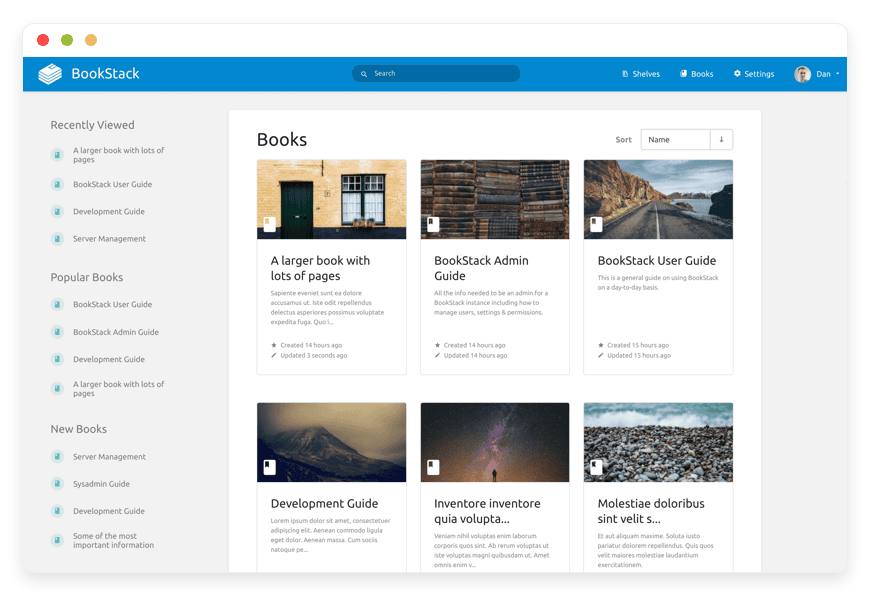
BookStack organises documentation into books, chapters, and pages. It is open-source, MIT-licensed, and built on PHP and Laravel.
For teams whose Notion use was mostly structured documentation and internal wikis, it is the closest fit.
We run managed BookStack hosting at €9/month per instance, with no per-seat fee.
The project’s own site is bookstackapp.com.
HedgeDoc — collaborative notes
HedgeDoc is a real-time collaborative Markdown editor, the successor to CodiMD, released under AGPL-3.0.
It covers the shared-notes and meeting-notes part of Notion well, with several people editing the same document live.
We run HedgeDoc for collaborative notes at €9/month flat.
The project lives at hedgedoc.org.
TriliumNext — personal knowledge bases
TriliumNext is a hierarchical personal knowledge base, under AGPL-3.0.
It suits people who used Notion as a private second brain rather than a team workspace.
We run TriliumNext for personal knowledge bases at €9/month.
The source is on GitHub.
NocoDB — the database layer
NocoDB turns a SQL database into a spreadsheet and no-code interface — the part of Notion that databases, relations, and table views covered.
It is the honest answer to “what replaces Notion’s databases,” because BookStack and the notes tools do not try to.
We run managed NocoDB hosting at €9/month.
Teams that need end-to-end encrypted collaboration sometimes add CryptPad, an open-source encrypted suite covering documents, spreadsheets, and forms.
Its site is cryptpad.org. Most teams adopt one or two of these tools, not the whole set.
The migration friction is real
Leaving Notion is not free of pain, and pretending otherwise would be dishonest. Notion’s relational databases — linked tables, rollups, and synced views — have no clean one-to-one open-source equivalent. NocoDB covers most table and relation work, but teams that built complex Notion databases should expect rebuilding, not a clean import.
The export itself is workable. From Notion’s settings you can export a workspace to Markdown, HTML, CSV, or PDF. Markdown and HTML carry most page content into tools like BookStack. The export flattens some structure, so headings, nesting, and embedded blocks need a second pass after import.
The database work is the hard part. Tables, relations, and views move into NocoDB with effort, not with a button. A small task tracker ports quickly. A workspace built on linked databases, rollups, and formulas is a rebuild project, and the rebuild cost can outweigh a year of Plus fees for some teams.
The last friction is structural: you adopt a stack. That means more than one tool to learn and run, instead of one workspace with one login. A migration done in a rush against a renewal deadline tends to go badly. Budget the time, move one workflow at a time, and keep Notion running until the new tools hold.
How DANIAN runs these
We run each app as its own managed instance at €9/month, flat, with no per-seat charge. We patch monthly, monitor 24/7, and back up daily off-site. You pick the region closest to your team from 21 datacenter locations across six continents. Email us or open a ticket for anything that needs a human, and a human replies.
The €9 covers hardware, security, updates, backups, and support. The price is per app, not per head — which is the structural difference from Notion’s seat model. Adding people to an app instance costs nothing from us. Adding a second app is another flat €9.
We handle the changes that need a human, like resource upgrades and region switches, from chat. We will not upgrade your resources or charge you without your explicit consent. Card failed? We wait. We don’t delete your data. There is a 7-day free trial, and no card is required to start.
See managed BookStack hosting →
When staying on Notion makes sense
Notion is not the wrong tool for everyone, and a migration you don’t need is a cost, not a saving. If your team leans on Notion’s relational databases, its template ecosystem, or its single-workspace convenience, the switch can cost more in rebuilding time than it saves on the bill. The honest cases for staying are real.
- Stay on Notion if your workspace is mostly relational databases and linked views. The rebuild cost in NocoDB is genuine, and the math may not favour moving.
- Stay if you are a 1–3 person team where $50/month on Plus is noise in the budget and AI was never the issue.
- Stay if single-workspace convenience matters more than the per-seat math — one tool, one login, nothing to run.
- Switch if your Notion use is mostly docs, wikis, and notes; if per-seat cost compounds as you hire; and if you would rather pay a flat fee per app than a rising fee per head.
Frequently asked questions
How much did Notion’s price increase in 2025–26?
Notion’s Business plan rose from $15 to $20 per user per month on annual billing in the May 2025 restructure — a 33% increase. The Plus plan stayed at $10 per user per month. No further base-seat increase has been published for 2026; the new 2026 charges are usage-based AI credits, not a higher seat price.
Did Notion remove the standalone AI add-on?
Yes. On 13 May 2025, Notion discontinued the separate $10/user AI add-on for new Free and Plus accounts and folded AI into the Business and Enterprise plans. Existing add-on subscribers moved at their first renewal on or after 13 August 2025. New customers can no longer buy the old add-on at any price.
Is Notion AI included in the Plus plan in 2026?
No. As of 2026, the Plus plan ($10/user/month annual) includes only a finite trial of complimentary AI responses, not the full feature set. Full Notion AI — agents, AI meeting notes, enterprise search — sits in the Business plan at $20/user/month. To get full AI, a Plus team must upgrade to Business.
What is the cheapest Notion plan that includes AI?
The Business plan, at $20 per user per month on annual billing ($24 month-to-month), is the cheapest Notion tier with full AI. The Free and Plus plans offer only a one-time AI trial. There is no longer a way to add full AI to a cheaper plan as a separate purchase.
How much does Notion cost for a team of 5 in 2026?
A 5-person team pays $50/month on Plus (annual billing) or $100/month on Business (annual). Business is the cheapest plan that includes full AI, so a 5-seat team that wants AI pays $1,200 a year. On month-to-month Business billing, five seats cost $120/month.
How much does Notion cost for 10 users in 2026?
Ten users cost $100/month on Plus (annual) or $200/month on Business (annual) — $2,400 a year for the AI-included tier. Because Notion charges per seat, every additional hire adds $20/month on Business. A flat per-app fee removes that per-head scaling entirely.
Why are small teams leaving Notion in 2026?
The common trigger is the renewal invoice. Teams open the annual bill, see Business at $20/seat with AI bundled in, and find they are paying for AI they did not choose. Per-seat cost compounds as they hire. Community threads also describe Notion AI as mostly searching your own workspace rather than replacing a standalone assistant.
Is Notion still worth it in 2026?
For teams that lean on its relational databases, templates, and single-workspace convenience, Notion is still a strong fit at $10–$20 per seat. For teams whose use is mostly docs, wikis, and notes, a managed open-source stack at €9 per app removes the per-seat math. The honest test is what you actually use.
Does Notion still have a free plan?
Yes. Notion’s Free plan remains at $0 and suits individuals and very small teams. It includes a one-time trial of complimentary AI responses, not ongoing full AI. Block and collaboration limits apply. For full AI features, the Business plan at $20/user/month is the entry point.
What happens to a grandfathered Notion AI add-on?
Subscribers who held the $8–$10 AI add-on before May 2025 keep it at the old price while they maintain the subscription. If they cancel, they cannot reactivate at that price — the only route back to full AI is the Business plan at $20/user/month. Verify your own account status directly with Notion.
Is there a single open-source tool that replaces Notion?
No single tool maps one-to-one onto Notion. Teams that left split it into parts: BookStack for docs and wikis, HedgeDoc for collaborative notes, TriliumNext for a personal knowledge base, and NocoDB for databases. The replacement is a small stack, each piece open-source and actively maintained.
What is the best self-hosted Notion alternative?
It depends on which part of Notion you used. For structured documentation and wikis, BookStack is the closest fit. For shared real-time notes, HedgeDoc. For a private knowledge base, TriliumNext. For databases and table views, NocoDB. Most teams adopt one or two of these, not all four.
What can replace Notion’s database feature?
NocoDB is the closest open-source match. It turns a SQL database into a spreadsheet and no-code interface, covering tables, relations, and views. It handles most database work, but teams with complex linked tables and rollups should expect to rebuild rather than import without edits. We run managed NocoDB hosting at €9/month.
BookStack vs Notion — what is the real difference?
BookStack is open-source documentation software organised into books, chapters, and pages. Notion is a closed, single-workspace tool with databases and AI. BookStack does not do relational databases; Notion does. BookStack has no per-seat fee when self-hosted or managed. For docs and wikis, BookStack is leaner; for databases, Notion is broader.
How do I migrate my content out of Notion?
From Notion’s settings, you can export a workspace to Markdown, HTML, CSV, or PDF. Markdown and HTML carry most page content into tools like BookStack. The export flattens some structure, and relational databases need rebuilding in NocoDB. Export a sample section first and check how your real content survives before committing.
How much does managed BookStack hosting cost?
On DANIAN, managed BookStack hosting is €9/month per instance, flat, with no per-seat charge. That price covers hardware, security, updates, daily off-site backups, and support. There is a 7-day free trial with no card required. A 5-person Notion Business plan, by comparison, costs $100/month.
What kind of access do I get to a managed instance on DANIAN?
You get your own dedicated instance of the app, isolated in its own container, reachable on your subdomain or a custom domain. You get per-container terminal access through the dashboard. We handle patching, backups, monitoring, and resource changes. Email us or open a ticket for anything that needs a human, and a human replies.
How does managed hosting compare to running these tools on my own VPS?
A production-class VPS at about $24/month, plus backups and monitoring, runs roughly $44/month in infrastructure before your time. Patching, updates, and on-call add hours each month. If you have a developer in-house and want full control, that path works. We run the same apps at €9/month with zero operational time on your side.
What happens to my data if I leave DANIAN later?
Your data is yours. These apps are open-source, so there is no proprietary lock-in: you can export your content and move it to your own server or another host. We provide your data on request and do not hold it hostage. Card failed? We wait. We don’t delete your data.
Do I pay per user with DANIAN?
No. DANIAN charges €9 per app per month, flat — not per user. You can add as many team members to an app instance as the software supports, at no extra charge from us. That is the structural difference from Notion’s seat model, where every additional user raises the bill.
Is this financial or legal advice?
No. This is operational and cost guidance, not financial or legal advice. Notion’s prices are taken from notion.com/pricing as of May 2026 and change often, so verify current pricing and your own account terms before deciding. For tax or contract questions about a migration, consult a qualified professional.
What to do this week
Open your most recent Notion invoice and find the per-seat line and the plan name. Multiply the seat price by your headcount, then by twelve. That annual number is what a migration has to beat. If most of your Notion use is docs and notes, the stack above beats it comfortably.
- Pull the number.
Find your plan and seat count, then compute the annual cost.
Business at $20/seat × headcount × 12 is the figure to beat. - Export a sample.
From Notion’s settings, export one workspace section to Markdown and HTML.
See how your real content survives the export before committing. - Trial one app.
Start with the layer that carries most of your Notion use — BookStack for docs, NocoDB for databases.
We run a 7-day free trial with no card.