After Evernote's free-tier cuts — notes in 2026
The slow gutting of Evernote’s free tier — where notes landed in 2026
Evernote’s free plan has been capped at 50 notes and one notebook since 4 December 2023. Paid tiers start near $99 a year and rise from there. Two open-source tools now do the job on infrastructure you control: Trilium Notes for a deep knowledge base, and Memos for fast capture. DANIAN runs either one for €9 a month.
TL;DR
- Since 4 December 2023, Evernote’s free plan holds a maximum of 50 notes and one notebook.
- Paid plans now run from about $99 a year (Starter, capped) to about $170 a year (Advanced, full features).
- Trilium Notes is an open-source hierarchical knowledge base with more than 36,000 GitHub stars, under the AGPL-3.0 licence.
- Memos is an open-source, Markdown-native quick-capture tool with around 60,000 GitHub stars, under the MIT licence.
- DANIAN runs a managed instance of either app for €9 per month, with daily backups and a 7-day free trial.
What happened to Evernote’s free tier
Bending Spoons bought Evernote in November 2022. In February 2023 it cut 129 staff. On 4 December 2023 it limited free accounts to 50 notes and one notebook. The squeeze then moved up the ladder, into the cheapest paid tier. Here is the sequence, with dates.
The new owner said the app had been unprofitable for years, then moved operations to Europe and laid off most of the original team. That is the backdrop. The product change that matters to note-takers came at the end of 2023.
On 4 December 2023, Evernote applied a hard cap to its free plan: 50 notes and one notebook, for new and existing users alike (TechCrunch). If you were over the limit, you kept the ability to view, edit, export, share, and delete what you had — but you could not create new notes past the cap without paying.
Since then the paid tiers have been restructured. The plans are now Free, Starter, Advanced, and Enterprise (Evernote compare-plans). Starter is cheaper than the old entry plan but capped — roughly 1,000 notes, 20 notebooks, 100 tags, and three devices. Advanced carries the full feature set. The pattern is clear: the free tier was hollowed out first, then caps appeared in the entry paid tier too.
Here is the honest read. If you keep 40 notes, none of this touches you. The people it hurt are the ones with years of archive — hundreds or thousands of notes — who can still read their data but can no longer add to it without a subscription.
Why people are leaving Evernote in 2026
The cap is the trigger, but it is rarely the whole reason. Three things push long-time users out: the steady rise in subscription cost, the sense of renting access to their own archive, and newer features landing only on the top tier. For many, the December 2023 change was simply the last push.
Cost creep is the first. The full-feature plan now runs about $170 a year. Over five years that is more than $800 to keep notes you wrote yourself, in an app whose terms have already changed once.
Ownership anxiety is the second. After watching the free tier shrink and the company change hands, people want their notes somewhere the terms cannot be rewritten again. A format they can export and software they can run is the hedge against the next policy change.
Feature gating is the third. AI search and the newer tools sit on the Advanced tier. Paying more to keep what used to feel standard wears thin over a few renewal cycles.
The honest version: none of this is unique to Evernote. Any subscription can tighten, and most eventually do. The fix is not a different landlord — it is owning the building.
What “alternative” means here
“Alternative” can mean three different things. A cheaper hosted app keeps the same rental model. Self-hosting open-source software gives you ownership but adds a server to run. Managed open-source sits between them: you own the data and the software, and someone else runs the box. That last option is what this article is about.
A cheaper subscription swaps one landlord for another. You still rent access to your own notes, and the terms can change again. The data also stays in a proprietary format you do not fully control.
Self-hosting flips that. You own the data and the application, and you run the server — the updates, the backups, the certificate renewals, all of it. For some people that is a fair trade. For most, it is a second thing to maintain.
Managed open-source keeps the ownership without the maintenance. The app is open-source and exportable. We run the infrastructure.
You keep a €9 line item instead of a sysadmin task. The thread through all of it is ownership: your notes live in formats you can export, and a codebase anyone can read.
The two tools that are live today
Two open-source note apps are live in the DANIAN catalogue right now: Trilium Notes and Memos. They are built for opposite habits. Trilium is a structured knowledge base for people who file and cross-reference. Memos is a single stream for people who jot and move on. Pick by how you actually take notes.
Trilium Notes — for a knowledge base you keep for years
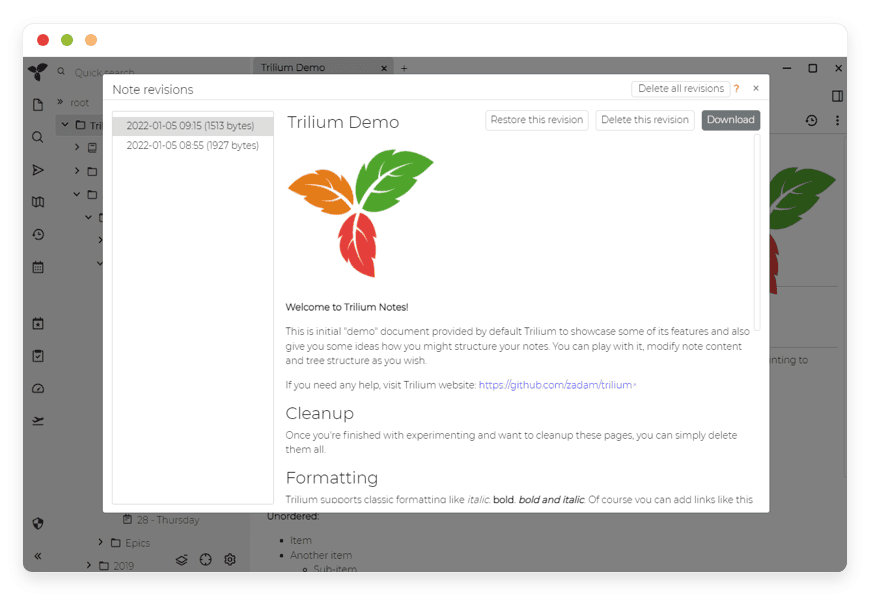
Trilium Notes is a free, open-source hierarchical note app for large personal knowledge bases. It carries more than 36,000 GitHub stars and ships under the AGPL-3.0 licence. The current project is maintained by the TriliumNext community (GitHub). DANIAN runs a managed instance for €9 a month.
At its core is an arbitrarily deep note tree. A single note can sit in several places at once, a feature Trilium calls cloning. The editor is WYSIWYG, with tables, images, and maths. Code notes get syntax highlighting. Search is full-text, and note hoisting lets you focus on one branch at a time.
The power-user features go further. Note attributes drive querying and scripting. There is a REST API, relation maps, mind maps, and an Excalidraw-based canvas. Trilium scales past 100,000 notes, so a large archive is not a problem.
One privacy detail is worth calling out: Trilium supports per-note encryption. You can protect individual notes inside an otherwise normal tree, which is useful for the handful of notes that hold credentials or sensitive records.
Two more pieces matter for a daily driver. Trilium runs its own sync server, so the same tree stays current across your devices. A browser web clipper saves pages and selections into the tree, much like clipping into Evernote. Both run on the same managed instance.
Mapping Evernote habits across is straightforward. Notebooks become branches in the tree, and stacks become parent notes. Tags become attributes you can also query. The web clipper carries over by name. Most of your muscle memory survives the move.
A note on provenance, since it affects which repository to trust. The original Trilium author handed the project to the TriliumNext community, and active development now lives in the TriliumNext/Trilium repository. An older repository under the same organisation has been archived; the link above points to the maintained one.
On mobile, Trilium offers a touch-friendly web interface, plus third-party native apps — TriliumDroid on Android and Trinote on iOS. Those native apps are community-built rather than official, which is worth knowing if a polished first-party mobile app is a hard requirement.
Best for: someone replacing a deep Evernote archive — the reference library, the project notebooks, the years of clipped research.
We run managed Trilium Notes at €9 a month, patched and backed up daily.
Memos — for quick capture you’ll actually keep up with
Memos is an open-source, self-hosted tool built for quick capture. It is Markdown-native and deliberately small — a single Go binary in a roughly 20 MB image. It carries around 60,000 GitHub stars under the MIT licence (GitHub). DANIAN runs a managed instance for €9 a month.
The interface is timeline-first. You open it, write, and you are done — there are no folders to navigate. Notes are stored as Markdown and export to Markdown, JSON, or CSV, so nothing is locked in.
The model is closer to a private microblog than a filing cabinet. Tags handle filtering. You can share selected notes publicly if you want, and there is no telemetry. Deployment is one command, and it runs on SQLite, MySQL, or PostgreSQL. Full REST and gRPC APIs are there if you want to build on it.
In daily use it feels like a private timeline. You write a line, add a tag, and it lands on the feed with a timestamp. Older notes scroll back by date, and search pulls up anything in seconds. There is nothing to file, which is the point.
The honest limit: Memos is not a hierarchical knowledge base. If your Evernote use was deep and nested, Memos will feel too flat. If it was a fast stream of small notes, it fits well.
Best for: daily logs, fleeting ideas, a personal journal, link-and-thought capture.
We run managed Memos at €9 a month, with daily backups.
Coming next: Docmost for team docs
A third option is on the way. Docmost — an open-source alternative to Confluence and Notion for collaborative team docs — is coming to the catalogue. When a small team needs shared pages with real-time editing rather than one person’s notes, that is the tool to watch. We will add a managed option once it is live.
Getting your notes out of Evernote
Your Evernote archive is not trapped. Even on the capped free plan, you can still export everything. The native format is ENEX, an XML file that keeps content, formatting, attachments, and tags. You export from the desktop app — the web and mobile apps cannot produce ENEX. Plan for a notebook-by-notebook export if your library is large.
In the Evernote desktop app for Windows or Mac, right-click a notebook or a selection of notes and choose Export. Pick ENEX for fidelity; HTML loses metadata. Evernote exports up to 100 notes at a time, or a whole notebook in one step, one notebook per file (Evernote Help). Repeat for each notebook.
ENEX files can be sized between 300 MB and 2 GB. For a large notebook, export in batches, and exclude very large video attachments if they stall the export.
Trilium has a built-in Evernote ENEX importer, so your .enex files go straight in — tree and tags included. For a large, structured archive, that is the cleaner path.
Memos imports Markdown rather than ENEX directly. So you convert first: a tool such as Yarle (with a graphical interface) or evernote2md (on the command line) turns ENEX into Markdown with attachments, and then you import the Markdown into Memos. That route suits a curated subset better than a deep, nested archive.
A word on fidelity. Note text, tags, and attachments transfer cleanly in ENEX. Internal links between notes do not always survive. Saved searches and reminders are Evernote-specific, so they will not carry over. For a heavily cross-linked archive, a short table-of-contents note in each notebook makes the structure easier to rebuild later.
The honest framing: a deep, structured library belongs in Trilium; a stream of short notes belongs in Memos; if you have both, it is reasonable to split them across the two.
One safety habit before you commit. After importing, spot-check a few notes for formatting and attachments. Keep your Evernote account until the new copy looks right. Even on the free plan, your existing notes stay readable. Only then make the new tool your daily home.
What each path costs
The software behind both tools is free. The cost is where you run it. Evernote’s paid plans run from about $99 to $170 a year, and the cheaper one is capped. Self-hosting is the software plus a server and your time. DANIAN runs a managed instance for €9 a month, uncapped.
| Path | What you pay | Notes and limits | You run the server? |
|---|---|---|---|
| Evernote Free | $0 | 50 notes, 1 notebook | No (hosted) |
| Evernote Starter | ~$8.25/mo billed yearly (~$99/yr) | ~1,000 notes, 20 notebooks, 3 devices | No (hosted) |
| Evernote Advanced | ~$14.17/mo billed yearly (~$170/yr) | Full feature set | No (hosted) |
| Self-host Trilium or Memos | Free software + ~$24/mo production-class VPS + your time | Unlimited; you own everything | Yes |
| DANIAN managed | €9/mo per app (€108/yr) | Unlimited; daily backups, monitoring, support | No — we do |
On raw price, DANIAN’s €9 a month sits between Evernote’s capped Starter plan and its full Advanced plan. The difference is not the headline number; it is what you get for it. Uncapped notes. Software you can export, and a codebase anyone can read. A managed box you never have to patch. Uncapped means what it says: no note ceiling, no notebook limit, no device count to watch.
If you are technical and enjoy running a server, self-hosting is genuinely cheaper in cash — these apps are light. You trade money for time and on-call duty. For some people that is the right trade, and there is no shame in it.
DANIAN’s €9 covers the work: updates, daily off-site backups, monitoring, and a human engineer. You pick the region from 21 datacenter locations across six continents, and you do not run the server.
Put it over five years. Evernote’s full plan is more than $800; the same span on DANIAN is €540, uncapped. Self-hosting beats both on cash, but the bill is paid in time. Think setup, updates, backups, and the night a disk fills up. Pick the cost you would rather pay.
How to pick
Three questions settle it. First, what shape are your notes — a nested library or a flat stream? Second, do you want to run a server, or pay someone to run it? Third, how much structure do you actually use? Answer those honestly, and the choice is usually obvious.
Shape. A deep, cross-referenced archive points to Trilium. A daily stream of short notes points to Memos.
Server. If running a small VPS sounds like a fine weekend, self-host. If it sounds like a chore, a managed instance keeps the same ownership without the on-call.
Structure. Heavy taggers and filers use Trilium’s attributes and relations. People who only ever search tend to use Memos and never miss the folders.
There is also a hybrid worth naming. Run Trilium for the reference library and Memos for the daily stream. That is two managed apps at €9 each. Many people find the split matches how they already think: a filing cabinet and a notebook, kept apart.
And a word on staying put. If you keep 40 notes and Evernote’s free tier still fits, there is no urgency. If you depend on Evernote’s polished first-party mobile apps or its document scanning, weigh that honestly — the open-source mobile story is good but community-built.
Document scanning is another honest gap; if you lean on Evernote’s scanner, keep a free account for that alone. Switch when ownership or the note cap is the thing pushing you, not for its own sake.
FAQ
What is the best open-source Evernote alternative in 2026?
There is no single best one; it depends on how you take notes. For a deep, structured archive, Trilium Notes fits. For quick daily capture, Memos fits. Both are open-source and free to run. DANIAN hosts either one for €9 a month, managed.
Is Trilium Notes really free?
Yes. Trilium is open-source under the AGPL-3.0 licence, free to download and run. You only pay for where it runs. DANIAN charges €9 a month to run a managed instance for you — backups, updates, and support included — but the software itself costs nothing.
Trilium or Memos — which one?
It depends on how you take notes. Trilium is a hierarchical knowledge base for people who file, tag, and cross-reference. Memos is a flat, timeline-first stream for quick capture. If you want both a reference library and a daily log, it is reasonable to run one of each.
Which is better for a team — Trilium or Memos?
Neither is really a team tool; both are built for one person’s notes. For shared pages with real-time editing, Docmost — an open-source alternative to Confluence and Notion — is the better fit, and it is coming to the DANIAN catalogue. Trilium and Memos suit individual knowledge bases and personal capture.
Can I run Trilium and Memos at the same time?
Yes, and many people do. Trilium holds the structured archive; Memos catches the daily stream. On DANIAN each app is a separate €9-a-month instance, billed per app. If you only want one, start with the shape that matches most of your notes.
Why did Evernote limit its free plan to 50 notes?
Bending Spoons bought Evernote in November 2022 and said the app had been unprofitable for years. On 4 December 2023 it capped free accounts at 50 notes and one notebook. Existing users kept read, edit, and export access, but could not add new notes past the cap without paying.
Is Evernote shutting down?
No. As of 2026 Evernote still operates under Bending Spoons. It cut staff in 2023 and capped the free tier, but the service runs and your data stays readable. The pressure on long-time users is cost and the note cap, not a shutdown.
What is the difference between Evernote and an open-source note app?
Evernote is proprietary software you rent; the terms and prices can change, as they have. An open-source app like Trilium or Memos uses formats you can export and code anyone can read. You own the data. The trade-off is Evernote’s polished first-party mobile apps and document scanning.
Can I move my whole Evernote archive across?
Mostly. Export from Evernote’s desktop app as ENEX, one notebook at a time. Trilium imports ENEX directly, so a large library moves cleanly. Memos takes Markdown, so you convert the ENEX first. Very large attachments and a few Evernote-specific features may need tidying afterwards.
Will my Evernote formatting and attachments survive the move?
Mostly. Note text, tags, and attachments transfer cleanly through Evernote’s ENEX export. Internal links between notes do not always survive, and saved searches and reminders are Evernote-specific, so they will not carry over. Spot-check a few notes after importing, and keep the originals until you are happy.
Does Trilium support Markdown?
Both apps do, in different ways. Memos is Markdown-native; you write in Markdown and export to Markdown, JSON, or CSV. Trilium uses a WYSIWYG editor but imports and exports Markdown, so your text moves in and out cleanly. Neither locks your writing into a closed format.
How many notes can Trilium handle?
A lot. Trilium is built for large personal knowledge bases and scales past 100,000 notes. Its deep note tree, cloning, and full-text search stay usable at that size. If your Evernote archive runs to thousands of notes, Trilium will hold it without trouble.
Are Trilium and Memos actively maintained?
Yes, both are active. Trilium released version 0.103.0 on 13 May 2026 and carries more than 36,000 GitHub stars. Memos released version 0.28.0 on 27 April 2026 and carries around 60,000 stars. Both have steady release histories and large communities behind them.
Can I access Trilium or Memos on my phone?
Yes. Both offer a touch-friendly web interface that works in a mobile browser. Trilium also has third-party native apps, TriliumDroid on Android and Trinote on iOS, which are community-built rather than official. If a polished first-party mobile app is essential, weigh that honestly before switching.
Do I need any server skills?
Not with the managed option. We deploy the app, patch it, back it up daily, and answer chat when something is off. You pick the region and start writing. If you would rather run it yourself, both apps self-host on a small server — that path needs comfort with updates and backups.
Where are my notes stored, and can I choose the region?
You choose. When you set up an app, you pick the region from 21 datacenter locations across six continents. Your application data is hosted in the region you select. If latency or location matters to you, that choice is yours to make at setup.
How safe are my notes, and are they encrypted?
Trilium supports per-note encryption, so you can protect individual notes that hold sensitive records. On a managed instance, we patch the app and take daily off-site backups, so a failure does not cost you your notes. You can also download your own backup over SFTP at any time.
Do Trilium and Memos track my data or run telemetry?
No. Memos ships with zero telemetry. Both apps are open-source and self-hosted, so your notes live on your own instance rather than a vendor’s servers. On DANIAN, we run the box and you own the data; you can export it or take a backup whenever you want.
How does this compare to running it on my own VPS?
Self-hosting is cheaper in cash and gives you total control. The apps are light, so a small production-class VPS handles them. The cost is your time: setup, updates, backups, and on-call. DANIAN’s €9 a month covers that work so you do not have to.
Is there a free trial, and do I need a credit card?
Yes, and no card is needed. Every app on DANIAN comes with a 7-day free trial. You sign up, pick your app and region, and start writing. If it is not the right fit, you walk away at the end of the trial with nothing charged.
What happens to my notes if I leave DANIAN?
They are yours and they are portable. Trilium exports to its own format and to Markdown; Memos exports to Markdown, JSON, or CSV. You can take a backup over SFTP or download it. The software is open-source, so you can keep running it anywhere you like.
What happens if my payment fails or I cancel?
If a card fails, we wait. We do not delete your data. Your notes stay where they are, and you can fix billing or export everything first. Because both apps are open-source, you can always take your data and run it elsewhere. Nothing is held hostage.
What to do this week
If Evernote’s cap is in your way, the move is straightforward. Export a notebook as ENEX from the desktop app this week. Try Trilium if you want structure, or Memos if you want speed. Run a managed instance for €9 a month, or self-host if you would rather. Either way, the notes become yours.
- Export one representative notebook from Evernote as ENEX.
- Decide whether your notes are a structured library or a flat stream.
- Spin up a 7-day trial of the managed app and import that notebook.
- Live with it for a week before moving the rest of your archive.
Start a 7-day trial of managed Trilium or Memos — no card needed.
The free tier shrank; your options grew. Owning your notes costs about what a capped plan does — and you stop renting access to your own writing.