After Pocket — self-hosted read-later in 2026
After Mozilla sunset Pocket — where reading lists landed in 2026
TL;DR
- Mozilla shut down Pocket in 2025: it announced the closure on 22 May, stopped the apps and website on 8 July, and permanently deleted all unexported data on 12 November 2025.
- Pocket’s export was a CSV inside a ZIP. It carried your links, titles, tags, and read or unread status — but never the saved article text.
- Three self-hosted tools absorbed most of the people leaving: Linkwarden for full-page archives, Wallabag for the closest reading experience, and Shiori for a single-binary minimal setup.
- The import paths differ. Linkwarden reads a Pocket export natively, Wallabag needs its file-based CSV importer because the old API path died with Pocket, and Shiori expects the legacy HTML format.
- None of them bring back Pocket’s recommendation feed. Migrating trades algorithmic discovery for full ownership of your archive, at €9 per app per month managed.
What changed when Pocket shut down
Pocket ran for 18 years before Mozilla retired it in 2025. Mozilla announced the shutdown on 22 May, stopped the apps and website on 8 July, and deleted all unexported accounts on 12 November. The reason given was a shift in how people use the web. Saving, syncing, and reading all stopped at once.
The timeline ran in three stages. On 22 May 2025, Pocket left the app stores, new sign-ups closed, and subscription renewals stopped. On 8 July, the apps, the website, the browser extensions, and the Firefox integration all stopped working. Pocket then entered a 90-day window where the only thing you could do was export your data.
That window closed on 12 November 2025. Mozilla had pushed the date back twice from an original 8 October deadline. After 12 November, the export page went offline, the Pocket API was switched off, and every remaining account was queued for permanent deletion.
The shutdown reached further than the standalone app. Pocket was wired into Firefox through the save button and the New Tab recommendations. Mozilla removed that integration in Firefox 140, and in the ESR 115 and 128 builds.
Pocket Premium subscriptions were refunded automatically on 8 July, prorated to the original payment method. The long-running Pocket Hits newsletter survived under a new name, Ten Tabs, from 17 June. Mozilla framed the whole decision as a response to changing browsing habits and a move to put resources back into Firefox.
What the Pocket export actually gave you
Pocket’s export was a CSV file delivered inside a ZIP archive. It listed your links with their titles, the time you saved each one, your tags, and whether each item was unread or archived. Large libraries arrived split across several CSV files. What it did not contain was the text of the articles themselves.
The format matters because it decides what survives the move. The columns were title, URL, time added, tags, and status. Tags were separated by pipes. Status was either unread or archive.
The time-added value was a Unix timestamp. A library over roughly 10,000 saves came split into numbered files of about 10,000 rows each.
The real gap is the article text. Pocket stored a clean reader-view copy of everything you saved. That copy did not come out in the export. Mozilla stated plainly that the export does not extract the text of saved links.
If you wanted the reader copies, you needed a third-party tool that pulled them through Pocket’s internal API before 12 November. That route is now closed for good.
Highlights came out separately. If you had highlighted passages, they arrived as a JSON file in an annotations folder inside the ZIP. No highlights meant no annotations file at all.
This shapes the rest of the decision. Every tool below can read your links, titles, tags, and read state from the export. None of them can recover article text that Pocket never released. A tool that re-fetches and stores readable copies — Wallabag, for one — rebuilds that reading experience from the live web, not from your export.
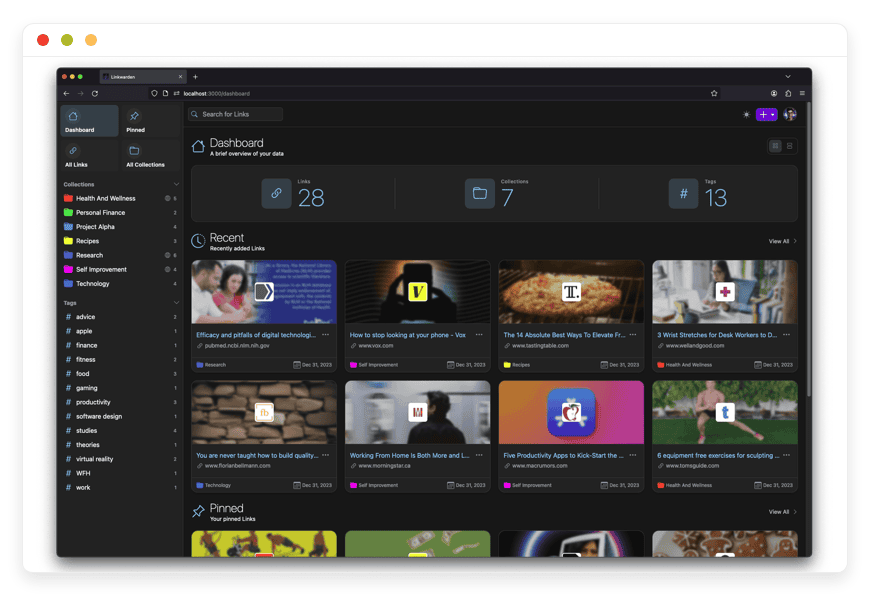
Linkwarden — full-page archives
Linkwarden is a self-hosted bookmark manager that does more than store a link. For every item you save, it captures a full-page archive: a screenshot, a PDF, and a single-file copy of the page. It also keeps a reader view. The point is durability — the page survives even if the original goes offline.
This is the tool for anyone whose real worry is link rot. A bookmark is only as good as the page it points to, and pages disappear. Linkwarden answers that by archiving the page itself at the moment you save it. It can also push a copy to the Internet Archive’s Wayback Machine.
Linkwarden is open source under the AGPL-3.0 license. The project has around 18,300 stars on GitHub as of this writing. It is actively maintained, with releases landing through early 2026.
The Pocket import is built in. Linkwarden added native Pocket import in version 2.11, released 27 June 2025, and a later point release brought in Pocket CSV tags. Its importer also reads browser bookmark HTML, its own JSON backups, Wallabag exports, and Omnivore exports. If a raw Pocket CSV gives the importer trouble, a small community tool converts it into a format Linkwarden reads cleanly.
Running it yourself means a few moving parts. Linkwarden runs in Docker and needs a PostgreSQL database. It uses a search engine called Meilisearch for full-text search across your saved pages.
The archives — those screenshots, PDFs, and HTML files — sit on disk by default, with object storage as an option once the library grows. A small server with 4 GB of RAM handles it comfortably.
For people who would rather not run any of that, we offer managed Linkwarden hosting at €9 a month, with the database, the search engine, the storage, and the updates handled.
Wallabag — the closest thing to Pocket’s reading experience
Wallabag is the self-hosted tool that feels most like Pocket did. When you save a link, it fetches the page and extracts the readable article text into a clean, distraction-free view. That is the core of what Pocket’s reader did. If the thing you miss is the reading, Wallabag is the closest replacement.
Wallabag has been around long enough to be the default answer for read-later self-hosters. It is open source under the MIT license and has roughly 12,500 stars on GitHub. It reads on the web, on mobile apps, and through browser extensions, and it stores a readable copy of each article so you can read offline.
There is one import detail that trips people up, and it is worth getting right. Wallabag has had a Pocket import for years, but that import worked through Pocket’s API. Pocket’s API was switched off on 12 November 2025, so the old API-based import no longer works. Some older guides still describe that method; it is dead.
The path that works is the file-based one. Wallabag added a Pocket CSV importer in version 2.6.13, released 4 June 2025. You upload the CSV from your Pocket export, and Wallabag re-fetches the article text for each link. This is the route to use after the shutdown.
Two practical notes. Wallabag runs on PHP and supports MySQL, MariaDB, PostgreSQL, or SQLite. And if your library is large, with many thousands of saves, the import can time out, because Wallabag is fetching every article fresh. The fix is to raise the memory limit and run the import through the background worker rather than the browser.
If running PHP and a database is not how you want to spend your time, we run Wallabag for read-later workflows at €9 a month, imports and all.
Shiori — minimal, single-binary bookmarks
Shiori is a lightweight bookmark manager written in Go. It ships as a single binary, runs as a command-line tool or a web app, and describes itself as a simple clone of Pocket. It parses a readable copy of each page and can store an offline archive. The appeal is how little it asks of your hardware.
Shiori is the choice when you want something small and quiet. It runs on a Raspberry Pi. Reports put its memory use at around 18 MB. There is no application server to babysit and no heavy database requirement — SQLite is the default, with MySQL and PostgreSQL available if you want them.
It is open source under the MIT license, with about 11,400 stars on GitHub. For a project this lightweight, that is a healthy, active community.
The import has a wrinkle worth knowing before you start. Shiori imports bookmarks from a Netscape-style HTML file, and it has a dedicated Pocket import command, but that command expects Pocket’s older HTML export, not the CSV that the 2025 shutdown produced. So you convert the CSV to HTML first, or use a community script that handles the conversion and pulls in text and images. It is one extra step, not a wall.
We also run Shiori for minimal bookmarks at €9 a month, for people who like the tool but not the terminal.
What none of them bring back: discovery
Pocket did two jobs. It saved what you found, and it suggested new things to read. The three tools above do the first job well. None of them does the second. Pocket’s recommendation feed — the curated articles, the trending reads, the New Tab suggestions — has no self-hosted equivalent. Migrating means giving that up.
This is the honest trade, and it is worth naming before you switch. Pocket’s discovery feed was driven by editorial curation and recommendation models. It surfaced articles you had not saved and would not have found on your own. For a lot of people, that feed was half the value.
A self-hosted bookmark tool is a different kind of thing. It organizes what you put into it. It does not go out and find new reading for you.
There is no algorithm suggesting your next article, because there is no shared pool of reading behavior to draw recommendations from. That is the cost of owning your own archive instead of renting space in someone else’s.
Mozilla kept the discovery function for itself. The Ten Tabs newsletter and the Firefox New Tab recommendations are where that curation lives now. If discovery was the part of Pocket you used most, a self-hosted tool will not replace it, and it is better to know that going in.
What migrating actually costs
Running one of these tools yourself is not free, even when the software is. The bill is part money and part time. A production-class server, off-site backups, and monitoring run to about $44 a month before you count your own hours. Patching, updates, and backup checks add a few hours a month on top.
Here is the honest math for the do-it-yourself path. A 2 vCPU, 4 GB production-class VPS runs about $24 a month. Add roughly $5 a month for off-site backup storage and about $15 a month for monitoring, and you are at $44 a month in infrastructure. A backup that lives on the same machine is not a backup, which is why the off-site line is not optional.
Then there is time. Expect five to ten hours to set things up, and one to two hours a month after that for security patches, certificate renewals, and backup verification. At a freelance rate, that time is worth €60 to €240 a month.
It is real work, and for some people it is enjoyable work. For others it is the exact thing they were paying Pocket to avoid.
The managed path collapses both lines into one. We run any of these three apps for €9 a month. That covers the server, the patching, the daily off-site backups, the monitoring, and a human engineer when something needs attention.
Your operational time is zero hours a month. Whether that nine euros is worth it depends entirely on how you value the hours.
How DANIAN runs these
We host Linkwarden, Wallabag, and Shiori as managed apps. You pick the app and the region; we handle deployment, patching, daily off-site backups, and monitoring. Each app runs in its own isolated container. When something needs a human, such as a config change, a DNS edit, or an import that stalled, you reach us and a person answers.
The operational practice is the product. We patch on a regular cadence and monitor around the clock. We back up every instance daily, off-site, so a failed machine is an inconvenience and not a loss. Each customer’s app runs isolated from every other one.
Region is your choice. We run across 21 datacenter locations on six continents, so you can put your reading archive close to where you are. That keeps it responsive and keeps the data where you want it.
The support is hands-on. If a Wallabag import stalls on a large library, we will raise the memory limit and run it through the background worker for you. If a Linkwarden archive needs object storage as the library grows, we will set it up. That is the kind of work we do without routing you to a documentation page.
Frequently asked questions
When exactly did Pocket shut down?
Mozilla announced Pocket’s shutdown on 22 May 2025. The apps, website, and browser extensions stopped working on 8 July 2025. After that, Pocket allowed exports only, until 12 November 2025, when the export page closed and all remaining data was permanently deleted.
Why did Mozilla shut down Pocket?
Mozilla said the way people use the web had changed and that it wanted to put its resources back into Firefox. Pocket had run for 18 years, first as Read It Later and then under Mozilla after a 2017 acquisition. The decision retired both the standalone app and its Firefox integration.
What happened to my Pocket Premium subscription?
Premium subscriptions were refunded automatically on 8 July 2025, prorated to your original payment method. Annual subscribers were refunded for the unused portion, and monthly renewals simply stopped. You did not need to request the refund. Premium features, including permanent copies and advanced search, ended on the same date.
Does Firefox still have Pocket built in?
No. Mozilla removed the Pocket integration, both the save button and the saved-items list, starting in Firefox 140 and in the ESR 115 and 128 builds. The New Tab page still shows curated story recommendations, but they are now presented as a Firefox feature rather than as Pocket.
I missed the deadline — can I still get my Pocket data back?
No. Mozilla permanently deleted all unexported Pocket accounts and data on 12 November 2025, and switched off the Pocket API on the same day. There is no recovery path after that date. If you never exported, the saved links, tags, and reading history are gone.
I exported my Pocket data before the deadline — what is in that file?
A CSV file inside a ZIP archive. Each row holds a link’s title, its URL, the time you saved it, your tags, and whether it was unread or archived. Large libraries were split into several numbered CSV files of about 10,000 rows each.
Does the Pocket export include the full article text?
No. The export carries your links and their metadata, not the article text. Pocket stored a reader-view copy of each article, but that copy was never included in the export. Tools like Wallabag rebuild a readable copy by re-fetching each page from the live web.
Will my Pocket tags and read or unread status transfer?
Yes, in most cases. The Pocket export records both your tags and each item’s status, unread or archived. Linkwarden and Wallabag both read these fields on import, so your organization carries over. Tags in the export are separated by pipes, which the importers handle for you.
What happened to my Pocket highlights?
Highlights were exported separately, as a JSON file inside an annotations folder in the ZIP. You only got that file if you had actually highlighted passages. The highlights were not part of the main CSV, so check the annotations folder if you want to keep them.
What is the best self-hosted Pocket alternative in 2026?
There is no single best one; it depends on what you used Pocket for. For the reading experience, Wallabag is closest. For durable full-page archives that survive link rot, Linkwarden is strongest. For the lightest setup on minimal hardware, Shiori wins — and all three are open source and import a Pocket export.
What is the difference between Linkwarden, Wallabag, and Shiori?
Linkwarden archives the whole page — screenshot, PDF, and HTML — so saved pages survive even if the original is taken down. Wallabag extracts clean readable article text for distraction-free reading. Shiori is a minimal single-binary tool for lightweight bookmarking. They overlap, but each leans toward a different job.
Which tool is closest to the Pocket reading experience?
Wallabag. Its core feature is extracting the readable text of an article into a clean reading view, which is what Pocket’s reader did. It stores that copy for offline reading and works through mobile apps and browser extensions. If reading was your main use of Pocket, start with Wallabag.
Do any of these replace Pocket’s article recommendations?
No — Pocket suggested new articles to read through a curated and algorithmic discovery feed, but none of these self-hosted tools do that. They organize what you save; they do not recommend new external reading. Migrating from Pocket means trading that discovery feed for full ownership of your own archive.
Are these tools actually open source?
Yes — Linkwarden is licensed under AGPL-3.0, and Wallabag and Shiori are both under the MIT license. All three are developed in the open on GitHub, where you can read the code, file issues, and see the release history. Open source is also what makes managed hosting of them possible.
Can I import my Pocket export into Linkwarden?
Yes. Linkwarden added native Pocket import in version 2.11, released in June 2025, and a later release improved how it reads Pocket CSV tags. You upload the export and Linkwarden brings in your links, titles, and tags. If the raw CSV misbehaves, a small community tool converts it into a format Linkwarden reads cleanly.
Does Wallabag still import from Pocket?
Yes, but only through the file-based importer. Wallabag’s older Pocket import used Pocket’s API, and that API was switched off on 12 November 2025, so the API method no longer works. Use the Pocket CSV importer added in Wallabag 2.6.13. It re-fetches each article’s text as it imports.
Can I import Pocket into Shiori?
Yes, with one extra step. Shiori’s Pocket import expects Pocket’s older HTML export format, but the 2025 shutdown produced a CSV. So you convert the CSV to an HTML bookmarks file first, or use a community script that does the conversion and also pulls in article text and images. After that, Shiori imports normally.
My Pocket library is huge — will the import break?
It can stall, especially in Wallabag, which re-fetches every article during import. The fix is to raise the memory limit and run the import through Wallabag’s background worker rather than the browser. On managed hosting, this is something we handle for you. Very large exports also arrive split across several CSV files.
What does it cost to self-host a read-later app?
The software is free, but running it is not. A production-class server runs about $24 a month, plus roughly $5 for off-site backups and $15 for monitoring, so about $44 a month. Add five to ten hours of setup, and one to two hours a month after that for maintenance.
Do I need to be technical to run these?
To self-host, yes — you will be working with Docker, a database, and a server. If that is not for you, managed hosting removes all of it. We run any of the three apps for €9 a month, handle the setup and updates, and answer when something needs a person. You just use the app.
If I use managed hosting, do I still own my data and can I leave?
Yes — the apps are open source and the data is yours. Each of these tools can export your library, so you are never locked in. If you ever want to move to your own server or another host, you take your export with you. Managed hosting saves you the operations, not your freedom to leave.
What to do this week
If you exported your Pocket data before November 2025, you already have what you need. Pick the tool that matches how you actually used Pocket. If it was reading, start with Wallabag. If it was keeping pages that must not disappear, start with Linkwarden. If you want the lightest setup, start with Shiori.
Then decide whether you want to run it or have it run for you. You can self-host any of the three for the cost of a server and a few hours a month. Or you can start a 7-day free trial and have us handle the operations while you get back to your reading list. Either way, the archive is yours now, not Mozilla’s.